Fully reversible: stablecoins and asset-seizure on chain

Reversing irreversibility and censorship-resistance

Stablecoins have made a major stride towards legitimacy with the signing of the GENIUS Act. That makes it a good time to visit some of the more surprising ways stablecoins differ from their underlying blockchain.

Two commonly cited advantages of blockchains are:

  1. Censorship resistance. By virtue of being a decentralized system, there is no government regulator or other authority in a position to decide who can transact on chain. It is not possible to “seize” funds or systemically exclude disfavored persons from the financial system.
  2. Irreversible transactions. Once the transaction is confirmed, it can not be undone. Unlike credit cards payments or ACH transfers, there are no disputes, no charge-backs or other avenues to claw back funds.

Whether these are features or bugs is in the eye of the beholder. Empowering individuals excluded from the banking system for politically reasons sounds noble— until that individual turns out to be Kim Jong-Un trying to finance a rogue nuclear weapons program. Likewise, finality in payments may seem very appealing to anyone accepting credit cards today. It is well known that scammers can pay for goods with a credit card and later contest the transaction in bad faith. That leaves the merchant holding the bag by default, or at least with the burden of proving that the buyer did indeed receive the services they were charged for. That may look like a raw deal for the merchant but consumers appreciate the value of such reversible transactions when they experience theft of digital assets, only to be told by their exchange/custodian that nothing can be done to recoup their losses.

Putting aside value judgments on irreversibility, there is one little-noted fact about stablecoin transactions: they are neither censorship-resistant or irreversible as a matter of necessity. This may come as a surprise. Stablecoins are built on top of blockchains lauded for having exactly those properties. Indeed it takes all the complexity of smart-contracts and virtual machines to “solve” that problem and create a centralized, tightly supervised digital asset class on top of an inherently decentralized, permissionless foundation.

No free lunch: in stablecoin issuers we trust

Stablecoins are an example of “real world assets on-chain.” Their distinguishing feature is being convertible one-to-one to a fiat currency such as the dollar or euro. By design blockchains are hermetically sealed systems: they have no direct interactions with the banking system or any other payment network. That makes it difficult to represent ownership of arbitrary assets in the real-world. This is where stablecoin issuers enter the picture: the issuer is the trusted third-party guaranteeing convertibility between the real world asset and its on-chain representation. Send dollars to the issuer and they will “mint” an equivalent amount of the stablecoin token and credit it to your blockchain address. Going in the other direction, participants may also choose to exit the system, exchanging their tokens for dollars. In that case the issuer execute a “burn,” taking out the equivalent quantity of tokens from circulation and returns the corresponding dollars back via traditional rails, such as wire transfer.

In practice, the stablecoin issuer does not have direct business relationships with every retail investor— that could not scale. Mints/burns are initiated by a relatively small number of intermediaries in the ecosystem, such as cryptocurrency exchanges. These intermediaries make it seamless for their customers to switch back and forth between fiat currency and stablecoins, while hiding the complexity of interactions with the issuer. Depending on the arrangement, they could also charge fees for the convenience or alternatively collect incentive payments from the issuer. Stablecoin issuance is a lucrative business, especially in a high interest regime. The issuer gets to collect interest on the fiat held in reserve. Since every dollar worth of stablecoin on chain requires a dollar held in an account by the issuer (for convertibility to work) the issuers profits correlate directly with the total outstanding amount in circulation. Conversely, it is a lousy deal for anyone to hold stablecoin when they could instead park the equivalent amount in fiat and collect the interest themselves.

In a 2001 essay titled “Trusted third-parties are security holes,” Nick Szabo called out the risks created by outsourcing critical roles in financial systems to allegedly trusted entities such as credit-card networks or certificate authorities. While this argument predated the rise of Bitcoin by several years, its warnings are prescient in the context of stablecoins. The convertibility of stablecoins to their underlying fiat currency is not guaranteed by any intrinsic property of blockchains. It does not matter that how decentralized the systems is and how well its consensus protocol as executed by thousands of independent nodes provides security against lone actors from disrupting the system. When it comes to stablecoins, it is 100% up to a single actor in the system—the stablecoin issuer— to link virtual dollars on-chain to real world dollars in a bank account.

It is easy to imagine ways that link can fail:

  • The issuer can embezzle funds and vanish.
  • It can deliberately issue more stablecoins than are held in reserves. That is, issue excess supply tokens without any fiat backing. Absent independent audits, the discrepancy could remain undetected for a long time, until some financial crisis results in a “run” with everyone trying to withdraw fiat out of the system, only to discover that the issuer cannot meet all redemptions.
  • That same situation can arise due to incompetence instead of malfeasance: the issuer may experience a security breach of their systems. If a threat actor gains control of the on-chain “money printer” they can mint new tokens for their own benefit without any fiat backing.
  • Instead of investing the reserves in low-risk assets such as treasuries, the issuer can roll the dice with dubious schemes and lose money, once again resulting in net deficit of fiat against virtual token.

All these cases lead to the same outcome: the stablecoin is no longer “full-reserve.” If all participants tried to convert back to the underlying currency, some of them would not get paid in full. Until recently, none of this was helped by the opacity of issuers operating in the Wild West of finance. In particular Tether, by far the largest issuer of dollar stablecoins with more than $100B outstanding, has been at the center of multiple controversies over its reserves and inconsistent statements. That includes a finding by NY state that at least during one stretch of time Tether was not fully backed. Time will tell if the newly enacted GENIUS legislation in the US will change this state of affairs and compel more transparency out of issuers.

For the remainder of this blog post, we put aside the ongoing shenanigans at Tether and focus on a hypothetical issuer that maintains full fiat backing of their assets, prudent in investing that fiat and competent at protecting against security threats. What are the risks posed by this ideal trusted third party?

Censorship-friendly by design

The surprising answer is that for virtually all major stablecoins in existence, this issuer retains the discretion to engage in arbitrary censorship and asset seizure. In order from mild to severe in their effects, these capabilities include:

  • Preemptively block any address from participating in stablecoin transactions— effectively a form of debanking
  • Freeze funds at any address. This goes one step further than mere debanking; now the issuer is temporarily preventing a network participant from accessing existing funds. Freezes can be lifted but in the worst-case scenario funds can remain accessible indefinitely.
  • Burn funds at any address. We are now fully in asset-seizure territory. Unlike a temporary freeze on assets which may be lifted, this one is irreversible from the perspective of the participant whose funds are gone.

As a corollary to #3: stablecoin issuers may be in a position to reverse transactions. Imagine Alice sends Bob some stablecoins. This is handled by decreasing the balance for Alice’s address on the stablecoin ledger and incrementing the balance for Bob’s address by an identical amount. If Alice later disputes the transaction and the issuer sides with Alice they can simply burn the assets at Bob’s address and magically mint an equivalent amount at Alice’s source address. Presto: the funds Alice sent are restored and the ones Bob received are gone, reverting to the state before the transaction. This legerdemain has no effect on whether the stablecoin remains fully backed 1:1 by equivalent fiat reserves. No actual dollars or euros have left the system; instead their virtual representation on chain has been reshuffled to Alice’s benefit and at the expense of Bob.

Stablecoins under the hood

To appreciate the how this works, we need to establish a few facts about how stablecoins are implemented at the nuts-and-bolts level. From an engineering view stablecoin is nothing more than a special type of smart-contract operating on a contract-capable blockchain that manages its own ledger of balances. “Smart-contract” is a fancy way of saying glorified software: program or code. Due to the severe resource restrictions in the type of computations most blockchains can execute, these programs are quite rudimentary compared to a typical mobile app or moderately complex interactive website. (Constrained computing resources should not be confused with simplicity; being rudimentary has not stopped these applications from having catastrophic bugs that are exploited for millions of dollars in losses routinely.)

Not every contract represents a stablecoin. Stablecoins conform to a specific template, a least-common denominator that determines the functionality expected. Often these are standardized on a given chain. For example Ethereum has ERC-20. That specification defines the set of functions every contract representing a “fungible token” must implement. Again not every “fungible token” is a stablecoin: some represent a utility token that in theory can be used to pay for certain services on-chain. (Or so the theory went in 2017 when ICOs were all the rage for funding early-stage projects, by selling tokens ahead of time before the service in question was event built.)

For example looking at the ERC20 standard, we observe a number of functions that every stablecoin must support. Here are some of the most important ones associated with moving funds:

  • transfer: Sends funds to an address.
  • approve: Pre-approve a specific address to be able to withdraw from the caller’s account up to specified amount. This is useful for smart-contract interactions— such as placing an order at a decentralized exchange— when the exact amount to be withdrawn can not be predicted in advance.
  • transferFrom: Variant of transfer used by smart-contracts, in conjunction with the preapproval mechanism.

Oddly there is nothing in the standard about supervisory functions reserved for the issuer: minting new assets on chain, burning or withdrawing assets from circulation, much less blocking specific addresses or seizing assets. Where is that functionality? The answer is it is considered out of scope for ERC-20 standard. In software engineering terminology, it would be called an “implementation detail” that each contract is free to sort out for itself. Strictly speaking one could deploy a stablecoin that does not have any way to seize funds. Yet it is telling that all major stablecoins to date including Circle, Paxos, Gemini Dollar and even Tether have opted for building this functionality. [Full disclosure: this blogger was involved in the development of GUSD]

Case study: Circle

Let’s take a look at the smart-contract for the Circle stablecoin or USDC. Etherscan shows the token with ticker USDC is managed by the contract at address 0xa0b86991c6218b36c1d19d4a2e9eb0ce3606eb48. That page shows the contract has a verified source code; that means someone has uploaded source code which when compiled with a specific version of the Solidity compiler, produces EVM bytecode identical to what exists at that address. (Effectively a deterministic build process for proving that a given piece of code really does correspond to a deployed contract.) But this verified code is decidedly underwhelming, with hardly any indication of stablecoin functionality. That is because the Circle contract is just a thin proxy, a wrapper that forwards all incoming calls to an underlying secondary contract. This level of indirection is common to complex contracts on Ethereum. It allows upgrading what is otherwise immutable logic. While the proxy code can not be modified, the target contract it forwards to is just an ordinary data field that can be modified to point to a new address when it is time to upgrade the contract. (Strictly speaking, Ethereum now has a way to upgrade contracts in-place but the proxy pattern provides more control and transparency over the process. Here )

For our purposes, finding the actual implementation of USDC requires going one level deeper and chasing the value of that initial pointer. Etherscan makes this easy, as the constructor arguments already have a helpfully named argument called “implementation” which points to another verified contract that contains the real USDC stablecoin logic. This allows us to chase down the original implementation that the contract was deployed with.

Here is the functionality for freezing an address in a function appropriately called “blacklist:”

function blacklist(address _account) public onlyBlacklister {
blacklisted[_account] = true;
emit Blacklisted(_account);
}

Once an address is marked as blacklisted, all other operations involving that address in any capacity fail. It would come as no surprise that assets can not be transferred out of that address, but it is not even possible to send funds to that address as destination.

That function to mark an address as blacklisted is gated by the modifier onlyBlacklister. In the Solidity programming language, modifiers signal that some function can only be invoked when specific conditions are met. Modifiers themselves are defined by functions returning a boolean true/false indication. In the same source code listing, we can locate that function in a parent class inherited by the stablecoin:

modifier onlyBlacklister() {
require(msg.sender == blacklister);
_;
}

Translation: this function checks that the Ethereum address of the caller is identical to a predefined “blacklister” address. Not surprisingly, the blacklisting capability is not publicly available for any random person to invoke. It can only be called by a specific designated address. So who is the privileged blacklister?

Etherscan also allows inspecting internal contract state, including the values of internal variables. For example we can observe what the current the initial V1 deployment of the contract, the blacklister address was identical to the “master-minter” address authorized to issue new USDC on chain— presumably Circle itself.

Outsourcing censorhip

While minting and blacklisting address were one and the same in this example, it is worth exploring the consequence of the inherent flexibility in the contract to separate them. Blacklisting role can be outsourced to a third-party who specializes in blockchain compliance. Stablecoin issuers are already leveraging services such as Chainalysis, Elliptic and TRM for oversight of their network. In an alternative operational mode, they could just assign the blacklisting role to one of those service providers. For that matter, in a slightly more dystopian alternate universe, a government regulator could demand the role for itself.

Recall that the pointer-to-implementation pattern allow upgrading contract logic. Indeed the code linked above is not the current version of USDC. It has already gone through multiple iterations. The latest version deployed as of this writing in January 2026 is open-sourced in the Circle Github repo. That code follows the same pattern as its predecessor: an authorized “blacklister” can freeze funds as before. But there is a difference in the deployment pattern: now the blacklister address is distinct from the minter. That does not imply they are different entities. It could just be a case of sound operational security to use different cryptographic keys to manage different functions. (Considering that the minting capability is far more sensitive and allows printing money out of thin-air, one would not want to use those keys for less-sensitive operations such as blacklisting.)

We can also observe on-chain how often that functionality is invoked by looking at all transactions originating from the blacklister. The record shows over 200 calls in the past year, of which:

  • 170 are calls to blacklist
  • 36 are calls to un-blacklist, that is lift the restrictions on a previously blacklisted address

Bottom line: This is not some hypothetical functionality lurking in the contract that is never exercised. Whoever holds the blacklisting capability for USDC has been routinely invoking that privilege as part of their oversight activities on the network.

Beyond blacklisting: Tether and asset seizures

Blacklisting an address prevents it from being able to move any funds, but is not the same as asset seizure. In the case of USDC, at worst funds can be indefinitely frozen and taken out of circulation. But they can not be reassigned to another party in response to a request from law enforcement. (At least not yet— recall that the proxy contract can be upgraded and Circle can introduce this additional capability in the future.)

Tether takes this one step further and allows direct seizure. Not only does it allow blacklisting, but there is an additional capability to reclaim funds after an address has been blacklisted. By following the implementation pointer from the current version, we can locate the responsible piece of logic. Excerpted here:

function destroyBlackFunds (address _blackListedUser) public onlyOwner {
require(isBlackListed[_blackListedUser]);
uint dirtyFunds = balanceOf(_blackListedUser);
balances[_blackListedUser] = 0;
_totalSupply -= dirtyFunds;
DestroyedBlackFunds(_blackListedUser, dirtyFunds);
}

This code zeroes out the balance of the blacklisted address, removing the equivalent amount of tether from circulation. That may not look like asset seizure, in the sense that the funds have vanished entirely but that is illusory. Recall that tethers on-chain are supposed to be backed by actual US dollars in a bank account somewhere. (Although in the case of Tether, that has been notoriously difficult to verify due to the opaque nature of the operation and checkered history with regulators.) While the on-chain balances are gone, the US dollars are still sitting in the bank and free to be released to law enforcement or whoever initiated the seizure. If the authorities demanded to receive the funds in-kind, Tether could even execute a “mint” to magically have the equivalent amount appear at a specified address.

Postscript: breaking fungibility and censorship at the off-ramp

To be clear, this post is not intended to single out Circle and its compliance program. There is no evidence that either issuer has engaged in arbitrary asset seizure or randomly reversed transactions to settle scores with their competitors. By all accounts, every intervention was precipitated by a demand from law enforcement or financial regulator. For a US-based financial services company, that is the offer-you-can-not-refuse. Furthermore this functionality is not a “backdoor” or some hidden feature the stablecoin operator hoped to obfuscate. Contract implementations are open-source and every action to freeze/seize funds is visible on-chain, operating in plain daylight. In multiple cases issuers even boasted publicly about their commitment to compliance by highlighting specific instances of seizure they executed.

One would expect stablecoin issuers greatly prefer a hands-off approach to unauthorized transactions involving their asset. Hand-wringing and bromides on the theme of “code is law” are preferable to active intervention because the latter creates a lot of operational expense. In a high-interest environment, stablecoin issuance is extremely lucrative: all one needs to do is occasionally mint some large allocation of tokens when a wire transfer comes in from a handful of business partners, sit back to collect interest on those deposits and occasionally wire funds outbound when one of those partners wants to convert their stablecoin back into fiat. This business can be run with minimal operational overhead. By contrast staffing a compliance department and actively fielding requests from regulators around the world to promptly freeze criminal transactions takes a lot of work, eating into those enviable margins. (Compare that to the cost of resolving disputes in a credit-card network. No surprise stablecoin payments can be much more “efficient” than Visa/MasterCard when the former does not have to maintain 24/7 support to deal with fraudulent transactions or settle disputes between disgruntled card-holders and aggrieved merchants.) For that reason stablecoin operators left to their own devices would prefer to avoid engaging in outright asset seizure, censorship or transaction reversal, except to the extent that criminal activity becomes a reputational risk for the business. Yet the record makes it clear they have time and again staged such interventions. Even Tether, with its checkered history and popularity with organized crime groups behind pig-butchering scams, has recognized the necessity of responding to demands from regulators and seized funds on multiple occasions.

While the preceding discussion focused on direct censorship and asset seizure on chain, stablecoin issuers have another enforcement mechanism at their disposal. They can simply refuse to honor the convertibility of tokens back into real world assets.

Consider this hypothetical: some digital asset business is breached and crooks walk away with a stash of USDC stablecoin. Before Circle has an opportunity to intervene, the stolen funds are distributed to multiple addresses, exchanged into other currencies via decentralized exchanges or lending pools, maybe even bridged to other chains for USDC on Solana. There is no longer a single address where the proceeds of theft are concentrated, making seizure or freeze complicated. In fact some funds maybe sitting at a shared address such as a lending pool, mixed with other USDC contributions from honest participants in that pool. Clearly freezing the entire address out of USDC ecosystem is not an appropriate response in this situation. Even trying to manually adjust the balance by a careful sequence of burn/mint operations runs the risk that USDC will interfere with the operation of the pool. Case in point: prices on a decentralized exchange are determined algorithmically by an automated market maker (AMM) based on how much of the asset exists in the pool on both sides of the trade. Suddenly zeroing out the USDC balance can result in market disruption and wild pricing discrepancies.

A different way Circle can address this problem is by declaring that some fraction of USDC in the pool is permanently “tainted.” That USDC will no longer be considered as eligible for conversion back to ordinary US dollars, regardless of how many times it is transferred to other blockchain addresses. That last property requires Circle to maintain constant vigilance, watching for movement of tainted funds to other addresses and give them the same cold-shoulder if they ever show up demanding fiat dollars in exchange for their now worthless stablecoins. (This raises some thorny questions: which fraction exactly is tainted? If 1 USDC of stolen funds is added to an address containing 9 clean USDC and withdrawn in multiple chunks, how is the taint propagated? For technical reasons explorer in an earlier post, it turns out FIFO works better than LIFO for this purpose.)

By implication everyone else dealing in USDC must perform the same sleuthing— or more likely, outsource this process to a blockchain analytics service such as Elliptic or TRM. If Circle will treat some chunks of USDC as effectively worthless regardless of what the on-chain record says, everyone else is obliged to treat those tokens as worthless. This creates an insidious type of shadow-debanking: participants holding tainted stablecoins are free to transact and move those funds on-chain freely. But the moment they head for an off-ramp to convert those tokens to real-world dollars, they will discover their holdings are worthless. Those balances maintained in the USDC smart-contract ledger on chain turns out to be a chimera. If the only authoritative record— the ledger maintained by Circle compliance department— assigns a zero balance to an account, that account has exactly zero dollars.

CP

The unbounded development team: promise and perils of AI coding assistants

Once upon a time, there was a software engineer we will call “Bob.” Bob worked in a large technology company that followed a traditional waterfall model of development, with separation of roles between program managers (“PM”) who defined the functional requirements and software design engineers (“SDE”) responsible for writing the code to turn those specs into reality. But program managers did not dream up specifications out of thin air: like every responsible corporate denizen, they were cognizant of so-called “resource constraints”— euphemism for available developer time.

“Features, quality, schedule; fix any two and the remaining one is automatically determined.”

Schedules are often driven by external factors such as synchronizing with an operating system release or hitting the shelves in time for the Christmas shopping season. Product teams have little influence over these hard deadlines. Meanwhile no self-respecting PM wants sacrifice quality. “Let’s ship something buggy with minimal testing that crashes half the time” is not a statement that a professional is supposed to write down on paper— although no doubt many have expressed that sentiment in triage meetings when hard decisions must be made as the release deadline is approaching. That leaves features as the knob easiest to tweak and this is where developer estimates comes in.

Bob had an interesting quirk. Whenever he was asked to guesstimate the time required to implement some proposed product feature, a strictly bimodal distribution was observed with two peaks:

  • Half-day
  • Two weeks

Over time a pattern emerged: features Bob approved of seemed to fit in an afternoon, even when they seemed quite complicated and daunting to other software engineers who preferred to steer clear of those implementation challenges. Other features that seemed straightforward on the surface were recast by Bob as a two-week long excursion into debugging tar-pits.

In Bob’s defense: estimating software schedules is a notoriously difficult problem that every large-scale project has suffered from since long before Fred Brooks made his immortal observations about the mythical man-month. Also Bob would not be the first or last engineer in history whose estimates were unduly influenced by a certain aesthetic judgment of the proposal. Highly bureaucratic software development shops prevalent in the 20th century relegated engineers to the role of errand boys/girls, tasked with the unglamorous job of “merely” implementing brilliant product visions thrown over the wall from the PM organization. Playing games with fudged schedule estimates becomes the primary means of influencing product direction in those dysfunctional environments. (It did not help that in these regimented organizations, program management and senior leadership were often drawn from non-technical backgrounds, lacking the credibility to call shenanigans on bogus estimates.)

Underlying this bizarre dynamic is the assumption that engineering time is scarce. There is an abundance of brilliant feature ideas that could delight customers or increase market share— if only their embodiment as running code can see the light of day.

AI coding assistants such as Codex and their integration into agentic development flows have now turned that wisdom on its head. It is easier than ever to go from idea to execution, from functional requirements to code-complete, with code that is actually complete: with a suite of unit tests, properly commented and separately documented. “Code is king” or “code always wins” used to be the thought-terminating cliché at large software companies: implying that a flawed, half-baked idea implemented in working code is better than the most elegant but currently theoretical idea on the drawing board. It is safe to say this code-cowboy mentality idolizing implementation over design is completely bankrupt: it is easier than ever to turn ideas into working applications. Those ideas need not even be expressed in some meticulous specification document with sections dedicated to covering every edge case. Vibe-coding is lowering the barrier to entry across the board, not just for implementation knowledge. When it comes to prompting LLMs, precision in writing still matters. Garbage-in-garbage-out still holds. But being able to specify requirements in a structured manner with UML or other formal language is not necessary. If anything the LLM can reverse-engineer that after the fact from its own implementation— in a hilarious twist on another tenet of the code-cowboy mindset: “the implementation is the spec.”

There is an irony here that LLMs have delivered in the blink of an eye the damage experts had once prognosticated/feared outsourcing could wreak on the industry: turn software implementation from being the most critical aspect of development practiced by rarefied talent to a commodity that could be shipped off to the lowest bidder in Bangalore. (The implications of this change on the “craft” of development are already being lamented.)

The jury is still out on whether flesh-and-blood developers can maintain that torrent of code generated by AI down the road, should old-fashioned manual modifications ever prove necessary. One school of thought expects a looming disaster: clueless engineers blindly shipping code they do not understand to production, knowing full well they are on the hook for troubleshooting when things go sideways. No doubt some are betting they will have long moved on and that responsibility will fall on the shoulders of some other unfortunate soul tasked with making sense of the imperfectly functioning yet perfectly incomprehensible code spat out by AI. Another view says such concerns are about as archaic as fretting over a developer having to jump in and hand-optimize or worse hand-correct assembly language generated by their compiler. In highly niche esoteric or niche of development where LLMs lack sufficient samples to train properly, it may well happen that human judgment is still necessary to achieve correctness. But for most engineers plan B for a misbehaving LLM assistant is asking a different LLM assistant to step in to debug its way out of the mess.

Software designers are now confronted with a variant of the soul-searching question: “If you knew you could not fail, what would you do?” For software projects, failure is and will remain very much an option. But its root causes are bound to be different. LLMs have taken the most romanticized view of failed projects off the table: ambitious product vision crashing against the hard reality of finite engineering time or limited developer expertise failing to rise to the occasion. Every one can now wield the power of a hundred-person team composed of mercenary engineers with expertise in every imaginable specialty from low-level systems programming to tweaking webpage layouts. That does not guarantee success but it does ensure the eventual outcome will take place on a scale grander than possible before. Good ideas will receive their due and reach their target market, no longer held back by mismatch between willpower and resources, or the vagaries of chancing upon the right VC willing to bankroll the operation.

At least, that is the charitable prediction. Downside is the same logic goes for terrible ideas too: they will also be executed to perfection. Perhaps those wildly skewed schedule estimates from engineer Bob served a purpose after all: they were a not-so-subtle signal that some proposed feature was a Bad Idea™ that has not been thought through properly. Notorious for sycophancy, AI coding assistants are the exact opposite of that critical mindset. They will not push-back. They will not question underlying assumptions or sanity-check the logic behind the product specification. They will simply carry out the instructions as prompted in what may well become the most pervasive example of “malicious compliance.” In the same way that social media bestowing everyone a bullhorn did not improve the average quality of discourse on the internet, giving every aspiring product manager the equivalent of 100 developers working around the clock to implement their whims is unlikely to yield the next game-changing application. If anything, making engineering costs “too cheap to meter” may result in companies doubling down on obviously failing ideas for strategic reasons. Imagine if Microsoft did not have to face the harsh reality of market discipline, but could keep iterating on Clippie or Vista indefinitely in hopes that the next iteration will finally take off. In a world where engineering time is scarce, companies are incentivized to cull failures early, to redirect precious resources towards more productive avenues. Those constraints disappear when shipping one more variant of the same bankrupt corporate shibboleth—think Google Buzz/Wave/Plus, Amazon Fire phone, Windows mobile platform, Apple Vision Pro— is just a matter of instructing the LLM to “think harder” and spin a few more hundreds hours iterating on the codebase.

CP

On the limits of binary interoperability

Once upon a time there was a diversity of CPU architectures: when this blogger worked on Internet Explorer in the late 90s, the browser had to work on all architectures that Windows NT shipped: Intel x86 being by far the most prevalent by market share, but also DEC Alpha, PowerPC, MIPS and SPARC. (There was also a version of IE for Apple Macintosh; while those also used PowerPC chips, that code base was completely different, effectively requiring an “emulation” layer to pretend that Win32 API was available on a foreign platform.)

2000s witnessed a massive consolidation of hardware. MSFT dropped SPARC, MIPS and PowerPC in quick succession. DEC Alpha— an architecture far ahead of its time— would limp along for a little longer because it was the only functioning 64-bit hardware at a time when MSFT was trying to port Windows to 64-bits. Code-named Project Sundown in a not-so-subtle dig at Sun Microsystems (then flying high with Java, long before the ignominious Oracle acquisition) this effort originally targeted the Intel Itanium. But working systems featuring the Itanium would not arrive until much later. Eventually Itanium would prove to be one of the biggest fiascoes in Intel’s history, earning the nickname “Itanic.” It survived in niche enterprise markets in zombie-like state until 2022 when it was finally put out to pasture.)

Even Apple once a pillar of the alliance pushing for PowerPC surprised everyone by switching to x86 during the 2000s. For a while it appeared that Intel was on top of the world. Suddenly “Intel inside” was true of laptops, workstations and servers. Only mobile devices requiring low-power CPUs had an alternative with ARM. AMD provided the only competition, but their hardware ISA was largely identical to x86. When AMD leapfrogged Intel by defining a successful 64-bit extension of x86 while Intel was running in circles with Itanium going nowhere, the Santa Clara company simply adopted AMD64 into what collectively became x64. Late 2010s then represented something of a reversal in fortunes for both Intel and x86/x64 architecture in general. Mobile devices began to outsell PCs, Apple jumped on the ARM bandwagon for its laptops, AWS began shilling for ARM in the datacenter and RISC-V made the leap from academic exercise into production hardware.

Old software meets new hardware

When a platform changes its underlying CPU architecture, there is a massive disruption to the available software ecosystem. By design most application development targets a specific hardware architecture. When the platform shifts to different hardware, existing software must be recompiled for the new hardware at a minimum. More often than not, there will be source code changes required, as in the case of going from targeting 32-bit Windows to 64-bit Windows.

Unlike operating system releases, this is not a process the platform owner can help with. Consider how conservative MSFT used to be about breaking changes. The company maintained an aggressive QA process to check that existing software released for previous versions of Windows continued to work the upcoming one. Sometimes that meant being bug-for-bug compatible with some behavior going back to Windows 3.1. Deliberate changes breaking existing software were rare. That is because Redmond understood the flywheel effect between operating systems and applications. The more applications exist for an operating system, the more motivated customers are to demand that OS for their next purchase. The more popular an OS becomes, the more likely independent software developers take notice and begin to write new applications or port their existing offerings to that OS. If one operating system has 90% of market share and its competitor only has 10%, the rational choice for ISVs is to prioritize the first one. That could take different shapes: It could be that the application only ships for that OS. The revenue from that marginal 10% expansion may not be enough to compensate for the steep increase in development cost. Especially when the platforms are fundamentally different, as in Windows and MacOS, there is often very little code-sharing possible and a lot of duplicated effort. Or they could deprioritize the effort, eventually releasing a greatly scaled-back version for the less-popular OS eventually, with fewer features and less attention to quality. (Exhibit A: MSFT Office for Mac.)

That makes hardware changes a treacherous time to navigate for platform owners, threatening to break this lucrative flywheel. If the new environment does not have the same rich ecosystem of third-party software support, customers may delay upgrading until their favorite apps are ported. Or worse, they may even consider switching to a competing platform: if migrating to 64-bit Windows is going to be a radical change and result in significant changes to the corporate IT platform, why not consider going all the way and switch to MacOS?

Enter binary compatibility. Windows has multiple compatibility layers for running applications that never expected to run on the current version of Windows. For example:

  • WoW64 (“Windows-on-Windows”) allows 32-bit binaries to execute on 64-bit Windows. This is the new iteration of the original “WoW” that helped run 16-bit DOS and Windows 3.X binaries on 32-bit Windows NT/2000/XP.
  • Similar layer exists for Windows on ARM to run binaries compiled for the x86/x64 architecture

In both cases, applications are given a synthesized (fabricated? falsified?) view of the operating system. There is a “Program Files” directory but it is not the one where native applications are installed. There is a “registry” with all the usual keys for controlling software settings, but it is not the same location referenced by native applications. Called registry redirection, this compatibility feature allows application written for a “foreign architecture” (for example 32-bit applications on native 64-bit operating system) to operate as if they were running on their original target without interfering with the rest of the system.

The phantom mini-driver on Windows ARM

Impressive as these tricks are, there are limits to interoperability between binaries compiled for different hardware architectures. Case in point: this blogger recently tried using a new brand of cryptographic hardware token on Windows ARM. Typically this requires installing the so-called mini-driver associated with that specific model. “Driver” terminology is misleading, as these are not the usual low-level device drivers running in kernel-mode. Modern smart-cards and USB hardware tokens look the same at that layer, such that they can be uniformly handled by a single PC/SC driver. Instead “mini-driver” abstraction is a user-mode extensibility mechanism introduced by the Windows smart-card stack. By creating a common abstraction that all hardware conforms to, it allows high-level applications such as web browsers and email clients to use cryptographic keys in a uniform manner, without worrying about vendor-specific implementation details behind how that key is stored. Effectively this becomes the “middleware” every vendor is responsible for providing if they want Windows applications to take advantage of their cryptographic widget.

In this case the vendor helpfully provided an MSI installer for their middleware, with one catch: there was only an x86 version. No problem, since Windows ARM can run x86 binaries after all. Sure enough, the installer ran without a hitch and after a few clicks reported successful installation. Except when it came time to use the hardware associated with the mini-driver: at that point, the system continued to fall back to the default PIV mini-driver instead of the vendor specific one. (This is a problem. As discussed in previous posts, the built-in PIV driver on Windows is effectively read-only. It can use existing objects on the card, but cannot handle key generation or provision new certificates.) That means the smart-card stack could not locate the more specific vendor driver with additional capabilities. Did the installer hallucinate its successful execution?

Internet Explorer and its doppelganger

Interview question from the late 2000s for software engineer candidates claiming high level of proficiency with Windows:

Why are there two versions of Internet Explorer on 64-bit Windows, one 32-bit and another 64-bit?”

The answer comes down to one of these limitations of interoperability: 64-bit processes can only load 64-bit DLLs in process. Likewise 32-bit processes can only load 32-bit DLLs. Before MSFT finally deprecated native-code extensions such as ActiveX and browser helper objects (“BHO”, historically one of the best ways to author malware for shadowing all browsing activity) it was not uncommon for websites to rely on the presence of such add-ons. For example Java and Adobe Flash were implemented this way. But historically such native extensions were all written for 32-bit Windows and they could not have successfully loaded into a 64-bit browser process.

MSFT is notorious for its deference to backwards compatibility and reluctance for breaking changes, for good reason— it did not turn out all that well when that principle was abandoned in one bizarre spell of hubris for Vista. So it was a foregone conclusion that 64-bit Windows must include 32-bit IE for down-level compatibility; there was no way hundreds of independent software publishers would get their act together in time to have 64-bit versions of their extensions ready when Vista hit the shelves. (Turns out they need not have worried; those copies were not exactly flying off the shelves.) The concession to backwards compatibility went much deeper than simply shipping two instances of the browser: 32-bit IE remained the default browser until a critical mass of those third-party extensions were ported to 64-bits, despite all of its limitations and lack of security hardening features available to true 64-bit applications. (From a consumer point of view, one could argue the unavailability of popular native code extensions is very much a feature. With Adobe Flash being a cesspool of critical vulnerabilities, having a browser that can never run Flash is an unambiguous win for security.)

Worth calling out: this was decidedly not the case for every Windows application. There were not two copies of Notepad or Solitaire; those are not extensible apps. Notepad did not offer a platform inviting third-party developers to add functionality packaged into DLLs meant for loading in-process.

Foreign architectures

This mismatch also explains the case of the “ghost” smart-card driver: those drivers are user-mode DLLs intended for in-process loading by the Windows cryptography API. Most applications interfacing with smart-cards only ship one version for the native architecture. For example there is exactly one copy of certreq for generating new certificate requests. On Windows ARM that is an ARM64 binary. It can not load DLLs written for the x64 architecture, even if those DLLs happen to present on the system.

That vindicates the installer: it was not hallucinating when it reported success. All of the necessary DLLs were indeed dropped in the right folder, which the installer was made to believe is the right place for shared library. Appropriate “registry” entries were created to inform Windows that a new smart-card driver was present and associated with cards of a particular model. But those changes happened in the simulated environment presented to x64 processes on Windows ARM. As far as native certreq ARM process is concerned, there is no evidence of this driver in the registry. (Manually creating the registry keys in the correct/non-redirected location will not solve the problem; it will only delay the inevitable failure point forward. The DLL those entries point to has the wrong architecture and will not load successfully.)

One could ask why the installer even proceeded in this situation: if “successful” completion of the install still results in an unusable setup guaranteed to fail at using the vendor hardware, why bother? But that assumes the installer is even aware that it is executing in a foreign architecture. Chances are when this installer was initially designed, the authors did not expect their product to be used on anything other than Intel x64 architecture. That is because binaries are by definition specific to one hardware platform and often a narrow range of operating system versions. The authors would have logically assumed there is no need to check for installation on ARM anymore than they had to check for RISC-V or PDP11: code execution would never reach that point if the condition being checked were true. It is redundant in the same way as checking if the system is currently experiencing a blue-screen.

The surprise is not why the installer incorrectly reported success. It is why the installer executed at all when invoked on a machine with completely unexpected hardware architecture where every instruction in the binary is being emulated to make it work. That is a testament to how well the ARM/x64 interoperability layer on Windows functions to sustain the illusion of a native Intel environment for emulated apps.

Post-script: limited workarounds

Interestingly MSFT did come up with a limited work-around for some of its core OS functionality, specifically the Windows shell, better known as “explorer.” The local predecessor of the more notorious Internet Explorer, this shell provides the GUI experience on Windows. Not surprisingly it has plenty of extensibility points for third-party developers to enhance or detract from the user-experience with additional functionality. For example, custom actions can be added to the right-click context menu such as upload this file to cloud drive, decompress this archive using some obscure format or scan for malware. Behind the scenes those additional functions are powered by COM components loaded in-process within explorer.

That model breaks when the shell is an x64 binary, while the COM object in question was compiled for x86. Unlike Internet Explorer where one can have a choice of two different versions to launch and even run them side-by-side, there can only be one Windows GUI active on the system. But this is where the use of COM standard also provides a general purpose solution. COM supports remote-procedure calls, “marshaling” data across process or even machine boundaries. By creating a 32-bit COM surrogate process, the shell can continue leveraging all of those 32-bit legacy extensions. They are now loaded in this separate 32-bit surrogate process and invoked cross-process from the hosting application. This trick is 100% transparent to the extension: as far as that COM object is concerned, it was loaded in-process by a 32-bit application exactly as the developers originally envisioned. (This is important because many extensions are not designed to deal with out-of-process calls.)

While that works for the shell, it does not work in general. Not every extensibility layer is designed with marshaling and remote-call capabilities in mind. Windows smart-card drivers are strictly based on a local API. While one could conceivably write a custom proxy to convert those into a remote call— indeed the ability forward smart-cards to a different machine over remote desktop proves this is possible— doing that is not as straightforward as opting into existing RPC capabilities of COM. Applications such as certreq do not have a magical interoperability layer to transparently use drivers written for a foreign architecture.

CP

** This story would become even more convoluted— and arguably an even better interview question— with additional updates to Internet Explorer. When IE8 introduced a multi-process architecture after being beaten to the punch by Google Chrome, its original design involved 64-bit “browser” hosting 32-bit “renderers” for individual tabs. Later versions introduced a an enhanced protected-mode that also used 64-bit renderers to leverage security improvements native to x64 binaries. This clunky and unsafe-by-default model persisted all the way through IE11. It was not until Edge that 32-bit browsers and native code extensions were finally deprecated.

Coinbase and the limits of DLP

In May, the world learned that Coinbase lost user data. Owing to disclosure requirements that apply to publicly-traded companies in the US, the company was compelled to issue a “confessional” SEC filing and associated blog-post dropping the news. Unnamed attackers had been extorting the company, threatening to release stolen private-information on customers obtained from an offshore vendor support vendor. Much as the announcement tried putting a brave face on the debacle and downplay the severity by pointing out that less than 1% of all customers were impacted, it was also notable for key omissions. For starters it turned out that one percent was not exactly random. Attackers had carefully targeted the most valuable customers: those with high-balance accounts, of greatest value to criminals interested in stealing cryptocurrency through social engineering.

While Coinbase was not upfront about what exactly went on, later reporting from Reuters and Fortune shed more light on the incident. It turned out the breach occurred in a decidedly low-tech fashion: Coinbase had outsourced its customer-support function to TaskUs, a business process outsourcing (BPO) company that operated support centers offshore with wages much lower than comparable US jobs. Some of those support representatives were bribed to funnel data over to the threat actor. These contractors did not have to “hack” anything any more than Edward Snowden had to breach anything at the NSA: by design, they were trusted insiders granted privileged access to Coinbase administrative systems for doing their daily jobs.

Granted, having access to customer data on your work machine is one thing. Shipping thousands of records from there to co-conspirators halfway around the world unnoticed is another. There is a slew of enterprise security products dedicated to making sure that does not happen. They are marketed under the catchy phrase DLP or “data-leak prevention.”

If we are being uncharitable, DLP threat-model can be summed up in one motto: “We catch the dumb ones.” These controls excel at stopping or at least detecting confidential information leaving the environment when the perpetrator makes no attempts to cover their tracks or lacks proper opsec skills despite best efforts. Example of rookie moves include:

  • Sending an email to your personal account from the corporate system, with a Word document attached containing the word “confidential”
  • Uploading the same document to Dropbox or Box (assuming those services are not used by the corporate IT environment, as would be the case for example when a company has settled on Google Workspace or Office365 for their cloud storage)
  • Creating a zip archive of an internal code repository and copying that to a removable USB drive.

Most DLP systems will sound the alarm when attackers are this inexperienced or brazen. But as soon as the slightest obfuscation or tradecraft is introduced, they can become surprisingly oblivious to what is happening.

Returning to the Coinbase incident: a natural question is whether TaskUs employed any DLP solutions, and if so, how the rogue insiders bypassed them so effectively that Coinbase remained oblivious as customer data went out the door for months. Not much has come to light about the exact IT environment of TaskUs. Were they running Windows or Macs? Did they have an old-school Active Directory setup or was the fleet managed through a more modern, cloud-centric setup such as Microsoft 365? There is good reason to expect the answers will be underwhelming. Customer support is outsourced overseas for one reason: reducing labor cost. It is unlikely that these shoestring-budget operations with their obsession on cost-cutting will be inclined to invest in fancy IT environments and robust security controls.

Yet it may not have mattered in the end. Some key details later emerged from an investigative piece on how the first handful of corrupt insiders were initially caught in January 2024— four months before Coinbase deigned to notify customers or investors about the extent of the problem. According to the Reuters article:

At least one part of the breach, publicly disclosed in a May 14 SEC filing, occurred when an India-based employee of the U.S. outsourcing firm TaskUs was caught taking photographs of her work computer with her personal phone, according to five former TaskUs employees.”

This is a stark reminder on the limitation of endpoint controls in general, not to mention the sheer futility of DLP technologies for protecting low-entropy information. TaskUs could have installed the kitchen sink of DLP solutions and not one of them would have made a difference for this specific attack vector. Equally misguided are calls for draconian restrictions on employee machines every time insider risks come up, as it must have for security teams in the aftermath of the Coinbase incident. It is possible to prevent screen-sharing and screenshots for specific URLs (Google Enterprise advertises controls for doing this in Chrome— assuming the IT department can reliably block all other browsers) or funnel all network traffic through a cloud proxy that only allows access to “known-good” websites. None of these prevent a disgruntled insider from using their phone to take a picture their desktop. For that matter, they can not stop a determined employee from memorizing short fragments of private information, such as the social-security number or address of a high-net-worth customer. This is much easier than trying to exfiltrate gigabytes of confidential documents or source code. Should customer support centers discriminate against candidates with good memorization skills?

To be clear, this is not an argument for throwing in the towel. There are standard precautions TaskUs could have taken given their threat model. Start with a policy against bringing personal devices into the workspace. This would at least have forced the malicious insiders to use company devices for exfiltration, giving DLP systems a fighting chance to catch them in case they stumbled. But even then, cameras are becoming ubiquitous in consumer electronics. Are employees not allowed to wear Meta Rayban glasses? For that matter, cameras are increasingly easy to conceal. Was that employee inspired to wear a three-piece suit to work today or is there a pinhole camera pointed at the screen hiding under that button?

In one sense, TaskUs and Coinbase were lucky. Customer service reps worked in a shared office space. They could witness and report on colleagues acting suspiciously. Consider how this scenario would have played out during the pandemic or for that matter in scenarios where employees are working remotely, with same level of access minus the deterrence factor of other people observing their actions.

CP

The mystery network interface: unexpected exfiltration paths

This is a story about accidentally stumbling on a trivial exfiltration path out of an otherwise locked-down environment. Our setting is a multi-national enterprise with garden-variety Windows-centric IT infrastructure with one modern twist: instead of physical workstations on desks or laptops, employees are issued virtual desktops. They connect to these Windows VMs to work from anywhere, getting a consistent experience whether they are physically situated in their own assigned office location, visiting one of the worldwide locations or from the comfort of their home— a lucky break that allowed for uninterrupted access during the pandemic.

Impact of virtualization

Virtualization makes some problems easier. It is an improvement over issuing employees laptops that leave the premises every night and can be used in the privacy of an employee residence without any supervision. Laptops walk out the door every night, can be stolen, stay offline for extended periods without security updates, connect to dubious public networks or interface with random hardware— printers, USB drives, docking stations, Bluetooth speakers— all of which create more novel ways to lose company data resident on that device. These risks are not insurmountable; there are well-understood mitigations for managing each one. For example, full-disk encryption can protect against offline recovery from disk in case of theft. But each one must be addressed by the defenders. Virtual desktops are immune from entire classes of attacks applicable to physical devices that can wander outside the trusted perimeter.

But virtualization can also introduce complications into other classic enterprise security challenges. Data leak prevention or DLP is one this particular firm greatly obsessed about. Most modern startups are far more concerned about external threat actors trying to sneak inside the gates and rampage through precious resources inside the perimeter. Businesses founded on intellectual property prioritize a different threat model: attackers already inside the perimeter moving confidential corporate data outside. Usually this is framed in the context of insider malfeasance: rogue employees jumping ship to a competitor trying to take some of the secret sauce with them. But under a more charitable interpretation, it can also be viewed as defense-in-depth against an external attacker who compromises the account of an otherwise honest insider, with the intention of rummaging through corporate IP. In all cases, defenders must focus on all possible exfiltration paths— avenues for communicating with the “outside world”— and implement controls on each channel.

Sure enough, the IT department spent an inordinate amount of time doing exactly that. For example, all connections to the Internet are funneled through a corporate proxy. When necessary that proxy executes a man-in-the-middle attack on TLS connections to view encrypted traffic. (No small irony that activity that would constitute criminal violation of US wiretap statutes in a public setting has become standard practice for IT departments that are possesses of a particular mindset around network security.) This setup affords both proactive defense and detection after the fact:

  1. Outright block connections to file-sharing sites such as Dropbox and Box to prevent employees from uploading company documents to unsanctioned locations. (Dreaded “shadow IT” problem.)
  2. Even for sites with permitted connection, log all history of connections, type of HTTP activity (GET vs POST vs PUT) including hash of the content exchanged. This allows identifying an employee after the fact if he/she goes on an upload spree to copy company IP from the internal environment to a cloud service.

Rearranging deck chairs

In other ways virtualization does not change the nature of risk but merely reshuffles it downstream, to the clients used for connecting to the machine where the original problem used to live.

This enterprise allowed connections from unmanaged personal devices. It goes without saying there will be little assurance about the security posture of a random employee device. (Despite the long history of VPN clients trying to encroach into device-management under the guise of “network health checks,” where connections are only permitted for clients devices “demonstrating” their compliance with corporate policies.) One way to solve this problem is by treating the remote client as untrusted: isolate content on the virtual desktop as much as possible from the client, effectively presenting a glorified remote GUI.

There is a certain irony here. Remote desktop access solutions have gotten better over time at supporting more integration with client-side hardware. For example over the years Microsoft RDP has added support to:

  • Share local drives with the remote machine
  • Use a locally attached printer to print
  • Allow local smart-cards to be used for logging into the remote system
  • Allow pasting from local clipboard to the remote machine, or vice verse by pasting content from the remote PC locally
  • Forward any local USB device such as webcam to the remote target
  • Forward local GPUs to the remote device via RemoteFX vGPU

These are supposed to be beneficial features: they improve productivity when using a remote desktop for computing. Yet they become trivial exfiltration vectors in the hands of a disgruntled employee trying to take corporate IP off their machine.

The mystery NIC

Fast forward to an employee connecting to their virtual desktop from home. Using the officially sanctioned VPN client and remote-desktop software anointed by the IT department, this person logs into their work PC as usual. Later on in the session, an unexpected OS notification appears regarding the discovery of an unknown network. That innocuous warning in fact signals a glaring oversight in exfiltration controls.

Peeking at “Network Connections” in Control Panel confirms the presence of a second network interface:

Network interfaces: the more, the merrier?

The appearance of the mystery NIC can be traced to an interaction between two routine actions:

  1. The employee connected their laptop to a docking station containing an Ethernet adapter. This is not an uncommon setup, since docking allows use of a larger secondary monitor and external keyboard/mouse for better ergonomics.
  2. Remote-desktop client was configured to forward newly connected USB devices to the remote server. This is also a common setup, to better single out devices that are intended for redirection by the explicit action of plugging them in after the session is created.
Microsoft RDP client settings for forwarding local devices. (Other remote-access clients have comparable features.)

The second point requires some qualifications. While arbitrary USB forwarding over RDP is clearly risky, it is necessary to forward some classes of devices. For instance, video conferencing requires a camera and microphone. Virtual desktops do not have any audio or video devices of their own. (Even if such emulated devices did exist and received synthetic A/V feeds, they would be useless for the purpose of projecting the real audio/video from the remote user.) That makes a blanket ban against all USB forwarding infeasible. Instead defenders are forced to carefully manage exceptions by device class.

It turns out in this case the configuration was too permissive: it allowed forwarding USB network adapters.

Free for all

On the remote side, once Windows detects the presence of an additional USB device, plug-and-play (once derided as plug-and-pray) works its magic:

  1. Device class is identified
  2. Appropriate device driver is loaded. There was an element of luck here in that the necessary driver was already present out-of-the-box on Windows, avoiding the need to search/download the driver via Windows Update. (This is still automatically done by Windows, for drivers that have passed WHQL certification.)
  3. Network adapter is initialized
  4. DHCP is used to acquire an IP address

Depending on group policy, some security controls continue to apply to this connection. For example the Windows firewall rules will still be in effect and can prevent accepting connections. But anything else not explicitly forbidden by policy will work. This is an important distinction. It turns out the reason many obvious exfiltration paths fail in the standard enterprise setup is an accident of network architecture, instead of deliberate endpoint controls. For instance, users can not connect to a random SMB share on the Internet because there is no direct route from the internal corporate network. By contrast mounting file-shares work just fine inside the trusted intranet environment; the difference is one of reachability. Similar observations apply to outbound SSH, SFTP, RDP and all other protocols except HTTP/HTTPS. (Because web access is critical to productivity, almost every enterprise fields dedicated forward proxies to sustain the illusion that every server on the Internet can be accessed on ports 80/443.) Most enterprises will not restrict connections using these protocols because of an implicit assumption that any host reachable on those ports is part of the trusted environment.

A secondary network interface changes that, opening another path for outbound connections. This one is no longer constrained by the intranet setup assumed by the IT department. Instead it depends on the network that Ethernet-to-USB adapter is attached to— one that is controlled by the adversary in this threat model. In the extreme case, it is wide open to connections from the internet. More realistically the virtual desktop will appear as yet another device on the LAN segment of a home network. In that case there will be some restrictions on inbound access but nothing preventing outbound connections.

Exfiltration possibilities are endless:

  1. Hard-copies of documents can be printed to a printer on the local network
  2. Network drives such as NAS units can be mounted as SMB shares, allowing easy drag-and-drop copy from virtual desktop.
  3. To stay under the radar, one can deploy another device on the local network to act as an SFTP server. On the virtual desktop side, an SFTP client such as putty or Windows’ own SSH client (standard on recent Win10/11 builds) can then upload files to that server. While activity involving file-shares and copying via Windows tends to be closely watched by resident EDR software, SFTP is unlikely to leave a similar audit trail.
  4. For those committed to GUI-based solutions, outbound RDP also works. One could deploy another Windows machine with remote access enabled on the home network, to act as the drop point for files. Then an RDP connection can be initiated from the virtual desktop, sharing the C:\ drive to the remote target. This makes the entire contents of the virtual desktop available to the unmanaged PC. While inbound RDP is disallowed from sharing drives, there are typically no such restrictions on outbound RDP— yet another artifact of the assumption that such connections can only work inside the safe confines of trusty intranet, where every possible destination is another managed enterprise asset.
  5. For a much simpler but noisier solution, vanilla cloud-storage sites (Box, Dropbox, …) will also accessible through the secondary interface. When connections are not going through the corporate proxy, rules designed to block file-sharing sites have no affect. Since most of these website offer file uploads through the web browser, no special software or dropping to a command line is required.
    • Caveat: It may take some finessing to get existing software on the remote desktop to use the second interface. While command line utilities such as curl will accept arguments to specify a particular interface used for initiating connections, browsers rarely expose that level of control.

These possibilities highlight a general point about the attackers’ advantage when it comes to preventing exfiltration from a highly connected environment. When a miss is as good as a mile, the fragility (futility?) of DLP solutions should ask customers to question whether this mitigation can amount to anything more than bureaucratic security theater.

CP

ScreenConnect: “unauthenticated attributes” are not authenticated

(Lessons from the ScreenConnect certificate-revocation episode)

An earlier blog post recounted the discovery of threat actors leveraging the ScreenConnect remote assistance application in the wild, and events leading up to DigiCert revoking the certificate previously issued to the vendor ConnectWise for signing those binaries. This follow-up is a deeper, more technical dive into a design flaw in the ScreenConnect executable that made it particularly appealing for malicious campaigns.

Trust decisions in an open ecosystem

Before discussing what went wrong with ScreenConnect, let’s cover the “sunny-day path” or how code-signing is supposed to work. To set context, let’s rewind the clock ~20 years, back to when software distribution was far more decentralized. Today most software applications are purchased through a tightly controlled app-store such as the one Apple operates for Macs and iPhones. In fact mobile devices are locked down to such an extent that it is not possible to “side-load” applications from any other source, without jumping through hoops. But this was not always the case and certainly not for the PC ecosystem. Sometime in the late 1990s with the mass adoption of the Internet, downloading software increasingly replaced the purchase of physical media. While anachronistic traces of “shrink-wrap licenses” survive in the terminology, few consumers were actually removing shrink-wrapping from a cardboard box containing installation CDs. More likely their software was downloaded using a web-browser directly from the vendor website.

That shift had a darker side: it was a boon for malware distribution. Creating packaged software with physical media takes time and expense. Convincing a retailer to devote scarce shelf-space to that product is an even bigger barriers. But anyone can create a website and claim to offer a valuable piece of software, available for nothing more than the patience required for the slow downloads over the meager “broadband” speeds of the era. Operating system vendors even encouraged this model: Sun pushed Java applets in the browsers as a way to add interactivity to static HTML pages. Applets were portable: written for the Java Virtual Machine, they can run just as well on Windows, Mac and 37 flavors of UNIX in existence at the time. MSFT predictably responded with a Windows-centric take on this perceived competitive threat against the crown jewels: ActiveX controls. These were effectively native code shared libraries, with full access to the Windows API. No sandboxing, no restrictions once execution starts. Perfect vehicle for malware distribution.

Code-signing as panacea?

Enter Authenticode. Instead of trying to constrain what applications can do once they start running, MSFT opted for a black & white model for trust decisions made at installation time based on the pedigree of the application. Authenticode was a code-signing standard that can be applied to any Windows binary: ActiveX controls, executables, DLLs, installers, Office macros and through an extensibility layer even third-party file formats although there were few takers outside of the Redmond orbit. (Java continued to use its own cross-platform JAR signing format on Windows, instead of the “native” way.) It is based on public-key cryptography and PKI, much like TLS certificates. Every software publisher generates a key-pair and obtains a digital certificate from one of a handful of trusted “certificate authorities.” The certificate associates the public-key with the identity of the vendor, for example asserting that a specific RSA public-key belongs to Google. Google can use its private-key to digitally sign any software it publishes. Consumers downloading that software can then verify the signature to confirm that the software was indeed written by Google.

A proper critique of everything wrong with this model— starting with its naive equation of “identified vendor” to “trusted/good” software you can feel confident installing— would take a separate essay. For the purposes of this blog post, let’s suspend disbelief and assume that reasonable trust decisions can be made based on a valid Authenticode signature. What else can go wrong?

Custom installers

One of the surprising properties about ScreenConnect installer is that the application is completely turnkey: after installation, the target PC is immediately placed under remote control of a particular customer. No additional configuration files to download, no questions asked of end users. (Of course this property makes ScreenConnect equally appealing for malicious actors as it does for IT administrator.) That means the installer has all the necessary configuration included somehow. For example it must know which remote server to connect for receiving remote commands. That URL will be different for every customer.

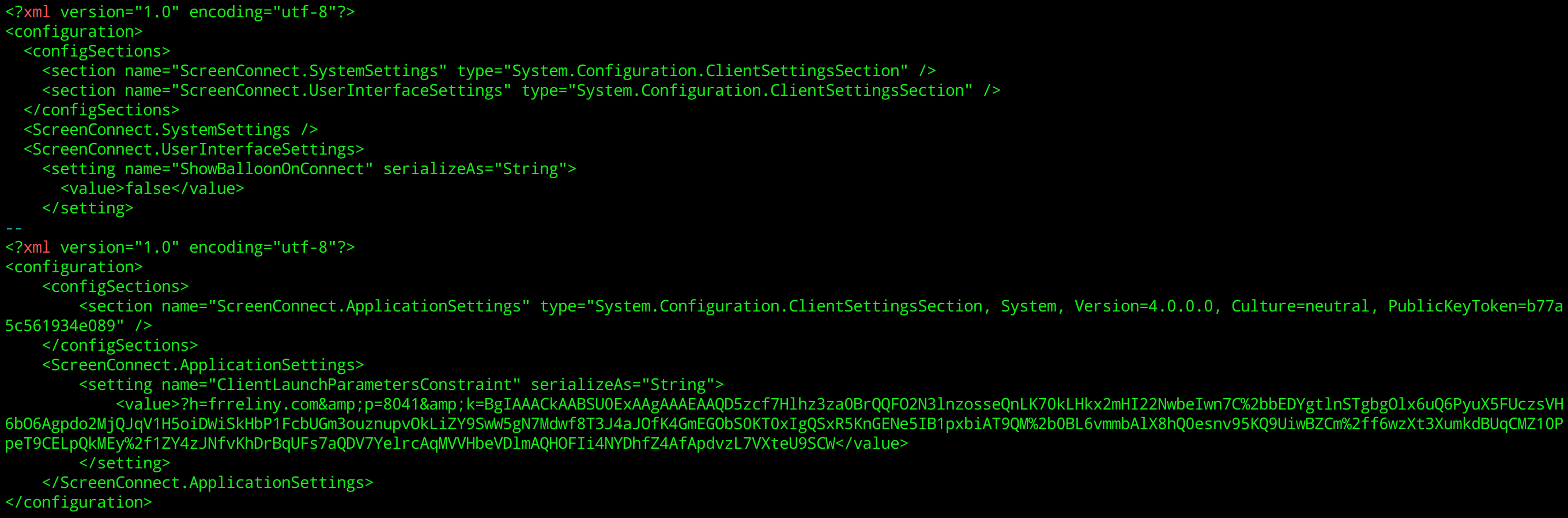
By running strings on the application, we can quickly locate this XML configuration.
For the malicious installer masquerading as bogus River “desktop app:”

This means ScreenConnect is somehow creating a different installer on-demand for every customer. The UI itself appears to support that thesis. There is a form with a handful of fields you can complete before downloading the installer. Experiments confirm that a different binary is served when those parameters are changed.

That would also imply that ConnectWise must be signing binaries on the fly. A core assumption in code-signing is a digitally signed application can not be altered without invalidating that signature. (If that were not true, signatures would become meaningless. An attacker can take an authentic, benign binary, modify it to include malicious behavior and have that binary continue to appear as the legitimate original. There have been implementation flaws in Authenticode that allowed such changes, but these were considered vulnerabilities and addressed by Microsoft.) 

But using osslcode to inspect the signature in fact shows:

    1. All binaries have the same timestamp. (Recall this is a third-party timestamp, effectively a countersignature, provided by a trusted-third party, very often a certificate authority.)

    2. All binaries have the same hash for the signed portion

Misuse of unauthenticated attributes

That second property requires some explanation. In an ideal world the signature would cover every bit of the file— except itself, to avoid creating a self-referential. There are indeed some simple code-signing standards that work this way: raw signature bytes are tacked on at the end of the file, offloading all complexity around format and key-management (what certificate should be used to verify this signature?) to the verifier.

While Authenticode signatures also appear at the end of binaries, their format is on the opposite end of the spectrum. It is based on a complex standard called Cryptographic Message Syntax (CMS) which also underlies other PKI formats including S/MIME for encrypted/signed email. CMS defines complex nested structures encoded using a binary format called ASN1. A typical Authenticode signatures features:

  • Actual signature of the binary from the software publisher
  • Certificate of the software publisher generating that signature
  • Any intermediate certificates chaining up to the issuer required to validate the signature
  • Time-stamp from trusted third-party service
  • Certificate of the time-stamping service & additional intermediate CAs

None of these fields are covered by the signature. (Although the time-stamp itself covers the publisher signature, as it is considered a “counter-signature”) More generally CMS defines a concept of “unauthenticated_attributes:” these are parts of the file not covered by the signature and by implication, can be modified without invalidating the signature.

It turns out ScreenConnect authors made a deliberate decision to abuse the Authenticode format.  They deliberately place the configuration in one of these unauthenticated attributes. The first clue to this comes from dumping strings from the binary along with the offset where they occur. In a 5673KB file the XML configuration appears within the last 2 kilobytes—  the region where we expect to find the signature itself.

The extent of this anti-pattern becomes clear when we use “osslsigncode extract-signature” to isolate the signature section:

$ osslsigncode extract-signature RiverApp.ClientSetup.exe RiverApp.ClientSetup.sig
Current PE checksum   : 005511AE
Calculated PE checksum: 0056AFC0
Warning: invalid PE checksum
Succeeded

$ ls -l RiverApp.ClientSetup.sig
-rw-rw-r-- 1 randomoracle randomoracle 122079 Jun 21 12:35 RiverApp.ClientSetup.sig

122KB? That far exceeds the amount of space any reasonable Authenticode signature could take up, even including all certificate chains. Using openssl pkcs7 subcommand to parse this structure reveals the culprit for the bloat at offset 10514:

There is a massive ~110K section using the esoteric OID “1.3.6.1.4.1.311.4.1.1”  (The prefix 1.3.6.1.4.1.311 is reserved for MSFT; any OID starting with that prefix is specific to Microsoft.)

Looking at the ASN1value we find a kitchen sink of random content:

  • More URLs
  • Additional configuration as XML files
  • Error messages encoded in Unicode (“AuthenticatedOperationSuccessText”)
  • English UI strings as ASCII strings (“Select Monitors”)
  • Multiple PNG image files

It’s important to note that ScreenConnect went out of its way to do this. This is not an accidental feature one can stumble into. Simply tacking on 110K at the end of the file will not work. Recall that the signature is encapsulated in a complex, hierarchical data structure encoded in ASN1. Every element contains a length field. Adding anything to this structure requires updating the length field for every enclosing element. That’s not simple concatenation: it requires precisely controlled edits to ASN1. (For an example, see this proof-of-concept that shows how to “graft” the unauthenticated attribute section from one ScreenConnect binary to another using the Python asn1crypto module.)

The problem with mutable installers

The risks posed by this design become apparent when we look at what ScreenConnect does after installation: it automatically grants control of the current machine to a remote third-party. To make matters worse, this behavior is stealthy by design. As discussed in the previous blog post, there are no warnings, no prompts to confirm intent and and no visual indicators whatsoever that a third-party has been given privileged access.

That would have been dangerous on its own— ripe for abuse if a ScreenConnect customers uses that binary for managing machines that are not part of their enterprise. At that point crosses the line from “remote support application”  into “remote administration Trojan” or RAT territory. But the ability to tamper with configuration in a signed binary gives malicious actors even more leeway. They do not even need to be a ScreenConnect customer. All they need to do is get their hands on one signed binary in the wild. They can now edit the configuration residing in the unauthenticated ASN1 attribute, changing the URL for command & control server to one controlled by the attacker. Authenticode signature continues to validate and the tampered binary will still get the streamlined experience from Windows: one-click install without elevation prompt. But instead of connecting to a server managed by the original customer of ScreenConnect, it will now connect to the attacker command & control server to receive remote commands.

Resolution

This by-design behavior in ScreenConnect was deemed such high risk that the certificate authority (DigiCert) who issued ConnectWise their Authenticode certificate took the extraordinary step of revoking the certificate and invalidating all previously signed binaries. ConnectWise was forced to scramble and coordinate a response with all customers to upgrade to a new version of the binary. The new version no longer embeds critical configuration data in unauthenticated signature attributes.

While the specific risk with ScreenConnect has been addressed, it is worth pointing out that nothing prevents similar installers from being created by other software publishers. No changes have been made to Authenticode verification logic in Windows to reject extra baggage appearing in signatures. It is not even clear if such a policy can be enforced. There is enough flexibility in the format to include seemingly innocuous data such as extra self-signed certificates in the chain. For that matter, even authenticated fields can be used to carry extra information, such as the optional nonce field in the time-stamp. For the foreseeable future it is up to each vendor to refrain from using such tricks and creating installers that can be modified by malicious actors.

CP

Acknowledgments: Ryan Hurst for help with the investigation and escalating to DigiCert

The story behind ScreenConnect certificate revocation

An unusual phishing site

In late May, the River security team received a notification about a new fraudulent website impersonating our service. Phishing is a routine occurrence that every industry player contends with. There are common playbooks invoked to take-down offending sites when one is discovered. 

What made this case stand out was the tactic employed by the attacker. Most phishing pages go after credentials. They present a fraudulent authentication page that mimics the real one, asking for password or OTP codes for 2FA. Yet the page we were alerted about did not have any way to log in. Instead, it advertised a fake “River desktop app.” River publishes popular mobile apps for iOS and Android, but there has never been a desktop application for Windows, macOS, or Linux.

As this screenshot demonstrates, the home page was subtly altered to replace the yellow “Sign up” button on the upper-right corner with one linking to the bogus desktop application. We observed the site always serves the same Windows app, regardless of the web browser or operating system used to view the page. Google Chrome on macOS and Firefox on Linux both received the same Windows binary, despite the fact that it could not have run successfully on those platforms.

This looked like a bizarre case of a threat actor jumping through hoops to write an entire Windows application to confuse River clients. Native Windows applications are a rare breed these days— most services are delivered through web or mobile apps. The story only got stranger once we discovered the application carried a valid code signature.

Authentic malware

Quick recap on code signing: Microsoft has a standard called “Authenticode” for digitally signing Windows applications. These signatures identify the provenance and integrity of the software, proving authorship and guaranteeing that the application has not been tampered with from the original version as published. This is crucial for making trust decisions in an open ecosystem when applications may be sourced from anywhere, not just a curated app store.

Authenticode signatures can be examined on non-Windows platforms using the open-source osslsigncode utility. This binary was signed by ConnectWise, using a valid certificate issued in 2022 from DigiCert:

Windows malware is pervasive, but malware bearing a valid digital signature is less common, and short-lived. Policies around code-signing certificates are clear on one point: if it is shown that a certificate is used to sign harmful code, the certificate authority is obligated to revoke it. (Note that code-signing certificates are governed by the same CAB Forum that sets issuance standards for TLS certificates, but under a different set of rules than the more common TLS use-case.)

ConnectWise is a well-known company that has been producing software for IT support over a decade. As it is unlikely for such a reputable business to operate malware campaigns on the side, our first theory was a case of key-compromise: a threat actor obtained the private keys that belonged to ConnectWise and started signing their own malicious binaries with it. This is the most common explanation for malware that is seemingly published by reputable companies: someone else took their keys and certificate. Perhaps the most famous case was Stuxnet malware targeting Iran’s nuclear enrichment program in 2010, using Windows binaries signed by valid certificates of two  Taiwanese companies with no relationship to either the target or (presumed) attackers.

Looking closer at the “malware” served from the fraudulent website we were investigating, we discovered something even more bizarre: the attackers did not go to the trouble of writing a new application from scratch or even vibe-coding one with AI. This was the legitimate ScreenConnect application published by ConnectWise, served up verbatim, simply renamed as a bogus River desktop application.

That was not an isolated example. On the same server, we discovered samples of the exact same binary relabeled to impersonate additional applications, including a cryptocurrency wallet. We are far from being the first or only group to observe this in the wild. Malwarebytes noted social-security scams delivering ScreenConnect installer in April this year, and Lumu published an advisory around the same time.

Fine line between remote assistance and RAT

ScreenConnect is a remote-assistance application for Windows, Mac, and even Linux systems. Once installed, it allows an IT department to remotely control a machine, for example by deploying additional software, running commands in the background, or even joining an interactive screen-sharing session with the user to help troubleshoot problems. 

Below is an example of what an IT administrator might see on the other side when using the server-side of ScreenConnect, either self-hosted or via a cloud service provided by ConnectWise. 

Example remote command invocation via ScreenConnect dashboard. Note commands are executed as the privileged NT AUTHORITY\SYSTEM user on the target system.

At least this is the intended use case. From a security perspective, ScreenConnect is a classic example of a “dual-use application.” In the right hands, it can deliver a productivity boost to overworked IT departments, helping them deliver better support to their colleagues. In the wrong hands, it becomes a weapon for malicious actors to remotely compromise machines belonging to unsuspecting users. To be clear: ScreenConnect is not alone in this capacity. There are multiple documented instances of remote-assistances apps repurposed by threat actors at scale to remotely commandeer PCs of users they had no relationship with. But there are specific design decisions in the ScreenConnect installer as well as the application itself that greatly amplify the potential for abuse:

  • The installation proceeds with no notice or consent. Because the binary carries a valid Authenticode signature, elevation to administrator privileges is automatic. Once elevated, there are no additional warnings or indications, nothing to help the consumer realize they are about to install a dangerous piece of software and cede control of their PC to an unknown third-party.
  • Once installed, remote control takes effect immediately. No reboot required, no additional dialog asking users to activate the functionality.
  • There is no indication that the PC is under remote management or that remote commands are being issued. For example, there is no system tray icon, notifications, or other visual indicators. (Compare this to how screen sharing— far less intrusive than full remote control— works with Zoom or Google Meets: users are given a clear indication that another participant is viewing their screen, along with a link to stop sharing any time.)
  • There is no desktop icon or Windows menu entry created for ScreenConnect. For a customer who was expecting to get the River desktop app, it looks like the installation silently failed because their desktop looks the same as before. To understand what happened, users would have to visit the Windows control panel, review installed programs and observe that an unexpected entry called “ScreenConnect” has appeared there.
After installation, no indication that ScreenConnect is present on the system.
  • Compounding these client-side design decisions, ScreenConnect was offering a 14-day free trial with nothing more than a valid email address required to sign up. [The trial page now states that it is undergoing maintenance— last visited June 15th.] A threat actor could take advantage of this opportunity to download customized installers such that upon completion, the machine where the installer ran will be under the control of that actor. (It is unclear if the threat actor impersonating River used a free trial with the cloud instance, or if they compromised a server belonging to an existing ScreenConnect customer. Around the same time, we found malware masquerading as a River desktop application, CISA issued a warning about a ScreenConnect server vulnerability being exploited in the wild.)

Disclosure timeline

  • May 30: Emails sent to security@ aliases for ScreenConnect and ConnectWise. No acknowledgment received in response.
    • We later determined that the company expects to receive vulnerability disclosures at a different email alias, and our initial reports did not reach the security team.
  • Jun 1: Ryan Hurst helped escalate the issue to DigiCert and outlined why this usage of a code-signing certificate contravenes CAB Forum rules. 
  • Jun 2: DigiCert acknowledged receiving the report of our investigation.
  • Jun 3: DigiCert confirms the certificate has been revoked.
    • Initial revocation time was set to June 3rd. Because Authenticode signatures also carry a trusted third-party timestamp, it is possible to revoke binaries forward from a specific point in time. This is useful when a specific key-compromise date can be identified: all binaries time-stamped before that point remain valid, all later binaries are invalidated. The malicious sample found in the wild masquerading as a River desktop app was timestamped March 20th. The most recent version of the ScreenConnect binary obtained via the trial subscription bears a timestamp of May 20th. Setting the revocation time to June 3rd has no effect whatsoever on validity of existing binaries in the wild, including those repurposed by malicious actors.
  • Jun 4: DigiCert indicates the revocation timestamp will be backdated to issuance date of the certificate (2022) once ConnectWise has additional time to publish a new version.
  • Jun 6: The ConnectWise security team gets in contact with River security team.
  • Jun  9: ConnectWise notifies customers about an impending revocation, stating that installers must be upgraded by June 10th.
  • Jun 10: ConnectWise extends deadline to June 13th.
  • Jun 13: Revocation timestamp backdated to issuance by DigiCert, invalidating all previously signed binaries. This can be confirmed by retrieving the DigiCert CRL and looking for the serial ID of the ConnectWise certificate:
$ curl -s "http://crl3.digicert.com/DigiCertTrustedG4CodeSigningRSA4096SHA3842021CA1.crl" | openssl crl -inform DER -noout -text | grep -A4 "0B9360051BCCF66642998998D5BA97CE"
    Serial Number: 0B9360051BCCF66642998998D5BA97CE
        Revocation Date: Aug 17 00:00:00 2022 GMT
        CRL entry extensions:
            X509v3 CRL Reason Code: 
                Key Compromise

Acknowledgements

  1. Ryan Hurst for help with the investigation and recognizing how this scenario represented a divergence from CAB Forum rules around responsible use of code-signing certificates. While we were not the first to spot threat actors leveraging ScreenConnect binaries in the wild, it was Ryan who brought this matter attention to the attention of the one entity— DigiCert, the issuing certificate authority— in a position to take decisive action and mitigate the risk.
  2. DigiCert team for promptly taking action to protect not only River clients, but all Windows users against all potential uses of the ScreenConnect fraudulently mislabeled as another legitimate application.

Matt Ludwigs & Cem Paya, for River Security Team


The case for keyed password hashing

An idea whose time has come?

Inefficient by design

Computer science is all about efficiency: doing more with less. Getting to the same answer faster in fewer CPU cycles, using less memory or economizing on some other scarce resource such as power consumption. That philosophy makes certain designs stand out for doing exactly the opposite: protocols crafted to deliberately waste CPU cycles, take up vast amounts of memory or delay availability of some answer. Bitcoin mining gets criticized— often unfairly— as the poster-child for an arms race designed to throw more and more computing power at a “useless” problem. Yet there is a much older, more mundane and rarely questioned waste of CPU cycles: password hashing.

In the beginning: /etc/passwd

Password hashing has ancient origins when judged by the compressed timeline of computing history. Original UNIX systems stored all user passwords in a single world-readable file under /etc/passwd. That was in the day of time-sharing systems, when computers were bulky and expensive. Individuals did not have the luxury of keeping one under their desk, much less in their pocket. Instead they were given accounts on a shared machine owned and managed by the university/corporation/branch of government. When Alice and Bob are on the same machine, the operating system is responsible for making sure they stay in their lane: Alice can’t access Bob’s files or vice verse. Among other things, that means making sure Alice can not find out Bob’s password.

Putting everyone’s password in a single world-readable file obviously fall short of that goal. Instead UNIX took a different approach: place a one-way cryptographic hash of the password. Alice and Bob could still observe each other’s password hashes but the hashes alone were not useful. Logging into the system required the original, cleartext version of the password. With a cryptographic hash the only way to “invert” the function is by guessing: start with a list of likely passwords, hash each one and compare against the one stored in the passed file. The hash function was also made deliberately slow. In most cryptographic applications, one prefers their hash function to execute quickly, inefficiency is a virtue here. It slows down attackers more than it slows down the defenders. The hash function is executed only a handful of times for “honest” paths when a legitimate user is trying to login. By contrast an attacker trying to guess passwords must repeat the same operation billions of times.

Later UNIX versions changed this game by separating password hashes— sensitive stuff— from other account metadata which must remain world-readable. Hashes were moved to a different place appropriately called the “shadow” file commonly placed at /etc/shadow. With this improvement attackers must first exploit a local privilege-escalation vulnerability to read the shadow file before they can unleash their password-cracking rig on target hashes.

Atavistic designs for the 21st century

While the 1970s are a distant memory, vestiges of this design persist in the way modern websites manage customer passwords. There may not be a world-readable password file or even shadow file at risk of being exposed to users but in one crucial way the best-practice has not budged: use one-way hash function to process passwords for storage. There have been significant advances in the construction of the hash functions are designed. For example the 1990s era  PBKDF2 includes an adjustable difficulty— read: inefficiency— level, allowing the hash function to waste more time as CPUs become faster. Its modern successor bcrypt follows the same approach. Scrypt ups the along a new dimension: in addition to being inefficient in time by consuming gratuitous amount of CPU cycles, it also seeks to be inefficient in space by deliberately gobbling up memory to prevent attackers from leveraging fast but memory-constrained systems such as GPUs and ASICs. (Interestingly these same constraints also come up in the design of proof-of-work functions for blockchains where burning up some resource such as CPU cycles is the entire point.)

Aside from committing the cardinal sin of computer science— inefficiency— there is a more troubling issue with this approach: it places the burden of security on users. The security of the password depends not only on the choice of hash function and its parameters, but also on the quality of the password selected. Quality is elusive to define formally, despite no shortage of “password strength meters” on websites egging users on to max out their scale. Informally it is a measure of how unlikely that password is to be included among guesses tried by a hypothetical attacker. That of course depends on exactly the order an attacker goes about guessing. Given that the number of all possible passwords is astronomically large, no classical computer has a chance of going through each guess even when a simple hash function is used. (Quantum-computers provide a speed-up in principle with Grover’s algorithm.) Practical attacks instead leverage the weak point: human factors. Users have difficulty remembering long, random strings. Absent some additional help such as password managers to generate such random choices, they are far more likely to pick simple ones with patterns: dictionary words, keyboard sequences (“asdfgh”),  names of relatives, calendar dates. Attacks exploit this fact by ordering the sequence of guesses from simple to increasing complexity. The password “sunshine123” will be tried relatively early. Meanwhile “x3saUU5g0Y0t” may be out of reach: there is not enough compute power available to the attacker to get that far down the list of candidates in the allotted time. Upshot of this constraint: users with weak passwords are at higher risk if an attacker gets hold of password hashes.

Not surprisingly websites are busy making up arbitrary password complexity rules, badgering user with random restrictions: include mixed case, sprinkle in numerical digits, finish off with a touch of special characters but not that one. This may look like an attempt to improve security for customers. Viewed from another perspective, it is an abdication of responsibility: instead of providing the same level of security for everyone, the burden of protecting password hashes from brute-force attack is shifted to customers.

To be clear, there is a minimal level of password quality helpful to resist online attacks. This is when the attacker tries to login through standard avenues, typically by entering the password into a form. Online attacks are very easy to detect and protect against: most services will lock out accounts after a handful of incorrect guesses or require CAPTCHA to throttle attempts. Because attackers can only get in a handful of tries this way, only the most predictable choices are at risk. (By contrast an attacker armed with stolen database of password hashes is only limited by the processing power available. Not to mention this attack is silent: because there is no interaction with the website— unlike the online guessing approach— the defenders have no idea that an attack is underway or which accounts need to be locked for protection.) Yet the typical password complexity rules adopted by websites go far beyond what is required to prevent online guessing. Instead they are aimed at the worst-case scenario of an offline attack against leaked password hashes.

Side-stepping the arms race: keyed hashing

One way to relieve end-users from the responsibility of securing their own password storage— as long as passwords remain in use, considering FIDO2 is going nowhere fast— is to mix in a secret into the hashing process. That breaks an implicit but fundamental assumption in the threat model: we have been assuming attackers have access to the same hash function as the defenders use so they can run it on their own hardware millions of times. That was certainly the case for the original UNIX password hashing function “crypt.” (Side-note: ironically crypt was based on the block cipher DES which uses a secret-key to encrypt data. “Crypt” itself does not incorporate a key.) But if the hash function requires access to some secret only known  to the defender, then the attacker is out of luck:

For this approach to be effective, the “unknown” must involve a cryptographic secret and not the construction of the function. For example making some tweaks to bcrypt and hoping the attacker remains unaware of that change provides no meaningful benefit. That would be a case of the thoroughly discredited security-through-obscurity approach. As soon as the attacker gets wind of the changes— perhaps by getting access to source code in the same breach that resulted in the leak of password hashes— it would be game over.

Instead the unknown must be a proper cryptographic key that is used by the hash function itself. Luckily this is exactly what a keyed hash does. In the same way that a plain hash function transform input of arbitrary size into a fixed size output in an irreversible manner, a keyed hash does the same while incorporating a key.

KH(message, key) → short hash

HMAC is one of the better options but there are others including the older generation CMAC and newer alternatives such as Poly1305 and KMAC. All of these functions share the same underlying guarantee: without knowing the key, it is computationally difficult to produce the correct result for a new message. That holds true even when the attacker can “sample” the function on other messages. For example an attacker may have multiple accounts on the same website and observe the keyed hashes for his/her own accounts for which he/she has selected the password. Assuming our choice of keyed hash lives up to its advertised properties, that would still provide no advantage in being able to compute keyed-hashes on other candidate passwords.

Modern options for key management

The main challenge for deploying keyed hashing at scale comes down to managing the lifecycle of the key. There are three areas to address:

  1. Confidentiality is paramount. This key must be guarded well. If attackers get hold of it, it stops being a keyed hash and turns into a plain hash. (One way to mitigate that is to apply the keyed hash in series after an old-school, slow unkeyed hash. More on this in a follow up post.) That means the key can not be stored in say the same database where the password hashes are kept: otherwise any attack that could get at hashes would also divulge the key, losing out on any benefits.
  2. Availability is equally critical. Just as important as preventing attackers from getting their hands on the key is making sure defenders do not lose their copy. Otherwise users will not be able to login: there is no way to validate whether they supplied the right password without using this key to recompute the hash. That means it can not be some ephemeral secret generated on one server and never backed-up elsewhere. Failure at that single point would result in loss of the only existing copy and render all stored hashes useless for future validation.
  3. Key rotation is tricky. It is not possible to simply “rehash” all passwords with a new key whenever the service decides it is time for change. There is no way to recover the original password out of the hash, even with possession of the current key. Instead there will be an incremental/rolling migration: as each customer logs in and submits their cleartext password, it will be validated against the current version of the key and then rehashed with the next version to replace the database entry.

Of these #3 is something an inevitable implementation twist, not that different in spirit from trying to migrate from one unkeyed hash to another. But there is plenty of help available in modern cloud environments to solve the first two problems.

Until about ~10 years ago using dedicated cryptographic hardware— specifically HSM or hardware security module— was the standard answer to any key management problem with this stringent combination of confidentiality and availability. HSMs allow “grounding” secrets to physical objects in such a way that the secret can be used but not disclosed.  This creates a convenient oracle abstraction: a blackbox that can be asked to perform the keyed-hash computations on any input message of our choosing, but can not be coerced to divulge the secret involved in those computations. Unfortunately those security guarantees come with high operational overhead: purchasing hardware, setting them up  in one or more physical data centers and working with the arcane, vendor-specific procedures to synchronize key material across across multiple units while retaining some backups in case the datacenter itself goes up in flames. While that choice is still available today and arguably provides the highest level of security/control, there are more flexible options with different tradeoffs along the curve:

  • CloudHSM offerings from AWS and Google have made it easier to lease HSMs without dealing with physical hardware. These are close to the bare-metal interface of the underlying hardware but often throw-in some useful functionality such as replication and backup automatically.
  • One level of abstraction up, major cloud platforms have all introduced “Key Management Service” or KMS offerings. These are often backed by an HSM but hide the operational complexity and offer simpler APIs for cryptographic operations compared to the native PKCS#11 interface exposed by the hardware. They also take care of backup and availability, often providing extra guard-rails that can not be removed. For example AWS imposes a mandatory delay for deleting keys. Even an attacker that temporarily gains AWS root permissions can not inflict permanent damage by destroying critical keys.
  • Finally TPMs and virtualized TPMs have become common enough that they can be used often at a fraction of the cost of HMSs. TPM can provide the same blackbox interface for computing HMACs with a secret key held in hardware. TPMs do not have the same level of tamper resistance against attackers with physical access but that is often not the primary threat one is concerned with. A more serious limitation is that TPMs lack replication or backup capabilities. That means keys must be generated outside the production environment and imported into each TPM, creating weak points where keys are handled in cleartext. (Although this only has to be done once for the lifecycle of the hardware. TPM state is decoupled form the server. For example all disks can be wiped and OS reinstalled with no effect on imported keys.)

Threat-model and improving chances of detection

In all cases the threat model shifts. Pure “offline” attacks are no longer feasible even if an attacker can get hold of password hashes. (Short of a physical attack where the adversary walks into the datacenter and rips an HSM out of the rack or yanks the TPM out of the server board— hardly stealthy.) However that is not the only scenario where an attacker can access the same hash function used by the defenders to create those hashes. After getting sufficient privileges in the production environment, a threat actor can also make calls to the same HSM, KMS or TPM used by the legitimate system. That means they can still mount a guessing attack by running millions of hashes and comparing against known targets. So what did the defenders gain?

First note this attack is very much online. The attacker must interact with the gadget or remote service performing the keyed hash for each guess. It can not be run in a sealed environment controlled by the attacker. This has two useful consequences:

  • Guessing speed is capped. It does not matter how many GPUs the attacker has at their disposal. The bottleneck is the number of HMAC computations the selected blackbox can perform. (Seen in this light, TPMs have an additional virtue: they are much less powerful than both HSMs and typical cloud KMSes. But this is a consequence of their limited hardware rather than any deliberate attempt to waste cycles.)
  • Attackers risk detection. In order to invoke the keyed hash they must either establish persistence in the production environment where cryptographic hardware resides or invoke the same remote APIs on a cloud KMS service. In the first case this continued presence increases the signals available to defenders for detecting an intrusion. In some cases the cryptographic hardware itself could provide clues. For example many HSMs have an audit trail of operations. Sudden spike in number of requests could be a signal of unauthorized access. Similarly in the second case usage metrics from the cloud provider provide a robust signal of unexpected use. In fact since KMS offerings typically charge per operation, the monthly bill alone becomes evidence of an ongoing brute-force attack.

CP

AWS CloudHSM key attestations: trust but verify

(Or, scraping attestations from half-baked AWS utilities)

Verifying key provenance

Special-purpose cryptographic hardware such as HSMs are one of the best options for managing high value cryptographic secrets, such as private keys controlling blockchain assets. When significant time is spent implementing such a heavyweight solution, it is often useful to be able to demonstrate this to third-parties. For example the company may want to convince customers, auditors or even regulators that critical value key material exists only on fancy cryptographic hardware, and not on a USB drive in the CEO’s pocket or some engineer’s commodity laptop running Windows XP. This is where key attestations come in handy. An attestation is effectively a signed assertion from the hardware that a specific cryptographic key exists on that device.

At first that may not sound particularly reassuring. While that copy of the key is protected by expensive, fancy hardware, what about other copies and backups lying around on that poorly guarded USB drive? These concerns are commonly addressed by design constraints in HSMs which guarantee keys are generated on-board the hardware and can never be extracted out in the clear. This first part guarantees no copies of the key existed outside the trusted hardware boundary before it was generated, while the second part guarantees no other copies can exist after generation. This notion of being “non-extractable” means it is not possible to observe raw bits of the key, save them to a file, write them on a Post-It note, turn it into a QR code, upload it to Pastebin or any of the dozens of other creative ways ops personnel have compromised key security over the years. (To the extent backups are possible, it involves cloning the key to another unit from the same manufacturer with the same guarantees. Conveniently that creates lock-in to one particular model in the name of security— or what vendors prefer to call “customer loyalty.” 🤷🏽)

CloudHSM, take #2

Different platforms handle attestation in different ways. For example in the context of Trusted Platform Modules, the operations are standardized by the TPM2 specification. This blog post looks at AWS CloudHSM, which is based on the Marvell Nitrox HSMs, previously named Cavium. Specifically, this is the second version of Amazon hosted HSM offering. The first iteration (now deprecated) was built on Thales née Gemalto née Safenet hardware. (While the technology inside an HSM advances slowly due to FIPS certification requirements, the nameplate on the outside can change frequently with mergers & acquisitions of manufacturers.)

Attestations only make sense for asymmetric keys, since it is difficult to convey useful information about a symmetric key without actually leaking the key itself. For asymmetric cryptography, there is a natural way to uniquely identify private keys: the corresponding public-key. It is sufficient for the hardware then to output a signed statement to the effect “the private key corresponding to public key K is resident on this device with serial number #123.” When the authenticity of that statement can be verified, the purpose of attestation is served. Ideally that verification involves a chain of trust going all the way back to the hardware manufacturer who is always part of the TCB. Attestations are signed with a key unique to each particular unit. But how can one be confident that unit is supposed to come with that key? Only the manufacturer can vouch for that, typically by signing another statement to the effect “device with serial #123 has attestation-signing key A.” Accordingly every attestation can be verified given a root key associated with the hardware manufacturer.

If this sounds a lot like the hierarchical X509 certificate model, that is no coincidence. The manufacturer vouches for a specific unit of hardware it built, and that unit in turn vouches for the pedigree of a specific user-owned key. X509 certificates seem like a natural fit. But not not all attestation models historically follow the standard. For example TPM2 specification defines its own (non-ASN1) binary format for attestations. It also diverges from the X509 format, relying on a complex interactive protocol to improve privacy, by having a separate, static endorsement key (itself validated by a manufacturer issued X509 certificate, confusingly enough) and any number of attestation keys that sign the actual attestations. Luckily Marvell has hewed closely to the X509 model, with the exception of the attestations themselves where another home-brew (again, non-ASN1) binary format is introduced.

Trust & don’t bother to verify?

There is scarcely any public documentation from AWS on this proprietary format. In fact given the vast quantity of guidance on CloudHSM usage, there is surprisingly no mention of proving key provenance. There is one section on verifying the HSM itself— neither necessary nor sufficient for our objective. That step only covers verifying the X509 certificate associated with the HSM, proving at best that there is some Marvell unit lurking somewhere in the AWS cloud. But that is a long ways from proving that the particular blackbox we are interacting with, identified by a private IP address within the VPC, is one of those devices. (An obvious question is whether TLS could have solved that problem. In fact the transport protocol does use certificates to authenticate both sides of the connection but in an unexpected twist, CloudHSM requires the customer to issue that certificate to the HSM. If there was a preexisting certificate already provisioned in the HSM that chains up to a Marvell CA, it would indeed have proven the device at the other end of the connection is a real HSM.)

Neither CloudHSM documentation or the latest version of CloudHSM client SDK (V5) have much to say on obtaining attestations for a specific key generated on the HSM. There are references to attestations in certain subcommands of key_mgmt_util, specifically for key generation. For example the documentation for genRSAKeyPair states:


-attest

Runs an integrity check that verifies that the firmware on which the cluster runs has not been tampered with.

This is at best an unorthodox definition of key attestation. While missing from the V5 SDK documentation, there are also references in the “previous” V3 SDK (makes you wonder what happened to V4?) to the same optional flag being available when querying key attributes with “getAttribute” subcommand. That code path will prove useful for understanding attestations: each key is only generated once, but one can query attributes any number of times to retrieve attestations.

Focusing on the V3 SDK which is no longer available for download, one immediately run into problems with ancient dependencies and incompatibility with modern Linux distributions It is linked against OpenSSL 1.x which will prevent installation out-of-the-box on modern distributions.

But even after jumping through the necessary hoops to make it work, the result is underwhelming: while the utility claims to retrieve and verify Marvell attestations, it does not expose the attestation to the user. In effect these utilities are asserting: “Take our word for it, this key lives on the HSM.” That defeats the whole point of generating attestations, namely being able to convince third-parties that keys are being managed according to certain standards. (It also raises the question of whether Amazon itself understands the threat model of a service for which it is charging customers a pretty penny.)

Step #1: Recovering the attestation

When existing AWS utilities will not do the job, the logical next step is writing code from scratch to replicate their functionality while saving the attestation, instead of throwing it away after verification. But that requires knowledge of the undocumented APIs offered by Marvell. While CloudHSM is compliant with the standard PKCS#11 API for accessing cryptographic hardware, PKCS#11 itself does not have a concept of attestations. Whatever this Amazon utility is doing to retrieve attestations involves proprietary APIs or at least proprietary extensions to APIs such as a new object attribute which neither Marvell nor Amazon have documented publicly. (Marvell has a support portal behind authentication, which may have an SDK or header files accessible to registered customers.) 

Luckily recovering the raw attestation from the AWS utility is straightforward. An unexpected assist comes from the presence of debugging symbols, making it much easier to reverse engineer this otherwise blackbox binary. Looking at function names with the word “attest”, one stands out prominently:

[ec2-user@ip-10-9-1-139 1]$ objdump -t /opt/cloudhsm/bin/key_mgmt_util  | grep -i attest
000000000042e98b l     F .text 000000000000023b              appendAttestation
000000000040516d g     F .text 0000000000000196              verifyAttestation

We can set a break point on verifyAttestation with GDB:

(gdb) info functions verifyAttestation
All functions matching regular expression "verifyAttestation":
File Cfm3Util.c:
Uint8 verifyAttestation(Uint32, Uint8 *, Uint32);
(gdb) break verifyAttestation
Breakpoint 1 at 0x40518b: file Cfm3Util.c, line 351.
(gdb) cont
Continuing.

Next generate an RSA key pair and request an attestation with key_mgmt_util:

Command:  genRSAKeyPair -sess -m 2048 -e 65537 -l verifiable -attest
Cfm3GenerateKeyPair returned: 0x00 : HSM Return: SUCCESS
Cfm3GenerateKeyPair:    public key handle: 1835018    private key handle: 1835019

The breakpoint is hit at this point, after key generation has already completed and key handles for public/private halves returned. (This makes sense; an attestation is only available after key generation has completed successfully.)

Breakpoint 1, verifyAttestation (session_handle=16809986, response=0x1da86e0 "", response_len=952) at Cfm3Util.c:351
351 Cfm3Util.c: No such file or directory.
(gdb) bt
#0  verifyAttestation (session_handle=16809986, response=0x1da86e0 "", response_len=952) at Cfm3Util.c:351
#1  0x0000000000410604 in genRSAKeyPair (argc=10, argv=0x697a80 <vector>) at Cfm3Util.c:4555
#2  0x00000000004218f5 in CfmUtil_main (argc=10, argv=0x697a80 <vector>) at Cfm3Util.c:11360
#3  0x0000000000406c86 in main (argc=1, argv=0x7ffdc2bb67f8) at Cfm3Util.c:1039

Owing to the presence of debugging symbols, we also know which function argument contains the pointer to the attestation in memory (“response”) and its size (“response_len”.) GDB can save that memory region to file for future review:

(gdb) dump memory /tmp/sample_attestation response response+response_len

Side note before moving on to the second problem, namely making sense of the attestation: While this example showed interactive use of GDB, in practice the whole setup would be automated. GDB allows defining automatic commands to execute after a breakpoint, and also allows launching a binary with a debugging “script.” Combining these capabilities:

  • Create a debugger script to set a breakpoint on verifyAttestation. The breakpoint will have an associated command to write the memory region to file and continue execution. In that sense the breakpoint is not quite “breaking” program flow but taking a slight detour to capture memory along the way.
  • Invoke GDB to load this script before executing the AWS utility.

Step #2: Verifying the signature

Given attestations in raw binary format, next step is parsing and verify the contents, mirroring what the AWS utility is doing in the “verifyAttestation” function. Here we specifically focus on attestations returned when querying key attributes because that presents a more general scenario: key generation takes place only once, while attributes of an existing key can be queried anytime. 

By “attributes” we are referring to PKCS#11 attributes associated with a cryptographic object present on the HSM. Some examples:

  • CKA_CLASS: Type of object (symmetric key, asymmetric key…)
  • CKA_KEYTYPE: Algorithm associated with a key (eg AES, RSA, EC…)
  • CKA_PRIVATE: Does using the key require authentication?
  • CKA_EXTRACTABLE: Can the raw key material be exported out of the HSM? (PKCS#11 has an interesting rule that this attribute can only be changed from true→false, it can not go in the other direction.)
  • CKA_NEVEREXTRACTABLE: Was the CKA_EXTRACTABLE attribute ever set to true? (This is important when establishing whether an object is truly HSM-bound. Otherwise one can generate an initially extractable key, make a copy out of the HSM and later flip the attribute.)

Experiments show the exact same breakpoint for verifying attestations is triggered through this alternative code path when “-attest” flag is present:

Command:  getAttribute -o 524304 -a 512 -out /tmp/attributes -attest
Attestation Check : [PASS]
Verifying attestation for value
Attestation Check : [PASS]
Attribute size: 941, count: 27
Written to: /tmp/attributes file
Cfm3GetAttribute returned: 0x00 : HSM Return: SUCCESS

Here is an example of the text file written with all attributes for an RSA key is. Once again the attestation itself is verified and promptly discarded by the utility under normal execution. But debugger tricks described earlier help capture a copy of the original binary block returned. There is no public documentation from AWS or Marvel on the internal structure of these attestations. Until recently there was a public article on the Marvell website (no longer resolves) which linked to two python scripts that are still accessible as of this writing:

These scripts are unable to parse attestations from step #1, possibly because they are associated with a different product line or perhaps different version of the HSM firmware. But they offer important clues about the format, including the signature format: it turns out to be the last 256 bytes of the attestation, carrying a 2048-bit RSA signature. In fact one of the scripts can successfully verify the signature on a CloudHSM attestation, when given the partition certificate from the HSM:

[ec2-user@ip-10-9-1-139 clownhsm]$ python3 verify_attest.py partition_cert.pem sample_attestation.bin 
*************************************************************************
Usage: ./verify_attest.py <partition.cert> <attestation.dat>
*************************************************************************
verify_attest.py:29: DeprecationWarning: verify() is deprecated. Use the equivalent APIs in cryptography.
  crypto.verify(cert_obj, signature, blob, 'sha256')
Verify3 failed, trying with V2
RSA signature with raw padding verified
Signature verification passed!

Step #3: Parsing fields in the attestation

Looking at the remaining two scripts we can gleam how PKCS#11 attributes are encoded in general. Marvel has adopted the familiar tag-length-value model from ASN1 and yet is inexplicably not ASN1. Instead each attribute is represented as concatenation of:

  • Tag containing the PKCS#11 attribute identifier, as 32-bit integer in big-endian format 
  • Length of the attributes in bytes, also 32-bit integer in same format
  • Variable length byte array containing the value of the attribute 

One exception to this pattern are the first 32-bytes of an attestation. That appears to be a fixed-size header containing metadata, which does not conform to this TLV pattern. Disregarding that section, here is a sample Python script for parsing attributes and outputting them using friendly PKCS11 names and appropriate formatting where possible. (For example CKA_LABEL as string, CKA_SENSITIVE as boolean and CKA_MODULUS_BITS as plain integer.)

CP

Spot the Fed: CAC/PIV card edition

Privacy leaks in TLS client authentication

Spot the Fed is a long-running tradition at DefCon. Attendees try to identify suspected members of law enforcement or intelligence agencies blending in with the crowd. In the unofficial breaks between scheduled content, suspects “denounced” by fellow attendees as potential Feds are invited on stage— assuming they are good sports about it, which a surprising number prove to be— and interrogated by conference staff to determine if the accusations have merit. Spot-the-Fed is entertaining precisely because it is based on crude stereotypes, on a shaky theory that the responsible adults holding button-down government jobs will stand out in a sea of young, irreverent hacking enthusiasts. While DefCon badges feature a cutting-edge mix of engineering and art, one thing they never have is identifying information about the attendee. No names, affiliation or location. (That is in stark contract to DefCon’s more button-down, corporate cousin, Blackhat Briefings which take place shortly before DefCon. BlackHat introductions often start with attendees staring at each others’ badge.)

One can imagine playing a version of Spot the Fed online: determine which visitors to a website are Feds. While there are no visuals to work with, there are plenty of other signals ranging from the visitor IP address to the specific configuration of their browser and OS environment. (EFF has a sobering demonstration on just how uniquely identifying some of these characteristics can be.) This blog post looks at a different type of signal that can be gleamed from a subset of US government employees: their possession of a PIV card.

Origin stories: HSPD 12

The story begins in 2004 during the Bush era with an obscure government edict called HSPD12: Homeland Security Presidential Directive #12:

There are wide variations in the quality and security of identification used to gain access to secure facilities where there is potential for terrorist attacks. In order to eliminate these variations, U.S. policy is to enhance security, increase Government efficiency, reduce identity fraud, and protect personal privacy by establishing a mandatory, Government-wide standard for secure and reliable forms of identification issued by the Federal Government to its employees and contractors […]

That “secure and reliable form of identification” became the basis for one of the largest PKI and smart-card deployments. Initially called CAC for “Common Access Card” and later superseded by PIV or “Personal Identity Verification,” these two programs combined for the issuance of millions of smart-cards bearing X509 digital certificates issued by a complex hierarchy of certificate authorities operated by the US government.

PIV cards were envisioned to function as “converged” credentials, combining physical access and logical access. They can be swiped or inserted into a badge-reader to open doors and  gain access to restricted facilities. (In more low-tech scenarios reminiscent of how Hollywood depicts access checks, the automated badge reader is replaced by an armed sentry who casually inspects the card before deciding to let the intruders in.) But they can also open doors in a more virtual sense online: PIV cards can be inserted into a smart-card reader or tapped against a mobile device over NFC to leverage the credential online. Examples of supported scenarios:

  • Login to a PC, typically using Active Directory and the public-key authentication extension to Kerberos
  • Sign/encrypt email messages via S/MIME
  • Access restricted websites in a web browser, using TLS client authentication.

This last capability creates an opening for remotely detecting whether someone has a PIV card— and by extension, affiliated with the US government or one of its contractors.

Background on TLS client authentication

Most websites in 2024 use TLS to protect the traffic from their customers against eavesdropping or tampering. This involves the site obtaining a digital certificate from a trusted certificate authority and presenting that credential to bootstrap every connection. Notably the customers visiting that website do not need any certificates of their own. Of course they must be able validate the certificate presented by that website, but that validation step does not require any private, unique credential accessibly only to that customer. As far as the TLS layer is concerned, the customer or “client” in TLS terminology, is not authenticated. There may be additional authentication steps at a higher layer in the protocol stack, such as a web page where the customer inputs their email address and password. But those actions take place outside the TLS protocol.

While the majority of TLS interactions today are one-sided for authentication, the protocol also makes provisions for a mode where both sides authenticate each other, commonly called “mutual authentication.” This is typically done with the client also presenting an X509 certificate. (Being a complex protocol TLS has other options including a “preshared key” model but those are rarely deployed.) At a high level, client authentication adds a few more steps to the TLS handshake:

  • Server signals to the client that certificate authentication is required
  • Server sends a list of CAs that are trusted for issuing client certificates. Interestingly this list can be empty, which is interpreted as anything-goes
  • Client sends a certificate issued by one of the trusted anchors in that list, along with a signature on a challenge to prove that it is control of the associated private key

Handling privacy risks

Since client certificates typically contain uniquely identifying information about a person, there is an obvious privacy risk from authenticating with one willy-nilly to every website that demands a certificate. These risks have been long recognized and largely addressed by the design of modern web browsers.

A core privacy principle is that TLS client authentication can only take place with user consent. That comes down to addressing three different cases when a server requests a certificate from the browser:

  1. User has no certificate issued by any of the trust anchors listed by the server. In this case there is no reason to interrupt the user with UI; there is nothing actionable. Handshake continues without any client authentication. Server can reject such connections by terminating the TLS handshake or proceed in unauthenticated state. (The latter is referred to as optional mode, supported by popular web servers including nginx.)
  2. There is exactly one certificate meeting the criteria. Early web browsers would automatically use that certificate, thinking they were doing the user a favor by optimizing away an unnecessary prompt. Instead they were introducing a privacy risk: websites could silently collect personally identifiable information by triggering TLS client authentication and signaling that they will accept any certificate. (Realistically this “vulnerability” only affected a small percent of users because client-side PKI deployments were largely confined to enterprises and government/defense sectors. That said, those also happen to be among the most stringent scenarios where the customer cares a lot about operational security and privacy.)
    Browser designers have since seen the error of their ways. Contemporary implementation are consistent in presenting some UI before using the certificate. This is an important privacy control for users who may not want to send identifying information:
  • There is still one common UX optimization to streamline this: users can indicate that they trust a website and are always willing to authenticate with a specific certificate there. Here is Firefox presenting a checkbox for making that decision stick:
  1. Multiple matching certificates can be used. This is treated identically as case #2, with the dialog showing all available certificate for the user to choose from, or decline authentication altogether.

Detecting the existence of a certificate

Interposing a pop-up dialog appears to address privacy risks from websites attempting to profile users through client certificates. While any website visited can request a certificate, users remain in control of deciding whether their browser will go along with. (And if the person complies and sends along their certificate to a website that had no right to ask? Historically browser vendors react to such cases with a time-honored strategy: blame the user— “PEBCAC! It’s their fault for clicking OK.”)

But even with the modal dialog, there is an information leak sufficient to enable shenanigans in the spirit of spot-the-Fed. There is a difference between case #1—no matching certificates— and remaining cases where there is at least one matching certificate. In the latter cases some UI is displayed, disrupting the TLS handshake until the user interacts with that UI to express their decision either way. In the former case, TLS connection proceeds without interruption. That difference can be detected: embed a resource that requires TLS client authentication and measure its load time.

While the browser is waiting for the user to make a decision, the network connection for retrieving the resource is stalled. Even if the user correctly decides to reject the authentication request, page load time has been altered. (If they agree, timing differences are redundant: the website gets far more information than it bargained for with the full certificate.) The resulting delay is on the order of human reaction times—the time taken to process the dialog and click “cancel”— well within the resolution limits of web Performance API.

Proof of concept: Spot-the-Fed

This timing check suffices to determine whether a visitor has a certificate from any one of a group of CAs chosen by the server. While the server will not find out the exact identity of the visitor— we assume he/she will cancel authentication when presented with the certificate selection dialog— the existence of a certificate alone is enough to establish affiliation. In the case of the US government PKI program, the presence of a certificate signals that the visitor has a PIV card.

Putting together a proof-of-concept:

  1. Collect issuer certificates for the US federal PKI. There are at least two ways to source this.
  1. Host a page on Github for the top-level document. It will include basic javascript to measure time taken for loading an embedded image that requires client authentication.
  2. Because Github Pages do not support TLS client authentication, that image must be hosted somewhere else. For example one can use nginx running on an EC2 instance to serve  a one-pixel PNG image.
  3. Configure nginx for optional TLS client authentication, with trust anchors set to the list of CAs retrieved in step #1

There is one subtlety with step #4: nginx expects the full issuer certificates in PEM format. But if using option 1A above, only the issuer names are available. This turns out not to be a problem: since TLS handshake only deals in issuer names, one can simply create a dummy self-signed CA certificate with the same issuer but brand new RSA key. For example, from login.gov we learn there is a trusted CA with the distinguished name “C=US, O=U.S. Government, OU=DoD, OU=PKI, CN=DOD EMAIL CA-72.”  It is not necessary to have the actual certificate for this CA (although it is present in the publicly availably bundles linked above); we can create a new self-signed certificate with the same DN to appease nginx. That dummy certificate will not work for successful TLS client authentication against a valid PIV card— the server can not validate a real PIV certificate without the real issuer public key of the issuing CA. But that is moot; we expect users will refuse to go through with TLS client authentication. We are only interested in measuring the delay caused by asking them to entertain the possibility.

Limitations and variants

Stepping back to survey what this PoC accomplishes: we can remotely determine if a visitor to the website has a certificate issued by one of the known US government certificate authorities. This check does not require any user interaction, but it also comes with some limitations:

  • Successful detection requires that the visitor has a smart-card reader connected to their machine, their PIV card is present in that reader and all necessary middleware required to use that card is present. In practice, no middleware is required for the common case of Windows: PIV support has been built into the OS cryptography stack since Vista. Browsers including Chrome & Edge can automatically pick up any cards without requiring additional configuration. On other platforms such as MacOS and Linux additional configuration may be required. (That said: if the user already has scenarios requiring use of their PIV card on that machine, chances are it is already configured to also allow the card to work in the browser without futzing with any settings.)
  • It is not stealthy in the case of successful identification. Visitors will have seen a certificate selection dialog come up. (Those without a client certificate however will not observe anything unusual.) That is not a common occurrence when surfing random websites. There are however a few websites (mis?)configured to demand client certificates from all visitors, such as this IP6 detection page.
    • It may be possible to close the dialog without user interaction. One could start loading a resource that requires client authentication and later use javascript timers to cancel that navigation. In theory this will dismiss the pending UI. (In practice it does not appear to work in Chrome or Firefox for embedded resources, but works for top-level navigation.) To be clear, this does not prevent the dialog from appearing in the first place. It only reduces the time the dialog remains visible, at the expense of increased false-positives because detection threshold must be correspondingly lower.
    • A less reliable but more stealthy approach can be built if there is some website the target audience frequently logs into using their PIV card. In that case the attacker can attempt to source embedded content from that site— such as an image— and check if that content loaded successfully. This has the advantage that it will completely avoid UI in some scenarios. If the user has already authenticated to the well-known site within the same browser session, there will be no additional certificate selection dialogs. That signals the user has a PIV card because they are able to load resources from a site ostensibly requiring a certificate from one of the trusted federal PKI issuer. In some cases UI will be skipped  even if the user has not authenticated in the current session, but has previously configured their web browser to automatically use the certificate at that site, as is possible with Firefox. (Note there will also be a PIN prompt for the smart-card— unless it has been recently used in the same browser session.)
  • While the PoC checks whether the user has a certificate from any one of a sizable collection of CAs, it can be modified to pinpoint the CA. Instead of loading a single image, one can load dozens of images in series from different servers each configured to accept only one CA among the collection. This can be used to better profile the visitor, for example to distinguish between contractors at Northrop Grumman (“CN=Northrop Grumman Corporate Root CA-384”) versus employees from the Department of Transportation (“CN=U.S. Department of Transportation Agency CA G4.”)
  • There are some tricky edge-cases involving TLS session resumption. This is a core performance improvement built into TLS to avoid time-consuming handshakes for every connection. Once a TLS session is negotiated with a particular server—with or without client authentication— that session will be reused for multiple requests going forward. Here that means loading the embedded image a second time will always take the “quick” route by using the existing session. Certificate selection UI will never be shown even if there is a PIV card present. Without compensating logic, that would result in false-negatives whenever the page is refreshed or revisited within the same session. This demonstration attempts to counteract that by setting a session cookie when PIV cards are detected and checking for that cookie on subsequent runs. In case the PoC is misbehaving, try using a new incognito/private window.

Work-arounds

The root cause of this information disclosure lies with the lack of adequate controls around TLS client authentication in modern browsers. While certificates will not be used without affirmative consent from the consumer, nothing stops random websites from initiating an authentication attempt.

Separate browser profiles are not necessarily effective as a work-around. At first it may seem promising to create two different Chrome or Edge profiles, with only one profile used for “trusted” sites setup for authenticating with the PIV card. But unlike cookie jars, digital certificates are typically shared across all profiles. Chrome is not managing smart-cards; Windows cryptography API is responsible for that. That system has no concept of “profiles” or other boundaries invented by the browser. If there is a smart-card reader with a PIV card present attached, the magic of OS middleware will make it available to every application, including all browser profiles.

Interestingly using Firefox can be a somewhat clunky work-around because Firefox uses NSS library instead of the native OS API for managing certificates. While this is more a “bug” than feature in most cases due to the additional complexity of configuring NSS with the right PKCS#11 provider to use PIV cards, in this case it has a happy side-effect: it becomes possible to decouple availability of smart-cards on Firefox from Chrome/Edge. By leaving NSS unconfigured and only visiting “untrusted” sites with Firefox, one can avoid these detection tricks. (This applies specifically to Windows/MacOS where Chrome follows the platform API. It does not apply to Linux where Chrome also relies on NSS. Since there is a single NSS configuration in a shared location, both browsers remain in lock-step.) But it is questionable whether users can maintain such strict discipline to use the correct browser in every case. It would also cause problems for other applications using NSS, including Thunderbird for email encryption/signing.

Until there are better controls in popular browsers for certificate authentication, the only reliable work-around is relatively low-tech: avoid leaving a smart-card connected when the card is not being actively used. However this is impossible in some scenarios, notably when the system is configured to require smart-card logon and automatically lock the screen on card removal.

CP