Inspecting communications from a smart card (1/2)

A previous post featured communication logged in transit to/from the secure element of an Android phone tapped against an NFC reader attached to a Windows 7 machine. This article provides a brief description of how such traces can be obtained, providing a glimpse into the internals of the smart card stack.

To recap the Windows architecture detailed earlier, here is a simplified depiction of  code paths invoked when an application is using a smart card:

Communication flow to a smart card

There are a lot of moving pieces here. Starting from the top:

  1. An application interested in performing a cryptographic operation. Typically this is user land application such as IE or Outlook, although it could be part of the operating system as in the case of Bitlocker disk encryption or winlogon process for login to the OS.
  2. The application calls into platform cryptographic API. To complicate matters, there are two of these in recent versions of Windows: the “legacy” but-not-quite-deprecated CAPI which has existed since NT4 days and the shiny new CNG introduced in Vista.
  3. Depending on which API the application targets, the code paths diverge. CAPI and CNG have different extensibility mechanisms for abstracting cryptographic hardware. The former defines cryptographic service providers (CSP) while the latter has key storage providers (KSP).
  4. But the paths converge again downstream as the smart card module associated with CAPI and CNG itself defines an extensibility scheme based on the same notion of smart card mini drivers.
  5. These drivers communicate with the card using PC/SC  (Personal Computer Smart Card) API. This is a standard initially developed by MSFT and later ported to OS X and Linux with an open-source clone called pcsclite.
  6. Transceive operation in PC/SC in turn results in data being funneled to a device driver for the card reader. Typically this is the CCID class driver in Windows, although some manufacturers also provide drivers unique to their particular hardware.
  7. This kernel mode driver communicates to the card reader hardware using a channel such as USB.
  8. Finally the reader communicates with the card via a physical layer, in this case NFC.

When the objective is observing the way Windows interacts with cards in a given scenario, there is a sweet spot in this stack: between the card driver and PC/SC.  Above that layer, there are no APDUs in the picture, only higher level semantics such as “verify PIN.” Below PC/SC layer, APDUs are encapsulated in lower level protocols which typically fragment them and envelop the content in additional metadata, which will eventually get stripped away by the reader when final APDU contents are being delivered to the card. While one could attempt to reconstruct the final contents closer to the source, this would require special hardware such as the Proxmark for intercepting NFC transmissions or the Smart Card Detective for contact cards. By contrast watching APDUs at the PC/SC layer can be done entirely in software, by intercepting a couple of entry points in the DLL that implement PC/SC.

Side note: certain cross-platform applications such as Firefox do not use the Windows cryptography API, and instead require alternative mechanism such as PKCS11 modules for smart card support. These applications bypass the first couple of layers in the above picture, but still rely on PC/SC for card communication. As such techniques that rely on intercepting PC/SC calls continue to work, in contrast to those operating at the higher layer.

[continued]

CP

NFC tags and authenticating wine

From the random innovations department comes an unusual application of NFC tags: authenticating rare wine bottles. According to the NFC Times story, ClikGenie demonstrated NFC-based solution to the problem of counterfeit wine. The idea is based on embedding tags in the label affixed to the bottle, along with a mobile application running on Android for scanning these tags. The description of target audience is somewhat contradictory: one section suggests that any consumer could verify the certificate of authenticity by scanning the label, but a subsequent paragraph hints at a restricted audience: “The CLIKSecure app itself is available only to designated employees, such as product inspectors.” (Or counterfeiters posing as one in order to reverse engineer the system, one might add.)

This is an interesting use case enabled by the combination of decreasing prices for NFC tags on the one hand, and increased popularity of Android devices with embedded NFC readers. It can be extended to other luxury goods subject to high incidence of counterfeiting. But the design and implementation are fraught with problems.

While technical details are sparse, the article suggests the scheme is relying on the unique ID of the tag. There in lies the first problem. NXP Semiconductors has been clear on pointing out that UID is intended for anti-collision Anti-collision refers to distinguishing between multiple tags present in the range of an NFC reader. When the reader turns on the RF field, all tags will be activated and start responding back. UID permits separating these responses. It was not intended as a way to authenticate a tag with any degree of assurance. While genuine Mifare tags do not permit overwriting the UID assigned at factory, counterfeit tags allows setting UID arbitrarily. This effectively “clones” the tag from the perspective of any application relying purely on UID.  Given that tags with cryptographic protection such as  Ultralight-C or Mifare classic are only marginally more expensive, not to mention the scanning device likely has Internet connectivity, the standard Mifare authentication could have been proxied. (Granted the original Mifare cryptography is broken, but the cost of an attack is higher than programming a bogus tag with same UID.)

The second issue is that tags can not authenticate wine per se, because it is relatively easy for the precious contents and their container to part ways. In fact it does not even authenticate the bottle, because the tag is part of a label affixed to the bottle. The article already points out that moderately sophisticated counterfeiting operations “… might remove an authentic label and place it on a bottle with a similar shape.” So the risk of replenishing an authentic bottle with cheaper wine already exists, and could impact the resale market. Suppose a bottle is purchased by consumer Alice and a few years later after it has appreciated in value, she wants to sell it back. Is it the original wine or was it replaced? Meanwhile the bottle and its label are still intact, and the tag will continue to authenticate.

At best the scheme only prevents Alice from scaling this fraud and creating many copies from one bottle. Such cloning can be detected if scanned UIDs are transmitted to an online service for reconciliation, where new entries are compared against existing ones in the database. (Although we have to account for the legitimate resale scenario where Alice scans the tag, then makes an honest sale to Bob who also insists on scanning the tag to verify the product.) Indeed the article implies the presence of such checks, involving a unique ID assigned to the phone and its GPS location. But even this reasoning is dubious, as it assumes everyone is using the application and diligently scanning every bottle. The final irony is that NFC is not required to prevent cloning when there is an online service keeping track of all observed labels. QR codes or plain serial numbers printed in digits would be equally effective. Sure they are easier to clone than NFC tags. But the cloud will notice any duplicate entries just as quickly, with no fancy hardware or mobile apps required. If anything  removing the need for specialized hardware could increase the chance of locating clones because more people are able to report on their inventory.

The choice quote:

“[…] CLIKSecure’s partners are working with customers in the luxury apparel and wine industries, though he declined to name any clients, he said, for fear of alerting counterfeiters.”

Because criminals can’t buy their own Android phones to check for tags before counterfeiting some object?

CP

Observing Windows smart card discovery in action

The previous post described how Windows picks drivers for unfamiliar smart cards. The low-level operation of that process can be observed by looking a trace of the communications occurring when the system encounteres an “unfamiliar” type of card, such as an NFC-enabled Android phone  in card-emulation mode.

First, some background on the host to card communication. The logical format for exchanging data with a smart card is the Application Protocol Data Units, or APDU for short. These can be viewed as the analog to packets in a networking protocol. These building blocks come in two variants, command and response. Usually cards operate in passive mode: the host initiates communication by sending request APDUs, cards reply with response APDUs. (There are a few exceptions to this model such as SIM application toolkit, when the card is calling the shots.) Basic structure of APDUs were defined in ISO7816 part #4. For a request APDU, there are a few mandatory bytes at the beginning with special significance defined by the standard, such as the instruction type and parameters. That header is followed by a variable length payload upto 256 bytes. The logical structure of the payload itself is completely up to the card application to define. In practice compact binary encodings such as ASN1 with BER are de rigeur. Response APDUs have even less structure. Two bytes at the end are reserved for a mandatory status word. These are preceded by an arbitrary response payload, also capped at 256 bytes. ISO7816 defines categories of status words corresponding to succesful operations as well as a litany of error codes.

For completeness, it’s worth mentioning that later updates also introduced extended length APDUs. These allow sending/receiving upto 64K of data at once. The catch is that support for extended length is not universal in card operating systems. Windows follows a least-common denominator approach and the built-in PIV/GIDS drivers do not use this feature. Neither does the discovery process, but it would have made little difference given that only small amounts of data are exchanged, as the trace reveals. In the case of the secure element in Android, support depends on the interface. It is possible to send extended length APDUs over NFC but not over wired interface from the Android side.

With that background, we can look at an APDU trace. This contains raw APDU dumps from three identical rounds of discovery on the Android secure element. A couple of differences from the driver specification jump out in the trace. The first request/response pair goes according to expectation, an attempt to select the  MSFT-defined discovery applet by its AID. Status word 6A82 means file not found in ISO7816 error codes. So far so good. But the second request/response attempts to obtain the device ID record from the non-existent applet. This is strange to say the least. If an application does not exist, it is hardly reasonable to ask that application to perform additional tasks. Instead the command was routed to the currently selected applet, which happens to be the Global Platform card manager. Luckily the card manager had no information associated with the proprietary Windows tag and returns an error corresponding to “referenced data not found” instead of returning some unrelated object that could have confused the discovery process.

Windows next proceeds with trying to select the PIV applet by its AID. Here is another divergence from the discovery spec: attempt to select the master file is skipped, in favor of directly looking for PIV. After getting another 6A82 it tries the same with GIDS by using that AID.  These well-known AIDs are documented in appendix D of the driver specification.) Because no GIDS applet exists on this stock Android device, Windows gives up at this point and falls back to using the ATR historical bytes to construct a device ID. All of this happens in less than a tenth of a second, barely perceptible compared to the time required for users to move the phone into the RF field.) While this is not reflected in the APDU trace, the OS would have checked for a driver at Windows Update using that identifier. Since there is none published for the Android embedded secure element, the discovery process concludes with the driver installation error observed in the experiment.

Next post will briefly discuss how this APDU trace was obtained.

CP

Quick primer on the Windows smart-card stack (3/3)

In the final post of this three-part series, we will discuss the discovery mechanism. The definitive reference on this topic is the smart card mini driver specification at MSDN. Here only a few points will be highlighted.

There are two slightly different notions of “discovery” involved in smart cards:

  • Mapping a card to an existing driver when the card is presented to the system. In this situation drivers are already installed but the
  • Installing an appropriate driver when a new type of card is encountered for the first time. This is the analog to “plug-and-play” technology for smart cards. PnP allows connecting a peripheral such as printer to the PC and having that device automatically get recognized as the appropriate model and configured for use. Gone are the days of manually installing software from CDs shipped by the manufacturer. (Not that hardware vendors seem to have gotten that memo, since packages usually include a CD with proprietary software that installs the drivers.)

Appendix D in the driver specification describes the steps involved in each of these processes. For the case of plug-and-play, the overarching goal is to obtain a device ID which can be used to query Windows Update for the appropriate driver corresponding to that hardware.

  1. The system first attempts to locate a proprietary smart-card plug-and-play applet on the card, with functionality defined by MSFT. If that applet exists, it can be queried for a particular object containing the device ID.
  2. If PnP applet does not exist, Windows tries selecting the master file (MF) on the card and later the EF.ATR object to derive the ID from these sources.
  3. If that also fails, the smart card stack goes into guessing mode, trying to locate PIV and GIDS applets in that order.
  4. If the card does not support either of these profiles, a final attempt is made to construct device ID from the historical bytes portion of the ATR.

For subsequent driver selection, there are three paths:

  1. By card ATR. A mapping in the registry allows associating a particular driver with all cards returning a specific. (ATR matching can be done partially, by specifying an associated bitmask. This allows covering all cards with a particular prefix for example.)
  2. If no explicit registry mapping is defined, Windows next consults a cache of ATRs for cards previously identified as having PIV and GIDS applets. (This mapping is also maintained in the registry.) In this case ATR matching is exact.
  3. In case the cache does not help, the system goes into guessing mode, trying GIDS and PIV AID in that order– note this is the opposite order used during plug-and-play installation.

One important difference in Windows 8 is that when no driver is found, the card is associated with the null driver. That is a “steady state” and requires manual override to associate the card with a different driver. By contrast Windows 7 would repeatedly attempt to perform PnP discovery on the same card.

CP

Quick primer on the Windows smart-card stack (2/3)

While the original CSP model made it possible to support smart cards, it was neither efficient or scalable. It put a significant burden on both upstream consumers and authors of each CSP. Applications had to know which CSP to load in advance– which is a tall order for smart cards, since they can be introduced at any point. In reality most applications were written on the assumption that a single CSP could service all their requirements, because the model did not permit easily mixing and matching. That meant even dedicated CSPs  had to effectively duplicate all of the functionality in the default CSP, including features that have nothing to do with smart cards. These limitations motivated MSFT to introduce a different model with the ill-fated Vista OS, eventually reaching its full potential with Windows 7.

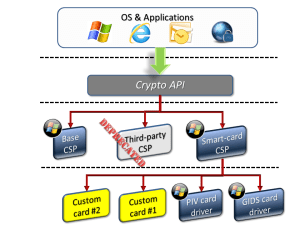
The new model takes advantage of the fact that there is a significant amount of logic shared across smart-card CSPs– such as prompting for a PIN– can be refactored into a platform component. The new architecture could be depicted in simplified form as follows:

Simplified model of smart-cards and CAPI for Vista and above

Simplified model of smart-cards and CAPI for Vista and above

Some observations about this architecture:

  • CSP layer is still intact, but third-party CSPs are largely deprecated. While existing ones will continue to work, MSFT can at some point discourage publication of new ones due to another legacy of the crypto wars: every CSP must be signed by MSFT itself. In the logic of export restrictions, this would have prevented the bad guys from writing stronger cryptography implementations than they were entitled to according to the framework. Again the original motivation is long gone, but the restriction survived in the architecture. (Tangent: it is trivial for users to override this, with administrative privileges. First approach is to configure the machine for kernel debugging, which permits loading unsigned CSP by design. Another approach, adopted by this blogger for a past project, involves modifying the function in advapi32 responsible for loading new providers. Reverse engineering reveals the location where return value from signature verification is used in a conditional branch. Hot patching that code in memory to with NOOPs allows ignoring failed signature checks. This is best automated with a DLL injected into all processes, using the app-init DLL mechanism for example, such that existing apps can transparently load the unsigned CSP without modification.)
  • There is a single CSP responsible for all smart cards.  One more layer of indirection has been added under that CSP, branching out to individual mini-drivers responsible for a particular card edge. Vendors introducing a proprietary card edge– as opposed to simply shipping new hardware that conforms to an existing standard– are now tasked with writing smart card mini-drivers hooking into the generic smart card CSP instead of writing wholesale CSPs specific to one model of cards.
  • To complicate the picture– Vista also introduced a new cryptographic API called Crypto Next Generation (CNG) with its own abstraction called Key Storage Providers, or KSP for short. Smart cards can also be accessed via this path using the unified smart-card KSP. One convenient property is that drivers can operate as part of either stack, depending on whether the calling application uses CAPI or CNG.
  • Drivers are assumed to communicate via the PC/SC interface to the card itself, and they are invoked only after a connection to the card is established at PC/SC layer. A corollary is that cryptographic hardware that does not appear as a CCID device, such as networked HSMs or USB tokens communicating via home-brew HID interface, either have to stick with writing legacy CSP or create the appearance of a fake smart-card, complete with an associated fake smart-card reader to appease PC/SC, as in the case of virtual smart cards built on top of the TPM.
  • The adjective “mini” is relative. Counting by sheer number of APIs, card drivers have a significantly more complex interface than the corresponding CSP they replaced.
  • Two card edges are built into the OS out of the box: PIV and GIDS. Logically these appear as different card types but in reality they are implemented by a single driver, msclmd.dll. For coping with the terra incognito of card models beyond that, there exists a fairly elaborate discovery mechanisms to map a given smart card to a driver, as well as install new drivers via plug-and-play mechanism when confronted with an unfamiliar “card” such as an Android phone with embedded secure element. This will be the subject of the last post in the series.

[continued]

CP

Quick primer on the Windows smart-card stack (1/3)

Earlier posts considered the idea of using a smartphone as a smartcard replacement for security scenarios such as logical access and encryption. The upshot is that presence of an embedded secure element and support for NFC with card-emulation mode gets surprisingly close without installing any software on either side. A commodity OS such as Windows already recognizes the phone as a smart card when it is tapped against an NFC reader, and attempts to use it for traditional smart card scenarios such as login. This article takes a closer look at exactly what goes on inside Windows when interacting with the phone over NFC, a story best related through a historical perspective on cryptography in Windows.

The first systematic usage of cryptography in Windows dates back to the 1990s and Clinton administration, when crypto wars were still raging. On one side the US government lobbied for strong export restrictions, arguing that encryption made it easier for criminals to evade surveillance by law enforcement agencies. On the other side an alliance of industry, civil liberatarians, self-described cypherpunks and academics pushed for widespread commercial availability of strong cryptography. Meanwhile the sudden growth of the web and ecommerce gave rise to the first large scale use of crypto for consumers: the Secure Sockets Layer protocol or SSL was the ultimate kitchen sink, mixing all of the basic building blocks: public-key encryption, symmetric ciphers, hash functions, digital certificates. The dependence of ecommerce on SSL translated into a product requirement to have all of those moving pieces implemented.

Eventually the US would back down from its position and the restrictions largely lifted in 2000, but not before they took their toll on the design of Windows cryptography API or CAPI for short. CAPI tried to walk this fine lien of enabling the “permited” use cases such as online banking for good guys while making it difficult for bad guys to implement the “frowned upon” scenarios. Many of the inexplicable design choices reflect these constraints. Case in point: for the longest time it was not possible for users to generate their own keys and provide that to the API for use in an encryption operation. Because users could override export restrictions, and for example use 128-bit keys when they were supposed to be limited to weak ciphers only. (Even when the regulatory constraints went away, the API remained hobbled with the restrictions, with the bizarre exponent-of-one trick to import keys with a dummy RSA operation.)

Still CAPI tried to provide an extensibility mechanism, using the notion of cryptographic service providers or CSPs. Applications did not simply ask to encrypt a message or compute a hash. Instead they firsted pick a CSP, which provided the implementation for set of algorithm and invoked the functionality through a consistent interface. (A similar extensibility mechanism was adopted later by openssl in the notion of engines.) While this made life slightly more cumbersome for consumers of cryptography– even simple tasks such as “hash this message with SHA1” required dozens of lines of code– on paper the model had significant advantages:

  • Support for new algorithms can be added by end users. In other words a third-party could author a CSP and install thiswithout waiting for MSFT to update the OS.
  • Default implementation of existing algorithms could be replaced. If a customer was concerned about side-channel attacks in the built-in RSA implementation, they could in principle write an improved version.
  • System-wide policies could be set on choice of algorithms. One could mandate that all applications that use hashing would pick SHA256 for example.

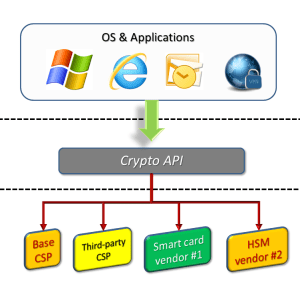
In reality it did not quite pan-out that way, for reasons beyond the scope of this post. But for our purposes the main feature is how smart cards were incorporated into the framework. Originally support for smart cards and custom cryptographic hardware such as HSMs were viewed as a special case of the second scenario. In this model each smartcard vendor writes a CSP tailored to the precise capabilities of their hardware. Customers would install that CSP on the machines where they planned to use that card.  Magically CAPI ensures that requests from existing applications– web browser, email client, VPN app etc.– are be transparently routed to the new CSP without changing the application. This is what the initial architecture looked like:

Diagram of Windows CSP

Original Windows CAPI architecture for smart-cards

[continued]

CP

Login with Facebook as .NET Passport V2, essentially

(Full disclosure: this blogger worked on Passport and its later incarnation Windows Live ID.)

Facebook is close to accomplishing what Microsoft set out to do with .NET Passport in the late 90s: become an identity provider trusted by the majority of popular websites.While recent usage/adoption statistics are difficult to come by, the increasing number of “login with Facebook” buttons popping up on sites ranging from Remember The Milk  to KickStarter suggests that companies representing all types of business segments are on board.

Facebook login may also the lone success story for identity federation– or to be more precise, federation in the consumer space. The enterprise scenario has received far more attention and enjoys an abundance of commercial solutions designed to solve a well-defined problem: employee Alice working at medium/large enterprise, typically a Windows shop running Active Directory, wants to use some cloud provider such as Salesforce. Main requirement is for Alice to login to that external resources using her existing Windows domain credentials, without managing a different username/password. SAML and its more Redmond-centric counterpart WS-Trust have been used with varying degrees of success to bridge that gap. What has never worked reliably is the consumer equivalent of that scenario: Alice using her Yahoo account to login to Twitter for example. There are isolated cases of interoperability, such as Remember The Milk also accepting login with Google identities, via combination of OpenID and oauth. But these are the happy exceptions. For the most part, each cloud provider stands in its own island of identity, with occasional one-off agreements and forays into federation experiments.

Except for Facebook. Starting with Facebook Connect, the service has seen increasing adoption of its identity system, with little under the guise of adding social features to websites. This is a far cry from the response to Passport when MSFT started pitching it around. Conceived from the beginning as an identity provider for the entire Internet– as opposed to merely all Microsoft properties, which would have been ambitious enough–  the service had little adoption. Expedia, originally spun out of MSFT, and eBay were among the few large sites accepting Passport logon along side their own identities. (Expedia would later phase out the service.) It was not for lack of trying either, at least on the Windows front.  For example, the IIS 6.0 web server in Windows Server 2003 had built-in support for Passport authentication at the HTTP level.

What was the difference? Several theories come to mind:

  • Better value proposition for relying parties. Passport provided identity and very little else. Granted there was an associated “profile” of user provided personal information. But there few forcing functions for that profile to be accurate (as opposed to “John Smith” living at zipcode 90210) comparable to the stringent real names requirement of Google Plus or the self-imposed convention followed by most Facebook users to represent their true name. Hailstorm aka .NET MyServices was the one ill-fated attempt by MSFT to attach large amounts of data and broker these to third-parties. That effort soon went up in flames. By contrast Facebook login brings an associated wealth of user-generated content, and even ability to post updates to the user timeline.
  • Fear of outsourcing in general. In this day and age of EC2 instances spun up on demand and sites scrapped together by mashing up third-party data feeds, it’s difficult to imagine a time when everyone insisted on running their own data-center and having full control of every feature in their service. That attitude, combined with an over-confidence that everything could be done better in house, predisposed developers against relying on some other authentication service. (The sheer number of password mishaps would prove them very wrong. It turns out the majority of those sites can better serve their users’ security if they delegate authentication to more competent entities.)
  • Fear of MSFT in particular. With diversified business interests in operating systems, productivity software, servers, gaming and entertainment, it is easy for any given website to consider MSFT a competitor, and shy away from entrusting a critical business function to the one company they are most concerned about.
  • Privacy concerns. Plenty of FUD, culminating with an EPIC complaint to FTC and other privacy advocacy groups did not help the matter. Facebook has arguably displaced MSFT as the great privacy boogeyman of the decade, but this was not true when Facebook Connect debuted in 2008, before the company got embroiled in multiple rounds of controversy around privacy of it own making.
  • Lack of standardization. Passport started out with a proprietary protocol, partly because there were few good options available for a web-based protocol that did not require changes to the web browser. Later Kerberos support was added but the corresponding functionality in browsers lagged behind. In principle Passport service could server as a Kerberos Domain Controller (KDC) compatible with Windows, and users could use Kerberos via the negotiate package supported by IE But the user experience for that would have been very restricted– it is a native dialog from the OS– compared to the full control that an HTML page gives the website for customizing the login experience. In any case WS-Trust and SAML followed soon with browser-aware profiles, and a few years later came the backlash against angle-brackets in the form of OpenID and Oauth. Facebook login is built on Oauth2.
  • Finally, one can’t rule out the passage of time helping out. Federated login was a foreign concept in 2000. It confused users: people had become so accustomed to having different identities at every site that they no longer expected their Hotmail credentials could also get them into their instant messaging client. Web site designers meanwhile had very little incentive to fix that, so they continued to put their own identity system front and center while offering federated login half-heartedly as a hidden option that required jumping through hoops. (Reflecting that lack of confidence, they hedged their bets and often required even federated users to also register a “native” account just in case the external identity system disappears overnight.)

CP

Smartphone as smart card– Android meets Windows

Continuing on the theme of using an Android smartphone as smart card, this post looks at how Windows interacts with smartcards and the moving pieces required to transparently substitute a phone for traditional smart-card scenarios such as login to the machine.

Windows has an elaborate smart card stack, with automatic discovery and installation for “drivers” (in quotes, because these are not kernel-mode device drivers in the traditional sense of mediating hardware access, but user-mode constructs that translate cryptography API features to low-level smart card commands)  This is described in great detail in the smart card mini driver specification on MSDN. For our purposes, there are two quick ways to observe how that stack reacts to an Android device in card emulation mode.

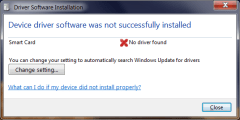
1. Using the GUI. Tapping the phone in card emulation mode against a contactless reader will trigger the driver discovery. This requires that the screen is on because Android ties card emulation state to the display being powered. (The screen does not have to be unlocked, although the built-in timeout that turns off the display after idling on the lock screen can lead to an abrupt disconnect.) This will lead to a sequence of device discovery notifications along the lines of:

DriverInstallInProgress    DeviceDriverNotInstalled

Clicking on the error message for additional details:

DriverInstallDetails

The implication is that the Android phone was recognized as a smart card. Windows 7 unsuccessfully tried to locate an appropriate driver, which includes a cloud check at Windows update, but there were no suitable candidates and the system eventually threw in the towel.

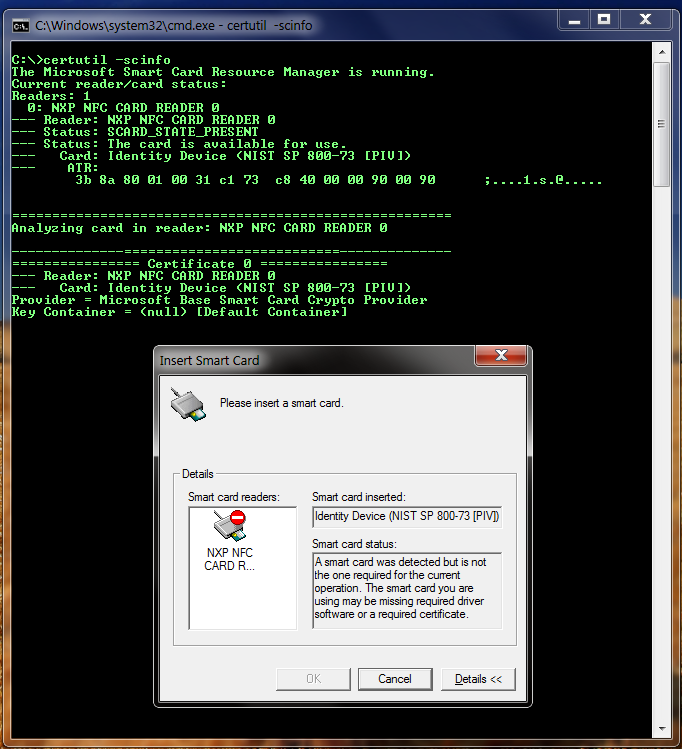
2. From the command line using certutil -scinfo, with the phone tapped against a contactless card reader. (Recall that the screen must be on, because Android ties card-emulation mode to the display being powered on.) Below is an example of what could happen:

UnknownSmartcard_AndroidSE

Parsing the rather verbose diagnostic output here, the takeaways are:

  • Windows treats the tap event as smart card being present in the reader. While the user gesture is different for contactless cards (tapping against the NFC surface instead of pushing the card into the reader slot) the PC/SC API abstracts aways that difference and unifies both under a card present event.
  • It observed an ATR (answer-to-reset) from the card of 3b 8a 80 01 00 31 c1 73  c8 40 00 00 90 00 90. Strictly speaking this is another case of playing loose with terminology: contactless cards do not have an ATR,  they have an answer-to-select or ATS. A quick search suggests this particular value is similar to ATRs returned from other versions of JCOP, consistent with the NXP hardware present on this particular Galaxy Nexus device.
  • Here is where it gets strange: the phone is categorized “Identity Device (NIST SP 800-73 [PIV])”– in other words, a card implementing the US government Personal Identity Verification standard. PIV is a successor to the Common Access Card, going back to a presidential directive from 2004 mandating strong identification requirements for federal employees. PIV is one of two smart card standards recognized out-of-the-box in Windows 7, the alternative being GIDS.
  • Problem is, a stock Android secure element initialized for Google Wallet has nothing to do with PIV. Attempting to treat it as a PIV card will not end well, as this example demonstrates. The error dialog appearing in front of the command prompt states the obvious: the “card” in question does not conform to the expected behavior. Without a PIV applet present, APDUs sent to the secure element will not produce expected outcome, eventually forcing the driver to give up.

This suggests two ways out of the current predicament of mismatched drivers:

  1. Getting the Android device to implement a PIV or GIDS, the two card edges recognized out of the box in Windows 7 without any middleware required. This effectively turns the current incorrect Windows assumption above into reality.
  2. Installing a driver that is specific to the Android device to avoid using the incorrect driver. While this will avoid the error messages, it turns out to be a dead-end. The primary beneficiary of the smart card stack is the cryptography API, which expects the card to have certain capabilities such as managing secret keys and credentials.  Without that functionality present in the secure element, the driver can not translate these requests into appropriate commands issued to the phone.

[continued]

CP

HP Envy Spectre and NFC– features missing in action

[continued from part I]

Not supporting card emulation mode in a laptop is understandable, given the absence of secure element and unwieldy form-factor. While it is possible to host-terminated card emulation without special purpose hardware, where traffic from the reader is routed to a garden-variety application running on Windows and emulating an ISO7816 card,  it’s difficult to imagine a practical use case for this. It’s one thing wielding a smart-phone against a point-of-sale terminal for mobile payments. It’s a completely different, unwieldy experience to recreate the same scenario using a 4-pound 14″ laptop where the antenna is located under the palm-rest.

More puzzling is lack of reader/writer mode. Long before NFC was a gee-whiz concept in consumer hardware, it was a standard feature in contactless smartcards used for high-security enterprise scenarios such as login, VPN and encryption. For example the US government PIV standard defines a subset of functionality accessible over NFC. Reader/writer mode exposed as PC/SC driver is a natural choice for that scenario, exposing PN533 as always present smart-card reader. As things stand, lack of reader mode rules out using an Android phone as smart-card replacement.

As for P2P mode, it can be flaky. This blogger was able to share links from the phone, using the standard Android beam functionality but the stack seems to get “wedged:” it will stop triggering Beam after a few attempts, or the Beam ritual will take place on Android but nothing happens on the laptop side.  Other reviewers noted they had problems with getting the feature working consistently; HP Touch to Share app for Android has more 1-star reviews than 5-star ones. Part of the challenge is that early versions instructed users to use that app for sharing links. But recent vintage  Android permits existing apps to share content via Beam. For example Chrome is designed to share link to the current web page, obviating the need for a special purpose application to transfer links. A recent update to the Windows side clarifies this, using a drop-down to toggle between the 2.3.X Gingerbread (still accounting for over 50% of devices) and more recent vintage 4.X phones:

HP_touch_to_share

Still the transfer works one way only– no way to send a link from the PC to the phone, a la Chrome to Phone— and it is limited to URLs, not contacts or other NDEF formats that Beam supports in principle. P2P is an overkill for such narrowly scoped use case, further restricting the target audience to users with Android NFC devices costing hundreds of dollars, instead of anyone who could get their hands on an NFC tag costing less than a dollar. (HP appears to have reversed course on this, supplying NFC tags with Spectre One.)

Overall one is left with the impression that NFC support in the Envy is scratching the surface. It is optimized for one narrow scenario, which turns out to not be very common and of limited utility, bordering on parlor-trick category. But the underlying hardware is capable of supporting a vast array of enterprise use cases, and while the Spectre is not aimed at that market, it contains hints of the broader potential of integrated NFC hardware.

CP