Time to revisit X509 name and path-length constraints?

Recalling the Leslie Lamport quote about the essence of a distributed system:

“You know you have a distributed system when the crash of a computer you’ve never heard of stops you from getting any work done.”

Substitute certification authority for “computer” and trust established for “work done,” and we have a good description of current PKI infrastructure. The fragility of this model, which has inspired critics such as Peter Guttman for over a decade now, was demonstrated again in the latest TurkTrust debacle. Here are the salient facts:

  • TurkTrust is a certification authority, present in Windows and NSS trusted root stores.  Virtually all web browsers recognize this organization as valid issuer of SSL certificates used for secure connections on the web.
  • TurkTrust issued two leaf certificates to websites with the “CA” property set to true. In other words, the lucky recipients became intermediate certification authorities themselves, inheriting all the privileges afforded  TurkTrust by web browsers to mint the equivalent of identity papers for any website in the world.
  • The intermediate CAs were used to issue fraudulent certificates, which were then used to falsely impersonate legitimate websites and intercept user traffic.
  • The problem was not discovered internally by TurkTrust during audits. Instead it was caught by Google, thanks to the Chrome certificate pinning feature.

There are a number of details lacking satisfactory explanation, in spite of a decent attempt at postmortem by TurkTrust. Leaving aside those questions, there are two fundamental questions around why the mistake was possible:

  • Why is TurkTrust– a CA based in Turkey and doing the majority of its business with companies Turkey– entrusted with issuing certificates for any company based anywhere in the world? This speaks to a profound breakdown of compartmentalization in X509, of any semblance of containing the failure of one component in the system from spreading to all others.
  • Why does a single mistake in using the wrong certificate template result in random website owners getting unfettered CA privileges, with no other checks and balances?

It turns out  the X509 standard already has provisions to help out with both. Not surprisingly, these features have not been used properly in the PKI system that emerged over the years.

The solution to the first problem is name constraints. If the CA certificate contains this particular property, it can only issue for websites with name matching the specified pattern. The natural restriction for TurkTrust would be requiring that the site name ends in “.TR”, indicating the top-level country domain for Turkey. Design of these constraints allow specifying both permitted and disallowed names. For example if some subdomain of TR was particularly sensitive, it can be further protected against TurkTrust errors by excluding that pattern. Incidentally, name constraints are propagated down the chain. Even if a bumbling CA accidentally creates a subordinate CA lacking any name constraints, the restrictions specified in the root still apply.

The solution to the second problem is path-length constraints. Any CA certificate can express a requirement to the effect certificate chains leading up to that point will be no longer than some fixed number of hops. Setting the limit to 1 hop prevents any “accidental” intermediate CA from being operational. Leaf certificates issued from that unintended intermediary would have an additional hop to the root CA, violating the path-length constraint.

Realistically neither extension has been used in practice for existing trust anchor. Few carry any name or path-length constraints, with the exception of subordinate CAs issued to companies such as Microsoft to issue their own certificates for their own domains. Understandably it is not in the interest of the CA to impose restrictions on itself– what if TurkTrust later wanted to expand its business into another country or create additional subordinate CAs? A less draconian requirement is that all leaf-certificates must be issued from an intermediate CA that has a path-length constraint of one. Since the key used to sign leaf certificates must be online, in the sense of being available in the normal course of business, it is at highest risk of “accidents.” While the path constraint does not prevent issuing mistakes, such incidents will be isolated to a small number of sites each time. (Granted when that site is Microsoft or Google, the mistake can have large repercussions.) One could also envision separate intermediaries for different top-level domains, but this is unlikely to reduce overall risk. Most likely all of them will run on same infrastructure with same operational profile, having exactly the same vulnerabilities.

Given that the economics do not favor CAs to exercise self-discipline, the next best option is self-defense for users. Unfortunately that involves changes to certificate verification logic to artificially simulate the constraints. Windows cryptography API has some flexibility in limiting trust associated with root anchors, for example to remove ability to issue certificates for specific purpose such as code signing.
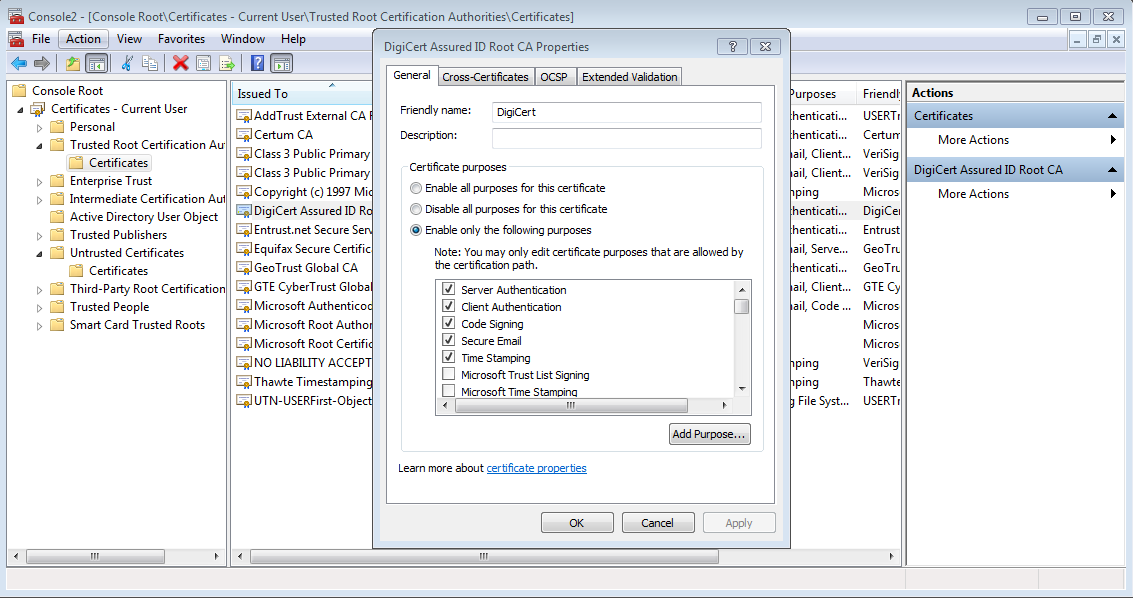
Using the management console

Editing properties using the management console

But that mechanism does not allow for introducing additional path or name constrains into an existing certification. (There is always the nuclear option of blacklisting a CA by putting them the Untrusted Certificates store but that goes well beyond the objective of “compartmentalizing” risk from CA failures.)

CP
Using the secure element on Android devices (3/3)

(Continued from part I and part II)

As discussed in earlier posts, the embedded secure element on Android devices is a generic computing environment, with its own processor, RAM and persistent storage, however modest those may be in comparison to the phone itself. This platform supports running multiple applications, developed in Javacard. Javacard is a very restricted subset of Java optimized for resource-constrained environments. It’s worth emphasizing that while Android SE is programmed in Javacard, not all smart cards are. Some accept native code applications– “native” to their underlying bare-metal architecture. Not to be outdone by Sun, there is also .NET Card supported by Microsoft as a scaled down version of its .NET platform for Redmond-sanctioned smartcard development. The Android SE is also Global Platform compliant. This grandiose-sounding standard sets down a uniform model for card management, independent of form factor and internal architecture. GP can manage SIM cards over-the-air for GSM networks, as well as chip-and-PIN credits card inserted into an ATM. It can install Javacard applets just as well as deliver native code or C# applications.

Our starting point for this discussion was: what functionality does Android SE expose out of the box? It turns out the answer is, very little. Global Platform only mandates a card manager. The card manager is not the analog for an operating system per se. It is more akin to a trusted installer service that provides the only way to add/remove applications from the card. Unlike other smart cards that have a single dedicated purpose such as transit and no provisions for being enhanced in the field, the Android SE starts out with a blank slate. There is no TPM-style functionality, password manager or EMV-payment capability exposed to the outside world when the chip rolls off the assembly line. The underlying hardware and operating environment are very much designed to support all of these scenarios. In fact between the certified tamper resistance, hardware acceleration for cryptography and rich library of primitives in Javacard, the SE makes for an ideal platform for such security-critical functionality. It takes an application (“applet” in preferred Javacard terminology) to package those raw capabilities and offer them up in a way accessible externally.  For example, when Google Wallet is installed and set up with cards/offers, then appropriate applets are installed that collectively implement the Paypass protocol for contactless payments over NFC.

Global Platform spells out how code is delivered (INSTALL for load and LOAD) and instantiated (confusingly named INSTALL for install.) By analogy to the PC, the first one installs new software while the second starts a new process from an executable image on the machine. GP also provides mechanisms for listing applications, deleting them, creating new security domains (similar to “users”) and managing the life-cycle of the card. For instance, locking the card if the issuer wants to suspend usage temporarily, or terminating it in an irreversible manner.

The catch is card management operations require authentication, specifically as the owner of the Issuer Security Domain. Global Platform defines this protocol, based on symmetric cryptography and clearly showing its age with a heavy reliance on DES– specifically triple-DES configured with two independent keys as 2TDEA. Each SE internally has a unique set of secret keys, called ISD keys or colloquially card manager keys. Possession of these keys is required for successful authentication, which in turn is a prerequisite for privileged operations like applet installation. GP envisions ISD keys being guarded by a trusted services manager (TSM), responsible for remotely managing the card without relinquishing keys to intermediate systems. This model strives for end-to-end security from TSM to the card, by avoiding security dependencies on other entities existing along the path. That includes the Android device, which is one of the final hops on the way. Card management commands are received from the cloud and funneled over to the SE. Rooting or jail-breaking the host operating system affords no special privileges because the local device does not have ISD keys.

Returning to the original question then: installing new functionality on the embedded secure element is possible on devices where:

  • The publisher of the application  has card manager keys, or
  • Existing TSM in possession of such keys can perform the installation

CP

** For completeness: there can be more than one set of ISD keys. All of them have equivalent privileges, including the ability to change other ISD keys. For example the embedded SE in PN65N from NXP Semiconductors features four key slots, theoretically allowing up to four different parties to manage the card at once. (That chip and its successor power virtually all NFC-enabled Android handsets. Only the recent Nexus 4 phone and Nexus 10 tablet have different hardware.) This is akin to having multiple cooks in the kitchen. Global Platform spec version 2.2 — which is not supported– adds even more flexibility with delegated management. ISD keys can be used to create supplementary security domains (SSD) which are capable of installing/removing applets on their own, but not interfere with code installed into other SSDs. That gives rise to an unbounded number of participants with ability to deploy applets in parallel.

Knight Capital, state-sponsored attacks and vulnerability of markets

The Knight Capital meltdown was an accident. So we are told– based on careful examination of the trading patterns and educated guesses, the culprit appears to be some testing code mistakenly released into the wild where it started conducting trades with real money on a real exchange, instead of the simulated environment used to verify the trading algorithms. There is no post-mortem released, at least not for public consumption– perhaps the SEC has received one under a confidentiality agreement. (That is a shame. The post-mortem would be required reading for software engineers, as another case study of a catastrophic bug missed before release, right up there with AT&T outage of 1990, Intel Pentium floating point unit and other epic failures.) Recalling the admonition, variously attributed to Robert Heinlein, that one should not attribute to  malice what can be explained by incompetence, let us grant that there was no foul played involved. No rogue trader upset by his/her latest bonus, no corrupt insider bribed by a competitor to throw a wrench into the gears, no Stuxnet-style targeted malware poisoning the trading algorithms. The episode still provides a glimpse into the scale of disruption possible from a deliberate attack on markets, carried out by a skilled adversary in control of a high-frequency trading system.

Concerns have been raised in the past about the systemic risks from high-frequency trading, including the increased volatility and possibility for short-lived but significant pricing anomalies such as the Flash Crash of May 2010. (That incident turned out to be an unrelated problem, triggered by a large sell order from Kansas of all places.) Most of these critiques focus on accidental bugs, instead of deliberate attacks against the system. While Knight Capital proves the timeliness of the random-failure model, it paints an even more bleak picture in terms of the likely robustness of the system in adversarial settings. In other words, inability of quality assurance process to catch even “good-intentioned” bugs does not bode well for its ability to stop malicious tampering that is deliberately designed to evade detection.

One objection is that the errant trading did not result in destruction of wealth as much as it facilitated a coordinated and rapid transfer. Specifically, funds migrated away from the NJ firm and towards a multitude of other HFT shops on the winning side of the botched trades. It is a zero-sum game, this argument goes, and markets were efficient at punishing Knight Capital for its mistake, moving capital to other participants where it will be put to less foolish use. While the zero-sum property may have been (approximately) maintained this time around, it is not clear how that assurance can scale as the size of the disruption increases. The pattern of trading can just as easily cause prices of underlying assets to decline, generating losses for unrelated third-parties holding on to the same positions. The flash-crash of May 2010 was precisely such an incident that triggered a precipitous but short-lived decline in the market.  The second problem is that drastic fluctuations  can cause the proverbial “loss of investor confidence” among non-institutional investors, as well as disappearing liquidity as automated systems exit the market when reality parts ways from their models.

The likely suspect both in possession of resources to execute such an attack and motives to benefit from the ensuing chaos are nation states. Non-state actors such as terrorist groups may have motive, but probably lack the sophistication and access to markets with signficant capital. (Still the idea of villains initiating market mayhem while placing bets on the result has been a timeless plot device for B-grade action movies.) As for commercial entities, it is very risky for any legitimate company to actively tamper with a competing trading platform or ECN in order to reap profits. Getting caught has career limiting consequences for all involved. (On the other hand, theft of competitors’ trading model with the purpose of either front-running them or  better yet trading against them is well within the realm of unethical possibilities, as in the Goldman Sachs programmer caught stealing source code in 2009.)

State sponsored computer warfare has received a lot of attention and FUD recently, mostly focused on the vulnerability of critical infrastructure such as the power grid or communication systems. Markets are not “critical infrastructure” in the sense that temporary disruption is not as life-threatening as widespread blackouts or toxic chemical release from industrial systems. On the other hand, it may have a very disproportionate effect on the economic well-being of the US. It is no secret that past waves of APT targets included financial institutions. But the geopolitical context driving such attacks and their objectives are complex. Stealing trade secrets or source code from companies headquartered in a different country  provides an economical advantage to the country initiating the theft, as well as any domestic competitors who become the recipients of said ill-gotten goods. It is not surprising that some nations have embraced the practice as an integral component of foreign policy. But given the tight coupling between national economies (“when the US sneezes, rest of the world catches a cold”) an action causing wholesale market disruption would have repercussions for the aggressor as well. This poses a particular challenge for China, long suspected as main perpetrator of attacks against US networks. It is one of the largest holders of US Treasuries, and its growth engine remains dependent on US companies that outsource manufacturing operations. Then there is the collateral damage to sovereign wealth funds associated with other nations invested in the same market, making it difficult to separate allies from foes in terms of harm inflicted by an indiscriminate attack against trading infrastructure.

CP

Using the secure element on Android devices (2/3)

The first post in this series described the permissions model for accessing the Android secure element from its contact interface. (Not to be confused with access from contactless aka NFC interface, which is open to any external device in NFC range.) This model can be viewed as a generalization of standard Android signature-based permissions— in fact for Gingerbread it was a vanilla signature permission based on matching the certificate used for signing NFC service.

Starting with ICS, there is an explicit whitelist of allowed signing certificates. Any user application signed with one of these keys can obtain access to the secure element, and more broadly to administrative actions involving the NFC controller such as toggling card emulation mode. These certificates can be retrieved and inspected from any Android device. With adb debugging enabled, an incantation such as “adb shell cat /etc/nfcee_access.xml | xmlstarlet select -T -o -t -v //signer[1]/@signature | xxd -r -ps | openssl x509 -inform DER -text -noout” will dump the certificate on a command line. [Full output]

Step by step:

  • Get the XML file containing the whitelist [nfcee_access.xml]
  • Locate the first signer element, then its signature attribute. In the above example this is done with an XPath query, with plain text output. On all production devices this blogger has encountered, there is exactly one such node. Development builds can have more. (As an aside, that XML attribute is a misnomer: “signature” contains an X509 certificate, instead of the signature on a particular APK. Same confusion exists in the Android API, where signatures field inside the package description actually contain certificates.)
  • Decode the value of the attribute as hex string
  • Interpret the result as an X509 certificate in ASN1 encoding, and parse the certificate.

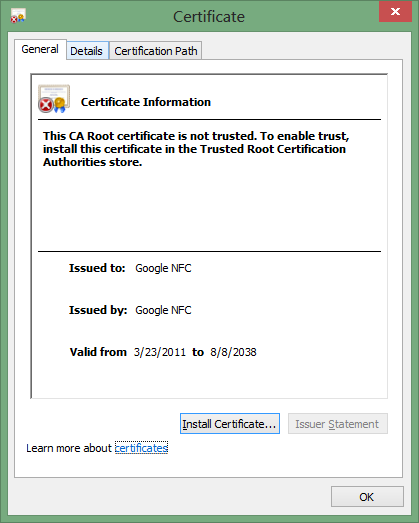
But it is easier to save the certificate output after the third-step with a .der extension [certificate] and open the file using the built-in Windows UI for inspecting certificates:

Trust path         Trust path

Android code authentication model uses self-signed certificates– in the above example, the issuer and subject are identical. This is in contrast to Authenticode, where publishers obtain certificates from a trusted third-party certificate authority such as Verisign. When an external issuer is involved, the subject name in the certificate is verified during the issuance process. A competent CA is not supposed to issue a Google certificate to someone not affiliated with Google. (In reality, process failures have occurred, but nowhere with the same frequency as SSL certificate issuance mistakes.) With self-signed certificates, anything goes for the subject name since it is decided entirely by the software publisher, with no external sanity checks. Luckily in this case the field contains sensible information, identifying the publisher as associated with Android and specifically the NFC stack. The important property is that other applications signed using the same key will have access to the secure element. Additional publishers can be granted access by also including their certificates in the whitelist.

That solves half the problem: communicating with the SE from contact interface, or in other words being able to exchange APDUs in terms of developer view. The logical next step is determining what can be done with that capability, which boils down to two questions:

  • What features/functionality is present in the SE out of the box?
  • If the built-in feature set proves insufficient for some use case, how does one update the SE contents to add new capabilities?

The final post in this series will attempt to elaborate on these questions, which are also discussed in a Stack Overflow thread dedicated to the access control mechanism in ICS.

[continued]

CP

Fine-grained control over framing web pages (1/2)

Firefox has recently enhanced its implementation of content framing checks, by adding support for Allow-From attribute of X-Frame-Options HTTP response header. This is a good time to revisit the motivation behind framing restrictions and the evolution of security mechanisms in web browsers to control framing.

HTML frames are a standard mechanism for aggregating content from different websites. Originally introduced as framesets in Netscape Navigator 2, they were later generalized to the more usable inline frame notion that remains in widespread use today. On the one hand, frames provide a safer alternative to other mechanisms such as script source inclusion. The same-origin policy can prevent active content from accessing resources on a different website, maintaining a security boundary between the framer and framee. On the other hand, the possibility of seamlessly framing other websites without any way for users to distinguish loca/external content can also lead to confusion and security issues.

The original X-Frame-Options header was introduced as a proprietary extension in Internet Explorer 8 in response to so-called clickjacking or UI-redress attacks. Clickjacking takes advantage of the flexibility of HTML layout to trick users into believing they are interacting with one website, when they are in fact interacting with a different one. The hypothetical example is clicking a seemingly harmless button on a malicious website, but having that click instead delivered to a different button on a banking website, which conveniently inititates a funds transfer from the victim to the attacker. The reason for that surprising otucome: the banking page was in fact present all along, inside a transparent frame “in front of” the malicious site, unbeknownst to the user.

Pulling this off requires the interaction of several features, all of which are seemingly benign in isolation:

  • Framing: Embedding the contents of one web site inside another page. In this case a trusted web page.
  • Positioning of frames: This allows shifting the framed content around, to better align with the fake UI element visually overlaid behind it.
  • Transparency: when third-party content is framed, its transparency can be adjusted from fully opaque to 100% transparent. The latter extreme end of the spectrum leads to a surprising situation: none of the content is visible to the user, but the browser treats this frame as the one in front. User interactions such as clicking inside that region will deliver those inputs to the transparent frame– even though it only has an ethereal presence.

X-Frame-Options tackles the problem by attacking the first condition, controlling which other sites can frame a given page. This is done by having the framee decare its intentions with a new HTTP response header when serving the page. The web browser is responsible for consulting this header when fetching framed content, and applying the stated restrictions to stop content rendering if necessary.

The original design was cobbled together quickly in response to the increasing alarm over clickjacking in spite of any lack of evidence for real-world exploitation. It provided three options: Allow, Deny and Same-Origin, corresponding to yes/no/conditional on origin permissions. This was a clear improvement over the string of unreliable frame-busting checks in Javascript which had become widespread at that point. Yet absent from the original spec was a middle ground: grant framing rights to a specific website, for the common scenario when widget.com to state that only acme.com is permitted to frame its pages. Same-origin is the closest option, and that does not help when the pages are in different domain. In fact “origin” in this case has strict definition of domain name; even foo.acme.com and bar.acme.com would be considered different origins. Since restricting framing to a set of known trusted sites is a common problem, there have been several workarounds to approximate the same behavior with varying degrees of success. For example:

  • Check the Referer header in the incoming HTTP request, identifyig the previous website the user is coming from. This sort of works, except that Referer is not guaranteed to be present and there were past vulnerabilities which allowed script or extensions such as Flash to forge that header. (While the user herself can always craft an HTTP request with any Referer, that constitutes a self-attack in this example. The bigger concern is when malicious.com can make a request to widget.com with Referer header set to acme.com, misleading the widget to believe it is being framed from an authorized container.) Given the fragility of the Referer header and its bad reputation as by-design privacy leak across sites, most robust designs shy away from depending on it for security checks.

[continued]

CP

Arduino, TPMs and smart cards: redefining Hardware Security Module

A recent proof of concept proposes using an Arduino as low-cost improvised HSM, store cryptographic keys  for authentication to Amazon Web Services. This is billed as an example of inexpensive commodity hardware disrupting the stodgy HSM (hardware security module) market. This argument slightly blurs the definition of what exactly constitutes an HSM.  The security properties of an HSM can be roughly divided into two categories:

  1. Reduced software attack surface. That is, the external interface for talking to the HSM is limited to the bare minimum, designed to protect against attacks against the integrity of the software. This threat model assumes an attacker has 0wned the box that the HSM is attached to and is free to send any traffic over the same channel. Beyond addresing the obvious concerns (eg sending malformed requests to trigger a memory corruption vulnerability) HSM try to reduce the risk by locking down the platform. For example the OS is typically immutable, with no room for users to install apps, there are no random “value-added” services running or  dubious components such as Java to pose risk even when unused.
  2. Physical tamper-resistance. The hardware itself resists attempts to pry sensitive data such as cryptographic keys out of the HSM, even when bad guys have unfettered physical access. This is a more formidable adversary: he/she can attempt almost every software attack available to the “authorized” machine (modulo attacks requiring credentials, which may not be available when HSM is captured in isolation) But they can also go after the hardware itself. For example crack the casing of the device open, pull out the disk drive or flash memory, and try to directly scrape data from the disk. They could exploit side-channels by measuring timing with high resolutionobserve power consumption or monitor RF emanations during a cryptographic operation. They could even try to deliberately induce faults by operating the chip outside its normal thermal limits, over-clocking  or zapping the circuits with lasers.

A design using the Arduino can meet the first criteria, depending on the quality of the software. While it was never engineered for this purpose, the “secure” option described in the post does appear to lock down the environment. For example the keys injected can not be extracted via standard mechanisms of memory access or JTAG interfaces.

But then again so does a Windows 95 box or ancient Palm Pilot connected to the server with a serial cable. When attackers are limited to accessing the so-called “HSM” from a single interface attached to the server, anything can qualify by running a suitably locked down, minimal crypto application in isolation. That code would be limited to handling a small number of external requests over the serial cable. No web surfing, TCP/IP or even a network connection, no PDF viewers or complex image parsers with tricky logic susceptible to memory corruption errors. More precisely, even if those components exist, they can not be invoked by the attacker. Suspending disbelief, the fact that underlying OS is full of vulnerabilities magically becomes irrelevant because latent bugs are not reachable via the one channel that exists between HSM and the server the adversary controls.

In reality one does worry about temporary physical access, where bad guys get their hands on the device for a “limited time” for some definition of limited. While permanent disappearance of an HSM might be noticed sooner or later, it is perfectly reasonable that devices may become temporarily inaccessible due to a network outage or deliberately taken out of service. That creates a perfect opportunity for attackers to take advantage  physical presence in the data center. Even destructive attacks are fair game: once all keys extracted, attacker can copy them into a brand new HSM of the same model to replace the unit damaged during the attack. The owners will not be any wiser unless they carefully inspect the casing itself.

The Arduino, along with the hypothetical Win95 box and Palm Pilot fail in this model because they are not hardened against side-channel or direct physical attacks. (Although presumably it takes more than attaching a network cable to the Arduino to pop it, unlike the other off-the-shelf devices.)

A Trusted Platform Module (TPM) built into the server is a much better starting point for HSM functionality on the cheap. By virtue of being built into the motherboard, it avoids cabling and hardware placement problems. It is difficult to find servers shipping with these, although HP appears to have produced them at some point. In the spirit of kludges, one could also imagine attaching a smart card reader to the server, with a card permanently inserted. (Much like connecting Arduino sticks with USB cable to racked servers, this would not fly in a real data-center environment.) As with TPMs, these provide a measure of software and hardware security. For quite a few models those properties are rigorously subject to testing by independent labs for Common Criteria and FIPS certifications. They also happen to be much cheaper than an Arduino unit: programmable blank cards can be purchased for a few dollars at high volume.

In fairness, one area where secure execution environments such as TPMs and smart cards have great disadvantage is speed. While they often feature hardware accelerators for cryptography, they are bottlenecked by I/O. Getting data into and out of the chip takes more time than processing it. With round-trip latency measured on the order of milliseconds, these setups are limited to low volume work loads. By contrast an off-the-shelf embedded system can achieve thousands of HMAC operations per second as the Arduino prototype notes. (Use of HMAC exacerbates the problem, because it requires the full message to be passed to the chip that contains the key. With digital signatures, typically one can get away with passing only the hash.)

CP

Inspecting communications from a smart card (2/2)

This post returns to the problem of capturing traffic between a Windows and a smart card and looks at the nuts-and-bolts of logging such communication. A simplifying assumption is that all applications go through PC/SC API to communicate with the card. This is partially enforced by the smart card driver architecture in Windows, as each driver is given a handle to an existing card connection when invoked. But there also exist hardware such as USB tokens, which do not advertise themselves as CCID devices, and therefore are not considered “smart cards” according to the OS. Typically these devices are accessed via proprietary vendor code using a different USB class such human-interface device (HID), by passing the OS stack. The approach described here will not capture such communication.

MSDN documentation on PC/SC API indicates that the functionality is implemented in the winscard.dll binary. Looking at the list of function, a few entry points stand out: connect to the card, transceive (send a command APDU and receive a response APDU in return) and close the connection. For ad hoc experiments, setting breakpoints on these functions and dumping the memory regions corresponding to the input/output buffers would suffice. A sketch of the process if one were walking through it manually:

Continue reading

Strict P3P validation in Internet Explorer 10

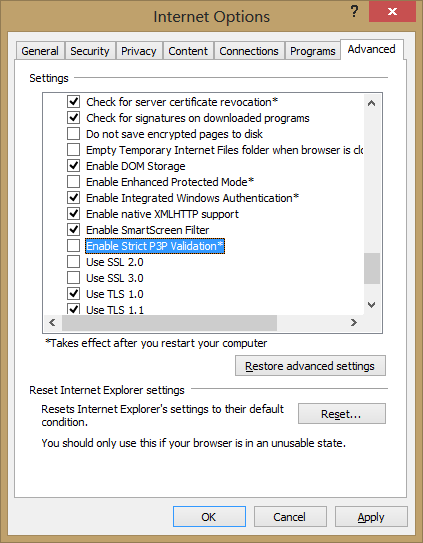
Consider it a shot across the bow, for websites playing fast and loose with P3P by leveraging a quirk of Internet Explorer. Those nonsensical compact P3P policies designed to appease IE privacy settings and keep cookies working may have their days numbered.  IE10, already included in Windows 8 and soon to debut downlevel on Windows 7,  introduces an advanced option for strict P3P validation, buried under Internet Options / Advanced settings:

Strict P3P validation setting

Strict P3P validation setting

There is very little documentation about the feature currently. Closest to an official statement is an article in German from the IE support team. Excerpts from a passable English version:

 “From a technical perspective, some providers use a niche in the P3P specification, which means that the user settings for cookies can be avoided. The P3P specification states (as an attempt to leave room for future improvements to privacy policies), that is not defined policy of browsers should be ignored.
[…]
This setting prevents the exploitation of the aforementioned weakness in P3P standard.”

Curiously the setting is not enabled by default, despite being placed under the security section– subtly implying that checking this box would be good for users. (That classification is itself unusual, since there is already a full tab dedicated to privacy settings.) One can only speculate. MSFT has proven that it will not shy away from a controversy over privacy: IE10 decided to launch with Do-Not-Track feature enabled by default, overruling widespread opposition. But in this case strict P3P enforcement will have limited impact with an opt-in configuration. It is almost axiomatic that most users will not tinker with settings under the hood, which have no obvious impact on the outward appearance of the system– eg colors and  layout. Few will venture anywhere near a setting labeled “Advanced.” Enterprises do often override defaults for managed environments, but this feature is far more meaningful to home users.

MSFT has called out this P3P issue in the past via IE Blog, and offered users an updated Tracking Protection List in response– again a purely symbolic gesture, as the fraction of users reading that post, much less applying the TPL, will be negligible. The new feature could be construed as an initial foray, testing the waters before migrating to opt-out model in a future release. (But that could make for a messy deployment: IE10 has auto-updates enabled by default, but it is rare for an incremental update to modify user settings. That would suggest only new installs get the strict enforcement policy.)

CP

Using the secure element on Android devices (1/3)

As earlier posts noted many Android devices in use have an NFC controller and embedded secure element (SE). That SE contains the same hardware internals as a traditional smart card, capable of performing  similar security-sensitive functionality such as managing cryptographic keys. While Google Wallet is the canonical application leveraging the SE, for  contactless payments, in principle other use cases such as authentication or data encryption can be implemented with appropriate code running on the SE. This is owing to the convenient property that in card emulation, the phone looks like a regular smart card to a standard PC, ready to transparently substitute for any scenario where traditional plastic cards were used. This property is easiest to demonstrate on Windows, but owing to the close fidelity of PC/SC API ports to OS X and Linux, it holds true for other  popular operating systems as well. All of this brings up the question of what it would take to leverage this embedded SE  hardware for additional scenarios such as logging into a Windows machine or encrypting a portable volume using Bitlocker-To-Go.

First a disclaimer: using the phone as a smart card does not require secure element involvement at all There is a notion of host-terminated card emulation: APDUs sent from another device over NFC are delivered to the Android OS for handling at the application processor, as opposed to routed to the SE and bypassing the main OS. This mode is not exposed out-of-the-box in Android even though the PN544 NFC controller used in most Android phones  is perfectly capable of it. Compliments of an open source environment, a Cyanogen patch exists for enabling the functionality. Android Explorations blog has a neat demonstration of using that tweak to emulate a smart card running a simple PKI “applet” except this applet is implemented as a vanilla Android user-mode application that process APDUs originating from external peer.

The problem with this model is that sensitive data used by the emulated smart card application, such as cryptographic keys, are by definition accessible to Android OS. That makes these assets vulnerable to software vulnerabilities in a commodity operating system, as well as more subtle hardware risks such as side-channel leaks. While Android has a robust defense-in-depth model, the secure element has a smaller attack surface by virtue of its simpler functionality and built-in hardware tamper resistance.

With that caveat out-of-the-way, there are two notions of “using the secure element” on Android:

  • Exchanging APDUs with SE, preferably from an Android application running on the same phone.
  • Managing the contents of the SE. In particular provisioning code that implements new functionality such as authentication with public-key cryptography required for smart card logon.

Let’s start with the easy piece first. The embedded SE sports two interfaces. It can be accessed via contact or host interface from Android applications, as well as a contactless interface over NFC, used by external devices such as point-of-sale terminals or smart card readers.  In principle applets running on the SE can detect which interface  they are accessed from and discriminate based on that. Fortunately most management tasks including code installation can be done over the NFC interface using card emulation mode, without involving Android at all. That said it is often more convenient and natural to perform some actions (such as PIN entry) on the phone itself. That calls for an ordinary Android application to access the embedded SE over its contact interface.

Consistent with the Android security model, such access is strictly controlled by permissions granted to applications. Unlike other capabilities such as network access or making phone calls, this is not a discretionary permission that can be requested at install time subject to user approval. In Gingerbread the access model was based  on signature of the calling application; more precisely only applications signed with the same key as the NFC stack. Starting with ICS a new model was introduced based on white-listing code signing  certificates. There is an XML file on the system partition containing list of certificates. Any APK signed with one of these certificates is granted access to the “NFC execution environment,” a fancy term for referring to the embedded SE, and can send arbitrary APDUs to the any applet present on the SE. That includes the special Global Platform card manager, which is responsible for managing card contents and installing new code on the card.

[continued]

CP

Smart card logon with EIDAuthenticate — under the hood

The architecture of Windows logon and its extensibility model is described in a highly informative piece by Dan Griffin focusing on custom credential providers. (While that article dates back to 2007 and refers to Vista, the same principles apply to Windows 7 and 8. ) The MSDN article even provides code sample for a credential provider implementing local smart card logon– exactly the functionality of interest discussed in the previous post. A closer look at the implementation turns up one of the unexpected design properties: they leverage built-in authentication schemes which are in turn built on passwords. Regardless of what the user is doing on the outside such as presenting a smart card with PKI capabilities, at the end of the day the operating system is still receiving a static password for verification. EIDAuthenticate follows the same model. The tell-tale sign is a prompt for existing local account password during the association sequence described earlier. FAQ on the implementation says as much:

A workaround is to store the password, encrypted by the public key and decrypted when the logon is done. Password change is handled by a password package which intercepts the new password and encrypts it using the public key stored in the LSA.

In plain terms, the password is encrypted using the public key located in the certificate from the card. The resulting ciphertext is stored on the local drive. As the smart card contains the corresponding private key, it can decrypt that ciphertext to reveal the original password, to be presented to the operating system just as if the user typed it into a text prompt. (The second sentence about intercepting password changes and re-encrypting the new password using the public key of the card is a critical part of the scheme. Otherwise smart card logon would break after a password change because the decrypted password is no longer valid.)

This is decidedly not the same situation as enterprise use of smart cards. Domain logon built into Windows does not use smart cards to recover a glorified password. Instead it uses an extension to Kerberos called PKinit. Standardized by RFC4556, pkinit bootstraps initial authentication to the domain controller using a private key held by the card. Unlike the local equivalents, there is no “password equivalent” that can be used to complete that step in the protocol. While smart cards may coexist with passwords in an enterprise (eg depending on security policy, some “low security” scenarios permit passwords while sensitive operations require smart card logon) these two modes of authentication do not converge to an identical path from the perspective of the domain controller. For example the company can implement a policy that certain users with highly privileged accounts such as domain administrators, must log in with smart cards. It would not be possible to work around such a policy by somehow emulating the protocol with passwords.

It is tempting to label EIDAuthenticate and solutions in the same vein as not being “true” smart card logon because they degenerate into passwords downstream in the process. While that criticism is accurate in a strict sense, the more relevant question is how these solutions stack up compared to using plain passwords typed into the logon screen each time. It’s difficult to render a verdict here, because the risks/benefits depend on the threat model. In particular, for stand alone PCs the security concerns about console logon, eg while sitting in front of the machine, are closely linked to security of the data stored on the machine. The next post in the series will attempt to answer this question.

CP