Microsoft 2-factor authentication: following familiar paths (part I)

Last week Microsoft  released 2-factor authentication for its online accounts service, previously known as Windows Live ID and Passport. This was a natural step, as cloud service providers continue to shore up security by improving their  authentication systems, occasionally prompted by a security breach as  in the recent case of Twitter. It was even foreshadowed by earlier appearance of an associated mobile app on Windows Phone store. The design also appears to have few surprises, sharing much of its DNA with previous two-factor authentication systems used in the consumer space:

  • One-time passcodes (OTP) are the second factor of authentication. Not USB dongles, smart cards, X509 certificates or some reincarnation of the extended CardSpace debacle. That choice simplifies integration and minimizes disruption to user-experience. Main difference is entering these additional codes during authentication in addition to the password. No software installation required, smart cards/readers to carry around, browser compatibility issues or  flaky device drivers. For frequently used machines, there is even an option to avoid asking for codes on each login.
  • Two ways to get OTP. Users can either have the code delivered via SMS to their registered phone number or they can use a mobile application to generate codes. This design also makes sense.
    • SMS has the largest reach, working equally well with a 10-year-old “feature phone” with no applications as it does with the latest Android or iOS device.
    • On the other hand, SMS requires users have connectivity to their wireless carrier– not just any old Internet access, but specifically their mobile carrier.  This may not be the case when the user is travelling overseas for example. SMS is also much less reliable in emerging markets than the US. (SMS does not guarantee delivery; it is best effort. Nor does it have a time-bound for successful completion.) It may also incur charges for the user and/or service sending the messages.
    • Mobile applications have the advantage that they can work offline, once provisioned. Downside is requiring a compatible application that can generate codes according to the appropriate scheme. MSFT has already released one for Windows Phone– a choice of platform that would be puzzling, were it not for the brand affiliation. Luckily both Android and iPhone already have compatible applications such as Google Authenticator and Duo Mobile.
  • Settled on TOTP standard described in RFC 6328 for generating the codes by mobile apps. This may have been forced by existing options on Android/iPhone: all of them implement TOTP as common feature.** This has some interesting consequences.
    • TOTP codes are generated based on a secret cryptographic key, referred to as “seed,” and current time. This naturally requires an accurate clock on the phone, up to some tolerance. Typically time is quantized into 30-second intervals and the verification logic attempts to accommodate drift by looking back/forward a few intervals. (Note that time-zones and daylight savings do not pose problems; “time” is always measured as Greenwich/UMT/Zulu time.)
    • Less obvious is that time-based codes are easier to clone than counter-based ones. Multiple users with the same key can independently generate the same sequence, without interfering with each other. The other leading contender is HOTP, which predates TOTP. That design uses a counter  incremented each time a code is generated. If multiple people tried to use the same cryptographic secret, they would quickly run into problems: once the counter is incremented, the server will not accept a second OTP generated using an earlier value. (This is actually useful for security, making it easier to detect inappropriate usage. Sharing of credentials is a strongly discouraged practice.)
  • The mechanism used to provision those TOTP seeds also sticks to established methods. Secret keys are packaged into URLs and rendered as QR codes on the web page, intended to be scanned with phone camera. Even the URL format follows an earlier convention introduced by Google Authenticator, using the custom otpauth protocol scheme. While MSFT was free to pick a different one in principle, compatibility with existing Android and iPhone apps is helped by sticking to the same scheme.

[continued]

CP
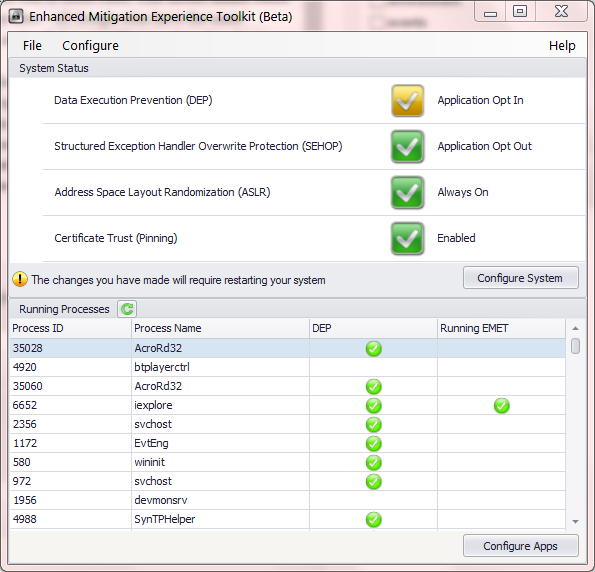
Certificate pinning in Internet Explorer with EMET

MSFT has just released a new beta of EMET (Enhanced Mitigation Experience Toolkit) v4 and one of the new features is certificate pinning. Pinning was introduced into mainstream usage by Google Chrome in 2011. Soon afterwards it proved instrumental in exposing the DigiNotar certificate authority breach that allowed Iranian government to intercept communications from political dissidents.

To recap why pinning is an important security feature: as described in earlier posts, the current trust model for digital certificates has a systematic flaw. Almost any one of 100+ trusted “certificate authorities” can fabricate a certificate on behalf of any company– even those located in a different country and have no business relationship with the CA. Such a credential will be happily accepted as authentic by web browsers and every other application about to make critical security decisions based on the identity of the website at the other end.

On the one hand, a diversity of CAs each serving different market segments is great for scaling the model commercially. On the other hand, a situation where all CAs are equally trusted and any one CA can undermine the security of websites served by a peer  leads to a quick race to the bottom in security. There is little incentive for competing on operational security or honesty, when customers are still at the whim of every other CA. Pinning addresses that problem by allowing a website to commit in advance to a set of CAs that it will do business with. That commitment takes all other CAs out of the risk equation. Even if they make a mistake, are compelled by a government to forge certificates or are simply dishonest, any certificates issued for the pinned site will be rejected by users aware of the prior commitment.

The catch is there is no standard for making such commitments. There is no field in the X509 format for a website to declare its intentions about what other CAs it may get certificates from in the future. (There is a draft RFC for HTTPS usage but that is at best partial solution. HTTP headers will not address the code signing case, for example.) Instead both Google and MSFT introduced their own home-brew designs independently.

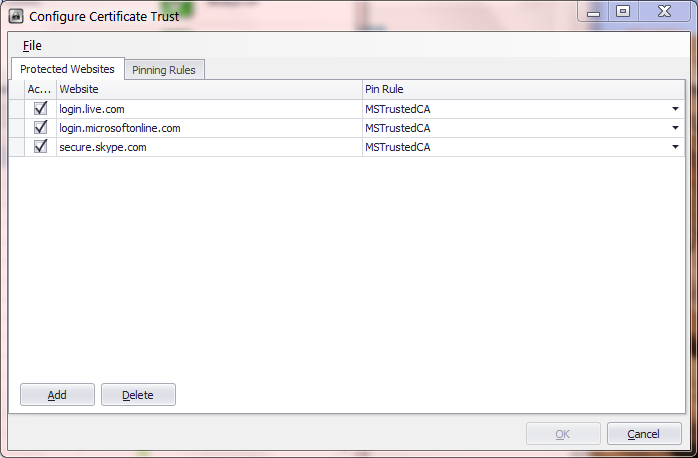
EMET_Overview   EMET_CertSettings

Here are some preliminary observations based on experimenting with a beta of EMET and comparing it to the existing pinning feature in Chrome: (This post may be updated as more information is available.)

  • Caveat emptor: certificate pinning only applies to Internet Explorer, unlike other EMET protection which apply broadly to all applications. This may seem obvious– after all Chrome pinning only applies to Chrome– but the difference is Windows provides a general purpose cryptography API for verifying certificates. IE happens to be just one consumer of the API. Many other critical applications both from MSFT (Skype, Office, …) and third-party ISVs would have benefited if pinning was added at lower-level in the platform instead.
  • Fine-print continues: pinning only works for the standard version of IE which has 32-bit renderers. It does NOT work with 64-bit renderers used by Enhanced Protected Mode. This is a problem. EPM itself is a security feature; for example, it has additional mitigations against memory corruption vulnerabilities. Asking users to disable one defense in order to take advantage of a completely orthogonal one is dubious at best.
  • On the plus side, IE allows importing pinning rules via XML files. [Default configuration] An enterprise can deploy its own constraints to protect employee machines for example. By comparison Chrome pin rules are hard-coded, and can not be modified easily by end users.
  • Going into the gritty details
    • Both designs have similar structure for describing the pinning constraints. There are pinning rules identifying a group of acceptable issuers. Then particular websites such as login.live.com are associated with exactly one of these rules. This model makes sense as rules are shared across many sites– all Google sites have the same constraint in the Chrome version, as do all three MSFT sites pinned in the EMET flavor.
    • The rules have roughly similar expressive capability. Chrome allows specifying a set of issuers that are specifically excluded, and can not appear anywhere in the chain– in addition to the usual notion of pinning that whitelists particular issuers. EMET has a blacklist option for unpinned sites.
    • Chrome allows specifying a trusted CA to appear anywhere along the chain, including as intermediary. Judging by the GUI-based configuration utility, EMET only allows white-listing by root CA.
    • EMET permits exception by country of origin of the CA, but this turns out not to be useful: it only allows whitelisting CAs based in a particular region, effectively creating a loophole for the constraint. Similarly the documentation refers to exceptions based on key-size, which seems intended as defense against CAs with short keys, rather than an affinity towards any particular CAs.
    • Chrome identifies certificates by hash of the subject public key. EMET uses the combination of distinguished name and serial number.
  • EMET allows rules to have an expiration date. This is useful, since the certificate itself will expire and the website may decide to go with a different issuer at some point. (There is a deeper issue about pinning creating an implicit lock-in: without changing the pinning rules, the site can not switch to different CA because everyone will interpret that as forgery attack.)
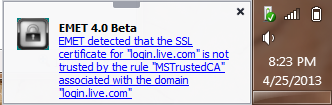
  • Chrome treats violations of pin constraint as fatal errors. By contrast EMET displays an out-of-band warning toast near the Windows tray that the user is free to disregard:
EMET_CertificateError

Notification for a certificate pin error

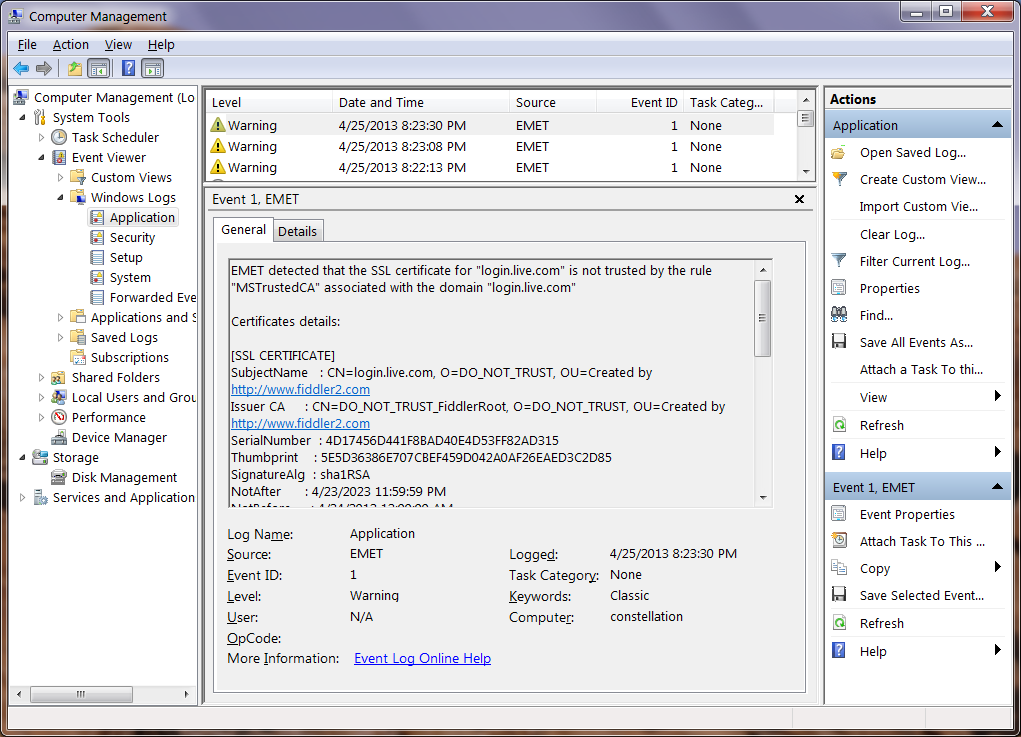
  • By default EMET records such failures as warnings in the Windows event log. Chrome can upload suspicious certificates observed to the cloud.
WindowsEventLog_Pin_warning

Windows Event Log, with EMET certificate error

  • Chrome makes an exception for private CAs installed on the local machine. These could be used by an enterprise for by-design content inspection, or by developers for monitoring web applications, as in the case of Fiddler or Burp Proxy. EMET appears to have a problem with these cases, flagging them as errors.

CP

Do-Not-Track and P3P: a matter of regulation

[Continued from part I]

Regulatory frameworks are critical to the success of any privacy standard relying on statements made by websites. There is a fundamental information asymmetry between consumers and sites they visit. Only the site has authoritative knowledge of its own data practices, consumer can not peek behind the curtain. They are forced to accept statements at face value, often without independent verification. This holds true for both P3P and DNT. But differences in the design/implementation of the protocols translates into varying degrees of dependence on regulation. P3P makes only modest demands for keeping websites honest in their policy statements. DNT in contrast requires heavy-handed market intervention for deployment.

For a website eyeing P3P, the options are:

  1. Do not implement it, and face the music. That could mean some functionality breaks.
  2. Implement P3P but deliberately publish an incorrect policy. This bogus policy will be crafted to meet the minimum bar for majority of users, preventing any interference with tracking cookies.
  3. Implement P3P with a policy accurately describing data practices. Again this may have consequences, if the policy leads to cookies getting dropped.
  4. Until recently: look for a loophole in P3P enforcement. The original Internet Explorer implementation was lenient about unrecognized syntax, making it possible to declare an invalid P3P policy which still satisfied the browser.

Along this spectrum P3P has just one dependence on regulation: create disincentives against option #2. The temptation for going down that route can be born of ignorance as often as malice. After IE6 launched, it was common for clueless developers to ask on help forums: “What header do I send to make Internet Explorer accept my cookies?”  In a world where privacy statements are not imbued with meaning,  that would be a legitimate question. Along those lines  P3P header is just an arbitrary sequence of symbols, a magic incantation to make web browsers behave correctly. It is the threat of legal repercussions that keeps reputable companies from testing that theory. This is all the while more astonishing considering that not a single court case has tested the theory of whether P3P statements are legally binding.**

Once outright deception is ruled out, market forces can decide between remaining options. The last one is primarily an implementation choice. After evidence emerged that it was being actively used to side-step P3P, MSFT fixed it by offering strict P3P validation in IE10. #1 and #3 are decisions about the business model of the website, ideally one that can be modeled as negotiation with users. Firefox and Chrome do not implement P3P; users are free to use either browser. Even for die-hard IE fans, the browser only provides default settings: users are free to override them if reasons were compelling. This is no different from websites pleading with users to enable ActiveX controls after security improvements to IE prevented them from running such dangerous code without explicit user action.

At first blush, DNT poses a similar set of choices:

  1. Do not implement the standard.
  2. Implement with false/misleading description of policies.
  3. Implement with correct description of tracking behavior. That includes the possibility that the website will not in fact change its tracking practices in response to user requests, as permitted by the standard.
  4. Look for a loophole in enforcement– recently one Adobe engineer had a creative idea to create a loophole for ignoring DNT statements from IE, on the technicality that the web browser made a decision for users. Sanity prevailed and that patch was reverted.

The kicker: the way IE10 implements Do-No-Track, there is no difference in user experience between  these. Option #2 may run afoul of same prohibitions against deceptive statements alluded to above. But there is no reason for any one to incur that risk when option #1 works just as well, with the added benefit of being less work.

P3P made minimal assumptions: regulation to prevent actors from making deliberately false statements. This blogger is not an attorney, but will posit the existence of laws already on the books covering that ground.

DNT as currently implemented requires much more. Because there are no incentives for deployment, heavy-handed intervention compelling websites is called for. That is a highly intrusive approach to technology regulation without precedent. After all no one is legally required to implement SSL, the most basic security protocol that can help protect user data in transit. For that matter websites are not required by law to comply with any RFC, support strong authentication, encrypt user data or conduct security reviews.

The debate around how far regulators should intervene in markets to correct privacy problems will continue. Making the success of a contentious privacy standard contingent on that question being resolved in a particular direction is guaranteed to further weaken the already long odds that standard faces.

CP

** P3P detractors soon hinged their hopes on that possibility, after realizing  deployment was inevitable.

Do-Not-Track and P3P: new privacy standard, weaker approach

[Full disclosure: The author was a participant in P3P standards effort and implementation in Internet Explorer.]

It could be the Internet equivalent of full moon, because someone is trying to introduce a privacy standard. After W3C threw in the towel on P3P, a very different proposal called Do-Not-Track, developed under the auspices of the same mighty standards body, is gathering momentum. Along the way it has stirred even more controversy than its predecessor, understandable in light of the higher stakes. The jury was out on advertising as a viable business when P3P was being debated. Its most vocal opponents were not exactly household names. (Case in point: several banner-ad networks were early participants in the standardization effort. Reminiscent of the old adage: best way to undermine a standard is to participate enthusiastically in its development committee.) Fast forward to today and there are many revenue models around delivering tailored content based on user interests.

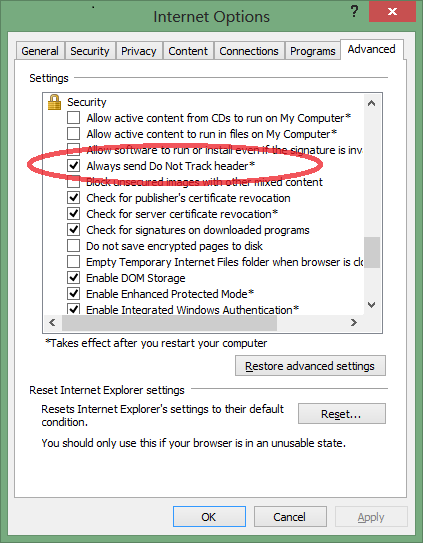
There is overlap in the cast of characters as well. A late participant to P3P, MSFT is spearheading the push for DNT this time around. Latest version of Internet Explorer is configured to send DNT header by default, in another heavily-contested decision. Somewhat incongruously for such a bold strategic call, the option itself is buried under a check-box in Advanced settings, instead of the Privacy tab where one would normally expect to find it:

Advanced settings dialog, with DNT checkbox

Do-Not-Track setting

Depending on perspective, that speaks of expediency or deliberate design. As one commenter here pointed out, it is much easier to add a checkbox to the kitchen-sink of advanced settings, than to alter the layout of manually crafted privacy tab. For the conspiracy-minded, burying a setting there make it all that more difficult for users to override the default.

Elsewhere in the industry, confusion reigns. Chrome was missing in action until recently, Firefox twice tried to explain its stance on default settings. Industry groups are crying foul, painting doom-and-gloom scenarios about what DNT will do. Privacy advocates on the other hand fear DNT does not go far enough, predicting that it will be easily subverted and calling for more draconian measures. P3P redux? Not quite. The controversy around DNT may be obscuring stark differences from P3P.

Do-Not-Track is a unilateral declaration. The user indicates their desire to avoid tracking by adding a note to every request sent to web sites. Putting aside for a minute the endless debate over what constitutes “tracking” and what compliant websites are supposed to do in response to receiving the DNT header– issues acknowledged as unresolved in the specification itself: what happens next? How does the user determine if their request is honored and what is the response if the answer is no? This is not necessarily a question of intent: the developers may not have gotten around to implementing DNT or they may not even be aware of it. One can not fault sites for failing to keep up with the latest RFC fashion and standard-du-jour. Early versions of the protocol ignored this problem in favor a simple one-way communication, a monologue delivered by the user. Following the inevitable rule that every protocol acquires bloat through the standardization process,  latest revisions address that oversight. Now there are optional (read: not going to happen) HTTP response headers, as well as a mandatory site-wide tracking status resource (read: bare-minimum everyone is expected to implement) formatted in JSON.*

But implementations have not kept up. IE10 sends the header with determination, then remains oblivious on whether that gesture made any difference. First-party sites could signal their objection by showing users an error page, but this is not a realistic solution. Even that option is not available to embedded third-party content, where the only viable solution is returning an error. But since users interact with third-party content in the context of a different top-level website, the result is some other website that looks broken. The problem is worse when trying to distinguish between those who have not yet implemented the standard yet and those actively paying attention to DNT. In other words, even early-adopters embracing the standard get little more than bragging rights.

P3P had two crucial differences. First it is the website doing the talking. The protocol calls on sites to declare their data practices in machine readable format suitable for automatic evaluation, and places the onus on web browsers to alter their behavior in response to any discrepancy between stated policy and user expectation. This is how the specification is written; it does not leave any wiggle room for implementations to do it the other way around. More importantly P3P adds a measure of self-defense. If the privacy policy is considered unsatisfactory according to the user criteria, the web browser starts rejecting cookies or otherwise impairing tracking functionality.**

Consequently P3P is not a one-sided plea for privacy. Users are not shouting in the darkness, in hopes that the benevolent web site will grant their wish. Similarly sites are not being asked to modify their behavior based on some unilateral user decision. They are only asked to declare existing behavior. If a site chooses to not implement P3P, that is strictly their decision. Possibly some functionality will break. The breakage could be obvious or it could be subtle– as in the case of downgraded cookies for third-party advertising networks. Either way the outcome is made transparent to the user: a somewhat confusing eye-of-Sauron icon in the status bar indicates when cookie handling has been  impacted by P3p. Both sides can attempt to influence the result. User can decide the website has compelling value to merit an exception and lower her privacy settings. Or she may deem lack of P3P compliance unacceptable and click away to a more enlightened competitor.

If DNT makes no difference to the user experience– not even a simple thumbs up/down indicator– there is little intrinsic motivation to support the standard. That leaves one last resort for deployment: external regulatory pressure. Both P3P and DNT make implicit assumptions about a surrounding regulatory framework to keep actors honest. But the difference in approach also translates into different degrees of intervention required.

[Continued]

* Another difference from P3P is abandoning XML for JSON– angle brackets are out, curly braces are the latest fashion.
** Granted it is naïve to assume that that tracking can be stopped completely by dropping cookies. It was not even true in 2000, as one of my colleagues from IE6 team pointed out on his blog. Since then newer developments such as Flash and HTML5 only added to the number of ways to emulate cookies using existing browser functionality. But the concern that cookies may stop “working” provided sufficient impetus for P3P adoption.

Default preferences: there is no way to avoid decisions

An excellent post on the Mozilla blog from a former colleague of this blogger touches on the problem of default settings in software: to what extent do they represent user intent as opposed to user apathy. It has been something of an accepted wisdom among software developers that few users change default settings that their applications are installed with, and even fewer will venture near options marked “advanced” or similar intimidating adjective intended to scare away users. Until now there was little public data to back up this intuition. The new research finally delivers hard data on this, with a few twists. The established wisdom survives: many of the knobs and levers are indeed untouched. The catchy title for the post “Writing for the 98%” follows from that observation:

Is it worth the engineering effort, UX effort, and screen real estate to make user-visible (to say nothing of discoverable) preferences if fewer than 2% of users benefit?

In the best case scenario, a whopping 10% of users enabled Do-Not-Track which had been turned off by default. Privacy appears to be that rare strong motivator for tweaking software settings: 1.5% disable history completely, 3% clear history on exit and 5% always start the browser in private mode.  A similar rate of activity is observed for security related settings. For example about 5% disable the password manager functionality that remembers credentials. Curiously some infrequent modifications disable existing security checks:  about 1-2% opt out of the safe browsing and malware checks.

At the other extreme are settings controlling the minutiae of security protocols, hidden under the Encryption tab of Advanced settings. 0.02% users have taken the trouble to disable SSL 3– something this blogger also does for IE. About 2% disable OCSP but more curiously 0.03% require OCSP checks. Perhaps the first group are trying to work around slow-down and certificate validations errors caused by failed OCSP checks. (X509Labs tracks OCSP responder performance by certificate authority to keep CAs honest.) The second group are likely to be security users who want revocation errors to hard-fail– eg if OCSP response is not available, treat the certificate as untrusted, instead of merrily carrying on. More surprising is that 1% of users have chosen to automatically send a personal certificate if there is exactly one. This option refers to client certificates, typically used only for high security enterprise/government scenarios where users login to websites with smart cards instead of passwords.

But there is also contradiction lurking here. The data point that only 10% enabled DNT is used as evidence that Mozilla made the right call in defaulting that setting to off:

This is an astonishingly high number of users to enable an HTTP header that broadcasts user intent, but is unable to enforce anything client-side. It is a testament to DNT advocates that adoption is this high, but even though this preference is changed by a large minority of users, Firefox should not enable it by default.

There is a circularity to the argument. All data indicates that users are not messing with browser settings. If Firefox instead shipped with DNT on by default and discovered that only 10% of users disabled it, would that also be an occasion to congratulate the designers on making the right call? (In fact since DNT unlike OCSP does not break anything– yet– it is very likely few users would touch it.) While we know that few users are modifying settings, the reasons for this are unclear. The post touches on some possibilities:

There are at least three plausible, possibly-overlapping interpretations: Firefox predicted the most useful default settings correctly, Firefox is doing a poor job converting user actions into saved preferences, or the population who cares about browser security preferences is really that small.

Another option: users lack meaningful information about the meaning of all these different browser settings, and do not understand what is at stake. It is one thing to have preferences about privacy and online tracking at high level. It is another to connect the dots between those intuitions to “third-party cookie blocking” or DNT. In general we can not equate absence of decision as endorsing the status quo. Did these users actually visit the Privacy tab and verify that DNT settings were configured as expected?

The situation is similar to the discrepancy in organ donation rates between Germany ( low) and Austria ( high)  The problem is not that one society is less altruistic or espouses different views on death. It turns out in Germany the preference is opt-in, while Austria goes with opt-out. In both cases few users are going out of their way to change that default. If public officials in these countries followed the Mozilla logic, they could all pat themselves on the back for having correctly predicted public sentiment, when in fact they were shaping it.

This underscores the uncomfortable place software vendors find themselves in. In an ideal world there is complete separation between policy and mechanism. Users decide on the policy for how their system behaves, the software developer provides the means for expressing that policy. But in reality any realistic application contains hundreds of policy decisions. Even the most flexible application that permits users to tweak each and every settings starts out in some reasonable default configuration, to serve as starting point. Otherwise it would be nearly impossible for users to configure a system from scratch. This is why the Mozilla argument rings hollow:

Frankly, it becomes meaningless if we enable it by default for all our users.  Do Not Track is intended to express an individual’s choice, or preference, to not be tracked.  It’s important that the signal represents a choice made by the person behind the keyboard and not the software maker, […]

Not enabling the setting and leaving users subject to tracking is itself a decision by the software maker. Forcing the question with the end-user is the only way to guarantee their intent is honoured accurately instead of second-guessed. Such in-your-face decision points are rare in mainstream software, because they are considered a distracting user experience.  Two well-known examples are browser choice page forced upon Windows 7/8 thanks to EU consent decree and the now deprecated Google Toolbar installer asking about PageRank.  These are the exceptions proving the rule. For all but the simplest software, striving for value-neutral design is an aspirational goal, never quite realized in practice. Accepting that limitation is the first step to recognizing our own biases/preferences/interests as designers, and asking how well users are being served by the same choices.

CP

Supply chain security, bogus smart cards and Global Platform

An interesting story from past week was IOActive expose on counterfeit chips. The researchers found that a “secure microprocessor” ordered from an online market place proved to be a lower-end version of the same hardware line, dressed up as the more capable/expensive product in a clear instance of hardware tampering. While in this case the modifications appear to be motivated by cost-saving– selling the lower-end hardware at higher price-point– the authors use the incident as starting point to ask:

If it is so easy to taint the supply chain and introduce fraudulently marked microprocessors, how hard is it to insert less
obvious – more insidious – changes to the chips? For example, what if a batch of ST19XT34 chips had been modified to weaken the DES/triple-DES capabilities of  the chip, or perhaps the random number generator was rigged with a more predictable pseudo random algorithm – such that an organized crime unit or government entity could trivially decode communications or replay transactions?

This is not the first time that the integrity of supply chain has been questioned, but it is notable for involving cryptographic hardware. What  the article does not mention is that many smart cards, embedded secure elements and similar hardware trusted execution environments have additional cryptographic properties that can be used for verifying their authenticity.

To take one example: Global Platform is a standard for managing smart cards and for lack of a better word, “card-like” gadgets such as USB tokens, SIM cards in cell phones and more recently the embedded secure elements on Android devices. Global Platform calls for each card to be provisioned with a unique set of keys used to authenticate the Issuer Security Domain or ISD. (In some instances there can be more than one ISD key– an earlier post about the Android secure element noted PN65N models have 4 key slots.) The keys are injected by the hardware manufacturer at fabrication time, and then transferred over to a Trusted Services Manager or TSM, responsible for managing the contents of the smart card. This can be done either by handing over big list of individual keys, or more commonly using a diversification scheme. In the latter case, manufacturer and TSM share a global seed key which is used to derive individual keys based on the card ID.

When the TSM wants to remotely install an application, there is a mutual authentication process laid out by GP that is carried out between the TSM and smart card. After running through the steps of the protocol, the TSM is assured  that it is talking to a genuine card provisioned with the right ISD keys, and the card is assured that it is receiving commands from an authorized TSM. Outcome is an authenticated and encrypted channel between the two parties who may be separated by a continent; the TSM could be website hosted in the US while the “smart card” is a SIM inside a phone travelling around Africa. With some caveats, GP secure messaging ensures that commands issued by the TSM can not be read or tampered with by any other party with access to the communication channel along the way. For example the TSM can guarantee that an EMV chip & PIN application is being installed on a proper smart card, and sensitive information such as card details used for payment will only be available inside that locked down environment. Garden-variety hardware counterfeiting is ruled out in this scenario. If the supply chain had been poisoned with bogus SIM cards, these cards would not have the correct ISD keys. Without being able to authenticate to the TSM, they would never get as far as receiving the credit card data.

But this is a far cry from saying that GP solves all hardware tampering issues. In particular three classes of problems remain:

  • Hardware already configured for use. If a card arrives from the manufacturer fully configured with no additional TSM involvement or provisioning necessary, Global Platform does not help. This is often the case for hardware tokens delivered to an enterprise: the manufacturer simply ships a batch of cards already configured with all necessary functionality. Customer does not have ISD keys for additional confirmation of card integrity. (Granted having possession of ISD keys can also become a liability, since it allows tampering with card applications. Luckily GP also defines supplementary security domains that can be used to authenticate compliant cards without privileges for modifying them.)
  • More complex counterfeiting, where the bogus chip contains a fully functional instance of the real hardware. This is easier than it looks because the physical form factor of most smart cards are huge in relation to the size of the circuitry inside. Inert plastic or air makes up the bulk of the volume, leaving plenty of room for sneaking in additional circuits. In this case, the counterfeit chip can execute a man-in-the-middle attack on communication with the card. While GP protects provisioning of functionality and data, it does not protect ordinary usage by end user. Credit card details sent encrypted remain safe from eavesdropping because the TSM-card communication takes place over secure messaging sessions. The same is not true of user PIN sent in the clear by the ordinary host application using the card.
  • Actual breach of tamper resistance. If ISD keys could be recovered from the authentic chip, one can create a full-replica with the same keys that is  indistinguishable for Global Platform purposes. But such an attack is far more difficult than merely substituting a look-alike unit. If the card has decent hardware and software security, key extraction will require substantial time, effort and specialized equipment. This makes it impractical to scale the attack to large volume of units.

— Cem

PIV, GIDS, home brew: choosing a smart card standard (2/2)

[continued from part I]

PIV and GIDS are the two smart card standards, or card edges, built into Windows 7. Earlier post in this series covered how the built-in discovery mechanism will try to check for both applications using their well-known AID when encountering an unfamiliar card for the first time. For those looking for a smart card solution with minimum hassle, that sound promising. No drivers or middleware installation required, not even behind the scenes installation from Windows Update. Implicitly one would also assume MSFT has tests their own applications– VPN, BitLocker-To-Go disk encryption, Kerberos smart card logon, TLS client authentication in Internet Explorer– end-to-end for these types of cards. In steady state, once cards have already been configured with the appropriate credentials, this assumption holds. The catch is, using a smart card is only part of the equation. Before reaching that point, the card must be configured with the type of cryptographic keys and credentials for the required scenario. For example VPN usually calls for an RSA key and associated X509 digital certificate.

PIV as defined by NIST SP 800-73 part I has the curious property that key-generation and loading certificates on the card requires the application administrator role, as distinct from card-holder role. While ordinary card operations such as signing a document calls for the user to enter his/her PIN, authenticating as the administrator typically calls for using a special RSA key or set of diversified symmetric keys which belong to the organization handing out the cards. End users typically do not have access to these credentials and can not load new credentials on the card without some help from the IT department. That has important implications for provisioning. For example it rules out the straight-forward enrollment option by visiting a web page that uses HTML keygen tag or the proprietary cenroll ActiveX control for Windows Certificate Server web-enrollment. Similarly the MSDN instructions for creating a self-signed certificate for use with BitLocker will not work on a PIV card.

On the bright side, requiring administrative privileges avoid certain maintenance head-aches. Because users can not muck with the contents of a card once issued, that may translate into fewer help-desk calls to replace/re-issue broken cards. That may have been the motivating factor behind this aspect of PIV design. (But then again, if users are allowed to run arbitrary software against the card, they can still brick it.) Otherwise the security advantages of such restrictions seem minor. Any attack that depends on users replacing the keys/certificates on a card, perhaps to take advantage of some vulnerability in the certificate validation logic somewhere, could also be implemented using bogus cards that do not obey PIV restrictions. One can argue that limiting the functionality of valid PIV cards makes the forgery of such attack cards a little more difficult, since attackers must also replicate the physical appearance of authentic cards.

The other major disadvantage is that properly configuring PIV cards requires separate middleware, usually locked into a particular vendor of cards. In other words, all that functionality built-into Windows for making PIV cards work seamlessly– a major requirement for government and defense customers– only applies to using existing credentials already on the card, not provisioning them in the first place.

That brings us to the second option supported out-of-the-box in Windows: GIDS or Generic Identity Device Specification backed primarily by MSFT and Oberthur. GIDS has functionality similar to PIV at a high-level. GIDS-compliant cards can generate and store multiple key-pairs of common algorithm types (RSA and ECC with standard NIST curves), perform cryptographic operations such as signing and decryption using these keys subject to PIN entry. They can also store auxiliary data including X509 certificates associated with the keys. Big advantage is that GIDS permits provisioning operations to be carried out with user PIN, allowing for self-service models.

At first that sounds like a decisive argument for going with GIDS. Returning to the original question, a user armed with a GIDS card can generate a self-signed certificate suitable for BitLocker by following exactly the steps in that MSDN article. The downsides are:

  • PIV is by far more common. That in itself is not an argument about the merits of either standard, but it does translate into a more competitive market with greater choice of  hardware, including in other form factors such as USB tokens. By contrast few vendors ship GIDS cards. (There are understandable reasons for this: PIV is a US federal standard mandated by the government, and it also predates GIDS by a couple of years.)
  • PIV enjoys better cross-platform support. While OS X and Linux never had very good smart  card support to begin with, the requirements from US government customers has forced vendors to at least implement basic support. There is even an Android application for reading basic information from PIV cards over NFC.
  • A certification model exists for PIV cards, with independent labs testing cards submitted by vendors. NIST maintains list of products certified under FIPS 140 and the security-level they were certified for. (This assumes that a formal certification process helps improve product quality in the long run– a premise some disagree with.)
  • Finally PIV has applications beyond logical access control. For example there is an entire suite of products for controlling building access with badge-readers that speak the PIV standard. No similar ecosystem of hardware and software exists for GIDS yet.

CP