Using a GoldKey token as PIV card (part I)

GoldKey is one of the handy self-encrypting drive solutions on the market, with an unusual feature: it can also function as a stand-alone smart card compliant with the PIV standard. An earlier post looked at the limitations of using a dedicated drive such as IronKey, compared to applying BitLocker-To-Go to any old disk using smart cards. The main problem is locking the user into the storage capacity of the removable drive. An IronKey has hardware secure element for managing encryption keys, but it is only capable of applying that to protect its on-board storage. By contrast, a general purpose smart card combined with BitLocker-To-Go can encrypt an arbitrarily large volume with comparable security assurance and much lower cost. Since the drive itself is just off-the-shelf commodity hardware, there is a very competitive market pushing storage capacities higher and prices lower.

GoldKey tokens then combine the best of both worlds. For users looking for a turnkey solution, they provide a ready-to-use encrypted drive with cross-platform support, independent of any operating system functionality. For those interested in encrypting other (larger) volumes in conjunction with an existing disk encryption system such as BitLocker, they offer full PIV card functionality. At low-level, the token presents itself as a smart card reader with PIV card already inserted into that reader.

In fact since PIV can also be used for other security applications such as authentication or document signing, the value proposition is not limited to encrypting data at rest. PIV standard defines up to five types of keys with confusing names, although not every card is necessarily provisioned with all of them:

  • Card management
  • PIV authentication
  • Card authentication
  • Key management
  • Digital signature

The first key is not intended for end-user scenarios; it is only for use by administrator in configuring cards. PIV authentication key is used for logical access, such as smartcard logon to Windows. Card authentication key is special in that it can be used over contactless interface– in other words, over NFC– which makes it perfectly suited for physical access scenarios: tap the card against an NFC reader to open doors. Key management is a fancy name for encryption. That key would be employed when decrypting S/MIME email message or protecting sensitive data at rest. The final key, as the name suggests, is for digitally signing email and documents. GoldKey user manual gives examples for many of these use cases, except physical access which obviously can not be supported easily due to form factor.

PIV is a great choice here, because it is a widely deployed standard with cross platform support. It also happens to be one of two card types recognized by default in Windows 7 and later out of the box. It does have one downside compared to the other, far less popular option of GIDS: in standard usage PIV cards do not allow self-service enrollment. More specifically, users can not generate new keys or load certificates on the card by themselves. Here the story gets better, owing to a GoldKey-specific quirk: in a departure from the strict FIPS behavior, these tokens can be provisioned by the end user using custom mini-drivers from GoldKey. Appreciating the significance of this– and why it is not standard FIPS 201 behavior– calls for a detour into PIV.

The limitation is not due to any oversights in NIST 800 SP73 part 2, the authoritative specification of the on-card behavior of PIV applications. Quick peek shows that all of the primitives required for certificate enrollment are present:

  1. Generate a new key pair and return the public key. That would be GENERATE ASYMMETRIC KEY.
  2. Digitally sign a CSR (certificate signing request) containing that public key using the corresponding private key. Check; signature operations are implemented using the all-purpose GENERAL AUTHENTICATE command. Constructing the CSR and populating its fields is typically done off-card, since the card does not know about certificate templates. Signing a hash of the resulting CSR is necessary and sufficient.
  3. CSR is sent to the certificate authority. CA verifies the identity of the requestor using an out-of-band process and sanity checks the CSR fields for consistency. (For example user Alice can only submit a CSR where the “common name” field says Alice.) The card is not involved in this step.
  4. Assuming all checks out, a proper X509 certificate is returned to the user. That certificate needs to be loaded on the card. That final step is accomplished with the PUT DATA command, also clearly defined in the spec.

The catch: steps #1 and #4 require administrator privileges. The specification also defines roles associated with the PIV application and associated credentials. End users have a PIN and entering that credential authenticates as card-holder rather than administrator.  (Note these privilege levels have no relationship to enrollment restrictions around the certificate, and whether the certificate authority is willing to issue a certificate. Even if the user has root/administrator privileges on the local machine and a certificate already in hand, the card would not allow loading it.) By contrast, authenticating as administrator requires credentials that are held by centralized authority such as the IT department overseeing the card deployment.

What could be the motivation for this policy choice?

[continued]

CP

TrustZone, TEE and the delusion of security indicators (part II)

[continued from part I]

The first post in this series reviewed a proposal advocating use of TrustZone on ARM architecture to implement trusted paths for payment applications. The advertised design is purportedly safe against malware affecting the host operating system. In this second post we look at why that does not quite work.

First, a digression into some technicalities that are solvable in principle. One requirement is that untrusted applications can not force a switch out of secure mode. Otherwise the display can revert to malware control in the middle of PIN collection. (Going back to the earlier parallel with Windows secure attention sequence, ordinary applications can not flip back to the main desktop once user has pressed CTRL+ALT+DEL, nor draw on the secure desktop.) Similarly input events from other sensors need to be suppressed. Otherwise side channel leaks may result. For example a proximity sensor along the lines of Samsung Galaxy S4 can reveal where the user’s hand was hovering before it touched down to register a key press.  Sensitive gyroscopes could hint at location of touch events, since pushing on different regions could causes the device to tilt slightly about its axis in different ways. Slightly far-fetched, the camera could capture images that include reflection of the screen from a mirror or glass surface. There is a uniform solution for all of these: during the PIN collection, disable all unnecessary sensors and directly process input events from the remainder in privileged mode.

What remains is a fundamental, conceptual problem with the design: how does the user know whether the device is operating in privileged mode? Looking at a PIN entry screen, how can one ascertain if that UI resulted from the payment application initiating a switch into privileged mode? What prevents malware from creating the exact same dialog and displaying it from its own untrusted execution mode?

Such doubts exist as long as the display can switch between untrusted and secure modes of operation. This is not merely a practical constraint. For flexibility, only critical functionality– such as PIN entry and key management– is typically implemented in privileged mode. Bulk of the business logic lives in a vanilla application running on the fully corruptible world of the host OS. But even if the entire payment application lived in privileged mode, it would not matter as long as the device also supports running plain applications. Once malware starts executing, there is no reason for it to cede control of display or trigger switch to trusted input mode.

This is where the TrustZone argument gets hand-wavy. “The device will have security indicators,” the proponents respond. Of course such visual indicators can not be part of the regular display area, since ordinary applications can render to the entire screen. Perhaps there is a dedicated LED beside the screen, lighting up when the display is operating in its trusted state. Minor problem: will users pay attention?

Growing volume of usability research in other contexts has demonstrated that users do not understand security indicators, even for something as common as the SSL status for a web browser. Several papers in usable security explored the effectiveness of various signals against phishing, including The emperor’s new security indicatorsYou’ve Been Warned: An Empirical Study of the Effectiveness of Web Browser Phishing Warnings and An Evaluation of Extended Validation and Picture-in-Picture Phishing Attacks. The findings are consistent:  passive indicators do not work. Users are not paying attention. Expecting that “this time is different,” that some obscure signal in an unfamiliar device, implemented differently by each type of hardware, will fare any better is unrealistic. Similar problems plague active defenses that depend on users to take some action such as pressing CTRL+ALT+DEL equivalent. When users see a PIN collection screen that looks vaguely legitimate, the natural response is to enter that PIN. It is not intuitive to “challenge” the payment application with an additional step to verify that it is indeed operating in a safe state.

Properly addressing such risks requires looking at the whole system. For example one could imagine connecting the credit card reader to the mobile POS such that its raw input goes directly to code running in privileged mode. Then the act of swiping a card could automatically switch the device into trusted input mode, without requiring cooperation from user applications. (That may still require a hardware change. Typically magnetic-stripe readers are attached via USB or audio jack in the case of Square dongles. In both cases the output is perfectly accessible to ordinary applications.) Even that simplistic model runs into problems with error cases. For example, when the wrong PIN is supplied and transaction is declined, the card holder will be prompted to reenter their PIN. But it is the same untrusted application responsible for making that determination and initiating a new PIN entry sequence.

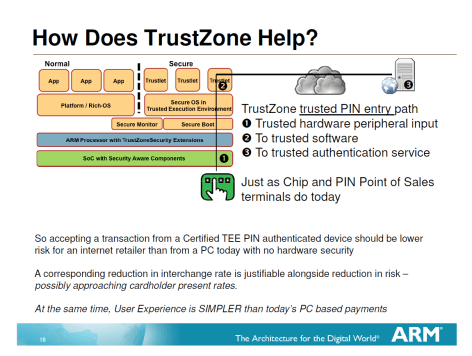
This is far from an exhaustive treatment of all possible design challenges, but it is enough to demonstrate the point: establishing trusted input path is a complex system problem. It requires careful understanding of the scenario, as well as the limitations of human factors in designing usable security. As a solution in search of a problem, TrustZone is understandably pitched as the magical fix for a slew of security challenges. But preventing one specific attack– malware intercepting PIN entry– is not the same as solving the original problem– guaranteeing that user enter payment information into the right place. Perhaps the naiveté is best exemplified by a quote from the slide shown earlier:

“A corresponding reduction in interchange rate is justifiable alongside reduction in risk – possibly approaching cardholder present rates.”

ARM the chip manufacturer is telling credit card networks that online purchases on mobile devices with TrustZone are so safe that they deserve to  be treated as card-present transactions, as if the user were physically present in person, instead of higher risk card-not-present?

One can imagine MasterCard and Visa beg to differ.

CP

TrustZone, TEE and the delusion of security indicators (part I)

“This time is different.”

Associated with speculative bubbles and market irrationality, that phrase also comes to mind occasionally in the field of information security. Completely ignoring history, a vendor enthusiastically pitches a solution that failed spectacularly under nearly very similar circumstances in the past. Latest addition to that venerable trend: trusted-execution environments (TEE) and TrustZone specifically being positioned as the silver bullet for trusted input on mobile devices.

Establishing trusted paths between a user and application running on general purpose computer is an ancient security conundrum. It was part of the motivation for the three finger-salute in Windows: pressing control, alt and delete keys simultaneously to bring up the system desktop. The problem can be phrased a deceptively simple question: how does the user verify that the user interface they are interacting with on-screen indeed belongs to the application they have in mind? This would be easy, except that a standard PC may have dozens of applications installed and at any given time any one could have full control over drawing the screen. Meanwhile getting it wrong can be quite problematic. Consider Windows logon. It is critical that the password is only entered into a genuine UI from the operating system, as opposed to a malicious application trying to capture that password by creating a look-alike dialog. Such differentiation can’t be accomplished using predictable features in the UI itself. Trying to distinguish the “real” logon screen by using a special logo or border color does not work. By assumption, even untrusted applications have full leeway to take over the entire desktop and paint anything on it.  That same collection of pixels could just as well have been rendered malicious application operating in full-screen mode. This is where the CTRL+ALT+DEL key combination comes in. It is special-cased by Windows: that sequence is directly intercepted by the OS. User applications can not trap and handle this on their own, nor can they prevent the OS from taking its intended action: displaying the secure desktop, where users can rest assured that subsequent UI interactions involve a trusted OS component.

This problem is by no means unique to desktop operating systems. Identical concerns arise when using a phone or tablet for security critical scenarios. One popular scenario, given as the first example on ARM Trustzone page  and explored in greater detail in another ARM presentation (slide #18) is PIN collection during a payment transaction.

TrustZone_PIN_entry

From “Securing the System withTrustZone® Ready Program”, presentation by ARM

The scenario has different manifestations:

  • User typing PIN credentials into their own device as part of an online purchase– explicitly alluded to in the slide.
  • Entering same credentials into a different mobile device such as iPad used as a point-of-sale terminal at a merchant location. (This is similar to the iPad/iPhone based POS that Square offers, except there is no PIN entry going on when processing credit cards in the US.)

For the second scenario, PCI requirements are very stringent around the collection of PIN, typically offloading this to dedicated PIN-entry-device (PED) hardware that does encryption on-board, before transmitting the PIN to the POS itself. The purported reason for not allowing PIN entry directly on the POS is the assumption that it is a higher risk environment as far as software attacks go. Such general-purpose computing devices are difficult to lock down, as openness is a virtue: users are free to install their choice of applications. The flip side however is that they can also make bad decisions around installing malware or intentionally disable security protections defined by the operating system. In fact the ARM scenario goes further in rejecting the commodity OS as part of the trusted computing base. Even if CTRL+ALT+DELETE style gestures could be resurrected from the 1990s, they would not help. They depend on the security of the underlying commodity OS such as Android, and the assumption is those components are too complex, too rich and present too large an attack surface.

Enter TrustZone into the fray. TZ is enjoying something of a resurgence, largely owing to wireless carriers success in stifling innovation with hardware secure elements— even when nearly all high-end Android devices have one ready for use in security critical applications. Unlike embedded secure elements or micro-SD based , TZ is a feature of the ARM processor and does not represent additional hardware cost. Based primarily in software, it defines a “secure world” similar to the informal ring -1 where hypervisors in x86/x64 world operate. Vanilla applications including the host OS run in standard mode, without access to the memory/resources of the privileged mode. There is a locked-down IPC mechanism for making calls to privileged applications and triggering certain entry points. For example when it is time for an extra-sensitive operation such as PIN entry during a payment, the point-of-sale application can initiate a context-switch to the secure world. At that point pre-existing code in the isolated compartment takes over and does not return control until user has entered the PIN. During this time both the display output as well as input devices such as touch screen, are directly controlled by privileged code. Even if malware happens to be resident on the device in the unprivileged compartment, it can not observe PIN entry. Sensor data– such as the location touch events on the screen– are routed directly to the special PIN collection application, with all code and data residing in privileged mode. When PIN entry is done, it is encrypted using the public-key of the payment processor and returned to the “ordinary” POS application as unintelligible ciphertext, safe from any mishap.

[continued]

Certificate pinning: translating Chrome settings into EMET

Following up on the comparison of EMET and Chrome implementations of certificate pinning, this post looks at applying the Chrome rules into EMET.

MSFT has recently published an update on the certificate trust functionality in EMET. The TechNet piece describes how additional settings can be imported. It also includes an example configuration file for Twitter. (Note that the example appears to have been created from scratch based on the existing Twitter certificate chain. There is an actual Twitter pin rule in Chrome but it is much more complex than the sample rule.) By default EMET only contains pins for three MSFT websites: login.live.com, login.microsoftonline.com and skype.live.com. That does not include any of the pins defined in Chrome. Luckily the import capability allows defining new rules, and in particular carrying over the constraints that have been shipping with Chrome for some time. But first they need to be translated into the appropriate XML format accepted by EMET.

One word of caution: the semantics for pinning rules are similar but not identical between IE and Chrome, as described at length in the earlier post. Exact translations are not always possible. For example Chrome allows whitelisting based on subordinate CAs (intermediary CAs appearing between the leaf and root) while EMET rules are based on the root only, as confirmed by experiment. Similarly EMET allows defining exceptions based on country and key-size, provisions that Chrome lacks.

When such details are lost in translation, the effect can be a more or less strict policy than original intent.  For example inability to declare trust in an intermediary means that the corresponding EMET rule will flag a certificate chain as forgery, when it was permissible according to the original. Going in the opposite direction, Chrome also permits explicitly blacklisting a CA; its existence anywhere in the certificate chain invalidates the chain. Because EMET can not express that, it may green-light a certificate chain that would have been rejected by Chrome. These are not hypothetical situations: Google pins in Chrome reference both intermediate CAs and explicitly blacklist certain issuers.

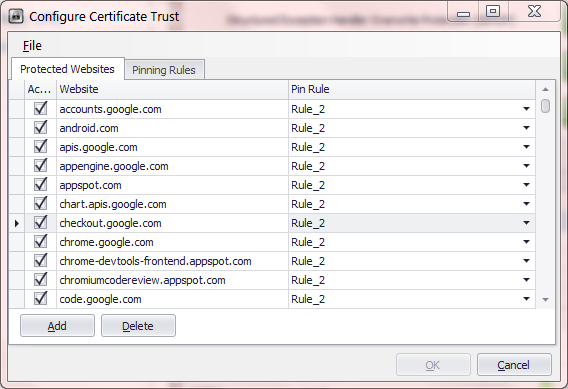
Microsoft certificate pin rules in EMET

Microsoft certificate trust rule, registry view

Behind the scenes, EMET options are stored in the Windows registry, under HKLM\Software\Microsoft\EMET. The certificate trust settings in particular reside in two subkeys under _settings_\Pinning. After a default install, there are only three pinned sites and one rule as expected. All three of these sites use the same pin rule identified by a GUID, white-listing 2 certificate authorities. Looking at the details of that rule, we can see that whitelist itself is stored as a multiline registry value, with the distinguished name and serial number for each CA listed in separate lines. In principle then we pinning rules can be configured by directly manipulating the registry. Of course there is nothing developers hate more than end users doing this type of under-the-covers manipulations of application state.

Fortunately there is an “officially sanctioned” import method, avoiding any direct mucking with implementation internals. Located in the EMET installation directory is a command line utility named emet_conf for administering different mitigations available. This can be viewed as the counterpart to emet_gui which provides a more user-friendly graphical interface for doing many of the same tasks. Once the rules from Chrome converted into suitable XML format defined by EMET, they can be imported into EMET to also protect Internet Explorer users.

To that end, here is an approximate translation for one subset of sites: [zipped XML file].

Caveat emptor:

  • This configuration is provided as-is; use at your own risk.
  • It contains the pinning constraints for Google websites only. Chrome also ships with rules for other groups such as Tor and Twitter.
  • For reasons noted above, the conversion can in principle introduce false positives– flagging valid chains as forgeries– as well as false negatives– failing to warn about incorrect certificate chains.

Configuring EMET requires administrator privileges– not surprisingly, since changing the settings involves a write to the HKLM section of the registry. As such this operation must be executed from an elevated shell:

C:\> emet_conf --import google_pins.xml
EMET is importing configuration, please wait...
Processed 0 entries

The import functionality seems buggy in the current beta release. A good way to observe this is by running the above command line under a debugger such as windbg, with CLR exception handling enabled to inspect uncaught managed exceptions. The command reports zero entries processed even when the operation is successful. One hopes these bugs will ironed out in the final release. Until then, the registry is a better way to confirm that rules were imported correctly. Refreshing registry editor view reveals the appearance of new subkeys under certificate trust settings.  Sure enough the EMET configuration GUI also confirms that story: both protected websites and the pinning rules are populated with new entries.

EMET_Sites_AfterImport   EMET_Rules_AfterImport

As a sanity check, we can try visiting a Google website and intercepting SSL connections using Fiddler. Fiddler performs this feat by executing a “friendly” man-in-the-middle attack, using a forged certificate. Doing that now triggers the EMET certificate warning because the observed certificate chain for the website is rooted in the local Fiddler “certificate authority” instead of one of the whitelisted CAs enumerated in the pinning rule.

CP

TLS client authentication and phishing (part III)

[Continued from part II]

The second post in this series considered what makes an authentication protocol resistant to phishing, in the presence of fallible users making wrong decisions about where to authenticate. Even with public-key cryptography and smart cards, safety hinges on incorporating a “context” as additional input to the protocol when producing the proof of user identity. As long as this context is guaranteed to be different between the legitimate website and its fraudulent replica, the protocol is not susceptible to man-in-the-middle attacks leveraging user confusion.

A good choice of context for a hypothetical web authentication protocol would be the name of the website on the other side. Substituting a different name leads to different contexts, even if they appear “close enough” as far as the user is concerned. PayPa1 (spelled with 1 instead of L) may resemble PayPal to the human eye, but software is not fooled. That one letter makes all the difference in the world, especially when the strings are used as input into a cryptographic computation. It might as well have been a completely random sequence of symbols unrelated to the original; the result will be uncorrelated. In our phishing scenario, Bob will indeed receive a “response” in the form of a signature from Alice, if she decides to go ahead with authentication. But he can not turn around and use that response in the parallel session for logging into the real PayPal. The signature has been computed over a different message and bears no resemblance to what the site expects.

To take a more concrete example of a widely deployed protocol, consider the TLS or Transport Layer Security, also referred to by the name of its predecessor SSL. This protocol  has an option to authenticate users with public-key cryptography during the initial handshake. This is an optional feature, not to be confused with authenticating the server, which is always part of the protocol. Dubbed client authentication, this extra step calls for the user digital signing a transcript of messages exchanged with the server when negotiating the SSL/TLS connection. While the exact contents of what is being signed is not important, the critical point is that it includes the digital certificate of the server. (The “challenge” can be viewed as other parts of the transcript that the server has freedom to choose, such as a random nonce sent during the ServerHello message. Alternatively one can view the context as predetermined part of the challenge; both parties verify this part is consistent with their expectation.) That means a transcript of TLS handshake against two different websites can never be identical, even when one is intentionally trying to masquerade as the other.

The result is a set up truly immune to phishing. Users can cavalierly authenticate to any website they come across, without having to worry about the possibility that one of them may be malicious. No site can use the result of that authentication process to impersonate that user at some other site. That is a far cry from the degree of caution required for using passwords and OTPs: if credentials associated with one site are accidentally typed into a different one, there is a real possibility that the latter site gets unauthorized access to user data at the former.

There is one subtlety, an unstated assumption: that phishing sites can not present same certificate as the target they are mimicking. That breaks down into two conditions:

  1. Certificate authorities will only issue a certificate with “PayPal” in the name field to the business entity known as PayPal.
  2. Successfully using a certificate for SSL/TLS requires having the corresponding private-key, which by assumption only PayPal has in the above example.

Surprisingly it turns out the protocol is resilient even if the first property is partially violated. Suppose a certificate authority mistakenly or deliberately grants a PayPal certificate to crooks– after all, it is axiomatic that CAs are generally incompetent and occasionally even dishonest/corrupt. Even that would not be enough to generate a response usable in a man-in-the-middle attack. The fraudulent certificate will still have a different public key than the authentic one, so the contexts are not identical. Recall that the point of a certificate is making an assertion that recognizable name such PayPal is associated with a particular public key. A certificate authority can be tricked/bribed into issuing a different certificate asserting that PayPal has a different public key, a key that is in fact controlled by a malicious actor. But no amount of CA ineptitude/malice can allow that malicious actor to magically recover the private key associated with the original certificate.

The protocol however is not resilient to breakdown of the second property. If the private key is compromised and attacker can redirect network traffic, they can “replay” the result of an authenticated session. (It is debatable whether that can be called replay, since it amounts to taking over an authenticated session after it has been established between the user and legitimate site.)

It is also worth pointing out that either of these attacks require diverting network traffic. In traditional phishing, the user is at the wrong site but does not realize it. Network traffic is not being diverted or redirected; the confusion only exists at the visual level. Trying to pass off a fraudulent certificate or use a compromised private key however requires manipulating network traffic, which is certainly possible but more difficult attack than vanilla phishing.

CP

Two-factor authentication and phishing: smart cards (part II)

First post in this series looked at a common two-factor authentication pattern that is susceptible to phishing. The second part examines an alternative design that does not have the same vulnerability.

This is the design commonly observed in critical enterprise/government applications where the stakes are high. These organizations typically avoid OTP and prefer solutions based on public-key cryptography instead. In this model each person has a pair of keys, a public-key that can be freely distributed and a private key carefully guarded by the user. For ease of identification, public-keys are typically embedded in digital certificates issued by a trusted third-party. A certificate effectively creates a binding between a public key and some identifying attributes about the user, such as their name, organization and email address. Authentication then works by first presenting the certificate– amounting to an unverified claim of identity, since certificates are public information– and then backing up the claim by proving possession of the private key corresponding to the public key in the certificate.

The critical difference from OTP hinges on that proof. Instead of sending over a secret value generated unilaterally, an interactive protocol is used that incorporates inputs from both sides. The party trying to verify user identity sends a challenge. That challenge is incorporated into a computation involving the private key and output from that computation is returned.  The recipient can use the public key from the certificate to verify that the response is consistent with the challenge.

Windows PIN entry dialog for smart cards

End users are thankfully not exposed to any of this complexity. The standard incarnation involves smart cards or similar dedicated hardware such as USB tokens– tiny embedded systems featuring tamper-resistant design for high-security applications. That approach avoids storing private key directly on general-purpose computer such as a PC or laptop, where it would become sitting duck for malware. Typically the card is configured to require PIN entry before performing these private key operations, giving rise to the two factors. First one is what-you-have, the physical possession of the card.  Second one is what-you-know, namely the knowledge of a short PIN. The resulting user experience becomes: insert card into reader slot (or tap against the reader surface, if both support NFC) and enter PIN when prompted. Smart cards are common in the enterprise and government space; they are exceedingly rare for consumer scenarios. For example the US government has a mandatory Personal Identity Verification (PIV) program that defines a standard for cards issued to millions of federal employees.

What makes this design inherently safe against phishing?

First, the protocol is too complex for direct user involvement. Private keys are long random sequences of characters. Even if they were directly accessible– not the case when keys are safely tucked away in a smart card– users can not reproduce them from memory if prompted.  Both the challenge and response are dozens of characters to type out. Corollary is that authentication protocol must be  automated by software, taking the user out of the loop. This creates a problem for the attacker: there is nothing to ask the user for. Even the most persuasive phishing could not get user to type out the private key into a web page. (Granted the user can be tricked into giving away the PIN, compromising one of the two factors of authentication. But without access to the private key residing on the smart card, PIN by itself does not allow impersonating the victim.)

That property is useful but not enough by itself. After all users are still responsible for making one critical decision: whether to login at a given website. Perhaps the attacker does not need to convince anyone to mail out their private keys, if he could instead convince the user to go about  their usual login  ritual at the wrong website. Using the example from previous post, suppose user Alice is tricked into using her smart card for paypa1.com (with 1 instead of L) a phishing site operated by Bob.

Bob can any issue any challenge to Alice consistent with the protocol, but he faces a dilemma: in order to login to the real PayPal site, he will have to answer a challenge chosen by PayPal. Unless he has a response corresponding to precisely that challenge, he will be out of luck. Being resourceful Bob does not give up. At the same time as Alice connects to his phishing website, Bob turns around and starts a parallel session with the real PayPal website in the background. This is the standard man-in-the-middle attack. User is connected to the attacker at the same time the attacker is connected to the legitimate destination, trying to impersonate both sides to each other.

  1. Bob claims to be Alice at PayPal by sending Alice’s certificate.
  2. PayPal sends Bob a challenge, requiring proof that he possesses the private key.
  3. Bob forwards the exact same challenge to Alice.
  4. Alice computes a response using her private key and returns it to Bob, expecting to be logged into her PayPal account.
  5. Bob forwards that response to the legitimate site.

By all indications that response is correct. After all it was generated using Alice’s private key, based on the same challenge PayPal issued. It would have been the exact same bits if Alice and PayPal interacted directly, without Bob in the middle to shuttle messages back and forth.

Game over? Not quite. This is where the nuts-and-bolts of protocol design comes into play. In addition to the challenge, well-designed schemes incorporate additional “context” into the response computation. That context is determined entirely by code under user control; the other side has no influence over it.

[continued]

CP

Twitter, two-factor authentication and phishing myths (part I)

This is not the first time that security of Twitter authentication has been called into question. There was the dump of 55K passwords from May 2012, and more recently another quarter-million Twitter accounts were breached in February. But few were clamoring for the popular service to introduce two-factor authentication until last week. That changed quickly, compliments of the Associated Press. The venerable news organization lost control over its Twitter account briefly, which got 0wned by a group calling itself the Syrian Electronic Army. The attackers only got as far as posting one bogus tweet, but that proved damaging enough. Claiming that President Obama was wounded in an attack on the White House, it triggered a brief market dip before everyone else realized the story was false.

It did not take long before the Monday-morning quarterbacks started speculating. Bloomberg criticized Twitter for waiting until the crisis to roll-out two-factor authentication, implying that it could have saved AP. (Because other companies have been deploying security features preemptively for no reason? Perhaps the parent company will reconsider the wisdom of a recent decision to add Twitter feeds into their popular data feed for finance professionals.) Meanwhile SC Magazine joined a chorus of sceptics in taking the glib view that two-factor authentication would have made no difference.

Which is it? As usual, the devil is in the details and depends . There are different ways to design two-factor authentication, and whether it can resist phishing depends critically on that. We can look at two points along the spectrum to see how they compare:

First one is what might be called “consumer-grade” two-factor authentication. This is what major cloud services typically offer end-users, balancing security against usability.  The second-factor is a one-time passcode (OTP) delivered by SMS or generated using a mobile application. This design is indeed vulnerable to phishing, once the notion of phishing itself is slightly generalized. Obviously existing wave of attacks that only collect passwords will not succeed. But the miscreants are quick to adopt. Soon they will  mimic the new login experience and also ask users for to type in the second factor. There is no reason to believe that the same users fooled into typing in their password into the fraudulent web page will stop short of doing the same with OTPs.

Fundamental problem is a weakness OTP shares with passwords: it puts the burden on end users to know they are authenticating to the “correct” website. If the address bar reads paypal.com that is good; but paypa1.com– with the digit 1 replacing the lower-case letter L to trick the unwary– that is bad. If that sounds like too much to ask for users, no wonder that combatting phishing has become a game of whack-a-mole where the measure of success is how quickly phishing sites are taken down once discovered. (But not before having claimed a few victims.)

That said, this type of second-factor still raises the bar for attackers. Because OTP codes are only valid for a short time period, the attacker is forced to “cash-in” stolen credentials right away by logging in with them. In other words the attack must be carried out in real-time. It is not possible to save the credentials, then come back and use them at a later point in time. In principle this also rules out a secondary market in resale of credentials, breaking the commercial model around account hijacking. It is no longer possible for Alice to phish for credentials, than later put these up for sale to Bob who specializes in pilfering personal data. Instead Alice herself has to do the plundering as well or at least collaborate with Bob at the time of attack, limiting her options downstream.

There is another way OTP may help, depending on the authentication policy: damage control. Typically the security policy requires user to re-authenticate periodically, for example every 24 hours. Even users who do not log out of their browser session will be asked to enter their credentials again after that time elapses. If such checkpoints require a fresh OTP, the attacker will be out of luck. After all it is one thing to get lucky and successfully trick the victim once; it is another to rely on repeating that feat every day.** Counter-point is that even access limited in time can be very damaging: one-full day is plenty of time to download all email and rifle through private documents.

Of course in reality, there are many ways for phishers to persist access after capturing both credentials. For example the system may have an option for “remember me” such that no additional OTPs are required when accessing the victim account from that machine. Similarly many large services  incorporate deliberate “features” that become back-doors in the hands of an attacker. Application passwords are one such example as described in previous post on MSFT 2-factor authentication, as are oauth permission grants.

So far we discussed the failures of one particular 2-factor authentication design to resist phishing. In part II we will look at a different approach that is indeed resistant to phishing– and already used widely in enterprise/government settings.

CP

** TOTP fares better compared to HOTP in this regard– with HOTP, attacker can collect additional codes in the sequence by pretending that the login did not succeed. Since TOTP codes are time-based, there is no way to phish for tomorrow’s valid codes today.

Microsoft 2-factor authentication: application passwords (part II)

[continued from part I]

The bane of any second-factor roll-out is compatibility with existing software. Sometimes it is a short-sighted protocol to blame, naively assuming that authentication equals sending along username/password. Other times the protocol is fine but some popular software implementing the protocol took a shortcut and only provided for the password option. Either way, the only way to appease these legacy scenarios is by providing them something resembling a “password,” which is to say a constant secret.

  • At first it is  tempting to make this secret vary over time, for example by appending the OTP. In general that is not an, because the value is meant to be collected once from the user,  but stored and used multiple times over time. For example, email clients on mobile devices are notorious for implementing IMAP with passwords. If the password changed over time, the user would have to reenter it each time they want to download mail on their phone
  • At the same time, this new credential can not be same as the existing user password. Otherwise it would completely defeat the point of two-factor authentication. In a well-designed scheme, knowing the password alone does not grant access to user data without the second factor.

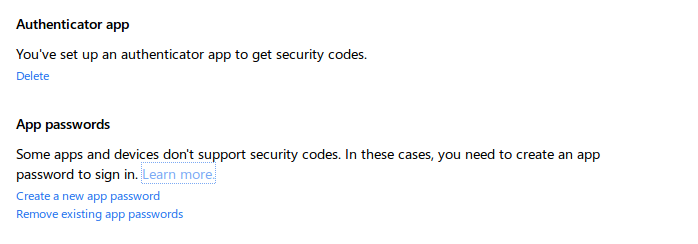
The work-around MSFT picked follows existing practice:  application passwords. These are randomly generated strings that can substitute for a “password” whenever a” legacy” application that is not aware of 2-factor authentication insists on collecting a password. (Legacy in quotes, because out of the gate that will include all client applications and hardware such as XBox console.) There are some interesting twists about AP usage.

Authenticator and application passwords

  • They are generated on demand, and intended to be copied into the necessary application at that time. Similar to the Google design, it is not possible to go back and look at an application password  generated in the past.
  • One difference is that MSFT does not show an inventory of existing APs, allow users to assign nicknames or track the date of generation.
  • Ergo: it is not possible to revoke APs individually either. Instead there is a single option to revoke all APs at the same time. This can be quite disruptive. For example dealing with a lost device means not only revoking the AP for that device but also breaking every other application (still in user possession) relying on APs.

Remove all application passwords

  • APs survive password changes. This has some interesting security implications. AP can function as a backdoor to the account. If an attacker is able to generate an AP, they can persist access even after legitimate user change the password. Corollary: users recovering from an account hijacking need to also check for rogue APs  to guarantee they have reverted to a safe state.

In some ways “application password” is a misnomer, because the credential is not scoped to any particular application. Users do not create one AP unique to Outlook.com access, and a different AP dedicated to SkyDrive that is not interchangeable with the first. Therein lies one of the great ironies: for all this effort expended on two-factor authentication, AP is a static, long-lived secret that grants full access to user data– in other words, a glorified password. That said, it has an improved risk profile compared to vanilla password. Because they are not chosen by the user, they are not predictable or easily guessed by dictionary attacks. Because they are only displayed once and not memorable strings, they are difficult to phish. (A creative website can convince users to generate a brand-new AP and paste it, but that is a lot more effort than asking  for their everyday password.)

There is one more challenge specific to two-factor authentication systems that are used for logging into devices, such as desktops or laptops. Such schemes need to operate offline, when the device has no network connectivity. MSFT design has to confront this problem: Windows 8 has support for signing into the operating system with online accounts, but OTP codes can only be verified by the cloud service. (In principle TOTP could be verified by sharing seed keys with trusted devices ahead of time, but such proliferation of secret material would greatly weaken security.) Considering that Windows 8 logon continues to work even for accounts with 2-factor enabled, the implications of this will be taken up in a future post.

CP