Using cloud services as glorified drive: BitLocker-To-Go (part III)

The second post in this series described how to map storage at an arbitrary cloud storage provider as an ordinary local drive in Windows, using virtual hard disks. This post will look at how to encrypt that drive such that any information data backed up to the cloud remains private under the worst-case scenario: the service provider going rogue and deciding to rifle through user data. While there are many ways to encrypt storage locally, we are primarily interested in options supported out-of-the-box on common operating systems such as Windows. It turns out that there is a built-in feature with exactly the right properties for this job: BitLocker-To-Go disk encryption or BL2G for short.

BitLocker and BitLocker-To-Go

Some context is required to distinguish BL2G from its better known cousin, BitLocker for boot volumes. There is plenty in common as the shared branding suggests. Both variants are full-disk encryption schemes; they operate at the level of an entire drive. This is contrast with a much older Windows feature called Encrypting File System, which operates at the level of files and directories. With EFS it is possible to designate particular directories or even individual files for encryption. For BitLocker that choice is made at the granularity level of a complete drive. (Strictly speaking these are logical drives, rather than physical instances. A single physical drive may be formatted with multiple partitions, each appearing as independent logical volumes.)

Both vanilla BitLocker and BL2G use similar formats and cryptographic primitives such as AES block cipher. Where they differ is the way encryption keys are derived, a difference rooted in the usage scenarios. Ordinary BitLocker protects boot volumes and is often used in conjunction with a built-in TPM that is part of that machine. One interesting corollary is that BitLocker can not encrypt everything. At least part of the boot-loader and core filesystem code responsible for decrypting the rest of the drive must be accessible in the clear. This poses a problem, since an attacker could then replace these pieces with a malicious bootloader/OS combination to obtain the. To thwart such attacks, BitLocker requires a verified boot process, where disk encryption keys are derived as a function of the code executed during the boot sequence. If any of those pieces change– such as the OS bootloader– TPM will generate different keys and disk can not be encrypted. Implicit in this design is the assumption that decryption only needs to happen locally. There is no expectation that the same drive can be removed from that laptop, popped into a different one– which contains a different TPM– and successfully decrypted on that new host.

BitLocker-To-Go is specifically aimed at solving that mobility scenario. While internal drives are rarely migrated between machines, USB thumb-drives are frequently used as low-tech high-latency network to carry data around. Unfortunately their size and mobility also makes them frequent subjects of theft or accidental loss. This is where BL2G comes in, providing full-disk encryption on removable media. In many ways BL2G has a simpler design because there is no boot sequence to worry about. On the other hand the mobility requirement rules out using an on-board TPM as the source of encryption keys, since TPM is bound to a single machine by design.

Encryption options

Instead BL2G gives users the option of a passphrase or smart cards. Ordinary BitLocker can also work with passphrases in the absence of a TPM but that leads to a situation where the burden is placed on users to pick “good” passwords. The difficulty of recovering the key is a function of user’s ability to pick random sequences of letters. This is exactly the weakness in SpiderOak client-side encryption described earlier. The same problem plagues OS X FileVault design, since Apple never quite figured out how to incorporate TPMs into their hardware. (Making matters worse FileVault uses the same secret for disk encryption as login to the OS. That means the secret will be typed often, for unlocking the screen for example, further discouraging choice of high-entropy ones.)

On Windows the smart card option is only available for BL2G. This is because the operating system is fully booted and running with all bells and whistles. By contrast ordinary BitLocker decryption takes place early on in the boot sequence, before smart card functionality has been initialized. Using this option requires a suitable “card” and/or reader combination but the options are quite diverse. Most common are plastic cards requiring insertion into a card reader, but contactless cards using NFC, USB tokens with embedded card or even an Android phone with embedded secure element can function as smart card as far as Windows is concerned. To confuse matters, starting in Windows 8 it is also possible to create a virtual smart card out of the TPM but doing that would break roaming.

One catch is that BL2G can not be applied to any old drive. For example SMB network shares can not be encrypted this way because such shares are not addressed as raw devices at the block level. Access to network drives is mediated by a remote server which presents a high-level abstraction of a file system, instead of a physical storage medium divided up into sectors. By contrast when a flash drive is attached, the OS takes direct control over its filesystem and manipulates the underlying media directly.

Enabling BitLocker-To-Go

Luckily VHD file mounted as local drive looks very much like that removable USB drive as far as the operating system is concerned. BL2G is enabled in exactly the same way: right-clicking on the mounted VHD image shows a context menu with the option to turn on BitLocker:
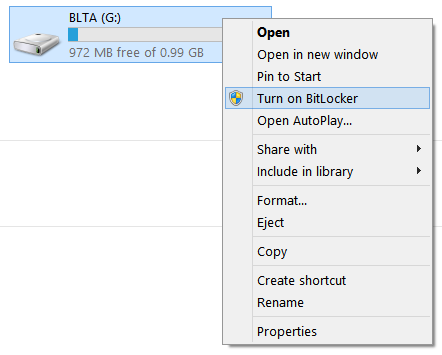
Manage_Bitlocker_menu

Enabling BitLocker-To-Go

As the shield icon suggests, the command requires administrator privileges. Selecting that and confirming the UAC prompt leads to a wizard walking the user through the steps of encrypting the drive and backing up the encryption key:
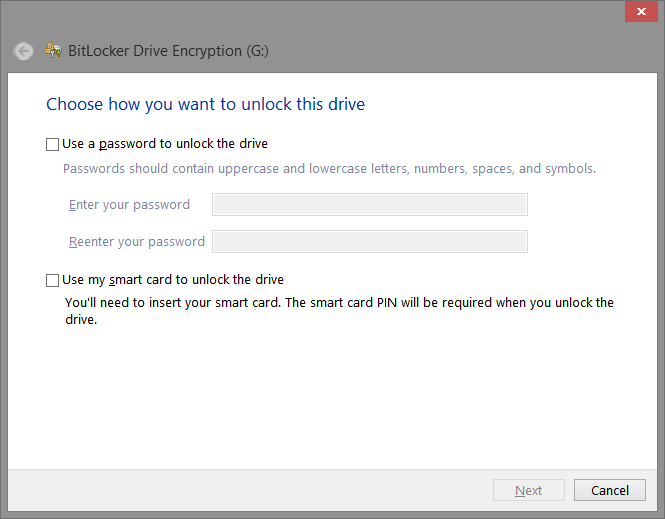
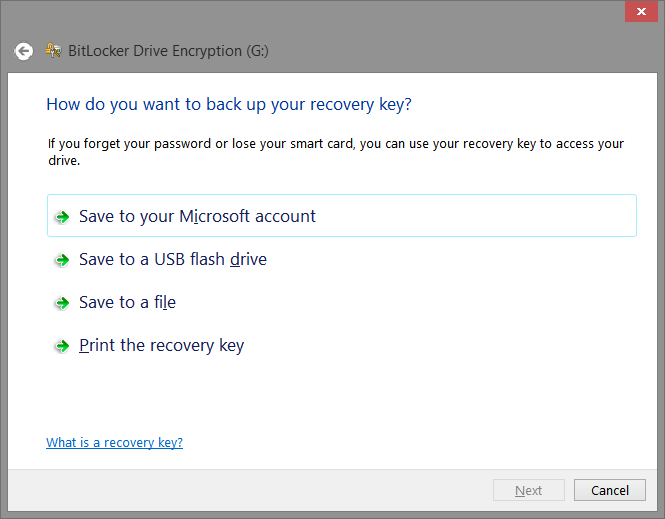
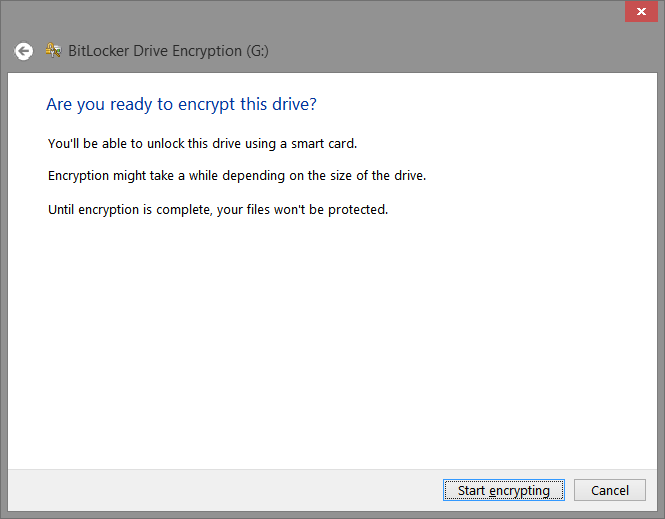
EnableBitlocker BackupRecoveryKey ReadyToEncrypt

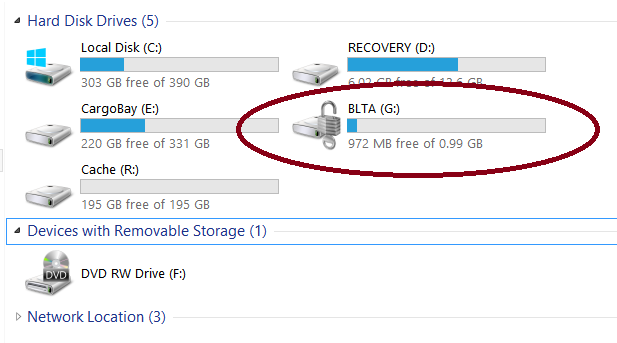
When the smart card option is selected, the wizard will require that a card is already inserted in the reader and search for a certificate with suitable properties. After encryption is complete, the drive icon changes to show a gray open padlock superimposed. This signals that the volume is protected by BL2G and that it is currently unlocked to allow access to the data.
AfterEncryption

Once BL2G encryption is complete, all data written to the virtual disk– which is represented by a single VHD file as far as the cloud service goes– is protected. There is no user chosen passphrase that can be brute-forced. (There is a usually a PIN set on the card for additional security but this PIN is only known to the card; it is never part of the encrypted disk image or shared with the cloud.)

The next post in the series will look at the experience of accessing that data from another machine, and some important limitations of this approach which make it impractical for large volumes.

CP

JavaCard, Global Platform and SIM vulnerabilities

Security researcher Karsten Nohl recently announced discovery of vulnerabilities in SIM cards, to be presented at the upcoming BlackHat conference. Since exact details of the problem are scant, this post will cover background material on smart cards– which SIM is a special case– and their management model. Nohl’s summary hints at the existence of two independent problems:

  • A cryptographic key used for provisioning code to the SIM card can be brute-forced. Recovering the key allows installing new applications.
  • Implementation error in the smartcard operating system running inside the SIM card, which allowed one application to access data belonging to another one.

The first problem is nominally the realm of Global Platform. GP is a standard dating back to the 1990s for describing how to carry out content management operations on a smart card. (Here we will use “smart card” in generic sense of a tamper-resistant execution environment regardless of its form factor. By this definition plastic cards used for chip & PIN, electronic passports, smaller SIM cards used in mobile phones to connect to the cellular network, embedded secure elements featured in certain Android phones, USB tokens etc. all feature a “card” environment inside.) Content management includes installing/deleting applications, creating new security domains– roughly corresponding to notion of user accounts on a desktop operating system– as well as assigning cryptographic keys and privileges for these domains. Unlike commodity desktop OSes, card platforms are inherently locked down: these operations are only allowed to well-defined roles such as “card issuer.” The end-user holding the card rarely has that power. Instead a centralized service called “trusted services manager” or TSM has possession of cryptographic keys used to authenticate to the card OS and carry out these privileged operations. GP defines a secure messaging protocol, prescribing the protocol for establishing an authenticated channel, and laying out the format for how individual messages addressed to the card are authenticated and encrypted. GP also has a notion of a card manager application, which performs a role akin to a software installer. Typically the TSM authenticates to the card manager using the issuer-security domain or ISD keys, informally known as card manager keys and uploads new application code over the secure channel. Until GP2.2 the card manager was the only way to install new code. GP2.2 introduced the notion supplementary security domains with privilege for managing code on the card.

How strong is the secure messaging protocol? The answer is, it depends on the choice of parameters. GP defines many options when it comes to the choice of cryptographic primitives. Most of them are based on symmetric keys, with TSM and card sharing a secret, typically unique for each card– so-called “diversified” set up because each card has different keys, avoiding a single global secret across the system. This is a historical artifact of public-key cryptography not being fast enough on the early generation of hardware, since smart cards are highly constrained in terms of power, CPU speed and memory. Cards used in payment applications typically support 2TDEA, which is to say triple-DES with two independent keys, with first and third key being equal. (Only specifying two keys and leaving the third constant would not work because it is vulnerable to a meet-in-the-middle attack.) For example 2TDEA is used for over-the-air provisioning of applets to the Android secure element when Google Wallet is set up. Latest amendments to the GP spec also introduced the option for using AES.

SIM cards however support an alternative way to install applications, using the SIM Application Toolkit. This is a standard only relevant to wireless carriers, independent of Global Platform.  Judging by reports it was this application using a single DES key for authenticating code installation rather than the card manager.

Assume that we recovered the card manager keys– while in this case it sounds like the attack did not accomplish that, we will conservatively look at the worst-case scenario. Now what? It’s tempting to conclude that it is game over. But the GP specification is a bit more nuanced than “ISD equals root.” In fact there is no concept of an all-powerful root or administrator role in cards compliant with GP. Here are examples of things that TSM can not do, even with complete control over card manager keys:

  • Read/write raw EEPROM, Flash or other persistent storage of the card
  • Recover private data belonging to an existing application
  • Upgrade the code for an existing application. In fact GP has no notion of in-place upgrade. An application can be deleted and reinstalled but that will lose all existing data associated with that instance. There is no way to “backdoor” an already installed application with a malicious version without losing all instance data.
  • Read out the cryptographic keys associated with any other security domain– TSM can overwrite them to take over any other supplementary security domain, but not learn the previous keys.
  • Attach debugger or other diagnostic schemes to existing applications; GP has no such concept either.
  • Recover the binary for an existing applications. Surprisingly even reading out the executable code is not possible after the application is installed.

This presents the attacker with a dilemma. We have a SIM card with previous installed application– the GSM applet– which contains valuable cryptographic secrets used to authenticate to the carrier network. (Just to be clear: the GSM key has nothing to do with Global Platform. It is used for obtaining cell phone service by proving identity of the subscriber to the base-station.) Even with ISD keys we can not scrape that secret out directly. But we are able to install other applications on the card. What can those applications do?

Global Platform is silent on this point. That is up to the underlying card environment. That brings us to the second vulnerability hinted in Nohl’s summary. JavaCard is a common standard for programming smart cards, running a highly restricted set of Java. Not all cards are JC-based, but it is popular enough that many SIM products utilize this platform. JavaCard in principle has a very clean model for supporting multiple, isolated applets running side-by-side on the same virtual machine. (This is unlike the model used for running Java on a commodity OS, where each application typically runs in its own process with its own instance of JVM. Due to the resource constraints of card environments, there is just one VM.) Short version is that all applets are isolated from each other, and the only way to communicate is by going through an explicit “sharable interface” mechanism to make RPC-style calls from one applet to another. Outside that mechanism, it is not possible for one applet to reach-in and read out data associated with another applet in the same VM.

At least that is the theory. In principle the virtual machine implementations running on card environments have much weaker validation rules compared to their full-fledged desktop incarnations. For example, the applet installation process for JavaCard includes an off-card validation step:

From Oracle, http://www.oracle.com/technetwork/java/javacard/javacard2-138597.html

From Oracle, JavaCard framework description

At this point, alarm bells should go off. The whole point of Java is that it promises sandboxing for code, in ways that native execution environments can not easily provide without great overhead. Yet the JVM on the card is relying on some external validation of bytecode to guarantee those properties? What happens if someone decides to “skip” that off-card validation step and install deliberately corrupted bytecode?

That we will find out at BlackHat this year.

CP

Using cloud services as glorified drive: virtual disks (part II)

The preceding post looked at a naïve approach for combining local file encryption using EFS with cloud storage, explaining why that mixture does not accomplish the intended objective. Here we look at an alternative design that does work as expected. There are three ingredients:

  1. Virtual disk images (also known as VHD files, after the extension used by MSFT virtualization software for this type of image)
  2. BitLocker-To-Go full volume encryption (“BL2G”)
  3. Any remote storage/backup system that relies on syncing a local folder to the cloud. For these examples we will use MSFT SkyDrive, but the same approach works for DropBox, Google Drive or any other service patterned on keeping a local folder synchronized

“All problems in computer science can be solved by adding one more layer of indirection” goes one popular CS aphorism. Virtualization happens to be one of the more broadly applicable ways of adding indirection. Virtual disk files are typically used to represent images for virtual machines. In this case, they solve a slightly different problem of bridging abstraction levels. The encryption scheme we plan to use operates on entire drives. Meanwhile cloud storage solutions typically work at the level of folders and files.  There are many ways to make a directory appear as a full disk drive– for example sharing the folder and then making a loopback connection to that network share will mount it as a drive. But that approach will present the “disk” in the wrong representation, as a remote SMB share not directly controlled by the local OS. By contrast BL2G requires disks directly addressable at block level.

This is where the ability to mount VHDs as removable drives comes in handy. In effect what looks like a single file to the cloud synchronization software appears as a removable drive to the operating system, much like a USB thumb drive that can be connected and disconnected at will. Better yet, Windows BL2G encryption feature is directly applicable to this type of disk. (For completeness: VMware also has a comparable VMDK format for disk images. However manipulating these requires additional software installation while VHD is natively supported out of the box.)

Creating the disk image

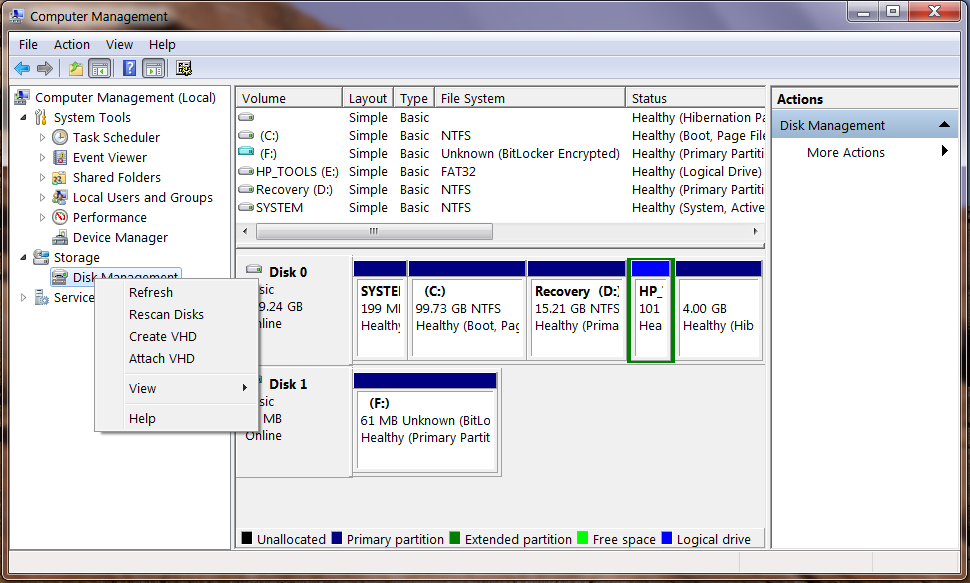
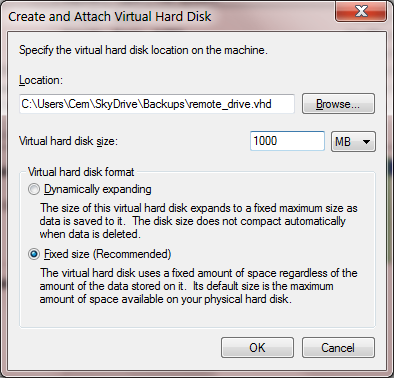
The first step then is creating the VHD. There are different ways of doing this based on the operating system version. For Windows 7, one needs the Storage Manager snap-in. This can be either added to any MMC console, or it can be accessed directly by right-clicking on “Computer” and choosing the Manage option. Right-clicking on storage manager brings up a context menu with the option to create a new VHD:

CreateVHD_ComputerManagement      CreateVirtualDisk_details

While the location of the VHD file is not important,  it helps to choose a modest size due to limitations of the synchronization process that will be discussed in greater detail later. After the file is created, the virtual disk has to be initialized and formatted, as described in this tutorial. These steps only need to be performed once. Once the VHD image is initialized with a file system, it can be mounted/unmounted multiple times.

Mounting the disk image

The other half of the puzzle is mounting an existing VHD which has been downloaded from the cloud. In other words, we want to get to a point where Windows views that file as an ordinary disk drive with a letter assigned such as R. In that state we can browse into that folder in Explorer and drag-and-drop files for cloud storage. In Windows 8 this is as simple as double-clicking the VHD file. Windows 7 requires more work, as the file extension is not recognized natively. Going back to the Disk Manager snap-in, the same context menu for creating new VHD images also has an option to attach existing ones, as illustrated in the above screenshot.

(In a more polished flow, these steps could be automated with diskpart utility present in Windows out-of-the-box. It is possible to write scripts that automatically mount and unmount the VHD compatible with either OS, and even associating that for handling the extension.)

With the VHD mounted as disk drive, it is now possible to open that drive in Explorer and move any files there. But doing so would result in those files getting backed up to the cloud provider as cleartext without encryption. Since our objective is to protect data from mishaps associated with the cloud provider, BL2G must be enabled first before using the virtual disk.

[continued]

CP

Using cloud storage as glorified drive: dead ends (part I)

Revisiting the ideal layered model for encrypted cloud backups from the previous post:

  • Encrypt user data with keys managed directly by the user, and not available to any third-party
  • Upload the resulting ciphertext after encryption to the cloud

Many solutions exists for the first part of the problem, which makes it a natural question to ask if they can be used without modification with a standard cloud storage offering to protect data from any mishaps in the cloud. In other words, the goal is to use the cloud as a glorified disk drive storing opaque bits, with no ability to peer into the meaning of those bits or perform any intelligent manipulation on them in the name of “adding value.”

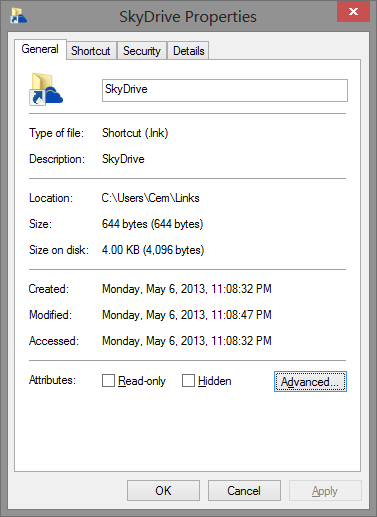
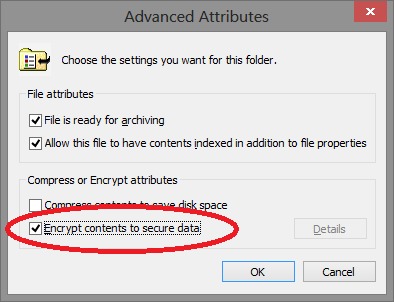
First point is that this composition is not always straightforward. Many obvious combinations do not work, due to the mismatch in the level where cloud backup systems operate and the level local data encryption is typically applied. To take on example of how things fail: Encrypted File System or EFS has been a feature of Windows since the W2K release. EFS operates at the filesystem level as part of NTFS, allowing entire directories or even individual files to be encrypted. Fortunately  many popular cloud storage systems such as Google Drive, Windows Sky Drive and Drop Box also present themselves as a local folder where files can be drag/dropped. A first attempt than might be enabling EFS on that folder, on the assumption that will result in encrypting the underlying content and keeping it safe from prying eyes on the cloud provider side. Enabling EFS is simple enough, via the advanced properties for any directory:

SkyDrive_properties       EFS_AdvancedProperties

This may look straightforward but it does not accomplish the intended effect of keeping the original data invisible to the cloud provider. To see why, we need a few facts about the way these cloud storage services usually operate. Typically there is a background process which we can call the synchronization agent, although they are often not implemented as a proper Windows service as one might expect. That agent is responsible for monitoring a set of local directories for changes, as well as listening to notifications from the cloud provider about availability of new content in the cloud. When the operating system informs the agent that a local file has changed, that agent kicks into action and uploads latest version of the modified file to the cloud. In the other direction, when the cloud provider sends a notification to the agent that there is a more recent version of the file available in the cloud, it is downloaded and dropped into the local folder.

The reason this does not interact as expected with EFS encryption is that the latter operates at a very low level, transparent to the I/O capabilities used by agents. Synchronization takes place under the same user account as the person who owns the EFS-protected directory containing confidential information. When that process attempts to open some file for reading, EFS driver in the filesystem stack kicks into action. It recognizes that the file is encrypted and looks for a decryption key. Because there is a private key associated with the same user account– corresponding public key was used to encrypt the directory in the first place– the driver can transparently decrypt that file and return its unprotected contents to the agent. The result is that instead of encrypted files, the original cleartext data will get sent over to the cloud provider.**

Incidentally this transparency is entirely by design. Reading/writing contents of encrypted files works exactly the same as for ordinary files. Same APIs and code paths are invoked from the developer perspective. Imagine the alternative: if there was a different set of APIs involved, every application would have to be rewritten to become compatible with EFS. Pragmatically then nobody could enable EFS, out of fear that some application they use had not been upgraded to become encryption-aware yet. EFS designers made the right call in opting for compatibility. It is an unintended consequence that EFS does not compose directly with popular cloud-storage designs in use today. (Incidentally there are specific APIs to retrieve encrypted contents of a file. While these would have achieved the desired effect of only backing up ciphertext, it requires modifying the synchronization agents to invoke different code paths.)

Next post will look at tricks for combining specific local encryption schemes with arbitrary off-the-shelf cloud storage solutions to achieve the desired privacy property: data stored remotely is not accessible to the cloud provider  regardless of their intentions.

[continued]

CP

** As an aside, lack of encryption is not the only problem.  Even if that could be addressed, there is loss of functionality in that uploaded data would become inaccessible on any other machine or even a fresh install of Windows on the same box. EFS uses public-key pairs that are generated locally on the machine where encryption is first applied. It is not trivial to roam that key to another device. EFS does have a notion of recovery agents to allow decryption when the original key pair is not available, but that heavyweight process would have to be invoked on every new device to recover access. For now we put aside this problem of access from multiple devices, focusing only on privacy in the context of just one device getting backed up and restored.

Cloud backup and privacy: the problem with SpiderOak (part II)

In the crowded field of online backup services, SpiderOak is an example of a company trying to distinguish itself on privacy. Billing itself a “zero-knowledge privacy environment,” the company emphasizes what they can NOT do:

SpiderOak is, in fact, truly zero knowledge.  The only thing we know for sure about your data is how many encrypted data blocks it uses […]  On the servers, we only see sequentially numbered data blocks — not your foldernames, filenames, etc.

As expected, this also translates into a limitation around password reset:

How is this reconciled with our ability to do a password reset?  The short answer is: It isn’t!  We cannot reset your password.  When you create a SpiderOak account, the setup process happens on your computer […] and there your password is used in combination with a strong key derivation function to create your outer layer encryption keys. Your password is never stored as part of the data sent to SpiderOak servers.

So far, so good. All user data is encrypted using keys derived from the password, before that information is backed up to the cloud. That password in turn is never communicated to the cloud provider. On the surface this appears to satisfy property #3 (and by implication #2) alluded to in the previous post: the service provider can not access user data even with full use of its own resources.

But there is a catch: values derived from the password are stored. The details are buried in the engineering matters section, under “User Authentication Details.” Ostensibly written to assure users that the protocol for verifying knowledge of the password is sound, it amounts to an admission that there is something stored by the service provider that can be used to distinguish correct versus incorrect password submissions. Specifically:

  1. Two random salts, stored in the clear by necessity
  2. A serialized RSA public key, also stored as plaintext
  3. A “challenge key” that is computed as output as a specific key-derivation function with the second salt, namely PBKDF2(password, first salt)
  4. Full RSA key including the private-half, AES-encrypted using the output of PBKDF2(password, second salt) as the encryption key

That combination serves as a password hash. It can be brute-forced. Given the first random salt and challenge key, it is possible to check if a password guess such as “asdfgh” is correct by re-computing the same key-derivation process via PBKDF2 and comparing the result to the stored value. That means it is in fact possible to recover data by trying large number of possible passwords. While the effectiveness of such an attack depends on the user choice of password and computing power available to the attacker, the risk calculus is the same in all cases. Data recovery can be attempted by the service provider going rogue, a disgruntled employee acting independently or law-enforcement/intelligence agency who obtains access to the encrypted data from the provider. This is in fact corroborated by one of the privacy FAQs directly taking up the question of whether user data can be recovered with access to bits stored in the cloud:

Unless there are significant advances in mathematics […] password derivation techniques on the SpiderOak key structure are very difficult. The key derivation functions we use are strongly designed to withstand heavy brute force password techniques and pre-computation, such that even on a very modern computer, each password guess takes about one second. […]  Of course, if you were to choose a password that is made entirely from words in a dictionary, fewer attempts may be needed to guess it.

That is the glass-half-full view. Key derivation is indeed using PBKDF2 with a reasonable number of iterations set to 16384. But already password cracking schemes have been built by hobbyists achieving billions of hashes per second, where the hash function is the underlying primitive operation. Bumping up the repetitions helps quantitatively, but does not address the root cause. As ArsTechnica found out much to their surprise, that random looking “qeadzcwrsfxv1331” may not be a great choice after all.

In case this seems like an inescapable consequence of how encryption works, consider a hypothetical alternative design. Suppose a user manages their own RSA encryption key, stored on their machine. This key is used to encrypt a randomly generated AES key, which is in turn used to encrypt bulk data uploaded to the cloud. In this model, there is no password to brute-force from any data uploaded to the cloud. Ciphertext available to the cloud provider is encrypted in a truly random 128-bit key, where all possible choices of the key are equally likely. (As an aside: that RSA private key may be locally encrypted with a user-chosen passphrase, which sounds like rearranging deck chairs.  There is a critical difference: brute-forcing that key will require access to the user machine. There is nothing uploaded to the cloud that helps.) Of course this would mean the data is not accessible on other devices unless the private-key can be roamed there. That is why the ideal implementation would utilize smart cards instead of locally storing keys on disk. Still the possibility of excluding brute-force attacks can be demonstrated without resorting to any fancy gadgets.

There is a broader architectural flaw here. Designs in the spirit of SpiderOak are badly conflating two orthogonal problems:

  • Encrypting user data with keys that are managed directly by the user and not available to any third-party
  • Saving the resulting ciphertext after encryption to a third-party cloud provider

Many popular solutions already exist for the first problem, with different security properties, key management options and cross-platform availability: BitLocker, PGP disk encryption, truecrypt, loop-aes, FileVault, … There is little reason to introduce yet another arbitrary scheme with new risks– in this case, susceptibility to brute forcing by the cloud provider.

Following posts will look at experimental ways to “compose” existing local encryption schemes with cloud backup services transparently, without giving up any control over cryptography and key management.

CP

Cloud backup and privacy: the problem with SpiderOak (part I)

Continuing the theme from an earlier post– that economic incentives for cloud computing favor service providers to have access to user data, instead of serving as repository of opaque bits– here we look at a service that attempts to swim against the current.

In the wake of FUD created around cloud computing due to PRISM allegations, SpiderOak has come to the forefront as exemplary service that optimizes for user privacy. SpiderOak provides remote backup and file access service, allowing users to save copies of their data in the cloud and access it from any of their devices. This is a crowded space with many competitors, ranging from startups specializing in that one field (DropBox, Mozy) to established companies (SkyDrive from MSFT, Google Drive from Google) offering cloud storage as one piece of  their product portfolio. Wikipedia has a comparison of online backup services, with helpful table that can be sorted on each attribute.

From a privacy perspective the interesting column is the one labeled “personal encryption.” The reason for this non-descriptive label is probably owing to the successful campaign of disinformation cloud service providers have embarked on to reassure users. Every service provider throws around phrases like “military grade encryption” and “256-bit AES” without any consideration to the overall threat model around what exactly that fancy cryptography is designed to protect against. Stripping away this usage of encryption as magic pixie dust, there are three distinct scenarios where it can be effective:

  1. Protecting data in transit. This assumes a bad guy eavesdropping on the network, trying to snoop on private information as it is being backed up to the cloud or, going in the opposite direction, as it is being downloaded from the cloud. This a well-understood problem, with established solutions. A standard communication protocol such as TLS can be used to set up an encrypted channel from the user to the service provider.
  2. Protecting data at rest, from unauthorized access. This is a slightly more nebulous threat model. Perhaps the provider backs up their own data on tape archives offsite, or sends off defective drives for repair– situations where media containing user data could be stolen. In this case bad guys– who are not affiliated with the cloud provider– attain physical possession of the storage. Proper encryption can still prevent them from recovering any useful information from that media.
  3. Protecting data from the service provider itself. This is the most demanding threat model. One envisions the provider itself going rogue, as opposed to #2 where they are only assumed to be incompetent/accident-prone. Standard scenario is the disgruntled employee with full access to the service, who decides to violate company policy and dig through private information belonging to customers. Slightly different but very contemporary issue is that of law enforcement access.

These properties are not entirely orthogonal. If data is not protected in transit, clearly it can not be protected from the service provider either– it is exposed during the upload time at a minimum. Likewise #3 implies #2: if the service provider can not decrypt the data even with full malicious intent, there is no act of negligence they can commit to enable third-parties to decrypt it either. The converse does not hold. Consider encrypted backups. If done correctly, the low-skilled burglars walking off with  backup tapes can not recover any user data. But since the provider can decrypt that data using keys held in its own system, so can others with access to the full capabilities of the company. That means not only the disgruntled employee looking for retribution, but also law enforcement showing up with appropriate papers not to mention APT from halfway around the world who 0wned the service provider.

It is easy to verify that #1 has been implemented, since that part can be observed by any user. Granted there are many ways to get TLS wrong, some more subtle than others. But that pales in comparison to the difficulty of independently verifying the internal processes used by the provider. Are  they indeed encrypting data at rest as claimed? Is there an unencrypted copy left somewhere accidentally? This is why designs that provide stringent guarantees about #3 are very appealing. If user data can not be recovered by the provider, it matters much less what goes on behind the closed doors of their data center.

[continued]

CP