CloudFlare and keyless SSL: far from NSL-proof (part II)

[continued from part I]

Handshakes with PFS

Perfect-forward secrecy precludes decrypting past traffic which was collected passively earlier. But we still can pull off a real-time active attack with the help of our friend CloudFlare. Suppose we have man-in-the-middle capability, controlling the network around our victim. When the victim tries to connect to the CDN, we impersonate the site and start a bogus handshake. Given access to a decryption oracle as in #1, we could always downgrade the choice of ciphersuite to avoid PFS but that is not very elegant. Users might get suspicious why they are not seeing the higher-security option. (Not that any web browser actually surfaces the distinction to users.  While the address bar turns green for extended validation certificates— purely cosmetic, since they have little security benefit– there is no reassuring icon to mark the presence of PFS.)

Luckily we can carry out a forged SSL handshake with PFS intact by enlisting the help of CloudFlare. This time instead of asking our friendly CDN to decrypt an arbitrary ciphertext, we ask for assistance with signing an opaque message. CloudFlare will turn around and pass on this request to the origin site. Once again origin is oblivious to the fact that this request is for MITMing a user as opposed to a new legitimate connection. Unlike simple RSA decryption, this time the transcript getting signed (more accurately its hash) is different each time so there is not even a way for the careful origin implementation to distinguish.

One could object this approach is highly inefficient. Why not let the target connect directly to CloudFlare and ask them to store a transcript of decrypted traffic for later retrieval? Because that would reveal the target of surveillance. Network MITM combined with well-defined interaction with the CDN (“sign this hash”) avoids divulging such information.

Oblivious customers

It’s worth emphasizing again that in neither case does origin site do anything extra or different to enable interception. As far that customer is concerned, they are simply holding up their part of the CloudFlare “keyless SSL” bargain. There is no need to send national-security letters to secure  cooperation from the origin site. They can remain blissfully ignorant, publishing a squeaky clean transparency report where they can boast about never having received requests for customer data. That’s because such requests are routed to the CDN, who is then legally obligated to keep its own customers in the dark about what is going on. (In fact CloudFlare claims having received “between 0-249” NSLs in its own transparency report, which is not broken down by customers.)

This is why one of the touted benefits around revoking trust is moot. In principle the customer can instantly revoke access by refusing to decrypt for CloudFlare if the CDN is suddenly considered  untrusted. (Of course they could have achieved the same effect in the traditional setup by revoking the certificates given to the CDN, but that runs into the vagaries botched and half-baked revocation checking in various browsers.) Minor problem: there is no way to know if the CDN is operating as advertised or helping third-parties intercept private communications to origin. There is no accountability in this design.

NSL canaries?

This blogger is not asserting such things are happening routinely at CloudFlare. The point is that it can happen and in spite of best intentions, a CDN can not provide guarantees against such compelled assistance. Even the NSL canary in CloudFlare transparency report is fully consistent with offering such on-demand decryption assistance:

  • CloudFlare has never turned over our SSL keys or our customers SSL keys to anyone.
  • CloudFlare has never installed any law enforcement software or equipment anywhere on our network.
  • CloudFlare has never provided any law enforcement organization a feed of our customers’ content transiting our network.

Providing a controlled interface for law-enforcement to request decryption/signing does not violate the letter or spirit of any of these assertions. When origin site provides an API for CloudFlare to call and request decryption, surely that does not count as the origin site installing CloudFlare software or equipment on its network. By the same token, if CloudFlare were to provide an API for law-enforcement to call and request decryption (which must be proxied over to origin site for “keyless SSL”) it does not count as installing law-enforcement software. Neither does it count as providing a feed of content transiting the network– that  “content” is captured by government in encrypted form as part of its intelligence activities, and CloudFlare simply provides tactical assistance in decryption. There is of course the question of whether such canaries are meaningful to begin with. If it turns out that CloudFlare was in fact colluding with US government all along in violation of the above statements, would the FTC– a different part of that same government– go after CloudFlare for deceptive advertising?

Clarifying threat models

This is not to say keyless SSL has no benefits. Only having one location containing sensitive keys as opposed to two reduces attack surface. (This is true even if origin uses a different hostname than externally visible one to avoid having another key that can enable MITM attacks. The links between CDN-origin are highly concentrated targets for surveillance.) It protects the origin from mistakes and vulnerabilities on the part of the CDN that lead to disclosure of the private key– such as the Heartbleed scenario that affected CDNs in April. But there is a clear difference between incompetence and malice. Keyless SSL provides no defense against a CDN colluding with governments to enable surveillance while keeping its customers in the dark.

CP

CloudFlare and keyless SSL: far from NSL-proof (part I)

CloudFlare recently announced the availability of keyless SSL for serving SSL traffic without having direct access to cryptographic keys used to establish those SSL connections. This post takes a closer look at the implications of the architecture for security and compelled-interception by governments.

Content distribution networks

Quick recap: a content distribution network or CDN is a distributed service for making a website  available to users with higher availability, reduced latency and lower load on the website itself. This is accomplished by having CDN servers sit in front of the origin site, acting as a proxy by fielding requests from users. Since many of these requests involve the same piece of static content such as an image, the CDN can serve that content without ever having to turn around and interact with the origin site. Also CDN systems are typically located around the world on optimized network connections, with much faster paths to end-users than the typical service can afford to build out itself. Over time CDNs have expanded their offerings to everything from DDoS protection to image rescaling and optimizing sites for mobile browsers.

SSL problem

There is one hitch to using a CDN with SSL: CDN infrastructure must terminate the connection. For example MSFT’s Bing search engine uses Akamai. When users type “https://www.bing.com” into their browser, that request is in fact going to Akamai infrastructure rather than MSFT. But SSL uses digital certificates and associated secret keys for authentication. That means either the CDN obtains a new certificate on behalf of the customer (with CDN-generated keys and customer vouching for the CDN) or the customer provides their CDN with existing certificate/key.

Getting by without keys

“Keyless SSL” is a misnomer since it is unavoidable for the SSL/TLS protocol to rely on cryptographic keys for security. But the twist is that the CDN no longer has direct control of the private-key. Instead the specific parts of the SSL protocol that call for using the private-key are forwarded to the origin site who performs that particular operation (either decryption or signing depending on whether PFS is enabled.) Everything else involved in that request is still handled by the CDN. There is a slight regression in performance. Public-key cryptography operations in a SSL handshake are one of the more computationally demanding parts of the protocol. Origin site must be involved in handling each of these again, forfeiting one of the benefits of using CDN in the first place. What do we get in return?

Security improvement?

CloudFlare goes to great lengths to emphasize that this design guarantees they can not be compelled to reveal customer keys to law enforcement– because they do not have those keys. This is a legitimate concern. CDNs create a centralized, single point of failure for mass surveillance. A CDN might be the best friend for data-hungry intelligence agencies. Instead of having to issue multiple requests to tap into traffic for different websites, they can directly work with 1 CDN serving those customers to get access to all content going through the CDN, without the to decrypt any content going through. To what extend does that picture change? It turns out the answer is, not much.

First observation is that the ability to use a cryptographic key without restriction can be just as good as  having direct access to raw key-bits. Recall that CloudFlare can make requests to origin site and ask for arbitrary operations to be performed using the key. In other words the origin presents an “oracle” interface for performing arbitrary operations. In other contexts this is enough to inflict serious damage. Here is a parallel from the Bitcoin world: Bitcoin wallets are represented by cryptographic keys. Moving funds involves digitally signing transactions using that key. If you do not trust someone with all of your money, you would not give them access to your wallet keys. But would you be comfortable with a system where that same person can submit opaque messages to you for signing? Clearly this would not end well: they could craft a series of Bitcoin transactions to transfer all funds out of your wallet into a new one that they control. You would become an accessory to theft of your own funds by rubber-stamping these transactions with a cryptographic signature whenever asked. A different low-tech example is withholding your checkbook from an associate who is not trusted with spending authority, but being perfectly happy to give them a signed blank-check whenever asked. Strictly speaking the checkbook itself is “safe” but your associate can still empty out your account.

Law-enforcement perspective

Building on that first observation, we note that possession of private keys is sufficient but not necessary condition for intercepting communications. Putting ourselves in the position of a government trying to monitor a particular user, let’s consider how we can enlist ClouldFlare to achieve our objectives even when keyless SSL is employed.

Simple handshake

For simple RSA-based key exchange, suppose our intelligence agency has collected and stored some SSL traffic in the past. Now we want to go back and decrypt that connection. All we need to do is decrypt the client key-exchange SSL handshake message that appears near the beginning. This message contains the so-called “premaster secret” encrypted in the origin site’s RSA key. So we take that message and enlist the help of our friendly CDN to decrypt it. When keyless SSL is in effect, CloudFlare can not perform that decryption locally. But it can ask origin site to do so using the exact same API, interface etc, used to terminate SSL connections for legitimate use-cases. Given the premaster secret, we can then derive session keys used for the remainder of the connection for bulk data encryption, unraveling all of the contents. Meanwhile the origin site is none-the-wiser about what just went on. There is no indication anywhere that past traffic is being decrypted under coercion as opposed to a new SSL connection being negotiated with a legitimate user.** The operations are identical.

[continue to part II]

CP

** A diligent origin implementation could notice that it is being asked to decrypt a handshake message that has already been observed in the past. Such a collision is extremely unlikely to happen between messages chosen by different users.

Lessons from Google Wallet: how wireless carriers undermined mobile security

Apple is expected to launch an NFC payments solution for iPhone. For the small community working at the intersection of NFC, payments and mobile devices, Apple’s ambitions in NFC has been one of the worst-kept secrets in the industry. The cast of characters overlaps significantly: there are only so many NFC hardware providers to source from, so many major card networks to partner with and very similar challenges to overcome on the way. Of the many parallel efforts going on in this space, some played out in full public view. Wireless carriers have been forging ahead with field trails for their ISIS project— now rebranding to Softcard to avoid confusion with the terrorist group. Others subtly hinted at their plans, as when Samsung insisted on specific  changes to support its own wallets. Then there was Apple, proceeding quietly until now. With almost three years since the initial launch of Google Wallet, now is a good time to look back on that experience, if only to gauge how the story might play out differently for Apple.  [Full disclosure: this blogger worked on Google Wallet 2012-2013. Opinion expressed here are personal.]

Uphill battles

There are many reasons why launching a new payment system is difficult and for precisely the same reasons, to pinpoint the root cause for why a deployed system has been slow to gain traction. Is it the unfamiliar experience for consumers, tapping instead of swiping plastic cards? (But that same novelty can also drive early adopters.) Were there other usability challenges? Is it the lack of NFC-equipped cash registers at all but largest merchants? Or was that just a symptom of an underlying problem: unclear value proposition for merchants. Tap-transactions have higher security and less fraud risk, yet merchants are still paying same old card-present interchange rate. For that matter did users perceive sufficient value beyond the gee-whiz factor? Initial product only supported a prepaid card and Chase MasterCards, limiting the audience further. All of these likely contributed to a slow start for Google Wallet.

But there was one additional impediment having nothing do with technology, design, human factors or economics of credit cards. It was solely a function of the unique position Google occupies, both competing against wireless carriers over key mobile initiatives, while courting the very same companies to drive Android market share.

When consumers root their phone to run your app

When the project launched in 2011, it was limited to Sprint phones. That is bizarre to say the least. All mobile app developers crave more users. Why would any software publisher limit their prospects to one carrier alone, and not even the one with largest customer base at that? There is no subtle technical incompatibility involved. There is nothing magical about the choice of wireless carrier that unlocks hidden features out of the same exact commodity hardware that is not available to a different user. It was a completely arbitrary restriction that can be traced to the strained relationship between Google and wireless carriers who had cast their lot with ISIS.

Outwardly Verizon stuck to the fiction that they were not blocking the application deliberately. In a figurative sense, that was correct. Google Wallet itself contained a built-in list of approved configurations. At start-up the app would check if it was running on one of these blessed devices and politely inform the user that they were not allowed to run this application. In effect the application censored itself. This was a way of making sure that even if a determined user managed to get hold of the application package (so-called APK, which was not directly available from Android Play Store for Verizon, AT&T and T-Mobile customers) and side-load it, it would still not refuse to work. That charade continued to play out for the better part of 2 years, with occasional grumblings from consumers and Verizon continuing to deny any overt blocking.

Users were furious. Early reviews on Play Store were a mix of  gushing praise with 5-stars, and  angry 1-star rants complaining that it was not supported on their device. Many opted for rooting their phone or side-loading the application to get it working on the “wrong” carrier. (Die-hard users going out of their way to run your mobile app would have been a great sign of success in any other context.) Interestingly there was one class of devices where it worked even on Verizon: the Galaxy Nexus phones that Google handed out as holiday gifts to employees in 2011. In a rare act of symbolic defiance, it was decided that since Google covered every last penny of these devices with no carrier subsidy, our employees were entitled to run whatever application they wanted.

One could cynically argue that capitulating to pressure from carriers was the right call in the overall scheme of things. It may have been a bad outcome for the mobile payments initiative per se, but it was the globally optimal decision for Google shareholders. Android enjoys a  decisive edge over iPhone in market share but that race is far from being decided. And US carriers have great control over the distribution of mobile devices. Phones are typically bought straight from the carrier at below-cost, subsidized by ongoing service charges. Google made some attempts to rock the boat with line of unlocked Nexus devices, as did T-Mobile with their recent crusade against hardware subsidies. But these collectively made only a small dent in the prevailing model. Carriers still have  a lot of say in which model of phone running what operating system gets prime placement on their store shelves and marketing campaigns. Despite the occasional criticism as surrender monkeys on net-neutrality, Google leadership had a keen understanding of these dynamics. They had intuited that a fine line had to be walked. Keeping carriers happy was priority for #1, while making room for occasional muck-racking with unlocked devices and spectrum auctions. It is simply not worth alienating AT&T and Verizon over an experiment in mobile payments, an initiative that was neither strategic nor likely to generate significant revenue.

The secure element distraction

Curiously the original justification for why Google Wallet could be treated differently than all other apps came down to quirks of hardware. During its first two years, NFC payments on Google Wallet required the presence of a special chip, called the embedded secure element. This is where sensitive financial information, including credit-card numbers and cryptographic keys used to complete purchases were stored. Verizon pinned the blame on SE when trying to justify its alleged non-blocking of Google Wallet:

Google Wallet is different from other widely-available m-commerce services. Google Wallet does not simply access the operating system and basic hardware of our phones like thousands of other applications. Instead, in order to work as architected by Google, Google Wallet needs to be integrated into a new, secure and proprietary hardware element in our phones. We are continuing our commercial discussion with Google on this issue.

One part of this is undeniably true: the secure element is not an open platform in the traditional sense. Unlike a mobile device or PC, installing new applications on the SE requires special privileges for the developer. This is intentional and part of the security model for this type of hardware; limiting what code can run on a platform can reduce its susceptibility to attacks.  But the great irony of course is that a different type of secure element with exact same restriction has been present all-along on phones: SIM cards. Both the embedded secure element and SIM cards follow the same standard called Global Platform. Global Platform lays down the rules around who gets to control applications on a given chip and exactly what steps are involved. Short version is that each chip is configured at the factory with a unique set of cryptographic secrets, informally called “card manager keys.” Possession of these keys is required for installing new applications on the chip.

For SIM cards the keys are controlled by, you guessed it, wireless carriers. ISIS relies on carriers ability to install their mobile wallet applications on SIM cards, in exactly the same way Google Wallet relied on access to embedded secure element. SIM cards have been around for much longer than embedded secure elements. Curiously their alleged lack of openness seems to have escaped attention. When was the last time Google threw a temper tantrum for not being allowed to install code on SIMs?

The closer one looks at Global Platform and SE architecture, the flimsier these excuses about  platform limitations begin to sound. The specific hardware used in Android devices supported at least 4 different card-manager keys. One spot was occupied by Google and used for managing Google Wallet payments code. Another one was reserved by the hardware manufacturer to help manage the chip if necessary. Remaining two slots? Unused. Nothing at the technology level would have prevented an arrangement for wireless carriers to attain the same level of access as Google. This is true for even for devices already in the field; keys can be rotated over the air. One can envision a system where the consumer gets to decide exactly who will be in charge of their SE and the current owner is responsible for rotating keys to hand off control to the new one. If that sounds like too many cooks in the kitchen, newer versions of Global Platform support an even cleaner model for delegating partial SE access. Multiple companies can each get a virtual slice of the hardware, complete with freedom to manage their own applications, without being able to interfere with each other. In other words multiple payment solutions could well have co-existed on the same hardware. There is no reason for users to pledge allegiance to Google or ISIS; they could opt for all of the above, switching wallets on-the-fly. Those wallets could run along-side applications using NFC to open doors, login to the enterprise system or access cloud services with 2-factor authentication, all powered by the same hardware.

Who controls the hardware?

But that is all water under the bridge. Google gave up on the secure element and switched to using a different NFC technology called “host-card emulation” for payments. There is no SE on the Nexus 5, latest in the Nexus line of flagship devices. With the controversial hardware gone, any remaining excuses to claim Google Wallet was somehow special also went out the door. Newly emboldened, the application was launched to all users on all carriers for the first time. “Google gets around wireless carriers” cried the headline on NFC World, with only a slight exaggeration of that gesture. (It probably didn’t hurt that that competitive pressure on ISIS had eased up, since they were finally ready for launch after multiple setbacks.) Installed-base and usage predictably jumped. Play Store reviews improved, the sharp spread in opinion between angry users denied access and happy ones raving about the technology narrowed. A few questioned whether payments would have been more secure with the SE. Otherwise quirks of Android hardware were quickly forgotten.

A good contrast here is with the TPM or Trusted Platform Module on PCs. Much like the secure element, TPM is a tamper-resistant special chip that is part of the motherboard on traditional desktops and laptops. TPMs first made their appearance with the ill-fated Windows Vista release. They were used to help protect user data as part of the Bitlocker disk-encryption scheme. Later Windows 7 expanded the use-cases, introducing virtual smart-cards to securely store generic credentials for authentication and encryption. The situation here is akin to Microsoft shipping Bitlocker, Dell choosing to include a TPM in their hardware and a consumer buying that model, only to be told by an ISP that customers using their broadband service are not allowed to enable Bitlocker disk encryption. Such an absurd scenario does not play out in PC market because everyone realizes that ISPs simply provide the pipes for delivering bits. Their control ends at the network port; an ISP has no say over what applications you can run.

In retrospect NFC payments were an unfortunate choice of first scenario to introduce secure elements. The contemporary notion of “payments” is laden with the expectation that one more middleman can always be squeezed into the proceed to take their cut of the transaction. It is hardly surprising that wireless carriers wanted a piece of that opportunity. Nevermind that Google itself never aspired to be one of those middleman vying for a few basis-points of the interchange. One imagines there would have been much less of a land-grab from carriers if the new hardware was instead tasked with obscure enterprise security scenarios such as protecting VPN access or hardening disk encryption (Unless backed by hardware, disk encryption on Android is largely security theater: it is based on predictable user-chosen PIN or short passphrase.)

Collateral damage

Hardware technology with significant potential for mobile security has been forced out of the market by intransigence of wireless carriers in promoting a particular vision of mobile payments. This is by no means the first or only time that wireless carriers have undermined security. Persistent failure to ship Android security updates is a better known, visible problem. But at least one can argue that is a sin of omission, of inaction. Integrating security updates from upstream Android code-base, verifying them against all the customizations small and large that OEMs/carrier made to differentiate themselves, takes time and effort. It is natural to favor the profitable path of selling new devices to subscribers over servicing existing ones already sold. But the case of hardware secure elements is a different type of failure. Carriers went out of their way to obstruct Google Wallet. Reasonable persons may disagree on whether that is a legitimate use of existing market power to tilt the playing field in favor of a competing solution. But one thing is clear: that strategy has all but eliminated a promising technology that holds significant potential for improving mobile security.

CP
Mobile devices and NFC in public transit (part II)

[continued from part I]

Looking at the progression of NFC hardware on Android devices:

  • Initial devices had PN65N and later PN65O chip from NXP, which combines an NFC controller with an embedded secure element. That secure element is capable of emulating Mifare Classic. (Not surprising; Mifare is an NXP design so it is not unexpected that NXP hardware could speak a proprietary NXP protocol.)
    As an example application of that feature, Google Wallet originally stored coupons on  sectors of the emulated Mifare Classic tag. These coupons were redeemed by the point-of-sale during the NFC transaction as a distinct step from the payment itself. (It’s as if two different NFC tags were presented to the reader.)
  • Later Android devices used a different chipset, combining a Broadcom NFC controller with a secure-element from STMicro running a card operating system from Oberthur. (What better demonstrates the inter-dependencies of hardware industry?)
    Surprisingly that Broadcom controller can not read Mifare tags in reader mode— this is the reason for the debacle of Samsung Tactiles and why Pay-By-Phone NFC stickers pasted on parking meters can not be read by a good chunk of Android phones. One can only assume Broadcom did not want to fork over the $$ for licensing the protocol from NXP.
    Oddly enough in card-emulation mode the Oberthur SE can emulate Mifare classic tags. But the story does not end there: due to unrelated NFC issues revealed during Android  testing, that Mifare emulation capability was disabled in firmware. So there is no Mifare emulation possible on devices such as Nexus 4 and Galaxy S4 based on the Broadcom chipset.
  • Eventually Google dropped support for the secure element altogether in favor of a plain NFC controller. On devices without SE, the story is simple: there is no Mifare emulation.

2. Reader configuration

Bottom line: none of the hardware options on the market for the past 3 years were capable of emulating DESFire or EV1 type cards used in some of the largest transit networks around the world. But this turns out not to be the final word on the problem. Going one level deeper, DESFire protocol can operate in 2 different ways: “native” mode or “standards” mode. In standard mode the protocol messages are actually compatible with ISO7816. Cards support this, which explains the existence of Android apps that can interface with a transit card and display your recent travel history and remaining balance.

That sounds like good news because SE applets and ordinary Android applications alike can act as card-emulation targets for these. For example one could write a plain JavaCard applet to run on SE, which will be activated by the turnstile to walk through the DESFire protocol. That mode may not perform very well; general-purpose SE environment lacks the hardware crypto acceleration found in a dedicated DESFire chip. (A user-mode Android application in HCE mode would be even worse due to the additional overhead involved in shuttling messages back and forth from NFC interface to the process.) But at least it is possible to use standard ISO7816 messages to communicate with the turnstile.

Except it turns out most deployed readers are configured for native mode only. That makes eminent sense from a design perspective. Transit systems have a closed architecture with both readers and cards under control of a single operator. If the cards can operate in native mode, why complicate the reader side by adding an extra, less efficient alternative? In principle the operator–which happens to be Cubic for many of these systems– could go around to every subway station, bus, ferry terminal and update readers. But it is difficult to see any compelling scenario to justify that effort at the moment.


This is the short answer to why we can not tap an Android phone to walk into BART: prevailing NFC hardware included on these devices is not capable of communicating with the turnstile. There is no intrinsic reason for this. It will change with the introduction of better hardware. Anticipating that moment, we can pose a different question. Suppose all turnstiles are magically reprogrammed to support standards mode or perhaps all future handsets are capable of full DESFire and EV1 emulation. What other challenges remain for enabling the public transit scenario?

[continued]

CP


Mobile devices and NFC in public transit (part I)

(Or, why phones still can’t be used to get on BART)

Soon after Google integrated Near Field Communications (NFC) into Android devices, much speculation followed on when existing NFC scenarios could finally be integrated into cell phones instead of requiring separate cards and tokens. Payments was the obvious first choice and that is what Google started with. There was already a nascent infrastructure in place for contactless payments with NFC-enabled cards, using variants of the chip & PIN protocol defined by major card networks. More than any other existing use case, this one arguably has the most “universal” appeal. Not everyone rides public-transit or works in an office building where doors are controlled by NFC badge readers. It’s not everyday that people attend a conference/concert that issues fancy NFC attendance badges or stays in a hotel where rooms are equipped with NFC locks. Commerce then was the original focus for Google Wallet, launching with support for payments and offers.

What’s in your wallet?

Meanwhile real-world wallets contain much more than payment methods and merchant loyalty cards. Identity documents such as drivers license or eID, employee badges, gym-membership cards. Then there are public-transit cards such as Clipper card for Bay Area, ORCA in Seattle and Oyster for London which conveniently happen to be also based on NFC. They are used by millions of people commuting daily. Better yet, there is a uniform infrastructure in place unlike the case of payments. All stations, buses and turnstiles accept the same type of card. That is an improvement over the situation for payments: there are many merchants who accept credit cards but can only process old-school magnetic stripe cards, not chip & PIN or NFC.

So why isn’t there an Android app for getting into BART? The answer turns out to be a trifecta of  hardware limitations, a trust infrastructure that does not scale and ultimately that same chicken-egg problem faced by any new technology: significant upfront costs compared to unclear benefits.

1. Hardware limitations

The phrase “NFC” hides a complex morass of different standards and wildly incompatible technologies united only by the 13.56Mhz frequency they all use. This disparate group of hardware/software specifications have been cobbled together into a single uniform brand under the auspices of the NFC Forum. But no amount of wrangling by a standards committee can make up for the lack of uniformity in underlying technology. For example there are 4 types of tags alone, with different memory capacities, security levels and communication protocols supported.

Emulating credit-cards

EMV payments use type-4 tags, where the “tag” behaves like an ordinary smart-card except that instead of using a brass contact plate to receive signals directly, the communication takes place over the air. So how does this work on a mobile device, since an Android phone looks like nothing like a plastic card? That’s where the 3 different NFC modes of operation come in. In card-emulation mode, the NFC controller behaves like an ordinary card, except that it does not handle any of the processing. It is simply a conduit for passing messages to/from a card-emulation target. Originally that target for Google Wallet was a special-purpose chip called the embedded secure element or eSE where payment applications resided. Later iterations favored host-card emulation, with an ordinary Android application responsible for processing the incoming NFC messages.

Emulating transit cards

Transit on the other hand uses Mifare. Which variant of Mifare? It depends. Here are some data points:

  • Hawaii and San Diego  use Mifare Classic, which is the original version  based on a proprietary cryptographic design. (Surprisingly Mifare Classic does not fall into any of the 4 tag types.)
  • Bay Area, Seattle and London are on the more modern DESFire or its successor DESFire EV1.
  • Some systems also use Mifare Ultralight tags for cheaper, single-fare tickets. (These are trivially clonable and forgeable.)

Can an Android device emulate Mifare? The answer depends on the hardware model and what type of tag we are trying to emulate.

[continue to part II]

CP


SSH with GoldKey tokens on OS X: provisioning (IV)

[continued from part III]

Until now we operated under the assumption that GoldKey tokens were already provisioned with PIV credentials. But that side-steps the question of how these key-pairs and certificates got there in the first place. The tokens arrive in a completely blank state, while PIV standard NIST SP800-73 defines several required objects such as CHUID, security-object, X509 certificates along with multiple containers that can cryptographic keys for different algorithms. Compare to the ongoing use of GoldKey, provisioning credentials turns out to be an involved problem, especially when the qualifier “on OS X” is thrown in. On Windows, there is a straightforward way using the standard certificate request path, with no manual software installation required in the best-case scenario. On other platforms the story is more complicated. Luckily provisioning and maintenance operations are infrequent. Worst case scenario they can be punted to enterprise IT department when there are special hardware/software requirements involved, much like printing employee badges.

Hierarchy of tokens

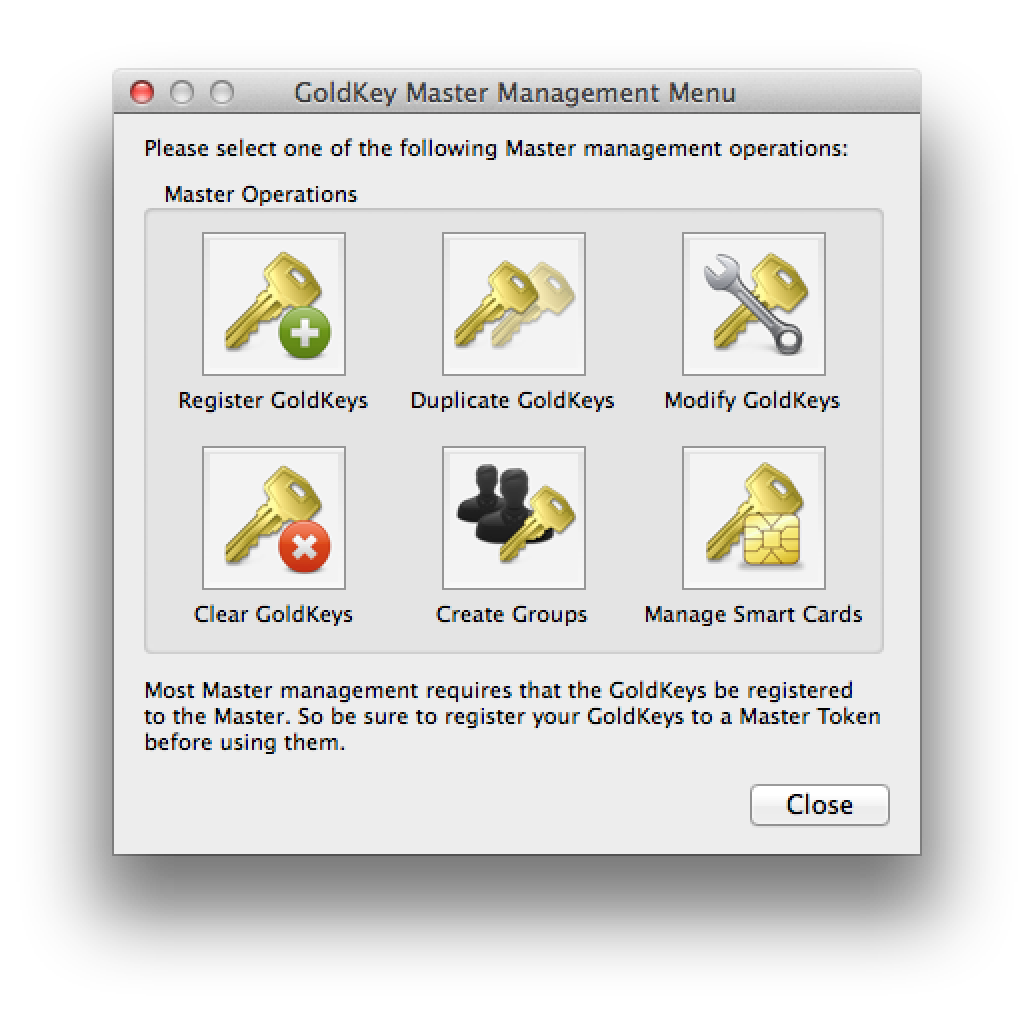
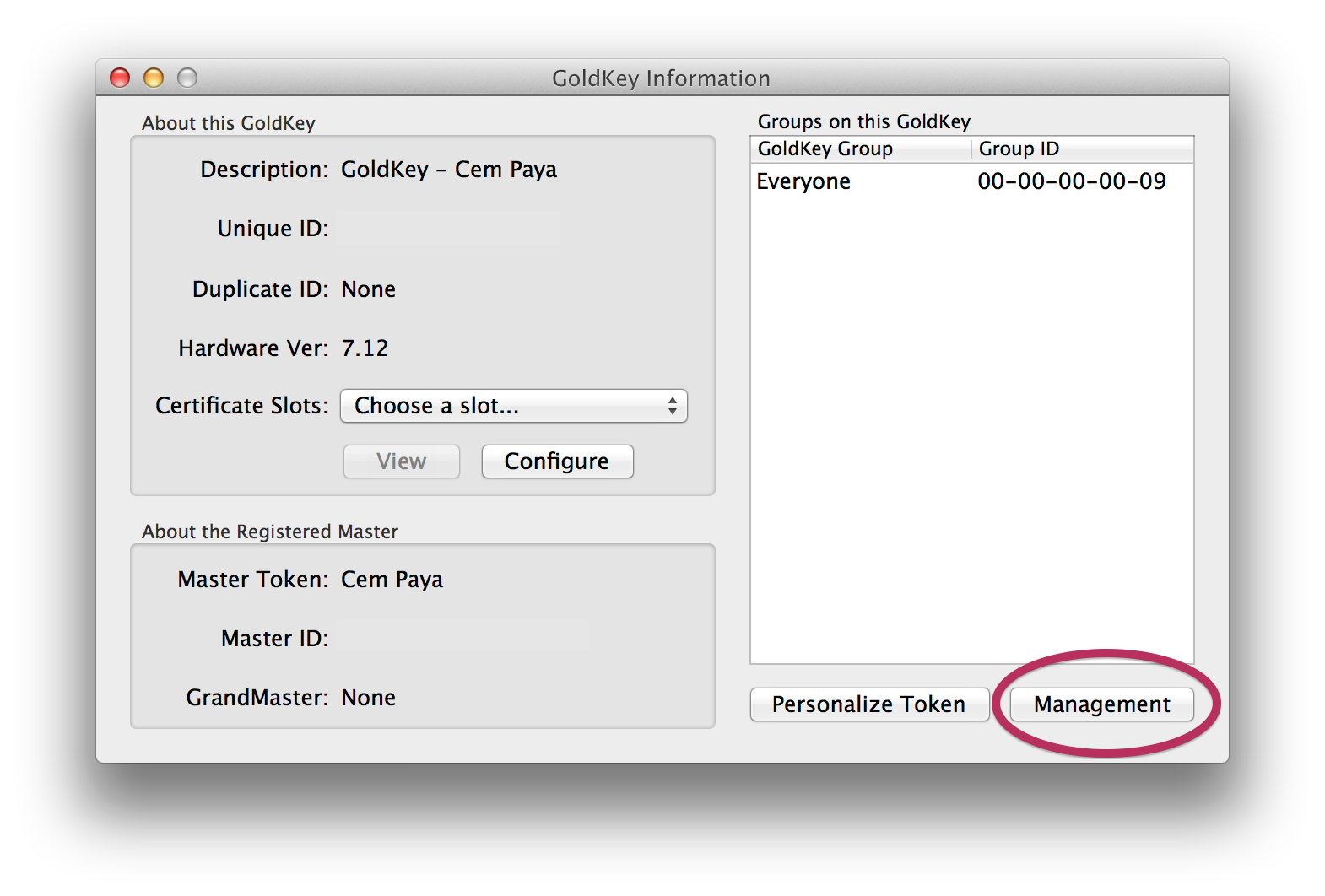
First let’s tackle a simpler problem: clearing an existing token and restoring it to original blank configuration. This turns out to require not just software but hardware support. GoldKey defines a hierarchy of tokens, with regular tokens managed by a master and masters in turn managed by a grandmaster token. Master tokens can perform administrative operations on a plain vanilla token. This functionality is accessed via the “Management” button under GoldKey information:

Accessing token management features

Accessing token management features

Dialog for managing GoldKey

Dialog for managing GoldKey

These all require having a master or grandmaster token. And it’s not just any master token, but the specific unit that this particular GoldKey was associated with during personalization phase. No such foresight or planning  involved during personalization? Not to worry: any master token can be used to completely clear out all data on that GoldKey and return it to clean slate configuration for re-personalization from scratch.

Provisioning with a master token

The same UI has an option labelled “manage smart cards” which sounds promising.

UI for managing certificates

UI for managing certificates

This allows provisioning into any of the 4 standard key types defined in the standard: PIV authentication, key-management, digital signature and card-authentication. But going down that path has an important caveat: it can only be used to provision from a PFX file, which is the MSFT variant of the PKCS12 standard. This format contains both the X509 certificate and associated private-key. But that means key material must be already available outside the token before one can import it, defeating one of the benefits of using cryptographic hardware tokens: secrets are generated on-card and never leave the secure execution environment.

Using the Windows mini-driver

Doing on-board key generation turns out to be fairly straightforward when using Windows with the GoldKey smart-card mini-driver installed. Recall that Windows has plug-and-play detection for cards and under normal circumstances will download the correct mini-driver from Windows Update. But in case the system associates a generic PIV driver instead of custom GoldKey one, it is possible to override that manually from device manager. Once correct driver is mapped, the built-in certreq utility can trigger key-generation and certificate loading.

One word of caution: GoldKey has a support article with example INF for generating self-signed certificates. Curiously the INF file used in that example does not perform key-generation on the token; it is not overriding the default cryptographic provider name to point at smart-card provider. (Fast key generation is a sign that it happened on the host. It takes about 30 seconds for 2048b RSA key to be generated, during which time the blue LED will blink.)

Also worth noting is that running certreq twice will not replace the existing PIV authentication key and associated X509 certificate. Instead it will provision to one of the other slots compatible with the specified usage, which turns out to be the key-management key. Clearing the original PIV authentication requires going back to the GoldKey client and using a master-token as described above.

What about on-board key generation from OS X or Linux? Not surprisingly, this is not supported by vendor software but it  is achievable using open-source alternatives. After all, PIV standard defines a GENERATE ASYMMETRIC KEY command for doing key-generation on the card. Leveraging this via open-source utilities (and some quirks of GoldKey tokens) will be the subject of another post.

CP