DIY VPN (part II)

[continued from part I]

Economics of a self-hosted VPN

This section considers the overall cost of operating a VPN server. First, we can rule out software acquisition costs. On the server side, the community edition for OpenVPN is freely available as open-source software. (The commercial dubbed OpenVPN Access Server comes with a per-user licensing model. While adding useful fit-and-finish including configuration GUI, that version does not change the fundamental scaling or security properties of the system.) On the client side, there are freeware options on all major platforms. One exception is when ADCS is leveraged for the certificate authority. Even there one can lease hourly access to a private Windows server from major cloud providers, rolling that into operational expenses instead of paying outright for the software. As far as operational expenses are concerned, what follows is a back of the envelope calculation using AWS as the infrastructure provider. While AWS has a free-tier for new customers, this analysis assumes that discount has already been exhausted, in the interest of arriving at a sustainable cost basis.

Computation

OpenVPN runs on Linux and is not particularly CPU intensive at the scale envisioned here— supporting a handful of users with 2-3 simultaneous connections at peak capacity. A single t3-nano instance featuring a single virtual CPU and half GB of RAM is perfectly up to task for that load. Based on current AWS pricing, these cost roughly half cent per hour when purchased on demand in US regions such as Virginia or Oregon. The operational cost can be reduced by committing to reserved instances. Paying upfront for one-year takes the price down to 0.30¢/hour while a three year term yields 0.20¢/hour. Even greater savings and flexibility may be achieved with what AWS terms  spot instances: current spot-prices for nano instances hover around 0.16-0.20¢ per hour depending on availability zone. However spot instances comes with the risk that the server may be preempted if demand spikes to the point where prices exceed the bid. That level of reliability may still be acceptable for a personal setup, since one can always bid on another spot instance with higher price. Conservatively using the 0.20¢ estimate, we arrive at EC2 instance costs just shy of $1.50 per month.

Storage

It turns out that the cost of running an instance is not the primary consideration, because of the modest computational requirements of openvpn. When using minimal instance types such as t3-nano, disk space becomes a significant contributor to cost. At the time of writing, AWS charges 10¢ per GB/month for entry-level SSD volumes attached to instances. Costs only go up from there for more demanding loads and guaranteed IOPS. (While there are cheaper options such as spinning disks, those can only be used in addition to existing boot volume and not as replacement.) That means simply keeping a 15GB disk around for a month alone exceeds the cost of running the instance for that same period.

Fortunately Linux distributions are also modest in their demands for disk space requirements. Minimum requirements for Ubuntu18 servernot the desktop edition, which is considerably more resource hungry— weight in at a svelte 256MB of memory and 1.5GB of disk space. It is not possible to translate that directly into an AWS image: all popular AMIs offered by Amazon come with minimum 8GB disk space, more than five times the stated baseline. AWS will not allow launching an EC2 instance based on one of these AMIs with a smaller boot volume.

Bring-your-own-image

There is a work around: AWS also allows customers to import their own virtual machine images from common virtualization platforms. That permits crafting a properly slimmed-down Linux image locally and converting it into an AMI.

Fair warning: this process is clunky and error-prone. After uploading an image to S3 and initiating the conversion as batch process, several minutes can elapse before AWS reports a problem (typically having to do with the image format) that takes users back to square one. It turns out only OVF format images accepted. VMware distributions including Fusion on OSX can export to that format using the included ovftool.

With some buffer to accommodate additional software inserted by AWS into the image, log files and future updates, we end up with an Ubuntu18 server AMI that can squeeze into 3GB SSD volume. That comes out to a recurring storage expense of 30¢ per EC2 instance. There is also the storage associated with the AMI itself, one copy per region. That carries the slightly lower price-tag charged to EBS snapshots and can be amortized across multiple instances launched in the same region. Assuming the worst case scenario of a single server, we arrive at an upper bound of 50¢ per month.

Bandwidth

While computation and storage expenses are highly competitive with typical prices charged by commercial VPN services, bandwidth is one area where Amazon is much less favorable for operating 24/7 VPN. Amazon charges 9¢ per GB for outbound traffic, defined as bits heading out of AWS infrastructure in that region. A VPN server has an unusual bandwidth symmetry. Most servers receive a small amount of data inboundsuch as a request for a web pageand  respond back with a large amount of data outbound, for example a high-resolution image or video stream. But a VPN server is effectively acting as proxy that shuttles traffic in both directions. Every incoming request from the client is forwarded to its true destination, becoming outbound traffic. Likewise every inbound response from that destination is sent back to the client as outbound traffic. So the total traffic volume for purpose of metering is closely approximated by the upstream and downstream traffic generated by users connected to the VPN, plus a small overhead introduced by the VPN protocol itself.

The average US household consumes 190GB of bandwidth per month according to the latest iGR report from 2017. While that report does not distinguish upstream/downstream, it is reasonable to assume downloading is responsible for the bulk of this figure. Adjusting by 50% for projected growth and including another 50GB for mobile devices with their own data plan yields a number around 300GB month of traffic. If 100% of that traffic is routed over the VPN service hosted at AWS, bandwidth costs alone would exceed all other other operational expenses by a factor of ten.

This cost scales linearly with the amount of VPN usage, or equivalently the number of users sharing the VPN. At large enough scales, the same also holds true for EC2 costs, since a single nano instance can not service an unbounded number of subscribers. But those limits are unlikely to be reached for a system intended for a handful of people, while the impact of additional bandwidth usage will be directly reflected in the monthly bill.

Verdict on self-hosting

AWS turns out to be highly competitive for hosting a VPN solution, with the caveat that only moderate usage is required. Considering that popular VPN services for consumers charge in the neighborhood of $3-$10 per month, a single nano instance can offer a better solution at lower cost, especially when the server is shared by multiple people. Advantages to self-hosting include:

  • Eliminating trust in a third-party service, including random client apps. VPN provider is in a position to observe traffic metadata, such as websites visited and frequency For unenlightened websites not using HTTPS, VPN service can even observe the full traffic exchange. Unscrupulous providers have taken advantage of this, most recently Facebook with its Onavo spyware product masquerading as VPN. Hosting your own VPN avoids that dependency, although one must still implicitly trust the infrastructure provider. Amazon has visibility into EC2 traffic which can be used to identify activity: “user coming from IP address 1.2.3.4 connected to the VPN server, and that resulted in VPN server reaching out to websites at address 6.7.8.9” While one can be confident AWS (unlike Facebook) respects privacy and will not randomly mine those logs to spy on their own customers, they can still be compelled to disclose records by law enforcement.
  • High-availability with the backing of Amazon infrastructure. Hardware, storage and networking failures are low probability events.
  • Geodistributed points of presence, with ability to host VPN servers in the US, Europe, South America and Asia.
  • Large selection of IP4 and IP6 addresses from the AWS range, compared to hosting from a residential connection.
  • More importantly, freedom to change IP addresses at will. New elastic IP can be requested from AWS and assigned to an instance anytime the service operator wants to discard their association with the existing address
  • Unlimited number of devices at no additional cost (within the capacity limits of the EC2 instance)

The self-hosting route also comes with two notable caveats:

  • Overhead of maintaining the service, particularly the PKI necessary for issuing/revoking certificates. OpenVPN does not help matters here: it does not directly implement CRL or OCSP for retrieving revocation information. It requires the presence of a CRL file deployed locally. (But one can get the same effect by crafting a custom script to be executed server-side for each connection, to invoke openssl for proper chain validation that pays attention to CDP or OCSP responder links in the certificate. Alternatively a cron job can periodically retrieve CRLs and update the local file openvpn expects to find this information.)
  • Steep pricing for bandwidth. This is less an argument against the DIY approach and more a cautionary note about using AWS for hosting, which is the obvious choice along with Azure and GCE. It turns out Azure and GCE are not that different when it comes to egress traffic. More cost-effective plans are available from alternative providers such as Linode and Digital Ocean, featuring upwards of 1 terabyte egress traffic for the fixed monthly price of server hosting.

CP
 

DIY VPN (part I)

Introduction

Net neutrality is not the only casualty of an FCC under the sway of a new administration. In a little noticed development, ISPs have free reign to spy on customers and sell information based on their Internet traffic. Google has been on a quest to encrypt all web traffic using the TLS protocol— engaging in subtle games of extortion by tweaking the default web browser UI to throw shade at sites still using the default unencrypted HTTP protocol. But there is one significant privacy limitation with TLS: it does not hide the identity of the website the user is visiting. Such metadata is still visible, both in the TLS protocol but also in the addressing scheme used for the underlying IP protocol.

This is where virtual private networks come in handy. By encapsulating all traffic through an encrypted tunnel into another connection point, they can also protect metadata from the prying eyes of surveillance-happy ISPs. But That is only the beginning: VPNs also reduce privacy risks from arguably the apex predator of online privacy— advertising-based revenue models. In the grand tradition of surveillance capitalism, every crumb of information about a customer is enlisted into building comprehensive profiles. Even if consumers never login to Facebook or Google, these networks can still build predictive profiles using alternative identifiers that help track consumers over time. Of all the stable identifiers that users carry around like unwanted, mandatory name-tags forced on them— HTTP cookies, their counterparts complements of Flash and creative browser fingerprinting techniques— IP addresses are one of the hardest to strip away. Incognito/private browsing modes allow shedding cookies and similar trackers at the end of the session, but IP addresses are assigned by internet service providers. In many cases they are surprisingly sticky: most residential broadband IPs rarely change.

From clunky enterprise technology to consumer space

In the post-Snowden era, the default meaning of “VPN” also changed. Once an obscure enterprise technology that allowed employees to connect to internal corporate networks from home, it shifted into the consumer space, pitched to privacy-conscious mainstream endusers as a way to protect themselves online. In an ironic twist, even Facebook the apex predator of online privacy infringement got into the act: the company acquired the analytics service Onavo and offered the existing Onavo VPN app to teenagers free of charge, in exchange for spying on their traffic. (When TechCrunch broke the news, Apple quickly put the kibosh on that particular privacy invasion by revoking the enterprise certificate Facebook had misused to create an app for general distribution with VPN privileges.) The result has been a competitive landscape for consumer VPN services, complete with the obligatory reviews and ranking from pundits.

For power users there is another option: hosting your own VPN service. This post chronicles experiences doing that, organized into two sections. First section an overview of what goes into building a functioning VPN server, using common, off-the-shelf open source components. Second half looks at the economics of the DIY approach, comparing the costs against commercial offerings and more importantly, looking at how different usage patterns— number of presence points, simultaneous users, monthly bandwidth consumed— affect those numbers.

Implementation considerations

“The nice thing about standards is that you have so many to choose from”

Andrew Tannenbaum

Maze of protocols

One of the first challenges in trying to create a VPN solution is the fragmented nature of the standard. Unlike the web where all web-browsers and web-servers have converged on the protocol TLS for protecting communications, there is no comparable “universal” VPN standard with comparable ubiquity. This is either surprising or utterly predictable depending on perspective. It is surprising considering VPNs are 20+ years old. Attempts to standardize VPN protocols are the same vintage: IPSec RFCs were published in 1995. L2TP followed a few years later. With the benefit of two decades to in protocol tinkering— proprietary, standards-based or somewhere in between— you might expect the ecosystem to converge on some least common denominator by now. Instead VPNs remain highly fragmented, with incompatible options pushed by every vendor. The roots of the technology in enterprise computing may have something to do with that outcome. If Cisco, Palo Alto and Fortinet compete on selling pricy VPN gear to large companies with the assumption that every employee will be required to also install a  VPN client from the same vendor who manufactures the hardware, there is little incentive to interoperate with each other.

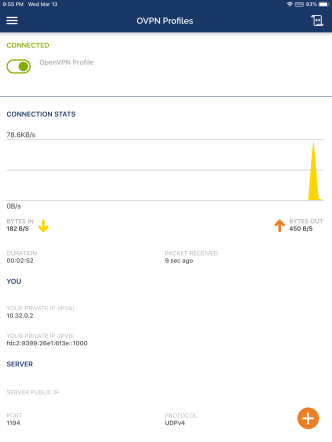
In this morass of proprietary blackbox protocols, OpenVPN stands out as one of the few options with some semblance of transparency. It is not tied to specific hardware, which makes for convenient DIY setups using cloud hosting: it is much easier— not to mention cost effective— to install software in a virtual server than rack a physical appliance in a datacenter cage. It also has good cross-platform support client side, with a good mixture of freeware and commercial applications on Windows, OSX and Linux flavors— the last one in particular being the black-sheep platform frequently neglected by commercial VPN offerings. (WireGuard is another more recent entry distinguished by modern cryptography, but it does not quite have the same level of implementation maturity.)

OpenVPN_on_iPad

OpenVPN on iPad

OpenVPN server-side

In the interest of reach and portability, this examples uses Ubuntu Server 18 LTS, since many commercial hosting services such as AWS and Linode offer virtual hosting for this operating system. There are extensive online tutorials on setting up the server-side online so this blog post will only summarize the steps here:

  1. Enable IPv4 & IPv6 forwarding via sysctl configuration
  2. Setup iptables rules (again, for IPv4 & IPv6) and make them persistent using iptables-persistent package.
  3. Tweak openvpn server configuration file
  4. Provision credentials
    • Generate Diffie-Hellman parameters
    • Use openssl to generate an RSA key-pair for the server & create a certificate signing request (CSR) based on that pair
    • Submit the certificate request to a certificate authority to obtain a server certificate and install this on the server— more on this in the next section

PKI tar-pit

OpenVPN supports authentication based on different models but the most commonly used design involves digital certificates. Every user of the VPN service as well every server they connect to has a private key and associated credential uniquely identifying that entity. There are no shared secrets such as a single password known to everyone, unlike for example in the case of L2TP VPNs where all users have the same “PSK” or preshared key. One crucial advantage of using public-key credentials is easy revocation: if one user loses their device or stops using the VPN service, their certificate can be revoked without affecting anyone else. By contrast, if an entire company is sharing the same PSK for every employee, it will be painful to rotate that secret for every departure. From an operational perspective, distributing credentials is simpler. Passwords have to be synchronized on both sides in order for the server to verify them. With digital certificates, the secret private key only exists on user device and the server does not need to be informed ahead of time whenever a new certificate is issued. (Although they need access to the certificate revocation list or CRL, in order to check for invalidated credentials.)

Public-key credentials avoid many of the security headaches of passwords but come with the operational burden of managing a PKI. That is arguably the most heavy-weight aspect for spinning up a stand alone VPN infrastructure. Large enterprises have an easier time because the overhead is effectively amortized into other use-cases of PKI in their existing IT infrastructure. Chances are any Window shop at scale is already running a certificate authority to support some enterprise use case. For example employees badges can be smart-cards provisioned with a digital certificate. Or every machine can be automatically issued a certificate using a feature called auto-enroll when they are connected to the domain controller, which is then leveraged for VPN. That seamless provisioning experience is difficult to recreate cross-platform once we accept the requirement to support OSX, Linux, Android and iOS platforms. Instead credentials must be provisioned and distributed manuallyand that includes both VPN users and VPN servers.

There are open-source solutions for running a certificate authority, notably EJBCA. OpenSSL itself can function as a primitive CA. OpenVPN introduced its own solution called easy-rsa, glorified wrapper scripts around OpenSSL to simplify common certificate management tasks.  But arguably the most user-friendly solution here is Windows Active Directory Certificate Services or ADCS. ADCS features both a GUI for simpler use-cases as well as automation through the command-line via old-school certutil and more modern powershell scriplets.

ADCS_2012_management_GUI.PNG

Active Directory Certificate Services GUI on Windows 2012

ADCS is not free software, but it is widely available as cost-effective, hosted solution from Amazon AWS and MSFT Azure among other providers. Considering the CA need only be powered on for the occasional provisioning and revocation, operational expenses will be dominated by the storage cost for the virtual disk image as opposed to the runtime of the virtual machine. One might expect a CA has to stay up 24/7 to serve revocation lists or operate an OSCP responder— and ADCS can do both of those, when the server also has IIS role installed. But OpenVPN can only parse revocation information from a local copy of the CRL. That rules out OCSP and implies CRLs must be manually synchronized to the server, defeating the point of having a server running around the clock to serve up revocation information. In effect OpenVPN only requires an offline CA.

[continued]

CP