Introduction
Net neutrality is not the only casualty of an FCC under the sway of a new administration. In a little noticed development, ISPs have free reign to spy on customers and sell information based on their Internet traffic. Google has been on a quest to encrypt all web traffic using the TLS protocol— engaging in subtle games of extortion by tweaking the default web browser UI to throw shade at sites still using the default unencrypted HTTP protocol. But there is one significant privacy limitation with TLS: it does not hide the identity of the website the user is visiting. Such metadata is still visible, both in the TLS protocol but also in the addressing scheme used for the underlying IP protocol.
This is where virtual private networks come in handy. By encapsulating all traffic through an encrypted tunnel into another connection point, they can also protect metadata from the prying eyes of surveillance-happy ISPs. But That is only the beginning: VPNs also reduce privacy risks from arguably the apex predator of online privacy— advertising-based revenue models. In the grand tradition of surveillance capitalism, every crumb of information about a customer is enlisted into building comprehensive profiles. Even if consumers never login to Facebook or Google, these networks can still build predictive profiles using alternative identifiers that help track consumers over time. Of all the stable identifiers that users carry around like unwanted, mandatory name-tags forced on them— HTTP cookies, their counterparts complements of Flash and creative browser fingerprinting techniques— IP addresses are one of the hardest to strip away. Incognito/private browsing modes allow shedding cookies and similar trackers at the end of the session, but IP addresses are assigned by internet service providers. In many cases they are surprisingly sticky: most residential broadband IPs rarely change.
From clunky enterprise technology to consumer space
In the post-Snowden era, the default meaning of “VPN” also changed. Once an obscure enterprise technology that allowed employees to connect to internal corporate networks from home, it shifted into the consumer space, pitched to privacy-conscious mainstream endusers as a way to protect themselves online. In an ironic twist, even Facebook the apex predator of online privacy infringement got into the act: the company acquired the analytics service Onavo and offered the existing Onavo VPN app to teenagers free of charge, in exchange for spying on their traffic. (When TechCrunch broke the news, Apple quickly put the kibosh on that particular privacy invasion by revoking the enterprise certificate Facebook had misused to create an app for general distribution with VPN privileges.) The result has been a competitive landscape for consumer VPN services, complete with the obligatory reviews and ranking from pundits.
For power users there is another option: hosting your own VPN service. This post chronicles experiences doing that, organized into two sections. First section an overview of what goes into building a functioning VPN server, using common, off-the-shelf open source components. Second half looks at the economics of the DIY approach, comparing the costs against commercial offerings and more importantly, looking at how different usage patterns— number of presence points, simultaneous users, monthly bandwidth consumed— affect those numbers.
Implementation considerations
“The nice thing about standards is that you have so many to choose from”
— Andrew Tannenbaum
Maze of protocols
One of the first challenges in trying to create a VPN solution is the fragmented nature of the standard. Unlike the web where all web-browsers and web-servers have converged on the protocol TLS for protecting communications, there is no comparable “universal” VPN standard with comparable ubiquity. This is either surprising or utterly predictable depending on perspective. It is surprising considering VPNs are 20+ years old. Attempts to standardize VPN protocols are the same vintage: IPSec RFCs were published in 1995. L2TP followed a few years later. With the benefit of two decades to in protocol tinkering— proprietary, standards-based or somewhere in between— you might expect the ecosystem to converge on some least common denominator by now. Instead VPNs remain highly fragmented, with incompatible options pushed by every vendor. The roots of the technology in enterprise computing may have something to do with that outcome. If Cisco, Palo Alto and Fortinet compete on selling pricy VPN gear to large companies with the assumption that every employee will be required to also install a VPN client from the same vendor who manufactures the hardware, there is little incentive to interoperate with each other.
In this morass of proprietary blackbox protocols, OpenVPN stands out as one of the few options with some semblance of transparency. It is not tied to specific hardware, which makes for convenient DIY setups using cloud hosting: it is much easier— not to mention cost effective— to install software in a virtual server than rack a physical appliance in a datacenter cage. It also has good cross-platform support client side, with a good mixture of freeware and commercial applications on Windows, OSX and Linux flavors— the last one in particular being the black-sheep platform frequently neglected by commercial VPN offerings. (WireGuard is another more recent entry distinguished by modern cryptography, but it does not quite have the same level of implementation maturity.)
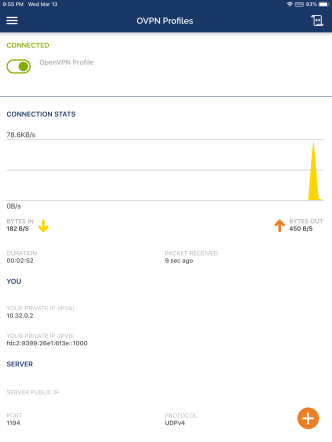
OpenVPN on iPad
OpenVPN server-side
In the interest of reach and portability, this examples uses Ubuntu Server 18 LTS, since many commercial hosting services such as AWS and Linode offer virtual hosting for this operating system. There are extensive online tutorials on setting up the server-side online so this blog post will only summarize the steps here:
- Enable IPv4 & IPv6 forwarding via sysctl configuration
- Setup iptables rules (again, for IPv4 & IPv6) and make them persistent using iptables-persistent package.
- Tweak openvpn server configuration file
- Define a range of private IPv4 and IPv6 addresses to assign clients
- Specify DNS servers (Google DNS is a natural choice)
- Define routes to send all traffic through the VPN
- Provision credentials
- Generate Diffie-Hellman parameters
- Use openssl to generate an RSA key-pair for the server & create a certificate signing request (CSR) based on that pair
- Submit the certificate request to a certificate authority to obtain a server certificate and install this on the server— more on this in the next section
PKI tar-pit
OpenVPN supports authentication based on different models but the most commonly used design involves digital certificates. Every user of the VPN service as well every server they connect to has a private key and associated credential uniquely identifying that entity. There are no shared secrets such as a single password known to everyone, unlike for example in the case of L2TP VPNs where all users have the same “PSK” or preshared key. One crucial advantage of using public-key credentials is easy revocation: if one user loses their device or stops using the VPN service, their certificate can be revoked without affecting anyone else. By contrast, if an entire company is sharing the same PSK for every employee, it will be painful to rotate that secret for every departure. From an operational perspective, distributing credentials is simpler. Passwords have to be synchronized on both sides in order for the server to verify them. With digital certificates, the secret private key only exists on user device and the server does not need to be informed ahead of time whenever a new certificate is issued. (Although they need access to the certificate revocation list or CRL, in order to check for invalidated credentials.)
Public-key credentials avoid many of the security headaches of passwords but come with the operational burden of managing a PKI. That is arguably the most heavy-weight aspect for spinning up a stand alone VPN infrastructure. Large enterprises have an easier time because the overhead is effectively amortized into other use-cases of PKI in their existing IT infrastructure. Chances are any Window shop at scale is already running a certificate authority to support some enterprise use case. For example employees badges can be smart-cards provisioned with a digital certificate. Or every machine can be automatically issued a certificate using a feature called auto-enroll when they are connected to the domain controller, which is then leveraged for VPN. That seamless provisioning experience is difficult to recreate cross-platform once we accept the requirement to support OSX, Linux, Android and iOS platforms. Instead credentials must be provisioned and distributed manually—and that includes both VPN users and VPN servers.
There are open-source solutions for running a certificate authority, notably EJBCA. OpenSSL itself can function as a primitive CA. OpenVPN introduced its own solution called easy-rsa, glorified wrapper scripts around OpenSSL to simplify common certificate management tasks. But arguably the most user-friendly solution here is Windows Active Directory Certificate Services or ADCS. ADCS features both a GUI for simpler use-cases as well as automation through the command-line via old-school certutil and more modern powershell scriplets.

Active Directory Certificate Services GUI on Windows 2012
ADCS is not free software, but it is widely available as cost-effective, hosted solution from Amazon AWS and MSFT Azure among other providers. Considering the CA need only be powered on for the occasional provisioning and revocation, operational expenses will be dominated by the storage cost for the virtual disk image as opposed to the runtime of the virtual machine. One might expect a CA has to stay up 24/7 to serve revocation lists or operate an OSCP responder— and ADCS can do both of those, when the server also has IIS role installed. But OpenVPN can only parse revocation information from a local copy of the CRL. That rules out OCSP and implies CRLs must be manually synchronized to the server, defeating the point of having a server running around the clock to serve up revocation information. In effect OpenVPN only requires an offline CA.
[continued]
CP
 Random Oracle
You must be logged in to post a comment.