HCE vs embedded secure element: interface detection (part VI)

[continued from part V]

Relay attacks are not new: they were originally introduced in the context of RFID systems and smart-cards. As soon as mobile devices gained NFC capability, it seemed a foregone conclusion that this class of  vulnerabilities would apply. The phone may have a different form factor, but abstract threat model is unchanged. If anything the situation got worse because of an added twist: because the “card” was effectively “attached” to a generic computing device, physical proximity to the victim is no longer required. If the attacker could execute code on the mobile device, that malware could relay their commands over a network link remotely.

Earlier defenses against relay attacks focused on distance-bounding, by measuring time taken for the gadget to respond to specific “challenge” commands. Excessive delays can be interpreted as evidence that traffic is being relayed over a long distance with network hops in between. This is at best an unreliable approach since it is betting on the network latency between victim and attacker. With improving networking technologies, it may become more difficult to identify a sharp threshold for differentiating between local and remote cases.

Fortunately modern dual-interface chips such as the Android secure element has a more  robust and reliable mitigation: interface detection. Unlike the simplistic descriptions of relay attacks which posit a single communication path to the chip, there are in fact two distinct routes or interfaces. More importantly applications running on these chips can detect which route a particular message came from. This is an intrinsic property of the hardware, specifically in terms of the way secure element is connected to the NFC controller. It is independent of Android; as such it can not be subverted by malware, even when running with full privileges of the operating system.

A naive picture

The seeming inevitability of relay attacks comes from a reasonable (but ultimately incorrect) picture of how the hardware is connected. Here is a naïve depiction of one reasonable architecture:

Naive view of NFC and secure element connection.

Naive view of NFC and secure element connection. (This is not the actual architecture.)

In this picture, secure element and NFC antenna are completely decoupled, independent pieces of hardware. The secure element is connected directly to the application processor, or in other words the Android operating system. When NFC transactions are performed, bits travel over the air, arrive at the NFC antenna, which dutifully routes them to the operating system in much the same way Bluetooth or 802.11 wireless interface would. (Granted there is more than an analog antenna required; there must be some circuitry to convert raw signals into meaningful data such as NFC tags being discovered.) The operating system in turn relays the commands to the SE and response is routed back in the opposite direction.

If that model was accurate, remote relay attacks would be inevitable. Since the secure element does not operate autonomously, it can only respond to commands, it can not actively go out and inspect its environment. (In fact SE is not even powered on most of the time.) Malware with sufficient privileges could “inject” traffic into the NFC stack– indicated by the red arrows above– that looks indistinguishable from traffic arriving over NFC. For that matter malware could also directly interface with SE by communicating with the device node directly. SE has no idea what is going on at the application level. It can not distinguish between remotely relayed commands versus legitimate NFC traffic originating from a nearby point-of-sale terminal.

Android SE/NFC architecture

This is how the hardware is connected in reality:
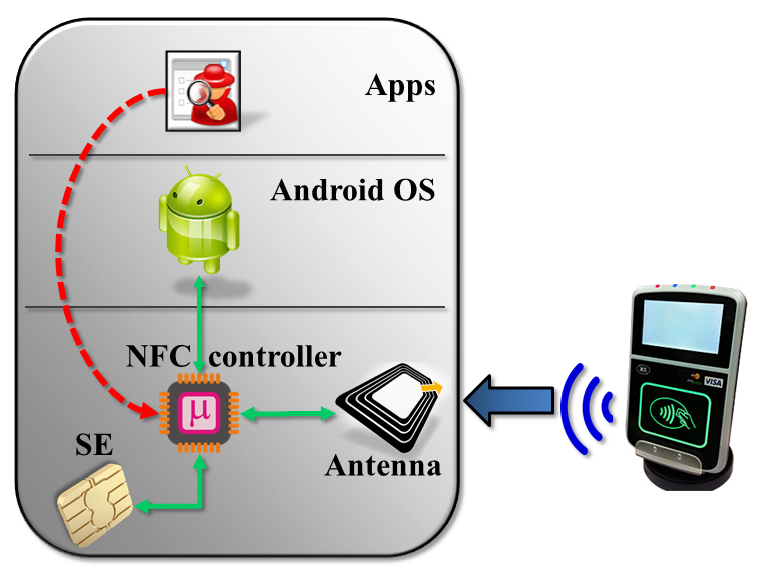
Secure element connection with NFC controller

Actual architecture for Android embedded SE


The main difference is that secure element, NFC antenna and Android are not connected to each other directly; the NFC controller sits at the junction of these systems. Depending on  NFC mode, that controller is responsible for routing data in different directions:

  1. In reader/writer and P2P modes, data flows to/from the NFC antenna to Android. SE is not involved. This is invoked for scanning tags and exchanging contacts using Android Beam.
  2. In wired-access mode, SE is powered on and Android communicates with SE over its wired (aka “contact”) interface. For instance when the user is entering their PIN to unlock Google Wallet, this channel is active for sending PIN down to the payment applet.
  3. In card-emulation mode, SE is also powered on and traffic from NFC antenna is delivered straight to the secure element, bypassing the host operating system. This is the active path when the phone is tapped against an NFC reader to complete a payment.

NFC controller and security guarantees

The last property already represents one important difference from the naïve picture. Bits are not traversing the host operating system. They go straight from NFC controller to the secure element. This provides some confidentiality, since responses from SE can not be observed by Android.  But by itself it would not have been enough, unless SE can distinguish between #2 and #3.

That is where the NFC controller comes in. Additional information is communicated to the secure element about which interface commands originated from. This is not part of the command payload– otherwise it could have been forged. Instead it is metadata, made available to applications running on the SE to allow them to alter their behavior accordingly. For example Javacard exposes an API to query incoming command and distinguish between contact and contactless interfaces.** An attacker with root privileges can interface with NFC controller directly by accessing the raw device, but not the embedded secure element– this is the red arrow again. Traffic to the SE is gated by the controller, and all data coming from the host-side (whether legitimate Android NFC stack or malware attempting to relay traffic) will be tagged correctly as contact interface.

One good question is how the NFC controller itself decides to report the incoming interface. After all if this were specified by Android, it could be subverted. The answer is that logic is part of the controller firmware. Android can instruct the controller to switch into a given state such as card-emulation or wired-access mode at any time. But once in that state, all commands relayed to the secure element will be correctly tagged with the corresponding interface.

What about software attacks against the controller itself? Firmware can be updated in the field and new versions are often distributed as part of the Android image, to update hardware on initial OS boot. This would normally create another attack vector: flash the chip with corrupted firmware, designed to confuse SE about true origin of commands. But in the case of the NFC controller, new firmware versions must be digitally signed by the publisher. That signature is verified by the controller before accepting an update.

Remote-relay attacks and SE applications

Interface detection then is the fundamental mitigation against remote-relay attacks. Code executing in the secure element can differentiate between traffic from:

  • Applications running on the phone– because they will be accessing the SE over contact interface
  • External NFC readers such as contactless smart-card readers and point-of-sale terminals

It is up to the application to implement additional security checks based on interface. This is not always straightforward. Protocols such as Mastercard Mobile PayPass call for an application that supports some functionality over both contact and contactless interfaces. For example PIN entry and displaying information about recent transactions is done via host, while actual payments are conducted over NFC. Such an applet can not categorically reject all commands coming from contact interface. A fine-grained policy is required that takes into account internal state machine, requested command and current interface. (In fairness, EMV protocols are not unique in this regard. For example US government PIV standard for identification cards also has very specific mandates on what functionality is available over which interface.)

Weakness of host-card emulation

Returning to the comparison motivating this series–security of host card emulation vs embedded secure element— we find another significant advantage for hardware secure. Without an SE, the naïve picture does become an accurate depiction of  the state of affairs. and defense against remote-relay attacks is weak. Ordinary apps can not fabricate traffic that looks like it is originating from an NFC reader. But malware that attains root privileges can pull it off, since it will be running with same privileges as the authentic Android NFC stack responsible for dispatching HCE commands to user-mode applications. By contrast, applications implemented on a hardware secure element can be secure against relay attacks even when the remote attacker is executing code as root. That is a very strong guarantee HCE can not provide.

It is also worth pointing out that this property is unique to NFC. If the payment protocol was implemented over Bluetooth or 802.11, interface detection can no longer help. In the current hardware architecture, traffic for these alternative wireless protocols must be routed through Android. This is another reason why moving the payment protocol to an  execution environment in TrustZone does not produce the same security guarantee, aside from the much weaker tamper-resistance compared to actual SE. Short of a significant architectural change to move control over NFC hardware to the TrustZone kernel itself (as opposed to plain Android kernel, where NFC device driver resides today) interface detection will not be reliable.

CP

** In principle both can be active simultaneously which is why the API exists at command level. For both the NXP and Oberthur secure elements in Android, that situation can not arise. Only one interface can be used, and switching resets the SE which simplifies life for application development. All decisions about interfaces can be made at SELECT time, with the guarantee that it will not change for that session.
How to fail at code-signing, the open-source edition (part II)

[continued from part I]

Two challenges confront a paranoid user trying to decide if the Tor browser-bundle they just downloaded is in fact the authentic version or malware masquerading as a privacy-enhancing tool.

Key management by cliques

First there is the theoretical problem of key-distribution. Verifying a signature requires knowing the public-key of the person who generated the signature. The simplistic idea that “signed” equals trustworthy proves not to work, as many people discovered much to their surprise when perfectly valid signatures were found on run-of-the-mill malware as well as sophisticated nation-sponsored attacks such Stuxnet. It matters who signed the code.

Authenticode uses a hierarchical trust model based on PKI, which is the same  model used for SSL certificates. Individuals or companies obtain digital certificates from certificate authorities. The certificate contains information about the person/entity it was issued to, such as their name or DNS domain, as well as a the public-key. It is effectively a statement from the CA that the public-key in question belongs to the person/entity named there. Because the certificate is signed by the issuing CA, it can be verified by anyone in possession of the CA public-key. In effect this amplifies trust; by trusting the public-key of 1 CA users can establish trust in the public-keys of any one else who obtain certificates from that CA. (Assuming they have confidence in the vetting process used before the CA is willing to vouch for the public-key.)

This model scales very well in relation to the number of CAs in existence. Case in point: web-browsers are preloaded with several dozen root CAs (most of which are unused, incidentally) but this small group of “trust anchors” allow verifying SSL certificates for  millions of websites. Flip side of that high leverage is a weakness: any one of them can undermine trust by deliberately or mistakenly issuing a certificate to the wrong party. Effective security of the system is determined by the least competent/most dishonest CA.

By contrast, PGP uses a web-of-trust model without centralized parties tasked with vouching for everyone else’s keys. Users individually exchange keys. They can also sign each others’ keys to serve as “introductions” for other contacts in the social graph. Such a distributed model is not susceptible to the weakest-link-in-the-chain problem that plagues X509 where a lot of power is concentrated in an oligarchy of CAs. When users are tasked with managing trust in public-keys one person at a time, the failure of some unrelated third-party will not lead to a catastrophic case of mistaken identity across the network.

Main downside is scaling globally. In order to verify signatures, users need the public-key of the person who created the signature. This is a challenge to say the least. In the standard PGP model, keys are obtained by following social links. Returning to our example of verifying the Tor binaries, users would ideally have a friend or friend-of-a-friend connected to the developer who created the signature. The Tor project conveniently has a page listing keys— ironically using SSL and centralized PKI model to bootstrap trust– but that page would have been blocked in our hypothetical scenario, along with the entire Tor website. There are centralized collections of keys such the MIT PGP key server, but they serve a very different purpose: they act as a directory for looking-up keys rather than a trusted third-party vouching for their integrity. Anyone can submit keys, and in fact bogus keys are submitted routinely. (It does not help that the key server runs over HTTP, allowing standard man-in-the-middle attacks to return bogus keys consistent with forged signature for a binary modified by the attacker.)

Usability, or why Johnny can’t verify signatures

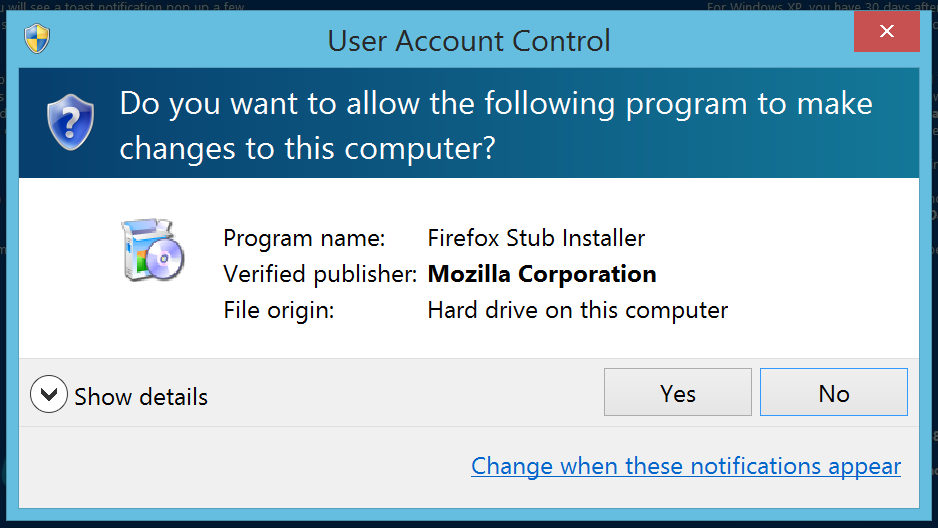
Second is a far more practical problem of usability.  Authenticode support is built into the operating system, with automatic signature verification before attempting to install software downloaded from the web:

Software installation prompt on Windows 8. Note the verified publisher information from Authenticode signature.

Verifying PGP signatures is not built into an operating system in the same way; the user is on their own. Getting PGP-compatible software is the first order of business. It is not part of Windows or OS X by default, but is commonly found on default installations of popular Linux distributions such as Ubuntu. Since desktop Linux has negligible market share, the effective result is that most users are being expected to go out of their way to install random software they have likely never used before (or for that matter, will ever use again) only to verify the authenticity of another piece of software they are interested in using immediately. Suspending disbelief that motivation exists, the next challenge is using the unfamiliar software for signature verification. While there are GUI front-ends for integrating PGP functionality with popular email clients– which is after all the primary use-case, encrypting and signing email messages– there is no good option for being able to verify detached signatures on random binaries. Users are expected to drop down to the command-line and type something along the lines of:

$ gpg --verify torbrowser-install-3.6.1_en-US.exe.asc torbrowser-install-3.6.1_en-US.exe

Assuming our determined user has obtained the correct PGP key and marked it as trusted, they will be greeted with this happy news:

gpg: Signature made Tue May  6 16:36:57 2014 PDT using RSA key ID 63FEE659
gpg: Good signature from "Erinn Clark <erinn@torproject.org>"
gpg:                 aka "Erinn Clark <erinn@debian.org>"
gpg:                 aka "Erinn Clark <erinn@double-helix.org>"
gpg: WARNING: This key is not certified with a trusted signature!
gpg:          There is no indication that the signature belongs to the owner.
Primary key fingerprint: 8738 A680 B84B 3031 A630  F2DB 416F 0610 63FE E659

(Incidentally that ominous sounding warning about key not being certified is expected; it does not indicate a problem with the signature.)

Easy enough?

CP


How to fail at code-signing, the open-source edition (part I)

Censorship vs. Tor browser-bundle

There is an interesting connection between recent episodes of Internet censorship in Turkey and primitive approaches used to authenticate the integrity of open-source software. To recap:

Anonymizing proxies

“There is never a shortage of solutions in democracies” as one Turkish politician has stated. A resourceful nation responded by resorting to using proxies and VPN services, all of which bypass the IP-level blocking by first connecting to one or more intermediate “jumping stones” which then routes traffic to the intended destination. Tor is by far the most popular option, operated as a free service by volunteers running nodes on their own machines. Given the difficulty of setting up Tor (despite advances since publication of that paper, including one-stop user-friendly Tor browser bundle containing a preconfigured Firefox build) it was impressive how quickly Tor usage spiked in Turkey, peaking at twice the baseline. In theory Tor is decentralized; there is no single point of failure, no single server that could be taken out to cut off access to the network. But for practical purposes, when an entire nation is trying to alter its web browsing habits, there is one choke point: getting the Tor client software. Sure enough the censorship soon moved to also block the main Tor website.

Verifying code integrity

So what does any of this have to do with code authentication? Consider a user trying to download and install the Tor browser bundle. They can no longer download it from the main website or any popular mirrors– ISPs will surely wake up and block these. More likely people will turn to their own social network, start emailing each other links to obscure servers hosting the software or even the entire binary as attachment. Some of these emails will be sent by well-meaning people trying to help their friends. Others may actually be attempts to distribute malware by capitalizing on the sudden demand for a popular piece of free software. Does the average user have a fighting chance of distinguishing these cases?

Business-as-usual scenario

First let’s consider how users normally authenticate the source of their applications. There are several possibilities:

  1. Installed from an app-store doing some level of vetting on authorship and pedigree of applications, which varies based on the philosophy of the market operator. Apple carefully curates the offerings, Google takes a laissez-faire approach and ends up with frequent occurrence of malware on Play Store.
  2. Downloaded from a trusted website. This is really a generalization of the first case. The distribution point acts as a proxy for the trustworthiness of the application. For example we assume that code downloaded over SSL from the Mozilla website is unlikely to be malicious.**
  3. Code signing. By far the most prevalent example of this is the Authenticode format used for software distribution on Windows.

Signing only helps if users can verify

What about the Tor browser bundle? At the time of this writing, it is not found on the Microsoft store, although it  could very well have been submitted there to make life easier for Windows users, the main audience in this case. The situation is not any better for Mac users. For iOS there is an Onion Browser in app-store but it is not free. (Worse there has been a bogus Tor app riddled with spyware which Apple did not take any action on for months.) The paucity of these choices rules out option #1 for most users. Because of active censorship, it can not be downloaded from the official Tor project website, also ruling out option #2. Individuals can create additional mirrors but trust in those will be necessarily limited to those in that person’s immediate social-network.

That leaves code signing. As it turns out, TBB is in fact cryptographically signed using PGP format. It is a detached signature, meaning that the signature is not part of the installer itself and must be located independently. While it is easier to verify signatures  that are part of the file-format, this is not a major obstacle. (In fact Authenticode also has support for detached signatures, since some file formats do not afford an easy way to sneak in extra data to contain the signature.) While the cryptography is sound, this is another case where Tor project has gone on a flight of fancy in terms of what can  be expected of mainstream users.

[continue to part II]

CP

** There is also a primitive approach usually seen in open-source software that involves publishing MD5 or SHA1 hashes and then serving the actual download from some other untrusted location. This also boils down to relying on location; trust is bootstrapped by based on the website which contains these hashes used to verify the integrity of the bulk data downloaded. Amusingly many download sites serve these hashes over unprotected HTTP connections, which makes the entire scheme into security theater.

How to fail at code-signing, the Microsoft edition

Recently this blogger had to debug a website problem on a particular combination of Windows and Internet Explorer. Modern-IE website built by MSFT has exactly the solution for this. Part of the massive marketing campaign to stop the long and slow decline in market share against competition from Firefox and Chrome, the site provides a wealth of resources for developers trying to ensure interoperability of their work against IE. Chief among those resources are virtual machines images for different Windows versions preloaded with commonly matched version of the web browser, going all the way back to such archaic combinations as the long-deprecated IE6 running on recently deprecated but-not-quite-abandoned Windows XP. (Lest anyone assume this is a free way to run Windows: the images are evaluation copies set to expire after a couple of weeks, similar to the evaluation VMs targeted at IT professionals.) More importantly, in a departure from MSFT-as-usual approach to assuming that users have bought into the MSFT ecosystem of Windows, Office, Active Directory and all other software, Modern-IE caters to developers using other virtualization platforms and even more surprisingly, alternative operating systems. For example, not only does it offer VM images customized for VMware Player— a competing offering against Hyper-V derived technology built into Windows– but there are images aimed at OS X and Linux users. (Curiously only VirtualBox images are offered for Linux, even though the VMware image would normally work just fine there, unless there is some hardware compatibility problem in the way the guest machine is configured.)

Authentication is hard

Unfortunately while the attempt is laudable, the implementation leaves much room for improvement. In particular, the way these images are packaged coupled with how they are downloaded creates a security vulnerability. Specifically a man-in-the-middle attack that modifies user traffic can replace the legitimate files by a maliciously crafted image and cause users to execute malicious code on their own machine. Of course virtual machine images are “code” in one sense, since they contain an entire operating system and associated applications. But that code is intended to be executed in the so-called “guest” virtual machine, isolated from the host environment by the virtualization boundary. Surprisingly the way Modern-IE packages and downloads VM images can result in code execution on the host machine running the VM, without requiring any vulnerabilities in the hypervisor or other failure of containment.

Cascading failures

So what is wrong with the MSFT approach?

  1. Download links are presented on a page that does not use SSL (Curiously the website does respond over SSL, but only to redirect users back to the unencrypted HTTP version.)
  2. The only way to check the integrity of downloads are MD5 hashes, also displayed over HTTP.
  3. VM images are packaged as multi-part RAR archives.

Let’s drill into each of the problems.

Trusted links from untrusted pages

First one has a slight twist. The download links themselves are using SSL but the page containing the links does not. This is sufficient to enable a classical man-in-the-middle attack. An adversary network traffic can substitute different links when the user is retrieving the top-level page.  Incidentally the links themselves provide no indication that the content is authentic, pointing to a domain  named “az412801.vo.msecnd.net”– totally legitimate? (Also amusingly the download instructions linked from the main page are served over SSL, but use PDF format. Just in case you needed another file-type frequently implicated in code-execution vulnerabilities.)

Integrity-check is security theater

Second one does not work as an integrity check, because the cryptographic hashes are also distributed over an unprotected HTTP connection. If an attacker is in a position to tamper with downloads, they are in just as good a position to tamper with a web-page displaying the expected hash for that download.

By the way that assumes users will go out of their way to check MD5 hashes manually. Given that the site is intended for a technical audience, one can argue this is not too much to ask for, although Windows developers will be slightly more inconvenienced. OS X and Linux have openssl command line pre-installed so they are one command away from hashing the file. Windows does not have a built-in MD5 checker although an unsupported command line tool can be found on MSDN. Not that it matters; none of the setup instructions mention anything about verifying the integrity of downloaded images.

Incidentally the choice of hash function is a throw-back to the 1990s. Following the initial Wang et al collision results against MD5, Windows security division initiated an MD5 deprecation effort around 2005, complete with a dedicated “MD5 program manager” role to oversee that project across different parts of the codebase. Clearly someone did not get the memo. (If MD5 hashes had been served over SSL, they could still have provided a reasonable guarantee. While pairwise collisions are easy to craft for MD5, this scenario requires a second pre-image attack eg crafting a malicious file that has same hash as a predetermined legitimate file, which the attacker has no control over.)

Choice of compression format

These two issues alone would not be as much of a problem if it were not for the third one. After all, plenty of content such as images and videos are downloaded over HTTP everyday without any way to authenticate their integrity. But RAR archives are self-extracting. Decompressing and extracting the VM image involves running the first chunk, which is just an executable binary for the appropriate platform: PE on Windows, ELF on Linux etc. Strictly speaking it is possible to unpack RAR archives without executing it using utilities such as the open-source unarchiver. But the instructions from MSFT are not that cautious: they simply suggest running the SFX file.

(Also worth mentioning: even without the unfortunate choice of RAR, running an arbitrary VM image is dangerous. Most virtualization platforms allow some sharing between host and guest, such as sharing folders on the host operating system with the guest. An attacker can craft a VM image specifying that user home directory will be shared with the guest operating system. That configuration would allow obtaining private user data or getting code-execution on the host by tampering with configuration, since attacker also controls the code executing inside the guest.)

Take #2

What is a better approach?

  • Display the download links from a page that is itself served over SSL. (Failing that, at least use SSL for displaying the cryptographic hashes but then burden is on the user to take extra steps for verifying them.)
  • Do not use RAR. It is an odd choice, a proprietary format not introduced by MSFT and still primarily used on Windows. Its main advantage is ability to split compressed archives into multiple pieces. Yet it’s been a long time since anyone had to worry about breaking up large files into smaller chunks to work around the 4GB limitation of FAT32 file systems. For OSX/Linux, both bzip or gzip are usually built-in and can handle large files. Meanwhile plain zip would be supported equally well on all platforms, providing a single cross-platform solution. (RAR packaging is platform specific necessarily, since the first chunk must be a native executable for that platform.)

CP

HCE vs embedded secure element: relay attacks (part V)

Part IV in this series sketched how it is possible to build a mobile wallet using NFC that can protect its secret keys even against an adversary executing code with Android root privileges. But there is one subtlety not explored in that discussion: keeping an attacker from getting hold of cryptographic keys is not the same as preventing unauthorized spending. The logical implications holds in one direction. If payments are authorized based on possession of cryptographic secrets– as is the case with EMV chip & PIN suite of protocols– being able to extract the key from the mobile device is game-over. But while key-recovery is sufficient for the hypothetical attacker to go around printing money compliments of another user, it is not necessary.

Remote relay attacks

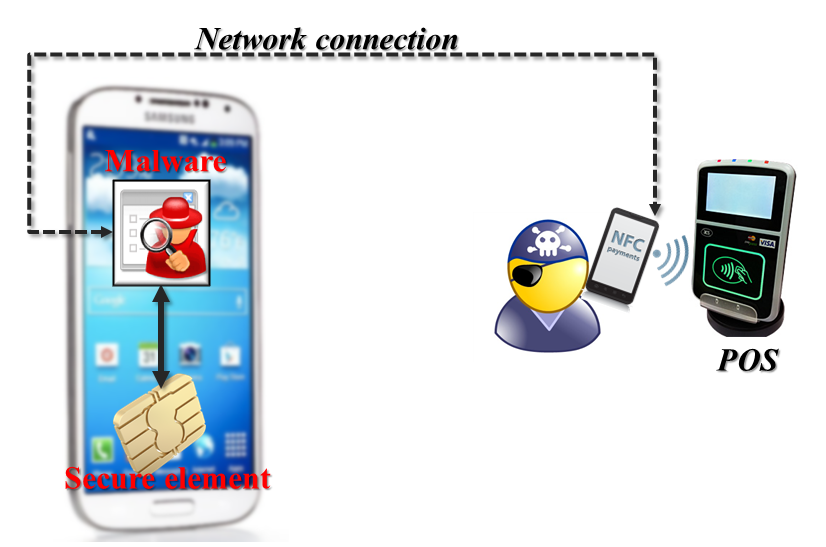
Consider a less ambitious attack that relies on merely interacting with the secure element, to simulate a payment operation. Legitimate transactions take place by having a point-of-sale terminal send commands to the secure element over NFC. What if malware resident on the mobile device emulated that behavior but then relayed the responses from SE to another phone controlled by the attacker? More specifically:

  • Attacker walks up to the cash-register and begins to pay for a purchase using NFC using his own Android phone.
  • But when the point-of-sale terminal sends a command to the attacker phone, these are not routed to the secure element. Instead they are delivered to a special application running on the phone via host-card emulation. (It used to be that rooted devices running Cyanogenmod were required for this; starting with Kitkat it can be implemented on stock Android.)
  • This special application receives the command from the merchant terminal, then forwards it over the Internet to malware running on the victim’s device
  • That malware uses its root privileges to deliver the command to the secure element– necessary since Android only allows whitelisted applications to interface with SE.
  • When SE responds to the command, the response is likewise ferried over the same network connection back to the attacker, who promptly forwards it over NFC back to the point-of-sale terminal.

In effect the POS at the store is communicating with the victim phone, although these communications are taking a rather circuitous route through the Internet instead of simply traversing a short distance as usual with NFC.

Remote-relay attack from SE-equipped phone to merchant POS

Relay attack visualized


Implications for security model

What has the attacker achieved after all this effort? If payments implemented in hardware secure element were still susceptible to attacks from local malware in this fashion, it would violate our earlier assumption that the Android operating system does not have to be trusted. With remote relay attacks, Android malware could still conduct unauthorized payments by channeling SE communications to a remote attacker, allowing them to make purchases without physical possession of the targeted device. That would also reduce one of the main advantages of SE-based implementation over HCE. Clearly an HCE solution implemented in pure software has no defense against root-level malware; secret keys can be permanently extracted out of application memory. In that sense HCE is an easier target. You only need to run the exploit once to extract keys; it is not necessary to maintain persistence on the victim device to continue making fraudulent payments. But relay-attack implies that even when cryptographic keys are safely tucked away in a dedicated chip, they can be exploited remotely as long as the phone itself is reachable over the network.

Are such attacks feasible? At first two practical limitations jump out, both related to network connectivity in real-time. (“Real-time” is the operative phrase. EMV protocols involve challenge/response interaction with the terminal. It is not possible to collect and store all possible responses from the SE ahead of time before starting a new transaction.) That presents the first obstacle for successful exploitation: the victim device may not be reachable at all. If the legitimate user turns off their phone or wanders outside the coverage area, it is not possible to relay commands in real-time this way. Likewise the attacker also needs connectivity for their own device, although that part is easier to control by carefully choosing the retail location where the scam will carried out. Second problem is around the quality of the connection measured in bandwidth and latency. Bandwidth turns out not to be a problem since the amount of data exchanged is on the order of hundreds of bytes. Latency is a bigger concern. There are timeouts at different levels of the protocol stack, from the raw NFC exchange– which also has an option to request an extension to buy more time– to application logic in the NFC reader. For example MasterCard recommends a limit of around 200 milliseconds for completing the entire tap & pay transaction, and that includes multiple command/response round-trips. (Granted some of the expected responses are predictable and do not require relaying the command all the way to the remote SE to find out the required answer.) But suppose the stars line up and our enterprising attacker does indeed have access to a high-bandwidth, low-latency connection to the victim device controlled by his malware? Or perhaps the point-of-sale terminal is very lenient and does not mind waiting longer than expected to complete the transaction?

It turns out there is a more fundamental defense available for preventing relay attacks against secure element applications: interface detection. That will be the topic of the final post in this series.

[continue to part VI]

CP

When defense-in-depth failed: Heartbleed

A good benchmark of foresight in security is not avoiding vulnerabilities but having defense-in-depth measures in place to minimize the impact from unforeseen flaws. (Or failing that, one can quibble over the consolation prize of who was fastest to respond and deploy patches.) In the recent case of the openssl Heartbleed vulnerability, such success stories were mostly absent. Few seemed to speak up and shrug-off the vulnerability by saying, in effect, that they were immune because of some brilliant feature implemented years ago as a precaution, without an inkling of specific details around the exact vulnerability it would insure against one day. Given how pervasive openssl is not just on web servers, but even traditional client-side software including mobile operating systems, most of the chuckling seemed to come from the Microsoft camp, continuing their “hat trick” of having steered clear of three epic SSL bugs in 2014: “goto fail” compliments of Apple, GnuTLS certificate validation and now Heartbleed.

Everyone else appeared to be in the same boat: catastrophic failure, caused by a straightforward implementation bug. Nothing fancy, no subtle ROP/ASLR-bypass techniques required to exploit it, completely platform independent, no massive fuzzing runs required to spot the bug in the first place: in fact it was so “shallow” from source-code that two different groups found it almost simultaneously.

“Show me the exploit”

It did not take long before the armchair-philosophizing started around the exact nature of what could be done. There was no question that the vulnerability is exploitable trivially to extract chunks of memory from the affected system. (Thankfully avoiding a throwback to 1990s-style “that vulnerability is purely theoretical” argument.) Naturally speculation moved to the second-order effects: what exactly could be in those regions of memory graciously returned by openssl to anyone who asked. That sensitive information could be spilled was proved relatively easily. Typical of most popular security mistakes, Yahoo! reprised its usual role with a dramatic demonstration of how usernames and clear-text passwords for other people could be recovered from their servers. While damaging and no doubt a big deal for the users involved, these disclosures were relatively contained in scope. A lot more uncertainty lingered around whether private-keys for the SSL server could be extracted using Heartbleed.

Cloudflare

This is where some initially put their hopes in “accidental-mitigations,” fortunate properties of the heap manager that just might protect private-keys because of their position in memory relative to leaked regions. This is what CloudFlare initially argued, complete with pretty pictures of heap layouts to visualize the location of where keys are loaded in memory and how far they are from the regions allocated for buffers. For a change CloudFlare was also willing to put its money where its idle speculations. The company created a challenge website [note: certificate revoked]  running the vulnerable nginx/openssl version, inviting anyone to attempt extraction of SSL keys. That did not take very long. In less than a day multiple users had extracted the supposedly protected private-key. (Only much later it became clear why reality did not agree with CloudFlare’s theories. At least one code-path in openssl creates a temporary copy of a prime factor of the modulus– sufficient to factor it and recover private keys– and later frees it, returning that copy to the heap without zeroing it out. Interestingly this is also a poignant reminder of why it is important to properly clear out sensitive data from memory when it is no longer needed. openssl had a mechanism in place for doing precisely that, which happens to be skipped in this case.)

Akamai

A more interesting argument was advanced by the content-distribution network Akamai. [Full disclosure: this blogger’s current employer is an Akamai customer]  Akamai claimed that due to a custom memory-allocation scheme employed in their modified version of openssl, private-keys would be protected from Heartbleed attacks. Unlike the Cloudflare argument based on heap layouts, Akamai was not claiming this was a matter of luck. Instead we were told, it was a deliberate, intentional defense-in-depth feature intended to protect cryptographic keys:

We replace the OPENSSL_malloc call with our own secure_malloc. Our edge server software sets up two heaps. Whenever we’re allocating memory to hold an SSL private key, we use the special “secure heap.” When we’re allocating memory to process any other data, we use the “normal heap.”

The story may have ended there as that rare success story of security-by-design in the field… until Akamai decided to contribute this patch to the open-source project. Once other people started looking at the code, it became obvious that the modification did not work. Worse the culprit was an amateurish mistake, demonstrating a complete failure to understand how RSA private-key operations are implemented using the Chinese-remainder theorem (CRT) representation of keys. Akamai patch protected only some of the CRT components but not others which are still sufficient to recover the key. It did not help that aside from failing to achieve the stated security objective, the patch contained implementation errors and required multiple iterations to get working.

Key-isolation: old is new again

After the dust settled and benefit of hindsight kicked-in, much better ideas for improving the current situation were put forward. One example is emulating the privilege separation in SSH: create an out-of-process key agent that holds the private keys and exposes a “decryption oracle” without processing hostile input directly from incoming connections.

Strangely missing in action were vendors of hardware-security modules or HSMs. In one sense there is no need to invent any novel technology to better protect cryptographic keys. There is a tried-and-true approach commercially available since at least as far back as 1990: store keys in dedicated crypto hardware, never exposing them directly to the main application. SSL has been one of the markets targeted by HSM vendors, often rebranding their products as “SSL accelerators.”  These early attempts emphasized performance instead of security, trying to capitalize on perceived costs of SSL when server CPUs struggled to keep up with RSA private-key operations. But they  never made much inroads into that market, instead remaining confined to special purpose applications such as banking or certificate authorities. Heartbleed would have been the perfect backdrop for a customer case-study, highlighting a website that deployed HSMs and can now assert confidently that their private keys were not compromised– and unlike Akamai, this mythical website would have been correct.

CP

HCE vs embedded secure element: taking Android out of the TCB (part IV)

[continued from part III]

Continuing the security comparison between HCE and secure-element based NFC applications, this post expands on an earlier theme around attack-surface, focusing on one massive piece of vulnerable code: the Android operating system itself.

When root means game-over

Consider the following hypothetical: is it possible to build an EMV payment application that runs on Android and yet can resist attacks from a remote adversary who is running arbitrary code with root privileges? At first this seems theoretically impossible. Payments are authorized based on the possession of a cryptographic key only known to the legitimate card holder. The assumption is if you have possession of the key, by executing a protocol specified by EMV that calls for proving possession of that key without revealing it– you are authorized to spend the funds associated with that account. If our hypothetical adversary has achieved root privileges on the device, they have full access to memory and storage of every application running on that device. That includes the payment application wielding this secret. Even if that secret was protected by a PIN/passphrase (let’s suspend disbelief and assume users pick high-entropy secrets immune to guessing) that PIN/passphrase will be input via phone UI such as an on-screen keyboard at some point. Since we posit that our adversary is running with root privileges, she can watch this interaction and learn the passphrase. Alternatively she can simply wait until after the secret has been fully decrypted locally– necessary for the device to be able to perform the type of computations envisioned by EMV payment protocols– and capture it at that point. No secret managed completely by an Android application can be immune from an attacker with root privileges on that Android device. It’s only a matter of knowing when/where to look for that secret in the target application’s address space; this is security through obscurity at best.

SE difference

Unless of course, the secret is not directly available to the mobile application either. Enter hardware secure elements. If  secrets such as cryptographic keys are stored in the secure element and never available in the clear to the mobile application, even root-level compromise of Android does not help our adversary. The embedded secure element is its own mini-computer, with separate RAM, storage and embedded operating system with its own concept of access control. Being root on Android is meaningless to SE: it grants no special privileges. In much the same way that an HSM can isolate cryptographic keys by offering an interface to perform operations with the key without revealing the raw bits of the key, SE keeps Android at arms-length from secret material.

Safe provisioning

The astute reader might ask how these cryptographic secrets that enable payments reached the secure element in the first place. It is common for provisioning to take place over-the-air, as opposed to the much more impractical alternative of requiring physical presence, where the user must walk into a bank branch and present their phone. That implies that some bits are pushed over the network to the mobile application which relays them to the secure element. (Recall that the only direct network interface SE has access to is NFC which is only good over short distances. All other communication such as accessing the card-issuer API endpoint over the Internet must be pass through the host device.)

Does that create an opportunity for malware running with root privileges to capture the secret, for ever so briefly when it is passing through the Android application? Not if the provisioning system is properly designed. Recall that secure elements compliant with Global Platform standard are “personalized” with unique keys (colloquially known as card-manager keys) required to perform administrative operations. These keys are not known to the owner of the phone or even the operating system on the mobile device; they are managed by a third-party called “trusted services-manager” or TSM. When TSM is installing a payment application and configuring that application with its own set of secrets, the commands sent to the SE for performing those steps are encrypted. Global Platform specification defines a “secure messaging” protocol describing the exact steps for establishing an authenticated & encrypted link between TSM and secure element. This protocol, or more accurately series of protocols since there are multiple variants, is designed to ensure that even when TSM and SE are not in physical proximity, as in the case of provisioning a payment application over the Internet– the issuer can be assured that sensitive information such as payment keys are delivered only to the designated SE and not recoverable by anyone else. While it is true that the commands sent by TSM are visible to the host operating system, where they can be intercepted or even modified by our hypothetical adversary who has attained root privileges, the secure messaging protocol ensures that no useful information is learned by mounting such an attack.

Threat models: ideal vs as-implemented

So this is another fundamental difference between applications implemented in SE versus those relying on host-card emulation. For HCE applications, Android operating system is part of the trusted computing-base by necessity. Any vulnerability that allows defeating the isolation between different apps– such as local privilege escalation to root– is  game-over for scenarios using host-card emulation without a hardware secure element. By contrast, SE based applications can in principle survive attacks in this very stringent threat model, where we posit a remote adversary (eg one who does not have physical possession of the phone but is running her choice of code on the device) has attained root privileges.

“In principle” is the operative phrase. While Global Platform protects secrets en route the secure element, there is a preceding step not covered by GP: authenticating the card-holder. Suppose the consumer is asked to enter the username and password for their online bank account into the Android application to verify their identity and request provisioning from that bank. That design is blatantly  vulnerable to local malware on the device. Those bank account details could be captured and relayed to a remote attacker, who proceeds to repeat the exact same process on a device she controls, with the payment credentials being delivered to her secure element. She could even preempt the legitimate user, by provisioning first and instructing the malware to prevent the original card-holder from completing the task, lest the bank notice the anomaly of two different devices requesting cards in quick succession. Some form of out-of-band authentication is required to thwart this attack, such as logging into the bank website from a different machine to initiate the request. (Ironically calling the bank and answering questions will not work since the audio-stream from the phone is also available to the attacker.) But even in the basic scenario with weak provisioning, SE provides a useful guarantee: if the device is compromised by malware after payment credentials are provisioned, the credentials are safe.

There is one more subtle attack that does not rely on trying to extract secrets from the local device. Suppose the remote attacker with root privileges abandons their effort to extract secrets from SE but instead attempts to use the SE, exactly as it would have been invoked for a payment transaction? The next and final post in this series will look at how the integration of SE with NFC controller can frustrate such relay attacks, in stark contract from HCE applications which are necessarily vulnerable.

[continued]

CP


Lessons from LinkedIn Intro for product security teams

That was quick: the controversial LinkedIn Intro feature– which effectively performed a man-in-the-middle attack against user email on iOS devices– has been scrapped unceremoniously less than three months after its introduction. It was a quiet farewell to a feature announced with great fanfare in a blog-post trumpeting the impressive engineering feats involved: install LinkedIn as email proxy to intercept and capture user email, route all incoming messages to LinkedIn servers in the cloud all for the purpose of annotating them with LinkedIn profile information about recipients and deliver it back into the inbox. Amidst the predictable chorus of I-told-you-so and schadenfreude is a question that is rarely raised: Why did this feature ship at all in the first place? More importantly from the perspective of security professionals: what was the involvement of LinkedIn security team in its conception, design and implementation? What lessons can we draw from this debacle for avoiding reputational risk with ill-conceived features damaging user trust?

Much of what follows is qualified by the caveat that this blogger is not privy to the internal deliberations that may have taken place at LinkedIn around Intro. For that reason we can not distinguish between whether this is a failure in the process for security assurance (as such, entirely avoidable) or simply well thought-out business decision that simply proved incorrect hindsight.

Moving security upstream

In companies with an immature approach to information security, the bulk of the activity around managing risks appear towards the end of the product cycle. At that stage the product requirements have been already cast in stone, technical architecture well-defined, specifications written– to the extent that anyone writes specs in this day and age of agile methodologies– and even the bulk of the implementation is completed. Into this scene steps in our security engineer at the eleventh hour to conduct some type of sanity-check. It may range from a cursory high-level threat model to low-level code review or black-box testing. That work can be extremely valuable depending on the amount of time/skills invested in uncovering vulnerabilities. Yet the bigger problem remains: much of the security battle has already been won or lost based on decisions made long before a single line of code is written.  Such decisions are not expressed in localized code chunks that can be spotted by the security reviewer scrutinizing the final implementation of a finished product. Their implications cut across feature lines.

Beyond whack-a-mole

Consider the way web browsers were designed before IE7 and Chrome: massively complicated functionality– HTML rendering and JavaScript execution– subject to attacks by any website the user cared to visit, contained in a single process running with the full privileges of the user. If there was a memory corruption vulnerability anywhere in those millions of lines of code (guaranteed to be present statistically speaking), the attacker exploiting that gets full control of the user’s account– and often the entire machine, since everyone was running with administrator privileges anyway. There are two approaches to solving this problem. First one is what MSFT historically tried: throwing more security review time at the problem, trying to find one more buffer-overrun. While this is not entirely a game of playing whack-a-mole– a downward trend in bugs introduced vs. found can be achieves with enough resources– it does not solve the fundamental problem: memory corruption bugs are very likely to exist in complex software implemented in low-level languages. At some point diminishing returns kicks-in.

The major security innovation in IE8 and Chrome was the introduction of sandboxing: fundamentally changing the design of the web-browser to run the dangerous code in low-privileged processes, adding defense-in-depth to contain the fallout from successful exploitation of a vulnerability that somehow eluded all attempts to uncover it before shipping. This is a fundamental change to the design and architecture of the web browser. Unlike fixing the yet-another-buffer-overrun problem, it was not “discovered” by a security researcher staring at the code or running an automated fuzzer. Nor is it implemented by making a small, local change in the code base. It calls for significant modifications across the board– pieces of functionality that used to be reside locally in memory, now are managed by another process, subject to security restrictions around access. Because of far-reaching consequences, security features such as sandboxing must be carefully accounted for in the product plans from the beginning, as part of a fundamental design criteria (or even more difficult re-design exercise, in case of Internet Explorer, saddled with a legacy 10-year old architecture.)

Security and development lifecycle

Introduction of sandboxing in web browsers is one example of the more general pattern that security assurance has greater impact as it moves upstream in the development life-cycle. Instead of coming into evaluate and find flaws in an almost-finished product, security professionals participate in architecture and design phases. This also reduces costs for fixing issues: not only are some flaws easier to spot at the design level, they are also much cheaper to fix before any time has been wasted on writing code. There is no reason to stop at product design either: even before a project is formally kicked-off, security team can provide ad hoc consulting, give presentations on common security defects or develop reference implementations of core functionality such as authentication libraries to be incorporated into upcoming products. But the ultimate sign of maturity in risk-management is when security professional have a voice at the table when deciding what to ship. Incidentally having a vote is not the same as having veto power; risk management for information security is one of many perspectives for the business.  A healthy organization provides an avenue for the security team to flag dubious product ideas early in the process before they gain momentum and acquire the psychological attachment of sunk-costs.

Whither LinkedIn?

Returning to the problem of LinkedIn Intro, the two questions are:

  • Does LinkedIn culture give the security team an opportunity for voicing objections to reckless product ideas before they are fully baked?
  • Assuming the answer is yes, did the team try– if unsuccessfully– to kill Intro in an effort to save the company from much public ridicule and embarrassment down the line? If yes, the security assurance process has worked, the team has done its job and the failure rests with decision-makers who overruled their objections and green-lighted this boondoggle.

We do not know the answer. The public record only reflects that the LinkedIn security team attempted to defend Intro, even going so far as to point out that it was reviewed by iSEC Partners. (Curiously, iSec itself did not step forward to defend their client and their brilliant product idea.) But that does not necessarily imply unequivocal support. This would not be the first time that a security team is put in the awkward position of publicly trying to defend a questionable design they unsuccessfully lobbied to change before.

CP

HCE vs embedded secure element: attack surface (part III)

In this post we continue the security comparison of mobile NFC scenarios using dedicated hardware  (such as UICC or embedded SE on Android) against the same use-case implemented on vanilla Android application with host card-emulation. In both cases, there is sensitive information entrusted to the application such as credentials required to complete an EMV transaction. This time we will focus on  attack surface and amount of code exposure these sensitive secrets have against software attacks. Borrowing the definition from MSDN:

The attack surface of an app is the union of code, interfaces, services, protocols, and practices available to all users, with a strong focus on what is accessible to unauthenticated users.

Here again it is clear that a mobile application is at a distinct disadvantage because the application and the platform it is built on-top is feature rich with connectivity and sharing functionality. Looking at the typical inputs an Android application may process:

  • Inputs from the UI– relevant when the phone lands into the hands of an attacker who can now press any button or otherwise try to bypass some access control
  • Network connectivity. At a minimum the application will need Internet access to provision payment instruments and interface with a back-end system for retrieving activity data.
  • Inter-process communication mechanisms from other applications installed on the same device. In Android this means intents, listeners etc. that the application responds to.
  • Filesystem. If the application relies on any data stored on disk, it must
  • NFC, inevitably for an application relying on NFC as transport.

By contrast the typical secure element has only 2 interfaces:

  • Wired or contact. For an ordinary smart card or SIM, this would be the physical connection attached to the brass plate on the surface, which receives power and signals form the reader. In the case of secure elements on mobile devices, these are typically hard-wired to the host device. When the SE is removable– for example with UICC or micro-SD based designs– it is possible  to use an external card-reader to access this interface.
  • Contactless or NFC, same as before.

While these are the only direct input paths, in many cases there is indirect exposure to other channels. For example there is often a companion user-mode application running on the host Android OS, helping load new application on the SE and configuring them. Such provisioning is often done over-the-air with the Android app simply shuttling data back-and-forth between its network connection and the contact interface of the SE.  This could be  straight through the base-band processor, bypassing the main Android OS or a standard TCP/IP connection. Either way an indirect channel exists where inputs from a potentially hostile network reach the secure element.

This is where a different property of the SE comes in: it is a locked-down environment, where routine operations– such as installing applications or even listing the existing ones– requires authentication with keys that are commonly not available to the owner of the phone. (They are instead held by the trusted-services manager or TSM entity responsible for card management.) This stands in contrast with an ordinary iPhone or Android where the user is free to install applications. Just in case the user makes a bad decision, each app has to worry about other malicious apps trying to subvert their security model and access private data associated with that application. By contrast code running on SE is tightly controlled and much of the complex functionality for managing the introduction of new code is not even accessible to ordinary attackers without possession of diversified keys unique to that particular SE.

Similarly in common secure element designs based on Global Platform, there is no concept of an all-powerful root/administrator with full access to the system. For example even the TSM armed with necessary keys can not read out the contents of EEPROM at will. This means that once an application is installed and secret material provisioned to that application (such as cryptographic keys for EMV chip & PIN payments) even the TSM has no way to read back those secrets from the card if the application does not allow it. One could imagine that TSM can try a different tactic: replace the legitimate application with a back-doored version designed to extract the secrets previously provisioned. But there is no concept of  “upgrade” in Global Platform: one can only delete an existing application instance– which also removes all of its associated data including the secrets– and install a new one. Barring vulnerabilities in the platform responsible for isolating multiple apps from each other (eg Java Card applet firewall) provisioned secrets are forward-secure. By contrast the author of ordinary mobile apps always have the option of upgrading their code in-place without losing data, creating another attack vector when code-signing process is subverted.

A similar risk applies on larger scale for the mobile operating system. Google effectively has root on Android devices, similarly for Apple on iOS and MSFT on Windows Phone. Often times the handset manufacturer and even wireless carrier subsidizing the device add their own apps running with system privileges, including remote update capabilities. These parties are the closest to a TSM incarnation (minus the “trusted” part) except they can snoop on any secret managed by any application on the device. Again the threat here is not that Google, Samsung or Verizon might go rogue, shipping malicious updates designed to steal information. The risk is that the platform includes this capability by-design, creating additional attack surface that others can attempt to exploit.

Finally there is the matter of sheer code-size: SE resources are highly limited, with EEPROM/flash storage on the order of 100KB– that includes code and data for all applications. That does not leave a lot of room for frivolous functionality, rarely used options or speculative features. This is a case where resource constraints help security by reducing total amount of code, and indirectly, opportunities for introducing bugs.

[continued]

CP


HCE vs embedded secure element: tamper resistance (part II)

Tamper-resistance

Tamper resistance refers to the ability of a system to resist attacks against its physical incarnation when in the hands of an attacker. From the perspective of the threat model, a key point is that we assume an adversary has gained physical access to the gadget. Duration of access and final condition of the device may vary depending on attack scenario:

  • Temporary vs. permanent. In the first case, the user may have temporarily left their device unattended in a hotel room, giving the attacker an opportunity to extract cryptographic keys or implant a backdoor. But the time allotted for accomplishing that task is limited. The adversary must ultimately return the device– or its functional clone– to avoid raising suspicion. In the second case, the device may have been lost or otherwise captured with no intention of being returned to its rightful owner, granting the attacker unlimited time to work.
  • Destructive vs. stealthy: This is mainly a concern for attackers who want to avoid detection, when returning the device in a completely mangled or damaged state will not do. This may either limit the range of attacks possible or it may require an elaborate substitution scheme following a successful attack. For example, if the goal is extracting secret keys from a smart-card, it may be acceptable to destroy the card in the process, as long as an identical-looking card can be created to behave functionally when it is provisioned with  same secret keys extracted out of the original. The user will not be any wiser.

Lasers and spectrometers

Attacks are commonly grouped into three categories, using the terminology from Tunstall et al:

  1. Non-invasive. These approaches attempt to extract information without modifying the card. For example simply measuring the time taken to complete various operations with a high-precision timer or introducing faults by varying the power-supply (without frying the chip) do not cause permanent damage to the card but may result in disclosure of information that was supposed to be contained in the card.
  2. Semi-invasive. Moving one step closer to the hardware, in this category are attacks that require the surface of the chip to be exposed. This includes passively monitoring electro-magnetic emanations from the chip as well as introducing temporary glitches, for example using precisely aimed laser pulses.
  3. Invasive. In the final group are attacks directly targeting the internal architecture of the chip, using sophisticated lab equipment. For example it may involve placing probes to monitor bus lines or even creating new wiring that alters the logic.

Comparison to off-the-shelf mobile hardware

Standard mobile device architecture does not even attempt at resisting physical attacks. For example reading any secrets in storage is as easy as removing the flash and using a standard connector to mount the same disk from another device. (Incidentally, disk encryption does little to hinder data recovery: Android disk encryption keys are derived from a user-chosen secret subject to brute-forcing.**) By contrast extracting data stored in the EEPROM or flash storage of a modern secure element– while not impossible by any means– requires significantly more work and dedicated laboratory equipment.

Similarly there is no attempt to reduce side-channel emissions on a standard ARM CPU such as shielding to reduce emanations or hide power consumption patterns. As simple experiments demonstrate, there is no reason to zap anything with lasers or carry out elaborate attacks to reverse engineer the circuitry: an ARM processor radiates so much in the way of EF radiation that meaningful signals can be picked up without even opening the case to reveal information about cryptographic operations. By contrast resistance to physical attacks are core part of the Common Criteria (CC) and FIPS 140-2 verification standards around cryptographic hardware. For example the SmartMX embedded secure element present in most NFC-enabled Android devices is part of a family of processors with EAL5+ level assurance according to CC.

Bottom line: for the purposes of resisting hardware attacks when the device lands in the hands of an attacker, there is no contest between an application implemented storing secrets on the main Android systems– such as a payment application using HCE– versus one implemented on dedicated cryptographic hardware such as the embedded secure element.

[continued]

CP

**  Android made matters worse with a design blunder: it forces the disk-encryption secret to be identical to the screen-unlock one. In other words that pattern/PIN/passphrase used to unlock the screen is the only secret input to a “slow” key-generation scheme that outputs the disk encryption key. Because unlocking the screen is a very common operation, this all but guarantees that a low-entropy, easily brute-forced secret will be used. This may have been a usability trade-off based on the assumption that asking users to juggle two different secrets– one only entered during boot and one used frequently for screen unlock– is too much.