CVV3: Demystifying credit card verification (part 2)

Completing an earlier post where we discussed CVV1 and CVV2, this second part looks at CVV3 or colloquially “dynamic CVV.”

One of the obvious security limitations of CVV1 and CVV2 is that they are constant for the life of a particular payment instrument. Because every transaction involves revealing these “secrets” to anther party, namely the merchant where the card-holder is making a payment, the odds are strongly against CVV1/CVV2 remaining secret for a very long time. Indeed card-holders have parted with their CVV via an array of impressive attack vectors over the years: from crude devices masquerading as fake card readers that skim entire magnetic stripes, to phishing attacks that brazenly ask unsuspecting users to input their card number CVV2 and plain incompetent ecommerce merchants that manage to get their entire customer database 0wned. PCI standards try to improve the situation by imposing restrictions against cavalier handling of card data– for example CVV2 can not be stored permanently, only used for authorizing the transaction in real time. But such measures are similar to devising incremental improvements for managing passwords, without fundamentally altering the limitations of a password based approach. Much of that is a limitation of the plastic card technology: the magnetic stripe is considered essentially a static, passive container for small amount of data; there are no “smarts” anywhere in the card.

(** Strictly speaking this is no longer true: several companies have introduced programmable magnetic stripes, where the information can be changed by a chip residing on the card. Similarly the printed CVV2 can be replaced by an LCD screen that flashes a code varying over time. Such cards have never seen widespread deployment.)

This is where EMV which stands for EuroPay, MasterCard and Visa enters into the picture. EMV defines a suite of protocols employing strong cryptography, where the card is not simply a glorified low-density storage medium but contains a chip capable of performing complex payment protocols including the series informally known as chip & PIN. Unfortunately as every engineer who ever proposed a new protocol soon realizes, breaking from the past is not that easy. Migration to EMV suite of protocols presents a formidable triad of challenges: nudge issuing banks to mail out new cards to their customers, convince merchants to replace their point-of-sale terminals with newer models that accept these cards,  and finally ensure that the payment processors those merchants connect to are aware of the improved protocols. Omit any of these steps and all the fraud risks inherent in a static secret return: this is what happens when an American customer travels overseas and hands over an old-fashioned magnetic stripe card to a merchant set up to process a chip & PIN transaction.

Backwards compatibility is a very appealing feature. Its promise is upgrading only part of the system at lower total cost, in such a way that the change remains transparent to other “legacy” components in place, while still attaining some of the benefits realized from a full upgrade. In the case of contactless payments, this takes the form of a “profile” of the original protocol that creates the appearance of having swiped an old-fashioned magnetic stripe card. Called mag-stripe profile appropriately enough, this variant of contactless payment protocols are distinguished by producing output that looks very similar to track-data obtained from plain plastic cards.

The main difference is a challenge-response step added to dynamically generate a different CVV value for each transaction. Instead of containing a fixed CVV1 for every swipe, this scheme instead computes the integrity check using cryptographic keys stored on the chip, as a function of card data as well as a challenge issued by the payment terminal. This constantly changing value is the CVV3 and it takes the place of CVV1 on the emulated track-data resulting from the transaction. (“Emulated” because it is assembled by the terminal from multiple individual card responses sent over NFC during a contactless payment.)

Backwards compatibility is served by keeping the remainder of the transaction identical, once the protocol exchange between card and NFC reader is complete. In that sense the changes required are minimal compared to full chip & PIN implementation. NFC reader is fully aware of the new protocol but beyond that point, there is only track-data returned to the point-of-sale terminal. This information is in exactly the same format as it appears on classic magnetic stripe cards. It is processed in the same manner, passed on to the payment processor for verification, who in turn will typically forward it to the issuer for final authorization. This level compatibility is what allows adding NFC-payments as bolt-on option to existing payment terminals configured for swipe transactions: at some level of abstraction, the new payment flow over NFC using the dynamic CVV3 merges with the existing flow for processing magnetic stripes with CVV1. That interchangeability has surprising security consequences, which will be explored in a subsequent post.

CP
NFC in US passports– verifying the random ID

One final post to conclude the series on reading data from recent US passports with an Android phone. In this post, we will look at the way the “unique ID” or UID emitted by the chip varies each time the chip is brought into the presence of an RF field.

Every NFC tag has a unique identifier that is burnt-in at the factory and constant throughout the lifetime of the hardware. Contrary to mistaken impressions, this identifier is intended for anti-collision eg distinguishing multiple tags when they are all in the presence of an RF field, rather than security applications to authenticate the tag. Devices such as ProxMark can forge an arbitrary UID. There are even off-the-shelf counterfeit MIFARE tags that allow overwriting the UID while still preserving the desired form factor.

While the UID falls short of being a reliable way to authenticate a particular tag, it is still problematic for privacy because it constitutes a persistent identifier that can be used for tracking. Each time the tag is scanned, it emits a constant value that permit correlating with previous times when that tag was scanned– this is true regardless of the higher level transaction. For example even a blank, unused tag completely void of data emits a UID. (Introducing application level protocols on top of the basic NFC transport can only make privacy worse: for example the standard contactless payment protocols will transmit stable identifiers such as the credit card number that are far less privacy-friendly, because unlike UID they can be correlated to many existing databases.)

This is where random UIDs enter into the picture. Instead of emitting the same UID, the hardware can be configured to generate a different one on each activation eg each time the tag is brought into the range of an RF field. A specific range of four-byte UIDs starting with 0x08 is reserved to designate such UID, and to disambiguate that from fixed UID assignments. The US passport is an example of hardware using this feature.

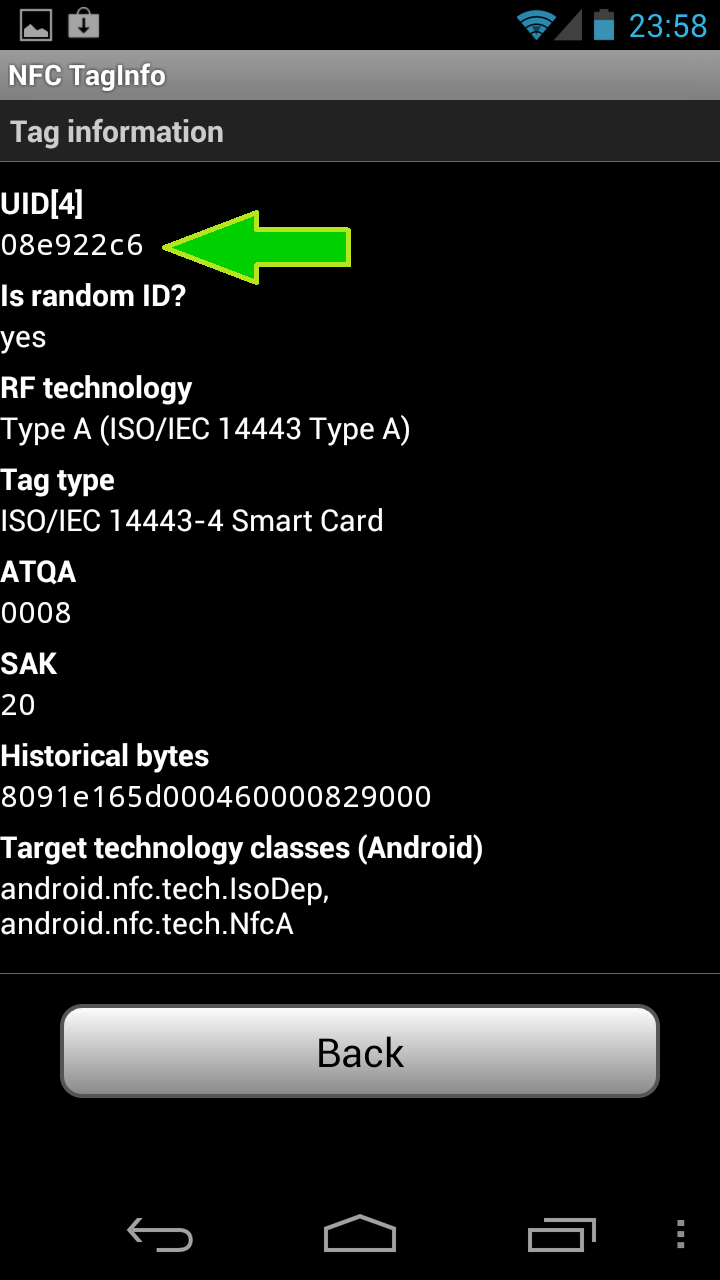
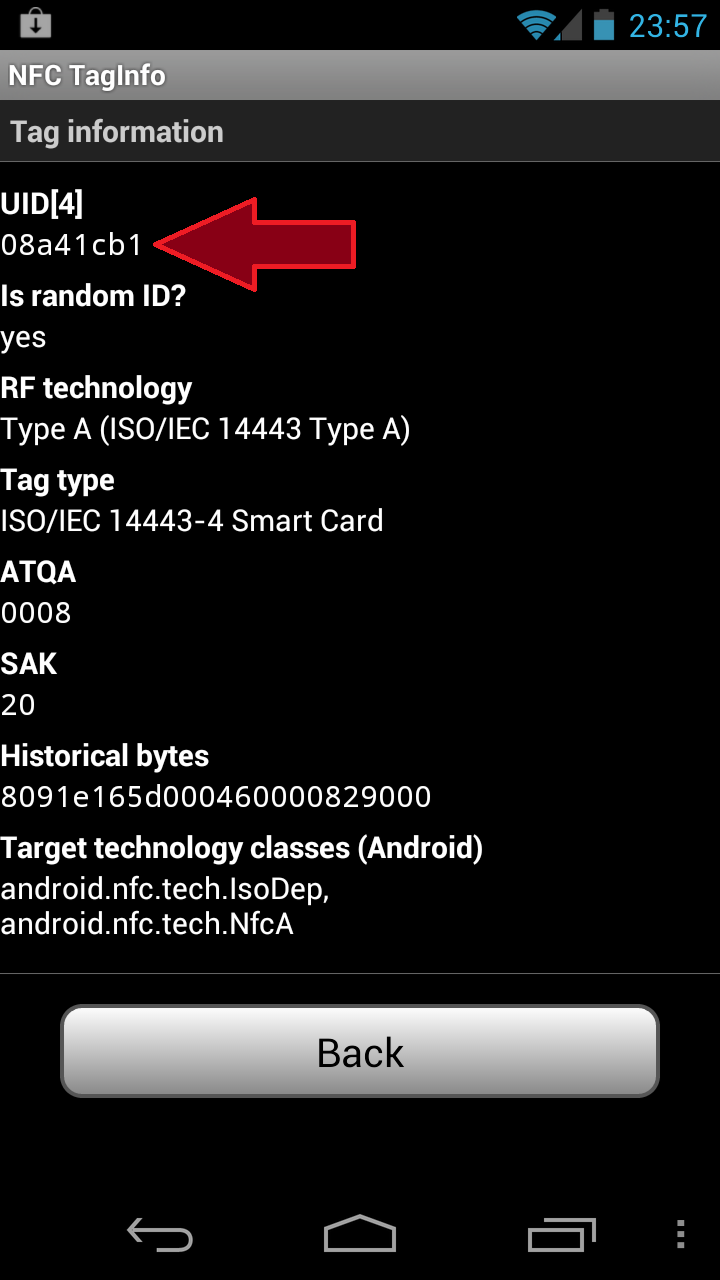
Going back to our NFC TagInfo application, scanning the same passport twice– removing it from the RF field of the phone between the two scans– shows the UID indeed changing:


CP


Reading the US passport with Android– basic access control

Following up on the first part of the post, NFC TagInfo can be used to read the contents of a US passport issued after 2007, after inputting the correct keys. This is done by selecting “Setup keys” option from the menu, then scrolling down to the ePassport/MRTD section. Only three fields are required: the nine-digit passport number, date of birth and expiration date on the passport.

This is part of the basic access control mechanism, intended to limit read access to the document. These three fields can be scanned from the fourth page of the passport, where they are printed in an OCR-friendly font and marked by chevrons. The idea is that access over NFC to the electronically stored data is only possible after having physically scanned one of the interior pages– in other words, no easy pick-pocketing by bumping someone with an NFC reader. (There are several design flaws with BAC, causing it to fall short of that goal, including the predictability of these numbers as well as more subtle cryptographic attacks against the protocol.)

After entering this information, it will be necessary to backtrack and re-scan the passport, as the application will not automatically re-scan with new key set. This time the scan will take a couple of seconds due to the amount of data transferred– the potential maximum 424 Kbps bandwidth for NFC is not even approached doing bulk transfers from the type of chips with limited computing power found in the passports. Afterwards the application will be able to display the encoded data, such as the photograph, as well as additional fields not present in the MRTD data such as issue date and country of birth.

[continued]

CP

Reading the US passport using Android — overview

Seems like it was only yesterday that the privacy community was up in arms about the perceived evils of the new US passport, equipped with RFID chip. There was that confrontation at the 2005 Computers, Freedom & Privacy conference in Seattle between a State Dept representative and Barry Steinhardt of the ACLU on the maximum reading range for RFID passports. From the tin-foil wrapper suggestions (having inspired a cottage industry at this point, also thanks to contactless payments) to Hollywood-esque scenarios of explosives rigged to go off when a particular individual walks by with their RFID passport, conspiracy theories carried the day.

Couple of years later with the new passports having become standard, it is possible to experiment directly with the technology. No special gadgets required: any Android phone with an NFC controller will do. That includes a wide-range of models from the purist “Google experience device” Nexus S to Samsung’s flagship Galaxy S3.

While there are many applications for scanning NFC tags, NFC TagInfo from NFC Research Lab stands out fpr having built-in logic for recogizing the data layout for several common types of cards, including passports.

Tapping the passport against the phone will not automatically bring up the application, as it does not contain any NDEF tags that Android applications typically use to configure auto-launch. Instead we have to start NFC TagInfo and then scan the passport. This will bring up an overview of the tag structure:

This screen already tells us a bunch of things:

1. There is an NFC chip in the passport. Near Field Communication is a type of RFID, operating at the 13.56 Mhz frequency. This is the only type of RFID that Android devices support. The more common RFID transponders such as garage door openers and key-fobs operate at a different frequency and can not be detected by the phone, because its radio does not operate at that frequency.

2. More specifically the NFC tag is an ISO 14443 smart-card, which Android also calls IsoDep technology. This is also how identification cards such as US government PIV card or contactless credit cards appear to the system.

3. “MRTD” stands for Machine Readable Travel Document, a reference to the international standard for encoding information about individuals for use in cross-border travel in a smartcard.

Clicking on that gray button is when things getting interesting, because the application will try– and most likely, fail– to access the contents of that MRTD. It will fail because the cryptographic keys required to access the data are initially missing:

This is where one of the properties of the MRTD protocol comes into play: decrypting contents of the passport requires cryptographic keys, which are derived from information printed on the passport itself. By supplying this information to the Android app, it is possible to get past this error. This is exposed via menu / “set up access keys” option.

[continued in part II]

CP

CVV1, CVV2, CVV3: Demystifying credit card data (1/2)

[This is a series of posts dedicated to describing the card-validation code (CVC) or card-validation value (CVV) for credit cards.]

Swiping a credit card through a magnetic stripe reader is perhaps the most common way of using a plastic card for payments. At the implementation view, involves reading the data encoded in the magnetic stripe on the back. In a pinch when there are no point-of-sale terminals present, getting an imprint of the card by pressing a carbon paper over it will do. When the merchant and card-holder are not in the same place,  the purchase is instead conducted by relaying the card number, expiration date, perhaps the billing address and an additional number printed on the card dubbed CVV2. More fashionable recently are contactless payments, where the card is tapped against a reader, as in Mastercard Paypass, Visa PayWave or Discover Zip. Each of these involves a slightly different protocol, relying on different characteristics of the card data to authenticate the card.

Swipe transaction are perhaps easiest to describe. The data encoded on the magnetic stripe is static, formatted according to ISO7813 in three tracks, with the third one typically unused. One of the fields in this track layout is the Card Validation Code (CVC) or CVC1. which serves as a cryptographic integrity check on the track contents. Much like a message authentication code, the CVC simplifies the process of authenticating track data when it is received by the issuing bank. It also prevents easy fabrication of credit cards: while track data is relatively predictable given the card number, expiration date and other fields, CVC1 does not have any predictable pattern that allows derivation from the other pieces.

CVC2 serves a similar purpoes but  is used in conjunction with card-not-present or “CNP” transactions such as ecommerce when the user types card information into a web browser.  While CVC1 is encoded in the magnetic stripe, CVC2 is only printed on the card itself– three-digits on the back under the magnetic stripe for Visa, Mastercard and Discover, and four-digits on the front for American Express. (The extra digit can be viewed as balancing out the fact that AmEx cards have 15 digits, one less than other major brands.) PCI standards impose stringent constraints on handling of CVC2. For example: while card numbers, expiration date and billing address can be saved for future use to simplify later transactions, CVC2 can not be stored by the merchant. It is only intended for authenticating the card owner during the purchase.

CVC2 and CVC1 are by design incompatible. It is not possible to use the CVC1 for making a purchase online, or encode CVC2 into a magnetic stripe for a successful swipe transaction. This has important ramifications on managing risks due to theft of payment information. It effectively creates a “firewall” between virtual and in-store fraud. Suppose a waiter has taken to swiping all customer credit cards through his very own mag-stripe reader to save a copy of the track data. The resulting cache of contraband information can be used to forge additional cards and used to make in-store payments compliments of unsuspecting diners. But unless our enterprising waiter also remembered to write down or photograph the CVC2 from those cards, they can not be used for any online purchase where the merchant validates CVC2. (Surprisingly some leading retailers including Amazon do not require CVC2, so this turns out not to be major impediment for the aspiring criminal.) Going in the other direction, when yet another website processing credit cards experiences a data breach, the spoils from this stunt can be used for additional online/mail-order/phone-order transactions. But they are not useful for minting actual plastic cards with valid magnetic stripe to use at an old-fashioned bricks-and-mortar store, due to the absence of CVC1.

Updated: 12.18.13 to correct CVC1 / CVC2 mix-up in last paragraph

[continued]

CP

Unanswered questions about the Flame certificate forgery (2/2)

Second question: why bother with MD5 collision in the first place?

As explained in the SummerCon presentation, this particular forgery depended on exquisite timing. First the expiration date of the certificate is exactly one year from the moment it issued, measured in seconds. Second, the serial number of the certificate issued by the TS licensing server is a function of two semi-predictable variables:

  • Number of other certificates issued before
  • Current time, in millisecond resolution

This poses quite a challenge for an attacker seeking to exploit a collision against MD5. Recall that the attack depends on crafting two certificates with identical hash– one is the certificate that the attacker predicts the licensing server will issue, the second one is the certificate that the attacker actually wants to obtain. Ability to find collisions in MD5 ensures that the signature on the first one is as good as a signature on the second one. But “predict” is the operative keyword here: after all it is up to the issuing authority to decide on the serial number and expiration date on the certificate that will be issued. Randomly chosen serial numbers would have trivially defeated the attack. (In fact this is such a good idea that randomization is required for so-called extended validation class of certificates that breathed new life into the defunct CA business model by allowing companies a lot more money to perform the same basic due-diligence they should have performed for every SSL certificate.) Instead the licensing server used current time and an incrementing counter to generate the serial number.

That is a lucky break for the attacker: guess the values correctly when crafting the collision, and the licensing server has unwittingly issued a code-signing certificate made out in the name of MSFT. Making life easier is the ability to do dry-runs of the attack, acquiring  licenses freely to observe the counter and current “time” according to the server: TS license server will happily issue “licenses” to any enterprise user in a certain Active Directory group, eg every employee of the company that has a valid business reason to access Windows server. But even with this advantage, it is a fragile process because it requires making projections about the variables above, namely:

  • How many other users will have obtained a license between now and when the collision is going to be submitted.
  • Exactly what time– down to the millisecond– that collision will be processed. Note this is not when the attacker submits the request to the licensing server; it’s when the server gets around to issuing the certificate. All types of latency, from simple network jitter, to OS scheduling delays could throw this off.

The first one is easy to work around: plan the attack over a weekend or official holiday, and perhaps at a time of day when few legitimate users are going to be requesting licenses to interfere with the attack. Assuming long term persistence on the enterprise network, one can observe the fluctuation in demand over time to spot such opportunities. A different strategy is to target an organization where the TS licensing server is idle by design– perhaps it has just been set up but is not yet activated, or it is being decommissioned in favor of a different licensing model. In this case the assumption is that the creators of Flame have resources to compromise lots of different organizations, so they can pick one with the right TS licensing setup.) In all cases, timing the attack to take place against an idle server can partially help with the second problem as well– if the server is only responding to the attacker, there is no concern about high load on the server leading to variable processing times. But the jury is out on whether milli-second accuracy can be obtained this way, so the attacker may still have to try multiple times. As a comparison point: even with a perfectly sequential serial ID and one-second time resolution, the forgery attack from 2008 required several tries.

The other side of the equation is the cost for each MD5 collision– this is the computational resources “wasted” as a result of guessing incorrectly. Latest estimates put this on the order of $10K-$100K per collision given publicly known techniques. It is likely that the Flame authors had access to novel cryptanalytic attacks lowering that cost, in addition to large amounts of computing power that might wash it away altogether. (As economists like to point out, CPU cycles are a non-replenishable resource. Once the upfront investment in a couple million servers is paid for, one might as well put them to use spinning on a problem.)

Another option is to mess with the licensing server’s notion of “time.” In most modern systems including Windows, the current clock is obtained from the network using a protocol such as NTP. If the Flame authors had access to exploits against the time synchronization scheme, they could “roll-back” the time to try again after each failed attempt with same timestamp. But this will not necessarily reduce the number of collisions required, since the number of issued certificates still increments regardless of success/fail, requiring a different collision to pair up with the expected serial number the CA will choose.

So far this discussion has only considered attacks that treat the licensing server as a black box– attacker interactions are restricted to submitting seemingly-valid license requests to the server and perhaps attacking its surrounding environment, such as disrupting clock synchronization. What they are not doing is outright break into that machine, exercise the signing capability directly on any chosen message or export the private key for future use. Why? Licensing servers are not a particularly sensitive/critical part of infrastructure. They are a regular Windows server, configured in a specific role. They are not specially hardened for better security or closely monitored for any sign of trouble. (After all the raison d’etre of the system is to guard MSFT revenue source, it has no intrinsic value to the enterprise.) Few enterprises use hardware security modules or other key-management techniques.

In addition to maintaining long-term presence in the enterprise network, it is also a safe bet that the Flame creators have access to a significant collection of vulnerabilities, both public and zero-day. Why would they not go after the target directly by compromising the licensing server? Recall that due to the flawed setup of the MSFT trust chain, any organization anywhere in the world operating a TS licensing server will do. In the highly unlikely event that the first enterprise they tried has a clue about security and runs bullet-proof Windows servers, the attackers need only move on to a different one. Surely some enterprise somewhere in the world is running a vulnerable licensing server ripe for the extraction of private keys? Armed with the key, the attackers need not waste any time trying to find MD5 collisions, they can issue the certificate directly. (The conspiratorially minded could argue this is exactly what happened, with the additional twist that a single MD5 collision was chosen *after the fact* to create the appearance that it was an interactive attack. This has the nice property of providing misdirection: actual timestamp on the certificate with colliding hash is no longer meaningful. It could have been back- or forward-dated to the point that trying to mine the logs from the CA during the alleged incident turns up noise.)

Finally there is the question of disclosing offensive capabilities. By attacking the licensing server directly, attackers risk burning a 0-day in case they are found out. (In the worst case scenario– more likely is that the server has known unpatched vulnerabilities with readily available weaponized exploits.) This is not exactly the end of the world. Stuxnet contained multiple 0-days and the authors presumably took into calculation the possibility that one day the malware samples will be reverse engineered. Not to mention that thanks to the likes of VUPEN, everyone and their uncle has access to Windows zero-days these days. Finding one being used in the wild might prompt an out-of-band patch from MSFT and some temporary indignation, but then everyone moves on.

Using an MD5 collision and embedding such a certificate in Flame on the other hand reveals an entirely capability: access to novel cryptographic techniques that are unknown in the civilian world. For an organization interested in trying to hide its capabilities, this is more revealing than the loss of a couple of Windows zero-days that could have blended into the background-noise of vulnerability research.

CP

Unanswered questions about the Flame certificate forgery (1/2)

1. Which enterprise was it?

The authors of Flame exploited a series of design flaws in the way MSFT operated terminal services licensing to obtain a code-signing certificate impersonating MSFT. This step involved interacting with some TS licensing server that was already setup to issue these licenses, which also double as code-signing certificate due to a blatant violation of least-privilege principle. Typically such licensing servers are operated by large enterprises, to simplify the problem of granting licenses to their users to connect to Windows server.

That raises an obvious question: which organization was it? While each licensing server receives a certificate with the same non-descript name Microsoft LSRA PA (that does not in fact identify the organization it belongs to, in yet another example of bad design)  they each have unique signing keys. As long as MSFT was keeping logs for the subordinate CA certificates issued, it is possible to identify conclusively which enterprise the forged certificate chains up through. So far MSFT has not publicly named the organization, nor have the implicated parties come forward of their own accord. It is entirely plausible that the organization did not realize it was their TS licensing infrastructure used to facilitate the Flame attack. This is similar to the pair of semi-conductor firms that had to be alerted their signatures were found on Stuxnet— how many organizations proactively checked their own CA against the forged Flame certificate chain?  But it is equally likely that MSFT or perhaps a law-enforcement agency would have reached out by now (keeping in mind this could be an organization anywhere in the world) and let these folks know they were the unlucky ones. So far this appears to be handled quietly, perhaps to protect the “guilty”– for most enterprises, having experienced a security breach is something to be swept under the rug. This is unfortunate, because it would have been possible to infer something about the modus operandi of the Flame creators based on why they picked that organization. That brings us to the second question.

[continued]

CP

Taking security seriously, while failing spectacularly at it

It’s become nearly impossible to state “we take security [of our users] seriously” with a straight face.

This week witnessed three different companies suffer three unrelated incidents (two of them sharing the same underlying root cause) and all of them resorting to the same damage control cliches.

Here is the MSFT mea culpa on the MD5 collision debacle covered earlier on this blog:

“Microsoft takes the security of its customers seriously”

Here is LinkedIn, responding to 6.5M unsalted password hashes floating around– as an aside, nothing like starting the day discovering your own password hash in a contraband file shared by colleagues before receiving a data breach notification from the clueless web site in question:

“We take the security of our members very seriously.”

Here is the online dating site eHarmony spinning the leak of 1.5 million passwords:

“The security of our customers’ information is extremely important to us, and we do not take this situation lightly.”

With companies taking security so seriously, attackers hardly need anyone to take a more light-hearted approach. One can imagine the Joker asking: “Why so serious?”

It is difficult to know from the outside how these vulnerabilities came about. (Full disclosure: the author is ex-MSFT employee,  but was not involved in terminal services and possesses no information about the incident beyond what is available from public sources.) Were they unknown to the organization? Is that because that aspect of the system was never reviewed by qualified personnel? Or was it missed because the reviewers assumed this was an acceptable solution? Or perhaps the issue was properly flagged by the security team but postponed/neglected by an engineering organization single-mindedly focused on schedule? It is safe to say there will be a post-mortem at MSFT. If LinkedIn and eHarmony have a culture of accountability and learning from mistakes, perhaps they will also conduct their own internal investigations. But the useful information and frank conclusions reached in such exercises rarely leave the safe confines of the company– and that is assuming the leadership can resist the temptation to turn that post-mortem into an exercise in whitewashing.

So we can only draw conclusions based on public information, without the benefit of mitigating circumstances to absolve the gift. And these conclusions are not flattering for any of the companies involved.

LinkedIn and Harmony committed a major design flaw in storing passwords using unsalted hashes with SHA1. This is a clear-cut case of bad judgment that even the CISSP-friendly excuse “we follow industry best practices” is not applicable–  the importance of salting to frustrate dictionary attacks is well known. For comparison the crypt scheme used for storing UNIX passwords dates to the 1980s and has salting. (Both sites could have also chosen intentionally slow hashes– for example by iterating the underlying cryptographic primitive– to further reduce the rate of password recovery, but this is a relatively small omission in comparison.) The fact that both sites a experienced a breach resulting in access to passwords is almost less of a PR black-eye given the frequency of such mishaps across the industry, compared to the skeletons in the closet revealed as a result of the breach.

By comparison, the MSFT incident is far more nuanced and complex compared to the LinkedIn/eHarmony basic failure to understand cryptography. It is not a single mistake, but a pattern of persistently poor judgment that resulted in the ability of Flame authors to create a forged signing certificate:

  • Using a subordinate CA chaining up the MSFT product root for terminal server licensing. The product root is extremely valuable because it is trusted for code signing. As explained by Ryan Hurst, there was already another MSFT root that would have been perfectly suitable for TS purpose.
  • Leaving the code-signing EKU in the certificate, even though terminals server licensing appears to have no conceivable scenario that requires this feature.
  • Attempting to mitigate the excessive privilege from aforementioned mistake by using critical extensions, such as the Hydra OID. (As an aside: “Hydra” was the ancient codename for terminal services in NT4 days.) This would have worked, if Windows XP correctly implemented the concept of critical extension– if the application does not recognize it, it must reject the certificate as invalid. On XP Authenticode certificates still past muster even in the presence of unknown critical extensions– that is almost one third of Windows installations, given the relatively “recent” age of Windows 7 and abysmal uptake of its predecessor Vista.
  • Issuing certificates using the MD5 algorithm in 2010 (!!)– that is nearly two years after a dramatic demonstration that certificate forgery is feasible against CAs using MD5 and six years after the publication of first results of MD5 collision.
  • Using a sequential serial number for each certificate issue, which is critical to enabling the MD5 collision attack by allowing attackers to predict exactly what the CA will be signing.
Individually any of these five blunders could be attributed to routine oversight. By itself any mistake would have been survivable, as long as remaining defenses were correctly implemented. But collectively botching all of them undermines the credibility of the  “taking security seriously” PR spin.
CP

Economics and incentives: terminal services licensing vulnerability

Or: “Don’t confuse the interests of the user with those of the software vendor.”

Researchers recently identified one of the zero days used by the ultra-sophisticated malware Flame, likely created by nation states for the express purpose of industrial-espionage. It turns out to be  yet another PKI vulnerability that allows attackers to create malicious code seemingly signed by MSFT. Carrying the MSFT signature is the ultimate seal of approval for software on Windows. Such applications typically get unique privileges or are given a free-pass on security checks due to the implicit trust placed in their pedigree. In response MSFT swiftly moved to revoke the issuing certificate authorities associated with these forged signatures. (The cruel irony, as pointed out by many commentators, is that Windows maintains those trust roots via Windows Update.)

While PKI vulnerabilities in Windows have devastating consequences, they are not new. Moxie’s find in 2002 regarding the failure to check key usage properly during chain validation was equally damaging, although it was reported the old-fashioned way by a security researcher instead of being reverse-engineered out of malware in the wild. What is unusual about this case is that a large chunk of the problem can be attributed to operational errors in the way MSFT handled licensing. My former colleague Ryan Hurst gives a great breakdown of the root-causes behind the security advisory #2718704 . Consistent with other epic failures of security on this magnitude, it was not a single isolated mistake but a series of engineering incompetence, poor design judgment and operational laziness (in choosing the path of least resistance for managing a new certificate authority) that culminated in the current crisis.

There is a different way to look at this vulnerability in terms of incentives. It’s axiomatic that software is not perfect– not in functionality or in security. Once this is acknowledged, the problem becomes one of managing risks rather than trying to eliminate the completely. Given that every piece of code we deploy might harbor some unknown but catastrophic vulnerability, the question comes down to whether the benefits derived from that application outweigh the risks.

Case in point: web browsers are one of the most closely scrutinized and heavily targeted pieces of software. In the most recent Pwn2Own competition at CanSecWest in Vancouver BC, every single major web browser was successfully exploited. Yet few security professionally would realistically  suggest that users stop visiting websites altogether. (More cautious among us may advise disabling a few bells-and-whistles such as Flash– a notoriously buggy component whose main “value proposition” is the promise of animated hamsters on every web page.) The benefits of the web applications are so compelling and obvious that we have invested massively in building more resilient browsers, so that users can continue to accrue those benefits with lower risk.

That brings up the question of what great value users derive from the software implicated in the latest debacle: Terminal Services Licensing Server. That calls for a slight detour into the arcane world of Windows pricing for enterprises. Most home users’ experience with Windows software licensing is thankfully limited to occasionally entering the 25-letter product activation code when installing a new copy of the operating system. (There is also the occasional false-positive nag when the OS decides that its environment has changed because the user installed some new hardware for example, and subtly accuses the user of pirating software.) Each such key corresponds to one license, either included as part of the purchase of the machine or perhaps of buying a new copy of the OS at retail price.

Enterprises have far more complex models when it comes to paying for software, especially “server class” software where a set of centralized, shared machines is offering applications– such as printing, file sharing or remote desktop– to a population of users. In these scenarios the enterprise pays not just for installing the server, but also for each user connecting to that server to access its functionality.

It’s instructive comparing this with an open-source model: licensing schemes appear to be fundamentally incompatible with “free” software models, where the adjective is used in the sense of rights accorded the user rather than monetary terms. A vendor could not charge users more to run that software on a machine with 16 processors compared to 4, or to serve a thousand users instead of a hundred. Any such artificial restrictions would be “edited” out of the source code in a matter of minutes. Open-source software is only limited by the capabilities of the hardware it runs on and fully “saturates” them to their full potential. Proprietary software on the other hand can be artificially throttled to implement “price discrimination” where two customers can end up paying a different amount for the exact same service. (Note the software distributed is identical whether it is set to serving 10 or 100 users. One could argue that scaling the application to handle the higher load itself is a cost for the developer. In that case this extra cost is being recouped by over-charging the heaviest users and under-charging the lower volume ones.)

The catch is, doing that requires additional machinery. Left to its own devices, software will run at full speed and service all requests. It takes extra effort to slow it down or limit it to only doing its job after the check has cleared. This is where the likes of Terminal Services Licensing comes in. Its mission in life is to make sure that a Windows server  product only does its “serving” to those clients that have paid for it. This is undoubtedly valuable to MSFT, in terms of enforcing the desired pricing model and collecting additional revenue. From the customer perspective, it could go either way. Economically it may lead to a more efficient outcome for the enterprise if paying based on actual server demand measured in real-time is cheaper than trying to estimate peak load and buy licenses upfront. Of course it could also be construed as nickel-and-diming these users: pay several thousand dollars for the server and then pay another $10-$50 for each client.

The Flame zero-day incident shows that economics is not the only dimension to this problem. Confronted with the risk of getting the enterprise 0wned, the prudent CSO would opt for paying more for software upfront, instead of worrying about one more useless component that creates additional opportunties for attack without any redeeming value– if they had the choice. All but the largest enterprises lack bargaining power when negotiating such deals. In fact lack of meaningful choice is a recurring theme: licensing software is proprietary (although the protocol has been disclosed, compliments of the consent decree) and there are no “better” or “more secure” alternatives that can be deployed as alternative.

More importantly, the flaws in Terminal Server Licensing create negative externalities for everyone,  due to the way MSFT implemented licensing by granting sub-ordinate CA status to enterprises. If some enterprise were to mismanage its signing privileges, it is no surprise that its own users can be compromised. That part is expected, and even creates proper incentive for each enterprise to secure its own signing infrastructure. But due to the stunning design flaw, malware signed by one misbehaving enterprise certificate authority (or “licensing server” to use the preferred terminology of software toll-extraction) can be used to every other enterprise and even home users who have no business accessing any server software.

That is a suboptimal risk tradeoff.

CP

Bringing cloud identity to the PC (1/2)

The recent announcement from an official MSFT blog that Windows 8 will allow sign-in to the machine with a Windows Live ID marks the final ascendancy of cloud identity systems. Until recently, there were two principal notions of  identity recognized by Windows.

  1. Local accounts, maintained by that PC and recognized by no other machine. This is what a consumer might have on their machine at home: if there are 5 people in the household, each one gets a different account . Note that passwords are not  required; the accounts can be setup such that merely clicking on the user tile is enough. In this model accounts are used purely for customization: each person can pick a different background, shortcuts, have different applications start up when they login, their web browser remembers their unique history, etc. The identity can not be asserted anywhere else: in order to read email for example, the user has to type a different password to sign-in to their mail provider. (There is a subtlety here in that this password for Hotmail/GMail/Yahoo etc. can be cached, making the local Windows account act as a “key ring” or “credential store” for other cloud identities, but the Windows identity itself is not recognized in the cloud.)
  2. Domain accounts: This is the enterprise scenario, where an IT department sets up an Active Directory system for central management of all computers in the company. Identities are then issued by the centralized system and recognized at by all machines that are members of the AD domain.  The user types in a username/password to logon to their laptop; this part of the experience is not changed. But the protocol used under the hood ensures that the same identity authenticated by those credentials is also good for accessing resources on a file share, sending a print job to the expensive color printer or downloading email from the local Exchange server the IT department runs.

Enterprise identity systems were the first to confront the challenge of integrating with the cloud. As basic functionality such as email, CRM, content management etc. were increasingly outsourced to web providers in the name of efficiency, some solution became mandatory to allow use of existing enterprise identity to authenticate to the cloud. Asking users to manage different passwords for each outsourced service quickly makes IT departments very unpopular– not that they have any political capital to burn, for the most part. Typically this is achieved by using a “bridging” solution that converts the brand of identity expression used in the enterprise eg crusty-old Kerberos, into a different format that is more in-tune with the fashionable standards on the web, which means typically angle-brackets and XML eg SAML.

While several companies market such bridging solutions for the enterprise market, until now the most sophisticated form of integration available to home users remained the old-school password manager: the local device will store all your passwords for websites, much like a keyring, the story goes, and once you login to that device you can use any key to unlock other doors out there. Variations on this theme, such as cloud-based password managers that allow roaming the keyring between different machines, remained the state of the art for PC and Mac platform.

In a sense this was understandable: being an open ecosystem, the PC had to cope with a myriad of different authentication systems, proprietary schemes vying to become standards  (mostly dead-ends it turned out) and incompatible usage models across the board: from the security conscious paranoid user to the convenience-driven casual web surfer.  Instead most of the innovation in simplifying the identity experience happened on relatively closed-platforms, what Jonathan Zittrain might have termed “appliances” with less-stringent requirements for integration beyond the services provided by the platform owner: iPhone, Android and ChromeOS proved how easy it is to use cloud identity when there is exactly one identity provider.

[continued]

CP