Host-card emulation and interop with multiple NFC wallets

Can multiple NFC tap-and-pay applications coexist on the same phone? The premise may sound overly ambitious, considering that getting even a single wallet to work has been a challenge during this nascent period of mobile payments. Until recently Google Wallet was only available on Sprint and unlocked T-Mobile/AT&T devices, while the ISIS project from US wireless carriers depends on switching to a special SIM card.

This quagmire was caused less by any inherent limitation in technology and more  by strategic maneuvering on the part of wireless carriers and OEMs to control payments. Both the embedded secure element originally used by Google Wallet and the new UICC hardware required for ISIS support the presence of multiple applications, in accord with Global Platform specifications. In principle that permits multiple wallets to co-exist on the same hardware, but the catch is secure elements are locked down platforms. Users can not install their own choice of applications. Special privileges typically obtained via contractual arrangements with the entity controlling the chip are required. Such deals have not materialized at large-scale.

Host-card emulation offers one way out of the quagmire by removing dependency on the secure element. Payment applications no longer require a secure element– only NFC controller– being able to install new apps on that dedicated SE or special privileges for interfacing with SE from an Android application. Does this solve the problem of multiple wallets? That depends on the definition of what it means for multiple wallets to coexist on the same device.

Detour: NFC transactions

Before diving into why having multiple wallets coexisting is still a challenge, here is quick primer on how EMV protocol operates. Starting from the moment the customer brings their device into the induction field of the NFC reader:

  • Terminal detects the presence of an NFC type-4 tag, or what Android calls ISO-Dep type.
  • A connection is set-up for exchanging messages called APDU or Application Protocol Data Unit.
  • Terminal activates the PPSE (Proximity Payment System Environment) application by sending an APDU containing a SELECT command with the well-known AID for PPSE.
  • Terminal interacts with PPSE to get a list of payment instruments available on the “card” (which in this case is actually a phone operating in NFC card-emulation mode) Each instrument is represented by a unique AID, in order of user preference. For example if the user prefers to pay with their Discover and use Visa as fallback in case that is not honored by the merchant, PPSE would present 2 AIDs with the Discover application appearing first.
  • Based on user preferences and merchant capabilities, one of these options is chosen by the terminal.
  • The terminal SELECTs the chosen payment application by AID and executes the network-specific protocol, such as PayPass for MasterCard or payWave for Visa.

One wallet at a time

Screenshot from Android 4.4 showing tap & pay settings

Tap & Pay settings from Kitkat

Designating  a single application for payments is straightforward: Android settings features a dedicated view to pick between available options. Under the hood, that setting controls routing for a specific AID: the one reserved for PPSE. The expectation is that each mobile wallet capable of handling NFC payments will declare that it can handle PPSE and other AID prefixes associated with different networks (for example A0000004 for MasterCard)

There is one subtlety: the syntax used for declaring HCE services permits the application to define groups such that either all or none of the AIDs in that group will be routed to the application. This avoids the situation when PPSE and cards get out of sync. Consider two wallet applications each containing a MasterCard. If the user decides to activate the first one, all future PPSE traffic will be routed there. But if the AID prefix for MasterCard remains associated with wallet #2, an inconsistent transaction state will arise. PPSE emulated by wallet #1 is used to pick a card for payment, but the actual payment is handled by wallet #2, contrary to user preference.

Multiple active wallets

While the scenario for a single NFC payment application is handled gracefully, the same approach does not work for combining multiple cards  from different wallets.

The problem is the directory view presented by PPSE. Because PPSE is routed to one specific wallet, at any point only the payment options associated with that application are available for NFC payments. Each wallet application maintains its own directory of cards, blissfully unaware of other wallets installed on the same device.  Using another card associated with a different mobile payment application requires changing the PPSE routing.

There is no system-wide PPSE instance to aggregate cards from multiple payment applications and create a unified representation to the point-of-sale terminal, containing all the payment options available to that customer. (Strictly speaking, it does not have to be an OS feature. In principle payment apps could agree on a standard among themselves to use Android intents for communicating card information to each other. But this assumes products from competing providers will cooperate for the higher-cause of serving the user, and possibly to their own detriment when a competitor’s payment option is prioritized above their own. This is asking a bit too much, which is why such functionality is best centralized in the core operating system.)

CP

Coin vs Google Wallet: comparing card-aggregation designs (part II)

[continued from part I]

Google Wallet: one more level of indirection

“All problems in computer science can be solved by another level of indirection.” — attributed to computer science pioneer David Wheeler

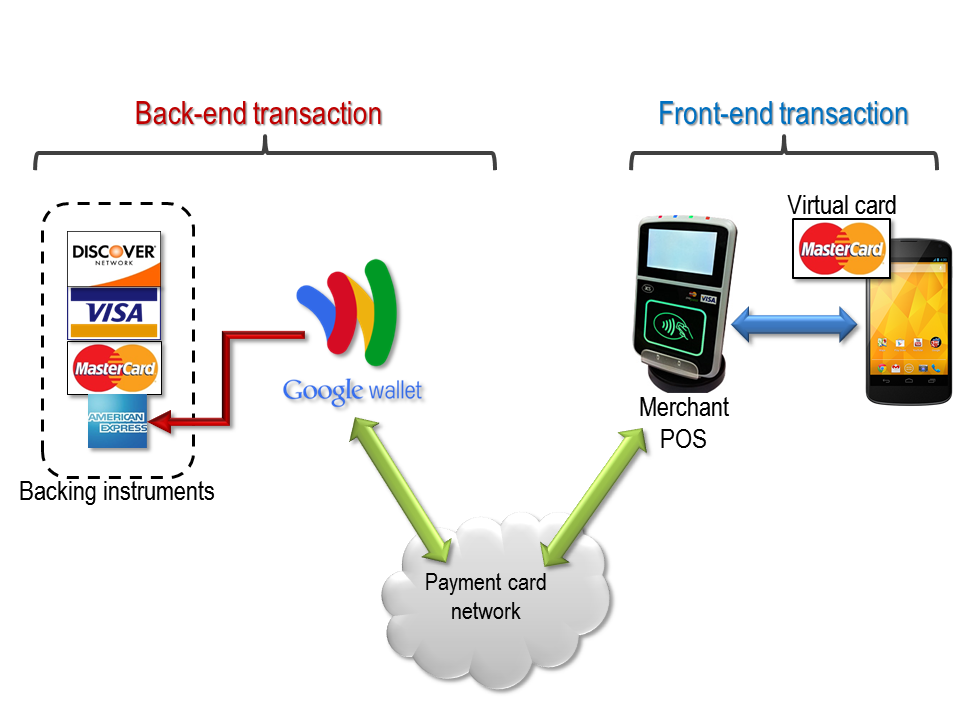
Google takes a very different approach to supporting multiple cards in a mobile wallet. Instead of carrying a literal representation of all the payment instruments, they are all hidden behind a “virtual card” which can effectively redirect transactions to any of these original credit cards. But this routing is done in real-time via the payment network itself, instead of trying to recreate a bitwise clone of the card.

Google Wallet: using virtual cards to proxy transactions

Google Wallet and virtual cards

Virtual cards

The picture above illustrates how this works, in the context of mobile payments using an Android phone over NFC. (Note that Google also launched an ordinary plastic card in 2013 which has slightly different functionality. In this example we cover the better-known NFC payment scenario where the existence of the virtual card is less obvious.)

Users have one or more backing instruments or funding sources in their wallet. These are standard credit cards, “added” to the conceptual wallet once by entering card-number and other relevant details such as expiration and CVC2 on a web-page or the mobile application, much like one would enter credit-card information when making an online purchase. This step is the rough equivalent of the swipe-magnetic-stripe/photograph/confirm sequence used by Coin when adding cards.  At any given time, exactly one of these backing instruments is active, which is to say the transactions will be charged to the card. Also much like Coin, the Google Wallet mobile app has UI for selecting among the options.

Proxying transactions in real-time

Where the two models diverge despite superficial similarities in UI metaphors is what happens during a transaction. When Google Wallet is used for an in-store NFC purchase, the credit-card seen by the point-of-sale terminal is not any of the actual backing instruments. Instead it is a virtual card, unique to that instance of Google Wallet. Each user and even each instance of the wallet application associated with a given user has its own virtual card provisioned. In one sense, this card is very “real:” it is a full-fledged MasterCard effectively issued on behalf of Google, accepted at any NFC terminal that supports the MasterCard PayPass protocol. It has an ordinary 16-digit card-number with a prefix associated with the MasterCard network, an expiration date and for NFC transactions, cryptographic keys used to generate the dynamic CVC. It is only “virtual” in the sense that its existence is not explicitly surfaced. For example, nowhere in the mobile app are the card-number or other details about this card revealed to the user, although one can often spot the last 4 digits printed on paper receipts. (In principle a determined user could simulate the NFC transaction with their own reader to observe the card-number, since this is part of simulated track-data exchanged in the clear as part of PayPass.) Consequently it is never directly handled by the end-user– never entered into a form on a web-page or recited over the phone. Nor does it ever appear on a consumer credit report as an additional card; much like a prepaid card would not show up as a line of credit.

When a user makes an NFC transaction with Google Wallet, the payment network– MasterCard in this case– will route the authorization request to Google, the nominal issuer of the virtual card. Google will in turn place a payment request on the active backing card for the exact same amount. Pending the outcome of that authorization, the original “front-end” transaction is approved or declined. All of this is done in real-time, and must complete in a matter of seconds to comply with network rules around transaction deadlines.

Two transactions in one

There are interesting consequences to this design. First is that Google plays dual roles:

  • Issuer: As far as the merchant is concerned, Google is the issuer for the card the customer just used. (Nominally Google partners with Bancorp Bank for this purpose, with Bancorp ending up as the issuer of record, as described in the Wallet FAQ entry.)
  • Merchant: As far as the original issuer of the backing card is concerned, Google is a merchant requesting payment authorization from that card.

Second observation is that virtual-card and actual backing instruments are completely decoupled. Unlike in the case of Coin, the Google Wallet virtual card is not a perfect replica of the original card the user added to their wallet. It does not have the same expiration date. They do not share the same name: for NFC transactions, cardholder names–ordinarily part of the emulated track data– are redacted. In fact they may not even be on the same network: the virtual cards are MasterCard but the active funding source could be a Discover or American Express card. This is the illusion created by the virtual card: as far as the customer is concerned, they just paid with their American Express card– even if the merchant does not actually accept AmEx cards, a common situation at small businesses. The merchant on the other hand may be slightly better off in terms of transaction fees. Even if they were accepting AmEx, they will likely pay a lower transaction fee for processing the same amount over MasterCard network, compared to ringing up a “native” AmEx card.

Another interesting property: the transaction types are different. The merchant side experience is a card-present (CP) payment– this is how all NFC tap-payments are treated, no different from swiping the magnetic stripe. Meanwhile the original issuing bank for the backing instrument sees a card-not-present (CNP) transaction from Google, similar to what would happen when making a purchase online by typing card details into a web page. In effect the CP transaction at the point-of-sale was proxied in real-time into a CNP transaction against the backing card.

Other twists are introduced by this two-sided design, such as the handling of disputes and charge-backs, as well as handling merchant-specific rewards such as a credit-card that gives cash-back for purchases made only at gas stations. For our purposes, the key architecture difference between cloning cards (Coin) and proxying transactions in real-time to another card (Google Wallet**) is sufficient to explore questions around how each technology holds up against common fraud-vectors, as well as their future prospects in the face of EMV chip & PIN adoption.

[continued]

CP

** Historical side-note: the first version of Google Wallet in late 2011 did not use virtual cards. Instead users had the option of provisioning their existing Citibank MasterCard or requesting a new prepaid card, also on the MasterCard network. Both of these were “native” cards: transactions were routed directly to the issuer without Google in the loop. From an implementation perspective, each card was represented by a distinct applet on the Android secure element. Virtual cards were introduced in an update the following August, and native cards subsequently deprecated.

Coin vs Google Wallet: comparing card-aggregation designs (part I)

Judging by the excitement around crowd-funded Coin, “card-aggregation”– having a single credit-card that can stand-in for multiple payment instruments– speaks to an unmet market demand. In the abstract the concept hardly seems innovative and already implemented in various online approximations. Many online  services such as PayPal perform exactly this service in the context of web payments. Users can load their PayPal account from traditional debit/credit cards or ACH transfers from a checking account, and later get to spend the funds at any merchant accepting PayPal. But that model requires a change on the merchant side to integrate the new payment method; PayPal transactions look very different from standard credit or debit payments to the merchant. Also customers typically fund a stored-balance account ahead of time, floating money to the payment provider and committing to the payment source long before the actual transaction time. It is a lot more tricky to support real-time card aggregation in the context of existing card networks and even more difficult to implement that for in-person payments at a bricks-and-mortar location as opposed to online transactions. (Prepaid cards suffer from the same problems as PayPal: requirement for advance funding.)

Coin is not the first company to tackle this problem but it has gotten a lot more traction than previous attempts which for the most part, never went beyond a technology demonstration. One possible exception is Google Wallet. In 2012 Google introduced a different approach for combining multiple payment credit-cards in a single mobile wallet. [Full-disclosure: this blogger worked on Google Wallet.] These two products make for an interesting comparison, attempting to create the same user-experience with diametrically opposed designs under-the-hood.

Coin: commercializing the dynamic mag-stripe

Coin is an example of the programmable magnetic-stripe (also called “dynamic magnetic stripe”) technology, covered earlier on this blog. When credit cards are swiped, the point-of-sale terminal reads information encoded on a thin-film made of magnetized material on the back of the card. That information is used to request payment authorization from the card network. The physical layout as well as logical format for this is standardized by ISO/IEC 7813. Informally the format is often referred to as track-data, because it is organized into three tracks with only the first two used on payment cards.

For vanilla plastic cards the contents of the magnetic stripe never change. They are written once at the time of issuance and remain fixed for the lifetime of the payment instrument. About the only change that can occur is unintended and detrimental: when the card comes into contact with a very strong magnetic field, that can lead to erasure of encoded data, resulting in an unreadable card much to the chagrin of the cardholder. This basic technology remained unchanged for decades, until around 2010 when programmable magnetic stripes made their commercial debut. These use a small embedded processor on the card to change the encoded data on demand. It’s clear this technology allows the realization of many advanced concepts, such as single-use card numbers or even single-use track data for a fixed card number that would be immune against skimming. (One could even implement a variation on the mag-stripe profile of EMV, by simulating an internal counter and reader-challenge to output track data containing  dynamic CVC3.)

Coin implements a more elementary scenario: switching between track-data copied from multiple cards, in order to “simulate” any one of these cards. Coin relies on what is arguably a security flaw in the design of magnetic-stripe cards: it is trivial to clone them. Information encoded on the stripe is fixed and readable by anyone in possession of inexpensive off-the-shelf equipment. Anyone can create a new card with exactly the same data– and consequently the same spending authority as the original card, when it is swiped for a purchase.

Abstract architecture of Coin

Coin card model for aggregating multiple cards

Card-cloning, grassroots approach

When journalists speak of card-skimming attacks against ATMs and point-of-sale terminals, usually they are referring to gangs installing malicious software or physically tampering with reader hardware to steal magnetic-stripe data for any card swiped at that location. Armed with that information, the criminals can create duplicate cards bearing same track-data and attempt fraudulent purchases with these clones. (There are additional complications of course: the cards need additional features to look legitimate, such as appropriate logos, holograms, embossed card-holder name etc. Also CVC2 is not present on the magnetic stripe, as such the “clone” is only usable for card-present transactions.)

Coin institutionalizes that practice, except this time cloning is done by the cardholder for his/her own convenience/benefit.

The product has not been released to the general public at the time of writing, but extensive FAQs and a lengthy demonstration given to TechCrunch conveys the general approach taken for provisioning. Users are given card readers– similar to the ubiquitous white Square readers– that interface with their iPhone/Adroid device. Existing plastic cards are swiped to extract their track-data. A mobile app then syncs the information over Bluetooth to the Coin card where it is stored. Shortly before a transaction, that same mobile app allows choosing among cloned cards. Dynamic magnetic-stripe is then reconfigured to present a perfect copy of the same track-data as found on the original card.

[continued at part II]

CP


HCE vs embedded secure element: interface detection (part VI)

[continued from part V]

Relay attacks are not new: they were originally introduced in the context of RFID systems and smart-cards. As soon as mobile devices gained NFC capability, it seemed a foregone conclusion that this class of  vulnerabilities would apply. The phone may have a different form factor, but abstract threat model is unchanged. If anything the situation got worse because of an added twist: because the “card” was effectively “attached” to a generic computing device, physical proximity to the victim is no longer required. If the attacker could execute code on the mobile device, that malware could relay their commands over a network link remotely.

Earlier defenses against relay attacks focused on distance-bounding, by measuring time taken for the gadget to respond to specific “challenge” commands. Excessive delays can be interpreted as evidence that traffic is being relayed over a long distance with network hops in between. This is at best an unreliable approach since it is betting on the network latency between victim and attacker. With improving networking technologies, it may become more difficult to identify a sharp threshold for differentiating between local and remote cases.

Fortunately modern dual-interface chips such as the Android secure element has a more  robust and reliable mitigation: interface detection. Unlike the simplistic descriptions of relay attacks which posit a single communication path to the chip, there are in fact two distinct routes or interfaces. More importantly applications running on these chips can detect which route a particular message came from. This is an intrinsic property of the hardware, specifically in terms of the way secure element is connected to the NFC controller. It is independent of Android; as such it can not be subverted by malware, even when running with full privileges of the operating system.

A naive picture

The seeming inevitability of relay attacks comes from a reasonable (but ultimately incorrect) picture of how the hardware is connected. Here is a naïve depiction of one reasonable architecture:

Naive view of NFC and secure element connection.

Naive view of NFC and secure element connection. (This is not the actual architecture.)

In this picture, secure element and NFC antenna are completely decoupled, independent pieces of hardware. The secure element is connected directly to the application processor, or in other words the Android operating system. When NFC transactions are performed, bits travel over the air, arrive at the NFC antenna, which dutifully routes them to the operating system in much the same way Bluetooth or 802.11 wireless interface would. (Granted there is more than an analog antenna required; there must be some circuitry to convert raw signals into meaningful data such as NFC tags being discovered.) The operating system in turn relays the commands to the SE and response is routed back in the opposite direction.

If that model was accurate, remote relay attacks would be inevitable. Since the secure element does not operate autonomously, it can only respond to commands, it can not actively go out and inspect its environment. (In fact SE is not even powered on most of the time.) Malware with sufficient privileges could “inject” traffic into the NFC stack– indicated by the red arrows above– that looks indistinguishable from traffic arriving over NFC. For that matter malware could also directly interface with SE by communicating with the device node directly. SE has no idea what is going on at the application level. It can not distinguish between remotely relayed commands versus legitimate NFC traffic originating from a nearby point-of-sale terminal.

Android SE/NFC architecture

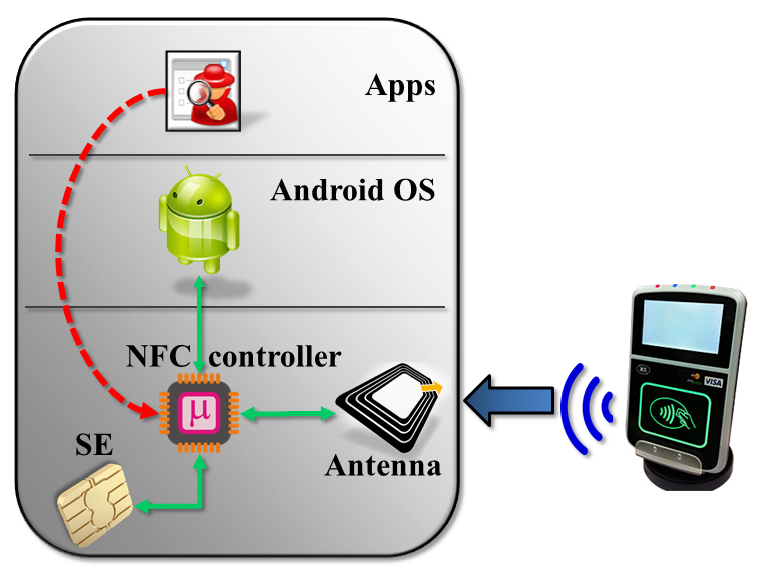
This is how the hardware is connected in reality:

Secure element connection with NFC controller

Actual architecture for Android embedded SE


The main difference is that secure element, NFC antenna and Android are not connected to each other directly; the NFC controller sits at the junction of these systems. Depending on  NFC mode, that controller is responsible for routing data in different directions:

  1. In reader/writer and P2P modes, data flows to/from the NFC antenna to Android. SE is not involved. This is invoked for scanning tags and exchanging contacts using Android Beam.
  2. In wired-access mode, SE is powered on and Android communicates with SE over its wired (aka “contact”) interface. For instance when the user is entering their PIN to unlock Google Wallet, this channel is active for sending PIN down to the payment applet.
  3. In card-emulation mode, SE is also powered on and traffic from NFC antenna is delivered straight to the secure element, bypassing the host operating system. This is the active path when the phone is tapped against an NFC reader to complete a payment.

NFC controller and security guarantees

The last property already represents one important difference from the naïve picture. Bits are not traversing the host operating system. They go straight from NFC controller to the secure element. This provides some confidentiality, since responses from SE can not be observed by Android.  But by itself it would not have been enough, unless SE can distinguish between #2 and #3.

That is where the NFC controller comes in. Additional information is communicated to the secure element about which interface commands originated from. This is not part of the command payload– otherwise it could have been forged. Instead it is metadata, made available to applications running on the SE to allow them to alter their behavior accordingly. For example Javacard exposes an API to query incoming command and distinguish between contact and contactless interfaces.** An attacker with root privileges can interface with NFC controller directly by accessing the raw device, but not the embedded secure element– this is the red arrow again. Traffic to the SE is gated by the controller, and all data coming from the host-side (whether legitimate Android NFC stack or malware attempting to relay traffic) will be tagged correctly as contact interface.

One good question is how the NFC controller itself decides to report the incoming interface. After all if this were specified by Android, it could be subverted. The answer is that logic is part of the controller firmware. Android can instruct the controller to switch into a given state such as card-emulation or wired-access mode at any time. But once in that state, all commands relayed to the secure element will be correctly tagged with the corresponding interface.

What about software attacks against the controller itself? Firmware can be updated in the field and new versions are often distributed as part of the Android image, to update hardware on initial OS boot. This would normally create another attack vector: flash the chip with corrupted firmware, designed to confuse SE about true origin of commands. But in the case of the NFC controller, new firmware versions must be digitally signed by the publisher. That signature is verified by the controller before accepting an update.

Remote-relay attacks and SE applications

Interface detection then is the fundamental mitigation against remote-relay attacks. Code executing in the secure element can differentiate between traffic from:

  • Applications running on the phone– because they will be accessing the SE over contact interface
  • External NFC readers such as contactless smart-card readers and point-of-sale terminals

It is up to the application to implement additional security checks based on interface. This is not always straightforward. Protocols such as Mastercard Mobile PayPass call for an application that supports some functionality over both contact and contactless interfaces. For example PIN entry and displaying information about recent transactions is done via host, while actual payments are conducted over NFC. Such an applet can not categorically reject all commands coming from contact interface. A fine-grained policy is required that takes into account internal state machine, requested command and current interface. (In fairness, EMV protocols are not unique in this regard. For example US government PIV standard for identification cards also has very specific mandates on what functionality is available over which interface.)

Weakness of host-card emulation

Returning to the comparison motivating this series–security of host card emulation vs embedded secure element— we find another significant advantage for hardware secure. Without an SE, the naïve picture does become an accurate depiction of  the state of affairs. and defense against remote-relay attacks is weak. Ordinary apps can not fabricate traffic that looks like it is originating from an NFC reader. But malware that attains root privileges can pull it off, since it will be running with same privileges as the authentic Android NFC stack responsible for dispatching HCE commands to user-mode applications. By contrast, applications implemented on a hardware secure element can be secure against relay attacks even when the remote attacker is executing code as root. That is a very strong guarantee HCE can not provide.

It is also worth pointing out that this property is unique to NFC. If the payment protocol was implemented over Bluetooth or 802.11, interface detection can no longer help. In the current hardware architecture, traffic for these alternative wireless protocols must be routed through Android. This is another reason why moving the payment protocol to an  execution environment in TrustZone does not produce the same security guarantee, aside from the much weaker tamper-resistance compared to actual SE. Short of a significant architectural change to move control over NFC hardware to the TrustZone kernel itself (as opposed to plain Android kernel, where NFC device driver resides today) interface detection will not be reliable.

CP

** In principle both can be active simultaneously which is why the API exists at command level. For both the NXP and Oberthur secure elements in Android, that situation can not arise. Only one interface can be used, and switching resets the SE which simplifies life for application development. All decisions about interfaces can be made at SELECT time, with the guarantee that it will not change for that session.

How to fail at code-signing, the open-source edition (part II)

[continued from part I]

Two challenges confront a paranoid user trying to decide if the Tor browser-bundle they just downloaded is in fact the authentic version or malware masquerading as a privacy-enhancing tool.

Key management by cliques

First there is the theoretical problem of key-distribution. Verifying a signature requires knowing the public-key of the person who generated the signature. The simplistic idea that “signed” equals trustworthy proves not to work, as many people discovered much to their surprise when perfectly valid signatures were found on run-of-the-mill malware as well as sophisticated nation-sponsored attacks such Stuxnet. It matters who signed the code.

Authenticode uses a hierarchical trust model based on PKI, which is the same  model used for SSL certificates. Individuals or companies obtain digital certificates from certificate authorities. The certificate contains information about the person/entity it was issued to, such as their name or DNS domain, as well as a the public-key. It is effectively a statement from the CA that the public-key in question belongs to the person/entity named there. Because the certificate is signed by the issuing CA, it can be verified by anyone in possession of the CA public-key. In effect this amplifies trust; by trusting the public-key of 1 CA users can establish trust in the public-keys of any one else who obtain certificates from that CA. (Assuming they have confidence in the vetting process used before the CA is willing to vouch for the public-key.)

This model scales very well in relation to the number of CAs in existence. Case in point: web-browsers are preloaded with several dozen root CAs (most of which are unused, incidentally) but this small group of “trust anchors” allow verifying SSL certificates for  millions of websites. Flip side of that high leverage is a weakness: any one of them can undermine trust by deliberately or mistakenly issuing a certificate to the wrong party. Effective security of the system is determined by the least competent/most dishonest CA.

By contrast, PGP uses a web-of-trust model without centralized parties tasked with vouching for everyone else’s keys. Users individually exchange keys. They can also sign each others’ keys to serve as “introductions” for other contacts in the social graph. Such a distributed model is not susceptible to the weakest-link-in-the-chain problem that plagues X509 where a lot of power is concentrated in an oligarchy of CAs. When users are tasked with managing trust in public-keys one person at a time, the failure of some unrelated third-party will not lead to a catastrophic case of mistaken identity across the network.

Main downside is scaling globally. In order to verify signatures, users need the public-key of the person who created the signature. This is a challenge to say the least. In the standard PGP model, keys are obtained by following social links. Returning to our example of verifying the Tor binaries, users would ideally have a friend or friend-of-a-friend connected to the developer who created the signature. The Tor project conveniently has a page listing keys— ironically using SSL and centralized PKI model to bootstrap trust– but that page would have been blocked in our hypothetical scenario, along with the entire Tor website. There are centralized collections of keys such the MIT PGP key server, but they serve a very different purpose: they act as a directory for looking-up keys rather than a trusted third-party vouching for their integrity. Anyone can submit keys, and in fact bogus keys are submitted routinely. (It does not help that the key server runs over HTTP, allowing standard man-in-the-middle attacks to return bogus keys consistent with forged signature for a binary modified by the attacker.)

Usability, or why Johnny can’t verify signatures

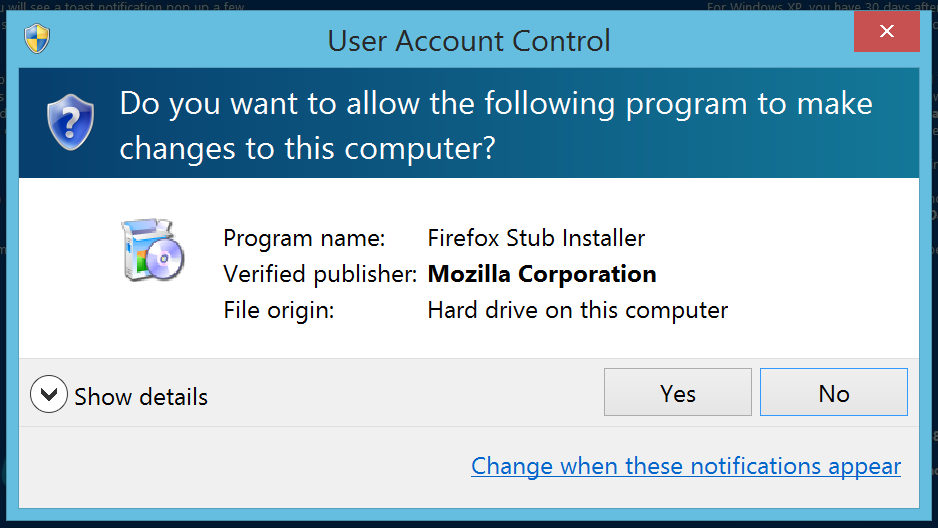
Second is a far more practical problem of usability.  Authenticode support is built into the operating system, with automatic signature verification before attempting to install software downloaded from the web:

Software installation prompt on Windows 8. Note the verified publisher information from Authenticode signature.

Verifying PGP signatures is not built into an operating system in the same way; the user is on their own. Getting PGP-compatible software is the first order of business. It is not part of Windows or OS X by default, but is commonly found on default installations of popular Linux distributions such as Ubuntu. Since desktop Linux has negligible market share, the effective result is that most users are being expected to go out of their way to install random software they have likely never used before (or for that matter, will ever use again) only to verify the authenticity of another piece of software they are interested in using immediately. Suspending disbelief that motivation exists, the next challenge is using the unfamiliar software for signature verification. While there are GUI front-ends for integrating PGP functionality with popular email clients– which is after all the primary use-case, encrypting and signing email messages– there is no good option for being able to verify detached signatures on random binaries. Users are expected to drop down to the command-line and type something along the lines of:

$ gpg --verify torbrowser-install-3.6.1_en-US.exe.asc torbrowser-install-3.6.1_en-US.exe

Assuming our determined user has obtained the correct PGP key and marked it as trusted, they will be greeted with this happy news:

gpg: Signature made Tue May  6 16:36:57 2014 PDT using RSA key ID 63FEE659
gpg: Good signature from "Erinn Clark <erinn@torproject.org>"
gpg:                 aka "Erinn Clark <erinn@debian.org>"
gpg:                 aka "Erinn Clark <erinn@double-helix.org>"
gpg: WARNING: This key is not certified with a trusted signature!
gpg:          There is no indication that the signature belongs to the owner.
Primary key fingerprint: 8738 A680 B84B 3031 A630  F2DB 416F 0610 63FE E659

(Incidentally that ominous sounding warning about key not being certified is expected; it does not indicate a problem with the signature.)

Easy enough?

CP


How to fail at code-signing, the open-source edition (part I)

Censorship vs. Tor browser-bundle

There is an interesting connection between recent episodes of Internet censorship in Turkey and primitive approaches used to authenticate the integrity of open-source software. To recap:

Anonymizing proxies

“There is never a shortage of solutions in democracies” as one Turkish politician has stated. A resourceful nation responded by resorting to using proxies and VPN services, all of which bypass the IP-level blocking by first connecting to one or more intermediate “jumping stones” which then routes traffic to the intended destination. Tor is by far the most popular option, operated as a free service by volunteers running nodes on their own machines. Given the difficulty of setting up Tor (despite advances since publication of that paper, including one-stop user-friendly Tor browser bundle containing a preconfigured Firefox build) it was impressive how quickly Tor usage spiked in Turkey, peaking at twice the baseline. In theory Tor is decentralized; there is no single point of failure, no single server that could be taken out to cut off access to the network. But for practical purposes, when an entire nation is trying to alter its web browsing habits, there is one choke point: getting the Tor client software. Sure enough the censorship soon moved to also block the main Tor website.

Verifying code integrity

So what does any of this have to do with code authentication? Consider a user trying to download and install the Tor browser bundle. They can no longer download it from the main website or any popular mirrors– ISPs will surely wake up and block these. More likely people will turn to their own social network, start emailing each other links to obscure servers hosting the software or even the entire binary as attachment. Some of these emails will be sent by well-meaning people trying to help their friends. Others may actually be attempts to distribute malware by capitalizing on the sudden demand for a popular piece of free software. Does the average user have a fighting chance of distinguishing these cases?

Business-as-usual scenario

First let’s consider how users normally authenticate the source of their applications. There are several possibilities:

  1. Installed from an app-store doing some level of vetting on authorship and pedigree of applications, which varies based on the philosophy of the market operator. Apple carefully curates the offerings, Google takes a laissez-faire approach and ends up with frequent occurrence of malware on Play Store.
  2. Downloaded from a trusted website. This is really a generalization of the first case. The distribution point acts as a proxy for the trustworthiness of the application. For example we assume that code downloaded over SSL from the Mozilla website is unlikely to be malicious.**
  3. Code signing. By far the most prevalent example of this is the Authenticode format used for software distribution on Windows.

Signing only helps if users can verify

What about the Tor browser bundle? At the time of this writing, it is not found on the Microsoft store, although it  could very well have been submitted there to make life easier for Windows users, the main audience in this case. The situation is not any better for Mac users. For iOS there is an Onion Browser in app-store but it is not free. (Worse there has been a bogus Tor app riddled with spyware which Apple did not take any action on for months.) The paucity of these choices rules out option #1 for most users. Because of active censorship, it can not be downloaded from the official Tor project website, also ruling out option #2. Individuals can create additional mirrors but trust in those will be necessarily limited to those in that person’s immediate social-network.

That leaves code signing. As it turns out, TBB is in fact cryptographically signed using PGP format. It is a detached signature, meaning that the signature is not part of the installer itself and must be located independently. While it is easier to verify signatures  that are part of the file-format, this is not a major obstacle. (In fact Authenticode also has support for detached signatures, since some file formats do not afford an easy way to sneak in extra data to contain the signature.) While the cryptography is sound, this is another case where Tor project has gone on a flight of fancy in terms of what can  be expected of mainstream users.

[continue to part II]

CP

** There is also a primitive approach usually seen in open-source software that involves publishing MD5 or SHA1 hashes and then serving the actual download from some other untrusted location. This also boils down to relying on location; trust is bootstrapped by based on the website which contains these hashes used to verify the integrity of the bulk data downloaded. Amusingly many download sites serve these hashes over unprotected HTTP connections, which makes the entire scheme into security theater.

How to fail at code-signing, the Microsoft edition

Recently this blogger had to debug a website problem on a particular combination of Windows and Internet Explorer. Modern-IE website built by MSFT has exactly the solution for this. Part of the massive marketing campaign to stop the long and slow decline in market share against competition from Firefox and Chrome, the site provides a wealth of resources for developers trying to ensure interoperability of their work against IE. Chief among those resources are virtual machines images for different Windows versions preloaded with commonly matched version of the web browser, going all the way back to such archaic combinations as the long-deprecated IE6 running on recently deprecated but-not-quite-abandoned Windows XP. (Lest anyone assume this is a free way to run Windows: the images are evaluation copies set to expire after a couple of weeks, similar to the evaluation VMs targeted at IT professionals.) More importantly, in a departure from MSFT-as-usual approach to assuming that users have bought into the MSFT ecosystem of Windows, Office, Active Directory and all other software, Modern-IE caters to developers using other virtualization platforms and even more surprisingly, alternative operating systems. For example, not only does it offer VM images customized for VMware Player— a competing offering against Hyper-V derived technology built into Windows– but there are images aimed at OS X and Linux users. (Curiously only VirtualBox images are offered for Linux, even though the VMware image would normally work just fine there, unless there is some hardware compatibility problem in the way the guest machine is configured.)

Authentication is hard

Unfortunately while the attempt is laudable, the implementation leaves much room for improvement. In particular, the way these images are packaged coupled with how they are downloaded creates a security vulnerability. Specifically a man-in-the-middle attack that modifies user traffic can replace the legitimate files by a maliciously crafted image and cause users to execute malicious code on their own machine. Of course virtual machine images are “code” in one sense, since they contain an entire operating system and associated applications. But that code is intended to be executed in the so-called “guest” virtual machine, isolated from the host environment by the virtualization boundary. Surprisingly the way Modern-IE packages and downloads VM images can result in code execution on the host machine running the VM, without requiring any vulnerabilities in the hypervisor or other failure of containment.

Cascading failures

So what is wrong with the MSFT approach?

  1. Download links are presented on a page that does not use SSL (Curiously the website does respond over SSL, but only to redirect users back to the unencrypted HTTP version.)
  2. The only way to check the integrity of downloads are MD5 hashes, also displayed over HTTP.
  3. VM images are packaged as multi-part RAR archives.

Let’s drill into each of the problems.

Trusted links from untrusted pages

First one has a slight twist. The download links themselves are using SSL but the page containing the links does not. This is sufficient to enable a classical man-in-the-middle attack. An adversary network traffic can substitute different links when the user is retrieving the top-level page.  Incidentally the links themselves provide no indication that the content is authentic, pointing to a domain  named “az412801.vo.msecnd.net”– totally legitimate? (Also amusingly the download instructions linked from the main page are served over SSL, but use PDF format. Just in case you needed another file-type frequently implicated in code-execution vulnerabilities.)

Integrity-check is security theater

Second one does not work as an integrity check, because the cryptographic hashes are also distributed over an unprotected HTTP connection. If an attacker is in a position to tamper with downloads, they are in just as good a position to tamper with a web-page displaying the expected hash for that download.

By the way that assumes users will go out of their way to check MD5 hashes manually. Given that the site is intended for a technical audience, one can argue this is not too much to ask for, although Windows developers will be slightly more inconvenienced. OS X and Linux have openssl command line pre-installed so they are one command away from hashing the file. Windows does not have a built-in MD5 checker although an unsupported command line tool can be found on MSDN. Not that it matters; none of the setup instructions mention anything about verifying the integrity of downloaded images.

Incidentally the choice of hash function is a throw-back to the 1990s. Following the initial Wang et al collision results against MD5, Windows security division initiated an MD5 deprecation effort around 2005, complete with a dedicated “MD5 program manager” role to oversee that project across different parts of the codebase. Clearly someone did not get the memo. (If MD5 hashes had been served over SSL, they could still have provided a reasonable guarantee. While pairwise collisions are easy to craft for MD5, this scenario requires a second pre-image attack eg crafting a malicious file that has same hash as a predetermined legitimate file, which the attacker has no control over.)

Choice of compression format

These two issues alone would not be as much of a problem if it were not for the third one. After all, plenty of content such as images and videos are downloaded over HTTP everyday without any way to authenticate their integrity. But RAR archives are self-extracting. Decompressing and extracting the VM image involves running the first chunk, which is just an executable binary for the appropriate platform: PE on Windows, ELF on Linux etc. Strictly speaking it is possible to unpack RAR archives without executing it using utilities such as the open-source unarchiver. But the instructions from MSFT are not that cautious: they simply suggest running the SFX file.

(Also worth mentioning: even without the unfortunate choice of RAR, running an arbitrary VM image is dangerous. Most virtualization platforms allow some sharing between host and guest, such as sharing folders on the host operating system with the guest. An attacker can craft a VM image specifying that user home directory will be shared with the guest operating system. That configuration would allow obtaining private user data or getting code-execution on the host by tampering with configuration, since attacker also controls the code executing inside the guest.)

Take #2

What is a better approach?

  • Display the download links from a page that is itself served over SSL. (Failing that, at least use SSL for displaying the cryptographic hashes but then burden is on the user to take extra steps for verifying them.)
  • Do not use RAR. It is an odd choice, a proprietary format not introduced by MSFT and still primarily used on Windows. Its main advantage is ability to split compressed archives into multiple pieces. Yet it’s been a long time since anyone had to worry about breaking up large files into smaller chunks to work around the 4GB limitation of FAT32 file systems. For OSX/Linux, both bzip or gzip are usually built-in and can handle large files. Meanwhile plain zip would be supported equally well on all platforms, providing a single cross-platform solution. (RAR packaging is platform specific necessarily, since the first chunk must be a native executable for that platform.)

CP

HCE vs embedded secure element: relay attacks (part V)

Part IV in this series sketched how it is possible to build a mobile wallet using NFC that can protect its secret keys even against an adversary executing code with Android root privileges. But there is one subtlety not explored in that discussion: keeping an attacker from getting hold of cryptographic keys is not the same as preventing unauthorized spending. The logical implications holds in one direction. If payments are authorized based on possession of cryptographic secrets– as is the case with EMV chip & PIN suite of protocols– being able to extract the key from the mobile device is game-over. But while key-recovery is sufficient for the hypothetical attacker to go around printing money compliments of another user, it is not necessary.

Remote relay attacks

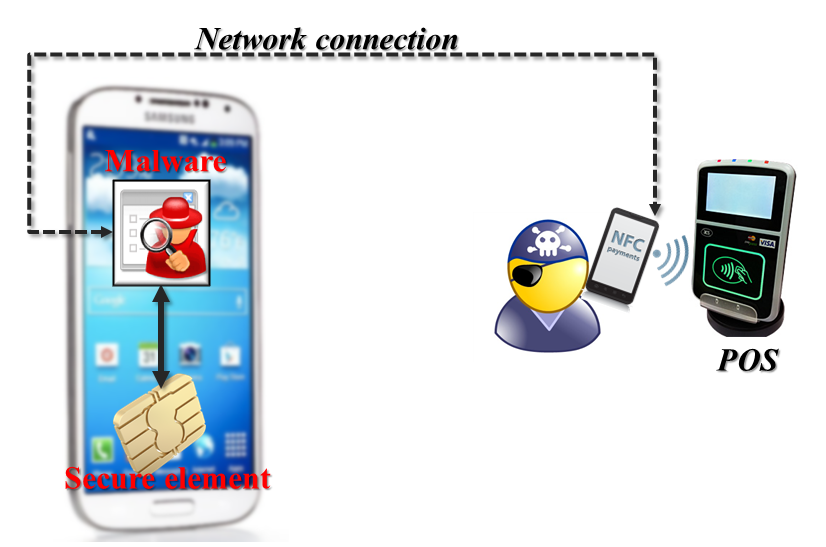
Consider a less ambitious attack that relies on merely interacting with the secure element, to simulate a payment operation. Legitimate transactions take place by having a point-of-sale terminal send commands to the secure element over NFC. What if malware resident on the mobile device emulated that behavior but then relayed the responses from SE to another phone controlled by the attacker? More specifically:

  • Attacker walks up to the cash-register and begins to pay for a purchase using NFC using his own Android phone.
  • But when the point-of-sale terminal sends a command to the attacker phone, these are not routed to the secure element. Instead they are delivered to a special application running on the phone via host-card emulation. (It used to be that rooted devices running Cyanogenmod were required for this; starting with Kitkat it can be implemented on stock Android.)
  • This special application receives the command from the merchant terminal, then forwards it over the Internet to malware running on the victim’s device
  • That malware uses its root privileges to deliver the command to the secure element– necessary since Android only allows whitelisted applications to interface with SE.
  • When SE responds to the command, the response is likewise ferried over the same network connection back to the attacker, who promptly forwards it over NFC back to the point-of-sale terminal.

In effect the POS at the store is communicating with the victim phone, although these communications are taking a rather circuitous route through the Internet instead of simply traversing a short distance as usual with NFC.

Remote-relay attack from SE-equipped phone to merchant POS

Relay attack visualized


Implications for security model

What has the attacker achieved after all this effort? If payments implemented in hardware secure element were still susceptible to attacks from local malware in this fashion, it would violate our earlier assumption that the Android operating system does not have to be trusted. With remote relay attacks, Android malware could still conduct unauthorized payments by channeling SE communications to a remote attacker, allowing them to make purchases without physical possession of the targeted device. That would also reduce one of the main advantages of SE-based implementation over HCE. Clearly an HCE solution implemented in pure software has no defense against root-level malware; secret keys can be permanently extracted out of application memory. In that sense HCE is an easier target. You only need to run the exploit once to extract keys; it is not necessary to maintain persistence on the victim device to continue making fraudulent payments. But relay-attack implies that even when cryptographic keys are safely tucked away in a dedicated chip, they can be exploited remotely as long as the phone itself is reachable over the network.

Are such attacks feasible? At first two practical limitations jump out, both related to network connectivity in real-time. (“Real-time” is the operative phrase. EMV protocols involve challenge/response interaction with the terminal. It is not possible to collect and store all possible responses from the SE ahead of time before starting a new transaction.) That presents the first obstacle for successful exploitation: the victim device may not be reachable at all. If the legitimate user turns off their phone or wanders outside the coverage area, it is not possible to relay commands in real-time this way. Likewise the attacker also needs connectivity for their own device, although that part is easier to control by carefully choosing the retail location where the scam will carried out. Second problem is around the quality of the connection measured in bandwidth and latency. Bandwidth turns out not to be a problem since the amount of data exchanged is on the order of hundreds of bytes. Latency is a bigger concern. There are timeouts at different levels of the protocol stack, from the raw NFC exchange– which also has an option to request an extension to buy more time– to application logic in the NFC reader. For example MasterCard recommends a limit of around 200 milliseconds for completing the entire tap & pay transaction, and that includes multiple command/response round-trips. (Granted some of the expected responses are predictable and do not require relaying the command all the way to the remote SE to find out the required answer.) But suppose the stars line up and our enterprising attacker does indeed have access to a high-bandwidth, low-latency connection to the victim device controlled by his malware? Or perhaps the point-of-sale terminal is very lenient and does not mind waiting longer than expected to complete the transaction?

It turns out there is a more fundamental defense available for preventing relay attacks against secure element applications: interface detection. That will be the topic of the final post in this series.

[continue to part VI]

CP

When defense-in-depth failed: Heartbleed

A good benchmark of foresight in security is not avoiding vulnerabilities but having defense-in-depth measures in place to minimize the impact from unforeseen flaws. (Or failing that, one can quibble over the consolation prize of who was fastest to respond and deploy patches.) In the recent case of the openssl Heartbleed vulnerability, such success stories were mostly absent. Few seemed to speak up and shrug-off the vulnerability by saying, in effect, that they were immune because of some brilliant feature implemented years ago as a precaution, without an inkling of specific details around the exact vulnerability it would insure against one day. Given how pervasive openssl is not just on web servers, but even traditional client-side software including mobile operating systems, most of the chuckling seemed to come from the Microsoft camp, continuing their “hat trick” of having steered clear of three epic SSL bugs in 2014: “goto fail” compliments of Apple, GnuTLS certificate validation and now Heartbleed.

Everyone else appeared to be in the same boat: catastrophic failure, caused by a straightforward implementation bug. Nothing fancy, no subtle ROP/ASLR-bypass techniques required to exploit it, completely platform independent, no massive fuzzing runs required to spot the bug in the first place: in fact it was so “shallow” from source-code that two different groups found it almost simultaneously.

“Show me the exploit”

It did not take long before the armchair-philosophizing started around the exact nature of what could be done. There was no question that the vulnerability is exploitable trivially to extract chunks of memory from the affected system. (Thankfully avoiding a throwback to 1990s-style “that vulnerability is purely theoretical” argument.) Naturally speculation moved to the second-order effects: what exactly could be in those regions of memory graciously returned by openssl to anyone who asked. That sensitive information could be spilled was proved relatively easily. Typical of most popular security mistakes, Yahoo! reprised its usual role with a dramatic demonstration of how usernames and clear-text passwords for other people could be recovered from their servers. While damaging and no doubt a big deal for the users involved, these disclosures were relatively contained in scope. A lot more uncertainty lingered around whether private-keys for the SSL server could be extracted using Heartbleed.

Cloudflare

This is where some initially put their hopes in “accidental-mitigations,” fortunate properties of the heap manager that just might protect private-keys because of their position in memory relative to leaked regions. This is what CloudFlare initially argued, complete with pretty pictures of heap layouts to visualize the location of where keys are loaded in memory and how far they are from the regions allocated for buffers. For a change CloudFlare was also willing to put its money where its idle speculations. The company created a challenge website [note: certificate revoked]  running the vulnerable nginx/openssl version, inviting anyone to attempt extraction of SSL keys. That did not take very long. In less than a day multiple users had extracted the supposedly protected private-key. (Only much later it became clear why reality did not agree with CloudFlare’s theories. At least one code-path in openssl creates a temporary copy of a prime factor of the modulus– sufficient to factor it and recover private keys– and later frees it, returning that copy to the heap without zeroing it out. Interestingly this is also a poignant reminder of why it is important to properly clear out sensitive data from memory when it is no longer needed. openssl had a mechanism in place for doing precisely that, which happens to be skipped in this case.)

Akamai

A more interesting argument was advanced by the content-distribution network Akamai. [Full disclosure: this blogger’s current employer is an Akamai customer]  Akamai claimed that due to a custom memory-allocation scheme employed in their modified version of openssl, private-keys would be protected from Heartbleed attacks. Unlike the Cloudflare argument based on heap layouts, Akamai was not claiming this was a matter of luck. Instead we were told, it was a deliberate, intentional defense-in-depth feature intended to protect cryptographic keys:

We replace the OPENSSL_malloc call with our own secure_malloc. Our edge server software sets up two heaps. Whenever we’re allocating memory to hold an SSL private key, we use the special “secure heap.” When we’re allocating memory to process any other data, we use the “normal heap.”

The story may have ended there as that rare success story of security-by-design in the field… until Akamai decided to contribute this patch to the open-source project. Once other people started looking at the code, it became obvious that the modification did not work. Worse the culprit was an amateurish mistake, demonstrating a complete failure to understand how RSA private-key operations are implemented using the Chinese-remainder theorem (CRT) representation of keys. Akamai patch protected only some of the CRT components but not others which are still sufficient to recover the key. It did not help that aside from failing to achieve the stated security objective, the patch contained implementation errors and required multiple iterations to get working.

Key-isolation: old is new again

After the dust settled and benefit of hindsight kicked-in, much better ideas for improving the current situation were put forward. One example is emulating the privilege separation in SSH: create an out-of-process key agent that holds the private keys and exposes a “decryption oracle” without processing hostile input directly from incoming connections.

Strangely missing in action were vendors of hardware-security modules or HSMs. In one sense there is no need to invent any novel technology to better protect cryptographic keys. There is a tried-and-true approach commercially available since at least as far back as 1990: store keys in dedicated crypto hardware, never exposing them directly to the main application. SSL has been one of the markets targeted by HSM vendors, often rebranding their products as “SSL accelerators.”  These early attempts emphasized performance instead of security, trying to capitalize on perceived costs of SSL when server CPUs struggled to keep up with RSA private-key operations. But they  never made much inroads into that market, instead remaining confined to special purpose applications such as banking or certificate authorities. Heartbleed would have been the perfect backdrop for a customer case-study, highlighting a website that deployed HSMs and can now assert confidently that their private keys were not compromised– and unlike Akamai, this mythical website would have been correct.

CP

HCE vs embedded secure element: taking Android out of the TCB (part IV)

[continued from part III]

Continuing the security comparison between HCE and secure-element based NFC applications, this post expands on an earlier theme around attack-surface, focusing on one massive piece of vulnerable code: the Android operating system itself.

When root means game-over

Consider the following hypothetical: is it possible to build an EMV payment application that runs on Android and yet can resist attacks from a remote adversary who is running arbitrary code with root privileges? At first this seems theoretically impossible. Payments are authorized based on the possession of a cryptographic key only known to the legitimate card holder. The assumption is if you have possession of the key, by executing a protocol specified by EMV that calls for proving possession of that key without revealing it– you are authorized to spend the funds associated with that account. If our hypothetical adversary has achieved root privileges on the device, they have full access to memory and storage of every application running on that device. That includes the payment application wielding this secret. Even if that secret was protected by a PIN/passphrase (let’s suspend disbelief and assume users pick high-entropy secrets immune to guessing) that PIN/passphrase will be input via phone UI such as an on-screen keyboard at some point. Since we posit that our adversary is running with root privileges, she can watch this interaction and learn the passphrase. Alternatively she can simply wait until after the secret has been fully decrypted locally– necessary for the device to be able to perform the type of computations envisioned by EMV payment protocols– and capture it at that point. No secret managed completely by an Android application can be immune from an attacker with root privileges on that Android device. It’s only a matter of knowing when/where to look for that secret in the target application’s address space; this is security through obscurity at best.

SE difference

Unless of course, the secret is not directly available to the mobile application either. Enter hardware secure elements. If  secrets such as cryptographic keys are stored in the secure element and never available in the clear to the mobile application, even root-level compromise of Android does not help our adversary. The embedded secure element is its own mini-computer, with separate RAM, storage and embedded operating system with its own concept of access control. Being root on Android is meaningless to SE: it grants no special privileges. In much the same way that an HSM can isolate cryptographic keys by offering an interface to perform operations with the key without revealing the raw bits of the key, SE keeps Android at arms-length from secret material.

Safe provisioning

The astute reader might ask how these cryptographic secrets that enable payments reached the secure element in the first place. It is common for provisioning to take place over-the-air, as opposed to the much more impractical alternative of requiring physical presence, where the user must walk into a bank branch and present their phone. That implies that some bits are pushed over the network to the mobile application which relays them to the secure element. (Recall that the only direct network interface SE has access to is NFC which is only good over short distances. All other communication such as accessing the card-issuer API endpoint over the Internet must be pass through the host device.)

Does that create an opportunity for malware running with root privileges to capture the secret, for ever so briefly when it is passing through the Android application? Not if the provisioning system is properly designed. Recall that secure elements compliant with Global Platform standard are “personalized” with unique keys (colloquially known as card-manager keys) required to perform administrative operations. These keys are not known to the owner of the phone or even the operating system on the mobile device; they are managed by a third-party called “trusted services-manager” or TSM. When TSM is installing a payment application and configuring that application with its own set of secrets, the commands sent to the SE for performing those steps are encrypted. Global Platform specification defines a “secure messaging” protocol describing the exact steps for establishing an authenticated & encrypted link between TSM and secure element. This protocol, or more accurately series of protocols since there are multiple variants, is designed to ensure that even when TSM and SE are not in physical proximity, as in the case of provisioning a payment application over the Internet– the issuer can be assured that sensitive information such as payment keys are delivered only to the designated SE and not recoverable by anyone else. While it is true that the commands sent by TSM are visible to the host operating system, where they can be intercepted or even modified by our hypothetical adversary who has attained root privileges, the secure messaging protocol ensures that no useful information is learned by mounting such an attack.

Threat models: ideal vs as-implemented

So this is another fundamental difference between applications implemented in SE versus those relying on host-card emulation. For HCE applications, Android operating system is part of the trusted computing-base by necessity. Any vulnerability that allows defeating the isolation between different apps– such as local privilege escalation to root– is  game-over for scenarios using host-card emulation without a hardware secure element. By contrast, SE based applications can in principle survive attacks in this very stringent threat model, where we posit a remote adversary (eg one who does not have physical possession of the phone but is running her choice of code on the device) has attained root privileges.

“In principle” is the operative phrase. While Global Platform protects secrets en route the secure element, there is a preceding step not covered by GP: authenticating the card-holder. Suppose the consumer is asked to enter the username and password for their online bank account into the Android application to verify their identity and request provisioning from that bank. That design is blatantly  vulnerable to local malware on the device. Those bank account details could be captured and relayed to a remote attacker, who proceeds to repeat the exact same process on a device she controls, with the payment credentials being delivered to her secure element. She could even preempt the legitimate user, by provisioning first and instructing the malware to prevent the original card-holder from completing the task, lest the bank notice the anomaly of two different devices requesting cards in quick succession. Some form of out-of-band authentication is required to thwart this attack, such as logging into the bank website from a different machine to initiate the request. (Ironically calling the bank and answering questions will not work since the audio-stream from the phone is also available to the attacker.) But even in the basic scenario with weak provisioning, SE provides a useful guarantee: if the device is compromised by malware after payment credentials are provisioned, the credentials are safe.

There is one more subtle attack that does not rely on trying to extract secrets from the local device. Suppose the remote attacker with root privileges abandons their effort to extract secrets from SE but instead attempts to use the SE, exactly as it would have been invoked for a payment transaction? The next and final post in this series will look at how the integration of SE with NFC controller can frustrate such relay attacks, in stark contract from HCE applications which are necessarily vulnerable.

[continued]

CP