An earlier post from 2025 covered the case of ScreenConnect, a popular remote-administration utility developed by the vendor ConnectWise for IT administrators to remotely manage Windows PCs. Such applications are inherently “dual-use:” they work equally well for legitimate IT departments to manage their corporate PCs as they do for criminals looking to take over unwitting consumers’ machines. Combined with a number of questionable design decisions in the ScreenConnect client around lack of notice/consent, it was no surprise the threat actors jumped on the chance to leverage this application for their campaigns. Typical modus operandi: targets are sent a phishing message suggesting they install a new Windows desktop application associated with a service they already use. Not surprisingly, that application was just a renamed ScreenConnect installer, which grants remote-control of the machine to the attacker as soon as installation is complete.
Multiple reports and eventual escalation of these incidents to Microsoft and DigiCert— the certificate authority who issued the code-signing certificate used by ConnectWise to sign their Windows binaries— resulted in a number of disruptive changes to the application and the associated cloud service. Two stand out from a security perspective:
- ScreenConnect installer no longer uses the “unauthenticated data” field in Authenticode signatures to stuff critical configuration. As the name implies, this field is not covered by the signature and could have been trivially altered by attackers to modify settings of a legitimate install, redirecting the C&C server away from the original customer (eg the IT department using ScreenConnect) to one controlled by the threat actor.
- ConnectWise no longer digitally signs installers for on-prem versions. Instead customers themselves are responsible for getting their own Authenticode certificate to sign the binary.
One would expect this to have been the end of the story. Fast forward to 2026, and more renamed ScreenConnect installers are showing up in the wild. This post takes a look at how the attacks have evolved.
Suspect binary
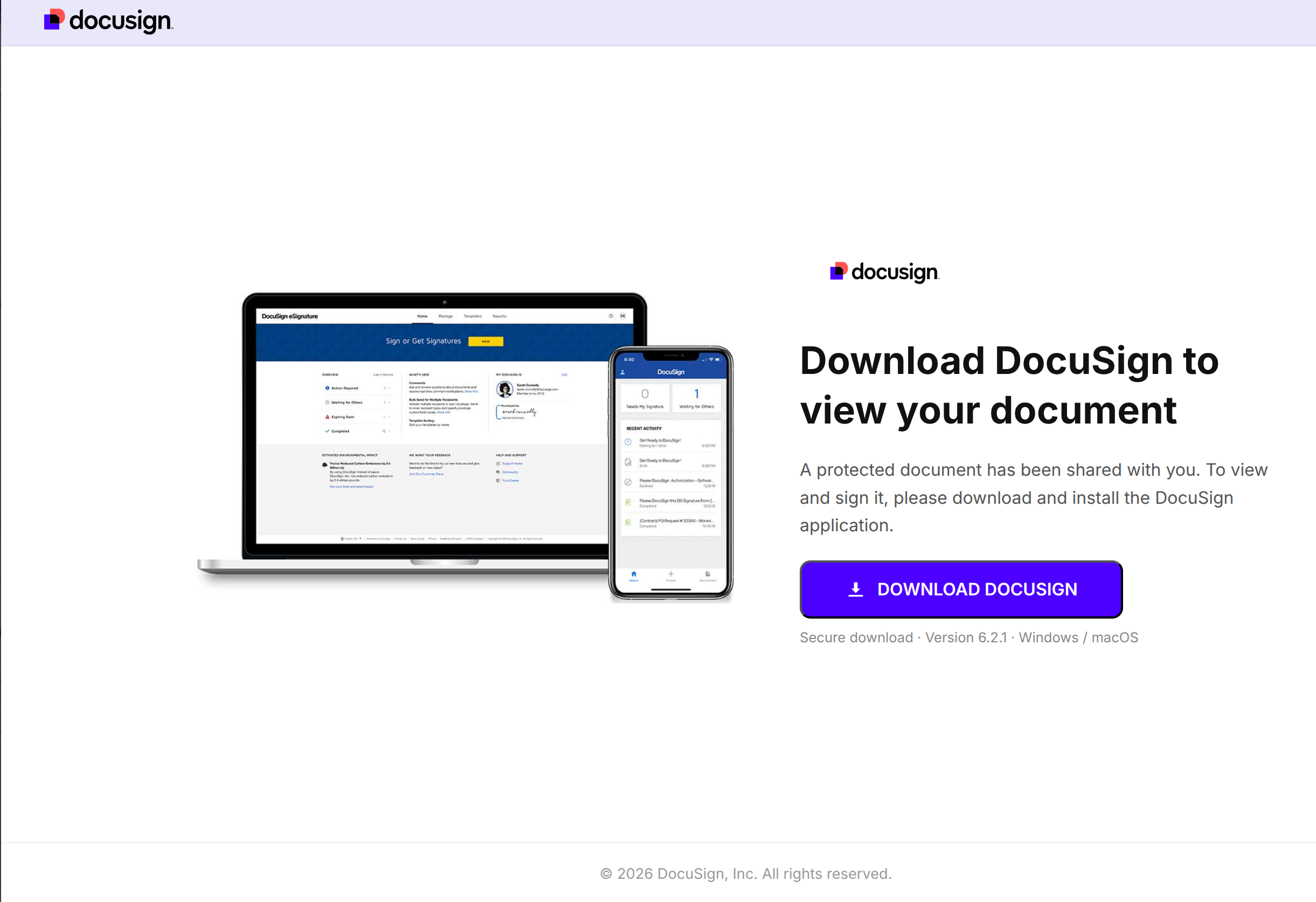
The suspect binary comes from a malicious website sporting generic DocuSign branding but registered under domain names intended to impersonate a financial service. Targets receive phishing emails with a false pretext involving new policy documents that they are required to review and sign for continued access to their account. Clicking the download button on this page returns a file named “DocuSignSetup.exe” Interestingly while the fine-print under the button claims both Windows and MacOS are supported, the exact same file is served for all platforms, including Linux. Presumably the threat actors concluded Windows is a sufficiently target-rich ecosystem and saw diminishing returns in chasing other platforms despite ScreenConnect having cross-platform support.
Looking closer at the binary:
1. Running strings on the binary turns up references to ScreenConnect, as well as XML configuration snippets observed in previous samples of the real installer:
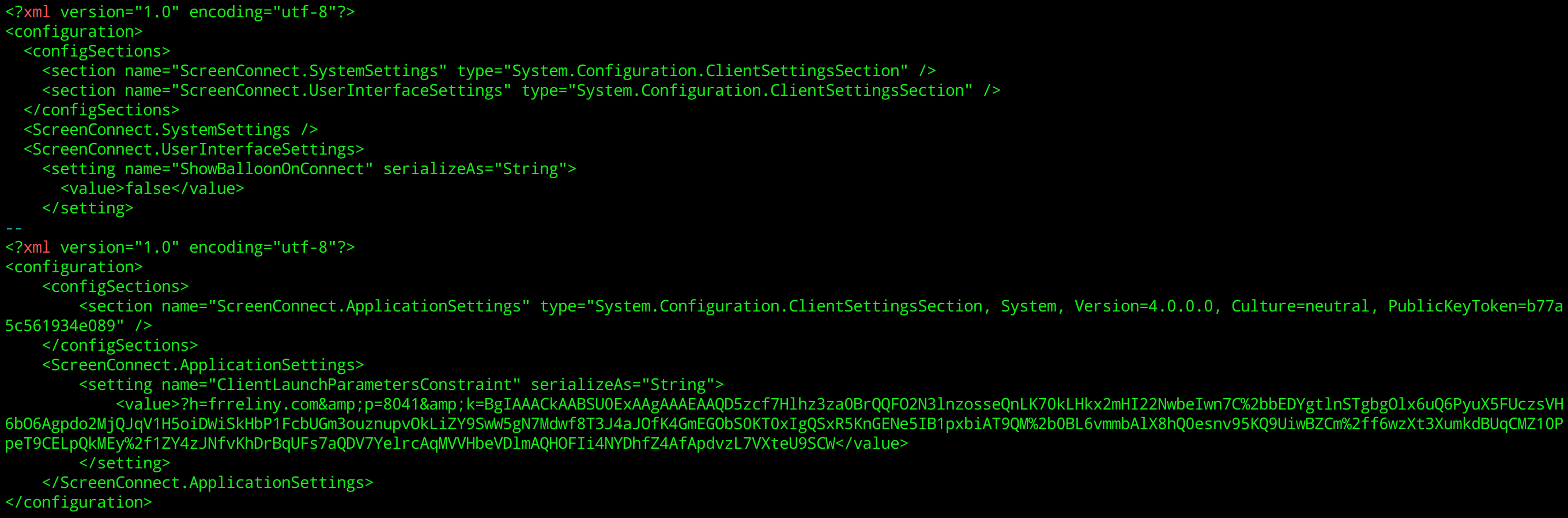
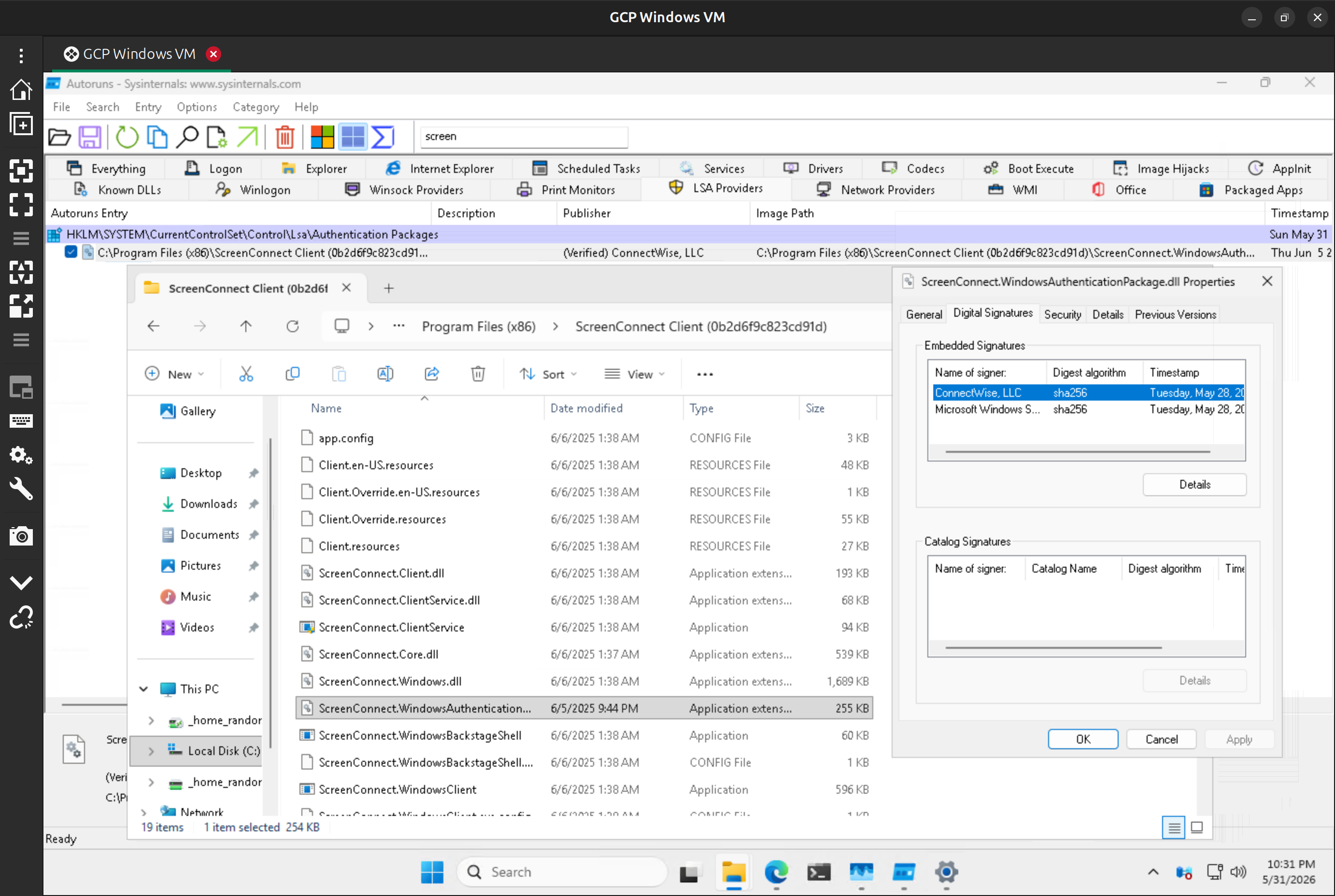
It is possible these strings and XML configuration were planted as a false-flag operation, as unused resources embedded in the binary to confuse attribution. Far more reliable evidence comes from running the installer in an isolated VM and observing changes to the system. Sure enough there is a ScreenConnect directory created under \Program Files (x86) and the helpful autoruns utility from SysInternals shows persistence components associated with ScreenConnect— including a DLL that is in fact signed by ConnectWise itself. While there is no guarantee that the threat actor did not make changes to the original installer prior to signing it, there is no question that real ScreenConnect components are installed and activated after running the malicious binary.
2. It carries a valid Authenticode signature chaining up to a publicly trusted root— specifically one of Microsoft’s own code-signing CAs. (Signer name has been redacted for privacy reasons explained below.) This is a very short-lived certificate with a mere 3 day lifespan, and the trusted timestamp on the binary shows it was signed about six hours after issuance, within the validity window of the certificate. Corollary: this binary will not result in a warning about unknown publisher when invoked on standard Windows versions.
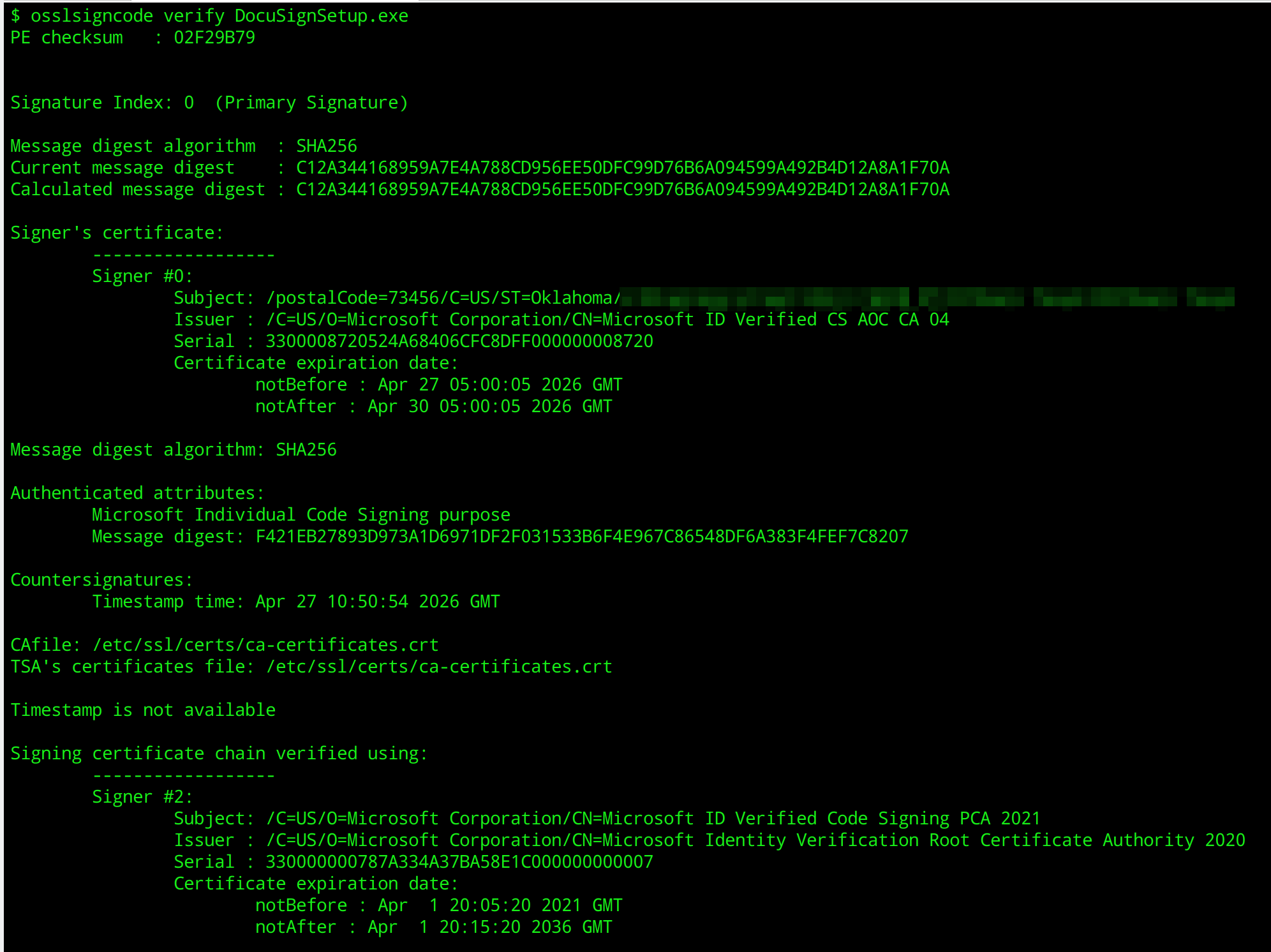
3. This is a garden-variety Authenticode signature. There is no evidence of the bloat associated with hiding configuration data in unsigned fields characteristic of ScreenConnect incidents from 2025. That rules out an installer created for a legitimate ConnectWise customer somehow landing in the hands of crooks who repurpose it by tampering with unauthenticated, free-floating configuration parameters.
Conclusion: crooks are still able to leverage ScreenConnect to remotely take over consumer PCs despite all steps taken by ConnectWise.
Microsoft in the middle
Accidental doxxing
What stands out in the above investigation is that the code-signing certificate was issued by MSFT itself. The common name on the immediate issuer reads: “Microsoft ID Verified CS AOC CA 04” This turns out to be part of the Azure Artifact Signing program, Microsoft’s own entrant in the increasingly popular code-signing-as-a-service category. After watching software publishers fumbling security around high-value signing keys— failures seized on by threat actors in high-profile incidents to sign exploits, including the Stuxnet worm discovered in 2010 that sabotaged Iran’s nuclear enrichment facilities— the industry has collectively given up on the idea that companies can be entrusted to manage their own keys. Instead a cloud service holds the keys on behalf of the software publisher and signs binaries subject to governance rules defined by the customer. DigiCert, SSL.com and other certificate authorities offer this functionality.
Regardless of whether keys are self-custodied or held by a trusted cloud service, requirements for issuing code-signing certificates are identical: the CA must verify the identity of the software developer. There are three levels of verification available, ranging from the most accessible to most stringent: individual/independent developers, organization validated and extended validation. In this case MSFT has issued the code-signing certificates to a specific individual rather than corporate entity. According to Azure artifact-signing documentation, the necessary identity verification for this type of certificate is outsourced to the third-party service Au10tix. Au10tix documentation suggests they can scan and validate government issued ID documents using smartphones. This type of remote identity verification is increasingly common for onboarding with fintech applications.
The surprising part: Azure Artifact Signing has an option to include the verified street address in the issued certificate. That is not a required field; its inclusion is controlled by a command line parameter or checkbox. Yet the persons who provisioned these certificates went out of their way to include their street address. (This is why the X509 subject name was redacted from the image above.) Whether or not they realize it, the developers who signed this binary doxxed themselves.
Verifiable criminality
There are three ways to interpret these observations:
- Threat actors are willingly signing malware under their true identity. This could be a matter of bad opsec: maybe they are not aware of how Authenticode works in general or do not realize that Azure’s artifact-signing exposes their identity to all targets receiving the malware. Or it could be calculated risk taking, assuming that law enforcement will not have resources to pursue this matter even when they are leaving their fingerprints all over the attack.
- Threat actors are enlisting unwitting accomplices to “borrow” their identity and complete Azure’s verification process. Support for this is mixed, given the limited data points. Of the three different signing certificates observed in the wild for this sample, one belonged to an individual in Oklahoma but two were associated with residents of Texas in close geographic proximity. If this hypothesis is true, there is still an investigative trail leading from individuals named in the Authenticode certificates to the perpetrators.
- Threat actors are using stolen identities to bypass Au10tix. This is the optimal choice for a seasoned criminal: it causes misattribution, framing someone else if law enforcement pursues the matter.
Malware bundle
There is another crucial difference between this campaign and previous ones built around ScreenConnect: this time around the installers appear to contain a veritable kitchen-sink of additional components. Standard ScreenConnect installers clock in at a few megabytes. The installers observed in this campaign vary in size from under 10MB to over 50MB. Additional reverse engineering is necessary to identify exactly what these components are but it can not be explained as natural variation in the size of the authentic installer. More likely the threat actor is bundling additional malware alongside ScreenConnect, such as a backup RAT in case ScreenConnect stops working in the future. This is a legitimate risk for the attacker— depending on configuration, the command & control channel is a cloud service operated by ConnectWise. That gives the company broad leeway to take action against any customer abusing the product, by disabling that account and disrupting the remote-control capability.
In a way, attackers are much better off than 2025 when they had to work with the installer provided by ScreenConnect. While they could make some changes to the configuration left unprotected by the Authenticode signature, they could not bundle arbitrary code. That constraint no longer applies. Empowered by Azure Artifact Signing to sign any executable, the threat actor is free to bundle additional malware or even tamper with safeguards in ScreenConnect if they wanted to. Suppose the ScreenConnect client added a mandatory notification for the user whenever remote-control sessions are started. An attacker can directly patch the binary to strip this out and then sign the whole bundle with their own certificate. That latter signature is just as good for appeasing Windows’s requirement for code provenance and suppressing scary warnings about unknown publisher.
Limits of revocation
As of Jun 3, at least one certificates that signed a malware sample has been revoked retroactively, while another one remains valid. In a sense, it may not matter even if revocation had been more timely and comprehensive. For consumers who were already tricked into installing the malware, the damage is already done: their PCs have already fallen under the threat actor’s control. Windows does not retroactively check Authenticode signatures for already installed applications in hopes of catching ones that were later revoked. EDR software can provide continuous monitoring, and there is some reason for optimism there: Windows Defender is categorizing the binary with revoked signature as malicious. But it is unclear how far that generalizes to all other variants with their variable payloads and for that matter, whether Defender will take the drastic step of neutralizing the ScreenConnect persistence mechanism on an existing PC. It is after all a “dual-use” application that can have legitimate uses in a managed IT environment. The distinction between “RAT” and “corporate fleet management” is not in the eye of the beholder, but it does depend on context: who paid for the PC, who is using it and whether they consented to remote management. ScreenConnect is better poised to neutralize an unauthorized use of their remote-control software by bringing the hammer down on specific instances of abuse. But that mechanism operates out-of-band in a messy world subject to human discretion, outside the regimented structures of PKI.
CP

