Samsung tectiles, NFC standards and compatibility

This is what gives NFC a bad name. Samsung decides to ship NFC tags in an effort to promote the fledgling technology. Later it turns out many devices including its own flagship Galaxy S4 can not read these “Tectile” tags. This blog post tries to explain what is going on.

There are three modes an NFC controller can operate in, covered in greater detail in earlier post. For our purposes the relevant one is reader mode. This is when the Android device is attempting to interrogate an NFC-enabled object and read/write data. Because this is a client-server interaction with the phone in charge of driving the protocol, compatibility becomes a function of both sides: controller hardware inside the phone/tablet/laptop and the tag.

Tags and controllers: diversity vs. concentration

When it comes to tags, there is no shortage of variation and diversity. There are four “types” of tags defined by NFC Forum. Within each category, there are multiple offerings with differing capacities and security levels. Android NFC API groups tags by type (A, B, F for Felica, V for proximity which is a slightly different standard and IsoDep for 14443-4) along with dedicated features for special-case handling of Mifare Classic and Ultralight. How many of these are users likely to run into?

  • Mifare Classic is the original technology that started it all. To this day it is used for public transit scenarios where subscribers are issued cards for long-term use.
  • By contrast disposable paper tickets typically use cheaper Ultralight tags which are type-2 in NFC forum designation.
  • Stickers and conference badges are also commonly based on type-2 tags.
  • The NFC Ring popularized by a Kickstarter campaign uses type-2 NTAG203 tags.
  • Type-3 or Felica is relatively uncommon outside Japan.
  • More recently  transit systems including Clipper in Bay Area and ORCA in Seattle have deployed DESFire EV1, which is a type-4 tag.
  • Credit cards used for tap-and-pay appear as type-4 tags at NFC level.

For all this diversity, it is a very different story on the controller side. Since NFC is a standard much like Bluetooth, in principle anyone can build an NFC controller. One may expect the usual proliferation of hardware with multiple companies getting into the game, creating a market with competing alternatives for an OEM to choose from. In reality Android devices have historically sourced hardware from only two manufacturers:

  • NXP:  The very first NFC-enabled Android device was the Nexus S released at the end of 2010. This device shipped the PN65N which combined an NFC controller (PN544) along with an embedded secure element from the SmartMX line of secure ICs.
  • Broadcom: This is the newcomer, first making its debut with Nexus 4. It was also picked up by the far more popular Samsung Galaxy S4. It also required a change to the NFC stack in the operating system in terms of how libnfc communicates with the NFC controller at low-level.

In principle nothing prevents an enterprising OEM from including an NFC controller from ay other supplier. OEMs do in fact make independent decision about sourcing ancillary components such as the NFC antenna that is typically embedded in the back cover of the phone. But Google has spent a lot of time fine-tuning the low-level NFC stack in Android to play nice with these popular hardware choices. OEMs going off the reservation also become responsible for maintaining necessary tweaks for their chosen brand even as Android itself continues to evolve its own stack.

Mifare Classic

Then there is the original NFC application that started it all, Mifare Classic. This product predates NFC forum and standardization of the technology but remains very popular for many applications, especially in public-transit systems. As explained in this summary:

Mifare Classic is not an NFC forum compliant tag, although reading and writing of the tag is supported by most of the NFC devices as they ship with an NXP chip.

This contains a hint about what is going on. All other tag types follow standard laid out by NFC forum, Mifare Classic does not. Interfacing with this tag type requires licensing and implementing additional protocols.

That explains why phones equipped with NXP-built PN65N and PN65O controllers have no problem with Classic tags. Broadcom on the other hand, appears to have decided on skipping the feature, perhaps betting on the market moving away from Classic tags to newer options such as DESFire EV1. In the long run this may be a reasonable strategic call. There are plenty of reasons to migrate, including security concerns: Mifare Classic uses a proprietary cryptographic protocol which has been successfully reverse-engineered and broken as early as 2008. In the short term however, Mifare Classic is far from going extinct and users with Broadcom devices are in for an unpleasant surprise.

Bonus: Mifare emulation in secure element

Demonstrating the complex intertwined dependencies in hardware industry, devices such as Nexus 4 can do Mifare Classic emulation. This is not reading an NFC tag– that would be handled by the NFC controller, which as we noted earlier does not support the proprietary Mifare classic protocol. Instead the phone is playing the opposite role and acting as a Mifare Classic tag to external readers. This seems particularly odd considering that card-emulation mode itself is a feature of NFC controller.

The contradiction is resolved by noting that in card-emulation mode the controller is simply acting as pass-through for the communication; it is not the one fielding Mifare Classic commands. The actual target communicating with the external NFC reader is the embedded secure element. On Nexus 4 and similar  devices, the controller is built by Broadcom but the attached SE is sourced from well-known French smart-card manufacturer Oberthur instead. That particular hardware does in fact license Mifare Classic protocols and can emulate such tags.

To answer the logical question of why one would want a phone with fully-programmable secure element acting as a primitive NFC sticker: Mifare emulation was used in Google Wallet for offer redemption. For example the user could receive a coupon that is provisioned into the secure element. This would be redeemed during checkout by tapping the NFC terminal at the point-of-sale. Logically two different NFC tags are involved in such a transaction.  One of them is the emulated Mifare Classic tag that contains a coupon for that merchant. The other is a type-4 ISO14443 standard “tag” containing EMV-compliant credit card responsible for payment.

CP
Using cloud services as glorified drive: iSCSI caveats (part VII)

Previous posts described a proof-of-concept using cloud computing to run Windows Server VMs and configure iSCSI targets to create private cloud storage encrypted by BitLocker-To-Go. In this update we will look at the fine-print and limitations of using iSCSI.

Concurrent access

One problem glossed over until now has been accessing data from multiple locations. Suppose the user has mounted the iSCSI target as local disk from one machine at home. Later they want to access the same data in the cloud from their laptop. This does not pose any problems for Bitlocker-To-Go decryption since the smart card protecting the volume is inherently mobile. (Also note the card is only used once to unlock the volume. It does not have to remain inserted in the reader or otherwise present near the machine for continued access.) But it does pose a problem with iSCSI model: the same underlying NTFS filesystem is now being manipulated by multiple machines with no synchronization. That is a recipe for data corruption.

Contrast this to the encrypted VHD model sketched earlier: in that case synchronization is done implicitly by software running locally on each machine, responsible for uploading that VHD file to the cloud. When uploads are done concurrently from multiple machines, it is up to the cloud provider to decide which one wins– most likely the one with most recent timestamp. But no attempt is done to “merge” files. If the user mounted VHD from one machine and added file A, then mounted it from another machine to add file B, the cloud provider does not magically collate those into a single virtual disk containing both additions. (On the bright side, whatever disk image is eventually uploaded is consistent. There is no possibility of ending up with corrupt “mash-up” combining sectors from both VHDs.)

If two machines are accessing the same iSCSI target and making modifications, there is no such guarantee. In both cases, each initiator eg some instance of Windows, will be directly manipulating file-system structures on the assumption that it alone is in charge of NTFS on that volume. The result is similar to what could happen if VHD image associated with a running virtual machine is also locally mounted by the host OS: too many cooks in the kitchen messing with the filesystem.

Solving this would require carefully coordinating access between multiple clients. One could envision a local agent on each machine, responsible for disconnecting or remounting the volume as read-only (but this is tricky) when another client connects to the same volume. The problem is that such a change will be disruptive to any application with files opened on that volume, akin to yanking a USB drive in the middle of using it.

Authentication and integrity pitfalls

The simplified flow described earlier did not use any authentication for iSCSI initiators. Of course this is not a viable option when the VM is running remotely on a cloud platform such as Azure; anyone on the Internet would be able to access the iSCSI target. Bitlocker encryption provides confidentiality but it can not provide integrity or availability. Without some manner of authentication, nothing prevents any other person from repeating the same steps to mount the remote disk and delete all data.

The problem with CHAP

At first it looks like this can be addressed by using CHAP (Challenge Handshake Authentication Protocol) which is officially part of the iSCSI standard. It is also supported by Windows. CHAP can provide mutual authentication between initiators and targets. Revisiting the steps from the previous post for configuring an iSCSI target, there is an authentication option on the Windows Server wizard to limit access to specific initiators in possession of a particular secret. These credentials are specified using the “Advanced” option on the initiator side. Limiting access in this manner mitigates the basic risk: random people hitting the IP address of our remote storage VM and discovering the iSCSI targets can no longer connect and overwrite data at will.

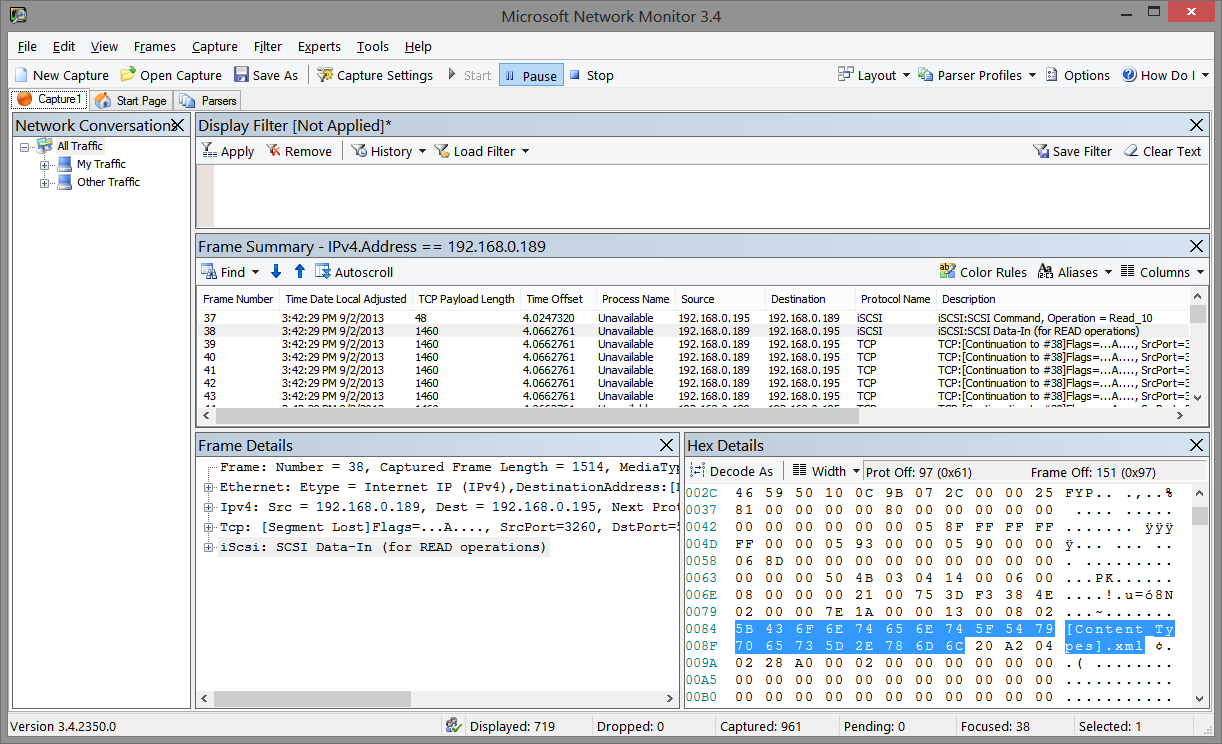
Suspending disbelief that such access control is scalable– since each device accessing the iSCSI volume would have its own initiator ID, it requires an entry in the target configuration– there is still another problem: CHAP does not protect the payload itself. This can be easily observed by getting a network trace of raw TCP traffic between an initiator and target. Below is an example from MSFT Network Monitor which comes with a built-in parser recognizing iSCSI traffic:

iSCSI traffic between initiator and target

iSCSI traffic between sample initiator and target

It shows an iSCSI response fragment transmitted when accessing a Powerpoint file. BitLocker is not turned on for the target volume– to make it easier to observe raw data in the trace– but CHAP authentication is enabled for the connection. Highlighted region of the IP packet shows distinctly recognizable plain-text data. A similar experiment would show that modifying parts of the payload is not detectable by either side. RFC3720 describing iSCSI says as much under security considerations:

The authentication mechanism alone (without underlying IPsec) should only be used when there is no risk of eavesdropping, message insertion, deletion, modification, and replaying.

When BitLocker-To-Go is used, eavesdropping problem goes away but tampering risks remain. An attacker can not recover the data or even make controlled changes such as flipping one bit. Under ordinary circumstances, standard encryption modes such as CBC would allow making such changes on ciphertext. But disk encryption schemes are designed to resist controlled bit-fiddling attacks. No scheme can actually prevent or detect changes completely, because there is no extra space to store an integrity check– one sector worth of plaintext must encrypt to exactly one sector ciphertext. The best outcome one can aim for is to ensure that any change to ciphertext will result in decrypting to effectively random data, uncorrelated with the original. That is still a problem. For example when the user is uploading a document to the cloud, an attacker intercepting network traffic can replace those BitLocker-protected blocks with all zeroes. When those blocks are later retrieved from the cloud to reconstruct the document, the modified ciphertext will still decrypt to something other than what the user originally uploaded.

Protecting the payload itself requires some type of transport-layer mechanism such as IPSec or establishing an ad-hoc ssh tunnel between initiator and target. This is yet another moving piece on top of an already complex setup. IPSec in particular is closely tied to Active Directory on Windows and requires having both sides being members of the same forest. That is a tall order, considering we want to access the cloud data from any Windows device, or even any device capable of acting as iSCSI initiator.

Verdict on iSCSI + BitLocker

Because of these limitations and general lack of support for iSCSI on platforms outside Windows, this proof-of-concept combining iSCSI targets in cloud VM with BitLocker-To-Go is far from being widely-usable.

The final post in this series will tackle the question of what an ideal solution for cloud storage with local encryption could look like.

[continued]

CP

Android RNG vulnerability: distorted incentives and platform ownership (part II)

[continued from part I]

The Android bargain: ceding control, gaining market share

The reason individual developers are enlisted to fix platform bugs is simple: Google does not have the ability to push security updates to users. In what may be the worst-kept secret of the mobile industry repeatedly pointed out by pundits,  the update channel for most devices is controlled by handset manufacturer and/or carrier. (The exception being “pure” Google-experience devices offered under the Nexus umbrella. But even these are not immune from carrier interference: for example Google caved-in to demands for blocking Google Wallet on Galaxy Nexus phones subsidized by Verizon.)

This is no accident or oversight. In trying to compete with iPhone for market share, Google made a Faustian bargain with OEMs and carriers. Providing them an open-source OS that could be endlessly customized and tweaked. This was not mere rhetoric or paying tribute to the open source model. It was a deliberate concession, partially ceding control of the handset software to provide a more appealing platform that OEMs/carriers would. An iPhone has only one “handset manufacturer” (Apple) and looks the same from Verizon or AT&T. Android follows the PC model of hardware competition in allowing OEMs to differentiate not only on features and pricing but also with “value-add” customizations to the OS: HTC Sense skin, Samsung eye-tracking etc. Carriers also jumped into the fray trying to distinguish their devices with customizations, for example controlling wireless-tethering to squeeze more revenue out of data plans.

By all indications, the plan worked. Reaching market a full year after the iPhone, Android nevertheless managed to overcome Apple’s first-mover advantage. Judged by unit shipments, Android dwarfs the iPhone in the US and globally.

Distorted incentives

There are two downsides to this hard-won battle for market share:

  • Once the OEM/carrier goes off the reservation and starts changing the operating system, incorporating updates is no longer a straightforward proposition. A security patch issued by Google for “vanilla” Android builds may not work against a heavily customized image from some OEM. (Imagine if Google pushed out an update that rendered some fraction of AT&T devices unusable?) At a minimum OEMs/carriers must be involved in testing the security update against their customizations to guarantee nothing will break. In some cases they may have to do additional work to modify the update to work for their particular scenario.
  • At the same time as the difficulty of delivering updates goes up, the economic incentive for doing so vanishes. Because the OEM/carrier views the operating system as an asset they can compete on (eg it is not a “freebie” magically gifted from Cupertino in identical shape to everyone) it is no longer something to be given away freely. Why invest in upgrading legacy devices when you can sell that customer a brand new phone with the latest and greatest OS? The same distortion applies to the carrier thanks to device subsidies: over time a subscriber pays more than the hardware retail cost. It is more profitable for the carrier to “upgrade” the user to new phone– even for nominal fee– locking them into another extended contract.

The ultimate contradiction: Google has less ability to deliver security updates to Android phones– devices  always powered on and connected to the Internet–than Microsoft had for Windows PCs in 2004.

CP

Android RNG vulnerability: when the platform fails

The recent vulnerability in the Android pseudo-random number generator (PRNG) used in critical applications including Bitcoin serves as an instructive example of how distorted incentives in the mobile device ecosystem upends the established wisdom around relying on the platform.

At first this looks like any other PRNG vulnerability, in the spirit of the Debian openssl debacle from 2008 but certainly of lower severity. But unlike Debian which affected ssh and SSL server keys, the consequences in this case lent themselves to better press coverage. All Android Bitcoin applications were  impacted. Money was lost to the tune of $5700. Still PCs get popped and bank account information used for fraud involving much larger amounts, using far more mundane web browser and Flash vulnerabilities. What makes this vulnerability unique?

  • Word of the problem originated with an announcement on Bitcoin mailing list, warning of a problem in Android that required updating all clients. There was no authoritative announcement from Android team or attempts to coordinate updates for other security-critical applications that may be at comparable risk.
  • It is not uncommon for a vendor to be blind-sided by an external researcher publicly dropping news of a security vulnerability, a zero-day so to speak. But when that happens most companies are quick to react, spin up a response and issue some type of announcement in order to get ahead of the messaging. But Google was missing in action completely for the first couple of days. Eventually a post on the Android developer blog confirmed the vulnerability— without providing much in the way of details around root cause.
  • But the post did offer a “solution” to work around the problem: a code snippet for developers to incorporate into their own application. In other words, individual apps were being asked to issue updates to compensate for a platform defect.

In platforms we trust

Platform APIs exists to centralize implementation of shared functionality, which can be inefficient, tricky or plain impossible if every individual application attempted to duplicate for themselves. Cryptographic PRNGs are a particularly good example of functionality best left to the platform. Computers are fundamentally deterministic, contrary to their outward appearance and getting them to generate “random” behavior is a difficult problem. In the absence of special hardware such as upcoming physical RNG in Intel chips, the quality of randomness depends on access to entropy sources serving as seed for initial state. A good implementation will attempt collect from the hardware and surrounding environment: hardware identifiers, timing events, location, CPU load, sensors, running processes, …  Not surprisingly this complexity is a good candidate for being punted to the platform. Windows packages it into platform API with CryptGenRandom. In Linux it is integrated even deeper into the OS as kernel-mode devices mapped under /dev/random and /dev/urandom, which are then invoked by cryptography libraries such as openssl.

Bitcoin applications relying on the platform API to produce cryptographic quality random numbers were on solid ground, following common wisdom in computer science about not reinventing the wheel. This is particularly true in cryptography which abounds in stories of home-brew implementations gone awry. The assumption is that platform owner is responsible for understanding how a particular primitive is best implemented on a given hardware/OS combination. That includes not only security against side-channel attacks but also leveraging hardware capabilities to squeeze that last percent of performance. (For example recent Intel processors have instructions for speeding up AES.) This is  the implicit contract between developers and platform owners: Developers call the “official” supported API which promises identical behavior across a wide-variety of devices and versions of the platform, instead of relying on undocumented behavior or reinventing the wheel in left-field. In return, the platform owner commits to keeping that API stable and providing the ideal implementation taking into account hardware/OS quirks.

Systemic risk

Platforms are not immune to vulnerabilities either and their effects can be far-reaching. For example in 2004 a critical vulnerability was found in the Windows ASN1 parser. The vulnerability affected all applications leveraging that API, directly or indirectly. These dependencies are not always obvious: sometimes the app calls one API which happens to invoke the vulnerable one under the covers, unbeknownst to the developer. For example parsing digital certificates invokes these code paths because X509 is built on ASN1. Widespread usage greatly amplifies the attack surface: any one of these applications can be used to trigger the vulnerability. This helps the attacker, creating multiple avenues to deliver an exploit. Whether or not it also increases the complexity for defender side depends on exactly how tightly applications and platform are connected.

  1. Loose coupling. In the case of Windows most platform functionality is packaged as a shared component called “dynamic link library” or DLL. There is exactly one DLL implementing an API and that single binary happens to be shared by all applications on the system.** In the best case scenario then “security fix” means Microsoft updating that DLL. That is what happened with that ASN1 vulnerability MS04-007. Users received patches from Microsoft Update website, individual applications using the API were not affected. Granted the process is far from perfect and occasionally faulty patches will break functionality, or reveal incorrect behavior in apps relying on undocumented quirks of the API. But it works well enough to operate at large scale by platform owners.
  2. Other times there is no clean separation between “platform” and its consumers. Instead the functionality offered by the platform provider is duplicated in every single application. A notorious example from 2009: critical vulnerability in Active Template Library. ATL is a building-block for developers offered by MSFT, used for writing ActiveX controls. That was bad news enough. Because these controls are often designed to be embedded on web pages, they are accessible to malicious sites. Worse, the vulnerability was traced to a part of ATL that is not distributed as part of Windows. Instead each application effectively incorporates the vulnerable code snippet into itself. Identifying and fixing all such vulnerable controls proved quite the mess, requiring a concerted outreach by MSFT to persuade individual software vendors to publish updates.

Strange case of the Android RNG vulnerability

Android circa 2013 can not accomplish what Windows could in 2003. The RNG vulnerability falls into category #1 while the response decidedly looks like #2. Based on published accounts, root-cause is a bad interaction between the way Android forks new processes and how Java RNG implementation initializes its entropy pool. This is fundamentally a platform problem. When the next version of Android is delivered to a device, this problem will go away. The implementation underlying that Java API for generating random-number will be updated transparently. Third-party applications calling that API will not notice a difference. The exact same app will call the same API but magically receive “more random” looking random numbers, instead of  the predictable ones that caused problems for Bitcoin. Individual developers do not recompile their applications and users do not have to reinstall every application to benefit from the upgrade.

Except this is exactly what happened: Android issued a desperate plea for developers to rewrite their applications and compensate for a bug ultimately fixed in the platform. What is going on here? The answer has little to do with any architectural  deficits in Android or Google shirking responsibility. Instead it is another consequence of the distorted economics of mobile, all but guaranteeing that users can not receive security updates.

[continued]

CP

** Strictly speaking there can be multiple variants. For example on 64-bit Windows, there is one for 32-bit and one for 64-bit applications. Similarly .NET introduces managed assemblies that can request a particular DLL version for compatibility. In these cases the number of files requiring an update can go from 1 to many. But it still remains the case that such updates can be delivered by MSFT– even for legacy versions of the DLL– without action required on the part of application developers.

NFC ring and screen unlock (part III)

The previous post sketched the risks involved in using NFC-enabled objects for access control and how the NFC Ring fares against common attacks. The final part in the series examines trade-offs involved in improving security with different tag choices.

Cryptography and NFC tags

As part II pointed out, more advanced NFC tags support access control using cryptographic means, including the original Mifare Classic. The quality of that cryptographic protocol is a different story. Classic tags used a proprietary cipher dubbed Crypto-1 which has been successfully reverse engineered and broken.

Since then NXP has introduced improved models using established cryptographic algorithms. For example DESfire uses triple-DES with two independent keys as the name suggests. Interestingly enough, DESfire chips were vulnerable to a side-channel attack based on measuring power consumption. In terms of the threat model, this falls under the “physical access” category; the attack requires carefully instrumenting the chip and observing its behavior in a controlled environment. Bumping someone in the subway with a stealth reader is unlikely to yield those conditions.

Further up the security chain there is DESfire EV1, which replaces two-key triple DES with AES. As of this writing there are no published attacks in the literature against EV1 model.

The final point along the spectrum is a programmable smart card. For example SmartMX is a family of embedded secure-execution environments from NXP, programmed using Javacard. This allows complete freedom to choose the cryptographic protocol, unlike the situation with picking an existing tag type such as DESfire where the protocol is fixed but users control the key material. For example a custom public-key authentication scheme can be defined or an existing profile such as NIST 800-73 PIV can be reused.

Trade-offs

Improved security  has associated costs, in both the monetary sense and engineering one. A tag must perform expensive cryptographic operations in order to authenticate the reader. That may take time, which is bad enough when dealing with the severely constrained hardware present on those tags. But more importantly it requires power. Since tags do not have batteries or any other internal source of energy, that power must originate with the induction field of the NFC reader, generating a current in the tag antenna. That coupling defines the main constraint on physical dimensions of NFC tags. Smaller antenna could translate into longer delays when scanning, incompatibility with certain readers that emit insufficient power or finicky behavior for positioning the tag in relationship to reader.

A ring form factor is hampered not only by the dimensions of what users are willing to wear but also the curvature of the antenna surface away from the plane of the reader. That argues against some heavyweight options such as EV1 but Ultralight C could have been a viable option. Starting with the original Ultralight (48 bytes and no access control) this variant triples the available space and adds 3DES authentication.

Opening more than one door

There is another complication to using these tags: the reader must have access to the same keys. This is relatively easy when the object is used for a single scenario. Typically tags start out with each sector configured to use default transport keys.  If that NFC ring is only used to unlock one Android device, that device can take over key-management and rotate keys to new, randomly generated ones stored on the phone. That approach gets tricky when the tag is used for multiple access-control scenarios, such as gating entry into several rooms with their own badge reader. In that case some type of cooperative scheme is required for each reader to reserve one or more free sectors for its own use. (Public-key based credentials do not have this problem, since a single public-key can be used with any number of access control implementations.)

CP

NFC and screen unlocking for mobile devices (part II)

[continued from part I]

Authenticating the tag

Any access control solution whether for physical spaces, local devices or network resources in the cloud has to confront the question of security assurance. What is the level of confidence that the person being granted access is indeed the legitimate user verses an attacker impersonating them? There is no right or wrong answer per se but a spectrum of levels depending on the authentication protocol used. Different protocols exhibit different levels of resistance against common risks.

Threat model

In the case of NFC tags, a reasonable threat model includes:

  • Passive eavesdropping: Listening on the NFC exchange between the legitimate user and a legitimate reader.
  • Skimming: Bumping into the user with a malicious reader to trigger some action against the tag. Note that in this case the attacker must also activate the tag by providing enough power via the reader. By contrast passive eavesdropping assumes there is another reader in range already powering the tag and only requires capturing the RF emanations.
  • Extended physical access:  This can be viewed as an extended version of skimming, where the attacker has possession of the NFC tag for an extended period of time to perform more intrusive attacks, including destructive ones that may involve prying open the chip in an irreversible way.
  • Social engineering: tricking the user into tapping their NFC tag against a malicious reader. This is a variant of skimming where the user is voluntarily performing the tap operation, defeating any shielding mechanism that may exist to deter unauthorized reading.

Choosing a tag

There is a dizzying array of different NFC tags offering a broad spectrum of security and storage options. Within the Mifare family alone there is the original “Classic,” then there is Mifare Plus, DESfire, EV1, Ultralight and Ultralight-C to name a few of the popular offerings. All of them present a sector-oriented data storage mechanism, with available space (ranging from a few dozen bytes to several KB) divided into “sectors.” The wire protocol over NFC defines commands for reading/writing blocks of data into these sectors.

Main differentiating feature between tag types is the access control mechanism they can support around data. In the simplest case such as Ultralight tags, all data on the tag is world-readable and world-writable. Anyone armed with an NFC reader– that includes an Android device these days– can read all data from the tag in a fraction of a second. This may sound like a security vulnerability but it is very often exactly the intended outcome. For example an NFC-enabled poster in a public setting bearing a URL is meant to be readable by anyone in the vicinity. There is no reason to restrict read access.

One step above that is rudimentary access control for making contents read-only. This is an irreversible transition that prevents future updates to data, which is useful in the previous example of tag left unattended in public space. Locking the tag prevents “vandalism” by random strangers overwriting contents with a different URL for example. However it does not help with keeping their contents secret.

More advanced tags such as the Classic and DESfire feature an access control based on cryptography. Instead of being an open book where any sector can be read by anyone, the chip is configured such that the contents of particular sector is only readable given knowledge of an associated secret key. (Strictly speaking there are two keys per sector, one for reading contents and one for writing, as well as changing the keys.) Before a reader can read data out of that sector, it must authenticate to the tag by proving knowledge of the associated secret key.

NFC ring

At the time of writing NFC Ring uses two NTAG203 tags labeled “public” and “private.” While the nomenclature is reminiscent of key pairs in public-key cryptography, the parallel is deceptive. Much like the Mifare Ultralight, NTAG203 provides absolutely no security protection for stored data. They are trivially cloned by reading out all sectors and writing them into another NTAG203 tag. If the user holds up their ring to hostile reader just once (think social engineering– “tap your ring here to earn free iTunes”) or someone bumps them with an NFC reader on the subway, or even passively intercepts 1 exchange between tag and legitimate reader, the attacker has all necessary information required to create a perfect clone.

According to comments from the designer, there is physical protection built into the design to make the private tag more difficult to read. This may combat skimming attacks in the same way that metallic sleeves on US passports prevent them from being read unless the covers are opened. On the other hand it would provide no defense against social-engineering, eavesdropping or physical access risk vectors since the private tag is being deliberately exposed in that scenario.

About the only tricky part is cloning the unique ID or UID assigned to the chip. These four or seven byte identifiers are burnt-in at manufacture time and can not be changed on a chip complying with the specification; effectively they reside on a read-only sector.  That last phrase about compliance however turns out to be the operative part. Already unlicensed Chinese versions of Mifare tags exist where the UID can be overwritten to any arbitrary value. For that matter a dedicated hardware device such as the ProxMark can be programmed to emulate any tag and reply to the reader with arbitrary responses, including a forged value UID.

The final post in this series will look at possible improvements using one of the more advanced tag types.

[continued]

CP

NFC and screen unlocking for mobile devices (part I)

NFC Ring is a crowd-funded project for producing a wearable ring with embedded NFC tags. It is meant to be general-purpose device with a variety of applications, ranging from casual to security critical: exchange contact information, unlock mobile devices or even control physical access to homes and cars, to cite a few example from the KickStarter page. Recent Twitter exchanges motivated this post discussing the nuts-and-bolts of using NFC tags for screen unlocking on mobile devices.

Unlocking with NFC, old-school

In one sense this is old news and already within reach using off-the-shelf components without writing a single line of code or soldering any wires:

  • Windows supports smart card logon for domain-joined machines. Using third-party solutions such as the excellent eIDAuthenticate package allows doing the same for stand alone home PCs.
  • Any credential provider in Windows also works for unlocking the screen. In other words smart cards can be used to unlock a machine that wakes up from hibernation or screen-saver, just as well as they can be used for logging into the OS after a fresh boot.
  • Many smart cards are dual-interface; they can be accessed either by insertion into a wired reader that comes into direct contact with the metal surface or by holding the card against a contactless NFC reader.
  • Recent generation laptops and tablets have integrated NFC readers, eliminating the need for separate smart card reader dangling off to the side. (Proof-of-concept featured earlier: reading smart cards using the NXP PN533 reader tucked under the keyboard rest of HP Envy Spectre laptops.)

Putting it all together: an NFC smart card unlocks a Windows laptop with integrated NFC reader.

Building for mobile

This is admittedly an outlier as far as “unlocking device with NFC” goes. First most users would interpret that scenario with mobile devices or Android tablets instead of traditional PCs. Windows 8 is trying to make inroads into the tablet market but WinRT sales have been disappointing. (iOS devices are out of the running since Apple has not yet figured out how to incorporate NFC yet.) Second, the NFC-enabled object in mind is often a compact token or tag instead of the vanilla plastic ID card– while this turns out to be a completely superficial distinction since the circuitry inside and RFID technology used are identical, there are fundamental engineering/physics reasons why larger objects are easier to work with. There are three challenges in designing a solution to unlock mobile device with a small NFC tag: tuning the antenna for good connection between tag-device, integrating with device OS to control screen state and crafting an authentication mechanism to verify that only authorized users in possession of the tag can access the device.

Engineering around antenna limits

In simple terms, the NFC ring is nothing more than an ordinary NFC tag in specific form factor. Already NFC tags have been incorporated into an impressive array of ordinary objects:  keychains, refrigerator magnets, business cards, even cup holders. Some options are wearable, such as bracelets used for event ticketing– Outside Lands  pass in 2012 was an NFC tag. The ring design however poses some formidable engineering challenges. First rings are typically made of metal, and having a large metal surface under/above an NFC tag prevents the ability of the tag to draw power from the field. This is typically solved by including a layer of ferrite below the tag, which increases the thickness of the sticker. A good example of this are NFC stickers on San Francisco parking meters, designed to launch the Pay-By-Phone application on compatible devices. Fundamentally this is a well-understood, solvable engineering problem. It involves practical trade-offs between ring dimensions and how much leeway users have in terms of location/distance when trying to use the ring against any given device.

Integrating with operating system

The story gets more complicated and platform dependent when considering the software side of the equation. Windows unlock with NFC works the hard way: that smart card is not merely unlocking the screen, it is performing full logon with public-key credentials. Doing that has side-effects beyond the local machine: for example it may involve talking to the domain controller to refresh Kerberos tickets. That constraints the solution space because NFC object in question must conform to the authentication model defined by Windows, by acting as a “credential” for an installed credential provider in the operating system. (Incidentally eIDAuthenticate used in the proof-of-concept adds that credential provider for stand alone machines. Domain-joined instances already have one for use with Kerberos.) That sounds like a very heavy-weight, over-engineered solution when the problem is framed as “make the screensaver go away.” But it highlights an important point: frequently the credentials used for unlocking the screen also serve other purposes. For example Android derives disk encryption keys from the PIN/pattern/passphrase used to unlock the screen. Unless alternative unlock mechanism via NFC can produce same credentials, it will not be interchangeable. Luckily disk decryption happens only once during boot process. All other times the user-entered code is not implicated in anything other than deciding whether it is safe to unlock the screen.

Managing screen state on Android

Instead of the complex credential providers architecture in Windows, Android has a simple elegant solution in the form of KeyguardManager and its replacement. These classes expose functionality for exiting the screen lock. Applications with the appropriate permission can invoke that API to unlock display based on any criteria, such as the presence of a particular NFC tag. There is a catch: NFC polling loop does not run when the screen is locked. This is in fact a security feature introduced in ICS release, in response to observations about the earlier Gingerbread behavior. In GB tags could be scanned and intents dispatched to application even when the screen was locked. (The screen had to be powered on; there is a different logic that powers off the NFC controller when display goes to sleep.) That made it too easy to have unintended actions happen by placing device in proximity to hostile NFC tags. Imagine web browser navigating to any page or having applications installed just by holding the phone against an appropriate tag.

Arguably ICS went overboard. At least some NFC intents are benign; the operating system could have continued processing NFC tags but suppressing intents unless the target application specifically opted into receiving them with locked screen. In any case that is not what the OS designers opted for, and this behavior can not be overridden by third-party applications. That means any screen unlock app that hopes to run on recent vintage Android has a serious problem because it will not be able to communicate with the magic tag when screen is locked– precisely when that communication is required. Existing applications in Play Store attempt to work around this by replacing the lock screen. But this is not a viable solution because the lock screen itself has useful functionality such as customizable gadgets, notifications and controls for audio player that can not be duplicated by a third-party application. Overcoming the limitation properly requires a change to the NFC stack itself to re-enable the polling loop or otherwise allows tag processing to continue. That option is only available to the OS provider or OEM/carrier making custom modifications to plain Android. That appears to be the path Motorola followed with the new Clip NFC system for MotoX phones.

[continued]

CP

Using cloud services as glorified drive: virtual iSCSI targets (part VI)

[continued from part V]

Since recent vintage Windows Server machines can function as “virtual” iSCSI targets, a storage solution can be built out of any cloud hosting provider such as Amazon EC2 or Windows Azure. Simply request new computing instances running the appropriate Windows server release, then configure the OS with an iSCSI software target accessible from the Internet. This post walks through the steps, assuming remote-desktop connection to the server. (The same work flow can also be automated with PowerShell scripting or using a server management console pointed at the VM instance.)

Broadly speaking, there are two parallel tasks, one for setting up the target and the initiator. These are somewhat intertwined because target configuration requires an identifier for the expected initiator.

Creating an iSCSI target

  • Add the iSCSI target role to Windows Server. Following the pattern started in Server 2008, the operating system has a modular feature set which can be activated on demand, instead of containing the kitchen sink of functionality. This will add a “File and storage services” option to the Server Manager dialog, used in the next series of steps.
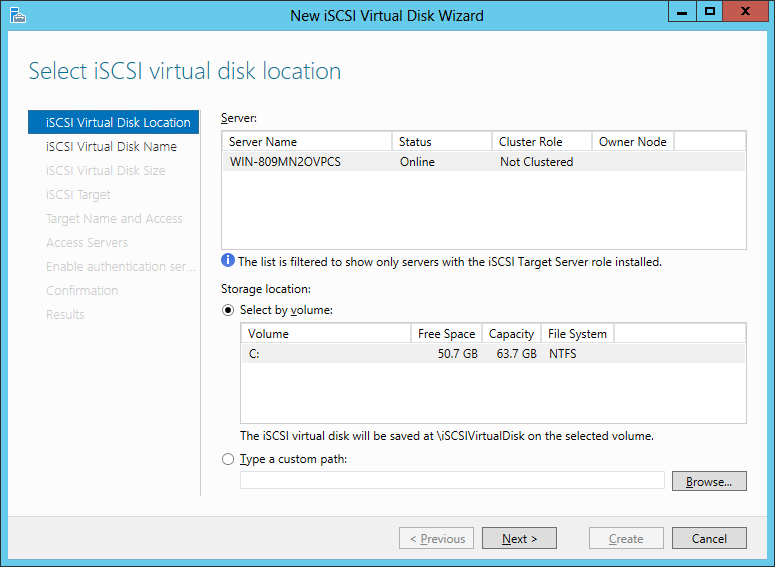
  • Select the link to create a new iSCSI virtual target. This will kick start a wizard.

iSCSI_target_disk_setup     iSCSI_name_initiator

  • The first step is creating a virtual disk. That’s right– iSCSI targets in Windows are backed by VHDs. This becomes a case of nested disk virtualization: a virtual machine running Server 2012 and backed by VHD  image– or equivalent format for VMware, Xen etc.– itself will include a virtual disk on its file system. We must go deeper.
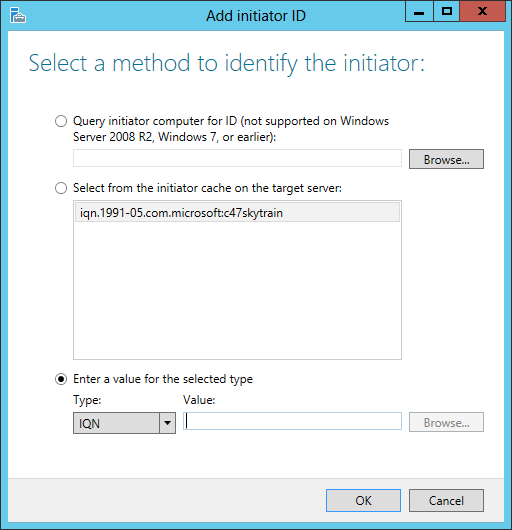
  • The dialog will also prompt for the expected ID of initiators connecting to this target. There are multiple ways to identify an initiator, none of them particularly intuitive. Easiest option is to copy paste the iSCSI Qualified Name or IQN style address that is automatically generated by each Windows instance acting as initiator. This name can be obtained from the “Configuration” tab in iSCSI Initiator Properties dialog, which is shown in the screenshots below. (For now skip any additional authentication settings.)
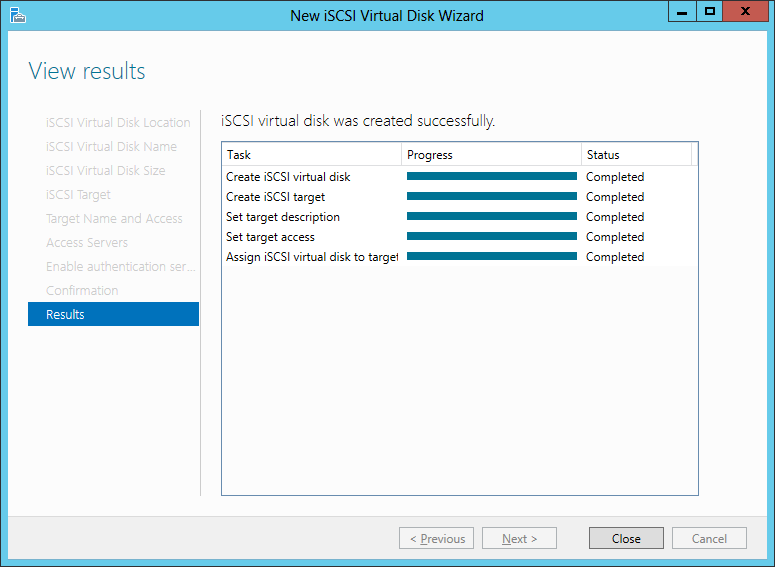
  • Once the target is created, both the virtual disk and the target backed by that disk will appear in the iSCSI node under Server Manager.

iSCSI_target_done   ServerManager_iSCSI_status

Connecting to the iSCSI target

  • Start the iSCSI Initiator application built into Windows 7/8.
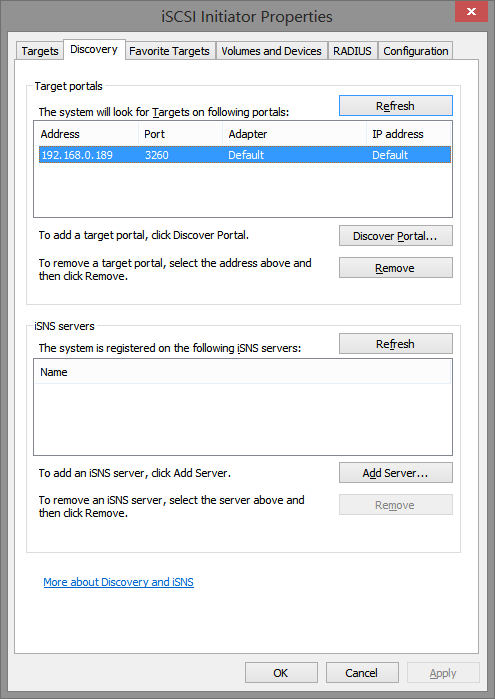
  • Easiest way to locate targets is letting Windows perform the discovery work. In the iSCSI Initiator Properties dialog, switch over to the “Discovery” tab and click on “Discover portal” button to specify the network location of the remote VM running Windows Server. This could be an IP address or DNS name. In the example below it is pointing to a local virtual machine addressed in private network space.

Initiator_DiscoveryTab    Initiator_FoundTarget

  • Switching back to the “Targets” tab and if necessary clicking “Refresh” shows the iSCSI targets located at that portal. A single server can offer multiple iSCSI targets; in the above example we only configured one target backed by one virtual disk.
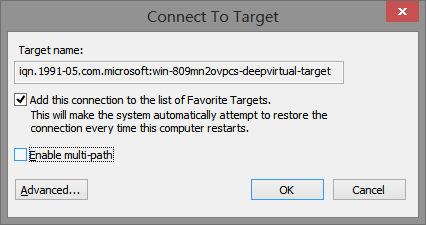
  • Clicking on “Connect” brings up a dialog, with the option to add this target to favorites already opted-in. Leaving that checkbox on is recommended. Windows will attempt to reconnect to these targets after reboots and similar events resulting in disconnect.

ConnectToTarget

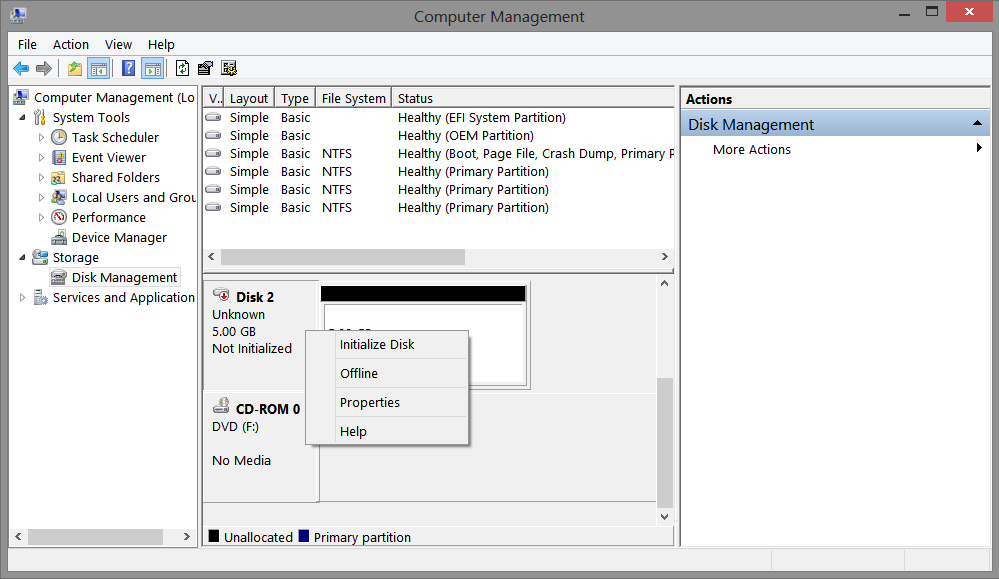
  • Finally after clicking OK to confirm the connection… nothing. An observant user may notice the status switched from “inactive” to “connected” but the rest of the system appears unaware of any new storage appearing. No new drives show up in Explorer, not even a notification about removable drive being connected. What happened?  The problem is that VHD created is a blank slate. Not only does it contain no data, it has not even been formatted with a filesystem such as NTFS. Switching over to the Disk Management snap-in (accessible from Computer Management) shows that a new disk has appeared but is listed as “Not initialized.”

UninitializedDisk

  • Fixing that requires a few more steps. These are strictly one-time initialization procedures that permanently setup a file-system structure inside the VHD. They will not have to be performed again when connecting to the iSCSI target in the future. First one is right-clicking and selecting “Initialize disk” from the context menu to initialize the disk. (For this application, choosing GUID partition table over MBR is fine, since the disk can only be accessed by recent vintage Windows instances that support iSCSI anyway.) Second part is creating one or more partitions on the initialized drive. Simplest approach is to allocate the entire space to a single primary partition. Finally the partition is formatted using a file-system such as NTFS.
  • Once the formatting is complete, a new disk will appear in Explorer corresponding to the remote iSCSI target, with the volume name and drive letter assigned in the formatting step. This drive is now usable from any application that can leverage local , which is transparently routed over the network to the remote virtual machine containing the iSCSI target disk.
  • More importantly for our purposes, the mapped disk supports BitLocker-To-Go encryption. Right-clicking on the disk icon will bring up the option to enable BitLocker full volume encryption.

After BL2G is enabled, all data written to the iSCSI target is automatically encrypted. The cloud provider hosting the VM behind that target sees only encrypted blocks being output by BitLocker. This is an important point: even though there is a virtual machine running a fully functional Windows Server operating system to emulate the iSCSI target, the encryption is not done there. BitLocker is not applied at the remote Windows Server VM. Doing so would be futile for protecting against attacks from the service provider. With commodity hardware, cloud platform has full control over the execution of any code inside the VMs it hosts and can subvert any encryption. In this design all cryptography takes place locally on the local user machine. For all the fancy capabilities available in that remote VM running Windows Server, it is only used to store opaque blocks encrypted before they are released to the cloud and only decrypted once they reach the user machine.

[Continued: iSCSI caveats]

CP

Lavabit, Silent Circle and the myth of self-reliance

If one-time presidential candidate Mitt Romney had been a cypherpunk, one can imagine him going on a different type of tone-deaf tirade on individual responsibility:

“47% of Internet users do not use any encryption at all, who are dependent on service providers, who believe these providers have a responsibility to protect their communications. … I’ll never convince them to take responsibility and care for their own privacy.”

There is a certain paradox in all the hand-wringing over Lavabit. After achieving its 15 minutes of fame as Edward Snowden’s email provider, the company shuttered its service very publicly due to unspecified government incursions, achieving notoriety and martyrdom along the way. They were soon followed by the start-up Silent Circle throwing in the towel for their private email service.

That poses one question: since when are users dependent on hosted cloud services to protect their own email? How did a movement predicated on Burning-Man-style radical self-reliance become so dependent on third-party service providers to protect email? It is as if two-decades worth of PGP and S/MIME development had been expunged from history, replaced by a brand new model of communication privacy based on the assumption that users are not capable of anything more complex than clicking web pages. It is worth revisiting that historic context around email encryption, if only to better contrast it with the fashionable web-driven services being hyped today.

End-to-end principle in action

PGP or Pretty Good Privacy started out in the 1990s, with the goal of making strong cryptography “universally” accessible to ordinary users. From the beginning the effort was plagued with regulatory and intellectual-property challenges, coinciding with the first round of cryptowars when technology industry battled the Clinton administration in an effort to relax restrictions around use of cryptography in commercial products. Unique to PGP is a decentralized peer-to-peer trust model. Sending encrypted email depends on knowing that person’s public key. But there is no centralized authority vouching for keys. Instead users vouch for each other, and establish confidence in other keys by navigating paths through already recognized keys. Trust traverses the social network– a remarkable concept, given that it was introduced a full decade before the rise of social networks, which allowed for the first time articulating those connections publicly, rendering them visible for all to see. What followed was community driven adoption, as PGP key-signing  parties started cropping up on the social agenda at IETF meetings and security conferences.

If PGP has been the grass-roots movement for email encryption, boldly fabricating new protocols and formats from scratch with nary a consideration for the patina of standardization, S/MIME is the buttoned-down corporate cousin following a conservative path of incremental change and conforming to existing organizational structures. Starting out a few years after PGP, it leveraged existing building blocks: X509 digital certificates for keys, PKCS for message formatting and MIME for email attachments. More importantly it called for a centralized, hierarchical  trust model where a single universally trusted entity– certificate authority in PKI parlance– mediates between large group of users who may not know each other personally. (Strictly speaking nothing prevents one from using self-signed certificates and manually managing trust with S/MIME. It just happens that most software implementations are not designed to play well with that approach, reflecting a design bias.)

However stark their philosophical differences may have been, PGP or S/MIME were united in one critical design principle: neither had much in the way of demands from infrastructure. Here was a great example of the vaunted end-to-end principle in action. All of the intelligence associated with encryption existed on the user’s own machine. Sure, email clients needed upgrades to recognize and process these new-fangled messages but the disruption ended there. Email servers remained the same– they could continue shuttling messages across the wire, oblivious to which ones were imbued with this magical security property. The network as we know it did not have to change. There was no separate “secure Internet,” “secure DNS” or “secure hosting provider” involved, existing alongside the vanilla Internet. Users did not have to change their ISP or obtain special “encryption-enabled” accounts from specialized providers marketing to niche audiences of the paranoid.

Cryptography goes mainstream?

Granted these early client applications left much to be desired in the way of usability. A seminal paper in usable security from 1999 by Alma Whitten and Doug Tygar was appropriately titled “Why Johnny Can’t Encrypt,” an unflinching look at the difficulties novice users faced in correctly operating PGP.

Fast forward to today. One might hope that the story has gotten better all around: export restrictions around cryptography lifted, interoperable standards codified in RFCs, ubiquitous support in software and polished user experience. Symantec acquired PGP, repackaging it as professionally supported enterprise-grade product. Meanwhile the GNU project implemented freeware clone GNU Privacy Guard. Before long it was ported to all major platforms, complete with user-friendly GUI installers on OS X and Windows. Mozilla ships the email client Thunderbird, providing easy integration with gpg clients. Meanwhile popular websites aimed at enthusiasts offer tutorials on setting up email encryption.

For skeptics who posit that the web-of-trust model for PGP with is hopelessly antiquated and can not scale beyond the rarefied community of high-minded technologists, there is comparable good news in S/MIME. Since 2000 it has been built into Microsoft Outlook and its free version Outlook Express shipping in every copy of Windows. Meanwhile rest of Windows client and server provide plenty of features to simplify roll out in enterprise setting: from issuing the certificates to automatically enrolling users for them, even integrating with smart cards for high-security use cases. All this using nothing but out-of-the-box Microsoft software installed on hundreds of millions of PCs. Surely all that enterprise experience will spill over into consumer use cases at home?

Johnny says: encryption is hard, let’s use web 2.0

A look at the “state-of-the-art” in private communication suggests otherwise. The head of the CIA attempts to use GMail draft messages to hide personal correspondenceMisleading announcements from major companies confuse users into assuming that switching to HTTPS on the web interface is the ultimate fix for email security. Meanwhile only one leading large-scale email provider  attempts to encrypt SMTP traffic in transit, leaving bulk of traffic in the clear when crossing boundaries between different providers. Meanwhile good-intentioned journalists and clueless websites promote a host of flash-in-the-pan services with dubious architecture (and in the case of CryptoCat, impressive catalog of vulnerabilities earning a 2013 Pwnie nomination) dependent on centralized providers in the cloud.

This preference for relying on third-parties “out there” instead of managing cryptographic capabilities locally is not a new development either. Nor are the inevitable disappointments. In the early 2000s, Hushmail was considered the gold standard for safe email communication. The architecture was deemed immune to subversion by the provider itself. With all the key-management logic handled by a Java application delivered from the website each time users visited, no one seemed troubled by the possibility that website may go rogue, turn on its users and serve a backdoored Java applet instead. Until of course that event came to pass, compelled by law enforcement.

Giving up on Bring-Your-Own-Cryptography?

Lost in the public lamenting over forced Lavabit closure is the fundamental question: are these services necessary in the first place? What is preventing the ordinary GMail, Hotmail or Yahoo Mail user from employing strong encryption to communicate with like-minded users? The answer is not “Google does not support encryption.” The web interface built by Google is just one way of using GMail. Users are free to access the same service via rich client applications such as  Outlook or Thunderbird, perfectly capable of grokking S/MIME and PGP with proper configuration. It is an indication of shift in mindset. The original cypherpunk vision made modest demands on infrastructure, calling for bring-your-own-cryptography model. Users made local changes to their installed software and email routine to accommodate existing services. Their intellectual descendants expect the mountain to come to them, in the form of a convenient cloud service accessible from an iPhone, solving all those messy key-management problems, with only the monthly bill to worry about.

CP

Using cloud services as glorified drive: iSCSI targets (part V)

The last post described the limitations of syncing Bitlocker-protected virtual disk images to the cloud. While the design achieves the stated goal of keeping data safe from any prying eyes– including the cloud storage provider– it is not very practical. There is contention between Windows operating system treating the VHD as mounted drive, and local synchronization agent trying to upload that file to the cloud. Note that even if concurrent access could be supported, it would not necessarily help. Because the sync agent does not know when the virtual filesystem completed updates to the disk image, it could end up uploading a corrupted image– similar to what would happen if a USB drive is suddenly yanked out when the machine is still trying to write to it.

iSCSI

What is needed is some way of addressing the virtual disk in the cloud at block level. This is where iSCSI comes in. SCSI stands for Small Computer System Interface, a  popular standard for connecting high-end disk drives since 1980s. iSCSI follows the convention of adding the magical “i” in front of technologies when they are updated for the Internet. While SCSI connections spanned a few inches from a disk drive inside the chassis to the motherboard, iSCSI allows the underlying protocol to run over an IP connection. This allows treating servers halfway around the world as if they were local disks, with low-level access to underlying disks.

That last property is critical since NFS, SMB and many other file sharing protocols exist to present a view of remote storage organized into directories and files. iSCSI operates at a much lower and allows addressing storage at block level. That also happens to be the level where Bitlocker operates. Starting with Windows Server 2008 and Windows 8, it is possible to enable Bitlocker on iSCSI targets as they are called in SCSI terminology. (This is a new development; Windows 7 did not support encryption on iSCSI volumes.)

That suggests a different plan of attack on using cloud services as glorified remote disk, without giving service provider any visibility into our private data:

  1. Place iSCSI volume in the cloud.
  2. Mount that iSCSI target as local drive. This can be done from any machine where we plan to access data
  3. Apply Bitlocker-To-Go full disk encryption with smart card to that drive
  4. Use the locally mapped disk as one would use any other removable storage to store our files
  5. Profit?

Steps #3 and #4 are straightforward, because they work in exactly the same way as previous VHD-based private backup solution. (Both the one-time initialization process to encrypt the volume and subsequent “unlocking” operations to access that data work same way.) So we focus on first two problems unique to iSCSI.

iSCSI targets in the cloud

The first challenge is finding an off-the-shelf service provider that offers storage presented as iSCSI target. This is not surprising. iSCSI is very much an enterprise technology designed to operate inside corporate networks and datacenters. There is no advantage for Dropbox or other consumer-grade services to present their storage across the Internet this way. Second is the problem of OS/device compatibility. As usual Windows leads the way here: both Windows 7 & 8 can access iSCSI targets, by acting as an iSCSI initiator. No such luck with OS X or mobile platforms such as Android. Even enterprise focused cloud storage services such as Box gravitate towards least-common denominator and have little incentive to support niche protocols. There is a plethora of network attached storage (NAS) hardware offerings with iSCSI functionality, but few hosted services with pay-as-you-go model. (Purchasing hardware and getting dedicated hosting does not count as “leveraging existing cloud services.”)

Luckily there is a simpler– but not free– solution based on existing services. In addition to acting as iSCSI client, Windows Server boxes can also function as iSCSI targets. Originally available as separately installed component called MSFT iSCSI Software Target for Server 2008 R2, the feature was later incorporated into Server 2012.

[continued: virtual iSCSI targets]

CP