Airbnb reviews and the prisoner’s dilemma

Reputation in the sharing economy

[Full disclosure: this blogger was head of information security for Airbnb 2013-2014]

In a recently published Vice article titled “I Accidentally Uncovered a Nationwide Scam on Airbnb” a journalist goes down the rabbit-hole of tracking down instances of fraud at scale on the popular sharing economy platform. The scam hinges on misrepresentation: unsuspecting guests sign up for one listing based on the photographs, only to be informed minutes before their check-in time about an unforeseen problem with unit that precludes staying there. Instead the crooks running the scam directs the guest to an allegedly better or more spacious unit also owned by the host. As expected, this bait-and-switch does not turn out very well for the guest, who discover upon arrival that their new lodgings are less than stellar: run-down, unsanitary and in some cases outright dangerous.

First, there is no excuse for the failure to crack down on these crooks. As the headline makes clear, this is not an isolated incident. Multiple guests were tricked by the same crook in exactly the same manner. In an impressive bit of sleuthing, the Vice journalist proceeds to identify multiple listings on the website using staged pictures with the same furniture and reach out to other guests conned by the same perpetrator. (She even succeeds in digging up property records for the building where the guests are routed after their original listing mysteriously becomes unavailable, identifying the owner and his company on LinkedIn.) Airbnb is not a struggling early stage stratup. It has ample financial resources to implement basic quality assurance: every listing must be inspected in person to confirm that its online depiction does not contain materially significant misrepresentations. The funds used to fight against housing ordinances or insult public libraries in San Francisco are better off redirected to combatting fraud or compensating affected customers. Ironically the company exhibited such a high-touch approach in its early days while it was far more constrained in workforce and cash: employees would personally visit hosts around the country to take professional photographs of their listings.

Second, even if one accepts the premise that 100% prevention is not possible— point-in-time inspection does not guarantee the host will continue to maintain the same standards— there is no excuse for appalling response from customer support. One would expect that guests are fully refunded for the cost of their stay or better yet, that Airbnb customer support can locate alternative lodgings in the same location in real time once guests discover the bait-and-switch. These guests were not staying in some remote island with few options; at least some of the recurring fraud took place in large, metropolitan areas such as Chicago where the platform boasts thousands of listings to choose from. Failing all else, Airbnb can always swallow its pride and book the guest into a hotel. Instead affected guests are asked to navigate a Kafkaesque dispute resolution process to get their money back even for one night of their stay. In one case the company informs the guest that the “host”— in other words, the crooks running this large-scale fraudulent enterprise— have a right to respond before customer support can take action.

Third, the article points to troubling failures of identity verification on the platform, or at least identity misrepresentation. It is one thing for users of social networks to get by with pseudonyms and nicknames. A sharing platform premised on the idea that strangers will be invited into each others’ place of residence is the one place where verified, real-world identity is crucial for deterring misconduct. If there is a listing hosted by “Becky” and “Andrew,” customers have every reason to believe that there are individuals named Becky and Andrew involved with that listing in some capacity. The smiling faces in the picture need not necessarily be the property owners or current lease-holder living there. They could be agents of the owner helping manage the listing or even professional employees at a company that specializes in brokering short-term rentals on Airbnb. But there is every expectation that such individuals exist, along with a phone number where they can be reached— otherwise, what is the point of collecting this information? Instead as the article shows, they appear to be fictitious couples with profile pictures scraped from a stock-photography website. The deception was in plain sight: an Airbnb review from 2012 referred to the individual behind the profile by his true name, not the fabricated couple identity. While there is an argument for using shortened versions, diminutives, middle-names or Anglicized names instead of the “legal” first name printed on official government ID, participants should not be allowed to make arbitrary changes to an existing verified profile.

To be clear: identity verification can not necessarily stop bad actors from joining the platform any more than the receptionist’s perfunctory request for driver’s license stops criminals from staying at hotels. People can and do commit crimes under their true identity. One could argue that Airbnb ought to run a background check on customers and reject those with prior convictions for violent offenses. Aside from being obviously detrimental to the company bottom line and possibly even running afoul of laws against discrimination (not that violating laws has been much of a deterrent for Airbnb) such an approach is difficult to apply globally. It is only for US residents that a wealth of information can be purchased on individuals, conveniently indexed by their social security number. More to the point, there is no “precrime unit” a la The Minority Report for predicting whether an individual with an otherwise spotless record will misbehave in the future once admitted on to the platform.

Far more important is to respond swiftly and decisively once misbehavior are identified, in order to guarantee the miscreants will never be able to join the platform again under some other disguise. At the risk of sounding like the nightmarish social-credit system being imposed in China as an instrument of autocratic control, one could envision a common rating system for the sharing economy: if you are kicked out of Airbnb for defrauding guests, you are also prevented from signing up for Lyft. (Fear not, Uber will likely accept you anyway.) In this case a single perpetrator brazenly operated multiple accounts on the platform, repeatedly bait-and-switching guests over to units in the same building he owned, leaving behind an unmistakable trail of disgruntled guest reviews. Airbnb still could not connect the dots.

The problem with peer-reviews

Finally and this is the most troubling aspect, the article suggests the incentive system for reviews is not working as intended. In a functioning market, peer reviews elicit honest feedback and accurately represent the reputation of participants. The article points to several instances where guests inconvenienced by fraudulent listings were either reluctant to leave negative feedback. Even worse, there were situations when the perpetrators of the scams left scathing reviews full of fabrications for the guests, in an effort to cast doubt on the credibility of the understandably negative reviews those guests were expected to leave.

Incidentally, Airbnb did change its review system around 2014 to better incentivize both parties to provide honest feedback without worrying about what their counterparty will say. Prior to 2014, reviews were made publicly visible as soon as the guest or host provided them in the system. This created a dilemma: both sides were incentivized to wait for the other to complete their review first, so they could adjust their feedback accordingly. For example, if guests are willing to overlook minor issues with the listing, the host may be willing to forgive of some their minor transgressions. But if the guest review consisted of nitpicking about every problem with the listing (“too few coffee mugs— what is wrong with this place?”) the host will be inclined to view guest conduct through an equally harsh lens (“they did not separate the recycling— irresponsible people”) That creates an incentive for providing mostly anodyne, meaningless feedback and avoiding confrontation at all costs. After all, the side that writes a negative review first is at a distinct disadvantage. Their counterparty can write an even harsher response, not only responding to the original criticism but also piling on far more serious criticisms against the author. It also means that reviews may take longer to arrive. When neither side wants to go first, the result is a game-of-chicken between guest & host played against the review deadline.

In the new review model, feedback is hidden until both sides complete their reviews. After that point, it is revealed simultaneously. That means both sides are required to provide feedback independently, without visibility into what their counterparty wrote ahead of time. In theory this elicits more honest reviews— there is no incentive to suppress negative feedback out of a concern that the other side will modify their review in response. (There is still a 30-day deadline to make sure feedback is provided in a timely manner; otherwise either side could permanently hold the reviews hostage.) The situation is similar to the prisoner’s dilemma from game theory: imagine both guest and host having grievances about a particular stay. The optimal outcome from a reputation perspective is one where both sides suppress the negative feedback (“cooperate”) leaving positive reviews, which looks great for everyone— and Airbnb. But if one side defects and leaves a negative review featuring their grievance, the other side will look even worse. Imagine a scenario where the guests say everything was great about the listing and host, while the host claims the guests were terrible people and demands payment from Airbnb for the damage. Even if these charges were fabricated, the guests have lost much of their credibility to counter the false accusations by going on the record with a glowing review about the host. So the stable strategy is to “defect:” include negative feedback in the review, expecting that the counterparty will likewise include their own version of the same grievance.

But game theoretical outcomes are only observed in the real world when participants follow the optimal strategies expected of rational agents. Decades of behavioral economics research suggest that actual choices made by humans can deviate significantly from that ideal. The Vice article quotes guests who were reluctant to leave negative reviews about the fraudulent hosts even after their decidedly unhappy experiences. This is not surprising either. There are other considerations that go into providing feedback beyond fear of retaliation. For example there are social norms against harshly criticizing other people; recall that all reviews are visible on Airbnb. Other users can look up a prospective guest and observe that he/she has been providing 1 star reviews  to all of their hosts. In the absence of such constraints, the game-theoretical conclusion would be taken to an extreme where both sides write the most negative review possible, constrained only by another social norm against making false statements.

Either way, the incentive structure for reviews clearly needs some tweaks to elicit accurate feedback.

CP

Update: Airbnb announced that the company will be manually verifying all 7 million of their listings.
Revocation is hard, the code-signing edition (part I)

Issuance vs revocation

Certificate revocation remains the Achilles heel of public-key infrastructure systems. The promise of public-key cryptography was stand-alone credentials that can be used in a peer-to-peer manner: a trusted issuer provisions the credential and then steps aside. They are not involved each time the credential is used to prove your identity. Contrast that with prevalent models on the web today such “login with Facebook” or “login with Google.” These are glorified variants of an enterprise authentication system called Kerberos that dates from the 1980s. Facebook or Google sit in the middle of every login, mediating the transaction. In the PKI model, they would be replaced by a trusted third-party, known as the “certificate authority,” issuing long-lived credentials to users. Armed with that certificate and corresponding private key, the person could now prove their identity anywhere without having to involve the CA again. This is the model for proving identities for websites: the TLS protocol, that once ubiquitous lock-icon on the address bar or green highlight around the name of the website, is predicated on the owner of that site having obtained a digital certificate from a trusted CA.

Revocation throws a wrench in that simple model. Credentials can expire but they can also be revoked: the website could lose their private-key or one of the assertions made in the certificate (“this company controls the domain acme.com”) may stop being true at any point. There are two main approaches to revocation not counting a home-brew design used by Google in Chrome, presumably because the relevant standards were not invented in Mountain View. The first one is Certificate Revocation Lists or CRLs: the certificate authority periodically creates a digitally signed list of revoked certificates. That blacklist is made available at a URL that is itself encoded in the certificate, in a field appropriately called the CDP, for “CRL Distribution Point.” Verifiers download CRLs periodically— each CRL defines its lifetime, to help with caching and avoid unnecessary polling— and check to see if the serial number of the certificate they are currently inspecting appears in the blacklist. There are additional optimizations such as delta-CRLs that can be used to reduce the amount of data transferred when dealing with large-scale PKI deployments where millions of certificates could have a revoked status at any time.

If CRLs are the batch mode for checking revocation, Online Certificate Status Protocol is the interactive version. OCSP defines an HTTP-based protocol for verifiers to query a service affiliated with the CA to ask about the current status of a certificate. Again the location of that service is embedded in the certificate in the “Authority Information Access” field. Interestingly OCSP responses are also signed and cacheable with a well-defined lifetime, which allows optimizations such as OCSP stapling.

Taken in isolation, the cost of doing a revocation check may seem daunting: web-browsers try to shave milliseconds from the time it takes to render a web page or start streaming that video. Imagine having to pause everything while a CRL is downloaded in the background or OCSP status queried. But recall that this cost is amortized over thousands of certificates: one CRL covers not just one website but all websites with a certificate from that CA. Considering that a handful of public certificate authorities account for the majority of TLS certificates, not having a fresh CRL already present would be the exceptional scenario, not the norm. More importantly the retrieval of this information need not be done in real-time: for example Windows has sophisticated heuristics to download CRLs for frequently used CAs in the background. It can even prefetch OCSP responses for frequently visited individual sites, based on a predictive model that those sites are likely to be visited again.

Weakest link in the (certificate) chain

There is one aspect of PKI operation that no amount of client-side optimizations can compensate for: CA incompetence. If CAs are not promptly acting on reports of lost credentials, failing to maintain CRLs correctly or experiencing frequent outages with their OCSP responders, relying-parties will at best remain in the dark about the status of certificates— having to make a difficult decision on what to do if revocation status can not be determined— or worse, reach the wrong conclusion and make trust decisions based on a bogus credential. Cases of CA ineptitude in the case of TLS certificates are legion, and need not bear repeating here other than to point out an economic truth: it would be astonishing to expect a different outcome. All CAs trusted by popular web-browsers are effectively on equal standing; there is nothing distinguishing a certificate issued by a competent CA from one that constantly screws up. In both cases the websites get their all-important lock icon or avoid being publicly shamed by Google Chrome. (Extended validation certificates were introduced a decade ago with better vetting requirements, but that only had the effect of creating two tiers. All EV-qualified issuers still stand on equal ground in terms of trust afforded by browsers.) That means issuers can only compete on price. There is zero incentive for CAs to compete on operational competence, beyond the minimal baseline required by the CA/Browser Forum to avoid getting kicked out. It turns out even that modest baseline is too high a bar: Symantec managed to get kicked out of both Mozilla and Google roots.

Operational errors by certificate authorities have been well documented in the context of TLS certificates. From relatively “minor” infractions such as issuing certificates to unauthorized parties pretending to be affiliated with major websites to epic failures such as accidentally signing subordinate certificates—effectively delegating ability to issue any certificate to the bad guys— public PKI has been veritable zoo of incompetence. It turns out that code signing and revocation create even more novel ways for CAs to stumble.

Same mathematics, different purposes

A public-key algorithm such as RSA can be used for different purposes such as encryption, authentication or digital signatures. The underlying computations are same: whether we are using RSA to protect email messages in transit or prove our identity to a remote website, there is a secret value that is used according to the same mathematical function. While  there are superficial differences in formatting and padding, there is no reason to expect a fundamental difference in risk profile. Yet each of these scenarios have different consequences associated with loss or compromise of keys. (To be clear,  “loss” here is used to mean a key becoming permanently unusable, both for the legitimate owner and any potential attacker. By contrast “key compromise” implies the adversary managed to get their hands on the key.)

Consider the case of a key used for authentication. In a realistic enterprise scenario, this could be a private key residing on a smart-card used for logging into Activity Directory. If that key is rendered unusable for some reason— let’s say the card inadvertently went through a cycle in the washing machine— the user will be temporarily inconvenienced. Until they replace the credential, they can not access certain resources. Granted, that inconvenience could be significant. Depending on group policy, they may not even be able to login to their own machine if smart-card logon is mandatory. But as soon as the IT department issues a new card with a new set of credentials, access is restored. The important point is that the new card will have equivalent credentials but different key-pair. Previous key was permanently bound to the malfunctioning hardware. It can not be resurrected. Instead a new key-pair is generated on the replacement card and a corresponding new X509 certificate is issued, containing the new public key. As far as the user is concerned, the new key is just as good as the previous one: there is nothing they are prevented from doing that used to be possible with the previous key material.

It would be an entirely different story if that same smart-card was used for email encryption, for example S/MIME which is popular in enterprise deployments. While we can reissue this employee a new card, the replacement can not decrypt email encrypted to the previous key. If there was no backup or key-escrow in place, there has been permanent loss of functionality: past encrypted correspondence has become unreadable. That goes beyond a “temporary inconvenience” IT department can resolve. This is one example of a more general observation: loss or compromise of a key can have different consequences depending on the high-level scenario it is used for, even when all of the cryptographic operations are otherwise identical.

Loss vs compromise

At first glance, the signature scenario looks similar to authentication as far as the consequences from key loss are concerned. If a signing key becomes unusable, simply generate a new one and start signing new messages with that replacement key. This is indeed the approach taken in systems such as PGP: users still have distribute the new key, perhaps by publishing it on a key-server. There is no need to go and re-sign previous messages: they were signed with a valid key, and recipients can continue to validate them using the previous key. (Note we are assuming that recipients are flexible about choice of signing key. There are other systems— notably cryptocurrencies such as Bitcoin— where control over funds is asserted by signing messages with one particular key which can not be changed. In that model, loss of the private key has serious repercussions, directly translating to dollars.)

The picture gets murky once again when considering compromise of the key, defined as adversaries coming into possession of the secret. For encryption keys, the results are straightforward: attackers can read all past messages encrypted in that key. The best-case scenario one can hope for is publicizing the replacement quickly, to prevent any more messages from being encrypted to the compromised key. Not much can be done to save past messages, beyond purging local copies. If an attacker can get hold of those ciphertexts by any avenue, they can decrypt them. There is no way to “revoke” all existing copies of previously encrypted ciphertexts. In fact the adversary may already have intercepted and stored those ciphertexts, optimistically betting on future capability for obtaining the decryption key.

Consequences from the compromise of a signing key are more subtle, because time enters into the picture as a variable. Authentication commonly occurs in real time and once, with a single known counter-party attempting to verify your identity. Signatures are created once and then verified an unbounded number of times by an open-ended collection of participants indefinitely into the future. That creates two complications when responding to a key compromise:

  • Future messages signed by the attacker using the compromised key must be invalidated, such that recipients are not accidentally tricked into accepting them
  • Yet past messages made by the authorized signer when they still had full control over the private-key must continue to validate properly.

To appreciate why that second property is critical, consider code-signing: software publish digitally sign the applications they distribute, to prevent malware authors from tricking users into installing bogus, back-doored versions imitating the original. Suppose a publisher discovers that their signing key has been compromised and used to sign malware— a very common scenario that figured prominently in high-profile campaigns such as Stuxnet. The publisher can quickly race to revoke their signing certificate. Client properly implementing revocation checks will then be protected agains the signed malware, rejecting the signature as invalid. But what about legitimate pieces of software that distributed by the same publisher? Indiscriminate revocation would result in all of those apps also becoming untrusted, requiring the publisher to not only re-sign every app they ever shipped but also guarantee that every single copy existing anywhere a customer may download apps from is replaced by the updated version.

[continued]

CP

DIY VPN (part I)

Introduction

Net neutrality is not the only casualty of an FCC under the sway of a new administration. In a little noticed development, ISPs have free reign to spy on customers and sell information based on their Internet traffic. Google has been on a quest to encrypt all web traffic using the TLS protocol— engaging in subtle games of extortion by tweaking the default web browser UI to throw shade at sites still using the default unencrypted HTTP protocol. But there is one significant privacy limitation with TLS: it does not hide the identity of the website the user is visiting. Such metadata is still visible, both in the TLS protocol but also in the addressing scheme used for the underlying IP protocol.

This is where virtual private networks come in handy. By encapsulating all traffic through an encrypted tunnel into another connection point, they can also protect metadata from the prying eyes of surveillance-happy ISPs. But That is only the beginning: VPNs also reduce privacy risks from arguably the apex predator of online privacy— advertising-based revenue models. In the grand tradition of surveillance capitalism, every crumb of information about a customer is enlisted into building comprehensive profiles. Even if consumers never login to Facebook or Google, these networks can still build predictive profiles using alternative identifiers that help track consumers over time. Of all the stable identifiers that users carry around like unwanted, mandatory name-tags forced on them— HTTP cookies, their counterparts complements of Flash and creative browser fingerprinting techniques— IP addresses are one of the hardest to strip away. Incognito/private browsing modes allow shedding cookies and similar trackers at the end of the session, but IP addresses are assigned by internet service providers. In many cases they are surprisingly sticky: most residential broadband IPs rarely change.

From clunky enterprise technology to consumer space

In the post-Snowden era, the default meaning of “VPN” also changed. Once an obscure enterprise technology that allowed employees to connect to internal corporate networks from home, it shifted into the consumer space, pitched to privacy-conscious mainstream endusers as a way to protect themselves online. In an ironic twist, even Facebook the apex predator of online privacy infringement got into the act: the company acquired the analytics service Onavo and offered the existing Onavo VPN app to teenagers free of charge, in exchange for spying on their traffic. (When TechCrunch broke the news, Apple quickly put the kibosh on that particular privacy invasion by revoking the enterprise certificate Facebook had misused to create an app for general distribution with VPN privileges.) The result has been a competitive landscape for consumer VPN services, complete with the obligatory reviews and ranking from pundits.

For power users there is another option: hosting your own VPN service. This post chronicles experiences doing that, organized into two sections. First section an overview of what goes into building a functioning VPN server, using common, off-the-shelf open source components. Second half looks at the economics of the DIY approach, comparing the costs against commercial offerings and more importantly, looking at how different usage patterns— number of presence points, simultaneous users, monthly bandwidth consumed— affect those numbers.

Implementation considerations

“The nice thing about standards is that you have so many to choose from”

Andrew Tannenbaum

Maze of protocols

One of the first challenges in trying to create a VPN solution is the fragmented nature of the standard. Unlike the web where all web-browsers and web-servers have converged on the protocol TLS for protecting communications, there is no comparable “universal” VPN standard with comparable ubiquity. This is either surprising or utterly predictable depending on perspective. It is surprising considering VPNs are 20+ years old. Attempts to standardize VPN protocols are the same vintage: IPSec RFCs were published in 1995. L2TP followed a few years later. With the benefit of two decades to in protocol tinkering— proprietary, standards-based or somewhere in between— you might expect the ecosystem to converge on some least common denominator by now. Instead VPNs remain highly fragmented, with incompatible options pushed by every vendor. The roots of the technology in enterprise computing may have something to do with that outcome. If Cisco, Palo Alto and Fortinet compete on selling pricy VPN gear to large companies with the assumption that every employee will be required to also install a  VPN client from the same vendor who manufactures the hardware, there is little incentive to interoperate with each other.

In this morass of proprietary blackbox protocols, OpenVPN stands out as one of the few options with some semblance of transparency. It is not tied to specific hardware, which makes for convenient DIY setups using cloud hosting: it is much easier— not to mention cost effective— to install software in a virtual server than rack a physical appliance in a datacenter cage. It also has good cross-platform support client side, with a good mixture of freeware and commercial applications on Windows, OSX and Linux flavors— the last one in particular being the black-sheep platform frequently neglected by commercial VPN offerings. (WireGuard is another more recent entry distinguished by modern cryptography, but it does not quite have the same level of implementation maturity.)

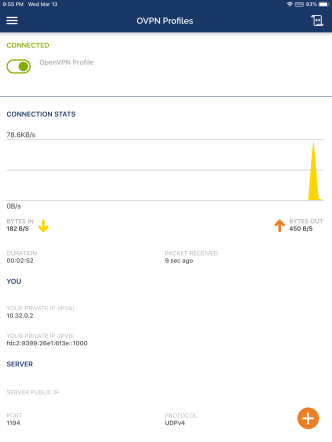
OpenVPN_on_iPad

OpenVPN on iPad

OpenVPN server-side

In the interest of reach and portability, this examples uses Ubuntu Server 18 LTS, since many commercial hosting services such as AWS and Linode offer virtual hosting for this operating system. There are extensive online tutorials on setting up the server-side online so this blog post will only summarize the steps here:

  1. Enable IPv4 & IPv6 forwarding via sysctl configuration
  2. Setup iptables rules (again, for IPv4 & IPv6) and make them persistent using iptables-persistent package.
  3. Tweak openvpn server configuration file
  4. Provision credentials
    • Generate Diffie-Hellman parameters
    • Use openssl to generate an RSA key-pair for the server & create a certificate signing request (CSR) based on that pair
    • Submit the certificate request to a certificate authority to obtain a server certificate and install this on the server— more on this in the next section

PKI tar-pit

OpenVPN supports authentication based on different models but the most commonly used design involves digital certificates. Every user of the VPN service as well every server they connect to has a private key and associated credential uniquely identifying that entity. There are no shared secrets such as a single password known to everyone, unlike for example in the case of L2TP VPNs where all users have the same “PSK” or preshared key. One crucial advantage of using public-key credentials is easy revocation: if one user loses their device or stops using the VPN service, their certificate can be revoked without affecting anyone else. By contrast, if an entire company is sharing the same PSK for every employee, it will be painful to rotate that secret for every departure. From an operational perspective, distributing credentials is simpler. Passwords have to be synchronized on both sides in order for the server to verify them. With digital certificates, the secret private key only exists on user device and the server does not need to be informed ahead of time whenever a new certificate is issued. (Although they need access to the certificate revocation list or CRL, in order to check for invalidated credentials.)

Public-key credentials avoid many of the security headaches of passwords but come with the operational burden of managing a PKI. That is arguably the most heavy-weight aspect for spinning up a stand alone VPN infrastructure. Large enterprises have an easier time because the overhead is effectively amortized into other use-cases of PKI in their existing IT infrastructure. Chances are any Window shop at scale is already running a certificate authority to support some enterprise use case. For example employees badges can be smart-cards provisioned with a digital certificate. Or every machine can be automatically issued a certificate using a feature called auto-enroll when they are connected to the domain controller, which is then leveraged for VPN. That seamless provisioning experience is difficult to recreate cross-platform once we accept the requirement to support OSX, Linux, Android and iOS platforms. Instead credentials must be provisioned and distributed manuallyand that includes both VPN users and VPN servers.

There are open-source solutions for running a certificate authority, notably EJBCA. OpenSSL itself can function as a primitive CA. OpenVPN introduced its own solution called easy-rsa, glorified wrapper scripts around OpenSSL to simplify common certificate management tasks.  But arguably the most user-friendly solution here is Windows Active Directory Certificate Services or ADCS. ADCS features both a GUI for simpler use-cases as well as automation through the command-line via old-school certutil and more modern powershell scriplets.

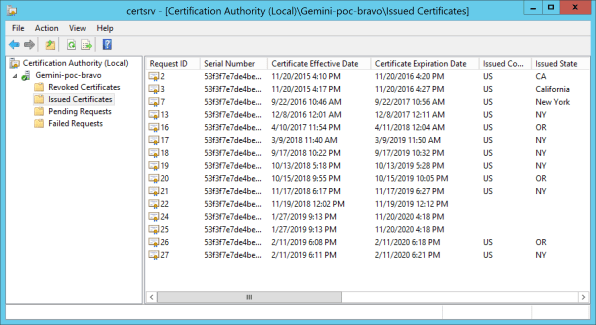
ADCS_2012_management_GUI.PNG

Active Directory Certificate Services GUI on Windows 2012

ADCS is not free software, but it is widely available as cost-effective, hosted solution from Amazon AWS and MSFT Azure among other providers. Considering the CA need only be powered on for the occasional provisioning and revocation, operational expenses will be dominated by the storage cost for the virtual disk image as opposed to the runtime of the virtual machine. One might expect a CA has to stay up 24/7 to serve revocation lists or operate an OSCP responder— and ADCS can do both of those, when the server also has IIS role installed. But OpenVPN can only parse revocation information from a local copy of the CRL. That rules out OCSP and implies CRLs must be manually synchronized to the server, defeating the point of having a server running around the clock to serve up revocation information. In effect OpenVPN only requires an offline CA.

[continued]

CP

Two-factor authentication: a matter of time

How policy change in Russia locked Google users out of their account

Two-factor authentication is increasingly becoming common for online services to improve the protection afforded to customer accounts. Google started down this road in 2009, and its efforts were greatly accelerated when the company got 0wned by China in the Aurora attacks. [Full disclosure: this blogger worked on Google security team 2007-2013] At the time, and to a large extent today, the most popular way of augmenting an existing password-based system with an additional factor involved one-time passcodes or “OTP” for short. Unlike passwords, OTPs changed each time and could not be captured once for indefinite access going forward. (Note this is not equivalent to saying they can not be phished—nothing prevents a crook from creating fake login pages which ask for both password and OTP, and in fact such attacks have been observed in the wild.)

Counters and ticking seconds

There are many ways to generate OTPs but they all follow a similar pattern: there is a secret key, often referred to as a “seed” and this secret is combined with a variable factor such as current time or an incrementing sequence number using a one-way function. This one-way property is critical: it is a security requirement that even if an adversary can observe multiple OTPs and know the conditions they were generated in (such as exact timing) they can not recover the secret-seed required to generate future codes.

Perhaps the most well-known 2FA solution and one of the oldest is a proprietary offering from RSA called SecurID. It  was initially implemented only on hardware tokens sold by the company. SecurID is a decidedly closed ecosystem, at least in its original incarnation: not only did customers have to buy the hardware from RSA Inc but you also had to integrate with a service operated by the same company in order to verify if OTP codes submitted by users. That is because only RSA knew the secret-seed embedded in each token; customers did not receive these secrets or have any way to reprogram the token with their own secrets.

HOTP

Such closed models may have been great for customer lock-in but would clearly not fly in a world accustomed to open standards, interoperability and transparency. (Not to mention the wisdom of relying on a third-party for your authentication, a lesson that many companies including Lockheed-Martin would learn the hard way when RSA was breached by threat-actors linked to China in 2010.) Other industry players began pushing for an open standard, eventually resulting in a new design called HOTP being published as an RFC. The letter “H” stands for HMAC, a modern cryptographic primitive with a sound security model, compared to the home-brew Rube-Goldberg contraption used in SecurID. HOTP uses an incrementing counter as the internal “state” of the token. Each time an OTP is generated, this counter is incremented by one.

That model relies on synchronization beween the side generating OTP codes and the side responsible for verifying them. Both must use the same sequence number in order to arrive at the same OTP value. The sides can get out of sync due to any number of problems: imagine that you generated an OTP (bumping up your own sequence number) but your attempt to login to a website failed because of a network timeout. The server never received the OTP and therefore its sequence number is one behind yours. In practice this is solved by checking a submitted OTP not just against the current sequence number N but a range of values {N, N+1, N+2, …, N + t} for some tolerance value t. If a given OTP checks out against one of the later values in this sequence, the server updates its own copy of the counter, on the assumption that the client skipped past a few values. Even then things can go awry since collisions are possible: a user can accidentally mistype an OTP which then happens to match one of these later numbers, incorrectly advancing the counter.

TOTP

An alternative to maintaining a counter is using implicit state both sides independently have access to without having to synchronize. Time is the most obvious example: as long as both the client generating OTP value and server verifying it have access to an accurate clock, they can agree on the state of the OTP generator. Again in practice there is some clock drift permitted; instead of using a very accurate time down the millisecond, it is instead quantized into intervals of say 30 or 60 seconds. OTP codes are then generated by applying the HMAC function to the secret seed and this time-interval count. This was standardized in an open standard called TOTP, or Time-Based One-Time Password Algorithm.

There is one catch with TOTP: both sides must have an accurate source of time. This is easier on the server-side verifying OTP codes, but more difficult client-side where OTP generation takes place. The reason HOTP and sequence-numbers historically came first is that they could be implemented offline, using compact hardware without network connectivity. While embedded devices can have a clock, the challenge is those clocks require a battery to remain powered 24/7 and more importantly they eventually start drifting, running slower/faster than true time. A token that runs one second too fast every day will be a full 6 minutes ahead after a year.

Fast forward to 2009 with the smartphone revolution already underway, our model envisioned mobile apps handling OTP generation. Unlike stand-alone tokens, apps running on a smartphone have access to a system clock that is constantly being synchronized as long as the device is online. That take cares of time drift—even when the phone is only sporadically connected to the internet— making TOTP more appealing.

Which time?

One of the first questions that comes up about TOTP is the effect of time-zones. What happens when a user sitting in New York computes a TOTP that is submitted to a service in California for verification? In this case client and server separated by three time-zones. At first glance it looks like since they disagree on the current time, time-based OTP would break down in this model. Luckily that is not the case: as with most protocols relying on an accurate clock, TOTP calls on both participants to use an absolute frame of reference, namely the UNIX epoch time. Defined as the number of seconds elapsed since midnight January 1st, 1970 on Greenwich timezone, it does not depend on current location or daylight saving adjustments. That means TOTP generators only need to worry about having an approximately correct clock, a problem that is easily solved when the 2FA app runs on a mobile device with internet connectivity periodically checking some server in the cloud for authoritative time.

Daylight saving time considered harmful

Never underestimate the ability of the real world to throw a wrench in the plans. In 2011 Russia announced that it would not adjust back from daylight saving in the fall:

“President Medvedev has announced that Russia will not come off daylight saving time starting autumn 2011. Medvedev argued that switching clocks twice a year is harmful for people’s health and triggers stress. “

While the medical profession may continue to debate the effects of switching clocks on the general population, this change caused a good deal of frustration for software engineers. Typically “local time” displayed to users is determined by starting from a reference time such as GMT, making adjustments for local timezone and seasonal factors such as daylight saving. In the case of the Android operating system, those adjustments were hard-coded. If Russia did not going switch back to DST as scheduled, those devices would end up displaying the “wrong” time, even when they have perfectly accurate internal clocks.

In principle, this is only a matter of updating the operating system to follow the new, health-conscious Russian regime. In reality of course updating Android devices in the field has been a public quagmire of indifference and mutual hostility amongst device manufacturers, wireless carriers and Google. While the picture has improved drastically with Google moving to assert greater control over the update pipeline, in 2011 the situation was dire. Except for the handful of users on “pure” Google-experience devices such as Nexus S, everyone else was at the mercy of their wireless carrier for receiving software updates and those carriers were far more interested in locking users into 2-3 year contracts by selling another subsidized device than supporting existing units in the field. Critical security updates? Maybe, if you are lucky. Bug fixes and feature improvements? Forget about it.

Given that abject negligence from carriers and handset manufacturers, what is the average user to do when their phone displays 3’o clock when every one else is convinced it is 4’o clock? This user will take matters into their own hands and fix it somehow. The “correct” way to do that is shifting the timezone over by one, effectively going from Kaliningrad to Moscow. But this is far from obvious: the more intuitive fix given this predicament is to manually adjust the system clock forward by an hour. (One soon discovers that automatic time adjustments must also be disabled, or the next check-in against an authoritative time-server on the Internet will promptly restore the “correct” time.) Problem solved, the phone now reports that the local-time is 4’o clock as expected.

Off-by-one (hour)

Except for the unintended interaction with two-factor authentication, specifically TOTP which uses the current time to generate temporary codes. Overriding the system clock will shift the UNIX epoch time too. Now the TOTP generator is being fed from a clock with full one-hour skew. Garbage-in, garbage out. Most TOTP implementations will try to correct for slight clock drifts by checking a few adjacent intervals around current time, where each “interval” is typically 30 or 60 seconds. But no sane deployment is going to look back/forward as far as one hour, on the assumption that if your local clock is that far off, you are going to have many other problems.

Sure enough, reports started trickling in that users in Russia were getting locked out of their Google accounts because the 2FA codes generated by Google Authenticator on Android were not working. (In this blogger’s recollection, our response was adding a special-case check for a handful intervals around the +1 hour mark measured from current time— not all intervals between now and +1 hour mark. This has the effect of slightly lowering security, by increasing the number of “valid” OTP codes accepted, since each interval typically corresponds to a different OTP code modulo collisions.)

Real world deployments have a way of rudely bringing about the “impossible” condition. Until this incident, it was commonplace to assert that the reliability of TOTP based two-factor authentication is not affected by timezones or quirks of daylight saving time. In a narrow sense that statement is still true but that would have been no consolation to the customers in Russia locked out of their own accounts. Looking for a pace to pointer fingers, this is decidedly not a case of PEBKAC. Confronted with an obvious bug in their software, those Android users picked the most intuitive way of solving it. Surely they are not responsible for understanding the intricacies of local-time computation or the repercussions of shifting epoch time. Two other culprits emerge. Is the entire Android ecosystem to blame for not being able to deliver software upgrades to users, a problem the platform is still struggling with today? After all the announcement in Russia came months ahead of the actual change and iOS devices were not affected to the same extent. Or is the root-cause a design flaw in Android, having hard-coded rules about when daylight saving time kick-in? This information could have been retrieved from the cloud periodically, allowing the platform to respond gracefully when the powers-that-be declare DST a threat to the well-being of their citizenry.

Either way this incident is a great example of a security feature going awry because of decisions made in a completely different policy sphere affecting factors originally considered irrelevant to the system.

CP


Extracting OTP seeds from Authy

An OTP app is an OTP app is an…

A recent post on the Gemini blog outlined changes to two-factor authentication (2FA) on Gemini, providing additional background on the Authy service. Past comments suggest there were common misconceptions about Authy, perhaps none more prominent than the assumption that it is based on SMS. Authy is a service which includes multiple options for 2FA: SMS, voice, mobile app for generating codes and OneTouch. At the same time a common question often asked is: “Can I use Google Authenticator or other favorite 2FA application instead?” Making that scenario work turns out to be a good way to gain insight into how Authy app itself operates under the covers.

Authy has mobile applications for Android, iOS as well as two incarnations for desktops: a Chrome extension and a Chrome application. All of them can generate one-time passcodes (OTP) to serve as second-factor when logging into a website. A natural question is how these codes are generated and whether they are compatible with other popular OTP applications such as Google Authenticator or Duo Mobile.

This is not a foregone conclusion and not all OTP-generation algorithms are identical. For example the earliest design in the market was SecurID by RSA Security. These were small hardware tokens with a seven-segment LCD display for showing numerical codes. RSA not only sold these tokens but also operated the service for verifying codes entered by users. For all intents and purposes, the tokens were a blackbox: the algorithm used to generate the codes was undocumented and users could not reprogram the tokens on their own. (That did not work out all that well when RSA was breached by nation-state attackers in 2011, resulting in the downstream compromise of RSA customers relying on SecurID— including notably Lockheed Martin.)

Carrying around an extra gadget for a single purpose limits usability, all but guaranteeing that solutions such as Secure ID are confined to “enterprise” scenarios— in other words, where employees have no say in the matter because their IT department decided this is how authentication works. Ubiquity of smart-phones made it possible to replace one-off special purpose gadgets with so-called “soft tokens:” mobile apps running on smartphones that can implement similar logic without the baggage of additional hardware.

Google Authenticator was among the first of these intended for mass market consumption, as opposed to the more niche enterprise scenarios. [Full disclosure: This blogger worked on two-factor authentication at Google, including as maintainer of the Android version of Google Authenticator] Early versions were open-sourced, although the version on Play Store diverged significantly after 2010 without releasing updates to source. Still looking at the code and surrounding documentation explains how OTPs are generated. Specifically it is based on two open standards:

  • TOTP: Time-based OTP as standardized in RFC 6238. Codes are generated by applying a keyed-hash function (specifically HMAC) to the current time, suitably quantized into intervals.
  • HOTP: HMAC-based OTP standardized by RFC 4226. As the RFC number suggests, this predates TOTP. Codes are generated by applying a keyed hash function to an incrementing counter. That counter is incremented each time an OTP is generated. (Incidentally the internal authentication system for Google employees— as opposed to end-users/customers— leveraged this mode rather than TOTP.)

The mystery algorithm

So what is Authy using? TOTP is a reasonable guess because Authy is documented to be compatible with Google Authenticator, and can in fact import seeds using the same URL scheme represented in QR-codes. But strictly speaking that only proves that Authy includes a TOTP implementation as subset of its functionality. Recall that Authy also includes a cloud-service responsible for provisioning seeds to phones; these are the “native” accounts managed by Authy, as opposed to stand-alone accounts where the user must scan a QR code. It is entirely conceivable that OTP generation for native Authy accounts follows some other standard. The fact that native Authy accounts generate 7-digit codes lends some support to that theory, since GA can only generate 6-digit codes. (Interestingly the URL scheme for QR codes allows 6 or 8 digits, but as the documentation points out GA ignores that parameter.)

Answering this question requires looking under the hood of the Authy app itself. In principle we can pick any version. This blog post uses the Chrome application as case study, because reviewing Chrome apps does not require any special software beyond the Developer Tools built into Chrome itself. No pulling APKs from the phone, no disassembling Dalvik binaries or firing up IDA Pro necessary.

There is another benefit to going after the Chrome application: since the end-goal is using an alternative OTP application to generate codes compatible with Authy, it is necessary to extract the secret-key used by the application. Depending on how keys are managed, this can be more challenging on a mobile device. For example some models of Android feature hardware-backed key storage provided by TrustZone, where keys are not extractable after provisioning. AN application can ask the hardware for specific operations to be performed with the key, such as signing a message as called for by TOTP. But it can not obtain raw bits of the key to ship them off-device. (While the security level of TrustZone is weak compared to an embedded secure element or TPM— hardened chips with real physical security— it still raises the bar against trivial software attacks.) By contrast browser applications are confined to standard Javascript interfaces, with no access to dedicated cryptographic hardware even if one exists on the machine.

Understanding the Chrome application

First install the Authy application from the Chrome store:

Install_Authy_app.PNG

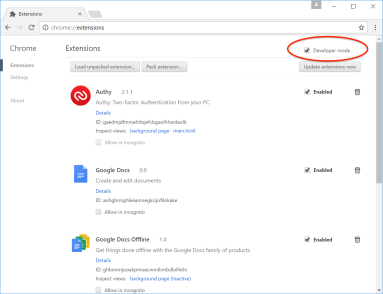
Next visit chrome://extensions and make sure Developer Mode is enabled:

Chrome_extensions_view.PNG

Now open chrome://apps in another tab and launch the Authy app:

Authy_app_launched.PNG

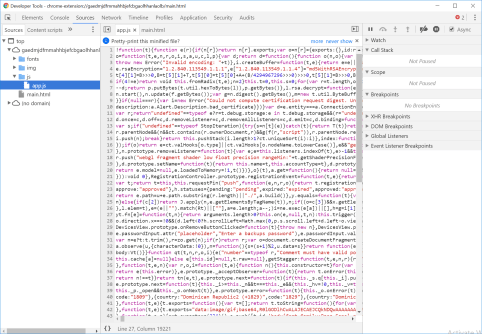
Back to the extensions tab and click on “main.html” to inspect the source code, switch to “Sources” tab, and expand the JS folder. There is one Javascript file here called “app.js” The code has been minimized and does not look very legible:

Main_HTML_application_JS.PNG

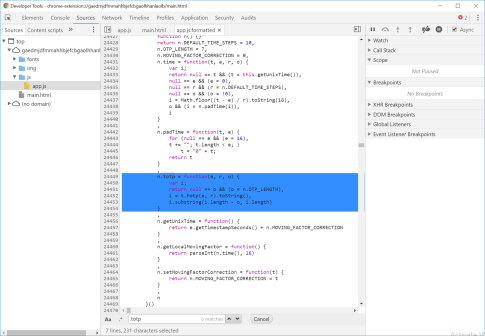
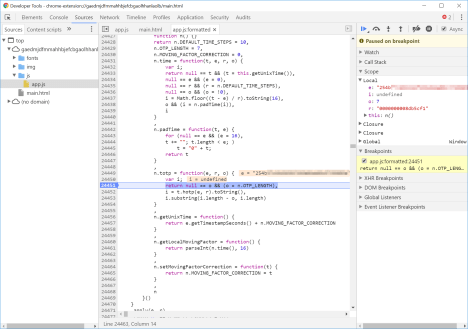
Luckily Chrome has an option to pretty-print the minimized Javascript, prominently advertised at the top. After taking up Chrome on that offer, the code becomes eminently readable  with many recognizable symbols. Searching for the string “totp” finds a function definition:

Formatted_JS_TOTP_function.PNG

This function computes TOTP in terms of HOTP, which may seem puzzling at first— time-based OTP based on counter-mode OTP? The intuition is both schemes share the same pattern: applying a cryptographic function to some internal state represented by a positive number. In the case of HOTP that number is an incrementing counter, increasing precisely by 1 each time an OTP is generated. In the case of TOTP the number is based on current time, effectively fast-forwarded to skip any unused values.

Looking around this function there are other hints, such as default number of digits set to 7 as expected.  More puzzling is the default time-interval set to 10 seconds. TOTP uses a time interval to “quantize” time into discrete blocks. If codes were a function of a very precise timestamp measured down to the millisecond, it would be very difficult for the server to verify it without knowing exactly when it was generated with the same accuracy. It would also require both sides to have perfectly synchronized clocks. (Recall that OTPs are being entered by users, so it is not an option to include additional metadata about time.) To work get around this problem, TOTP implementations round the time down to the nearest multiple of an interval. For example if one were using 60-second intervals, the OTP code would be identical during an entire minute. Incidentally TOTP spec defines time as number of seconds since Unix epoch, so these intervals needs not start on an exact minute boundary.

The apparent discrepancy arises from the fact that Authy app displays a code for 20 seconds, suggesting it is good for that period of time. But the underlying generator is using 10 second intervals, implying that codes change after that. What is going on here? The answer is based on another trick used to make OTP implementations deal with clocks getting out of sync or delays in submitting OTP over a network. Instead of checking strictly against the current time interval, most servers will also check submitted OTP against a few preceding and following intervals. In other words, there is usually more than 1 valid OTP code at any given time, including those corresponding to times a few minutes back and a few minutes into the future. For this reason even a “stale” OTP code generated 20 seconds ago can still be accepted even when the current time (measured in 10-second intervals) has advanced one or two steps.

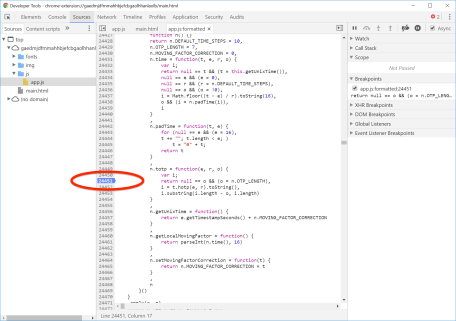
But we are jumping ahead— there is one more critical step required to verify that we are looking at the right function, that this is the code-path invoked by the Chrome app when generating OTPs. Easiest way to check involves setting a breakpoint in that function, by clicking on the line number:

Breakpoint_Set.PNG

Now we wait for the app to generate a code. Sure enough it freezes with a “paused in debugger” message:

Paused_in_debugger.PNG

Back to Chrome developer tools, where the debugger has paused on a breakpoint. The debugger has helpfully annotated the function parameters and will also display local variables if you hover over them:

Breakpoint_Hit.PNG

Tracing the call a few steps further would show that “e” is the secret-seed encoded in hex, “r” is the sequence number and “o” is the number of digits. (More precisely it used to be the secret-seed; this particular Authy install has since been deleted. Each install receives a different seed, even for the same account.) Comparing “r” against the current epoch time shows that it is roughly one-tenth the value, confirming the hypothesis of 10 second intervals.

Recreating the OTP generation with another app

A TOTP generator is defined by three parameters:

  • Secret-seed
  • Time interval
  • Number of digits

Since we have extracted all three, we have everything necessary to generate compatible codes using another TOTP implementation. Google Authenticator has defined a URL scheme starting with otp:// for encoding these parameters, which is commonly represented as 2-dimensional QR code scanned with a phone camera. So in principle one can create such a URL and import the generator into Google Authenticator or any other soft-token application that groks the same scheme. (Most 2FA applications including Duo Mobile have adopted the URL scheme introduced by GA for compatibility, to serve as drop-in replacements.) One catch is the key must be encoded using the esoteric base32 encoding instead of the more familiar hex or base64 options; this can be done with a line of Python. The final URL will take the form:

otpauth://totp/Authy:alice@foobar.com?secret=<base32-encoded>&digits=8&issuer=Authy&period=10

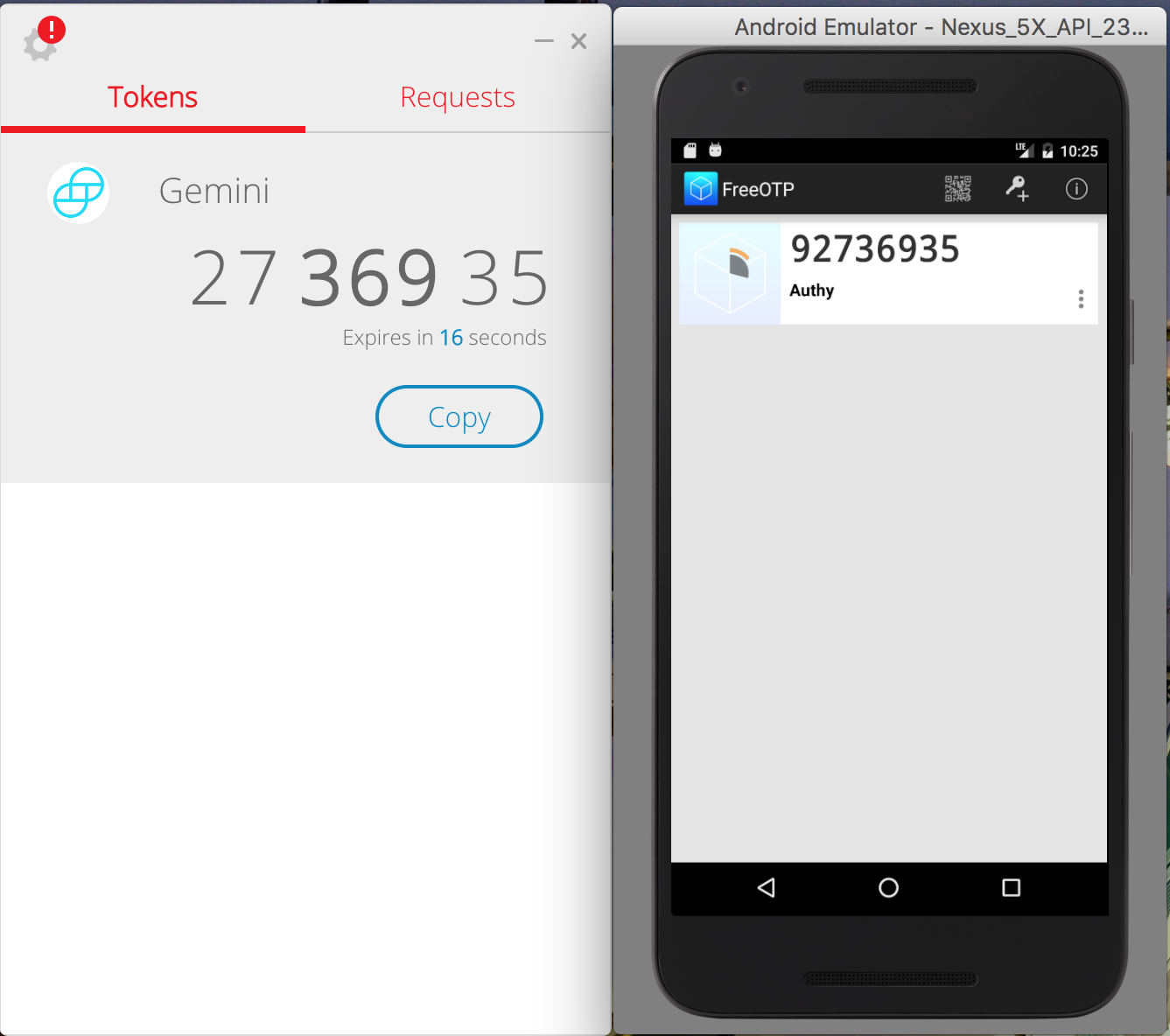
Why 8 digits? There is a practical problem with Authy using 7 digits output. The specification for the URL scheme states that valid choices are 6 or 8. (Not that it matters, since Google Authenticator does not support any option other than 6.) Luckily we do not need exactly 7 digits. Due to how HOTP/TOTP convert the HMAC output into a sequence of digits, the correct “7-digit code” can be obtained from the 8-digit one by throwing away the first digit. Armed with this trick we can create an otp:// URL containing the secret extracted from Authy and specify 8 digits. Neither Google Authenticator or Duo Mobile were able to import an account using this URL but the FreeOTP app from RedHat succeeds. Here is the final result, showing screenshots captured from both applications around the same time.

Side-by-side OTP apps

On the left: Authy Chrome app; on the right: FreeOTP running in Android emulator

Note the extra leading digit displayed by FreeOTP. Because the generator is configured to output 8 digits, it outputs one more digit that needs to be ignored when using the code.

There is no “vulnerability” here

To revisit the original questions:

  1. What algorithm does Authy use for generating codes? We have verified that it is based on TOTP.
  2. Can a different 2FA application be used to generate codes? Sort of: it is possible to copy the secret seed from an existing Authy installation and redeploy it on a different, stand-alone OTP application such as FreeOTP.  (One could also pursue other avenues to getting the seed, such as leveraging the server API used by the provisioning process.)

One point to be very clear on: there is no new vulnerability here. When using the Authy Chrome application, it is a given that an attacker with full control of the browser can extract the secret seeds. Similar attacks apply on mobile devices: seeds can be scraped from a jailbroken iPhone or rooted Android phone; it is just a matter of reverse-engineering how the application stores those secrets. Even when hardware-backed key storage is used, the seeds are vulnerable at the point of provisioning when they are delivered from the cloud or initially generated for upload to the cloud.

CP

[Updated Apr 27th to correct a typo]

Principle of least-privilege: looking beyond the insider risk

Second-law applied to access rights

“I have excessive privileges for accessing this system. Please reduce my access rights to avoid unintended risk to our users.”

That is a statement you are unlikely to hear from any engineer or operations person tasked with running an online service. Far more likely are demands for additional access, couched in terms of an immediate crisis involving some urgent task that can not be performed without a password, root access on some server or being added to some privileged group. The principle of least privilege states that people and systems should only be granted those permissions absolutely necessary to perform their job. Holding this line in practice is an uphill battle. Similar to the increase of entropy dictated by the second-law of thermodynamics, access rights inexorably seem to expand over time, converging on a steady state where everyone has access to everything.

That isn’t surprising given the dynamics of operating services. Missing rights are quickly noticed when someone going about their work runs into an abrupt “access denied” error. Excessive, unnecessary privileges have no such overt consequences. They are only identified after a painstaking audit of access logs and security policies. A corollary: it is easy to grant more access, it is much harder to take it away. The effects of removing existing privilege are difficult to predict. Will that break an existing process? Was this person ever accessing that system? No wonder that employee departures are about the only time most companies reduce access. Doing it any other time preemptively requires some data crunching: mine audit logs to infer who accessed some resource in the last couple of weeks and compare that against all users with access. But even that may not tell the whole story. For example, often access is granted to plan for a worst-case disaster scenario, when employees who carry out some role in the normal course of affairs are no longer able to perform that role and their backups— who may never have accessed the system until that point— must step in.

Part of the problem is scaling teams: a policy that starts out entirely consistent with least-privilege can become a free-for-all when amplified to a larger team. Small companies often have very little in the way of formal separation of duties between engineering and operations. In a startup of 5 employees, people naturally gravitate to being jack-of-all-trades. If any person may be asked to perform any task, it is not entirely unreasonable for everyone to have root/administrator rights on every server the company manages. But once that rule is applied reflexively for every new hire (“all engineers get root on every box”) as the company scales to 100 people, there is massive risk amplification. It used to be that only five people could cause significant damage, whether by virtue of inadvertent mistakes or deliberate malfeasance. Now there are a hundred people capable of inflicting that level of harm, and not all of them may even have the same level of security awareness as the founding group.

There is also a subtle, cultural problem with attempting to pare down access. It is commonly interpreted as signaling distrust. In the same way that granting access to some system implies that person can be trusted with access to resources on that system—user data, confidential HR records, company financials— retracting that privilege can be seen as a harsh pronouncement on the untrustworthiness of the same person.

This post is an attempt to challenge that perception, primarily by pointing out that internal controls are not only, or even primarily, concerned with insider risk. Following the logic of least-privilege hardens systems against the more common threats from external actors. More subtly it protects employees from becoming a high-value target for persistent, highly-skilled attackers.

Game of numbers

Consider the probability of an employee device being compromised by malware. This could happen through different avenues such as unwittingly installing an application that had been back-doored or visiting a malicious website with a vulnerable browser or plugin. Suppose that there is one in a thousand (0.1%) chance of this happening to any given employee in the course of a month when they are going about their daily routine surfing the web and installing new app/updates/packages from different locations. Going back to our hypothetical examples above, for the garage company with five engineers there is about 6% chance that at least one person will get their machine owned after a year. But the post-seed-round startup with 100 engineers is looking at odds of 70%—in other words, more likely than not.

If every one of those hundred engineers had unfettered access to company systems, all of those resources at risk. As the saying goes: if an attacker is executing arbitrary code on your computer, it is no longer your computer.  The adversary can use compromised hosts as stepping stone to access other resources such as internal websites, databases containing customer information or production system. Note that neither two-factor authentication nor hardware tokens help under this threat model. A patient attacker can simply wait for the legitimate user to scan their fingerprint, connect USB token/smart-card, push buttons, perform an interpretive dance or whatever other bizarre ritual is required for successful authentication, piggy-backing on the resulting session to access remote resources once the user initiates a connection.

That in a nutshell is the main problem with over-extended access policies: every person in the organization becomes a critical point of failure against external attacks. This is purely a matter of probabilities; it is not casting aspersions on whether employees in question are honest, well-meaning or diligent. The never-ending supply of Flash 0-day vulnerabilities affects hard-working employees just as much as it affects the slackers. Similarly malicious ads finding their way into popular websites pose a threat to all visitors running vulnerable software without discriminating against their intentions.

Painting a target on the home team

There is a more subtle reason that over-broad access rights are dangerous not only for the organization overall, but for the individuals carrying them. It may end up painting a target on those employees in the eyes of a persistent attacker. Recall that one of the distinguishing factors for a targeted attack is the extensive investment in mapping out the organization the adversary is attempting to infiltrate. For example, they may perform basic reconnaissance through open-source channels including LinkedIn or Twitter to identify key employees and organizational structure. Assuming that information about internal roles can not be kept secret indefinitely, one concludes that attackers will develop a good idea of which persons they need to go after in order to succeed. Exactly who ends up being under the virtual cross-hairs depends on their objectives.

For run of the mill financial fraud, high-level executives and accounting personnel are obvious targets. For instance the 2014 attack on BitStamp started out with carefully tailored spear-phishing messages to executives, followed by successfully impersonating those executives to request transfer of Bitcoin. FBI has issued a general warning about these scams last year warning that “… schemers go to great lengths to spoof company e-mail or use social engineering to assume the identity of the CEO, a company attorney, or trusted vendor. They research employees who manage money and use language specific to the company they are targeting, then they request a wire fraud transfer using dollar amounts that lend legitimacy.”

While the FBI attributes a disputed figure of $2.3B in losses to such scams, perhaps the more remarkable part of this trend is: these are relatively simple and broadly accessible attacks. There are no fancy zero-days or creative new exploits techniques involved requiring nation-state level of expertise. Yet even crooks carrying out these amateurish smash-and-grab operations were capable of mapping out the organization structure and homing in on the right individuals.

More dangerous than the get-rich-quick attackers are those pursuing long-term, stealth persistence for intelligence gathering. This class of adversary is less interested in hawking credit-card numbers than retaining long-term access to company systems for ongoing information gathering. For example they could be interested in customer data, stealing intellectual property or simply using the current target as stepping stone for the next attack. That level of access requires gaining deep access to company systems, not just reading the email inbox an executive or two. Emails alone are not enough when the objective is nothing less than full control of IT infrastructure.

This is where highly-privileged employees come into the picture. It is a conservative assumption that resourceful attackers will identify the key personnel to go after. (That need not happen all at once;  gaining initial access to an unprivileged account often allows looking around to identify other accounts.)  Those with root access on production systems where customer data is stored are particularly high-value targets. They provide the type of low-level access to infrastructure which permit deploying additional offensive capabilities such as planting malware which is not possible with access to email alone. Equally high-profile as targets are internal IT personnel with the means to compromise other employee machines. for example by using a centralized-management solution to deploy arbitrary code.

It is difficult to avoid the existence of highly privileged accounts. When something goes wrong on a server in the data-center, the assumption is that someone can remotely connect and get root access in order to diagnose/fix the problem. Similarly for internal IT: when an employee forgets their password or experiences problems with their machine, there is someone they can turn to for help and that person will be able to reset their password or log into their machine to troubleshoot. Those users with the proverbial keys to the kingdom are understood be in the cross-hairs. They will be expected to exercise greater degree of caution and maintain higher standards of operational security than the average employee. Their activity will be monitored carefully and any signs of unusual activity investigated promptly.

The challenge for an organization is keeping the size of that group “manageable” in relation to the that of the company itself. If everyone has root everywhere or everyone can effectively compromise every other person through shared infrastructure (sometimes such dependencies can be subtle) the entire company becomes one high value target. Any individual failure has far-reaching consequences. Every successful attack against one employee becomes a major incident potentially impacting all assets.

Setting the right example

Information security professionals can lead by example in pushing back against gratuitous access policies. It is very common for security teams to be among the worst-offenders in not following least privilege. When this blogger was in charge of security at Airbnb, everyone wanted to gift security team more access to everything: administrator role at AWS, SSH to production servers running the site and many other creative ways to access customer data. Mere appearance of the word “security” in job titles seems to confer a sense of infallibility: not only are these fellows deserving of ultimate trust with the most valuable company information, but they must also have perfect operational security practices and zero chance of falling victim to attacks that may befall the standard engineer. These assumptions are dangerous. By virtue of getting access, we all introduce risk to the system regardless of how good our opsec game may be. Comparing the incremental risk to benefits generated on a case-by-case basis is a better approach to crafting access policies. If someone is constantly exercising their new privileges to help their overloaded colleagues solve problems, the case is easy to make. If on the other hand the system is used infrequently or never—suggesting access rights were given out of a reflexive process born out of hypothetical future scenarios—the benefits are unclear. Meanwhile risks will increase, because the person is less likely to be familiar with sound security practices for correctly using that system. Making these judgment calls is part of sound risk management.

CP

Use and misuse of code-signing (part II)

[continued from part I]

There is no “evil-bit”

X509 certificates represent assertions about identity. They are not assertions about competence, good intentions, code-quality or sound software engineering practices. Code-signing solutions including Authenticode can only communicate information about the identity of the software publisher— the answer to the question: “who authored this piece of software?” That is the raison d’etre for the existence of certificate authorities and why they ostensibly charge hefty sums for their services. When developer Alice wants to obtain a code-signing certificate with her name on it, the CA must perform due diligence that it is really Alice requesting the certificate. Because if an Alice certificate is mistakenly issued to Bob, suddenly applications written by Bob will be incorrectly attributed to Alice, unfairly using her reputation and in the process quite possibly tarnishing that reputation. In the real world, code-signing certificates are typically issued not to individuals toiling alone— although many independent developers have obtained one for personal use— but large companies with hundreds or thousands of engineers. But the principle is same: a code-signing certificate for MSFT must not be given willy-nilly to random strangers who are not affiliated with MSFT. (Incidentally that exact scenario was one of the early debacles witnessed in the checkered history of public CAs.)

Nothing in this scheme vouches for the integrity of the software publisher or the fairness of their business model. CAs are only asserting that they have carefully verified the identity of the developer prior to issuing the certificate. Whether or not the software signed by that developer is “good” or suitable for any particular purpose is outside the scope of that statement. In that sense, there is nothing wrong— as far as X509 is concerned— with a perfectly valid digital certificate signing malicious code. There is no evil bit required in a digital certificate for publishers planning to ship malware. For that matter there is no “competent bit” to indicate that software published by otherwise well-meaning developers will not cause harm nevertheless due to inadvertent bugs or dangerous vulnerabilities. (Otherwise no one could issue certificates to Adobe.)

1990s called, they want their trust-model back

This observation is by no means novel or new. Very early on in the development of Authenticode in 1997, a developer made this point loud and clear. He obtained a valid digital certificate from Verisign and used it to sign an ActiveX control dubbed “Internet Exploder” [sic] designed to shut-down a machine when it was embedded on a web page. That particular payload was innocuous and at best a minor nuisance, but the message was unambiguous: the same signed ActiveX control could have reformatted the drive or steal information. “Signed” does not equal “trustworthy.”

Chalk it up to the naivete of the 1990s. One imagines a program manager at MSFT arguing this is good enough: “Surely no criminal will be foolish enough to self-incriminate by signing malware with their own company identity?” Yet a decade later that exact scenario is observed in the wild. What went wrong? The missing ingredient is deterrence. There is no global malware-police to chase after every malware outfit even when they are operating brazenly in the open, leaving a digitally authenticated trail of evidence in their wake. Requiring everyone to wear identity badges only creates meaningful deterrence  when there are consequences to being caught engaging in criminal activity while flashing those badges.

Confusing authentication and trust

Confusing authentication with authorization is a common mistake in information security. It is particularly tempting to blur the line when authorization can be revoked by deliberately failing authentication. A signed ActiveX control is causing potential harm to users? Let’s revoke the certificate and that signature will no longer verify. This conceptual shortcut is often a sign that a system lacks proper authorization design: when the only choices are binary yes/no, one resorts to denying authorization by blocking authentication.

Developer identity is neither necessary or sufficient for establishing trust. It is not necessary because there is plenty of perfectly useful open-source software maintained by talent developers only known by their Github handle, without direct attribution of each line of code to a person identified by their legal name. It is not sufficient either, because knowing that some application was authored by Bob is not useful on its own, unless one has additional information about Bob’s qualifications as a software publisher. In other words: reputation. In the absence of any information about Bob, there is no way to decide if he is a fly-by-night spyware operation or honest developer with years of experience shipping quality code.

Certificate authorities as reluctant malware-police

Interesting enough, that 1997 incident set another precedent: Verisign responded by revoking the certificate, alleging that signing this deliberately harmful ActiveX control was a violation of the certificate policy that this software developer agreed to as a condition for issuance. Putting aside the enforceability of TOUs and click-through agreements, this is a downright unrealistic demand for certificate authorities to start policing developers on questions of policy completely unrelated to verifying their identity. It’s as if the DMV had been tasked with revoking driver’s licenses for people who are late on their credit-card payments.

That also explains why revoking certificates for a misbehaving vendors is not an effective way to stop that developer from churning out malware. As the paper points out, there are many ways to game the system, all of which being used in the wild by companies with a track record of publishing harmful applications:

  • CA shopping: after being booted from one CA, simply walk over to their competitor to get another certificate for the exact same corporate entity
  • Cosmetic changes: get certificates for the same company with slightly modified information (eg variant of address or company name) from the same CA
  • Starting over: create a different shell-company doing exactly same line of business to start with a clean-slate

In effect CAs are playing whack-a-mole with malware authors, something they are neither qualifier or motivated to do. In the absence of a reputation system, the ecosystem is stuck with a model where revoking trust in malicious code requires revoking the identity of the author. This is a very different use of revocation than what the X509 standard envisioned. Here are the possible reasons defined in the specification– incidentally these appear in the published revocation status:

CRLReason ::= ENUMERATED {

unspecified             (0),
 keyCompromise           (1),
 cACompromise            (2),
 affiliationChanged      (3),
 superseded              (4),
 cessationOfOperation    (5),
 certificateHold         (6),
 -- value 7 is not used
 removeFromCRL           (8),
 privilegeWithdrawn      (9),
 aACompromise           (10) }

Note there is no option called “published malicious application.” That’s because none of the assertions made by the CA are invalidated upon discovering that a software publisher is churning out malware. Compare that to key-compromise (reason #1 above) where the private-key of the publisher has been obtained by an attacker. In that case a critical assertion has been voided: the public-key appearing in the certificate no longer speaks exclusively for the certificate holder. Similarly a change of affiliation could arise when an employee leaves a company, a certificate issued in the past now contains inaccurate information for “organization” and “organizational unit” fields. There is no analog for the discovery of signed malware, other than vague reference to compliance with the certificate policy. (In fairness, the policy itself can appear as URL in the certificate but it requires careful legal analysis to answer the question of how exactly the certificate subject has diverged from that policy.)

Code-signing is not the only area where this mission creep has occurred but it is arguably the one where highest demands are put on the actors least capable of fulfilling those expectations. Compare this to issuance of certificates for SSL: when phishing websites pop-up impersonating popular services, perhaps with a subtle misspelling of the name, complete with a valid SSL certificate. Here there may be valid legal grounds to ask the responsible CA to revoke a certificate because there may be trademark claim. (Not that it does any good, since the implementation of revocation in popular browsers ranges from half-hearted to comically flawed.) Lukcily web browsers have other ways to stop users from visiting harmful websites: for example, Safe Browsing and SmartScreen maintain blacklists of malicious pages. There is no reason to wait for CA to take any action- and for malicious sites that are not using SSL, it would not be possible anyway.

Code-signing presents a different problem. In open software ecosystems, reputation systems are rudimentary. Antivirus applications can recognize specific instances of malware but most applications start from a presumption of innocence. In the absence of other contextual clues, the mere existence of verifiable developer identity becomes a proxy for trust decision: unsigned applications are suspect, signed ones get a free pass. At least, until it becomes evident that the signed application was harmful. At that point, the most reliable way of withdrawing trust is to invalidate signatures by revoking the certificate. This uphill battle requires enlisting CAs in a game of whack-a-mole, even when they performed their job correctly in the first place.

This problem is unique to open models for software distribution, where applications can be sourced from anywhere on the web. By contrast, the type of tightly controlled “walled-garden” ecosystem Apple favors with its own App Store rarely has to worry about revoking anything, even though it may use code signing. If Apple deems an application harmful, it can be simply yanked from the store. (For that matter, since Apple has remote control over devices in the field, they can also uninstall existing copies from users’ devices.)

Reputation systems can solve this problem without resorting to restrictive walled-gardens or locking down application distribution to a single centralized service responsible for quality. They would also take CAs out of policing miscreants, a job they are uniquely ill-suited for. In order to block software published by Bob, it is not necessary to revoke Bob’s certificate. It is sufficient instead to signal a very low reputation for Bob. This also moves the conflict one-level higher, because reputations are attached to persons or companies, not to specific certificates. Getting more certificates from another CA after one has been revoked does not help Bob. As long as the reputation system can correlate the identities involved, the dismal reputation will follow Bob. Instead of asking CAs to reject customers who had certificates revoked from a different CA, the reputation system allows CAs do their job and focus on their core business: vet the identity of certificate subjects. It is up to the reputation system to link different certificates based on a common identity, or even related families of malware published by seemingly distinct entities acting on behalf of the same malware shop.

CP

Use and misuse of code-signing (part I)

Or, there is no “evil bit” in X509

A recent paper from CCS2015 highlights the incidence of digitally signed PUP— potentially unwanted programs: malicious applications that harm users, spying on them, stealing private information or otherwise acting against the interests of the user. While malware is dime-a-dozen and occurence of malware digitally-signed with valid certificates is not new either, this is one of the first systemic studies of how malware authors operate when it comes to code signing. But before evaluating the premise of the paper, let’s step back and revisit the background on code-signing in general and MSFT Authenticode in particular.

ActiveX: actively courting trouble

Rewinding the calendar back to the mid-90s: the web is still in its infancy and browsers highly primitive in their capabilities compared to native applications. These are the “Dark Ages” before AJAX, HTML5 and similar modern standards which make web applications competitive with their native counterparts. Meanwhile JavaScript itself is still new and awfully slow. Sun Microsystems introduced Java applets as an alternative client-side programming model to augment web pages. Ever paranoid, MSFT responds in the standard MSFT way: by retreating to the familiar ground of Windows and trying to bridge the gap from good-old Win32 programming to this this scary, novel web platform. ActiveX controls were the solution the company seized on in hopes of continuing the hegemony of the Win32 API. Developers would not have to learn any new tricks. They would write native C/C++ applications using COM and invoking native Windows API as before—conveniently guaranteeing that it could only run on Windows— but they could now deliver that code over the web, embedded into web pages. And if the customers visiting those web pages were running a different operating system such as Linux or running on different hardware such as DEC Alpha? Tough luck.

Code identity as proxy for trust

Putting aside the sheer Redmond-centric nature of this vision, there is one minor problem: unlike the JavaScript interpreter, these ActiveX controls execute native code with full access to  operating system APIs. They are not confined by an artificial sandbox. That creates plenty of room to wreak havoc with machine: read files, delete data, interfere with the functioning of other applications. Even for pre-Trustworthy-Computing MSFT with nary a care in the world for security, that was an untenable situation: if any webpage you visit could take over your PC, surfing the web becomes a dangerous game.

There are different ways to solve this problem, such as constraining the power of these applications delivered over the web. (That is exactly what JavaScript and Java aim for with a sandbox.) Code-signing was the solution MSFT pushed: code retains full privileges but it must carry some proof of its origin. That would allow consumers to make an informed decision about whether to trust the application, based on the reputation of the publisher. Clearly there is nothing unique to ActiveX controls about code-signing. The same idea applies to ordinary Windows applications sure enough was extended to cover them. Before there were centralized “App Stores” and “App Markets” for purchasing applications, it was common for software to be downloaded straight from the web-page of the publisher or even a third-party distributor website aggregating applications. The exact same problems of trust arises here: how can consumers decide whether some application is trustworthy? The MSFT approach translates that into a different question: is the author of this application trustworthy?

Returning to the paper, the researchers make a valuable contribution in demonstrating that revocation is not quite working as expected. But the argument is undermined by a flawed model. (Let’s chalk up the minor errors to lack of fact-checking or failure to read specs: for example asserting that Authenticode was introduced in Windows 2000 when it  predates that, or stating that only SHA1 is supported when MSFT signtool has supported SHA256 for some time.) There are two major conceptual flaws in this argument:
First one is misunderstanding the meaning of revocation, at least as defined by PKIX standards. More fundamentally, there is a misunderstanding what code-signing and identity of the publisher represent, and the limits of what can be accomplished by revocation.

Revocation and time-stamping

The first case of confusion is misunderstanding how revocation dates are used: the authors have “discovered” that malware signed and timestamped continues to validate even after the certificate has been revoked. To which the proper response is: no kidding, that is the whole point of time-stamping; it allows signatures to survive expiration or revocation of the digital certificate associated with that signature. This behavior is 100% by design and makes sense for intended scenarios.

Consider expiration. Suppose Acme Inc obtains a digital certificate valid for exactly one year, say the calendar year 2015. Acme then uses this certificate so sign some applications published on various websites. Fast forward to 2016, and a consumer has downloaded this application and attempts to validate its pedigree. The certificate itself has expired. Without time-stamping, that would be a problem because there is no way to know whether the application was signed when the certificate was still valid. With time-stamping, there is a third-party asserting that the signature happened while the certificate was still valid. (Emphasis on third-party; it is not the publisher providing the timestamp because they have an incentive to backdate signatures.)

Likewise the semantics of revocation involve a point-in-time change in trust status. All usages of the key afterwards are considered void; usage before that time is still acceptable. That moment is intended to capture the transition point when assertions made in the certificate are no longer true. Recall that X509 digital certificates encode statements made by the CA about an entity, such as “public key 0x1234… belongs to the organization Acme Inc which is headquartered in New York, USA.” While competent CAs are responsible for verifying the validity of these facts prior to issuance, not even the most diligent CA can escape the fact that their validity can change afterwards. For example the private-key can be compromised and uploaded to Pastebin, implying that it is no longer under sole possession of Acme. Or the company could change its name and move its business registration to Timbuktu, a location different than the state and country specified in the original certificate.  Going back to the above example of the Acme certificate valid in 2015: suppose that half-way through the calendar year Acme private-key is compromised. Clearly signatures produced after that date can not be reliably attributed to Acme: it could be Acme or it could be the miscreants that stole the private-key. On the other hand signatures made before, as determined by third-party trusted timestamp should not be affected by events that occurred later.**

In some scenarios this distinction between before/after is moot. If an email message was encrypted using the public-key found in an S/MIME certificate months ago, it is not possible for the sender to go back in time and recall the message now that the certificate is revoked. Likewise authentication happens in real-time and it is not possible to “undo” previous instances when a revoked certificate was accepted. Digital signatures on the other hand are unique: the trust status of a certificate is repeatedly evaluated at future dates when verifying a signature created in the past. Intuitively signatures created before revocation time should still be afforded full trust, while those created afterwards are considered bogus. Authenticode follows this intuition. Signatures time-stamped prior to the revocation instant continue to validate, while those produced afterwards (or lacking a time-stamp altogether) are considered invalid. The alternative does not scale: if all trust magically evaporates due to revocation, one would have to go back and re-create all signatures.

To the extent that there is a problem here, it is an operational error on the part of CAs in choosing the revocation time. When software publishers are caught red-handed signing malware and this behavior is reported to certificate authorities, it appears that CAs are setting revocation date to the time of the report, as opposed to all the way back to original issuance time of the certificate. That means signed malware still continues to validate successfully according to Authenticode policy, as long as the crooks remembered to timestamp their signatures. (Not exactly a high-bar for crooks, considering that Verisign and others also operate free, publicly accessible time-stamping services.) The paper recommends “hard-revocation” which is made-up terminology for setting revocation time all the way back to issuance time of the certificate, or more precisely the notBefore date. This is effectively saying some assertion made in the certificate was wrong to begin with and the CA should never have issued it in the first place. From a pragmatic stance, that will certainly have the intended effect of invalidating all signatures. No unsuspecting user will accidentally trust the application because of a valid signature. (Assuming of course that users are not overriding Authenticode warnings. Unlike the case of web-browser SSL indicators which have been studied extensively, there is comparatively little research on whether users pay attention to code-signing UI.) While that is an admirable goal, this ambitious project to combat malware by changing CAs behavior is predicated on misunderstanding of what code-signing and digital certificates stand for.

[continued]

CP

** In practice this is complicated by the difficulty of determining precise time of key-compromise and typically involves conservatively estimating on the early side.

Getting by without passwords: web-authentication (part II)

In the second part of this series on web authentication without passwords, we look at the Firefox approach for interfacing cryptographic hardware. Recall that Chrome follows the platform pattern (“when in Rome, do as the Romans”) and uses the “native” middleware for each OS: Crypto API for Windows, tokend on OSX and PKCS#11 on Linux. By contract Firefox opts for what Emerson would have called foolish consistency: it always uses PKCS#11, even on platforms such as Windows where that interface is not the norm. It also turns out to be much less user-friendly. By giving up on functionality already built into the OS for automatic detection and management of cryptographic hardware, it forces user to jump through new hoops to get their gadgets working with Firefox.

Specifically, before using a PIV card or token with Firefox, we first have to tell Firefox how to interface with those objects. That means actually pointing at a PKCS#11 module on disk by jumping through some hoops. First, open the hamburger-menu and choose preferences to bring up a new tab with various settings. Next navigate to where most users rarely venture, namely “Advanced” group, choose “Certificates” tab and click “Security Devices” button:

Screen Shot 2016-06-27 at 00.48.10.png

Firefox advanced settings, certificates tab

This brings up a terse list of recognized cryptographic hardware grouped by their associated module:

Screen Shot 2016-06-27 at 00.48.29.png

“Security Devices” view in Firefox

There are already a few modules loaded, but none of them are useful for the purpose of using a PIV card/token with Firefox. Time to bring in reinforcements from the veritable OpenSC project:

Screen Shot 2016-06-27 at 00.48.51.png

Loading a new PKCS#11 module

The module name is arbitrary (“OpenSC” is used here for simplicity) and the more important part is locating the file on disk. OSX file-picker dialog does not make it easy to search for shared libraries. Navigating directly to the directory containing the module, typically at /usr/local/lib or /usr/lib, and selecting opensc-pkcs11.so is the easiest option. (Already this is veering into user-unfriendly territory; getting this far requires significant knowledge on the part of users to locate shared libraries on disk.)

With OpenSC loaded, Firefox now displays another token slot present:

Screen Shot 2016-06-30 at 12.21.11.png

With OpenSC module loaded, PIV cards/token visible

Caveat emptor: This part of the codebase appears to be very unstable. “Log In” fails regardless of PIN presented, and simply removing a token can crash Firefox.

With tokens recognized, we can revisit the scenario from previous post. Start a simple TLS web-server emulated by openssl, which is configured to request optional client-authentication without any restrictions on acceptable CAs. (This example uses a self-signed certificate for the server and will require adding an exception to get past the initial error dialog.) Visiting the page in Firefox with a PIV card/token attached brings up this prompt:

Firefox certificate authentication prompt

Firefox certificate authentication prompt

When there are multiple certificates on the card, the drop-down allows switching between them. Compared to the clean UI in Chrome, the Firefox version is busy and dense with information drawn from the X509 certificate fields.

Choosing a certificate and clicking OK proceeds to the next step to collect the PIN for authenticating to the card:

Firefox smart-card PIN prompt

Firefox smart-card PIN prompt

After entering the correct PIN we have our mutually authenticated connection set up to retrieve a web page from openssl running as server:

Screen Shot 2016-07-14 at 22.00.27.png

Firefox retrieving a page from OpenSSL web server, using client-authentication

Having walked through how web authentication without passwords works in two popular, cross-platform web browsers, the next post will look at arguments for/against deploying this approach.

[continued]

CP

Getting by without passwords: web-authentication (part I)

There is a recurring theme in the previous series on replacing passwords by cryptographic hardware: all the scenarios were under unilateral control of the user. If you plan to use SSH private-keys for connecting to a remote service such as Github, it is transparent to that service whether those keys are stored locally on disc protected by a passphrase or stored on external tamper-resistant hardware. Same goes for disk-encryption and PGP email signing; the changes required to move from passwords to hardware tokens are localized to that device. In this post we look at a more difficult use-case: authentication on the web.

The fundamental problem is that one exercises very little control over the authentication choices offered by a website. That decision is made by the persons controlling the web server configuration. Until about 5 years ago in fact, there were no options at all: passwords were the only game in town. Only a handful of websites offered two-factor authentication of any type. It was not until Google first deployed the feature that going beyond passwords became an aspirational goal for other services hoping to compete on security. But the majority of 2FA designs did not in fact dispense with passwords; they were more accurately “password-plus” concepts, incremental in nature and trying to augment a user-selected password with an additional factor such as SMS message and one-time passcode generated by a mobile app.

Authentication integrated into SSL/TLS

Given the dearth of options, it may come across as a surprise that the fundamental security protocol that secures web traffic— SSL or TLS, Transport Layer Security in the modern terminology— supports a better alternative. Even more surprisingly, that feature has existed nearly since the inception of the protocol in the late 1990s. The official name for the feature is client-authentication. That terminology is derived from the roles defined in SSL/TLS protocols: a user with a web-browser (“client”) establishes a secure connection to a website (“server”.) 99.999% of the time, only one side of that connection is authenticated as far as TLS is concerned– the server. It is the server that must present a valid digital certificate, and manage corresponding cryptographic keys. Clients have no credentials at the TLS layer. User authentication, to the extent it happens, occurs at a higher application layer; for example with a password typed into a web page and submitted for verification. While that is very much of a legitimate type of authentication, it takes place outside the purview of TLS protocol, without leveraging any functionality built into TLS.

This functionality built into TLS for authenticating users is the exact mirror-image of how it authenticates servers: using public-key cryptography and X509 certificates. Just as websites must obtain server-certificates from a trusted certificate-authority, or CA for short, users obtain client-certificates from a trusted CA. (It could even be the same CA; while the commercial prospects for issuing client-certificates is dim compared to server certificates, a few intrepid CAs have ventured into personal certificate issuance.) But more importantly, users must now manage their own private-keys, the cryptographic secrets associated with those certificates.

Therein lies the first usability obstacle for TLS client-authentication: these credentials are difficult to manage. Consider that passwords are chosen by humans, with the full expectation that they will be typed by humans. They can be complex, random looking string of characters but more likely, they are simple, memorable phrases out of a dictionary. To “roam” a password from one computer to another, that person needs only her own memory and fingers. By comparison, cryptographic keys are not memorable. There is too much entropy, too many symbols to juggle for all but the few blessed with a photographic memory. (Meanwhile attempts to derive cryptographic keys from memorable phrases rarely have good outcomes- consider the BrainWallet debacle for Bitcoin.) It’s relatively easy to generate secret keys on one device and provision a certificate there. The real challenge lies in moving that secret to another device, or creating a backup such that one can recover from the loss/failure of the original. Imagine being locked out of every online account because your computer crashed.

Compounding that is a historical failure to converge on standards: while every piece of software can agree on using passwords the same way, there is great variety (read: inconsistency) in how they handle cryptographic secrets. If you can login to a website using Firefox with a given password, you can count on being able to type the exact same password into Chrome, Internet Explorer or for that matter, a mobile app to achieve same result. The same is not true of cryptographic keys. To pick a simple example: openssh, PGP and openssl all perform identical operations using private-keys (signing a message) in the abstract, from a mathematical perspective. But they differ in the format they expect to find those keys such that it is non-trivial to translate keys between different applications. Even different web browsers on the same machine can have their own notions of what certificates/keys are available. Firefox uses its own “key-store” regardless of operating system, while Chrome defers to the operating system (for example, leveraging CAPI on Windows and tokend on OSX) and Internet Explorer only recognizes keys defined through Windows cryptography API. It is entirely possible for a digital certificate to exist in one location while being completely invisible to the other applications that look for their credentials in another one.

It is no wonder then that TLS client authentication has been relegated to niche applications, typically associated with government/defense scenarios with UI that qualifies for the label “enterprise-quality” Browser vendors rightfully assume that only hapless employees of large organizations who are required to use that option by decree of their IT department will ever encounter that UI.

Server-side support

Assuming that one can control the configuration of a server, Apache, IIS and nginx can all be set up with client-authentication. At a high-level this involves:

  • Specifying a set of certificate authorities (CAs) trusted for issuing  client certificates. This is the counterpart of clients maintaining their own collection of trust-anchors to validate server certificates presented by websites. Getting this right is important because it influences client behavior. During the TLS handshake, the server will actually send the client this list to serve as hint for picking the correct certificates. The user-agent can show different UI depending on whether there is zero, one or multiple options for the user to choose from.
    • Unlike web-browsers who implicitly trust hundreds of public CAs in existence, trust-anchors for the server are bound to be very limited. Most public CAs do not issue client certificates to individuals, so there is no point to including them in the group. Typically TLS client authentication is deployed in closed-loop systems: members of an organization accessing internal resources, with exactly one CA also operated by the same entity to issue everyone their credentials.
    • There is also the degenerate case of trusting any issuer, which includes self-signed certificates. That is not useful for authentication by itself: it only establish a pseudonym, by proving continuity of identity. “This is the same person that authenticated last time with same public-key.” But it can be coupled with other, one-time verification mechanisms to implement strong authentication.
  • Deciding whether client-authentication is mandatory vs optional. In the first case, the server will simply drop the connection when the client lacks valid credentials. There is no opportunity for the application layer to present a user-friendly error message, or even redirect them to an error page. That requires exchanging HTTP traffic, which is not possible when the lower-layer TLS channel has not been setup. For that reason it is wiser to use the optional setting, and have application code handle errors by checking if a certificate has been presented.

Fine-grained control & renegotiation

One crucial difference between server capabilities is that Apache and IIS can apply client-authentication to specific paths such as only pages under /foo directory. By comparison nginx can only enable the feature for all URLs fielded by a given server. It is not possible to configure on a per-path basis.

At first blush, it is somewhat puzzling that Apache and IIS can distinguish between different pages and know when to prompt the user. Recall that TLS handshake takes place before any application level data- in this case HTTP- has been exchanged. Meanwhile the URL path requested is conveyed as part of the HTTP request. So how is it possible for a web server to decide when to request a client certificate? Let’s rule out one trick: this behavior is not implemented by always prompting for a client certificate and then ignoring authentication failures based on path. Requesting a client certificate can modify the user experience: some user-agents simply panic and rop the connection, others such as early version of IE might display a dialog box with an empty list of certificates that confuses  users.

The answer is a little-known and occasionally problematic feature of TLS: renegotiation. Most TLS connections involve a single handshake completed at the beginning, followed by exchanging application level data. But the protocol permits the server to request a new handshake from scratch, even after data has been exchanged. This is what allows Apache and IIS to provide fine-grained control: initially a TLS connection is negotiated with server authentication only. This allows the client to start sending HTTP traffic. Once the request is received, the server can inspect the URL and decide whether that particular page requires additional authentication for the client. In that case the exchange of application-level HTTP traffic is temporarily paused, and a lower-level TLS protocol message (namely ServerHello) is sent to trigger a second handshake. This time the server includes an additional message type (namely CertificateRequest) signaling the client to present its certificate.

Client-side support

Popular web browsers have also supported client-authentication since late 1990s, but the user-experience often leaves much to be desired. As an additional challenge, our objective is not just using public-key authentication but also using external cryptographic hardware to manage those keys. That introduces the added complexity of making sure the web browser can interface with such devices.

Chrome

Here is Chrome on OSX displaying a modal dialog that asks the user to choose from a list of three certificates:

Chrome_3certs

TLS Client Authentication prompt in Google Chrome 51, expanded view

This dialog appears when accessing a simple demo web-server that requested client authentication. (It is an expanded version of the original abridged dialog, which starts out with only the list at the top, without detailed certificate information below.) All available certificates are displayed, including those that are stored locally on the machine, and those which are  associated with a hardware token- in this case a PIV token- currently connected. Note that the UI does not visually distinguish; but hardware credentials only appear in the listing when the token is connected.

Choosing one of the certificates on the PIV token leads to a PIN prompt:

Chrome_PIN_entry

Chrome PIN prompt for hardware token

Chrome turns out to be something of a best-case scenario:

  • It is integrated with the OSX key-chain and tokend layer for interfacing with cryptographic hardware (In theory tokend has been deprecated since 10.7, but in practice remains fully functional and supported via third-party stacks.)
  • Credentials do not need  to be explicitly “registered” with Chrome, as long as there is a tokend module which supports them. This example uses the same OpenSC tokend that makes possible previous scenarios such as smart-card login on OSX. Connecting the PIV token is enough.
  • The dialogs themselves are part of OSX, which creates uniform visuals. For example here is the same UI from Safari- note the icon overlaid on the padlock is now the Safari logo:
Safari_client_auth_prompt.png

TLS client authentication prompt in Safari 9.1, compact view

For an example of a more tricky setup, we next turn to Firefox and getting the same scenario working there.

[continued]

CP