Twitter, two-factor authentication and phishing myths (part I)

This is not the first time that security of Twitter authentication has been called into question. There was the dump of 55K passwords from May 2012, and more recently another quarter-million Twitter accounts were breached in February. But few were clamoring for the popular service to introduce two-factor authentication until last week. That changed quickly, compliments of the Associated Press. The venerable news organization lost control over its Twitter account briefly, which got 0wned by a group calling itself the Syrian Electronic Army. The attackers only got as far as posting one bogus tweet, but that proved damaging enough. Claiming that President Obama was wounded in an attack on the White House, it triggered a brief market dip before everyone else realized the story was false.

It did not take long before the Monday-morning quarterbacks started speculating. Bloomberg criticized Twitter for waiting until the crisis to roll-out two-factor authentication, implying that it could have saved AP. (Because other companies have been deploying security features preemptively for no reason? Perhaps the parent company will reconsider the wisdom of a recent decision to add Twitter feeds into their popular data feed for finance professionals.) Meanwhile SC Magazine joined a chorus of sceptics in taking the glib view that two-factor authentication would have made no difference.

Which is it? As usual, the devil is in the details and depends . There are different ways to design two-factor authentication, and whether it can resist phishing depends critically on that. We can look at two points along the spectrum to see how they compare:

First one is what might be called “consumer-grade” two-factor authentication. This is what major cloud services typically offer end-users, balancing security against usability.  The second-factor is a one-time passcode (OTP) delivered by SMS or generated using a mobile application. This design is indeed vulnerable to phishing, once the notion of phishing itself is slightly generalized. Obviously existing wave of attacks that only collect passwords will not succeed. But the miscreants are quick to adopt. Soon they will  mimic the new login experience and also ask users for to type in the second factor. There is no reason to believe that the same users fooled into typing in their password into the fraudulent web page will stop short of doing the same with OTPs.

Fundamental problem is a weakness OTP shares with passwords: it puts the burden on end users to know they are authenticating to the “correct” website. If the address bar reads paypal.com that is good; but paypa1.com– with the digit 1 replacing the lower-case letter L to trick the unwary– that is bad. If that sounds like too much to ask for users, no wonder that combatting phishing has become a game of whack-a-mole where the measure of success is how quickly phishing sites are taken down once discovered. (But not before having claimed a few victims.)

That said, this type of second-factor still raises the bar for attackers. Because OTP codes are only valid for a short time period, the attacker is forced to “cash-in” stolen credentials right away by logging in with them. In other words the attack must be carried out in real-time. It is not possible to save the credentials, then come back and use them at a later point in time. In principle this also rules out a secondary market in resale of credentials, breaking the commercial model around account hijacking. It is no longer possible for Alice to phish for credentials, than later put these up for sale to Bob who specializes in pilfering personal data. Instead Alice herself has to do the plundering as well or at least collaborate with Bob at the time of attack, limiting her options downstream.

There is another way OTP may help, depending on the authentication policy: damage control. Typically the security policy requires user to re-authenticate periodically, for example every 24 hours. Even users who do not log out of their browser session will be asked to enter their credentials again after that time elapses. If such checkpoints require a fresh OTP, the attacker will be out of luck. After all it is one thing to get lucky and successfully trick the victim once; it is another to rely on repeating that feat every day.** Counter-point is that even access limited in time can be very damaging: one-full day is plenty of time to download all email and rifle through private documents.

Of course in reality, there are many ways for phishers to persist access after capturing both credentials. For example the system may have an option for “remember me” such that no additional OTPs are required when accessing the victim account from that machine. Similarly many large services  incorporate deliberate “features” that become back-doors in the hands of an attacker. Application passwords are one such example as described in previous post on MSFT 2-factor authentication, as are oauth permission grants.

So far we discussed the failures of one particular 2-factor authentication design to resist phishing. In part II we will look at a different approach that is indeed resistant to phishing– and already used widely in enterprise/government settings.

CP

** TOTP fares better compared to HOTP in this regard– with HOTP, attacker can collect additional codes in the sequence by pretending that the login did not succeed. Since TOTP codes are time-based, there is no way to phish for tomorrow’s valid codes today.
Microsoft 2-factor authentication: application passwords (part II)

[continued from part I]

The bane of any second-factor roll-out is compatibility with existing software. Sometimes it is a short-sighted protocol to blame, naively assuming that authentication equals sending along username/password. Other times the protocol is fine but some popular software implementing the protocol took a shortcut and only provided for the password option. Either way, the only way to appease these legacy scenarios is by providing them something resembling a “password,” which is to say a constant secret.

  • At first it is  tempting to make this secret vary over time, for example by appending the OTP. In general that is not an, because the value is meant to be collected once from the user,  but stored and used multiple times over time. For example, email clients on mobile devices are notorious for implementing IMAP with passwords. If the password changed over time, the user would have to reenter it each time they want to download mail on their phone
  • At the same time, this new credential can not be same as the existing user password. Otherwise it would completely defeat the point of two-factor authentication. In a well-designed scheme, knowing the password alone does not grant access to user data without the second factor.

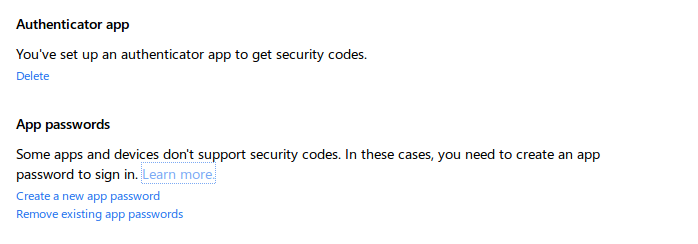
The work-around MSFT picked follows existing practice:  application passwords. These are randomly generated strings that can substitute for a “password” whenever a” legacy” application that is not aware of 2-factor authentication insists on collecting a password. (Legacy in quotes, because out of the gate that will include all client applications and hardware such as XBox console.) There are some interesting twists about AP usage.

Authenticator and application passwords

  • They are generated on demand, and intended to be copied into the necessary application at that time. Similar to the Google design, it is not possible to go back and look at an application password  generated in the past.
  • One difference is that MSFT does not show an inventory of existing APs, allow users to assign nicknames or track the date of generation.
  • Ergo: it is not possible to revoke APs individually either. Instead there is a single option to revoke all APs at the same time. This can be quite disruptive. For example dealing with a lost device means not only revoking the AP for that device but also breaking every other application (still in user possession) relying on APs.

Remove all application passwords

  • APs survive password changes. This has some interesting security implications. AP can function as a backdoor to the account. If an attacker is able to generate an AP, they can persist access even after legitimate user change the password. Corollary: users recovering from an account hijacking need to also check for rogue APs  to guarantee they have reverted to a safe state.

In some ways “application password” is a misnomer, because the credential is not scoped to any particular application. Users do not create one AP unique to Outlook.com access, and a different AP dedicated to SkyDrive that is not interchangeable with the first. Therein lies one of the great ironies: for all this effort expended on two-factor authentication, AP is a static, long-lived secret that grants full access to user data– in other words, a glorified password. That said, it has an improved risk profile compared to vanilla password. Because they are not chosen by the user, they are not predictable or easily guessed by dictionary attacks. Because they are only displayed once and not memorable strings, they are difficult to phish. (A creative website can convince users to generate a brand-new AP and paste it, but that is a lot more effort than asking  for their everyday password.)

There is one more challenge specific to two-factor authentication systems that are used for logging into devices, such as desktops or laptops. Such schemes need to operate offline, when the device has no network connectivity. MSFT design has to confront this problem: Windows 8 has support for signing into the operating system with online accounts, but OTP codes can only be verified by the cloud service. (In principle TOTP could be verified by sharing seed keys with trusted devices ahead of time, but such proliferation of secret material would greatly weaken security.) Considering that Windows 8 logon continues to work even for accounts with 2-factor enabled, the implications of this will be taken up in a future post.

CP

Microsoft 2-factor authentication: following familiar paths (part I)

Last week Microsoft  released 2-factor authentication for its online accounts service, previously known as Windows Live ID and Passport. This was a natural step, as cloud service providers continue to shore up security by improving their  authentication systems, occasionally prompted by a security breach as  in the recent case of Twitter. It was even foreshadowed by earlier appearance of an associated mobile app on Windows Phone store. The design also appears to have few surprises, sharing much of its DNA with previous two-factor authentication systems used in the consumer space:

  • One-time passcodes (OTP) are the second factor of authentication. Not USB dongles, smart cards, X509 certificates or some reincarnation of the extended CardSpace debacle. That choice simplifies integration and minimizes disruption to user-experience. Main difference is entering these additional codes during authentication in addition to the password. No software installation required, smart cards/readers to carry around, browser compatibility issues or  flaky device drivers. For frequently used machines, there is even an option to avoid asking for codes on each login.
  • Two ways to get OTP. Users can either have the code delivered via SMS to their registered phone number or they can use a mobile application to generate codes. This design also makes sense.
    • SMS has the largest reach, working equally well with a 10-year-old “feature phone” with no applications as it does with the latest Android or iOS device.
    • On the other hand, SMS requires users have connectivity to their wireless carrier– not just any old Internet access, but specifically their mobile carrier.  This may not be the case when the user is travelling overseas for example. SMS is also much less reliable in emerging markets than the US. (SMS does not guarantee delivery; it is best effort. Nor does it have a time-bound for successful completion.) It may also incur charges for the user and/or service sending the messages.
    • Mobile applications have the advantage that they can work offline, once provisioned. Downside is requiring a compatible application that can generate codes according to the appropriate scheme. MSFT has already released one for Windows Phone– a choice of platform that would be puzzling, were it not for the brand affiliation. Luckily both Android and iPhone already have compatible applications such as Google Authenticator and Duo Mobile.
  • Settled on TOTP standard described in RFC 6328 for generating the codes by mobile apps. This may have been forced by existing options on Android/iPhone: all of them implement TOTP as common feature.** This has some interesting consequences.
    • TOTP codes are generated based on a secret cryptographic key, referred to as “seed,” and current time. This naturally requires an accurate clock on the phone, up to some tolerance. Typically time is quantized into 30-second intervals and the verification logic attempts to accommodate drift by looking back/forward a few intervals. (Note that time-zones and daylight savings do not pose problems; “time” is always measured as Greenwich/UMT/Zulu time.)
    • Less obvious is that time-based codes are easier to clone than counter-based ones. Multiple users with the same key can independently generate the same sequence, without interfering with each other. The other leading contender is HOTP, which predates TOTP. That design uses a counter  incremented each time a code is generated. If multiple people tried to use the same cryptographic secret, they would quickly run into problems: once the counter is incremented, the server will not accept a second OTP generated using an earlier value. (This is actually useful for security, making it easier to detect inappropriate usage. Sharing of credentials is a strongly discouraged practice.)
  • The mechanism used to provision those TOTP seeds also sticks to established methods. Secret keys are packaged into URLs and rendered as QR codes on the web page, intended to be scanned with phone camera. Even the URL format follows an earlier convention introduced by Google Authenticator, using the custom otpauth protocol scheme. While MSFT was free to pick a different one in principle, compatibility with existing Android and iPhone apps is helped by sticking to the same scheme.

[continued]

CP

Windows smartcard logon with Android secure element and NFC

There are different ways to interpret the notion of “logging into your computer PC using a phone.” While it is increasingly common to see phones provide second-factor for login to websites (by sending SMS challenges or using installed apps to generate one-time passcodes) users still have. In addition these ad hoc schemes are not compatible with how authentication works for typical operating systems– for example in an enterprise environment, that means Kerberos.

Here we consider a different approach where the phone is used as primary credential, replacing a standard smart card in conjunction with a short user PIN. Restricting our attention to PCs running Windows on one side and Android devices on the other, it turns out the bulk of the machinery required for implementing this is already present. Quick recap of these raw ingredients from previous posts:

Putting together all of this, we can implement Windows smart card logon with an Android phone:

  1. Write a minimal PIV application for the eSE. Why PIV? In fairness it is one of two options: support for PIV and GIDS standards is built into the OS starting with Windows 7. More over there is a discovery process to automatically recognize such cards as soon as they are introduced to the system. PIV specification is slightly easier to follow and it turns out smart card logon requires a tiny subset of specified functionality.
    • Strictly speaking the applet is not– and can not be– fully PIV compliant. The standard does not permit using the authentication key over NFC. That key is only meant to be used over contact interface, when the card is inserted into a standard reader. Luckily in this case having a more permissive applet does not change anything; Windows does not differentiate between contact verses contactless readers, and will try to use a discovered PIV card either way.
  2. Install the application on the eSE using standard Global Platform commands.
    • Caveat: this part can not be replicated with off-the-shelf hardware. Card manager keys for the secure element will not be known for standard production devices. Luckily one perk of working on Google Wallet is access to development phones, with keys rotated to default well-known values. (This is different from knowing the keys for a production device– a phone with rotated keys can not run Google Wallet any longer, because its keys are not consistent with the ones TSM expects.)
  3. Setup target machine for smart card logon.
    • For enterprise scenarios where the machine is joined to Active Directory, this is built-in. No further action is required on the client machine. However some configuration is required by IT administrators on the backend to issue suitable certificates (for example by installing Active Directory Certificate Services) or setup trust in third-party CA issuer.
    • For local logon to home machine without AD, eIDAuthenticate is a good third-party solution.
  4. Personalize the PIV applet, by setting a PIN, generating key pairs and installing certificates from the enterprise CA. Specifically smart card logon uses only the PIV authentication certificate; remaining keys and certificates are not required.
    • That said, the OS will query the card for other data objects defined in the standard, such as the CHUID and security object. While these are not relevant to the authentication protocol, returning an error can confuse the driver that expects a compliant PIV applet to be configured properly.

That’s it. Tap the phone against a contactless smart card reader and the familiar smart card logon sequence with PIN entry follows. The video shows this proof-of-concept on an HP Envy Spectre, something of a best-case scenario here because it includes an NFC controller under the palm rest, a rarity for laptops on the market today.

One caveat about the HP Spectre: by default the built-in NFC controller only supports peer-to-peer mode, instead of reader mode required to communicate with an external “card” such as the Android eSE. NXP Semiconductors has the necessary drivers to enable reader mode, with the controller appearing as PC/SC compliant smart card reader that Windows can use.

Also note the proof of concept does not require making any changes to Android OS or even writing an Android app. Recall that the eSE is effectively its own environment. Installation of the PIV applet and its personalization can be done entirely over NFC, without going through the Android side at all. For example the employee can walk up to help desk and tap their phone on a reader there to enroll.

CP

The RFID boogeyman, part II: passports

If one could point to a single application responsible for giving RFID its bad reputation, it would have to be passports or machine readable travel documents (MRTD) in the standards parlance. The benefits of using smart card functionality to make passports more difficult to counterfeit are difficult to argue against. On the flip side, it has been equally difficult to articulate the value of having those chips support contactless access over RFID. In the US particularly, it has been a controversial decision pitting the privacy advocacy community against the State Department leading the charge for the new design.

Such vociferous opposition is understandable, as the stakes are  higher compared to use of RFID for payment cards. While it requires something of a  Luddite to completely opt out of the conveniences of credit/debit cards, consumers at least enjoy choice of issuers. The usual market forces are continue to operate: if there is indeed strong reluctance for contactless functionality in payments,  customers will gravitate to banks catering to that demand. (Determined card-holders can even take unilateral action and fry the chip in the card.) By virtue of being government issued, passports offer no such easy opt-out. Crossing national borders usually requires some type of identification, and citizens have little choice but to obtain that ID from their country of their citizenship. More importantly NFC functionality is a critical part of passports– it is not an “optional” feature, unlike credit cards where transactions  can still work the old-fashioned way by swiping the magnetic stripe. (Not to mention that tampering with passports is illegal.) The perception that a privacy infringing technology is being foisted on the populace has fueled many a conspiracy theory and FUD cycles.

That FUD has been non-stop and, quite frequently, wildly inaccurate. One sensationalist article from 2010 claims US passports can be read from 217 feet. Aside from the dubious use of “read” (see earlier post about what it takes to actually recover personal data from a passport) the article also conflates two different technologies. The actual demonstration at BlackHat involved EPC Gen 2 tags, which are RFID tags operating on a different frequency than the NFC chips present in passports. NFC stands for Near Field Communications— emphasis on “near.” While sufficiently powerful transmitters and sensitive antennas will no doubt increase the range significantly, up to several meters, to date there has not been a successful demonstration of reading NFC tags anywhere near distances implied by the article. Granted “attacks always get better” as the saying goes, but the article amounts to arguing that trains are dangerous by citing statistics on horse carriages.

An even more pervasive assumption is that individuals can be tracked simply by virtue of carrying their passport. This is a dubious proposition, at least in the simplistic interpretation of “tracking.” In the manifesto describing seven Laws of Identity— fashionable when  Infocard/CardSpace was all the rage– Cameron posited that the problem with RFID is projecting an omni-directional identity:

Another example involves the proposed usage of RFID technology in passports and student tracking applications. RFID devices currently emit an omni-directional public beacon.

Paraphrased, this is asserting that RFID  tags emit a constant, unique identifier to everyone instead of allowing the owner to project a variable identity based on the observer. While that  holds true for earlier generation of RFID tags, it is demonstrably false for US passports, as anyone can verify with an NFC-capable Android phone. In fact it is required that passports are configured to emit a random identifier, picked anew each time the passport is scanned.

Granted randomizing the identifier emitted at the transport level is a necessary but not sufficient condition to prevent tracking. There could be other constant identifiers lurking in higher level protocols, permitting correlation. Here the picture is more complex. The designers have taken additional steps to avoid obvious pitfalls. For example retrieval of unique chip identifiers (such as the CPLC) is not allowed until the reader is authenticated to the card. That authentication step requires already knowing data from the passport, as explained in previous post. The design translates into a limited tracking capability: at best the reader gets a yes/no answer, learning whether the passport scanned is identical to one where the name, date of birth and expiration are known. By repeating this query, one could check against multiple persons. The time required for issuing these queries increases linearly with each such attempt– and these chips are not exactly blazing fast, given the requirement to be powered by an external field. (There is also an unintentional weakness which permits answering the same yes/no question using only a previously observed exchange with legitimate reader, without knowing the passport data.)

That is still enough for targeted surveillance against a small number of individuals, but not practical for tracking movement of every person with a passport who wanders within range of stealth readers. There is clearly room for improvement, because the expression of user “consent” for getting his/her passport scanned is far from clear. One could imagine alternatives where PIN entry is required (and this PIN can be changed by the user) or even a simple physical switch activated by pressing a touch-sensitive area on the passport. Similar designs have already seen trial deployments for payments. Even better, if NFC convergence takes off and passports are integrated into smart phones some day,  existing mechanisms controlling when NFC functionality is accessible could provide a much better balance of privacy and user control over presenting their identity.

CP

PIV card and mobile devices: NFC as missing link

An article in the Government Computing News titled Are mobile devices already making PIV cards obsolete? draws attention to the incompatibility of US government PIV standard with newfangled mobile devices. The author asks whether the shift to smart-phones and tablets is threatening to render the ID card program obsolete barely after it has gained momentum. With the prevalence of NFC in mobile devices (mostly owing to Android ecosystem, although Nokia, Blackberry predate it) this perceived incompatibility may be increasingly an artifact of  design decisions in the PIV specification rather than any intrinsic limitation of smartcards. After all PIV cards are dual-interface: they have both old-school metal contacts for insertion into traditional card reader, as well as NFC antennas for communicating wirelessly. Since NFC-capable phones can act as card reader, one might expect that using the contactless interface will solve the problem– modulo NFC adoption, which is helped by the fact that the Pentagon favors Android for military applications. But it turns out that deliberate design decisions in PIV protocols frustrate that  expectation.

Traditional contact-based card readers were historically used in conjunction with desktop machines, where having a separate gadget with dangling USB cable going back to the PC was less of a problem because the setup was stationary. Overtime came readers integrated into existing hardware such as keyboards, to better blend in with the existing peripherals.  Laptops posed a slight s carrying yet another gadget quickly becomes a usability problem, even when the gadget in question can be quite tiny. In response manufacturers designed  readers intended for the PC Card and later ExpressCard slot directly such that it can be left permanently fixed in place. (Strangely the move from PC Card to ExpressCard standard made the ergonomics worse. Now part of the reader must just out of the narrower slot in order to match ID-1 card dimensions, instead of being flush against the laptop edge in previous designs.)

Mobile devices however continue to pose a challenge due to the paucity of options. It is not that there are no card readers available– they are just very awkward looking. The generic availability of USB in Android makes it possible to reuse existing USB card readers, as ACR has done. Alternatively some manufacturers designed custom readers for phones, since they are no longer required to follow the USB CCID standard prevalent on Windows. There are a couple of products marketed as mobile CAC readers taking that route on iOS, Blackberry and other mobile operating systems. These gadgets are expensive, almost comparable to the cost of the phone and unwieldy. They combine the problems of one-more-widget-to-carry-around (or forget/lose) when not in use, with the problem of poor ergonomics when needed. Some of them functions as sleeve for the phone– a design that ironically would not fly on Android because it would interfere with NFC, with the card being recognized as NFC tag while also being activated on contact interface. Perhaps the least intrusive design is the baiMobile 3000MP which acts as a sleeve for the card and links up to the phone via Bluetooth.

What about NFC? Considering all card functionality can be accessed equally well over NFC, such kluges to get contact readers playing well with mobile device are no longer necessary for the latest crop of phones. In effect the devices are shipping with built-in contactless readers at no extra cost.

There is a catch. While it is true that communicating to the card works equally well from either interface, it does not follow that applications will respond identically. In fact card environments permit applications to determine what interface they have been invoked from and behave differently. In the extreme case, that could mean declining all requests from one interface. There are good security arguments for such discriminatory behavior. Case in point: payment applications running in a secure element inside a mobile device have reason to be suspicious of access from contact interface. That is where host applications and malware lurk. Contactless access from an NFC reader is the proper path for a legitimate point-of-sale terminal, and the payment application can check this during a transaction.

PIV also mandates similar restrictions, except in the other direction. The standard has a significant bias in favor of the contact interface, forbidding most operations over NFC. A look at the PIV data model in NIST SP 800-73 section 1 shows how bad the situation is.  Appendix A lists up to four active X509 certificates and associated key pairs, identified by their purpose: card authentication, PIV authentication, signature and key management. Of these four, only the card authentication certificate can be used over NFC. Worse, that key does not provide two-factor authentication because there is no PIN entry required. It is primarily intended for low-security physical access scenarios. Employees tap their badge against a reader to open doors. (Even in that scenario, FIPS defines “restricted” and “exclusionary” areas where PIN entry and use of a different card key is required, which is only possible by inserting the card into a contact reader.)

The upshot is PIV cards can be accessed from an NFC-enabled mobile device, but they can not be used for any purpose other than physical access. Other applications such as Kerberos authentication with PKINIT, document signing or encrypted email call for using keys that are disallowed for contactless mode. These restrictions are not without good justification: NFC provides no encryption at the transport layer. This is unlike Bluetooth for example, where the pairing process also negotiates keys for protecting future traffic. If PIV messages between card and phone were carried over the air instead of direct contact, it would create new privacy problems. Most notably the user PIN sent to the card, as well as any decrypted data returned from the card would be susceptible to eavesdropping within NFC range. Future protocol improvements can overcome these limitations, but that will not help already deployed cards.

CP

Smart card logon with EIDAuthenticate — under the hood

The architecture of Windows logon and its extensibility model is described in a highly informative piece by Dan Griffin focusing on custom credential providers. (While that article dates back to 2007 and refers to Vista, the same principles apply to Windows 7 and 8. ) The MSDN article even provides code sample for a credential provider implementing local smart card logon– exactly the functionality of interest discussed in the previous post. A closer look at the implementation turns up one of the unexpected design properties: they leverage built-in authentication schemes which are in turn built on passwords. Regardless of what the user is doing on the outside such as presenting a smart card with PKI capabilities, at the end of the day the operating system is still receiving a static password for verification. EIDAuthenticate follows the same model. The tell-tale sign is a prompt for existing local account password during the association sequence described earlier. FAQ on the implementation says as much:

A workaround is to store the password, encrypted by the public key and decrypted when the logon is done. Password change is handled by a password package which intercepts the new password and encrypts it using the public key stored in the LSA.

In plain terms, the password is encrypted using the public key located in the certificate from the card. The resulting ciphertext is stored on the local drive. As the smart card contains the corresponding private key, it can decrypt that ciphertext to reveal the original password, to be presented to the operating system just as if the user typed it into a text prompt. (The second sentence about intercepting password changes and re-encrypting the new password using the public key of the card is a critical part of the scheme. Otherwise smart card logon would break after a password change because the decrypted password is no longer valid.)

This is decidedly not the same situation as enterprise use of smart cards. Domain logon built into Windows does not use smart cards to recover a glorified password. Instead it uses an extension to Kerberos called PKinit. Standardized by RFC4556, pkinit bootstraps initial authentication to the domain controller using a private key held by the card. Unlike the local equivalents, there is no “password equivalent” that can be used to complete that step in the protocol. While smart cards may coexist with passwords in an enterprise (eg depending on security policy, some “low security” scenarios permit passwords while sensitive operations require smart card logon) these two modes of authentication do not converge to an identical path from the perspective of the domain controller. For example the company can implement a policy that certain users with highly privileged accounts such as domain administrators, must log in with smart cards. It would not be possible to work around such a policy by somehow emulating the protocol with passwords.

It is tempting to label EIDAuthenticate and solutions in the same vein as not being “true” smart card logon because they degenerate into passwords downstream in the process. While that criticism is accurate in a strict sense, the more relevant question is how these solutions stack up compared to using plain passwords typed into the logon screen each time. It’s difficult to render a verdict here, because the risks/benefits depend on the threat model. In particular, for stand alone PCs the security concerns about console logon, eg while sitting in front of the machine, are closely linked to security of the data stored on the machine. The next post in the series will attempt to answer this question.

CP

Smart card logon without Active Directory

Ever since the prescient Wired declared that passwords are passé, a natural question comes up around exploring alternative authentication schemes. While Windows has historically boasted smart card support since the days of Win2K,  the catch is that capability gets classified under “enterprise feature.” This is short hand for medium or large company, with managed computing environment and dedicated IT staff. Translated into technical  terms, the “managed” requirement implies an Active Directory installation, with centralized servers responsible for administering resources remotely and individual user PCs joined to a domain under the oversight of these servers.

At first blush that rules out consumer scenarios. Most home users do not even have the right edition of Windows to join a domain if one existed. For example, anyone running Windows 7 Home Basic or Home Premium editions is out of luck. For users on a more advanced version of  the OS that meets the prerequisites, a more fundamental problem looms: it requires a Windows server class machine to create a domain. At best home PCs are likely to be members of a home group, introduced in Windows 7. Home groups can be created without a dedicated server and function as rudimentary AD domains, with support for cross-machine authentication and file sharing. But they still lack the more advanced capabilities of an enterprise domain including support for strong authentication.

Shifting our attention to third-party solutions, the picture becomes more complicated:

  • Several custom schemes exist for smart card logon to stand alone computers
  • Caveat emptor: it turns out the benefits for doing that are marginal for the typical home user scenario, when the machine only permits local access.

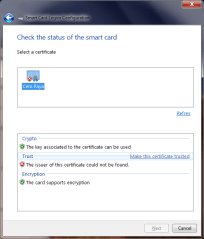
Control panel screenshot showing new itemIn this post we tackle the first point. EIDAuthenticate is a popular example of freely available third-party solution that permits local logon using a wide range of card types including the European eID cards and US PIV standard. EIDAuthenticate is based on the idea of associating a smart card with an existing local account that has been already setup with a password. After completing installation, a new control panel option appears for configuring smart-card logon, as shown in the screenshot on the right.

Selecting this new option brings up a window with three options, one of which is initially grayed out first time around (“Disable smart card logon”) since the functionality is already disabled. Assuming that we already have a compatible smart card such as PIV, we can choose the first option and follow the setup sequence:

  • Insert/tap a compatible smart card
  • Choose one of the X509 certificates located on the card
  • Fix any certificate validation errors.  Since there is no prior trust relationship with Active Directory is assumed, the certificate on the card could have been issued by a certificate authority that is not recognized by the machine.
  • Enter current Windows password for the user account
  • [Optional]  Dry run, by simulating a login with the selected card to verify that everything is working as intended. The experience here depends on the card profile. For example in the case of PIV cards, a dialog will be displayed to collect the PIN.
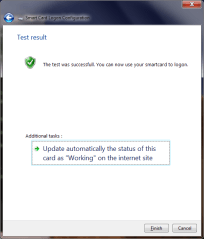
  • On successful completion of the dry run, the control panel displays a confirmation page.

Configure smart-card eID_CheckCertificate SmartCardCheckComplete

After this association is created between a particular card (more precisely, a certificate on that card since there can be more than one usable) that card can be used to login to Windows by selecting one of the “Other credentials” or “Insert smartcard” buttons on the logon screen, or simply inserting/tapping a card to implicitly select the smart card path. Case in point: the screenshots from November post on using Android devices as smart cards were captured on a machine with EIDAuthenticate installed.

[continued]

CP

Login with Facebook as .NET Passport V2, essentially

(Full disclosure: this blogger worked on Passport and its later incarnation Windows Live ID.)

Facebook is close to accomplishing what Microsoft set out to do with .NET Passport in the late 90s: become an identity provider trusted by the majority of popular websites.While recent usage/adoption statistics are difficult to come by, the increasing number of “login with Facebook” buttons popping up on sites ranging from Remember The Milk  to KickStarter suggests that companies representing all types of business segments are on board.

Facebook login may also the lone success story for identity federation– or to be more precise, federation in the consumer space. The enterprise scenario has received far more attention and enjoys an abundance of commercial solutions designed to solve a well-defined problem: employee Alice working at medium/large enterprise, typically a Windows shop running Active Directory, wants to use some cloud provider such as Salesforce. Main requirement is for Alice to login to that external resources using her existing Windows domain credentials, without managing a different username/password. SAML and its more Redmond-centric counterpart WS-Trust have been used with varying degrees of success to bridge that gap. What has never worked reliably is the consumer equivalent of that scenario: Alice using her Yahoo account to login to Twitter for example. There are isolated cases of interoperability, such as Remember The Milk also accepting login with Google identities, via combination of OpenID and oauth. But these are the happy exceptions. For the most part, each cloud provider stands in its own island of identity, with occasional one-off agreements and forays into federation experiments.

Except for Facebook. Starting with Facebook Connect, the service has seen increasing adoption of its identity system, with little under the guise of adding social features to websites. This is a far cry from the response to Passport when MSFT started pitching it around. Conceived from the beginning as an identity provider for the entire Internet– as opposed to merely all Microsoft properties, which would have been ambitious enough–  the service had little adoption. Expedia, originally spun out of MSFT, and eBay were among the few large sites accepting Passport logon along side their own identities. (Expedia would later phase out the service.) It was not for lack of trying either, at least on the Windows front.  For example, the IIS 6.0 web server in Windows Server 2003 had built-in support for Passport authentication at the HTTP level.

What was the difference? Several theories come to mind:

  • Better value proposition for relying parties. Passport provided identity and very little else. Granted there was an associated “profile” of user provided personal information. But there few forcing functions for that profile to be accurate (as opposed to “John Smith” living at zipcode 90210) comparable to the stringent real names requirement of Google Plus or the self-imposed convention followed by most Facebook users to represent their true name. Hailstorm aka .NET MyServices was the one ill-fated attempt by MSFT to attach large amounts of data and broker these to third-parties. That effort soon went up in flames. By contrast Facebook login brings an associated wealth of user-generated content, and even ability to post updates to the user timeline.
  • Fear of outsourcing in general. In this day and age of EC2 instances spun up on demand and sites scrapped together by mashing up third-party data feeds, it’s difficult to imagine a time when everyone insisted on running their own data-center and having full control of every feature in their service. That attitude, combined with an over-confidence that everything could be done better in house, predisposed developers against relying on some other authentication service. (The sheer number of password mishaps would prove them very wrong. It turns out the majority of those sites can better serve their users’ security if they delegate authentication to more competent entities.)
  • Fear of MSFT in particular. With diversified business interests in operating systems, productivity software, servers, gaming and entertainment, it is easy for any given website to consider MSFT a competitor, and shy away from entrusting a critical business function to the one company they are most concerned about.
  • Privacy concerns. Plenty of FUD, culminating with an EPIC complaint to FTC and other privacy advocacy groups did not help the matter. Facebook has arguably displaced MSFT as the great privacy boogeyman of the decade, but this was not true when Facebook Connect debuted in 2008, before the company got embroiled in multiple rounds of controversy around privacy of it own making.
  • Lack of standardization. Passport started out with a proprietary protocol, partly because there were few good options available for a web-based protocol that did not require changes to the web browser. Later Kerberos support was added but the corresponding functionality in browsers lagged behind. In principle Passport service could server as a Kerberos Domain Controller (KDC) compatible with Windows, and users could use Kerberos via the negotiate package supported by IE But the user experience for that would have been very restricted– it is a native dialog from the OS– compared to the full control that an HTML page gives the website for customizing the login experience. In any case WS-Trust and SAML followed soon with browser-aware profiles, and a few years later came the backlash against angle-brackets in the form of OpenID and Oauth. Facebook login is built on Oauth2.
  • Finally, one can’t rule out the passage of time helping out. Federated login was a foreign concept in 2000. It confused users: people had become so accustomed to having different identities at every site that they no longer expected their Hotmail credentials could also get them into their instant messaging client. Web site designers meanwhile had very little incentive to fix that, so they continued to put their own identity system front and center while offering federated login half-heartedly as a hidden option that required jumping through hoops. (Reflecting that lack of confidence, they hedged their bets and often required even federated users to also register a “native” account just in case the external identity system disappears overnight.)

CP

Why encryption would not have saved General Petraeus (part II)

[Second post in a series on why encryption is not the silver bullet for the case of General Petraeus and Paula Broadwell]

2. Encryption does not hide traffic patterns

The first half of this discussion centered on usability challenges of encrypting email with common cloud-based email providers, and how their web interfaces did not exactly help in this endeavor. It turns out that even for the very patient users willing to invest the extra effort and incur the overhead of setting up encryption, it would have made no difference against the type of surveillance FBI is believed to have conducted in this case.

First the threats sent by Ms. Broadwell to Ms. Kelley had to be readable by the recipient. Even if they were encrypted, Ms. Kelley would have voluntarily revealed their contents to law enforcement since it was at her urging that the FBI began investigating the source of these communications.  NBC coverage suggests that FBI only relied on location history for that account (IP addresses and timestamps) to determine the owner. In fact since it is described as an “anonymous” account, it is possible that Ms. Broadwell limited its use to sending those warning shots, never corresponding with other persons that could link the account to her true identity. In other words, the investigators had to rely on metadata for unmasking the sender.

Once Ms. Broadwell’s identity was established– presumably by obtaining access to other accounts accessed from the same IP addresses– law enforcement had access to correspondence sent from these additional accounts. Let’s suspend disbelief and assume that 100% of communications to/from that account were encrypted. This would not have prevented  obtaining metadata about other email addresses observed to be frequently communicating with Ms. Broadwell and performing similar analysis to establish the link to General Petraeus.

As several commentators pointed out, using an anonymizing proxy such as Tor— even when limited to the one-off email account– could have helped with obscuring IP addresses.

3. Encryption would have drawn more attention to the sender

In reality of course not all of the correspondence discovered in Ms. Broadwell’s account would be encrypted. Most of it is routine chatter with friends and associates that does not warrant the extra hassle of using cryptography. When only a few senders in the address book are using encryption, these contacts immediately stand out. Given Ms. Broadwell’s level of security clearance and access to the inner circle of national security leadership, it would have been an alarming discovery that she is corresponding with unknown individuals from a personal email account using strong cryptography.

It’s a murky picture around the question of whether individuals can be legally compelled to decrypt their own communications to aid an investigation. But once investigators had uncovered a frequent pattern of encrypted traffic between General Petraeus and a suspect in an investigation under suspicion of mishandling classified information, either or both sides of that exchange would come under enormorous pressure to come clean by revealing cleartext version of their correspondence– irrespective of whether they can be forced to, as matter of due process.

CP