SSH with GoldKey tokens on OS X (part II)

[continued from part I]

Life-cycle of  an authentication token can be divided into roughly three stages:

  1. Initial setup. This includes steps such as acquiring the hardware, generating keys and provisioning credentials on the token and setting an initial PIN before handing it over to the user.
  2. Normal usage, namely  SSH authentication with private keys on the token. This also includes changing the PIN as necessary.
  3. “Administrative” maintenance such as resetting a forgotten PIN, clearing out all credentials on the token for transfer to another user or issuing new keys.

This post will focus on the second part, namely using the token for SSH authentication on OS X. But it is worth pointing out that the lines between provisioning and steady-state usage are somewhat arbitrary. For example users could receive completely uninitialized tokens and handle key generation on their own, just as SSH keys are typically generated unassisted on end-user machines. Since SSH only cares about the raw cryptographic key, it does not matter whether users load a self-signed certificate or one obtained from their own CA. It would be a different story if the use-case called for certificates chaining up to a trusted authority. That said, there is some benefit to performing the key-generation in a trusted environment and noting the public-key directly. For example it can be used to enforce a policy that employees can only use SSH keys that were generated in hardware. (PIV standard does not provide a way to generate such an attestation after the fact to prove that a particular public-key was generated in hardware.)

OS X setup

These instructions assume that the token has been personalized with default PIN and secret question/answer and PIV authentication certificate was provisioned. Subsequent posts will take up some of the subtleties around performing key-generation on the token as well as wiping out and reinitializing tokens that have credentials present.

1. Check openssh version and upgrade if necessary

While openssh uses PKCS #11 interface, it is dependent on a compile time macro which can be configured to include or exclude that functionality. Earlier versions may have been more inclined to opt-out, possibly because PKCS support was not stable. Of course Apple is notorious for shipping ancient versions of open-source software, so it comes as no surprise that the version of openssh built into OS X 10.8 does not have smart-card support.

OS X 10.9 ships with a more recent vintage 6.2 from March 2013 which has been compiled with PKCS support. (That said, this version as built by Apple still has a serious bug that breaks agent-forwarding and PIN caching that we will describe later.)
For reference the latest stable release as of this writing is 6.6p1 from March 2014.

2. Install required software

Install opensc 0.14 from precompiled binaries for OS X or build from source tarballs.

Also install the GoldKey client for OS X which is required for changing the PIN. Note that the GoldKey PIV application does not honor the CHANGE AUTHENTICATION DATA command that is normally used on PIV cards to set a new PIN. Instead the entire token including any optional encrypted flash-drive has a single unified PIN controlled via the  GoldKey management interface which also prompts for secret question. That process takes place via GoldKey utility, (not to be confused with “GoldKey Vault” also installed by the same package)  selecting “GoldKey information” from the menu and clicking on “Personalize.”
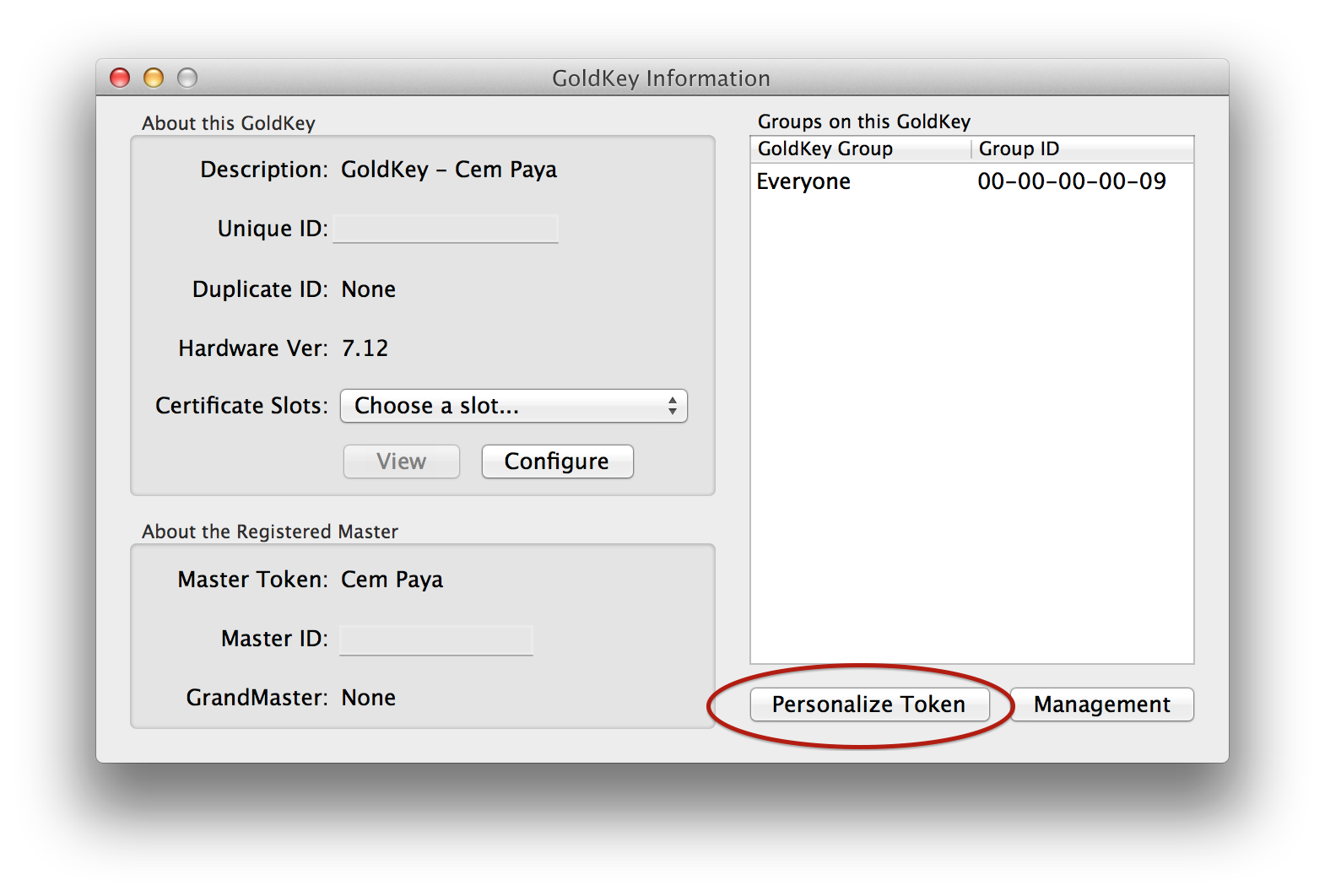
GoldKey information

GoldKey personalization dialog

3. Modify SSH configuration

In principle this step is optional, since the PKCS module can be specified in the ssh command line using the -I option during invocation. But doing that every time is inconvenient and some utilities such as git expect to invoke “ssh” with no additional parameters by default, leaving out the hardware token support.

Specify the path to the PKCS #11 module such as:

PKCS11Provider /usr/lib/opensc_pkcs11.so

There is one pitfall here as cautioned in the documentation for openssh: if the configuration includes an Identities or IdentityFile directive, it can interfere with the ability to leverage additional credentials present on the token.

4. Export SSH public-key from token

ssh-keygen has support for downloading an existing public key from the token:

ssh-keygen -D /usr/lib/opensc_pkcs11.so

(Somewhat confusingly, this does not in fact perform key-generation on the token; it only retrieves existing credentials already present.)

A more round-about way of accomplishing the same task is to read out the PIV authentication certificate and format the public-key in the certificate in a suitable format required by openssh. For example OpenSC project includes a pkcs11-tool for retrieving arbitrary data-objects from the card  application by label, including certificates. openssl can be used to extract the public-key field out of that certificate and passed to ssh-keygen to convert from PKCS #8 into the native ssh format.

pkcs11-tool --module /usr/lib/opensc-pkcs11.so\
 -r -a "Certificate for PIV Authentication" --type cert |\
openssl x509 -inform DER -pubkey -noout |\
ssh-keygen -i -m PKCS8 -f /dev/stdin

Verifying the setup

At this point the configuration can be verified against any ssh server. Here is an example involving Github, which supports multiple SSH keys associated with an account– very convenient for testing before switching 100% to hardware tokens:

$ git pull
Enter PIN for 'PIV_II (PIV Card Holder pin)': 
remote: Counting objects: 1234, done.
... 

Second line highlighted above is the prompt for a PIN associated with the PKCS #11 module.

The next post will discuss some edge-cases around using the token with other applications, as well as pitfalls around SSH agent-forwarding, which does not function correctly with the version of openssh utilities shipped in OS X 10.9.

[continued]

CP

Dual-interface smart-cards and problem of user intent (part I)

Comparing the security of NFC applications implemented with host-card emulation (HCE) against those using an embedded secure element, we noted that SE hardware architecture allows for interface detection, a critical mitigation against remote relay attacks.  This post expands on another application of the same feature: recognizing user intent in traditional smart card scenarios when they are used in conjunction with an untrusted PC.

Smart-cards and malicious hosts

First a few words on the problem. Consider a standard use-case for smart cards: accessing a remote resource, such as SSH or remote-desktop into another machine in the cloud. In a high-assurance environment that would call for strong authentication– in other words,bg not passwords– using cryptographic keys managed on the card. A typical flow might be:

  • User initiates the action
  • Local machine prompts the user for their smart-card.
  • User inserts their card into the reader (or in the case of NFC, brings it into the field of the reader)
  • PIN prompt is displayed
  • User enters their PIN
  • PIN is relayed to the card to authenticate the user to the card.
  • Once the card application is convinced it is dealing with the legitimate card-holder, it performs a cryptographic operation (such as signing a challenge) to authenticate the user to the remote resource.

When preventing key recovery is not enough

Consider the problem of malware resident on the host PC. Card applications and communication interface are designed to prevent the extraction of secret key material via pure software attacks, such as trying to exploit a memory corruption vulnerability. Let’s posit this is working correctly. Let’s further grant that cryptographic primitives are not vulnerable to side-channel leaks (such as timing differences or padding oracles) that can be used to recover keys using pure software attacks.

Smart-card meets hostile PC

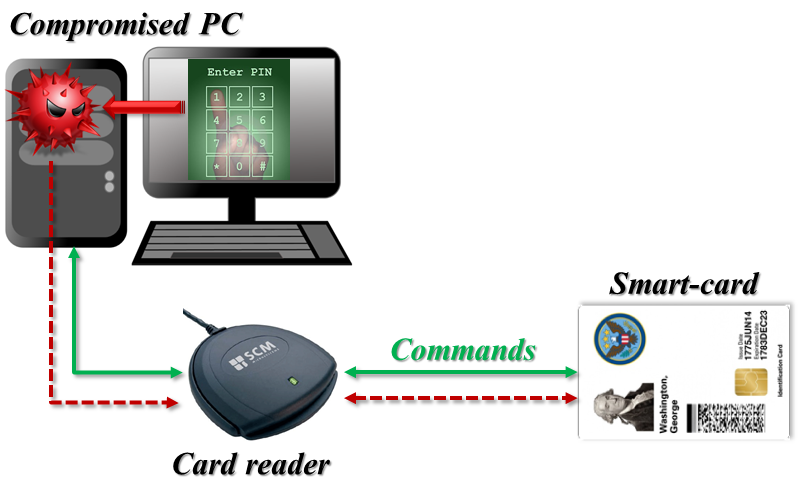
Smart-card interacting with a hostile PC controller by adversary

That rules out the obvious avenue for malware to permanently exfiltrate cryptographic secrets out of the card and ship-them off for future use. But the host can ask the card to perform any operation using those secrets while the card is attached. This is because at the card level there is no concept of “user intent.” Looking at a typical architecture as pictured above, there is a compromised PC running malware controlled by the adversary. A card-reader is attached typically via USB or serial link, and the card is introduced to the reader, allowing the PC to issue commands to the card and receive responses in a standardized format known as APDU. Neither the card reader or card have any indication about the provenance of those APDUs, beyond the obvious fact that they originated from the host. There is no other verifiable indication about which particular application sent those commands, whether that application is acting on behalf of the legitimate card-holder or carrying out its own agenda. In effect, the card is just a passenger along for the ride, with PC software calling the shots on exactly what messages are being signed, decrypted or otherwise processed using the card. After card is attached to the system and the user has authenticate, there is an implicit channel (red-dashes above) available to the malware for issuing arbitrary requests to the card.

Just to drive home the point that this is not a hypothetical scenario– and choice of a US government PIV card for illustrative purposes above is not entirely coincidental: in 2012 AlienVault reported that the Sykipot malware was targeting smart cards  by using a key-logger to capture PINs and later issuing its own set of commands to the card.

Working around PIN checks

Requiring PIN entry, as many card applications do before performing sensitive operations, does not solve this problem.  In the most  common scenario, PIN is entered locally on the compromised PC. This input can be intercepted by malware running at sufficiently high privilege and replayed any time later to authenticate to the card to perform some other private-key operations desired by the attacker.

Consider the more advanced case observed in defense and banking scenarios where an external PIN entry device is used. This is a distinct piece of hardware with its own numeric key-pad. Individual keystrokes are not shipped to the PC but instead the entire PIN is delivered to the card as part of a PIN verification command. (Since the format of that command varies by card application, this must be decided upon in advance and programmed into the PIN-pad firmware.) While this will hide the PIN from  malware resident on the host, it does not stop the malware from free-riding on the authenticated channel after PIN verficiation is done. After all PIN entry is being done at the behest of some application the user started– for example it could be their email client trying to decrypt an encrypted message. There is no social engineering required here; malware can simply wait until the user has legitimate reason to enter their PIN on external device because some other application requested card usage. As long as attacker can take control of that application– which is often doable without special privileges– or more directly, take control of the PC/SC interface controlling all card communication, additional commands can be injected for processing by on-card application.

Towards establishing user intent

Some “card”-like devices in the form of USB tokens have a button or similar input device on the card itself to establish user intent. (In fact there are also cards with their own PIN pad to avoid the untrusted entry path problem; the one button for confirming a transaction is effectively a special case of that design.) This is effectively creating a user nuisance in the name of marginal security. It does prevent the card from being commandeered by malware on host, since sensitive operations requires the user to take action. On the other hand, the user still has no idea what operation is about to be performed when they press the button. For example is the token going to sign the document they submitted or another message chosen by malware? Suppose there is an error message saying the operation did not succeed and needs to be repeated; is there a way to distinguish an “honest” error from malware having hijacked the click for its own purpose?

Interface detection on dual-interface cards can emulate these button presses, but they can do one better by allowing the user to verify exactly what is being requested of the card.

[continue to part II]

CP

How to fail at code-signing, the open-source edition (part II)

[continued from part I]

Two challenges confront a paranoid user trying to decide if the Tor browser-bundle they just downloaded is in fact the authentic version or malware masquerading as a privacy-enhancing tool.

Key management by cliques

First there is the theoretical problem of key-distribution. Verifying a signature requires knowing the public-key of the person who generated the signature. The simplistic idea that “signed” equals trustworthy proves not to work, as many people discovered much to their surprise when perfectly valid signatures were found on run-of-the-mill malware as well as sophisticated nation-sponsored attacks such Stuxnet. It matters who signed the code.

Authenticode uses a hierarchical trust model based on PKI, which is the same  model used for SSL certificates. Individuals or companies obtain digital certificates from certificate authorities. The certificate contains information about the person/entity it was issued to, such as their name or DNS domain, as well as a the public-key. It is effectively a statement from the CA that the public-key in question belongs to the person/entity named there. Because the certificate is signed by the issuing CA, it can be verified by anyone in possession of the CA public-key. In effect this amplifies trust; by trusting the public-key of 1 CA users can establish trust in the public-keys of any one else who obtain certificates from that CA. (Assuming they have confidence in the vetting process used before the CA is willing to vouch for the public-key.)

This model scales very well in relation to the number of CAs in existence. Case in point: web-browsers are preloaded with several dozen root CAs (most of which are unused, incidentally) but this small group of “trust anchors” allow verifying SSL certificates for  millions of websites. Flip side of that high leverage is a weakness: any one of them can undermine trust by deliberately or mistakenly issuing a certificate to the wrong party. Effective security of the system is determined by the least competent/most dishonest CA.

By contrast, PGP uses a web-of-trust model without centralized parties tasked with vouching for everyone else’s keys. Users individually exchange keys. They can also sign each others’ keys to serve as “introductions” for other contacts in the social graph. Such a distributed model is not susceptible to the weakest-link-in-the-chain problem that plagues X509 where a lot of power is concentrated in an oligarchy of CAs. When users are tasked with managing trust in public-keys one person at a time, the failure of some unrelated third-party will not lead to a catastrophic case of mistaken identity across the network.

Main downside is scaling globally. In order to verify signatures, users need the public-key of the person who created the signature. This is a challenge to say the least. In the standard PGP model, keys are obtained by following social links. Returning to our example of verifying the Tor binaries, users would ideally have a friend or friend-of-a-friend connected to the developer who created the signature. The Tor project conveniently has a page listing keys— ironically using SSL and centralized PKI model to bootstrap trust– but that page would have been blocked in our hypothetical scenario, along with the entire Tor website. There are centralized collections of keys such the MIT PGP key server, but they serve a very different purpose: they act as a directory for looking-up keys rather than a trusted third-party vouching for their integrity. Anyone can submit keys, and in fact bogus keys are submitted routinely. (It does not help that the key server runs over HTTP, allowing standard man-in-the-middle attacks to return bogus keys consistent with forged signature for a binary modified by the attacker.)

Usability, or why Johnny can’t verify signatures

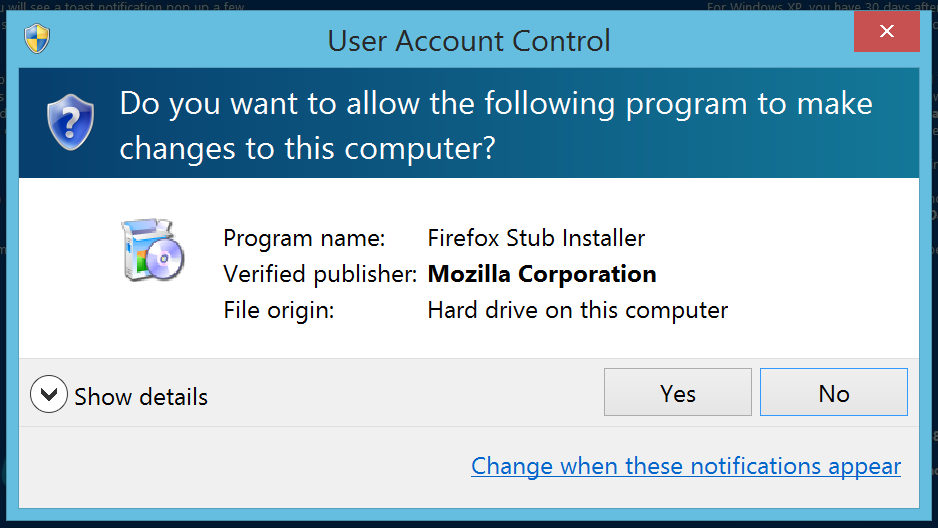
Second is a far more practical problem of usability.  Authenticode support is built into the operating system, with automatic signature verification before attempting to install software downloaded from the web:

Software installation prompt on Windows 8. Note the verified publisher information from Authenticode signature.

Verifying PGP signatures is not built into an operating system in the same way; the user is on their own. Getting PGP-compatible software is the first order of business. It is not part of Windows or OS X by default, but is commonly found on default installations of popular Linux distributions such as Ubuntu. Since desktop Linux has negligible market share, the effective result is that most users are being expected to go out of their way to install random software they have likely never used before (or for that matter, will ever use again) only to verify the authenticity of another piece of software they are interested in using immediately. Suspending disbelief that motivation exists, the next challenge is using the unfamiliar software for signature verification. While there are GUI front-ends for integrating PGP functionality with popular email clients– which is after all the primary use-case, encrypting and signing email messages– there is no good option for being able to verify detached signatures on random binaries. Users are expected to drop down to the command-line and type something along the lines of:

$ gpg --verify torbrowser-install-3.6.1_en-US.exe.asc torbrowser-install-3.6.1_en-US.exe

Assuming our determined user has obtained the correct PGP key and marked it as trusted, they will be greeted with this happy news:

gpg: Signature made Tue May  6 16:36:57 2014 PDT using RSA key ID 63FEE659
gpg: Good signature from "Erinn Clark <erinn@torproject.org>"
gpg:                 aka "Erinn Clark <erinn@debian.org>"
gpg:                 aka "Erinn Clark <erinn@double-helix.org>"
gpg: WARNING: This key is not certified with a trusted signature!
gpg:          There is no indication that the signature belongs to the owner.
Primary key fingerprint: 8738 A680 B84B 3031 A630  F2DB 416F 0610 63FE E659

(Incidentally that ominous sounding warning about key not being certified is expected; it does not indicate a problem with the signature.)

Easy enough?

CP


Physical access with PIV card: untapped potential

“Build it, and they will come” does not always work out for standards. Case in point: the sad state of physical access implementations for the US government PIV (Personal Identity Verification) card. Specified by NIST publication SP800-73 lays out an ambitious vision, supporting both logical and physical access control. The first category is access to buildings, restricted areas such as airport tarmacs. In the second category are scenarios such as smart-card logon for computers, connecting to a wireless network that uses 802.1x authentication or creating a VPN tunnel to the corporate network. The standard defines multiple public/private key-pairs and associated X509 certificates that a card can carry, intended for different purposes such as encryption or document signing. It even has some limited flexibility in choosing algorithms, supporting both RSA and ECDSA.

Strong authentication with public-key cryptography

The capabilities outlined in the PIV specification lend to a straightforward physical access protocol with high-level assurance. A very rough sketch of the interaction between card and compatible readers would run like this:

  • Cardholder presents their card into a badge reader
  • The reader queries the PIV card for one of the digital certificate.
  • It verifies the certificate up to a trust root and performs revocation checking.
  • Then the reader extracts the public-key from the certificate and issues a cryptographic challenge to the card that can only be answered with the corresponding private key.
  • Card computes the response to the challenge.
  • Reader uses the public-key to verify that the card response is correct. If this step fails, the protocol terminates with failure.
  • If the response is correct, the reader has successfully verified the identity of the cardholder.
  • This is not quite the end of the story however, since we still have to determine whether that person is allowed access to the restricted space. Typically that involves querying a back-end system that keeps track of access rules. These rules can be arbitrarily complex. For example some users may only be granted access to restricted area during business hours. But such policies are independent of the authentication scheme used between card and reader.

Reality: static data, no authentication

In reality many readers that claim to support PIV cards however do not implement anything near this level of security assurance. To take one example: the RP40 is a widely-deployed contactless reader from HID’s multiCLASS family of readers. Along with legacy 125Khz used for supporting the flawed and broken HID iClass protocol, the reader supports the modern 13.56Mhz band associated with NFC.

The PIV card also happens to be dual-interface, meaning that it can be used either by bringing the reader into contact with the metal plate on the card surface or wirelessly, by holding the card in the induction field generated by an NFC reader. The standard goes to great lengths to distinguish between NFC and contact-based usage, describing which operations are permitted in both cases. Of the different key-pairs specified in the PIV standard, only one– the card authentication key– can be used over NFC. The others are only accessible over the contact interface. (This restriction correlates with requirement for PIN entry: any key that requires PIN entry prior to use can only be invoked over the contact interface.)

RP40 specifications state that these readers support the “US Government PIV” standard. In principle then RP40 readers could have implemented a sound public-key based cryptographic protocol, compliant with the PIV standard by using the card-authentication key along the lines sketched above. But it turns out they don’t. Much like other early generation of PIV-compatible readers, they rely one of two pieces of static data:

  • UID associated with the card. This operates at the NFC layer, independent of PIV standard. UID supposed to be a unique identifier for NFC tags. In reality it is neither guaranteed to be unique across all tags or stable. Some cards deliberately emit a random UID that changes on each NFC activation, as a privacy measure designed to deter tracking. NFC standard only depends on UID to be unique for multiple tags introduced into the reader field at the same time, so-called “anti-collision” purposes. It is not intended to be used for authentication. While genuine NFC tags are required to have globally unique identifiers burnt-in at the factory, counterfeit chips exist that allow changing the UID to masquerade as any other tag.
  • CHUID, or card-holder unique identifier. Despite the name similarity, CHUID is a data object defined by the PIV standard. This is just a static piece of information stored on the card. It may have its own signature or other integrity protection but this signature is also static. CHUID can be trivially copied to another card and replayed. (Incidentally an update to FIPS201, the basis for PIV standard, clarified this further and deprecated use of CHUID for access control.)

In neither case is there a challenge-response protocol to verify that this static data emitted from the card was not cloned from a legitimate one. In fairness HID also has a new line of readers called PIVclass which does have proper authentication using either card-authentication key over NFC or the PIV authentication key with card slot & numeric keypad for PIN entry. But this is a relatively recent offering, specifically targeted at the government sector. Many commercial office buildings– including this blogger’s current and previous office locations– have an installed base of HID multiCLASS readers. Ripping out readers and installing new ones is a difficult proposition. Until they are upgraded, physical access with PIV falls short of its full potential.

CP

Reminder: oauth tokens and application passwords give attackers persistence (part II)

[continued from part I]

The password anti-pattern

Oauth protocol is an example of design-by-committee.  It started out as a solution to a simple data sharing problem. Before long it branched out into a series of edge-cases for solving every possible use-case while blurring the line between authentication and authorization along the way.

The starting objective can be plainly stated as: allow user data to be reused across websites. To take a contemporary example, suppose LinkedIn wants to access user contacts from Gmail in order to suggest existing professional connections by comparing email addresses. The original approach adopted by every website in these situations came to be called the password anti-pattern. LinkedIn simply asked users to type in their Gmail password, then turned around and impersonated the user to Google, logging into their account to scrape contacts. (We could also call it “institutionalized phishing” but when respectable web services engage in the practice, a more neutral expression is preferred in polite company. Incidentally LinkedIn has been sued over their aggressive contact scraping, and the plaintiffs allege “hacking” into user accounts. That sounds like a creative attorney describing this practice of impersonating users with their password.)

There are many problems with the password anti-pattern. It trains users to get phished by creating the misleading impression that it is OK for any website to ask for any other website’s password. It is not compatible with two-factor authentication because it assumes that only a password is needed. (To add insult to injury, LinkedIn could also have asked for the one-time passcode since 2-factor authentication with OTP is still susceptible to phishing. Luckily they have not gone that far.) Finally any access granted will be lost when the user changes their password, requiring another round of collection.

Oauth addressed this problem by defining a protocol for the user to grant one website (“consumer“) access to specific resources associated with that user at another website (“service provider“). Not only does this avoid password sharing but it offers fine-grained access control: LinkedIn could request permission to access contacts only, without  getting access to email or documents for instance. The end result of completing the oauth consent flow is an access token obtained by the consumer that can be used to access user data in the future.

Oauth for unauthorized access

By the definition of the earlier post, oauth counts as “alternative account access” mechanism. It can be used independently of passwords or any other credentials to access user data. Of course if this works for legitimate websites the user intended to grant access, it works just as well for websites controlled by attackers. After gaining temporary access to an account, an attacker can go through the oauth approval flow and grant her own website access to all possible user resources associated with that service provider.

Oauth for client applications

The original oauth use case was an example of authorization problem: controlling access to resources. Oauth did not prescribe how users authenticate at either the consumer or the resource provider. Almost immediately the protocol came to be repurposed and used for different use-cases: accessing user data from devices and client-applications. The distinction between these is becoming blurred now. Originally the first category intended to cover special-purpose appliances such as DVD players or gaming consoles, while the second one refers to applications running on commodity platforms such as a Windows desktop application or a mobile app on iPhone.

Both have two distinguishing features. At a superficial level, they lack the standard web browser interface for interacting with the ordinary oauth approval flow. More importantly, the ultimate destination for user data is a device he/she owns, as opposed to a service in the cloud with its own distinct identity. This is a somewhat bizarre notion of “authorization”: devices and applications are not independent actors with their own volition. In traditional security models, they are perceived as agents working on behalf of the user without any distinction made. Accessing Netflix from a DVD player is not a case of “authorizing” the DVD player to download movies, any more than logging into a banking website is an act of “authorizing” the web browser to access financial data.

Oauth and Android

Android relies heavily on this model for managing Google accounts. Because authentication on mobile devices is highly inconvenient, the operating system attempts to do this only once and persist some type credential for the life of the phone. When the user sets up their account on ICS and newer flavors of Android, an all-powerful oauth token is stored by the account manager. This token has the special login scope: it can be used to obtain oauth tokens for any other scope. Much like other access tokens, it can be revoked by the user. Unlike ordinary oauth tokens, it is invalidated automatically on a password change, providing some damage control in cases of recovering from account hijacking.

[continued]

CP

Reminder: oauth tokens and application passwords give attackers persistence (part I)

The recent dispute over whether Twitter itself experienced a breach or merely oauth tokens were compromised from a third-party website serves as a useful reminder about the risks of “alternative account access” credentials. That phrase is intended to cover the different ways of accessing user data held by a cloud provider without going through the standard authentication process such as typing a username and password.

These side-channels present two problems:

  • They can become the primary avenue for account hijacking
  • More subtly they can function as backdoor to persist access, after the attacker has obtained unauthorized access to the account in some other way

Seeking persistence

Consider the plight of an attacker who managed to get access to a user account temporarily. That could mean the user forgot to log out of a public machine. Maybe they were phished but they have 2-factor authentication enabled, leaving the attacker holding just 1 valid OTP. (See earlier post on why two-factor authentication with OTP can not prevent phishing.) Or they made a bad decision to use a friend’s PC temporarily to check email and that PC happened to be infected with malware.

In all cases the attacker ends up controlling an authenticated session with the website, having convinced that website they are in fact the legitimate user. The catch is such sessions have a limited lifetime. They can expire for any number of reasons: some sites impose a time limit, others explicitly allow users to logout their existing sessions– Google supports that feature— or trigger logout automatically based on certain events such as a password change. The attacker’s objective is achieving persistence under these circumstances. In other words, extending access to user data as far into the future as possible.

Value of stealth

One option of course is to change the password and lock the original user out. Unfortunately this has the disadvantage of alerting the target that their account has been hijacked. The victim may then take steps to recover, contacting the service provider and even alerting their friends out-of-band.

The “ideal” solution is one where attacker can peacefully coexist with the legitimate user, signing into the account and accessing user data freely without locking out the victim or otherwise tipping them off. Staying under the radar has two benefits. First it buys attacker time to download data from the account they just breached; bandwidth limitations mean that pilfering years worth of email could take a while. Equally important, it allows additional user data to accumulate in the compromised account. More incoming email, more pictures uploaded, more documents authored.

Application passwords

One example of such peaceful coexistence is application passwords or application-specific passwords (ASP) in Google terminology. ASPs are a temporary kludge to deal with incompatibilities created by two-factor authentication. Many protocols have been designed and many applications coded on the assumption that “authentication” equals submitting a username and password. They also bet on these c these credentials rarely changes and can be collected once from the user to be repeatedly used without additional prompting. Two-factor schemes introduce a secondary credential varying over time, breaking that assumption.

If every application had to be upgraded to support the new type of credential, 2FA could not be deployed in any realistic scenario. On the other hand if users were allowed to login with just a password, that would void any benefit of second-factor by leaving open some avenue where it is not enforced. (It turns out Dropbox had exactly this architectural flaw— basic mistakes happen often in our industry.)

Trading compatibility for security

ASP to the rescue. These are randomly generated passwords issued by the service– not chosen by the user. That makes them ideal for “appeasing” applications that demand a password, even when the system has moved on to better-and-safer means of authentication. Why is this better than the good old-fashioned password the user already had? ASPs are randomly generator and not meant to be user memorable. There is no way to phish users for an existing ASP because the user does not know it. Usually it is not even possible to go back and look at previously issued ASPs, except during initial creation. They are displayed generated, entered into the relevant application and promptly forgotten about.

Unintended consequences

Of course if the user can generate ASPs that grant access to email or other resources accessible over a programmatic API, so can the bad guys if they get unauthorized access to the user account. That brings us to option #1 for persistence: create an ASP. Even if the user later logs out all sessions or even changes their password, ASPs remain valid.

There is a catch: the scope of data that can be accessed. Typically an ASP can not be used to sign-in on a web page through the browser; it does not function as a direct replacement for the “real” password. Instead it is used by native applications (desktop or mobile) accessing API endpoints or using a standard protocol such as IMAP to sync email. In fact IMAP is a fairly common offering shared by multiple services. It also happens to be one of the more valuable pieces of user data. Beyond that each service has different API offerings offering access to different resources. For example Google has a “deprecated” proprietary authentication protocol dubbed ClientLogin that accepts ASP and returns authentication tokens suitable for user data.

The second part of this post will focus on a different way to get persistence that does not have this “limitation” of relying on home-brew authentication schemes.

[continued]

CP

** As an aside: “application-specific” turns out to be a misnomer. Even if the ASP is generated for and only given to the email application, that same ASP can be used by a different application for accessing other resources owned by that user.

NFC and screen unlocking for mobile devices (part II)

[continued from part I]

Authenticating the tag

Any access control solution whether for physical spaces, local devices or network resources in the cloud has to confront the question of security assurance. What is the level of confidence that the person being granted access is indeed the legitimate user verses an attacker impersonating them? There is no right or wrong answer per se but a spectrum of levels depending on the authentication protocol used. Different protocols exhibit different levels of resistance against common risks.

Threat model

In the case of NFC tags, a reasonable threat model includes:

  • Passive eavesdropping: Listening on the NFC exchange between the legitimate user and a legitimate reader.
  • Skimming: Bumping into the user with a malicious reader to trigger some action against the tag. Note that in this case the attacker must also activate the tag by providing enough power via the reader. By contrast passive eavesdropping assumes there is another reader in range already powering the tag and only requires capturing the RF emanations.
  • Extended physical access:  This can be viewed as an extended version of skimming, where the attacker has possession of the NFC tag for an extended period of time to perform more intrusive attacks, including destructive ones that may involve prying open the chip in an irreversible way.
  • Social engineering: tricking the user into tapping their NFC tag against a malicious reader. This is a variant of skimming where the user is voluntarily performing the tap operation, defeating any shielding mechanism that may exist to deter unauthorized reading.

Choosing a tag

There is a dizzying array of different NFC tags offering a broad spectrum of security and storage options. Within the Mifare family alone there is the original “Classic,” then there is Mifare Plus, DESfire, EV1, Ultralight and Ultralight-C to name a few of the popular offerings. All of them present a sector-oriented data storage mechanism, with available space (ranging from a few dozen bytes to several KB) divided into “sectors.” The wire protocol over NFC defines commands for reading/writing blocks of data into these sectors.

Main differentiating feature between tag types is the access control mechanism they can support around data. In the simplest case such as Ultralight tags, all data on the tag is world-readable and world-writable. Anyone armed with an NFC reader– that includes an Android device these days– can read all data from the tag in a fraction of a second. This may sound like a security vulnerability but it is very often exactly the intended outcome. For example an NFC-enabled poster in a public setting bearing a URL is meant to be readable by anyone in the vicinity. There is no reason to restrict read access.

One step above that is rudimentary access control for making contents read-only. This is an irreversible transition that prevents future updates to data, which is useful in the previous example of tag left unattended in public space. Locking the tag prevents “vandalism” by random strangers overwriting contents with a different URL for example. However it does not help with keeping their contents secret.

More advanced tags such as the Classic and DESfire feature an access control based on cryptography. Instead of being an open book where any sector can be read by anyone, the chip is configured such that the contents of particular sector is only readable given knowledge of an associated secret key. (Strictly speaking there are two keys per sector, one for reading contents and one for writing, as well as changing the keys.) Before a reader can read data out of that sector, it must authenticate to the tag by proving knowledge of the associated secret key.

NFC ring

At the time of writing NFC Ring uses two NTAG203 tags labeled “public” and “private.” While the nomenclature is reminiscent of key pairs in public-key cryptography, the parallel is deceptive. Much like the Mifare Ultralight, NTAG203 provides absolutely no security protection for stored data. They are trivially cloned by reading out all sectors and writing them into another NTAG203 tag. If the user holds up their ring to hostile reader just once (think social engineering– “tap your ring here to earn free iTunes”) or someone bumps them with an NFC reader on the subway, or even passively intercepts 1 exchange between tag and legitimate reader, the attacker has all necessary information required to create a perfect clone.

According to comments from the designer, there is physical protection built into the design to make the private tag more difficult to read. This may combat skimming attacks in the same way that metallic sleeves on US passports prevent them from being read unless the covers are opened. On the other hand it would provide no defense against social-engineering, eavesdropping or physical access risk vectors since the private tag is being deliberately exposed in that scenario.

About the only tricky part is cloning the unique ID or UID assigned to the chip. These four or seven byte identifiers are burnt-in at manufacture time and can not be changed on a chip complying with the specification; effectively they reside on a read-only sector.  That last phrase about compliance however turns out to be the operative part. Already unlicensed Chinese versions of Mifare tags exist where the UID can be overwritten to any arbitrary value. For that matter a dedicated hardware device such as the ProxMark can be programmed to emulate any tag and reply to the reader with arbitrary responses, including a forged value UID.

The final post in this series will look at possible improvements using one of the more advanced tag types.

[continued]

CP

NFC and screen unlocking for mobile devices (part I)

NFC Ring is a crowd-funded project for producing a wearable ring with embedded NFC tags. It is meant to be general-purpose device with a variety of applications, ranging from casual to security critical: exchange contact information, unlock mobile devices or even control physical access to homes and cars, to cite a few example from the KickStarter page. Recent Twitter exchanges motivated this post discussing the nuts-and-bolts of using NFC tags for screen unlocking on mobile devices.

Unlocking with NFC, old-school

In one sense this is old news and already within reach using off-the-shelf components without writing a single line of code or soldering any wires:

  • Windows supports smart card logon for domain-joined machines. Using third-party solutions such as the excellent eIDAuthenticate package allows doing the same for stand alone home PCs.
  • Any credential provider in Windows also works for unlocking the screen. In other words smart cards can be used to unlock a machine that wakes up from hibernation or screen-saver, just as well as they can be used for logging into the OS after a fresh boot.
  • Many smart cards are dual-interface; they can be accessed either by insertion into a wired reader that comes into direct contact with the metal surface or by holding the card against a contactless NFC reader.
  • Recent generation laptops and tablets have integrated NFC readers, eliminating the need for separate smart card reader dangling off to the side. (Proof-of-concept featured earlier: reading smart cards using the NXP PN533 reader tucked under the keyboard rest of HP Envy Spectre laptops.)

Putting it all together: an NFC smart card unlocks a Windows laptop with integrated NFC reader.

Building for mobile

This is admittedly an outlier as far as “unlocking device with NFC” goes. First most users would interpret that scenario with mobile devices or Android tablets instead of traditional PCs. Windows 8 is trying to make inroads into the tablet market but WinRT sales have been disappointing. (iOS devices are out of the running since Apple has not yet figured out how to incorporate NFC yet.) Second, the NFC-enabled object in mind is often a compact token or tag instead of the vanilla plastic ID card– while this turns out to be a completely superficial distinction since the circuitry inside and RFID technology used are identical, there are fundamental engineering/physics reasons why larger objects are easier to work with. There are three challenges in designing a solution to unlock mobile device with a small NFC tag: tuning the antenna for good connection between tag-device, integrating with device OS to control screen state and crafting an authentication mechanism to verify that only authorized users in possession of the tag can access the device.

Engineering around antenna limits

In simple terms, the NFC ring is nothing more than an ordinary NFC tag in specific form factor. Already NFC tags have been incorporated into an impressive array of ordinary objects:  keychains, refrigerator magnets, business cards, even cup holders. Some options are wearable, such as bracelets used for event ticketing– Outside Lands  pass in 2012 was an NFC tag. The ring design however poses some formidable engineering challenges. First rings are typically made of metal, and having a large metal surface under/above an NFC tag prevents the ability of the tag to draw power from the field. This is typically solved by including a layer of ferrite below the tag, which increases the thickness of the sticker. A good example of this are NFC stickers on San Francisco parking meters, designed to launch the Pay-By-Phone application on compatible devices. Fundamentally this is a well-understood, solvable engineering problem. It involves practical trade-offs between ring dimensions and how much leeway users have in terms of location/distance when trying to use the ring against any given device.

Integrating with operating system

The story gets more complicated and platform dependent when considering the software side of the equation. Windows unlock with NFC works the hard way: that smart card is not merely unlocking the screen, it is performing full logon with public-key credentials. Doing that has side-effects beyond the local machine: for example it may involve talking to the domain controller to refresh Kerberos tickets. That constraints the solution space because NFC object in question must conform to the authentication model defined by Windows, by acting as a “credential” for an installed credential provider in the operating system. (Incidentally eIDAuthenticate used in the proof-of-concept adds that credential provider for stand alone machines. Domain-joined instances already have one for use with Kerberos.) That sounds like a very heavy-weight, over-engineered solution when the problem is framed as “make the screensaver go away.” But it highlights an important point: frequently the credentials used for unlocking the screen also serve other purposes. For example Android derives disk encryption keys from the PIN/pattern/passphrase used to unlock the screen. Unless alternative unlock mechanism via NFC can produce same credentials, it will not be interchangeable. Luckily disk decryption happens only once during boot process. All other times the user-entered code is not implicated in anything other than deciding whether it is safe to unlock the screen.

Managing screen state on Android

Instead of the complex credential providers architecture in Windows, Android has a simple elegant solution in the form of KeyguardManager and its replacement. These classes expose functionality for exiting the screen lock. Applications with the appropriate permission can invoke that API to unlock display based on any criteria, such as the presence of a particular NFC tag. There is a catch: NFC polling loop does not run when the screen is locked. This is in fact a security feature introduced in ICS release, in response to observations about the earlier Gingerbread behavior. In GB tags could be scanned and intents dispatched to application even when the screen was locked. (The screen had to be powered on; there is a different logic that powers off the NFC controller when display goes to sleep.) That made it too easy to have unintended actions happen by placing device in proximity to hostile NFC tags. Imagine web browser navigating to any page or having applications installed just by holding the phone against an appropriate tag.

Arguably ICS went overboard. At least some NFC intents are benign; the operating system could have continued processing NFC tags but suppressing intents unless the target application specifically opted into receiving them with locked screen. In any case that is not what the OS designers opted for, and this behavior can not be overridden by third-party applications. That means any screen unlock app that hopes to run on recent vintage Android has a serious problem because it will not be able to communicate with the magic tag when screen is locked– precisely when that communication is required. Existing applications in Play Store attempt to work around this by replacing the lock screen. But this is not a viable solution because the lock screen itself has useful functionality such as customizable gadgets, notifications and controls for audio player that can not be duplicated by a third-party application. Overcoming the limitation properly requires a change to the NFC stack itself to re-enable the polling loop or otherwise allows tag processing to continue. That option is only available to the OS provider or OEM/carrier making custom modifications to plain Android. That appears to be the path Motorola followed with the new Clip NFC system for MotoX phones.

[continued]

CP

TLS client authentication and phishing (part III)

[Continued from part II]

The second post in this series considered what makes an authentication protocol resistant to phishing, in the presence of fallible users making wrong decisions about where to authenticate. Even with public-key cryptography and smart cards, safety hinges on incorporating a “context” as additional input to the protocol when producing the proof of user identity. As long as this context is guaranteed to be different between the legitimate website and its fraudulent replica, the protocol is not susceptible to man-in-the-middle attacks leveraging user confusion.

A good choice of context for a hypothetical web authentication protocol would be the name of the website on the other side. Substituting a different name leads to different contexts, even if they appear “close enough” as far as the user is concerned. PayPa1 (spelled with 1 instead of L) may resemble PayPal to the human eye, but software is not fooled. That one letter makes all the difference in the world, especially when the strings are used as input into a cryptographic computation. It might as well have been a completely random sequence of symbols unrelated to the original; the result will be uncorrelated. In our phishing scenario, Bob will indeed receive a “response” in the form of a signature from Alice, if she decides to go ahead with authentication. But he can not turn around and use that response in the parallel session for logging into the real PayPal. The signature has been computed over a different message and bears no resemblance to what the site expects.

To take a more concrete example of a widely deployed protocol, consider the TLS or Transport Layer Security, also referred to by the name of its predecessor SSL. This protocol  has an option to authenticate users with public-key cryptography during the initial handshake. This is an optional feature, not to be confused with authenticating the server, which is always part of the protocol. Dubbed client authentication, this extra step calls for the user digital signing a transcript of messages exchanged with the server when negotiating the SSL/TLS connection. While the exact contents of what is being signed is not important, the critical point is that it includes the digital certificate of the server. (The “challenge” can be viewed as other parts of the transcript that the server has freedom to choose, such as a random nonce sent during the ServerHello message. Alternatively one can view the context as predetermined part of the challenge; both parties verify this part is consistent with their expectation.) That means a transcript of TLS handshake against two different websites can never be identical, even when one is intentionally trying to masquerade as the other.

The result is a set up truly immune to phishing. Users can cavalierly authenticate to any website they come across, without having to worry about the possibility that one of them may be malicious. No site can use the result of that authentication process to impersonate that user at some other site. That is a far cry from the degree of caution required for using passwords and OTPs: if credentials associated with one site are accidentally typed into a different one, there is a real possibility that the latter site gets unauthorized access to user data at the former.

There is one subtlety, an unstated assumption: that phishing sites can not present same certificate as the target they are mimicking. That breaks down into two conditions:

  1. Certificate authorities will only issue a certificate with “PayPal” in the name field to the business entity known as PayPal.
  2. Successfully using a certificate for SSL/TLS requires having the corresponding private-key, which by assumption only PayPal has in the above example.

Surprisingly it turns out the protocol is resilient even if the first property is partially violated. Suppose a certificate authority mistakenly or deliberately grants a PayPal certificate to crooks– after all, it is axiomatic that CAs are generally incompetent and occasionally even dishonest/corrupt. Even that would not be enough to generate a response usable in a man-in-the-middle attack. The fraudulent certificate will still have a different public key than the authentic one, so the contexts are not identical. Recall that the point of a certificate is making an assertion that recognizable name such PayPal is associated with a particular public key. A certificate authority can be tricked/bribed into issuing a different certificate asserting that PayPal has a different public key, a key that is in fact controlled by a malicious actor. But no amount of CA ineptitude/malice can allow that malicious actor to magically recover the private key associated with the original certificate.

The protocol however is not resilient to breakdown of the second property. If the private key is compromised and attacker can redirect network traffic, they can “replay” the result of an authenticated session. (It is debatable whether that can be called replay, since it amounts to taking over an authenticated session after it has been established between the user and legitimate site.)

It is also worth pointing out that either of these attacks require diverting network traffic. In traditional phishing, the user is at the wrong site but does not realize it. Network traffic is not being diverted or redirected; the confusion only exists at the visual level. Trying to pass off a fraudulent certificate or use a compromised private key however requires manipulating network traffic, which is certainly possible but more difficult attack than vanilla phishing.

CP

Two-factor authentication and phishing: smart cards (part II)

First post in this series looked at a common two-factor authentication pattern that is susceptible to phishing. The second part examines an alternative design that does not have the same vulnerability.

This is the design commonly observed in critical enterprise/government applications where the stakes are high. These organizations typically avoid OTP and prefer solutions based on public-key cryptography instead. In this model each person has a pair of keys, a public-key that can be freely distributed and a private key carefully guarded by the user. For ease of identification, public-keys are typically embedded in digital certificates issued by a trusted third-party. A certificate effectively creates a binding between a public key and some identifying attributes about the user, such as their name, organization and email address. Authentication then works by first presenting the certificate– amounting to an unverified claim of identity, since certificates are public information– and then backing up the claim by proving possession of the private key corresponding to the public key in the certificate.

The critical difference from OTP hinges on that proof. Instead of sending over a secret value generated unilaterally, an interactive protocol is used that incorporates inputs from both sides. The party trying to verify user identity sends a challenge. That challenge is incorporated into a computation involving the private key and output from that computation is returned.  The recipient can use the public key from the certificate to verify that the response is consistent with the challenge.

Windows PIN entry dialog for smart cards

End users are thankfully not exposed to any of this complexity. The standard incarnation involves smart cards or similar dedicated hardware such as USB tokens– tiny embedded systems featuring tamper-resistant design for high-security applications. That approach avoids storing private key directly on general-purpose computer such as a PC or laptop, where it would become sitting duck for malware. Typically the card is configured to require PIN entry before performing these private key operations, giving rise to the two factors. First one is what-you-have, the physical possession of the card.  Second one is what-you-know, namely the knowledge of a short PIN. The resulting user experience becomes: insert card into reader slot (or tap against the reader surface, if both support NFC) and enter PIN when prompted. Smart cards are common in the enterprise and government space; they are exceedingly rare for consumer scenarios. For example the US government has a mandatory Personal Identity Verification (PIV) program that defines a standard for cards issued to millions of federal employees.

What makes this design inherently safe against phishing?

First, the protocol is too complex for direct user involvement. Private keys are long random sequences of characters. Even if they were directly accessible– not the case when keys are safely tucked away in a smart card– users can not reproduce them from memory if prompted.  Both the challenge and response are dozens of characters to type out. Corollary is that authentication protocol must be  automated by software, taking the user out of the loop. This creates a problem for the attacker: there is nothing to ask the user for. Even the most persuasive phishing could not get user to type out the private key into a web page. (Granted the user can be tricked into giving away the PIN, compromising one of the two factors of authentication. But without access to the private key residing on the smart card, PIN by itself does not allow impersonating the victim.)

That property is useful but not enough by itself. After all users are still responsible for making one critical decision: whether to login at a given website. Perhaps the attacker does not need to convince anyone to mail out their private keys, if he could instead convince the user to go about  their usual login  ritual at the wrong website. Using the example from previous post, suppose user Alice is tricked into using her smart card for paypa1.com (with 1 instead of L) a phishing site operated by Bob.

Bob can any issue any challenge to Alice consistent with the protocol, but he faces a dilemma: in order to login to the real PayPal site, he will have to answer a challenge chosen by PayPal. Unless he has a response corresponding to precisely that challenge, he will be out of luck. Being resourceful Bob does not give up. At the same time as Alice connects to his phishing website, Bob turns around and starts a parallel session with the real PayPal website in the background. This is the standard man-in-the-middle attack. User is connected to the attacker at the same time the attacker is connected to the legitimate destination, trying to impersonate both sides to each other.

  1. Bob claims to be Alice at PayPal by sending Alice’s certificate.
  2. PayPal sends Bob a challenge, requiring proof that he possesses the private key.
  3. Bob forwards the exact same challenge to Alice.
  4. Alice computes a response using her private key and returns it to Bob, expecting to be logged into her PayPal account.
  5. Bob forwards that response to the legitimate site.

By all indications that response is correct. After all it was generated using Alice’s private key, based on the same challenge PayPal issued. It would have been the exact same bits if Alice and PayPal interacted directly, without Bob in the middle to shuttle messages back and forth.

Game over? Not quite. This is where the nuts-and-bolts of protocol design comes into play. In addition to the challenge, well-designed schemes incorporate additional “context” into the response computation. That context is determined entirely by code under user control; the other side has no influence over it.

[continued]

CP