SSH with GoldKey tokens on OS X: provisioning (IV)

[continued from part III]

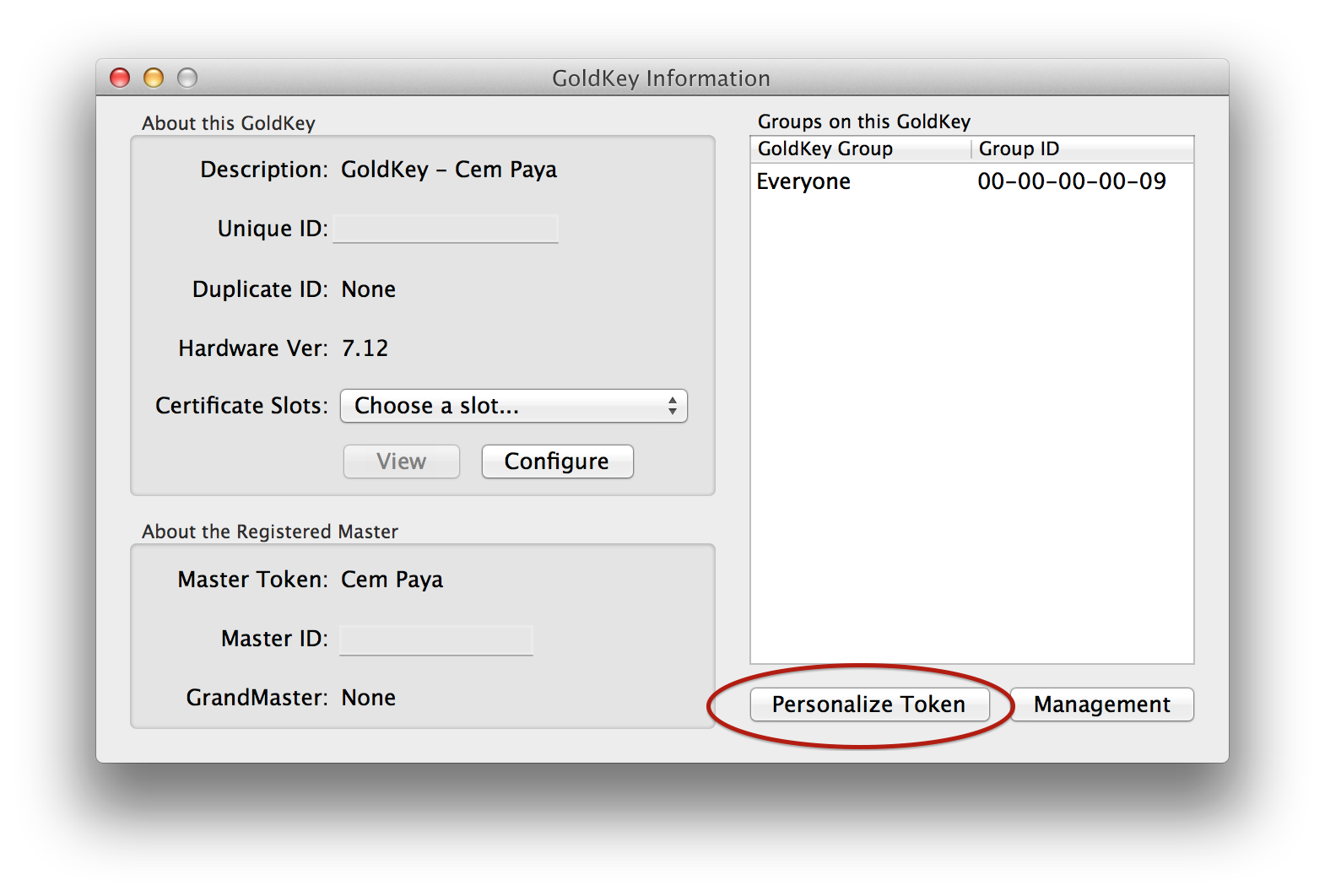
Until now we operated under the assumption that GoldKey tokens were already provisioned with PIV credentials. But that side-steps the question of how these key-pairs and certificates got there in the first place. The tokens arrive in a completely blank state, while PIV standard NIST SP800-73 defines several required objects such as CHUID, security-object, X509 certificates along with multiple containers that can cryptographic keys for different algorithms. Compare to the ongoing use of GoldKey, provisioning credentials turns out to be an involved problem, especially when the qualifier “on OS X” is thrown in. On Windows, there is a straightforward way using the standard certificate request path, with no manual software installation required in the best-case scenario. On other platforms the story is more complicated. Luckily provisioning and maintenance operations are infrequent. Worst case scenario they can be punted to enterprise IT department when there are special hardware/software requirements involved, much like printing employee badges.

Hierarchy of tokens

First let’s tackle a simpler problem: clearing an existing token and restoring it to original blank configuration. This turns out to require not just software but hardware support. GoldKey defines a hierarchy of tokens, with regular tokens managed by a master and masters in turn managed by a grandmaster token. Master tokens can perform administrative operations on a plain vanilla token. This functionality is accessed via the “Management” button under GoldKey information:
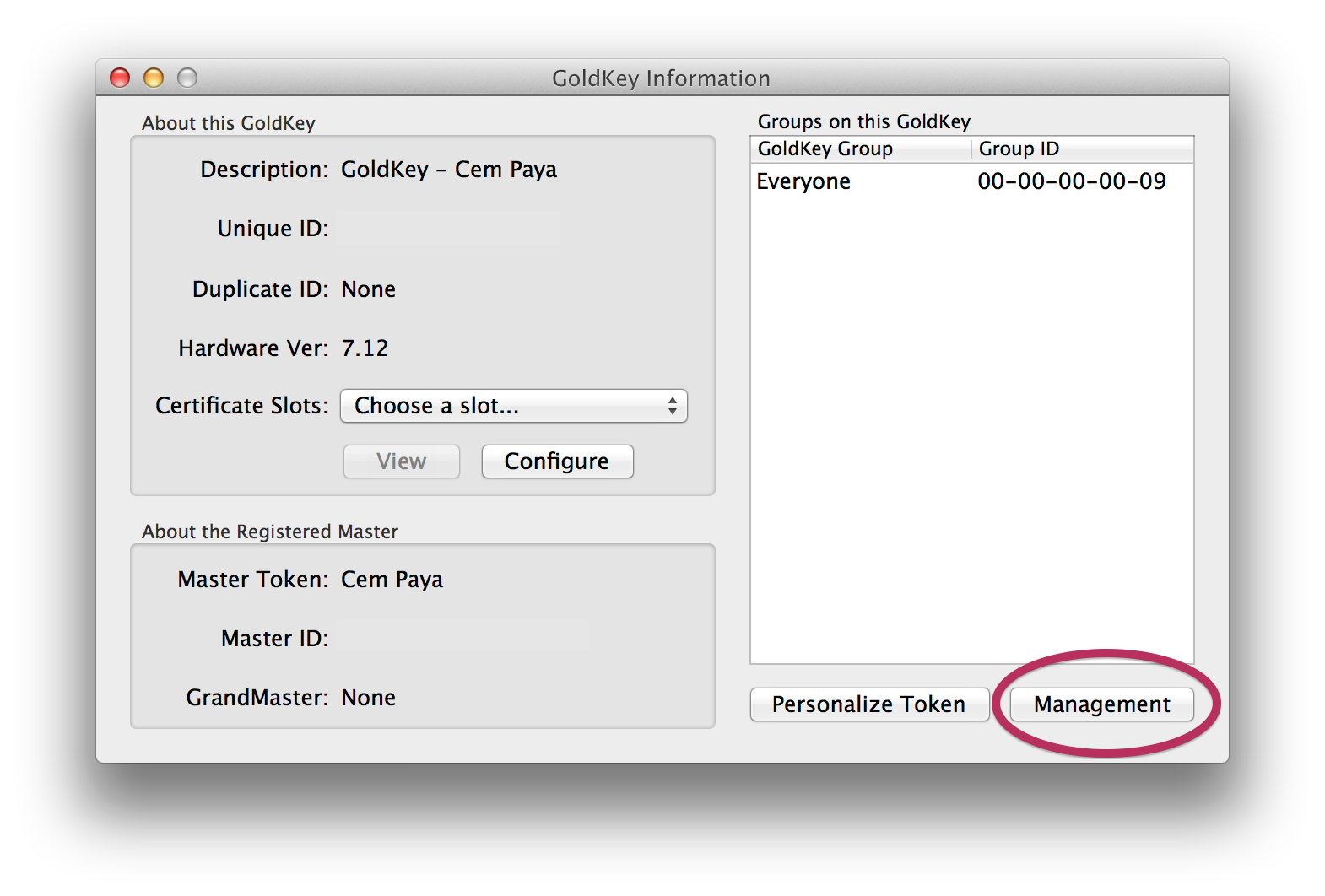
Accessing token management features

Accessing token management features

Dialog for managing GoldKey

Dialog for managing GoldKey

These all require having a master or grandmaster token. And it’s not just any master token, but the specific unit that this particular GoldKey was associated with during personalization phase. No such foresight or planning  involved during personalization? Not to worry: any master token can be used to completely clear out all data on that GoldKey and return it to clean slate configuration for re-personalization from scratch.

Provisioning with a master token

The same UI has an option labelled “manage smart cards” which sounds promising.

UI for managing certificates

UI for managing certificates

This allows provisioning into any of the 4 standard key types defined in the standard: PIV authentication, key-management, digital signature and card-authentication. But going down that path has an important caveat: it can only be used to provision from a PFX file, which is the MSFT variant of the PKCS12 standard. This format contains both the X509 certificate and associated private-key. But that means key material must be already available outside the token before one can import it, defeating one of the benefits of using cryptographic hardware tokens: secrets are generated on-card and never leave the secure execution environment.

Using the Windows mini-driver

Doing on-board key generation turns out to be fairly straightforward when using Windows with the GoldKey smart-card mini-driver installed. Recall that Windows has plug-and-play detection for cards and under normal circumstances will download the correct mini-driver from Windows Update. But in case the system associates a generic PIV driver instead of custom GoldKey one, it is possible to override that manually from device manager. Once correct driver is mapped, the built-in certreq utility can trigger key-generation and certificate loading.

One word of caution: GoldKey has a support article with example INF for generating self-signed certificates. Curiously the INF file used in that example does not perform key-generation on the token; it is not overriding the default cryptographic provider name to point at smart-card provider. (Fast key generation is a sign that it happened on the host. It takes about 30 seconds for 2048b RSA key to be generated, during which time the blue LED will blink.)

Also worth noting is that running certreq twice will not replace the existing PIV authentication key and associated X509 certificate. Instead it will provision to one of the other slots compatible with the specified usage, which turns out to be the key-management key. Clearing the original PIV authentication requires going back to the GoldKey client and using a master-token as described above.

What about on-board key generation from OS X or Linux? Not surprisingly, this is not supported by vendor software but it  is achievable using open-source alternatives. After all, PIV standard defines a GENERATE ASYMMETRIC KEY command for doing key-generation on the card. Leveraging this via open-source utilities (and some quirks of GoldKey tokens) will be the subject of another post.

CP
FakeID, Android NFC stack and Google Wallet (part IV)

[continued from part III]

Wallet substitution attacks

There is a more indirect way of spying on purchase history by replacing the existing wallet with one controlled by the attacker. We noted that payments can not be relayed remotely because those commands are only honored over NFC interface. But administrative commands from the Trusted Service Manager (TSM) responsible for managing the SE are delivered via contact interface. These are used to download/install/uninstall code and personalize payment applets after installation. Since FakeID-signed malware can send arbitrary commands over that interface, it can also be used to relay legitimate traffic from TSM.

Consider an adversary who has already set up Google Wallet on her own local device, trying to attack a remote victim using malware that exploits FakeID.

  • Attacker requests TSM to perform a wallet-reset on the local device.
  • But each time local TSM agent tries to communicate with local SE, the commands are relayed to the remote victim device and forwarded to that SE using the malware running there.
  • In particular when the TSM queries for the unique SE identifier (CPLC or Card Production Life Cycle data) attacker returns the value associated with victim SE. This substitution is necessary because the card-manager keys are unique to each SE.
  • Given the wrong CPLC, TSM now proceeds to configure victim SE with payment applets representing the attacker. TSM generates an install script, a sequence of commands encrypted & authenticated using Global Platform secure messaging.
  • The commands are sent to the attacker device who relays them to the victim SE. Existing applets are deleted and replaced by new instances personalized for the attacker.

The attacker effectively replaces the victim wallet with her own. Each time the victim makes a transaction, it will bill to the attacker who can observe this spending from the transaction history in the cloud.

Such an attack is possible but comes with several caveats, not the least of which is the fact that it stretches the definition of an “attack” when the victim is getting a blank check to spend attacker funds. Of course the adversary can try to minimize costs by ensuring that the backing instruments do not have sufficient funds. In that case it will still show up as a declined transaction, complete with merchant and amount. But that brings us to the second problem: the attack is not very stealthy. At best attacker can write the victim a blank check, authorizing every transaction and hoping the victim will not notice that his/her own credit-card is never getting charged.

Finally there is another problem confronting the attacker glossed over above. After new applets are installed, they still need to be configured with a PIN.  Given access to SE, attacker can set any initial PIN desired by sending the appropriate incantation over contact interface. But the problem is, existing user PIN is not known. (Recall that FakeID only permits malware to send its own commands to SE; it does not allow spying on traffic sent by other applications.) Each time Google Wallet collects a PIN from the user and attempts to verify it, that value will be sent to the SE applets. If the PIN is wrong, the applet will respond with an error and also disable payments. In order to work around that, we have to make additional assumptions about the malware, such as social-engineering user into entering the PIN into a fake prompt or trying to masquerade as the legitimate wallet application instead of coexisting along-side it.

Denial-of-service

This is one easy category of attacks available when malware can exchange arbitrary traffic with the secure element. For example:

  • Locking the payment application by making too many failed PIN attempts. Resetting Google Wallet recovers from this state by deleting that instance and installing a new one.
  • Locking the SE itself by issuing a reset command to the controller applet. In later iterations of Google Wallet, the controller applet is installed with card-locking privileges. Following Global Platform, when card is placed into “locked” state, no application other than card manager can be selected. This too is a fully reversible state. In fact it happens by-design during wallet reset, with over-the-air commands from TSM relayed to the SE for unlocking during the next time wallet is initialized.
  • “Bricking” the secure element.** Global Platform-compliant cards typically have a feature designed to defend against brute-forcing card-manager keys. Too many failed authentication attempts will result in permanently locking up the chip. (Note this is authenticating to the card itself to manage all of its contents, as opposed to authenticating to one particular applet such as NFC payments, which can be deleted and reinstalled.) Since a failed authentication is defined as INITIALIZE-UPDATE command not followed by a successful EXTERNAL-AUTHENTICATE, malware can simply loop on the first to run up the tally.

Summary

To summarize then: contrary to speculation on FakeID affecting NFC payments, there is no easy remote attack for getting sensitive financial data out of the embedded secure element, much less for conducting unauthorized transactions. (And that’s assuming was something present in SE worth stealing: Google Wallet no longer relies on secure element hardware for payments. Unless Sprint, Samsung or another enterprising OEM launch new NFC wallets, the hardware will lie dormant.) That said, there are legitimate denial-of-service concerns, including permanently and irreversibly locking up the secure element in a way that most consumers can not easily recover from.

CP

** Bricking appears in quotes above because the chip does not quite get TERMINATED as defined by Global Platform. For example NXP SmartMX goes into a “fused” state when the failure count exceeds the limit. Existing applets can be selected and will continue to function, however no new applications can be installed/deleted going forward. This is much better than a true “terminated” state, although it is still of greatly diminished utility for the user.

FakeID, Android NFC stack and Google Wallet (part III)

[continued from part II]

3. Secure element access

This is probably the most interesting scenario in mind when NFC payments are mentioned as a potential casualty of the Android FakeID vulnerability:

“This can result in a wide spectrum of consequences. For example, the vulnerability can be used by malware to escape the normal application sandbox and take one or more malicious actions: […] gain access to NFC financial and payment data by impersonating Google Wallet; […]”

Before exploring this particular threat vector, let’s reiterate that all Google Wallet instances have been using host-card emulation for NFC payments since Q4 2013.  That includes both new installations and earlier ones migrated from the secure element architecture. With the SE completely out of the picture, the following discussion is largely hypothetical. Still for the sake of this exercise, we will consider a concrete version of Google Wallet that leveraged the secure element from two-years back, circa August 2012. Could a malicious Android app access any financial information from that version using FakeID?

Interface detection, revisited

First observation is that the secure element has 2 interfaces to the outside world: the “contact” (aka wired) interface attached to the host Android operating system and the “contactless” route that is directly attached to the NFC antenna. All communication from host applications arrives via the first path, while external NFC readers communicate over the second one. Relevant to the current problem, applications running in SE can distinguish between these cases and behave differently. Informally this is known as interface detection or interface discrimination. It is one of the corner-stones of the security model against remote-relay attacks.

Payments happen over NFC only

Google Wallet applets are configured to only execute payments over the NFC interface. Barring implementation bugs in the applets’ use of interface detection, it is not possible for an Android application to simulate an external NFC reader to initiate a fraudulent transaction. This holds true even if malware attains root privileges, by-passes NFC stack and interfaces directly with raw NFC hardware. Incidentally FakeID vulnerability does not permit that level of access; it only enables going through the legitimate NFC stack to exchange traffic with SE.

Information disclosure

While executing a payment or reading out track-data containing credit card number, expiration etc. will not work, an attacker can still attempt to interact with SE to get information. As a starting point, it can survey SE contents by trying to select applets using their well-known application IDs or AID. (It is not possible directly to enumerate installed applets. Doing that requires authenticating to the SE with unique card-manager keys.)  Each flavor of EMV payments for Visa, MasterCard, American Express and Discover have unique AIDs that can be used to finger-print whether a payment instrument of that brand exists. In the case of Google Wallet, only MasterCard is supported. The ability to use other payment networks is achieved via cloud-based indirection; the SE only contains a single “virtual” MasterCard, so there is no concept of backing instruments at that level. As such the only information gleamed will be whether the device is set-up for tap & pay at all. Depending on the SE model, there is also an optional controller applet designed to provide additional constraints on the behavior of the payment applet, and its existence can be used to distinguish between versions of Google Wallet.

After locating applets, malware could try interacting with the applet to gain additional information. But there is very little interesting data to retrieve over contact interface.** There is a “log” of recent transactions but this log only contains success/failure state. No information about amount paid, merchant let alone line-level item data is stored. (None of that information was even sent to SE in the original PayPass mag-stripe profile. While  the mobile variant MMPP added support for terminal to relay amount/currency-code, that field is not reliable since it is not authenticated by the CVC3.) In earliest iterations of Wallet, two different types of MasterCard were supported and the controller applet kept track of the currently active card. In a situation with multiple cards present, malware can observe which card is selected. More interestingly it can modify the selection and cause the next transaction to be charged to a different card– still belonging to the current user– than the one originally picked.

Active attacks

The ability to change actively selected card is not particularly useful, but it points in the direction of exploring other ways that SE access can be leveraged to tamper with the state of the payment applications or for that matter SE hardware itself. The final post in this series will look at denial-of-service risks as well as more subtle substitution-attacks around replacing the user wallet with one controlled by the adversary.

[continued]

CP

** Over NFC one can read out the full credit-card number– that is how the mag-stripe profile of EMV payments work. But that capability is only available to external NFC readers and not local malware, because of interface detection in SE applets.

SSH with GoldKey tokens on OS X: fine-print (part III)

Second post in this series reviewed the basics of getting ssh working with GoldKey tokens. Here we focus on edge-cases and Mac specific problems.

Fine-print: compatibility with other applications

Invoking ssh from the command line is not the only use-case for SSH authentication. Many applications leverage SSH tunnels to protect otherwise unauthenticated/weakly-authenticated connections. One example already covered is the source-control system git. git invokes ssh in a straightforward manner, with some customization possible via an environment variable. Because all of this happens in a terminal, PIN prompt also appears inline on the same terminal session and everything works as expected after user enters correct PIN.

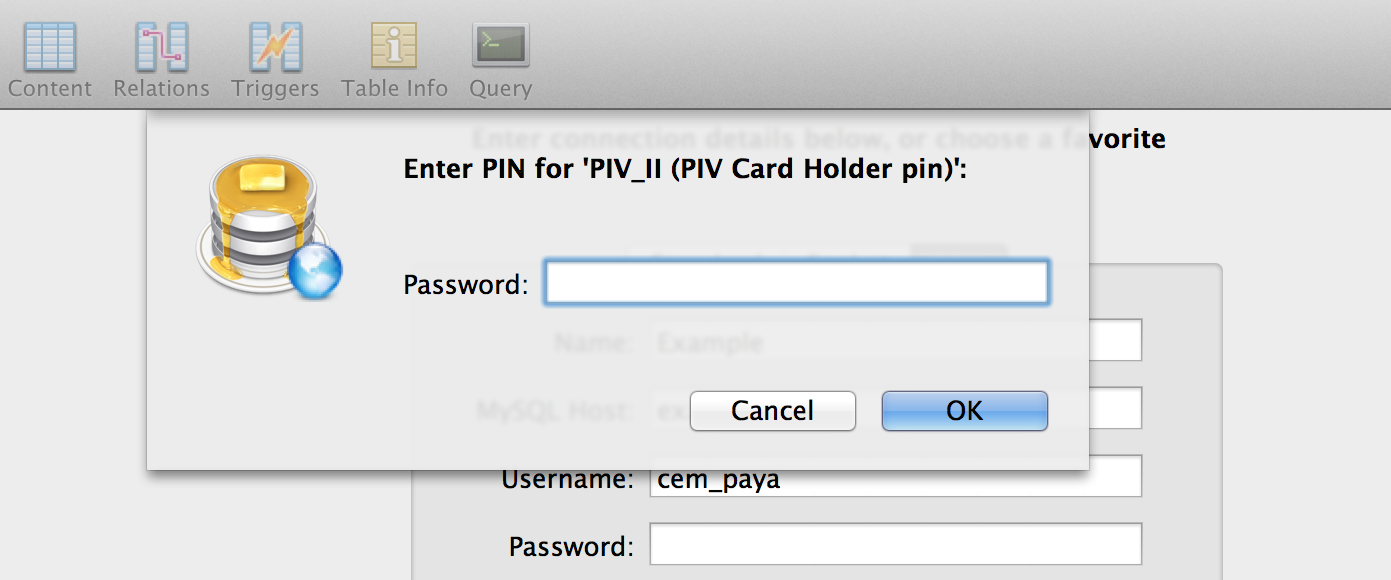
Such automatic compatibility does not hold true for more complex use cases, and depends to some extent on the way SSH authentication is invoked. Interestingly  GUI applications can also work with cryptographic hardware if they are designed properly. For example Sequel Pro is a popular SQL client for OS X. It supports accessing databases over SSH tunnels through bastion hosts. When using a GoldKey for the SSH credential, PIN prompt will appear in a modal dialog:

PIN prompt from Sequel Pro on OS X

PIN prompt from Sequel Pro on OS X

This is compliments of the custom ssh-agent built into OS X, which includes changes from Apple to interface with the system keychain for collecting PIN/passphrase to unlock keys. Unfortunately this “value-added” version from Apple has a downside: it does not work correctly with hardware key.

Macintrash strikes back: key-agent troubles

One problem quickly discovered by Airbnb engineers during this pilot concerned SSH key-agent: adding credentials from the token to SSH agent does not work. In fact, it is worse than simply failing: it fork-bombs the machine with copies of ssh-pkcs11-helper process until no additional processes can be created. (pkill to the rescue for terminating all of them by name.) No one can accuse Apple for having tested enterprise scenario.

This creates two problems:

  1. Usability: GoldKey PIN must be entered each time. Arguably this is beneficial for security; guidelines for PIV clients even discourage PIN caching, since it can lead to problems when a computer is left unattended with the token attached. But there is also an inconvenience element to frequent PIN entry. This is more of a concern when the token is used for scenarios such as accessing a git repo, when frequent server interactions are common. (SSH to multiple targets in quick succession is rare although there are applications such as massively parallel SSH designed to do exactly that.)
  2. Functional limitation: Putting aside the security vs usability debate for PIN caching, there is a more fundamental problem with key-agent not supporting hardware tokens: it breaks scenarios relying on SSH agent-forwarding. For example, when the user connects to server A and from there tries connecting to server B, they need an agent running on their local machine and that agent to be forwarded to server A in order to authenticate to B using credentials on the GoldKey token. A less obvious example of “nested” connection involves logging into a remote machine and then executing a git pull there to sync a repository, which involves SSH authentication under the covers.

Luckily the limitation turns out to be a function of openssh binaries included out-of-the-box with Mavericks. Upgrading to 6.6p1 and making sure that all of the binaries executed– including ssh-agent and ssh-pkcs11-helper– point to this latest version solves the problem.

$ ssh-add -s /usr/lib/opensc-pkcs11.so
Enter passphrase for PKCS#11: 
Card added: /usr/lib/opensc-pkcs11.so
$ ssh-add -e /usr/lib/opensc-pkcs11.so
Card removed: /usr/lib/opensc-pkcs11.so

The collateral damage however is losing PIN collection for GUI applications, such as the Sequel Pro example above. That functionality is dependent on custom OS X keychain integration which the vanilla open-source ssh-agent lacks. When the application is invoked manually from the terminal, we can see the PIN prompt appear on stdout. Not good.

One work-around is to manually add the key to the agent before invoking GUI applications. A better solution is provided by the Homebrew version of openssl which combines the keychain patch with latest openssh sources to satisfy both use cases.

The final post in this series will conclude with a discussion of setup, key-generation/credential provisioning and maintenance operations.

[continued]

CP

FakeID, Android NFC stack and Google Wallet (part II)

[continued from part I]

2. Notifications

Next up in the discussion what attackers can achieve by getting NFC admin privilege with FakeID vulnerability, we turn to information disclosure from Android notifications. Certain notifications are only delivered to these privileged applications, as defined in NfcExecutionEnvironment and NfcAdapterExtras classes:

  • AID selected. Generated when an external NFC reader activates a particular application on the secure element, by issuing a SELECT command. The full application ID or AID for short is included in the notification.
  • APDU received. Note that while the source-code defines an extra parameter for delivering the APDU contents, that payload is always empty. In general NFC controller does not stash aside all incoming APDUs addressed to the secure element and deliver another copy to the host-operating system. This would amount to spying on traffic directed at the SE. (That said the host could always switch the controller into host-card emulation mode and receive the traffic directly but then SE will not be receiving that traffic over NFC itself.) Only exception is the SELECT command as noted earlier, where AID from the command payload is surfaced to Android apps. This would have been useful if there were different applets co-existing on eSE with different use-cases (payments, physical access, identity…) each of them with an associated Android app that may need to take action when that specific applet has been invoked.
  • EMV card removed. This is not generated by the NFC controller in Android.
  • Mifare access detected. Applicable when SE has Mifare emulation enabled to also emulate a Mifare Classic tag in addition to ISO7816-style card. Early incarnations of Google Wallet on NXP PN65N/O used this feature for storing coupons. Intended use-case was redeeming a coupon and making a payment in one tap transaction. Later offers were moved out of Mifare sectors into ordinary Android land. Future iterations of the NFC hardware– specifically the Oberthur SE coupled to the Broadcom controller– had Mifare emulation disabled, even when the underlying hardware supports it.
  • RF field on/off. These notifications indicate when the phone comes into the presence of an NFC field or is removed out of the field. This is useful to gauge the beginning and end of a transaction. Since external NFC readers communicate directly with the eSE without the bits flowing through Android itself, there is no other way of reliably identifying those points. (Polling the SE over contact interface is not a good solution, because doing so disables card-emulation and possibly interrupt a transaction in progress.) For example Google Wallet acquires a wake-lock when the NFC field is initially detected, to prevent the screen from going dark in the middle of a transaction.

An application with NFC admin privileges could receive all of these notifications, subject to the caveats noted above. In principle this would allow an application to infer when payments happen. For example the presence of an RF field alone is strong indication, since the only application present on most Android SE are payment applications. But there is even more unambiguous signal returned by the AID-selected notification: PayPass and PPSE applets invoked during the NFC payment transaction have unique AIDs that are easily recognized.

In short receiving these notifications discloses information about when a user conducts a payment transaction and which type of card is used based on the AID chosen by the terminal. (In the case of Google Wallet, it is always a MasterCard so there is no new information revealed.) But it reveals no information about the contents of the transaction, such as the merchant or amount. In fact it does not even allow differentiating between successful and failed transactions, because the traffic after the initial SELECT is not visible.

Remainder of this series will review risks associated with rogue Android applications accessing the embedded secure element via NFC extras APIs.

[continued]

CP

FakeID, Android NFC stack and Google Wallet (part I)

Google Wallet and Android NFC stack are frequently mentioned as one of the casualties from the Android FakeID vulnerability. This post looks at what an attacker can accomplish with forged NFC admin permissions.

Code-signing reinvented

“Those who do not understand UNIX are condemned to reinvent it, poorly” — attributed to Henry Spencer.

Spencer’s observation has a parallel for digital signature standards, which can be formulated as:

“Those who do not understand PKI, X509 and CMS are condemned to reinvent it, poorly.”

FakeID is not the first time that a serious implementation error was found in Android’s code signing mechanism. Unlike the earlier incarnation that involves a subtle mismatch between the contents of the ZIP archive making up an application versus what is covered by the signature, the new vulnerability affects a more specific code-path: signature-based permissions. This is one of the options for defining an Android permission, to be granted specifically to other applications that are signed with the exact same certificate as the one defining the permission.

For instance the original NFC administrator aka NFCEE_ADMIN permission in Android prior to ICS operated this way. Google Wallet was signed with the same key as the NFC stack on official builds of Android, obtaining this permission on installation. (Of course an OEM or carrier always has the option to recompile and sign the NFC stack using a different key in order to hamper Google from offering a mobile payment application on their devices.) Starting in ICS, this model was generalized to read out a list of acceptable signing certificates from an XML file which can not be modified by end users on non-rooted devices.  The underlying vulnerability still applies to this version, because the same code-path is used by the NFC stack when verifying whether a caller requesting special NFC privileges is any one of the approved signers.

Meaning of NFC administrator privilege

What has been obscured in this discussion so far is what happens if a malicious app could attain NFC administrator privileges. What is the worst case scenario assuming Google Wallet is installed on the device? Can this attack result in fraudulent transactions or access to financial information? Short answer is no.

One important caveat: many of the risks discussed here assume the presence of an embedded secure element being used for NFC payments. While this was the original architecture for Google Wallet from 2011-2013, more recent iterations are built entirely on host-card emulation, leaving the SE unused regardless of hardware capabilities. In fact many flagship devices including the Nexus 5 do not even feature an SE any longer. Yet for the purposes of this discussion, we will roll-back the clock to 2011 and assume the worst case scenario: namely that eSE exists and has been provisioned with active payment applets.

There are three kinds of additional privileges granted by the NFCEE_ADMIN permission:

  1. Ability to control card-emulation state
  2. Ability to receive notifications
  3. Access to the secure element. Note that this specifically applies to the embedded secure element. On ISIS devices, NFC controller is connected to the UICC as secure element. Host communication to that hardware goes through RIL (Radio Interface Layer) as with all SIM access, not the NFC execution environment defined by NFC stack.

Let’s examine each of these in turn.

1. Card-emulation state

Android only defines two possible states for controlling NFC card-emulation status:

1. Off: Meaning the external NFC input is not delivered to the eSE
2. On when screen on: NFC communication to the eSE is tied to screen state.

(Not to be confused with controlling card-emulation route— that is fixed at boot time. It used to be always pointed at the embedded secure element on earlier versions, and later defaults to host-card emulation.)

#2 is the default setting when Google Wallet is installed and tap-to-pay is configured. In that sense, the device is already operating in the most “permissive” state and there is nothing malware can do to move the user into a weaker configuration. Of course malware can interfere with payments by keeping card emulation disabled but this is at best a low-severity denial of service. No access to financial data results from doing that.

Note that the underlying NFC controller hardware supports other options, including always-on as long as the phone is on and in the extreme case, powered-by-the-field where eSE can draw power from an external NFC reader even when the device itself is completely powered off. (In fact, there is no concept of “screen is on” at NFC controller level; synchronizing card-emulation to screen state is orchestrated manually by NFC stack in response to display events.) But there is no way of activating these options by making calls to the NFC extras interface, even when caller gains access to the API by subverting the signature permission.

[continued]

CP

SSH with GoldKey tokens on OS X (part II)

[continued from part I]

Life-cycle of  an authentication token can be divided into roughly three stages:

  1. Initial setup. This includes steps such as acquiring the hardware, generating keys and provisioning credentials on the token and setting an initial PIN before handing it over to the user.
  2. Normal usage, namely  SSH authentication with private keys on the token. This also includes changing the PIN as necessary.
  3. “Administrative” maintenance such as resetting a forgotten PIN, clearing out all credentials on the token for transfer to another user or issuing new keys.

This post will focus on the second part, namely using the token for SSH authentication on OS X. But it is worth pointing out that the lines between provisioning and steady-state usage are somewhat arbitrary. For example users could receive completely uninitialized tokens and handle key generation on their own, just as SSH keys are typically generated unassisted on end-user machines. Since SSH only cares about the raw cryptographic key, it does not matter whether users load a self-signed certificate or one obtained from their own CA. It would be a different story if the use-case called for certificates chaining up to a trusted authority. That said, there is some benefit to performing the key-generation in a trusted environment and noting the public-key directly. For example it can be used to enforce a policy that employees can only use SSH keys that were generated in hardware. (PIV standard does not provide a way to generate such an attestation after the fact to prove that a particular public-key was generated in hardware.)

OS X setup

These instructions assume that the token has been personalized with default PIN and secret question/answer and PIV authentication certificate was provisioned. Subsequent posts will take up some of the subtleties around performing key-generation on the token as well as wiping out and reinitializing tokens that have credentials present.

1. Check openssh version and upgrade if necessary

While openssh uses PKCS #11 interface, it is dependent on a compile time macro which can be configured to include or exclude that functionality. Earlier versions may have been more inclined to opt-out, possibly because PKCS support was not stable. Of course Apple is notorious for shipping ancient versions of open-source software, so it comes as no surprise that the version of openssh built into OS X 10.8 does not have smart-card support.

OS X 10.9 ships with a more recent vintage 6.2 from March 2013 which has been compiled with PKCS support. (That said, this version as built by Apple still has a serious bug that breaks agent-forwarding and PIN caching that we will describe later.)
For reference the latest stable release as of this writing is 6.6p1 from March 2014.

2. Install required software

Install opensc 0.14 from precompiled binaries for OS X or build from source tarballs.

Also install the GoldKey client for OS X which is required for changing the PIN. Note that the GoldKey PIV application does not honor the CHANGE AUTHENTICATION DATA command that is normally used on PIV cards to set a new PIN. Instead the entire token including any optional encrypted flash-drive has a single unified PIN controlled via the  GoldKey management interface which also prompts for secret question. That process takes place via GoldKey utility, (not to be confused with “GoldKey Vault” also installed by the same package)  selecting “GoldKey information” from the menu and clicking on “Personalize.”

GoldKey information

GoldKey personalization dialog

3. Modify SSH configuration

In principle this step is optional, since the PKCS module can be specified in the ssh command line using the -I option during invocation. But doing that every time is inconvenient and some utilities such as git expect to invoke “ssh” with no additional parameters by default, leaving out the hardware token support.

Specify the path to the PKCS #11 module such as:

PKCS11Provider /usr/lib/opensc_pkcs11.so

There is one pitfall here as cautioned in the documentation for openssh: if the configuration includes an Identities or IdentityFile directive, it can interfere with the ability to leverage additional credentials present on the token.

4. Export SSH public-key from token

ssh-keygen has support for downloading an existing public key from the token:

ssh-keygen -D /usr/lib/opensc_pkcs11.so

(Somewhat confusingly, this does not in fact perform key-generation on the token; it only retrieves existing credentials already present.)

A more round-about way of accomplishing the same task is to read out the PIV authentication certificate and format the public-key in the certificate in a suitable format required by openssh. For example OpenSC project includes a pkcs11-tool for retrieving arbitrary data-objects from the card  application by label, including certificates. openssl can be used to extract the public-key field out of that certificate and passed to ssh-keygen to convert from PKCS #8 into the native ssh format.

pkcs11-tool --module /usr/lib/opensc-pkcs11.so\
 -r -a "Certificate for PIV Authentication" --type cert |\
openssl x509 -inform DER -pubkey -noout |\
ssh-keygen -i -m PKCS8 -f /dev/stdin

Verifying the setup

At this point the configuration can be verified against any ssh server. Here is an example involving Github, which supports multiple SSH keys associated with an account– very convenient for testing before switching 100% to hardware tokens:

$ git pull
Enter PIN for 'PIV_II (PIV Card Holder pin)': 
remote: Counting objects: 1234, done.
... 

Second line highlighted above is the prompt for a PIN associated with the PKCS #11 module.

The next post will discuss some edge-cases around using the token with other applications, as well as pitfalls around SSH agent-forwarding, which does not function correctly with the version of openssh utilities shipped in OS X 10.9.

[continued]

CP

SSH with GoldKey tokens on OS X (part I)

Earlier posts discussed how GoldKey tokens are compatible with PIV standard and can be used on Windows for traditional smart-card scenarios such as BitLocker  disk encryption or logon with Active Directory. This update considers a different use case with the exact same hardware, which this blogger has been piloting with Airbnb engineering team: SSH from Apple OS X. In theory this should be easier compared to the use-cases already covered. SSH authentication protocol uses raw public-keys and does not care for X509 certificates or other data-objects (such as the CHUID or security-object) defined in such exacting detail by NIST SP 800-73. If the Windows use-cases only touched on a small subset of PIV capabilities (for example, only the PIV authentication certificate and keys are involved in domain-logon or TLS client authentication) SSH calls for even less functionality.

Middleware all the way down

The complication lies in the middleware. Applications such as SSH or a web browser are rarely written with one particular model or brand of cryptographic hardware in mind. Instead they pursue broad compatibility by accessing such hardware using an interface that abstracts away implementation quirks, communication interfaces and specific commands syntax required to perform high-level operation such as signatures. As long as software exists that conforms to this interface– typically authored by the hardware vendor– the card/token/gadget in question can be transparently used for all of the same code paths.

One problem is that this magical interface is not standardized across platforms or even applications on the same platform. For example on Windows, preferred way of exposing cryptographic hardware to the platform is via smart card mini-drivers, a proprietary standard defined by MSFT. Not to be left behind, Apple has its own proprietary interface called “tokend” for the same purpose. Just in case one suspected this reinvention of the wheel was confined to closed platforms, openssl also defines its own abstraction called engines.

The closest any interface can be said to have at least aspired towards “standard” status is PKCS #11. PKCS stands for Public-Key Cryptography Standards, a series of specifications developed by RSA (now owned by EMC) in the early 1990s. While some specifications were later published as RFCs in the spirit of a true modern standard, others remained under RSA control or turned over to other private industry consortia. Among these standards, PKCS #11 is titled “cryptographic token interface.” It defines a fixed API to be implemented in a “module” for each type of cryptographic hardware, providing a uniform way for developers to access the underlying functionality. (Somewhat confusingly there is also PKCS #15, which defines low-level functionality and communication protocol for an on-card application implementing cryptographic functionality. PKCS #11 does not assume that the card application complies with PKCS #15; it is a higher-level interface designed to hide away those details.)

Luckily openssh— the popular implementation of SSH protocol shipping with OS X and many Linux flavors– has settled on PKCS #11 for its choice of hardware abstraction. Returning to the problem of using a GoldKey for SSH, as long we have a suitable PKCS #11 module this scenario is theoretically supported. Even better this module need not be specific to the GoldKey or depend on GoldKey corporation to write a single line of code. Since the token closely (but not exactly) follows the widely used US government PIV standard, generic middleware developed for traditional PIV scenarios– government, defense, enterprise– is sufficient.

“Macintrash” problem for smart-cards

Windows users might be forgiven for assuming such middleware must already exist in the OS. After all PIV middleware (albeit in the form of mini-drivers rather than PKCS #11) has shipped out-of-the-box starting in Windows 7 in 2009. No additional software is necessary for the operating system or any application to use PIV cards, effectively plug-and-play for cryptographic hardware. Credit for that level of convenience goes to commercial pressure from US federal contracts requiring PIV support, a key constituency that MSFT could not afford to ignore. OS X on the other hand has never aspired to be an enterprise-grade platform. To the extent that it has found acceptance in enterprise and government sectors, that success appears to have been in spite of Apple. Not surprisingly then, OS X has the worst smart-card support among the triumvirate of major desktop OS platforms. Apple even went so far as to remove the built-in tokend in OS X 10.7 Lion that once enabled CAC/PIV cards support, ceding that ground to third-party providers such as Thursby.

OpenSC to the rescue

Since there is no built-in PIV support in contemporary OS X, first order of business is locating alternative middleware. While there are commercial third-party offerings for PIV on OS X, there is also a popular open-source option with an extended track record: OpenSC. This cross-platform project provides a PKCS #11 module compatible with PIV standard as well as tokend and openssl engines for additional use cases.

The remaining posts in this series will describe the end-to-end process (including provisioning of PIV credentials, which is tricky because standard PIV does not grant card-holders this privilege) for getting this scenario working with opensc.

[continued]

CP

Dual-interface smart-cards and problem of user intent (part II)

[continued from part I]

Simulating a gesture

To demonstrate how multiple interfaces, specifically contact and NFC, on one smart card can help provide greater certainty about user intent against malicious hosts, let’s start with a simple example: emulating the presence of an external physical “button” on the card that the user must press before an action can be completed. The goal is to come up with some gesture the card-holder must perform, such that it is not possible for malware on local PC to emulate it via software alone. Key property is that an application running on the smart-card must be able to ascertain independently whether the gesture was performed, without relying in any way on the host PC since the latter can be malicious. This check will gate sensitive operations such as digitally signing a message or authenticating the user to a remote website.

Strawman

Asking user to insert the card is not sufficient, since any number of unauthorized actions can follow after that. At first a more promising approach is to require that the user remove and replace the card. A card application can detect this indirectly: removal cuts off power to the card, resulting in a hard-reset and loss off data stored in transient memory. Unfortunately this does not work because it can be simulated by malware on PC, which can reset the card or even shut-off USB power to the reader hardware, while the card is sitting still. That situation looks indistinguishable from the physical remove/return sequence as far the on-card application is concerned.

Switching interfaces

With a dual-interface card and dual-interface reader (or less elegantly two distinct readers, one for contact and one for NFC) we can ask the user to perform a slightly different ritual: start with the card in contact slot and switch to NFC, or vice-verse. Card application can detect which interface it has been activated from, make a note of this and wait until it is called again from the complementary interface before proceeding with the requested operation. Because activation areas on the reader are different, no amount of software trickery from the malicious host can magically move the card into a different physical spot required to access it using a different interface.**

Establishing intent

This is certainly a great deal of user annoyance for relatively little gain. It also suffers from the same problem as pressing a button built into the card: the user can not be sure exactly what operation resulted from the gesture, only that something was done. The good news is the sequence can be augmented to inspect exactly what was requested from the card, by enlisting the help of another device equipped with its own reader. Here is a scenario combining traditional PC with an NFC-capable mobile device used to double-check the operation:

  1. PC application streams a message to the card over contact interface and asks the card-application to sign it. (We assume that signature requests and responses are only exchanged over this interface and never over NFC, as enforced by the on-card application.)
  2. Card application caches the message in non-volatile memory, but returns an error indicating that user confirmation is required
  3. Host PC conveys this error message to the user.
  4. User takes the card out of the reader, and taps it against the NFC reader built into her Android phone
  5. Some Android application communicates with the card over NFC to retrieve the cached message, parse and format it for inspection by the user
  6. User reviews the message to confirm that it does indeed correspond to the intended operation. If everything looks correct, she informs the mobile app to authorize the action.
  7. That confirmation is relayed to the card application over NFC, which notes this
  8. User inserts the card back into the contact slot
  9. PC application requests signature again
  10. This time the operation succeeds, because of user confirmation received in step #7

Neither the PC or mobile device acting in isolation can sign an unauthorized message the user did not intend to sign. PC can submit any message but no signature is produced until it is independently confirmed. Meanwhile the mobile device can only confirm operations, but it can not originate new requests or even receive responses. This system can still be subverted if both the PC driving the signature operation and the mobile device used for confirming it are compromised by the same adversary. In that case an attacker can present one message to the card while displaying another one to the user for confirmation. But that is a decidedly higher bar than compromising either side in isolation.

Dual-interface requirement is critical here: asking for confirmation from another PC over same interface would not work for the same reason that card removal is not a reliable signal. There is no way for the on-card application to detect that it has been moved to another device, as opposed to simply power-cycled while sitting in the same reader.

Example: NFC payments with mobile secure element

The flow described in the previous section is already implemented in a familiar context: NFC payments from a mobile device with a secure element.

This video features the Visa NFC payments demonstration for 2012 London Olympics. Specifically around the 1:50 mark, there is a transaction with an explicit confirmation step. The phone is tapped against an NFC reader which communicates with the payWave application on the secure element to complete a purchase. Unlike the preceding transaction in the video, this time the protocol does not run to completion. Instead transaction details are displayed on the phone UI for confirmation. Once the user is satisfied that this is indeed the purchase they intended to make, a second tap against the reader completes the transaction.

To see how this is exploiting dual-interface capability to verify user intent, recall earlier posts describing how secure-elements in current generation of Android phones are effectively dual-interface cards, with the “contact” interface permanently wired to the host operating system and NFC side only accessible to external readers via built-in antenna. In this case the “PC” is replaced by a point-of-sale terminal asking the user to authorize a transaction. The “message” to sign is typically a step in the EMV payment protocol, although the card response is not exactly a signature in the cryptographic sense. The roles of contact/contactless interface are inverted: primary transaction flows over NFC, while out-of-band confirmation is obtained from the user over the contact interface hooked up to the mobile device. Because the secure element can not be taken out and moved independently, the act of bringing the phone into/away-from point-of-sale serves as the equivalent of moving between readers. (We are deliberately glancing over some implementation questions that depend on hardware configuration. For example, if the SE can be used simultaneously on both interfaces, some type of polling mechanism is required to determine when transaction is confirmed. Alternative is that only a single interface can be active, in which case the host controls whether SE is attached to NFC or contact-interface. It also means the user must pull their phone out of the NFC field for confirmation and bring it back, giving rise to a “double-tap” experience. This is how the Android eSE was configured for Google Wallet in its original design.)

CP

** Note there is one subtlety here related to the physical construction of dual-interface readers: we assume the hardware is properly shielded to isolate the contact-slot from NFC field, or include hard-coded logic to suppress NFC when contact is detected to prevent double-activation. Otherwise it is possible for a card sitting in the contact slot to be simultaneously accessed over NFC. The opposite case however goes against physics: when the brass contact-plate is not touching corresponding metal points in the reader, that interface can not be activated. Similar concerns apply when the card is being moved into position because it may be passing through the NFC field temporarily.

Dual-interface smart-cards and problem of user intent (part I)

Comparing the security of NFC applications implemented with host-card emulation (HCE) against those using an embedded secure element, we noted that SE hardware architecture allows for interface detection, a critical mitigation against remote relay attacks.  This post expands on another application of the same feature: recognizing user intent in traditional smart card scenarios when they are used in conjunction with an untrusted PC.

Smart-cards and malicious hosts

First a few words on the problem. Consider a standard use-case for smart cards: accessing a remote resource, such as SSH or remote-desktop into another machine in the cloud. In a high-assurance environment that would call for strong authentication– in other words,bg not passwords– using cryptographic keys managed on the card. A typical flow might be:

  • User initiates the action
  • Local machine prompts the user for their smart-card.
  • User inserts their card into the reader (or in the case of NFC, brings it into the field of the reader)
  • PIN prompt is displayed
  • User enters their PIN
  • PIN is relayed to the card to authenticate the user to the card.
  • Once the card application is convinced it is dealing with the legitimate card-holder, it performs a cryptographic operation (such as signing a challenge) to authenticate the user to the remote resource.

When preventing key recovery is not enough

Consider the problem of malware resident on the host PC. Card applications and communication interface are designed to prevent the extraction of secret key material via pure software attacks, such as trying to exploit a memory corruption vulnerability. Let’s posit this is working correctly. Let’s further grant that cryptographic primitives are not vulnerable to side-channel leaks (such as timing differences or padding oracles) that can be used to recover keys using pure software attacks.

Smart-card meets hostile PC

Smart-card interacting with a hostile PC controller by adversary

That rules out the obvious avenue for malware to permanently exfiltrate cryptographic secrets out of the card and ship-them off for future use. But the host can ask the card to perform any operation using those secrets while the card is attached. This is because at the card level there is no concept of “user intent.” Looking at a typical architecture as pictured above, there is a compromised PC running malware controlled by the adversary. A card-reader is attached typically via USB or serial link, and the card is introduced to the reader, allowing the PC to issue commands to the card and receive responses in a standardized format known as APDU. Neither the card reader or card have any indication about the provenance of those APDUs, beyond the obvious fact that they originated from the host. There is no other verifiable indication about which particular application sent those commands, whether that application is acting on behalf of the legitimate card-holder or carrying out its own agenda. In effect, the card is just a passenger along for the ride, with PC software calling the shots on exactly what messages are being signed, decrypted or otherwise processed using the card. After card is attached to the system and the user has authenticate, there is an implicit channel (red-dashes above) available to the malware for issuing arbitrary requests to the card.

Just to drive home the point that this is not a hypothetical scenario– and choice of a US government PIV card for illustrative purposes above is not entirely coincidental: in 2012 AlienVault reported that the Sykipot malware was targeting smart cards  by using a key-logger to capture PINs and later issuing its own set of commands to the card.

Working around PIN checks

Requiring PIN entry, as many card applications do before performing sensitive operations, does not solve this problem.  In the most  common scenario, PIN is entered locally on the compromised PC. This input can be intercepted by malware running at sufficiently high privilege and replayed any time later to authenticate to the card to perform some other private-key operations desired by the attacker.

Consider the more advanced case observed in defense and banking scenarios where an external PIN entry device is used. This is a distinct piece of hardware with its own numeric key-pad. Individual keystrokes are not shipped to the PC but instead the entire PIN is delivered to the card as part of a PIN verification command. (Since the format of that command varies by card application, this must be decided upon in advance and programmed into the PIN-pad firmware.) While this will hide the PIN from  malware resident on the host, it does not stop the malware from free-riding on the authenticated channel after PIN verficiation is done. After all PIN entry is being done at the behest of some application the user started– for example it could be their email client trying to decrypt an encrypted message. There is no social engineering required here; malware can simply wait until the user has legitimate reason to enter their PIN on external device because some other application requested card usage. As long as attacker can take control of that application– which is often doable without special privileges– or more directly, take control of the PC/SC interface controlling all card communication, additional commands can be injected for processing by on-card application.

Towards establishing user intent

Some “card”-like devices in the form of USB tokens have a button or similar input device on the card itself to establish user intent. (In fact there are also cards with their own PIN pad to avoid the untrusted entry path problem; the one button for confirming a transaction is effectively a special case of that design.) This is effectively creating a user nuisance in the name of marginal security. It does prevent the card from being commandeered by malware on host, since sensitive operations requires the user to take action. On the other hand, the user still has no idea what operation is about to be performed when they press the button. For example is the token going to sign the document they submitted or another message chosen by malware? Suppose there is an error message saying the operation did not succeed and needs to be repeated; is there a way to distinguish an “honest” error from malware having hijacked the click for its own purpose?

Interface detection on dual-interface cards can emulate these button presses, but they can do one better by allowing the user to verify exactly what is being requested of the card.

[continue to part II]

CP