Certificate pinning: translating Chrome settings into EMET

Following up on the comparison of EMET and Chrome implementations of certificate pinning, this post looks at applying the Chrome rules into EMET.

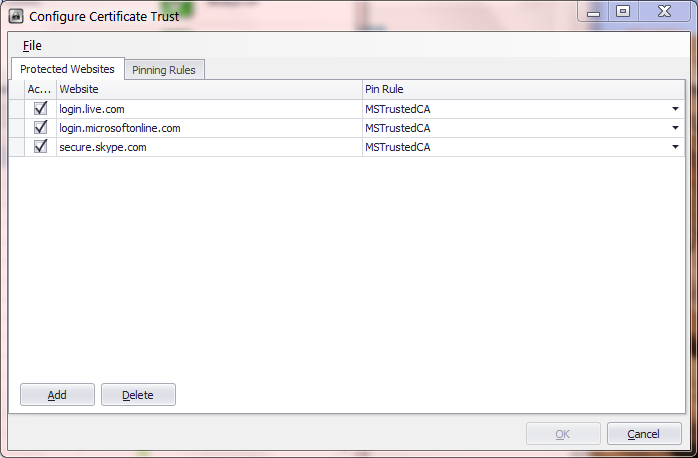
MSFT has recently published an update on the certificate trust functionality in EMET. The TechNet piece describes how additional settings can be imported. It also includes an example configuration file for Twitter. (Note that the example appears to have been created from scratch based on the existing Twitter certificate chain. There is an actual Twitter pin rule in Chrome but it is much more complex than the sample rule.) By default EMET only contains pins for three MSFT websites: login.live.com, login.microsoftonline.com and skype.live.com. That does not include any of the pins defined in Chrome. Luckily the import capability allows defining new rules, and in particular carrying over the constraints that have been shipping with Chrome for some time. But first they need to be translated into the appropriate XML format accepted by EMET.

One word of caution: the semantics for pinning rules are similar but not identical between IE and Chrome, as described at length in the earlier post. Exact translations are not always possible. For example Chrome allows whitelisting based on subordinate CAs (intermediary CAs appearing between the leaf and root) while EMET rules are based on the root only, as confirmed by experiment. Similarly EMET allows defining exceptions based on country and key-size, provisions that Chrome lacks.

When such details are lost in translation, the effect can be a more or less strict policy than original intent.  For example inability to declare trust in an intermediary means that the corresponding EMET rule will flag a certificate chain as forgery, when it was permissible according to the original. Going in the opposite direction, Chrome also permits explicitly blacklisting a CA; its existence anywhere in the certificate chain invalidates the chain. Because EMET can not express that, it may green-light a certificate chain that would have been rejected by Chrome. These are not hypothetical situations: Google pins in Chrome reference both intermediate CAs and explicitly blacklist certain issuers.

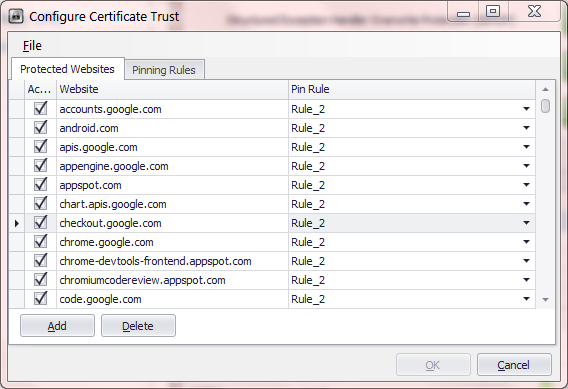
Microsoft certificate pin rules in EMET

Microsoft certificate trust rule, registry view

Behind the scenes, EMET options are stored in the Windows registry, under HKLM\Software\Microsoft\EMET. The certificate trust settings in particular reside in two subkeys under _settings_\Pinning. After a default install, there are only three pinned sites and one rule as expected. All three of these sites use the same pin rule identified by a GUID, white-listing 2 certificate authorities. Looking at the details of that rule, we can see that whitelist itself is stored as a multiline registry value, with the distinguished name and serial number for each CA listed in separate lines. In principle then we pinning rules can be configured by directly manipulating the registry. Of course there is nothing developers hate more than end users doing this type of under-the-covers manipulations of application state.

Fortunately there is an “officially sanctioned” import method, avoiding any direct mucking with implementation internals. Located in the EMET installation directory is a command line utility named emet_conf for administering different mitigations available. This can be viewed as the counterpart to emet_gui which provides a more user-friendly graphical interface for doing many of the same tasks. Once the rules from Chrome converted into suitable XML format defined by EMET, they can be imported into EMET to also protect Internet Explorer users.

To that end, here is an approximate translation for one subset of sites: [zipped XML file].

Caveat emptor:

  • This configuration is provided as-is; use at your own risk.
  • It contains the pinning constraints for Google websites only. Chrome also ships with rules for other groups such as Tor and Twitter.
  • For reasons noted above, the conversion can in principle introduce false positives– flagging valid chains as forgeries– as well as false negatives– failing to warn about incorrect certificate chains.

Configuring EMET requires administrator privileges– not surprisingly, since changing the settings involves a write to the HKLM section of the registry. As such this operation must be executed from an elevated shell:

C:\> emet_conf --import google_pins.xml
EMET is importing configuration, please wait...
Processed 0 entries

The import functionality seems buggy in the current beta release. A good way to observe this is by running the above command line under a debugger such as windbg, with CLR exception handling enabled to inspect uncaught managed exceptions. The command reports zero entries processed even when the operation is successful. One hopes these bugs will ironed out in the final release. Until then, the registry is a better way to confirm that rules were imported correctly. Refreshing registry editor view reveals the appearance of new subkeys under certificate trust settings.  Sure enough the EMET configuration GUI also confirms that story: both protected websites and the pinning rules are populated with new entries.

EMET_Sites_AfterImport   EMET_Rules_AfterImport

As a sanity check, we can try visiting a Google website and intercepting SSL connections using Fiddler. Fiddler performs this feat by executing a “friendly” man-in-the-middle attack, using a forged certificate. Doing that now triggers the EMET certificate warning because the observed certificate chain for the website is rooted in the local Fiddler “certificate authority” instead of one of the whitelisted CAs enumerated in the pinning rule.

CP

TLS client authentication and phishing (part III)

[Continued from part II]

The second post in this series considered what makes an authentication protocol resistant to phishing, in the presence of fallible users making wrong decisions about where to authenticate. Even with public-key cryptography and smart cards, safety hinges on incorporating a “context” as additional input to the protocol when producing the proof of user identity. As long as this context is guaranteed to be different between the legitimate website and its fraudulent replica, the protocol is not susceptible to man-in-the-middle attacks leveraging user confusion.

A good choice of context for a hypothetical web authentication protocol would be the name of the website on the other side. Substituting a different name leads to different contexts, even if they appear “close enough” as far as the user is concerned. PayPa1 (spelled with 1 instead of L) may resemble PayPal to the human eye, but software is not fooled. That one letter makes all the difference in the world, especially when the strings are used as input into a cryptographic computation. It might as well have been a completely random sequence of symbols unrelated to the original; the result will be uncorrelated. In our phishing scenario, Bob will indeed receive a “response” in the form of a signature from Alice, if she decides to go ahead with authentication. But he can not turn around and use that response in the parallel session for logging into the real PayPal. The signature has been computed over a different message and bears no resemblance to what the site expects.

To take a more concrete example of a widely deployed protocol, consider the TLS or Transport Layer Security, also referred to by the name of its predecessor SSL. This protocol  has an option to authenticate users with public-key cryptography during the initial handshake. This is an optional feature, not to be confused with authenticating the server, which is always part of the protocol. Dubbed client authentication, this extra step calls for the user digital signing a transcript of messages exchanged with the server when negotiating the SSL/TLS connection. While the exact contents of what is being signed is not important, the critical point is that it includes the digital certificate of the server. (The “challenge” can be viewed as other parts of the transcript that the server has freedom to choose, such as a random nonce sent during the ServerHello message. Alternatively one can view the context as predetermined part of the challenge; both parties verify this part is consistent with their expectation.) That means a transcript of TLS handshake against two different websites can never be identical, even when one is intentionally trying to masquerade as the other.

The result is a set up truly immune to phishing. Users can cavalierly authenticate to any website they come across, without having to worry about the possibility that one of them may be malicious. No site can use the result of that authentication process to impersonate that user at some other site. That is a far cry from the degree of caution required for using passwords and OTPs: if credentials associated with one site are accidentally typed into a different one, there is a real possibility that the latter site gets unauthorized access to user data at the former.

There is one subtlety, an unstated assumption: that phishing sites can not present same certificate as the target they are mimicking. That breaks down into two conditions:

  1. Certificate authorities will only issue a certificate with “PayPal” in the name field to the business entity known as PayPal.
  2. Successfully using a certificate for SSL/TLS requires having the corresponding private-key, which by assumption only PayPal has in the above example.

Surprisingly it turns out the protocol is resilient even if the first property is partially violated. Suppose a certificate authority mistakenly or deliberately grants a PayPal certificate to crooks– after all, it is axiomatic that CAs are generally incompetent and occasionally even dishonest/corrupt. Even that would not be enough to generate a response usable in a man-in-the-middle attack. The fraudulent certificate will still have a different public key than the authentic one, so the contexts are not identical. Recall that the point of a certificate is making an assertion that recognizable name such PayPal is associated with a particular public key. A certificate authority can be tricked/bribed into issuing a different certificate asserting that PayPal has a different public key, a key that is in fact controlled by a malicious actor. But no amount of CA ineptitude/malice can allow that malicious actor to magically recover the private key associated with the original certificate.

The protocol however is not resilient to breakdown of the second property. If the private key is compromised and attacker can redirect network traffic, they can “replay” the result of an authenticated session. (It is debatable whether that can be called replay, since it amounts to taking over an authenticated session after it has been established between the user and legitimate site.)

It is also worth pointing out that either of these attacks require diverting network traffic. In traditional phishing, the user is at the wrong site but does not realize it. Network traffic is not being diverted or redirected; the confusion only exists at the visual level. Trying to pass off a fraudulent certificate or use a compromised private key however requires manipulating network traffic, which is certainly possible but more difficult attack than vanilla phishing.

CP

Two-factor authentication and phishing: smart cards (part II)

First post in this series looked at a common two-factor authentication pattern that is susceptible to phishing. The second part examines an alternative design that does not have the same vulnerability.

This is the design commonly observed in critical enterprise/government applications where the stakes are high. These organizations typically avoid OTP and prefer solutions based on public-key cryptography instead. In this model each person has a pair of keys, a public-key that can be freely distributed and a private key carefully guarded by the user. For ease of identification, public-keys are typically embedded in digital certificates issued by a trusted third-party. A certificate effectively creates a binding between a public key and some identifying attributes about the user, such as their name, organization and email address. Authentication then works by first presenting the certificate– amounting to an unverified claim of identity, since certificates are public information– and then backing up the claim by proving possession of the private key corresponding to the public key in the certificate.

The critical difference from OTP hinges on that proof. Instead of sending over a secret value generated unilaterally, an interactive protocol is used that incorporates inputs from both sides. The party trying to verify user identity sends a challenge. That challenge is incorporated into a computation involving the private key and output from that computation is returned.  The recipient can use the public key from the certificate to verify that the response is consistent with the challenge.

Windows PIN entry dialog for smart cards

End users are thankfully not exposed to any of this complexity. The standard incarnation involves smart cards or similar dedicated hardware such as USB tokens– tiny embedded systems featuring tamper-resistant design for high-security applications. That approach avoids storing private key directly on general-purpose computer such as a PC or laptop, where it would become sitting duck for malware. Typically the card is configured to require PIN entry before performing these private key operations, giving rise to the two factors. First one is what-you-have, the physical possession of the card.  Second one is what-you-know, namely the knowledge of a short PIN. The resulting user experience becomes: insert card into reader slot (or tap against the reader surface, if both support NFC) and enter PIN when prompted. Smart cards are common in the enterprise and government space; they are exceedingly rare for consumer scenarios. For example the US government has a mandatory Personal Identity Verification (PIV) program that defines a standard for cards issued to millions of federal employees.

What makes this design inherently safe against phishing?

First, the protocol is too complex for direct user involvement. Private keys are long random sequences of characters. Even if they were directly accessible– not the case when keys are safely tucked away in a smart card– users can not reproduce them from memory if prompted.  Both the challenge and response are dozens of characters to type out. Corollary is that authentication protocol must be  automated by software, taking the user out of the loop. This creates a problem for the attacker: there is nothing to ask the user for. Even the most persuasive phishing could not get user to type out the private key into a web page. (Granted the user can be tricked into giving away the PIN, compromising one of the two factors of authentication. But without access to the private key residing on the smart card, PIN by itself does not allow impersonating the victim.)

That property is useful but not enough by itself. After all users are still responsible for making one critical decision: whether to login at a given website. Perhaps the attacker does not need to convince anyone to mail out their private keys, if he could instead convince the user to go about  their usual login  ritual at the wrong website. Using the example from previous post, suppose user Alice is tricked into using her smart card for paypa1.com (with 1 instead of L) a phishing site operated by Bob.

Bob can any issue any challenge to Alice consistent with the protocol, but he faces a dilemma: in order to login to the real PayPal site, he will have to answer a challenge chosen by PayPal. Unless he has a response corresponding to precisely that challenge, he will be out of luck. Being resourceful Bob does not give up. At the same time as Alice connects to his phishing website, Bob turns around and starts a parallel session with the real PayPal website in the background. This is the standard man-in-the-middle attack. User is connected to the attacker at the same time the attacker is connected to the legitimate destination, trying to impersonate both sides to each other.

  1. Bob claims to be Alice at PayPal by sending Alice’s certificate.
  2. PayPal sends Bob a challenge, requiring proof that he possesses the private key.
  3. Bob forwards the exact same challenge to Alice.
  4. Alice computes a response using her private key and returns it to Bob, expecting to be logged into her PayPal account.
  5. Bob forwards that response to the legitimate site.

By all indications that response is correct. After all it was generated using Alice’s private key, based on the same challenge PayPal issued. It would have been the exact same bits if Alice and PayPal interacted directly, without Bob in the middle to shuttle messages back and forth.

Game over? Not quite. This is where the nuts-and-bolts of protocol design comes into play. In addition to the challenge, well-designed schemes incorporate additional “context” into the response computation. That context is determined entirely by code under user control; the other side has no influence over it.

[continued]

CP

Twitter, two-factor authentication and phishing myths (part I)

This is not the first time that security of Twitter authentication has been called into question. There was the dump of 55K passwords from May 2012, and more recently another quarter-million Twitter accounts were breached in February. But few were clamoring for the popular service to introduce two-factor authentication until last week. That changed quickly, compliments of the Associated Press. The venerable news organization lost control over its Twitter account briefly, which got 0wned by a group calling itself the Syrian Electronic Army. The attackers only got as far as posting one bogus tweet, but that proved damaging enough. Claiming that President Obama was wounded in an attack on the White House, it triggered a brief market dip before everyone else realized the story was false.

It did not take long before the Monday-morning quarterbacks started speculating. Bloomberg criticized Twitter for waiting until the crisis to roll-out two-factor authentication, implying that it could have saved AP. (Because other companies have been deploying security features preemptively for no reason? Perhaps the parent company will reconsider the wisdom of a recent decision to add Twitter feeds into their popular data feed for finance professionals.) Meanwhile SC Magazine joined a chorus of sceptics in taking the glib view that two-factor authentication would have made no difference.

Which is it? As usual, the devil is in the details and depends . There are different ways to design two-factor authentication, and whether it can resist phishing depends critically on that. We can look at two points along the spectrum to see how they compare:

First one is what might be called “consumer-grade” two-factor authentication. This is what major cloud services typically offer end-users, balancing security against usability.  The second-factor is a one-time passcode (OTP) delivered by SMS or generated using a mobile application. This design is indeed vulnerable to phishing, once the notion of phishing itself is slightly generalized. Obviously existing wave of attacks that only collect passwords will not succeed. But the miscreants are quick to adopt. Soon they will  mimic the new login experience and also ask users for to type in the second factor. There is no reason to believe that the same users fooled into typing in their password into the fraudulent web page will stop short of doing the same with OTPs.

Fundamental problem is a weakness OTP shares with passwords: it puts the burden on end users to know they are authenticating to the “correct” website. If the address bar reads paypal.com that is good; but paypa1.com– with the digit 1 replacing the lower-case letter L to trick the unwary– that is bad. If that sounds like too much to ask for users, no wonder that combatting phishing has become a game of whack-a-mole where the measure of success is how quickly phishing sites are taken down once discovered. (But not before having claimed a few victims.)

That said, this type of second-factor still raises the bar for attackers. Because OTP codes are only valid for a short time period, the attacker is forced to “cash-in” stolen credentials right away by logging in with them. In other words the attack must be carried out in real-time. It is not possible to save the credentials, then come back and use them at a later point in time. In principle this also rules out a secondary market in resale of credentials, breaking the commercial model around account hijacking. It is no longer possible for Alice to phish for credentials, than later put these up for sale to Bob who specializes in pilfering personal data. Instead Alice herself has to do the plundering as well or at least collaborate with Bob at the time of attack, limiting her options downstream.

There is another way OTP may help, depending on the authentication policy: damage control. Typically the security policy requires user to re-authenticate periodically, for example every 24 hours. Even users who do not log out of their browser session will be asked to enter their credentials again after that time elapses. If such checkpoints require a fresh OTP, the attacker will be out of luck. After all it is one thing to get lucky and successfully trick the victim once; it is another to rely on repeating that feat every day.** Counter-point is that even access limited in time can be very damaging: one-full day is plenty of time to download all email and rifle through private documents.

Of course in reality, there are many ways for phishers to persist access after capturing both credentials. For example the system may have an option for “remember me” such that no additional OTPs are required when accessing the victim account from that machine. Similarly many large services  incorporate deliberate “features” that become back-doors in the hands of an attacker. Application passwords are one such example as described in previous post on MSFT 2-factor authentication, as are oauth permission grants.

So far we discussed the failures of one particular 2-factor authentication design to resist phishing. In part II we will look at a different approach that is indeed resistant to phishing– and already used widely in enterprise/government settings.

CP

** TOTP fares better compared to HOTP in this regard– with HOTP, attacker can collect additional codes in the sequence by pretending that the login did not succeed. Since TOTP codes are time-based, there is no way to phish for tomorrow’s valid codes today.

Microsoft 2-factor authentication: application passwords (part II)

[continued from part I]

The bane of any second-factor roll-out is compatibility with existing software. Sometimes it is a short-sighted protocol to blame, naively assuming that authentication equals sending along username/password. Other times the protocol is fine but some popular software implementing the protocol took a shortcut and only provided for the password option. Either way, the only way to appease these legacy scenarios is by providing them something resembling a “password,” which is to say a constant secret.

  • At first it is  tempting to make this secret vary over time, for example by appending the OTP. In general that is not an, because the value is meant to be collected once from the user,  but stored and used multiple times over time. For example, email clients on mobile devices are notorious for implementing IMAP with passwords. If the password changed over time, the user would have to reenter it each time they want to download mail on their phone
  • At the same time, this new credential can not be same as the existing user password. Otherwise it would completely defeat the point of two-factor authentication. In a well-designed scheme, knowing the password alone does not grant access to user data without the second factor.

The work-around MSFT picked follows existing practice:  application passwords. These are randomly generated strings that can substitute for a “password” whenever a” legacy” application that is not aware of 2-factor authentication insists on collecting a password. (Legacy in quotes, because out of the gate that will include all client applications and hardware such as XBox console.) There are some interesting twists about AP usage.

Authenticator and application passwords

  • They are generated on demand, and intended to be copied into the necessary application at that time. Similar to the Google design, it is not possible to go back and look at an application password  generated in the past.
  • One difference is that MSFT does not show an inventory of existing APs, allow users to assign nicknames or track the date of generation.
  • Ergo: it is not possible to revoke APs individually either. Instead there is a single option to revoke all APs at the same time. This can be quite disruptive. For example dealing with a lost device means not only revoking the AP for that device but also breaking every other application (still in user possession) relying on APs.

Remove all application passwords

  • APs survive password changes. This has some interesting security implications. AP can function as a backdoor to the account. If an attacker is able to generate an AP, they can persist access even after legitimate user change the password. Corollary: users recovering from an account hijacking need to also check for rogue APs  to guarantee they have reverted to a safe state.

In some ways “application password” is a misnomer, because the credential is not scoped to any particular application. Users do not create one AP unique to Outlook.com access, and a different AP dedicated to SkyDrive that is not interchangeable with the first. Therein lies one of the great ironies: for all this effort expended on two-factor authentication, AP is a static, long-lived secret that grants full access to user data– in other words, a glorified password. That said, it has an improved risk profile compared to vanilla password. Because they are not chosen by the user, they are not predictable or easily guessed by dictionary attacks. Because they are only displayed once and not memorable strings, they are difficult to phish. (A creative website can convince users to generate a brand-new AP and paste it, but that is a lot more effort than asking  for their everyday password.)

There is one more challenge specific to two-factor authentication systems that are used for logging into devices, such as desktops or laptops. Such schemes need to operate offline, when the device has no network connectivity. MSFT design has to confront this problem: Windows 8 has support for signing into the operating system with online accounts, but OTP codes can only be verified by the cloud service. (In principle TOTP could be verified by sharing seed keys with trusted devices ahead of time, but such proliferation of secret material would greatly weaken security.) Considering that Windows 8 logon continues to work even for accounts with 2-factor enabled, the implications of this will be taken up in a future post.

CP

Microsoft 2-factor authentication: following familiar paths (part I)

Last week Microsoft  released 2-factor authentication for its online accounts service, previously known as Windows Live ID and Passport. This was a natural step, as cloud service providers continue to shore up security by improving their  authentication systems, occasionally prompted by a security breach as  in the recent case of Twitter. It was even foreshadowed by earlier appearance of an associated mobile app on Windows Phone store. The design also appears to have few surprises, sharing much of its DNA with previous two-factor authentication systems used in the consumer space:

  • One-time passcodes (OTP) are the second factor of authentication. Not USB dongles, smart cards, X509 certificates or some reincarnation of the extended CardSpace debacle. That choice simplifies integration and minimizes disruption to user-experience. Main difference is entering these additional codes during authentication in addition to the password. No software installation required, smart cards/readers to carry around, browser compatibility issues or  flaky device drivers. For frequently used machines, there is even an option to avoid asking for codes on each login.
  • Two ways to get OTP. Users can either have the code delivered via SMS to their registered phone number or they can use a mobile application to generate codes. This design also makes sense.
    • SMS has the largest reach, working equally well with a 10-year-old “feature phone” with no applications as it does with the latest Android or iOS device.
    • On the other hand, SMS requires users have connectivity to their wireless carrier– not just any old Internet access, but specifically their mobile carrier.  This may not be the case when the user is travelling overseas for example. SMS is also much less reliable in emerging markets than the US. (SMS does not guarantee delivery; it is best effort. Nor does it have a time-bound for successful completion.) It may also incur charges for the user and/or service sending the messages.
    • Mobile applications have the advantage that they can work offline, once provisioned. Downside is requiring a compatible application that can generate codes according to the appropriate scheme. MSFT has already released one for Windows Phone– a choice of platform that would be puzzling, were it not for the brand affiliation. Luckily both Android and iPhone already have compatible applications such as Google Authenticator and Duo Mobile.
  • Settled on TOTP standard described in RFC 6328 for generating the codes by mobile apps. This may have been forced by existing options on Android/iPhone: all of them implement TOTP as common feature.** This has some interesting consequences.
    • TOTP codes are generated based on a secret cryptographic key, referred to as “seed,” and current time. This naturally requires an accurate clock on the phone, up to some tolerance. Typically time is quantized into 30-second intervals and the verification logic attempts to accommodate drift by looking back/forward a few intervals. (Note that time-zones and daylight savings do not pose problems; “time” is always measured as Greenwich/UMT/Zulu time.)
    • Less obvious is that time-based codes are easier to clone than counter-based ones. Multiple users with the same key can independently generate the same sequence, without interfering with each other. The other leading contender is HOTP, which predates TOTP. That design uses a counter  incremented each time a code is generated. If multiple people tried to use the same cryptographic secret, they would quickly run into problems: once the counter is incremented, the server will not accept a second OTP generated using an earlier value. (This is actually useful for security, making it easier to detect inappropriate usage. Sharing of credentials is a strongly discouraged practice.)
  • The mechanism used to provision those TOTP seeds also sticks to established methods. Secret keys are packaged into URLs and rendered as QR codes on the web page, intended to be scanned with phone camera. Even the URL format follows an earlier convention introduced by Google Authenticator, using the custom otpauth protocol scheme. While MSFT was free to pick a different one in principle, compatibility with existing Android and iPhone apps is helped by sticking to the same scheme.

[continued]

CP

Certificate pinning in Internet Explorer with EMET

MSFT has just released a new beta of EMET (Enhanced Mitigation Experience Toolkit) v4 and one of the new features is certificate pinning. Pinning was introduced into mainstream usage by Google Chrome in 2011. Soon afterwards it proved instrumental in exposing the DigiNotar certificate authority breach that allowed Iranian government to intercept communications from political dissidents.

To recap why pinning is an important security feature: as described in earlier posts, the current trust model for digital certificates has a systematic flaw. Almost any one of 100+ trusted “certificate authorities” can fabricate a certificate on behalf of any company– even those located in a different country and have no business relationship with the CA. Such a credential will be happily accepted as authentic by web browsers and every other application about to make critical security decisions based on the identity of the website at the other end.

On the one hand, a diversity of CAs each serving different market segments is great for scaling the model commercially. On the other hand, a situation where all CAs are equally trusted and any one CA can undermine the security of websites served by a peer  leads to a quick race to the bottom in security. There is little incentive for competing on operational security or honesty, when customers are still at the whim of every other CA. Pinning addresses that problem by allowing a website to commit in advance to a set of CAs that it will do business with. That commitment takes all other CAs out of the risk equation. Even if they make a mistake, are compelled by a government to forge certificates or are simply dishonest, any certificates issued for the pinned site will be rejected by users aware of the prior commitment.

The catch is there is no standard for making such commitments. There is no field in the X509 format for a website to declare its intentions about what other CAs it may get certificates from in the future. (There is a draft RFC for HTTPS usage but that is at best partial solution. HTTP headers will not address the code signing case, for example.) Instead both Google and MSFT introduced their own home-brew designs independently.

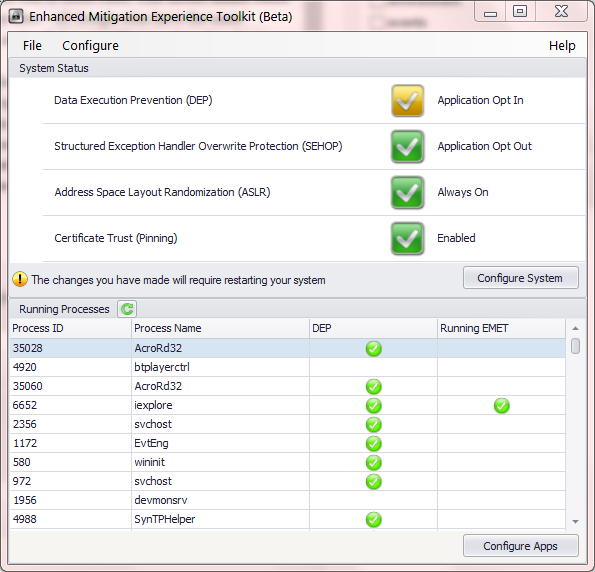
EMET_Overview   EMET_CertSettings

Here are some preliminary observations based on experimenting with a beta of EMET and comparing it to the existing pinning feature in Chrome: (This post may be updated as more information is available.)

  • Caveat emptor: certificate pinning only applies to Internet Explorer, unlike other EMET protection which apply broadly to all applications. This may seem obvious– after all Chrome pinning only applies to Chrome– but the difference is Windows provides a general purpose cryptography API for verifying certificates. IE happens to be just one consumer of the API. Many other critical applications both from MSFT (Skype, Office, …) and third-party ISVs would have benefited if pinning was added at lower-level in the platform instead.
  • Fine-print continues: pinning only works for the standard version of IE which has 32-bit renderers. It does NOT work with 64-bit renderers used by Enhanced Protected Mode. This is a problem. EPM itself is a security feature; for example, it has additional mitigations against memory corruption vulnerabilities. Asking users to disable one defense in order to take advantage of a completely orthogonal one is dubious at best.
  • On the plus side, IE allows importing pinning rules via XML files. [Default configuration] An enterprise can deploy its own constraints to protect employee machines for example. By comparison Chrome pin rules are hard-coded, and can not be modified easily by end users.
  • Going into the gritty details
    • Both designs have similar structure for describing the pinning constraints. There are pinning rules identifying a group of acceptable issuers. Then particular websites such as login.live.com are associated with exactly one of these rules. This model makes sense as rules are shared across many sites– all Google sites have the same constraint in the Chrome version, as do all three MSFT sites pinned in the EMET flavor.
    • The rules have roughly similar expressive capability. Chrome allows specifying a set of issuers that are specifically excluded, and can not appear anywhere in the chain– in addition to the usual notion of pinning that whitelists particular issuers. EMET has a blacklist option for unpinned sites.
    • Chrome allows specifying a trusted CA to appear anywhere along the chain, including as intermediary. Judging by the GUI-based configuration utility, EMET only allows white-listing by root CA.
    • EMET permits exception by country of origin of the CA, but this turns out not to be useful: it only allows whitelisting CAs based in a particular region, effectively creating a loophole for the constraint. Similarly the documentation refers to exceptions based on key-size, which seems intended as defense against CAs with short keys, rather than an affinity towards any particular CAs.
    • Chrome identifies certificates by hash of the subject public key. EMET uses the combination of distinguished name and serial number.
  • EMET allows rules to have an expiration date. This is useful, since the certificate itself will expire and the website may decide to go with a different issuer at some point. (There is a deeper issue about pinning creating an implicit lock-in: without changing the pinning rules, the site can not switch to different CA because everyone will interpret that as forgery attack.)
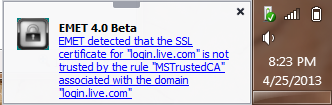
  • Chrome treats violations of pin constraint as fatal errors. By contrast EMET displays an out-of-band warning toast near the Windows tray that the user is free to disregard:
EMET_CertificateError

Notification for a certificate pin error

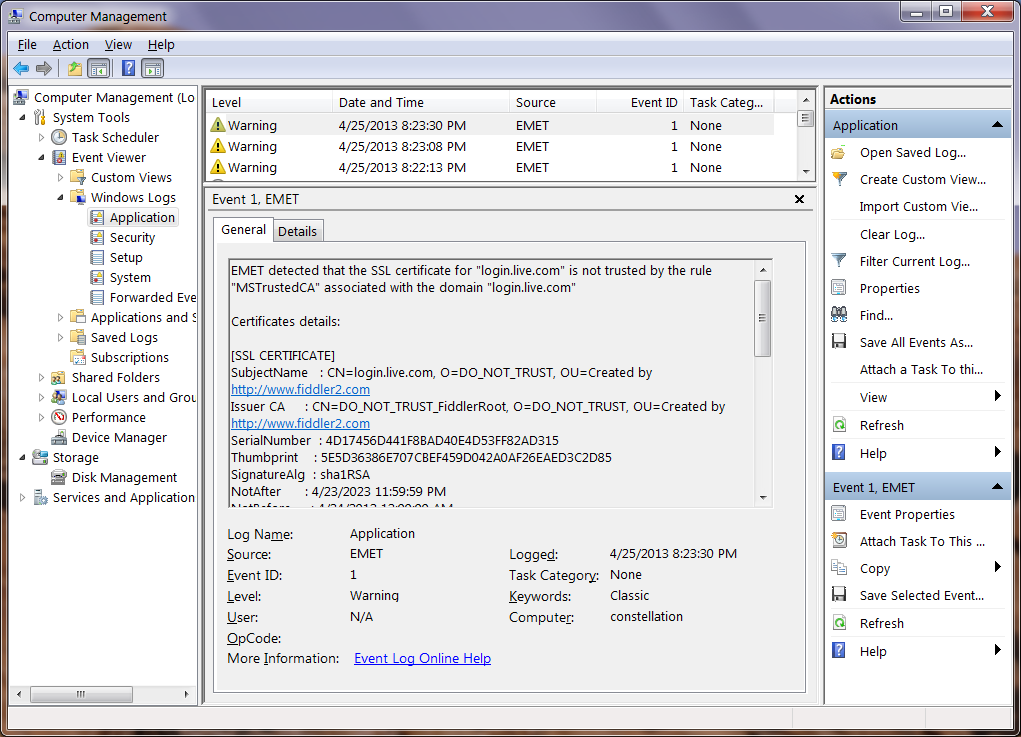
  • By default EMET records such failures as warnings in the Windows event log. Chrome can upload suspicious certificates observed to the cloud.
WindowsEventLog_Pin_warning

Windows Event Log, with EMET certificate error

  • Chrome makes an exception for private CAs installed on the local machine. These could be used by an enterprise for by-design content inspection, or by developers for monitoring web applications, as in the case of Fiddler or Burp Proxy. EMET appears to have a problem with these cases, flagging them as errors.

CP

Do-Not-Track and P3P: a matter of regulation

[Continued from part I]

Regulatory frameworks are critical to the success of any privacy standard relying on statements made by websites. There is a fundamental information asymmetry between consumers and sites they visit. Only the site has authoritative knowledge of its own data practices, consumer can not peek behind the curtain. They are forced to accept statements at face value, often without independent verification. This holds true for both P3P and DNT. But differences in the design/implementation of the protocols translates into varying degrees of dependence on regulation. P3P makes only modest demands for keeping websites honest in their policy statements. DNT in contrast requires heavy-handed market intervention for deployment.

For a website eyeing P3P, the options are:

  1. Do not implement it, and face the music. That could mean some functionality breaks.
  2. Implement P3P but deliberately publish an incorrect policy. This bogus policy will be crafted to meet the minimum bar for majority of users, preventing any interference with tracking cookies.
  3. Implement P3P with a policy accurately describing data practices. Again this may have consequences, if the policy leads to cookies getting dropped.
  4. Until recently: look for a loophole in P3P enforcement. The original Internet Explorer implementation was lenient about unrecognized syntax, making it possible to declare an invalid P3P policy which still satisfied the browser.

Along this spectrum P3P has just one dependence on regulation: create disincentives against option #2. The temptation for going down that route can be born of ignorance as often as malice. After IE6 launched, it was common for clueless developers to ask on help forums: “What header do I send to make Internet Explorer accept my cookies?”  In a world where privacy statements are not imbued with meaning,  that would be a legitimate question. Along those lines  P3P header is just an arbitrary sequence of symbols, a magic incantation to make web browsers behave correctly. It is the threat of legal repercussions that keeps reputable companies from testing that theory. This is all the while more astonishing considering that not a single court case has tested the theory of whether P3P statements are legally binding.**

Once outright deception is ruled out, market forces can decide between remaining options. The last one is primarily an implementation choice. After evidence emerged that it was being actively used to side-step P3P, MSFT fixed it by offering strict P3P validation in IE10. #1 and #3 are decisions about the business model of the website, ideally one that can be modeled as negotiation with users. Firefox and Chrome do not implement P3P; users are free to use either browser. Even for die-hard IE fans, the browser only provides default settings: users are free to override them if reasons were compelling. This is no different from websites pleading with users to enable ActiveX controls after security improvements to IE prevented them from running such dangerous code without explicit user action.

At first blush, DNT poses a similar set of choices:

  1. Do not implement the standard.
  2. Implement with false/misleading description of policies.
  3. Implement with correct description of tracking behavior. That includes the possibility that the website will not in fact change its tracking practices in response to user requests, as permitted by the standard.
  4. Look for a loophole in enforcement– recently one Adobe engineer had a creative idea to create a loophole for ignoring DNT statements from IE, on the technicality that the web browser made a decision for users. Sanity prevailed and that patch was reverted.

The kicker: the way IE10 implements Do-No-Track, there is no difference in user experience between  these. Option #2 may run afoul of same prohibitions against deceptive statements alluded to above. But there is no reason for any one to incur that risk when option #1 works just as well, with the added benefit of being less work.

P3P made minimal assumptions: regulation to prevent actors from making deliberately false statements. This blogger is not an attorney, but will posit the existence of laws already on the books covering that ground.

DNT as currently implemented requires much more. Because there are no incentives for deployment, heavy-handed intervention compelling websites is called for. That is a highly intrusive approach to technology regulation without precedent. After all no one is legally required to implement SSL, the most basic security protocol that can help protect user data in transit. For that matter websites are not required by law to comply with any RFC, support strong authentication, encrypt user data or conduct security reviews.

The debate around how far regulators should intervene in markets to correct privacy problems will continue. Making the success of a contentious privacy standard contingent on that question being resolved in a particular direction is guaranteed to further weaken the already long odds that standard faces.

CP

** P3P detractors soon hinged their hopes on that possibility, after realizing  deployment was inevitable.

Do-Not-Track and P3P: new privacy standard, weaker approach

[Full disclosure: The author was a participant in P3P standards effort and implementation in Internet Explorer.]

It could be the Internet equivalent of full moon, because someone is trying to introduce a privacy standard. After W3C threw in the towel on P3P, a very different proposal called Do-Not-Track, developed under the auspices of the same mighty standards body, is gathering momentum. Along the way it has stirred even more controversy than its predecessor, understandable in light of the higher stakes. The jury was out on advertising as a viable business when P3P was being debated. Its most vocal opponents were not exactly household names. (Case in point: several banner-ad networks were early participants in the standardization effort. Reminiscent of the old adage: best way to undermine a standard is to participate enthusiastically in its development committee.) Fast forward to today and there are many revenue models around delivering tailored content based on user interests.

There is overlap in the cast of characters as well. A late participant to P3P, MSFT is spearheading the push for DNT this time around. Latest version of Internet Explorer is configured to send DNT header by default, in another heavily-contested decision. Somewhat incongruously for such a bold strategic call, the option itself is buried under a check-box in Advanced settings, instead of the Privacy tab where one would normally expect to find it:

Advanced settings dialog, with DNT checkbox

Do-Not-Track setting

Depending on perspective, that speaks of expediency or deliberate design. As one commenter here pointed out, it is much easier to add a checkbox to the kitchen-sink of advanced settings, than to alter the layout of manually crafted privacy tab. For the conspiracy-minded, burying a setting there make it all that more difficult for users to override the default.

Elsewhere in the industry, confusion reigns. Chrome was missing in action until recently, Firefox twice tried to explain its stance on default settings. Industry groups are crying foul, painting doom-and-gloom scenarios about what DNT will do. Privacy advocates on the other hand fear DNT does not go far enough, predicting that it will be easily subverted and calling for more draconian measures. P3P redux? Not quite. The controversy around DNT may be obscuring stark differences from P3P.

Do-Not-Track is a unilateral declaration. The user indicates their desire to avoid tracking by adding a note to every request sent to web sites. Putting aside for a minute the endless debate over what constitutes “tracking” and what compliant websites are supposed to do in response to receiving the DNT header– issues acknowledged as unresolved in the specification itself: what happens next? How does the user determine if their request is honored and what is the response if the answer is no? This is not necessarily a question of intent: the developers may not have gotten around to implementing DNT or they may not even be aware of it. One can not fault sites for failing to keep up with the latest RFC fashion and standard-du-jour. Early versions of the protocol ignored this problem in favor a simple one-way communication, a monologue delivered by the user. Following the inevitable rule that every protocol acquires bloat through the standardization process,  latest revisions address that oversight. Now there are optional (read: not going to happen) HTTP response headers, as well as a mandatory site-wide tracking status resource (read: bare-minimum everyone is expected to implement) formatted in JSON.*

But implementations have not kept up. IE10 sends the header with determination, then remains oblivious on whether that gesture made any difference. First-party sites could signal their objection by showing users an error page, but this is not a realistic solution. Even that option is not available to embedded third-party content, where the only viable solution is returning an error. But since users interact with third-party content in the context of a different top-level website, the result is some other website that looks broken. The problem is worse when trying to distinguish between those who have not yet implemented the standard yet and those actively paying attention to DNT. In other words, even early-adopters embracing the standard get little more than bragging rights.

P3P had two crucial differences. First it is the website doing the talking. The protocol calls on sites to declare their data practices in machine readable format suitable for automatic evaluation, and places the onus on web browsers to alter their behavior in response to any discrepancy between stated policy and user expectation. This is how the specification is written; it does not leave any wiggle room for implementations to do it the other way around. More importantly P3P adds a measure of self-defense. If the privacy policy is considered unsatisfactory according to the user criteria, the web browser starts rejecting cookies or otherwise impairing tracking functionality.**

Consequently P3P is not a one-sided plea for privacy. Users are not shouting in the darkness, in hopes that the benevolent web site will grant their wish. Similarly sites are not being asked to modify their behavior based on some unilateral user decision. They are only asked to declare existing behavior. If a site chooses to not implement P3P, that is strictly their decision. Possibly some functionality will break. The breakage could be obvious or it could be subtle– as in the case of downgraded cookies for third-party advertising networks. Either way the outcome is made transparent to the user: a somewhat confusing eye-of-Sauron icon in the status bar indicates when cookie handling has been  impacted by P3p. Both sides can attempt to influence the result. User can decide the website has compelling value to merit an exception and lower her privacy settings. Or she may deem lack of P3P compliance unacceptable and click away to a more enlightened competitor.

If DNT makes no difference to the user experience– not even a simple thumbs up/down indicator– there is little intrinsic motivation to support the standard. That leaves one last resort for deployment: external regulatory pressure. Both P3P and DNT make implicit assumptions about a surrounding regulatory framework to keep actors honest. But the difference in approach also translates into different degrees of intervention required.

[Continued]

* Another difference from P3P is abandoning XML for JSON– angle brackets are out, curly braces are the latest fashion.
** Granted it is naïve to assume that that tracking can be stopped completely by dropping cookies. It was not even true in 2000, as one of my colleagues from IE6 team pointed out on his blog. Since then newer developments such as Flash and HTML5 only added to the number of ways to emulate cookies using existing browser functionality. But the concern that cookies may stop “working” provided sufficient impetus for P3P adoption.

Default preferences: there is no way to avoid decisions

An excellent post on the Mozilla blog from a former colleague of this blogger touches on the problem of default settings in software: to what extent do they represent user intent as opposed to user apathy. It has been something of an accepted wisdom among software developers that few users change default settings that their applications are installed with, and even fewer will venture near options marked “advanced” or similar intimidating adjective intended to scare away users. Until now there was little public data to back up this intuition. The new research finally delivers hard data on this, with a few twists. The established wisdom survives: many of the knobs and levers are indeed untouched. The catchy title for the post “Writing for the 98%” follows from that observation:

Is it worth the engineering effort, UX effort, and screen real estate to make user-visible (to say nothing of discoverable) preferences if fewer than 2% of users benefit?

In the best case scenario, a whopping 10% of users enabled Do-Not-Track which had been turned off by default. Privacy appears to be that rare strong motivator for tweaking software settings: 1.5% disable history completely, 3% clear history on exit and 5% always start the browser in private mode.  A similar rate of activity is observed for security related settings. For example about 5% disable the password manager functionality that remembers credentials. Curiously some infrequent modifications disable existing security checks:  about 1-2% opt out of the safe browsing and malware checks.

At the other extreme are settings controlling the minutiae of security protocols, hidden under the Encryption tab of Advanced settings. 0.02% users have taken the trouble to disable SSL 3– something this blogger also does for IE. About 2% disable OCSP but more curiously 0.03% require OCSP checks. Perhaps the first group are trying to work around slow-down and certificate validations errors caused by failed OCSP checks. (X509Labs tracks OCSP responder performance by certificate authority to keep CAs honest.) The second group are likely to be security users who want revocation errors to hard-fail– eg if OCSP response is not available, treat the certificate as untrusted, instead of merrily carrying on. More surprising is that 1% of users have chosen to automatically send a personal certificate if there is exactly one. This option refers to client certificates, typically used only for high security enterprise/government scenarios where users login to websites with smart cards instead of passwords.

But there is also contradiction lurking here. The data point that only 10% enabled DNT is used as evidence that Mozilla made the right call in defaulting that setting to off:

This is an astonishingly high number of users to enable an HTTP header that broadcasts user intent, but is unable to enforce anything client-side. It is a testament to DNT advocates that adoption is this high, but even though this preference is changed by a large minority of users, Firefox should not enable it by default.

There is a circularity to the argument. All data indicates that users are not messing with browser settings. If Firefox instead shipped with DNT on by default and discovered that only 10% of users disabled it, would that also be an occasion to congratulate the designers on making the right call? (In fact since DNT unlike OCSP does not break anything– yet– it is very likely few users would touch it.) While we know that few users are modifying settings, the reasons for this are unclear. The post touches on some possibilities:

There are at least three plausible, possibly-overlapping interpretations: Firefox predicted the most useful default settings correctly, Firefox is doing a poor job converting user actions into saved preferences, or the population who cares about browser security preferences is really that small.

Another option: users lack meaningful information about the meaning of all these different browser settings, and do not understand what is at stake. It is one thing to have preferences about privacy and online tracking at high level. It is another to connect the dots between those intuitions to “third-party cookie blocking” or DNT. In general we can not equate absence of decision as endorsing the status quo. Did these users actually visit the Privacy tab and verify that DNT settings were configured as expected?

The situation is similar to the discrepancy in organ donation rates between Germany ( low) and Austria ( high)  The problem is not that one society is less altruistic or espouses different views on death. It turns out in Germany the preference is opt-in, while Austria goes with opt-out. In both cases few users are going out of their way to change that default. If public officials in these countries followed the Mozilla logic, they could all pat themselves on the back for having correctly predicted public sentiment, when in fact they were shaping it.

This underscores the uncomfortable place software vendors find themselves in. In an ideal world there is complete separation between policy and mechanism. Users decide on the policy for how their system behaves, the software developer provides the means for expressing that policy. But in reality any realistic application contains hundreds of policy decisions. Even the most flexible application that permits users to tweak each and every settings starts out in some reasonable default configuration, to serve as starting point. Otherwise it would be nearly impossible for users to configure a system from scratch. This is why the Mozilla argument rings hollow:

Frankly, it becomes meaningless if we enable it by default for all our users.  Do Not Track is intended to express an individual’s choice, or preference, to not be tracked.  It’s important that the signal represents a choice made by the person behind the keyboard and not the software maker, […]

Not enabling the setting and leaving users subject to tracking is itself a decision by the software maker. Forcing the question with the end-user is the only way to guarantee their intent is honoured accurately instead of second-guessed. Such in-your-face decision points are rare in mainstream software, because they are considered a distracting user experience.  Two well-known examples are browser choice page forced upon Windows 7/8 thanks to EU consent decree and the now deprecated Google Toolbar installer asking about PageRank.  These are the exceptions proving the rule. For all but the simplest software, striving for value-neutral design is an aspirational goal, never quite realized in practice. Accepting that limitation is the first step to recognizing our own biases/preferences/interests as designers, and asking how well users are being served by the same choices.

CP