Cloud backup and privacy: the problem with SpiderOak (part II)

In the crowded field of online backup services, SpiderOak is an example of a company trying to distinguish itself on privacy. Billing itself a “zero-knowledge privacy environment,” the company emphasizes what they can NOT do:

SpiderOak is, in fact, truly zero knowledge.  The only thing we know for sure about your data is how many encrypted data blocks it uses […]  On the servers, we only see sequentially numbered data blocks — not your foldernames, filenames, etc.

As expected, this also translates into a limitation around password reset:

How is this reconciled with our ability to do a password reset?  The short answer is: It isn’t!  We cannot reset your password.  When you create a SpiderOak account, the setup process happens on your computer […] and there your password is used in combination with a strong key derivation function to create your outer layer encryption keys. Your password is never stored as part of the data sent to SpiderOak servers.

So far, so good. All user data is encrypted using keys derived from the password, before that information is backed up to the cloud. That password in turn is never communicated to the cloud provider. On the surface this appears to satisfy property #3 (and by implication #2) alluded to in the previous post: the service provider can not access user data even with full use of its own resources.

But there is a catch: values derived from the password are stored. The details are buried in the engineering matters section, under “User Authentication Details.” Ostensibly written to assure users that the protocol for verifying knowledge of the password is sound, it amounts to an admission that there is something stored by the service provider that can be used to distinguish correct versus incorrect password submissions. Specifically:

  1. Two random salts, stored in the clear by necessity
  2. A serialized RSA public key, also stored as plaintext
  3. A “challenge key” that is computed as output as a specific key-derivation function with the second salt, namely PBKDF2(password, first salt)
  4. Full RSA key including the private-half, AES-encrypted using the output of PBKDF2(password, second salt) as the encryption key

That combination serves as a password hash. It can be brute-forced. Given the first random salt and challenge key, it is possible to check if a password guess such as “asdfgh” is correct by re-computing the same key-derivation process via PBKDF2 and comparing the result to the stored value. That means it is in fact possible to recover data by trying large number of possible passwords. While the effectiveness of such an attack depends on the user choice of password and computing power available to the attacker, the risk calculus is the same in all cases. Data recovery can be attempted by the service provider going rogue, a disgruntled employee acting independently or law-enforcement/intelligence agency who obtains access to the encrypted data from the provider. This is in fact corroborated by one of the privacy FAQs directly taking up the question of whether user data can be recovered with access to bits stored in the cloud:

Unless there are significant advances in mathematics […] password derivation techniques on the SpiderOak key structure are very difficult. The key derivation functions we use are strongly designed to withstand heavy brute force password techniques and pre-computation, such that even on a very modern computer, each password guess takes about one second. […]  Of course, if you were to choose a password that is made entirely from words in a dictionary, fewer attempts may be needed to guess it.

That is the glass-half-full view. Key derivation is indeed using PBKDF2 with a reasonable number of iterations set to 16384. But already password cracking schemes have been built by hobbyists achieving billions of hashes per second, where the hash function is the underlying primitive operation. Bumping up the repetitions helps quantitatively, but does not address the root cause. As ArsTechnica found out much to their surprise, that random looking “qeadzcwrsfxv1331” may not be a great choice after all.

In case this seems like an inescapable consequence of how encryption works, consider a hypothetical alternative design. Suppose a user manages their own RSA encryption key, stored on their machine. This key is used to encrypt a randomly generated AES key, which is in turn used to encrypt bulk data uploaded to the cloud. In this model, there is no password to brute-force from any data uploaded to the cloud. Ciphertext available to the cloud provider is encrypted in a truly random 128-bit key, where all possible choices of the key are equally likely. (As an aside: that RSA private key may be locally encrypted with a user-chosen passphrase, which sounds like rearranging deck chairs.  There is a critical difference: brute-forcing that key will require access to the user machine. There is nothing uploaded to the cloud that helps.) Of course this would mean the data is not accessible on other devices unless the private-key can be roamed there. That is why the ideal implementation would utilize smart cards instead of locally storing keys on disk. Still the possibility of excluding brute-force attacks can be demonstrated without resorting to any fancy gadgets.

There is a broader architectural flaw here. Designs in the spirit of SpiderOak are badly conflating two orthogonal problems:

  • Encrypting user data with keys that are managed directly by the user and not available to any third-party
  • Saving the resulting ciphertext after encryption to a third-party cloud provider

Many popular solutions already exist for the first problem, with different security properties, key management options and cross-platform availability: BitLocker, PGP disk encryption, truecrypt, loop-aes, FileVault, … There is little reason to introduce yet another arbitrary scheme with new risks– in this case, susceptibility to brute forcing by the cloud provider.

Following posts will look at experimental ways to “compose” existing local encryption schemes with cloud backup services transparently, without giving up any control over cryptography and key management.

CP

Cloud backup and privacy: the problem with SpiderOak (part I)

Continuing the theme from an earlier post– that economic incentives for cloud computing favor service providers to have access to user data, instead of serving as repository of opaque bits– here we look at a service that attempts to swim against the current.

In the wake of FUD created around cloud computing due to PRISM allegations, SpiderOak has come to the forefront as exemplary service that optimizes for user privacy. SpiderOak provides remote backup and file access service, allowing users to save copies of their data in the cloud and access it from any of their devices. This is a crowded space with many competitors, ranging from startups specializing in that one field (DropBox, Mozy) to established companies (SkyDrive from MSFT, Google Drive from Google) offering cloud storage as one piece of  their product portfolio. Wikipedia has a comparison of online backup services, with helpful table that can be sorted on each attribute.

From a privacy perspective the interesting column is the one labeled “personal encryption.” The reason for this non-descriptive label is probably owing to the successful campaign of disinformation cloud service providers have embarked on to reassure users. Every service provider throws around phrases like “military grade encryption” and “256-bit AES” without any consideration to the overall threat model around what exactly that fancy cryptography is designed to protect against. Stripping away this usage of encryption as magic pixie dust, there are three distinct scenarios where it can be effective:

  1. Protecting data in transit. This assumes a bad guy eavesdropping on the network, trying to snoop on private information as it is being backed up to the cloud or, going in the opposite direction, as it is being downloaded from the cloud. This a well-understood problem, with established solutions. A standard communication protocol such as TLS can be used to set up an encrypted channel from the user to the service provider.
  2. Protecting data at rest, from unauthorized access. This is a slightly more nebulous threat model. Perhaps the provider backs up their own data on tape archives offsite, or sends off defective drives for repair– situations where media containing user data could be stolen. In this case bad guys– who are not affiliated with the cloud provider– attain physical possession of the storage. Proper encryption can still prevent them from recovering any useful information from that media.
  3. Protecting data from the service provider itself. This is the most demanding threat model. One envisions the provider itself going rogue, as opposed to #2 where they are only assumed to be incompetent/accident-prone. Standard scenario is the disgruntled employee with full access to the service, who decides to violate company policy and dig through private information belonging to customers. Slightly different but very contemporary issue is that of law enforcement access.

These properties are not entirely orthogonal. If data is not protected in transit, clearly it can not be protected from the service provider either– it is exposed during the upload time at a minimum. Likewise #3 implies #2: if the service provider can not decrypt the data even with full malicious intent, there is no act of negligence they can commit to enable third-parties to decrypt it either. The converse does not hold. Consider encrypted backups. If done correctly, the low-skilled burglars walking off with  backup tapes can not recover any user data. But since the provider can decrypt that data using keys held in its own system, so can others with access to the full capabilities of the company. That means not only the disgruntled employee looking for retribution, but also law enforcement showing up with appropriate papers not to mention APT from halfway around the world who 0wned the service provider.

It is easy to verify that #1 has been implemented, since that part can be observed by any user. Granted there are many ways to get TLS wrong, some more subtle than others. But that pales in comparison to the difficulty of independently verifying the internal processes used by the provider. Are  they indeed encrypting data at rest as claimed? Is there an unencrypted copy left somewhere accidentally? This is why designs that provide stringent guarantees about #3 are very appealing. If user data can not be recovered by the provider, it matters much less what goes on behind the closed doors of their data center.

[continued]

CP

Cloud computing and privacy: misaligned incentives

Continuing revelations from The Guardian and Washington Post about the extent of US and British surveillance over Internet communications is once again raising questions around privacy and cloud computing. This is not the first time critics have argued that increasingly storing greater amounts of data with remote services is a step backwards. But in previous instances underlying issues were often quirks of regulation, such as ECPA setting a lower bar for access to stored communications.

There is a more fundamental reason cloud services amplify privacy risks, if not necessarily create them in the first place. The ideal model from a commercial  perspective calls for hoarding user data and having free reign over processing that data internally. That freedom enables  services built on intelligent ways of crunching information to generate new value. The ideal model from the perspective of user privacy calls for minimizing data collection and keeping the provider at arm’s length from having direct access to data. Models optimizing for privacy stand at significant disadvantage in economic terms.

It comes down to a distinction between two different uses of the cloud: storage and processing. Storage is a commodity. Processing is not. Storage can be made privacy-friendly easily, processing can not.

Let’s take a simple example: backing up files to protect against data loss. Hardware failures happen, disks crash, sometimes entire systems are burglarized from residences. Each person trying to protect against this individually becomes unwieldy: imagine backing up your data regularly on drives and locking them away in bank vaults. There are clear economies of scale from centralizing that into commercial services, offering users the option to have their data remotely backed up over the network to the cloud– which is short hand for distributing it across data centers that may be located anywhere in the world. This enables another use case: since the information uploaded is always accessible from anywhere with a network connection– unlike offline backups stored in a vault– consumers also enjoy the benefit of mobility.

The critical question: can the provider offering this service read uploaded data? In principle there is no need. All of the information can be encrypted by the user before getting uploaded to the cloud, using cryptographic keys that are only known to the owner of that information. If the user experiences data loss and wants to restore the files lost, they download the encrypted bits from the cloud, then use those keys to decrypt locally to recover the original information.

The problem is few services operate this way. There is one design/engineering reason, and one business reason for that. To get the design argument out-of-the-way: “users can not be trusted to manage their own encryption keys” the critiques charge. “If they lose access to keys, we can not be the ones to tell them all their data is gone.” (One amusing manifestation of this is a type of design where data is encrypted but the encryption keys are escrowed with service provider– in other words, useless window dressing.) Aside from the obvious problem of patronizing users, this argument overlooks the obvious fact that many fielded systems work exactly that way. BitLocker disk encryption technology in Windows makes it very clear that loss of keys means loss of access to encrypted volumes. It nudges and cajoles the user into printing a hard-copy of recovery keys for safe keeping to forestall that outcome.

The deeper problem is economical.

Remote storage is a mature technology with limited room for innovation. It has a simple, one-dimensional competitive model based on price per gigabyte of capacity. Some variability can be thrown in by an escalating feature arms-race: Does it support sharing? Can files be accessed from mobile devices? Is syncing automated? Yet it is difficult to distinguish a service based on these features because at the end of the day most providers have converged on similar paradigms with comparable feature set. Cloud storage appears as a local folder or drive, with items uploaded by simply dragging icons into that location, using the familiar GUI metaphor. Once feature sets have reached equilibrium and all the check-boxes are marked in the comparison table, the result is a race to the bottom in pricing between interchangeable services, competing on offering most storage at lowest cost. That number will quickly converge to zero.

It is much easier to compete on clever ways of processing uploaded data, “adding value” in the IT lexicon. For example, scan all the documents for keywords and offer full-text search. Index all of the photographs, sort them by location and time taken, identify faces for tagging. Allow publishing those images for all the world to admire, or limited sharing with groups of friends.  Given a spreadsheet modeling financial data, keep it updated with stock quotes in real-time. Sometimes the processing is for the benefit of the provider: scan email messages for keywords to display relevant advertising. The extreme case is “pure” cloud computing, where all processing of the data, including the process of creating/editing the documents is done by interacting with the service online.

Such intelligence built into the hosted service is a sustainable advantage that can continue differentiating the business over time. The price of storage continues to drop thanks to Moore’s law but that has an equalizing effect. Not only does a rising tide lift all boats, it wipes out any temporary advantage. Even if one provider temporarily builds a cheaper/more efficient storage system using custom in-house designs, less skilled competitors will sooner or later close the gap when they purchase the next generation hardware off-the-shelf. (Better yet, they can outsource storage requirements to an existing cloud platform such as EC2 or Azure to benefit from their economies of scale.) By contrast better algorithms for crunching customer data and producing new information provide a competitive edge that is more difficult to replicate. Improvements in hardware alone do not help achieve parity. Nor can these capabilities that purchased from a third-party as part of a standardized offering.

To summarize: economic pressures on cloud services create strong incentives for amassing customer data in ways that can be readily processed. It is not an appealing proposition to become glorified disk drives in the cloud storing opaque blocks of encrypted information the service has no visibility into. That incentive structure means that cloud services will continue to  concentrate information security risk in the short-term. User data may well be protected in transit and even in storage– websites boast of impressive-sounding data practices such as “military grade AES 256-bit encryption.” At the end of the day, the business model depends on being able to recover the original data and operate on it. Regardless of how many layers of encryption exist, somewhere some machine controlled by the service provider has the ability to reconstruct the data. That means so can other people: disgruntled employees, foreign governments such as China conducting industrial espionage, as well as overreaching surveillance programs from US intelligence.

CP

** Is there a middle ground? Some processing can be done on encrypted data. From the early days of cryptography, researchers noted that some encryption schemes had these useful properties: given encrypted version of unknown values, sometimes it was possible to compute a function of the original values, such as their sum or product. But these remained parlor tricks. It was not until more recently that the Holy Grail of the field, fully homomorphic encryption (FHE) schemes were first constructed, allowing the computation of arbitrary functions on encrypted data– in theory. The operative keyword remains “theory”– these schemes are extremely inefficient in the generalized case. For some important use cases such as searching over encrypted text, more specialized , practical implementation exist. To date no major cloud service has attempted to commercialize that model.

T-Mobile, jailbreaking devices and security updates: economics of mobile (part II)

[continued from part I]

Market inefficiencies result when devices are “subsidized” by the carrier, starting with the fact that it is not even a proper subsidy. The analogy with leasing a car breaks down for two reasons:

  • At some point over the lifetime of the service plan, the phone is paid for and subscriber is released from the contract Yet the technical limitations on the device are not lifted. (In fairness, there has been some progress over time, including carriers providing limited unlocking capabilities to customer that ask, reinforced by regulations guaranteeing that freedom.)
  • More fundamentally, consumers are rarely given a meaningful choice of paying outright for their phone from the beginning in exchange for not having any carrier-imposed restrictions imposed in the first place. There is a small market for unlocked devices that can be used in conjunction with any GSM carrier. There is also a healthy grassroots movement for jail-breaking and unlocking devices, but this is hardly sanctioned by carriers or OEMs. Nor is relying on the existence of security vulnerabilities in mobile software a sound basis for improving competition in the market.

Distorted incentives caused by such bundling also explains why the recent ACLU petition to FTC is tilting at windmills. ACLU  charges that wireless carriers are short-changing subscribers by abandoned devices with known, exploitable security vulnerabilities. Looking at the economics makes it clear why that happens:

  • Each time a device is sold directly through the carrier channel, the carrier earns a net profit and extends the “lock-in” period for subscriptions. Shipping updates to existing devices is a cost with intangible benefits. Those costs are increased  owing to carriers’ enthusiasm for customizing the core Android OS with their “value add” software. Since they are no longer shipping an off-the-shelf version, security updates coming out of Google must be carefully reviewed and integrated into their own private fork.
    Compared to the more familiar PC market, this is a fundamentally a different model for software distribution: Dell may sell machines loaded with Windows, but has little say in scheduling security updates to the operating system. Consumers are free to download them directly from Microsoft Update.
  • Further upstream, similar set of incentives apply to the OEM.  Selling one more device generates new revenue, servicing existing ones is pure overhead. Of course there are indirect pressures to continue support: abandoning the device after initial sale would lead to a reputation akin to that of an automobile manufacturer who refuses to service vehicles sold or produce spare parts. (Tampered by the reality that mobile devices last ~18 months on average and are much cheaper to upgrade compared to cars.)
    OEM options are also limited by what the carrier will permit. Since OEMs do not typically sell direct to consumers– with notable exceptions for Apple and that negligible fraction of “pure” Nexus devices— any demand to continue support must originate with the carrier. But the carrier has the exact opposite incentives: the conscientious OEM who eagerly ships Android upgrades and security patches to existing device is undesirable. It eats into the carriers ability to book additional revenue from hardware sales.

There is an argument for vertical integration here. Devices getting upgraded is a net positive for the ecosystem, and it may even allow charging more for hardware by increasing consumer confidence that their large investment will not become obsolete anytime soon. But in a fragmented ecosystem, none of the individual actors in isolation has the right incentives.   In the case of the iPhone by contrast, Apple acts as hardware OEM, operating  system provider and often the distribution channel via retail stores. Coupled with the precedent set by AT&T exclusivity (something AT&T had to compete with other carriers for) Apple has been able to maintain an iron grip on the core operating system and deliver upgrades independently of carrier incentives, optimizing for the brand and ecosystem overall.

CP

T-Mobile, jailbreaking devices and security updates: economics of mobile (part I)

An economic subtext connects these three seemingly unrelated events:

  1. T-Mobile announcing a new approach to pricing wireless plans, with emphasis on surfacing the full price of phones instead of subsidizing hardware with inflated charges on voice/data service.
  2. ACLU petition to FTC on Android security, urging action against wireless carriers for not delivering security updates to mobile devices
  3. Ongoing argument about user freedom to jailbreak devices and load alternative software– including replacing the entire operating system– than what the device originally shipped with

All of them are facets of the same clash of incentives surrounding mobile devices. The cast of characters in this conflict is numerous, some looming large others largely consigned to invisible roles. First is the hardware manufacturer who assembled the hardware (“assembled” because often times it amounts to no more than sourcing components from dozens of suppliers and soldering/gluing them together) Then there is the operating system vendor who wrote the platform running on that device. There are application developers competing to develop applications running on that platform, trying to reach maximum audience. Fourth is the wireless carrier, who often acts as the distribution channel in the US. While it possible to purchases phones  à la carte without bundled service plans– Google has been on the frontlines of trying to popularize that model with Nexus series of flagship Android devices– most devices are purchased as part of bundle that includes wireless service. In fact as the original exclusivity of iPhone to AT&T demonstrates, a highly desirable device may be available only from one particular carrier.  Finally, there is the hapless consumer at the end of that chain, the one using that phone every day for making calls  and accessing the internet. Sometimes one or more of these roles is played by the same entity. For example Apple both produces  the iPhone, furnishes the operating system and provides some of the key applications. Google did not have the same extent of vertical integration until the 2012 acquisition of Motorola mobility, which builds devices. All of these players are battling over a fundamental question: Who controls the phone? Whose device is it? Who gets to decide what can be done using the capabilities of that hardware? That question has been answered in different ways depending on circumstances. The carrier wins in the majority of cases with a simple argument: the user never really paid for the device. Phones are sold at substantial discount relative to the cost of the hardware, with the expectation that wireless service revenue over the lifetime of the contract will make up for that loss. It is better to view the phone as “leased” to the consumer instead of outright sold, according to this argument. In the same way that lessee can not make extensive modifications to leased cars such as swapping the engine, subscribers are expected to follow the requirements from the carrier. Logical conclusion, if one accepts this premise, is carriers call the shots and impose restrictions according to their own interests.

Most obvious example is that devices are locked to a specific carrier, artificially creating interoperability and restricting full use of hardware capabilities. Not all GSM networks use the same frequency bands, but OEMs intentionally build phones to operate on multiple frequencies. This allows the device to operate with any carrier, by popping in the appropriate SIM card. This helps not only for permanently switching  carries but also when travelling overseas, with a temporary prepaid SIM from the destination country.) But if AT&T has subsidized the cost of the device, then a user who goes over to T-Mobile shortly after purchasing one is a net loss. Naturally the contract imposes 12 or 24 month terms, guaranteed to recoup the hardware subsidy with a healthy profit margin. Not trusting consumers to honor that– it would be messy sending a collections agency after everyone to recoup the amount owed if they defect early– the carrier also raises switching costs at the hardware level. The phone is restricted from operating on other networks, by locking the baseband to one carrier, effectively undoing the flexibility OEMs built-in at manufacture time.

[continued]

CP

GoldKey tokens: installing smart card driver for PIV (part III)

Picking up from part I and part II, we turn to the problem of installing vendor-specific drivers to access additional PIV functionality in GoldKey USB token which is not exposed by the driver built into Windows.

The driver can downloaded from Microsoft Update Catalog. (Credit goes to Himanshu Soni from MSFT for this hint.) First step is obtaining the hardware ID. This is easiest to do from the GUI using Device Manager:

Viewing device properties in Computer Management / MMC

Viewing device properties in Computer Management / MMC

The hardware ID is hidden in the “Details” tab of the Properties dialog, by scrolling the drop down menu:

Device details for GoldKey token detected as smart card

Device details for GoldKey token, detected as PIV-compatible smart card

Right-clicking to copy that ID, we can run a query on online Catalog by hardware ID. The search returns a couple of hits, for different version of the driver and operating system. After installing the latest driver available for the appropriate local Windows version, there will be several changes in the way smart card stack operates. First the USB token will be identified as GoldKey instead of as generic PIV card:

Smart cards and readers, after GoldKey driver installation

Smart cards and readers, after GoldKey driver installation

Note that the virtual smart card reader presented by GoldKey– after all every card must be present in a reader according to PC/SC model– is still identified as a generic MSFT device based on the Windows user-mode driver framework (WUDF)

Another side-effect of installing the driver is a change to the registry to correctly identify all future instances of GoldKey based on the answer-to-reset (ATR) value returned by the card on initial activation. Looking at HKLM\Software\Microsoft\Cryptography\Calais\SmartCards, we observe that there is a new card type in addition to the built-in entries for PIV and GIDS:

Registry key corresponding to GoldKey

Registry key corresponding to GoldKey

As for the meaning of the values:

  • “Crypto Provider” refers to the cryptographic service provider (CSP) associated with this smart  card. Not surprisingly, since the token confirms to the Windows smart-card architecture described earlier, this is the vendor-independent base CSP used for all smart cards. Same goes for the “Key Storage Provider” entry, which is the CSP-equivalent in the next-generation cryptographic API in Windows.
  • 80000001 value identifies the smart-card mini driver. In this case it is a DLL authored by GoldKey installed from Microsoft Update earlier. (By contrast, the other two entries both point to the same system DLL with tell-tale prefix “ms” often used for MSFT binaries.) This module will be loaded by the CSP/KSP, depending on which interface an application is using.
  • The more interesting values are “ATR” and “ATR Mask,” which are responsible for the discovery logic. When a new smart card is presented, the system checks its ATR for exact match against each smart card type defined these registry keys. The criterion for comparison is:

Observed & ATR-Mask == ATR & ATR-Mask

where “Observed” is the ATR returned by the unknown card, & denotes bitwise and operator, ATR and ATR-Mask are the values taken from registry key. The mask provides flexibility when the ATR can vary slightly for the “same” type of card. For example a certain byte may differ depending on card options, even when all of them have exact same card applications and should be mapped to the same driver. By setting specific bytes or bits in the mask to zero, they are effectively ignored in the comparison. In other words it is a rudimentary wild-card pattern. In this case, the ATR mask is set to all ones, indicating an exact byte-for-byte comparison with no variations allowed.

With the ATR mapping in place, all other instances of GoldKey tokens will also be correctly associated with the custom driver. Next we can examine what happens during a provisioning operation by re-running the command line from last post and capturing an APDU trace.

[continued]

CP

PIV cards: provisioning according to FIPS (part II)

The first post in this series described how the PIV specification defined different privilege levels, and specifically required administrator access to enroll for new digital certificates on a compliant card. By itself this is not a technical limitation. After all end users can be given the administrator credential for their cards, in addition to the usual PIN used for authenticating as card-holder. Alternatively cards can be issued with a well-known default administrator key. Realistic deployments do not work this way. Typically those credentials are held by the organization overseeing the card program. Enrollment is either done ahead of time– users are issued cards already configured with the necessary certificates– or it is done in person. The user shows up at the IT department office and connects their card to a dedicated machine that has access to the administrator keys for all cards issued by that organization. There are two arguments for doing it this way:

  • Lower maintenance costs. Users can not delete credentials or otherwise mess up the existing card state if they do not have credentials necessary for doing so. But this argument fails for two reasons. First users would have to go out of their way to trigger provisioning events, using specialized software. Second even with the administrator restriction, they can still lock up a card by entering wrong PIN repeatedly. In the case of Global Platform compliant cards, they may even brick the card for good by repeatedly failing authentication to the card manager.
  • Verify the authenticity of cards. This is a more subtle requirement: when a user is trying to enroll for a certificate, how does the issuer know that keys were indeed generated on a smart card? The whole point of using smart cards is that key material is generated and lives only inside the card; it never leaves that trusted boundary. During certificate enrollment, the user is presenting a CSR already signed with the private key they claim was generated on the card. Can the issuer verify this? Even if enrollment is done in person similar concerns remain for high-assurance environments. How does the IT staff know that user is presenting a genuine card? After all anyone can take a blank white plastic card, print all the right logos and provision an applet that looks like PIV but has an intentional backdoor for leaking keys.
    Requiring extra authentication before generating keys and loading certificates can mitigate that, if the protocol is designed properly. It is not clear this holds for PIV. There is a challenge-response scheme for authenticating administrators, but at the end of the day the card responds with a simple yes/no answer declaring success. A bogus card can always report success making it look indistinguishable from the genuine version. (That said, it is possible to use this as a primitive operation to verify that the card is genuine. Armed with the administrator credentials, one can flip a coin and depending on the result, either authenticate correctly or deliberately supply the wrong answer to the card. A counterfeit card has 50% chance of  returning the correct success/failure status. Repeating that multiple times one can get down the probability of using bogus card as low as desired. It is unclear if such a process is ever used in practice.)

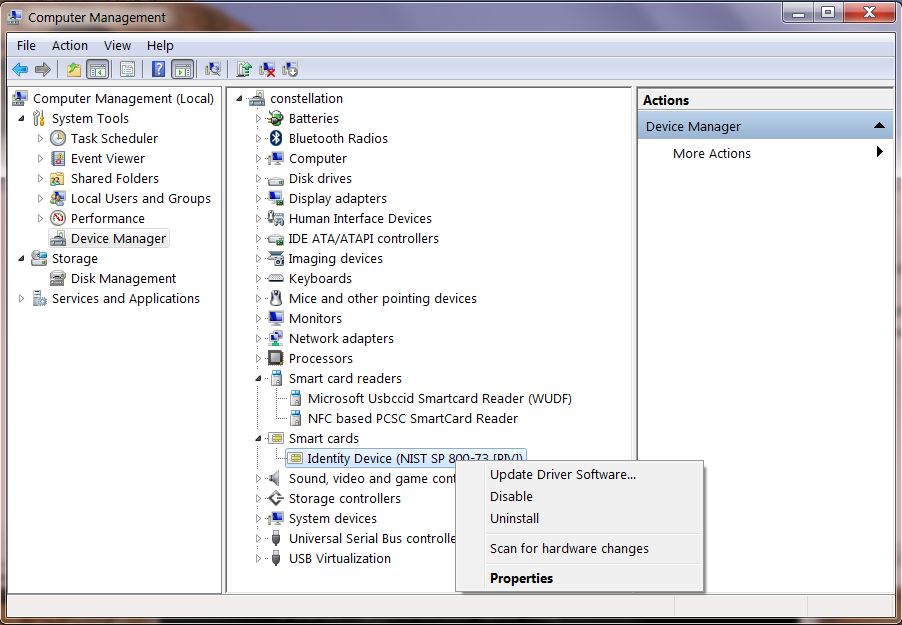
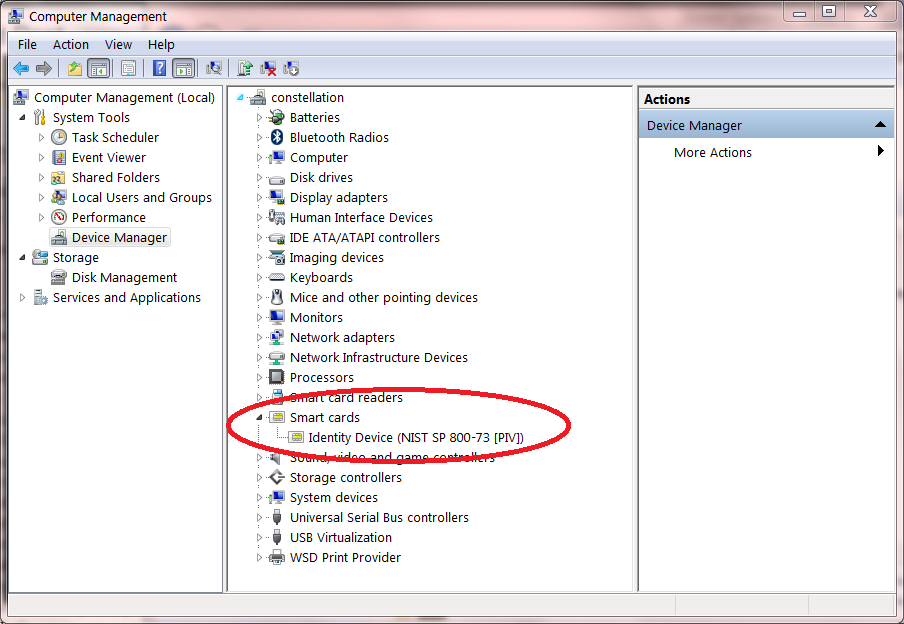
Back to the GoldKey. As hinted earlier, the PIV application on the token supports provisioning as card holder. The catch is that requires installing additional software. This is an unintended side-effect of the way discovery works in Windows: The GoldKey token presents itself as a plain smart card and reader combination, the OS will automatically try to infer the type of card. One of the steps in this process is to check for PIV and GIDS cards by selecting the well-known AID for those standards. By design the token responds successfully to a SELECT for PIV. But that leads the OS to conclude that this is “just” an ordinary PIV card and associate it with the built-in driver. This can be observed by expanding the “Smart cards” node in Device Manager:

GoldKey token detected as PIV card

GoldKey token detected as PIV card

That inscrutable device name comes from the document defining the PIV standard: National Institute of Standards & Technology (NIST) publication 800-73. The good news is smart card discovery worked flawless and identified the GoldKey token as PIV card. The bad news is that built-in driver for PIV does not support provisioning, for reasons alluded to above and in the earlier post. One way to verify this is to try using certreq tool to generate a self-signed certificate for a regular PIV card, as described in the MSDN article on BitLocker. The operation will fail:

Error when attempting to provision to standard PIV card

Error when attempting to provision to standard PIV card using the built-in driver

As an aside, GoldKey would present a different error if used in the same scenario, since it also emulates a card reader with a fixed card– there is no point in asking user to insert a different card.

Getting past this stage requires installing the correct smart card mini driver.

[continued]

CP

Using a GoldKey token as PIV card (part I)

GoldKey is one of the handy self-encrypting drive solutions on the market, with an unusual feature: it can also function as a stand-alone smart card compliant with the PIV standard. An earlier post looked at the limitations of using a dedicated drive such as IronKey, compared to applying BitLocker-To-Go to any old disk using smart cards. The main problem is locking the user into the storage capacity of the removable drive. An IronKey has hardware secure element for managing encryption keys, but it is only capable of applying that to protect its on-board storage. By contrast, a general purpose smart card combined with BitLocker-To-Go can encrypt an arbitrarily large volume with comparable security assurance and much lower cost. Since the drive itself is just off-the-shelf commodity hardware, there is a very competitive market pushing storage capacities higher and prices lower.

GoldKey tokens then combine the best of both worlds. For users looking for a turnkey solution, they provide a ready-to-use encrypted drive with cross-platform support, independent of any operating system functionality. For those interested in encrypting other (larger) volumes in conjunction with an existing disk encryption system such as BitLocker, they offer full PIV card functionality. At low-level, the token presents itself as a smart card reader with PIV card already inserted into that reader.

In fact since PIV can also be used for other security applications such as authentication or document signing, the value proposition is not limited to encrypting data at rest. PIV standard defines up to five types of keys with confusing names, although not every card is necessarily provisioned with all of them:

  • Card management
  • PIV authentication
  • Card authentication
  • Key management
  • Digital signature

The first key is not intended for end-user scenarios; it is only for use by administrator in configuring cards. PIV authentication key is used for logical access, such as smartcard logon to Windows. Card authentication key is special in that it can be used over contactless interface– in other words, over NFC– which makes it perfectly suited for physical access scenarios: tap the card against an NFC reader to open doors. Key management is a fancy name for encryption. That key would be employed when decrypting S/MIME email message or protecting sensitive data at rest. The final key, as the name suggests, is for digitally signing email and documents. GoldKey user manual gives examples for many of these use cases, except physical access which obviously can not be supported easily due to form factor.

PIV is a great choice here, because it is a widely deployed standard with cross platform support. It also happens to be one of two card types recognized by default in Windows 7 and later out of the box. It does have one downside compared to the other, far less popular option of GIDS: in standard usage PIV cards do not allow self-service enrollment. More specifically, users can not generate new keys or load certificates on the card by themselves. Here the story gets better, owing to a GoldKey-specific quirk: in a departure from the strict FIPS behavior, these tokens can be provisioned by the end user using custom mini-drivers from GoldKey. Appreciating the significance of this– and why it is not standard FIPS 201 behavior– calls for a detour into PIV.

The limitation is not due to any oversights in NIST 800 SP73 part 2, the authoritative specification of the on-card behavior of PIV applications. Quick peek shows that all of the primitives required for certificate enrollment are present:

  1. Generate a new key pair and return the public key. That would be GENERATE ASYMMETRIC KEY.
  2. Digitally sign a CSR (certificate signing request) containing that public key using the corresponding private key. Check; signature operations are implemented using the all-purpose GENERAL AUTHENTICATE command. Constructing the CSR and populating its fields is typically done off-card, since the card does not know about certificate templates. Signing a hash of the resulting CSR is necessary and sufficient.
  3. CSR is sent to the certificate authority. CA verifies the identity of the requestor using an out-of-band process and sanity checks the CSR fields for consistency. (For example user Alice can only submit a CSR where the “common name” field says Alice.) The card is not involved in this step.
  4. Assuming all checks out, a proper X509 certificate is returned to the user. That certificate needs to be loaded on the card. That final step is accomplished with the PUT DATA command, also clearly defined in the spec.

The catch: steps #1 and #4 require administrator privileges. The specification also defines roles associated with the PIV application and associated credentials. End users have a PIN and entering that credential authenticates as card-holder rather than administrator.  (Note these privilege levels have no relationship to enrollment restrictions around the certificate, and whether the certificate authority is willing to issue a certificate. Even if the user has root/administrator privileges on the local machine and a certificate already in hand, the card would not allow loading it.) By contrast, authenticating as administrator requires credentials that are held by centralized authority such as the IT department overseeing the card deployment.

What could be the motivation for this policy choice?

[continued]

CP

TrustZone, TEE and the delusion of security indicators (part II)

[continued from part I]

The first post in this series reviewed a proposal advocating use of TrustZone on ARM architecture to implement trusted paths for payment applications. The advertised design is purportedly safe against malware affecting the host operating system. In this second post we look at why that does not quite work.

First, a digression into some technicalities that are solvable in principle. One requirement is that untrusted applications can not force a switch out of secure mode. Otherwise the display can revert to malware control in the middle of PIN collection. (Going back to the earlier parallel with Windows secure attention sequence, ordinary applications can not flip back to the main desktop once user has pressed CTRL+ALT+DEL, nor draw on the secure desktop.) Similarly input events from other sensors need to be suppressed. Otherwise side channel leaks may result. For example a proximity sensor along the lines of Samsung Galaxy S4 can reveal where the user’s hand was hovering before it touched down to register a key press.  Sensitive gyroscopes could hint at location of touch events, since pushing on different regions could causes the device to tilt slightly about its axis in different ways. Slightly far-fetched, the camera could capture images that include reflection of the screen from a mirror or glass surface. There is a uniform solution for all of these: during the PIN collection, disable all unnecessary sensors and directly process input events from the remainder in privileged mode.

What remains is a fundamental, conceptual problem with the design: how does the user know whether the device is operating in privileged mode? Looking at a PIN entry screen, how can one ascertain if that UI resulted from the payment application initiating a switch into privileged mode? What prevents malware from creating the exact same dialog and displaying it from its own untrusted execution mode?

Such doubts exist as long as the display can switch between untrusted and secure modes of operation. This is not merely a practical constraint. For flexibility, only critical functionality– such as PIN entry and key management– is typically implemented in privileged mode. Bulk of the business logic lives in a vanilla application running on the fully corruptible world of the host OS. But even if the entire payment application lived in privileged mode, it would not matter as long as the device also supports running plain applications. Once malware starts executing, there is no reason for it to cede control of display or trigger switch to trusted input mode.

This is where the TrustZone argument gets hand-wavy. “The device will have security indicators,” the proponents respond. Of course such visual indicators can not be part of the regular display area, since ordinary applications can render to the entire screen. Perhaps there is a dedicated LED beside the screen, lighting up when the display is operating in its trusted state. Minor problem: will users pay attention?

Growing volume of usability research in other contexts has demonstrated that users do not understand security indicators, even for something as common as the SSL status for a web browser. Several papers in usable security explored the effectiveness of various signals against phishing, including The emperor’s new security indicatorsYou’ve Been Warned: An Empirical Study of the Effectiveness of Web Browser Phishing Warnings and An Evaluation of Extended Validation and Picture-in-Picture Phishing Attacks. The findings are consistent:  passive indicators do not work. Users are not paying attention. Expecting that “this time is different,” that some obscure signal in an unfamiliar device, implemented differently by each type of hardware, will fare any better is unrealistic. Similar problems plague active defenses that depend on users to take some action such as pressing CTRL+ALT+DEL equivalent. When users see a PIN collection screen that looks vaguely legitimate, the natural response is to enter that PIN. It is not intuitive to “challenge” the payment application with an additional step to verify that it is indeed operating in a safe state.

Properly addressing such risks requires looking at the whole system. For example one could imagine connecting the credit card reader to the mobile POS such that its raw input goes directly to code running in privileged mode. Then the act of swiping a card could automatically switch the device into trusted input mode, without requiring cooperation from user applications. (That may still require a hardware change. Typically magnetic-stripe readers are attached via USB or audio jack in the case of Square dongles. In both cases the output is perfectly accessible to ordinary applications.) Even that simplistic model runs into problems with error cases. For example, when the wrong PIN is supplied and transaction is declined, the card holder will be prompted to reenter their PIN. But it is the same untrusted application responsible for making that determination and initiating a new PIN entry sequence.

This is far from an exhaustive treatment of all possible design challenges, but it is enough to demonstrate the point: establishing trusted input path is a complex system problem. It requires careful understanding of the scenario, as well as the limitations of human factors in designing usable security. As a solution in search of a problem, TrustZone is understandably pitched as the magical fix for a slew of security challenges. But preventing one specific attack– malware intercepting PIN entry– is not the same as solving the original problem– guaranteeing that user enter payment information into the right place. Perhaps the naiveté is best exemplified by a quote from the slide shown earlier:

“A corresponding reduction in interchange rate is justifiable alongside reduction in risk – possibly approaching cardholder present rates.”

ARM the chip manufacturer is telling credit card networks that online purchases on mobile devices with TrustZone are so safe that they deserve to  be treated as card-present transactions, as if the user were physically present in person, instead of higher risk card-not-present?

One can imagine MasterCard and Visa beg to differ.

CP

TrustZone, TEE and the delusion of security indicators (part I)

“This time is different.”

Associated with speculative bubbles and market irrationality, that phrase also comes to mind occasionally in the field of information security. Completely ignoring history, a vendor enthusiastically pitches a solution that failed spectacularly under nearly very similar circumstances in the past. Latest addition to that venerable trend: trusted-execution environments (TEE) and TrustZone specifically being positioned as the silver bullet for trusted input on mobile devices.

Establishing trusted paths between a user and application running on general purpose computer is an ancient security conundrum. It was part of the motivation for the three finger-salute in Windows: pressing control, alt and delete keys simultaneously to bring up the system desktop. The problem can be phrased a deceptively simple question: how does the user verify that the user interface they are interacting with on-screen indeed belongs to the application they have in mind? This would be easy, except that a standard PC may have dozens of applications installed and at any given time any one could have full control over drawing the screen. Meanwhile getting it wrong can be quite problematic. Consider Windows logon. It is critical that the password is only entered into a genuine UI from the operating system, as opposed to a malicious application trying to capture that password by creating a look-alike dialog. Such differentiation can’t be accomplished using predictable features in the UI itself. Trying to distinguish the “real” logon screen by using a special logo or border color does not work. By assumption, even untrusted applications have full leeway to take over the entire desktop and paint anything on it.  That same collection of pixels could just as well have been rendered malicious application operating in full-screen mode. This is where the CTRL+ALT+DEL key combination comes in. It is special-cased by Windows: that sequence is directly intercepted by the OS. User applications can not trap and handle this on their own, nor can they prevent the OS from taking its intended action: displaying the secure desktop, where users can rest assured that subsequent UI interactions involve a trusted OS component.

This problem is by no means unique to desktop operating systems. Identical concerns arise when using a phone or tablet for security critical scenarios. One popular scenario, given as the first example on ARM Trustzone page  and explored in greater detail in another ARM presentation (slide #18) is PIN collection during a payment transaction.

TrustZone_PIN_entry

From “Securing the System withTrustZone® Ready Program”, presentation by ARM

The scenario has different manifestations:

  • User typing PIN credentials into their own device as part of an online purchase– explicitly alluded to in the slide.
  • Entering same credentials into a different mobile device such as iPad used as a point-of-sale terminal at a merchant location. (This is similar to the iPad/iPhone based POS that Square offers, except there is no PIN entry going on when processing credit cards in the US.)

For the second scenario, PCI requirements are very stringent around the collection of PIN, typically offloading this to dedicated PIN-entry-device (PED) hardware that does encryption on-board, before transmitting the PIN to the POS itself. The purported reason for not allowing PIN entry directly on the POS is the assumption that it is a higher risk environment as far as software attacks go. Such general-purpose computing devices are difficult to lock down, as openness is a virtue: users are free to install their choice of applications. The flip side however is that they can also make bad decisions around installing malware or intentionally disable security protections defined by the operating system. In fact the ARM scenario goes further in rejecting the commodity OS as part of the trusted computing base. Even if CTRL+ALT+DELETE style gestures could be resurrected from the 1990s, they would not help. They depend on the security of the underlying commodity OS such as Android, and the assumption is those components are too complex, too rich and present too large an attack surface.

Enter TrustZone into the fray. TZ is enjoying something of a resurgence, largely owing to wireless carriers success in stifling innovation with hardware secure elements— even when nearly all high-end Android devices have one ready for use in security critical applications. Unlike embedded secure elements or micro-SD based , TZ is a feature of the ARM processor and does not represent additional hardware cost. Based primarily in software, it defines a “secure world” similar to the informal ring -1 where hypervisors in x86/x64 world operate. Vanilla applications including the host OS run in standard mode, without access to the memory/resources of the privileged mode. There is a locked-down IPC mechanism for making calls to privileged applications and triggering certain entry points. For example when it is time for an extra-sensitive operation such as PIN entry during a payment, the point-of-sale application can initiate a context-switch to the secure world. At that point pre-existing code in the isolated compartment takes over and does not return control until user has entered the PIN. During this time both the display output as well as input devices such as touch screen, are directly controlled by privileged code. Even if malware happens to be resident on the device in the unprivileged compartment, it can not observe PIN entry. Sensor data– such as the location touch events on the screen– are routed directly to the special PIN collection application, with all code and data residing in privileged mode. When PIN entry is done, it is encrypted using the public-key of the payment processor and returned to the “ordinary” POS application as unintelligible ciphertext, safe from any mishap.

[continued]