Digital River, Microsoft and code-signing failures

In the wake of the recent Adobe code-signing debacle, this is a good time to revisit other failure modes of code signing. Recently this blogger tried downloading an evaluation copy of Microsoft Office and noticed a strange warning dialog about the installer being signed by “Digital River.” (Granted, that could make the author one of 5 people in the world paying attention to such warnings– and not proceeding with running the installer as a result.)

Who was Digital River and why would software published by MSFT carry a signature of any corporate entity other than MSFT itself? From a pure authentication perspective, the situation looked indistinguishable from a man-in-the-middle attack, where some nebulous attacker on the network observed the download request and clumsily substituted a Trojaned application instead, hoping the user would not notice the difference. The code was downloaded straight from the official Office website, a page that is not served over SSL. Or perhaps the servers hosting the application had been breached and started distributing malware to unsuspecting users hoping for free copies of Office.

Cursory Googling revealed a more benign, mundane explanation that did not involve malfeasance: Digital River hosts the official online MSFT store, serving as the distribution channel for purchasing software via direct download model. (Top search results include a forum post from 2009 featuring an irate customer titled “digital river does not deserve to be microsoft default agent”) But the same search also turned up a disturbing presentation on F-Secure website by Jarno Niemelä, dating back to 2010. The good news: it confirmed that Digital River does in fact handle software distribution for many published besides MSFT, and even digitally signs the applications on their behalf– that would explain the Authenticode dialog above. That alone does not make it safe to proceed past the dialog: all it means is that trust in the purposed Office installer is only as good as the trust in all other software signed by DR. After all any one of the other applications bearing the identical signature could have been substituted in its place, if the only criteria for establishing trust is that certificate. What else has DR signed? That is the really bad news: DR had been caught signing malware, as well as installers which were effectively open-ended: meta-installers designed to invoke other installers from third-party URLs that DR had no control over.

Vouching for the integrity of applications one has no control over is at best extreme naivete, and at worst, willful negligence under the guise of solving a problem for software publishers. There is no question that unsigned code is a user-experience problem: web browsers and A/V react differently, and present  danger-Will-Robinson warnings when confronted with applications of unknown origin. That is by design. “Solving” that problem by having another company sign anything thrown its way undermines any security benefit of code authentication. These technologies are rooted in the principle that trust– or lack thereof– in software  is derived from trust in the identity/brand of the publisher. When that identity is laundered by having some other entity such as Digital River putting its own brand on the product without conducting due diligence, it removes any semblance of accountability from the original author.

Returning to the example that served as the jumping point for this post, Office derives its credibility from having been authored by MSFT– not by virtue of being distributed by Digital River. That same code carry  exactly same degree of trust regardless of its download location. In fact being signed by Digital River subtracts from the credibility of the code, which is exactly the opposite of intended effect. An up-and-coming software company with no brand recognition might benefit from using the service: after all, anything beats the unsigned  code warning. (But then again, Digital River is not exactly a household name either. The only reasons to prefer that over having  your own certificate could be the cost and difficulty of implementing code signing– just ask Adobe.) In the case of MSFT, there is net loss of trust in the end product.

Luckily Office 2013 preview is also available for download. It carries the expected MSFT signature.

CP

Bringing cloud identity to the PC (2/2)

With Windows 8 released to manufacturing and available for download from MSDN, this is a good time to complete the post on using cloud identity in a traditional PC operating system. As MSFT announced on the Building Windows blog almost a year ago, Windows 8 will support signing in with Windows Live ID, now rebranded as Microsoft ID. Instead of creating local accounts, users can now authenticate to a Windows 8 machine using their existing cloud account.

Of course such integration is far from novel, with many examples of familiar consumer devices that had tight integration with a cloud authentication service, in some cases requiring that users authenticate with such an account to setup the device in the first place:

  •  iOS and its use of an Apple account on iPod/iPhone/iPad
  • Android and its integration with Google accounts systems. In fact Android has an extensible account manager concept: it allows defining additional cloud identity providers by having installed applications act as account authenticators, which can be invoked by any other app. (Looked another way, Android re-invented SSPI model that Windows supported since NT4 but never quite at the level of interchangeability its designers hoped– no new ideas under the sun.)
  • More recently Chrome OS and similar integration with Google accounts

In all cases, this identity becomes an integral part of device functionality when accessing cloud-based functionality: for example it is used to backup settings, migrate to new device, download email and calendar entries, make purchases in the respective app markets. This requires a level of integration between the OS and applications, such that after logging into the OS once, the user is automatically also logged into cloud services without having to explicitly type their password again. Without such automatic transfer of authentication state, the initial login would become pure window dressing that only grants access to local system resources. Luckily such seamless integration exists in Windows 8: after logging in, the mail application transparently downloads mail from Hotmail, Sky Drive can access saved files, Messenger can display presence information for contacts and Internet Explorer can open web pages requiring Live ID as already authenticated. In fact since as long as the functionality is implemented as standard SSP, it becomes available to third-party applications to use for creating apps that access user-data stored in the MSFT cloud.

There are also differences: first one is that Windows supports local accounts and the user may be upgrading a Windows 7 box– because nobody is running Vista– already configured with one. This introduces a requirement to retroactively associate an existing account with a cloud identity. Mobile devices started out with the assumption of cloud connectivity, and a clean slate to define their identity scheme. Second the user experience is different: for mobile devices user authentication is rare for good reasons: phones have awful virtual keyboards that make typing plain English painful, much less a strong password that containing  random mixture of symbols and digits. (While Android screen-lock can be configured with a passphrase, this is logically not the same as the Google account password.) With Windows 8 and Chrome OS even unlocking the screen locally can involve some type of authentication, making this ritual more frequent. That also creates a challenge in having to support offline mode: since the device may not have network connectivity at all times, it still has to authenticate the user’s cloud identity without the benefit of reaching the cloud.

Offline mode is not a new problem, as similar issues existed for the bread-and-butter protocols Windows supported before (NTLM and Kerberos) and can be solved by locally caching password hashes, at the well-known risk of introducing brute-force attacks against these cached copies. But some credentials can not be checked offline: an example is the one-time password or OTP codes used for Google 2-step verification: since these are meant to be dynamically generated each time, caching is not applicable and only Google knows what the next code in the sequence is. MSFT has a different concept called single-use codes for Live ID, which is not a secondary factor but replaces the password. It is unclear if these still work for login in connected state; they will likely not work for offline mode.

Stepping back, such tight-coupling between the OS and a particular cloud-identity provider also creates a natural “nudge” for users to favor cloud services authenticated by that identity, since the applications “just work” naturally without additional setup. Consider the difference between having to sign-in to a third-party email or instant-email service, verses going with the path of least resistance using the built-in variant that is automatically signed in. Granted most applications “solve” this problem with a strong bias for saving passwords (as well as annoying opt-out settings to automatically launch as soon as  the user logs in) This may level the playing field for user experience at the expense of security: instead of refreshing credentials over time, they rely on a password or long-lived token to create the illusion of automatic sign-in. Of course in the case of Windows 8, those cached credentials are already at the mercy of Live ID if the user enables one of the highly  touted-features: synchronization of saved passwords across multiple machines, as long as the user is signing in with the same Live ID, similar to Chrome synchronizing website passwords.


CP

Credit card authorization: compatibility of CVC1 and CVC3

As discussed in the second post in the series, the magnetic-stripe profile of certain EMV payment protocols such as Paypass produces data in a format similar to what swiping a traditional plastic card might yield. This backwards compatibility has undeniable advantages for transitioning to the more advanced protocols. For example, point-of-sale terminals can have an NFC capability added as bolt-on accessory, without altering the transaction further downstream.

The downside of this seamless transition is that there is no strict firewall separating NFC payments with dynamic CVV3 from swipe-transactions that rely on static CVV1 for authorization. It is possible, albeit inconvenient, to encode NFC transaction data on a plain card and use it at a regular point-of-sale terminal. This explains the replay demonstration that Kristin Padgett performed at Shmoocon in January in 2012. Intended to prove the ease of skimming information from contactless credit cards, this stunt actually serves as an unintended proof of the interchangeability of CVV1 and CVV3. The researcher executed one round of the payment protocol between a hypothetical victim’s contactless plastic card and an NFC reader controlled by the researcher. This transaction does not actually cause any money to exchange hands. It is never reported to the payment network. It is only used to record the transcript of the protocol.  (This is the often hyped “skimming” part: in the US many cards have no additional protection such as PIN required to complete the transaction, unlike in Europe where it is common to have PIN entry above certain transaction threshold.) The transcript is then used to construct track data, encoded on a plastic card and swiped through a Square reader, to conduct the actual “fraudulent” transaction.

To be more precise, and this is where details of the protocol become important, it is not the case that a CVV3 can be substituted whenever the CVV1 appears on track data. The individual fields are not identical between the standard plastic card and emulated stripe from a contactless payment. (Among other things, a contactless payment include a transaction counter or ATC that is echoed in track data, incrementing for each transaction.) Rather the complete, unaltered track-data containing one-time generated CVV3 can to be substituted in place of static track data containing CVV1. The Shmoocon demonstration was a beautiful example of how the entire payment stack, starting with the custom hardware of the Square reader, the payment processing backend of Square and the acquiring bank involved (Chase Paymentech, for all Square transactions) were oblivious to the change in form factor. The whole point of backwards compatibility is that at some point far enough downstream from the terminal, everything looks identical. Square is likely not alone in creating this type of avenue for contactless payments to be tunneled over plain magnetic stripes via swipe transactions.

That is not to say that the discrepancy could not have been detected along the way by one of the participants in the chain. Backwards compatibility is same as indistinguishability. Specifically the track-data format includes a service code with different values defined for cards containing chips, designated as “integrated circuit” in the standards. Track data containing this value arriving over a magnetic stripe reader is immediately suspect. In principle either the Square hardware or if track data is visible at all within the application, the associated mobile app could have rejected it right away.  Even further upstream, the payment processor often knows exactly what type of point-of-sale terminal exists at a merchant location– because the hardware is provisioned as part of a packaged offering from the processor. Arrival of track-data containing CVV3 from that merchant would then serve as strong signal of a problem if the merchant is known to be not capable of contactless payments. (One complication is whether card issuers have taken care to define different service codes for cards that have both traditional magnetic-stripe and IC component. If the standard magnetic stripe on the card has same service code as the one emulated by the chip, this heuristic fails. In that case additional heuristics can be used, such as presence of ATC or the appearance of CVV on two tracks, as opposed to track #2 only.)

One final point about replaying CVV3 track data: each protocol execution can only be used to create one valid magnetic-stripe. This is because of the ATC or transaction counter, which is incremented for each time the payment protocol is run. In principle that means the enterprising criminal has to capture multiple transactions when in the vicinity of the contactless card, and then go through the trouble of re-encoding the magnetic stripe with different track data between purchases. This is independent of any other restrictions the issuing bank may have around ATC that creates additional defenses against fraud. For example if the victim uses their card after skimming but before the attacker has gotten around to conducting a transaction. In that case all of the track-data captured by the attacker sports a counter less than the most recent one the bank has observed in a succesful transaction.

CP

CVV3: Demystifying credit card verification (part 2)

Completing an earlier post where we discussed CVV1 and CVV2, this second part looks at CVV3 or colloquially “dynamic CVV.”

One of the obvious security limitations of CVV1 and CVV2 is that they are constant for the life of a particular payment instrument. Because every transaction involves revealing these “secrets” to anther party, namely the merchant where the card-holder is making a payment, the odds are strongly against CVV1/CVV2 remaining secret for a very long time. Indeed card-holders have parted with their CVV via an array of impressive attack vectors over the years: from crude devices masquerading as fake card readers that skim entire magnetic stripes, to phishing attacks that brazenly ask unsuspecting users to input their card number CVV2 and plain incompetent ecommerce merchants that manage to get their entire customer database 0wned. PCI standards try to improve the situation by imposing restrictions against cavalier handling of card data– for example CVV2 can not be stored permanently, only used for authorizing the transaction in real time. But such measures are similar to devising incremental improvements for managing passwords, without fundamentally altering the limitations of a password based approach. Much of that is a limitation of the plastic card technology: the magnetic stripe is considered essentially a static, passive container for small amount of data; there are no “smarts” anywhere in the card.

(** Strictly speaking this is no longer true: several companies have introduced programmable magnetic stripes, where the information can be changed by a chip residing on the card. Similarly the printed CVV2 can be replaced by an LCD screen that flashes a code varying over time. Such cards have never seen widespread deployment.)

This is where EMV which stands for EuroPay, MasterCard and Visa enters into the picture. EMV defines a suite of protocols employing strong cryptography, where the card is not simply a glorified low-density storage medium but contains a chip capable of performing complex payment protocols including the series informally known as chip & PIN. Unfortunately as every engineer who ever proposed a new protocol soon realizes, breaking from the past is not that easy. Migration to EMV suite of protocols presents a formidable triad of challenges: nudge issuing banks to mail out new cards to their customers, convince merchants to replace their point-of-sale terminals with newer models that accept these cards,  and finally ensure that the payment processors those merchants connect to are aware of the improved protocols. Omit any of these steps and all the fraud risks inherent in a static secret return: this is what happens when an American customer travels overseas and hands over an old-fashioned magnetic stripe card to a merchant set up to process a chip & PIN transaction.

Backwards compatibility is a very appealing feature. Its promise is upgrading only part of the system at lower total cost, in such a way that the change remains transparent to other “legacy” components in place, while still attaining some of the benefits realized from a full upgrade. In the case of contactless payments, this takes the form of a “profile” of the original protocol that creates the appearance of having swiped an old-fashioned magnetic stripe card. Called mag-stripe profile appropriately enough, this variant of contactless payment protocols are distinguished by producing output that looks very similar to track-data obtained from plain plastic cards.

The main difference is a challenge-response step added to dynamically generate a different CVV value for each transaction. Instead of containing a fixed CVV1 for every swipe, this scheme instead computes the integrity check using cryptographic keys stored on the chip, as a function of card data as well as a challenge issued by the payment terminal. This constantly changing value is the CVV3 and it takes the place of CVV1 on the emulated track-data resulting from the transaction. (“Emulated” because it is assembled by the terminal from multiple individual card responses sent over NFC during a contactless payment.)

Backwards compatibility is served by keeping the remainder of the transaction identical, once the protocol exchange between card and NFC reader is complete. In that sense the changes required are minimal compared to full chip & PIN implementation. NFC reader is fully aware of the new protocol but beyond that point, there is only track-data returned to the point-of-sale terminal. This information is in exactly the same format as it appears on classic magnetic stripe cards. It is processed in the same manner, passed on to the payment processor for verification, who in turn will typically forward it to the issuer for final authorization. This level compatibility is what allows adding NFC-payments as bolt-on option to existing payment terminals configured for swipe transactions: at some level of abstraction, the new payment flow over NFC using the dynamic CVV3 merges with the existing flow for processing magnetic stripes with CVV1. That interchangeability has surprising security consequences, which will be explored in a subsequent post.

CP

NFC in US passports– verifying the random ID

One final post to conclude the series on reading data from recent US passports with an Android phone. In this post, we will look at the way the “unique ID” or UID emitted by the chip varies each time the chip is brought into the presence of an RF field.

Every NFC tag has a unique identifier that is burnt-in at the factory and constant throughout the lifetime of the hardware. Contrary to mistaken impressions, this identifier is intended for anti-collision eg distinguishing multiple tags when they are all in the presence of an RF field, rather than security applications to authenticate the tag. Devices such as ProxMark can forge an arbitrary UID. There are even off-the-shelf counterfeit MIFARE tags that allow overwriting the UID while still preserving the desired form factor.

While the UID falls short of being a reliable way to authenticate a particular tag, it is still problematic for privacy because it constitutes a persistent identifier that can be used for tracking. Each time the tag is scanned, it emits a constant value that permit correlating with previous times when that tag was scanned– this is true regardless of the higher level transaction. For example even a blank, unused tag completely void of data emits a UID. (Introducing application level protocols on top of the basic NFC transport can only make privacy worse: for example the standard contactless payment protocols will transmit stable identifiers such as the credit card number that are far less privacy-friendly, because unlike UID they can be correlated to many existing databases.)

This is where random UIDs enter into the picture. Instead of emitting the same UID, the hardware can be configured to generate a different one on each activation eg each time the tag is brought into the range of an RF field. A specific range of four-byte UIDs starting with 0x08 is reserved to designate such UID, and to disambiguate that from fixed UID assignments. The US passport is an example of hardware using this feature.

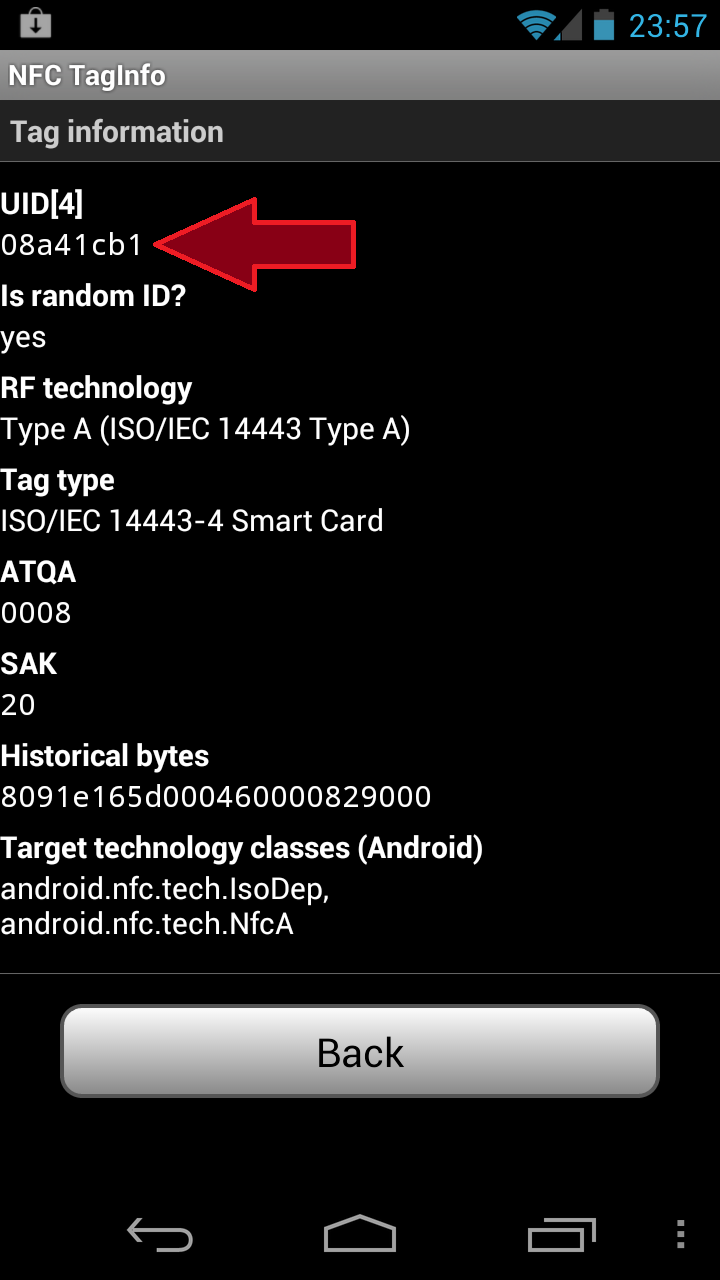
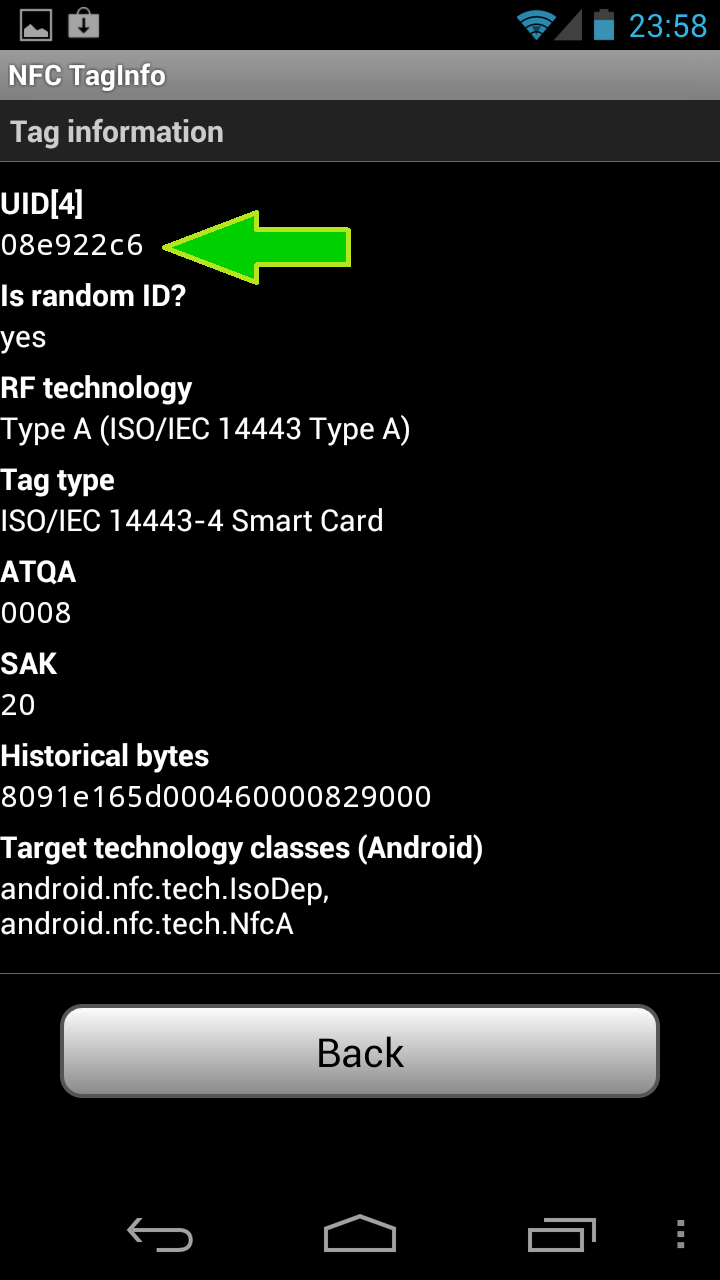
Going back to our NFC TagInfo application, scanning the same passport twice– removing it from the RF field of the phone between the two scans– shows the UID indeed changing:


CP


Reading the US passport with Android– basic access control

Following up on the first part of the post, NFC TagInfo can be used to read the contents of a US passport issued after 2007, after inputting the correct keys. This is done by selecting “Setup keys” option from the menu, then scrolling down to the ePassport/MRTD section. Only three fields are required: the nine-digit passport number, date of birth and expiration date on the passport.

This is part of the basic access control mechanism, intended to limit read access to the document. These three fields can be scanned from the fourth page of the passport, where they are printed in an OCR-friendly font and marked by chevrons. The idea is that access over NFC to the electronically stored data is only possible after having physically scanned one of the interior pages– in other words, no easy pick-pocketing by bumping someone with an NFC reader. (There are several design flaws with BAC, causing it to fall short of that goal, including the predictability of these numbers as well as more subtle cryptographic attacks against the protocol.)

After entering this information, it will be necessary to backtrack and re-scan the passport, as the application will not automatically re-scan with new key set. This time the scan will take a couple of seconds due to the amount of data transferred– the potential maximum 424 Kbps bandwidth for NFC is not even approached doing bulk transfers from the type of chips with limited computing power found in the passports. Afterwards the application will be able to display the encoded data, such as the photograph, as well as additional fields not present in the MRTD data such as issue date and country of birth.

[continued]

CP

Reading the US passport using Android — overview

Seems like it was only yesterday that the privacy community was up in arms about the perceived evils of the new US passport, equipped with RFID chip. There was that confrontation at the 2005 Computers, Freedom & Privacy conference in Seattle between a State Dept representative and Barry Steinhardt of the ACLU on the maximum reading range for RFID passports. From the tin-foil wrapper suggestions (having inspired a cottage industry at this point, also thanks to contactless payments) to Hollywood-esque scenarios of explosives rigged to go off when a particular individual walks by with their RFID passport, conspiracy theories carried the day.

Couple of years later with the new passports having become standard, it is possible to experiment directly with the technology. No special gadgets required: any Android phone with an NFC controller will do. That includes a wide-range of models from the purist “Google experience device” Nexus S to Samsung’s flagship Galaxy S3.

While there are many applications for scanning NFC tags, NFC TagInfo from NFC Research Lab stands out fpr having built-in logic for recogizing the data layout for several common types of cards, including passports.

Tapping the passport against the phone will not automatically bring up the application, as it does not contain any NDEF tags that Android applications typically use to configure auto-launch. Instead we have to start NFC TagInfo and then scan the passport. This will bring up an overview of the tag structure:

This screen already tells us a bunch of things:

1. There is an NFC chip in the passport. Near Field Communication is a type of RFID, operating at the 13.56 Mhz frequency. This is the only type of RFID that Android devices support. The more common RFID transponders such as garage door openers and key-fobs operate at a different frequency and can not be detected by the phone, because its radio does not operate at that frequency.

2. More specifically the NFC tag is an ISO 14443 smart-card, which Android also calls IsoDep technology. This is also how identification cards such as US government PIV card or contactless credit cards appear to the system.

3. “MRTD” stands for Machine Readable Travel Document, a reference to the international standard for encoding information about individuals for use in cross-border travel in a smartcard.

Clicking on that gray button is when things getting interesting, because the application will try– and most likely, fail– to access the contents of that MRTD. It will fail because the cryptographic keys required to access the data are initially missing:

This is where one of the properties of the MRTD protocol comes into play: decrypting contents of the passport requires cryptographic keys, which are derived from information printed on the passport itself. By supplying this information to the Android app, it is possible to get past this error. This is exposed via menu / “set up access keys” option.

[continued in part II]

CP

CVV1, CVV2, CVV3: Demystifying credit card data (1/2)

[This is a series of posts dedicated to describing the card-validation code (CVC) or card-validation value (CVV) for credit cards.]

Swiping a credit card through a magnetic stripe reader is perhaps the most common way of using a plastic card for payments. At the implementation view, involves reading the data encoded in the magnetic stripe on the back. In a pinch when there are no point-of-sale terminals present, getting an imprint of the card by pressing a carbon paper over it will do. When the merchant and card-holder are not in the same place,  the purchase is instead conducted by relaying the card number, expiration date, perhaps the billing address and an additional number printed on the card dubbed CVV2. More fashionable recently are contactless payments, where the card is tapped against a reader, as in Mastercard Paypass, Visa PayWave or Discover Zip. Each of these involves a slightly different protocol, relying on different characteristics of the card data to authenticate the card.

Swipe transaction are perhaps easiest to describe. The data encoded on the magnetic stripe is static, formatted according to ISO7813 in three tracks, with the third one typically unused. One of the fields in this track layout is the Card Validation Code (CVC) or CVC1. which serves as a cryptographic integrity check on the track contents. Much like a message authentication code, the CVC simplifies the process of authenticating track data when it is received by the issuing bank. It also prevents easy fabrication of credit cards: while track data is relatively predictable given the card number, expiration date and other fields, CVC1 does not have any predictable pattern that allows derivation from the other pieces.

CVC2 serves a similar purpoes but  is used in conjunction with card-not-present or “CNP” transactions such as ecommerce when the user types card information into a web browser.  While CVC1 is encoded in the magnetic stripe, CVC2 is only printed on the card itself– three-digits on the back under the magnetic stripe for Visa, Mastercard and Discover, and four-digits on the front for American Express. (The extra digit can be viewed as balancing out the fact that AmEx cards have 15 digits, one less than other major brands.) PCI standards impose stringent constraints on handling of CVC2. For example: while card numbers, expiration date and billing address can be saved for future use to simplify later transactions, CVC2 can not be stored by the merchant. It is only intended for authenticating the card owner during the purchase.

CVC2 and CVC1 are by design incompatible. It is not possible to use the CVC1 for making a purchase online, or encode CVC2 into a magnetic stripe for a successful swipe transaction. This has important ramifications on managing risks due to theft of payment information. It effectively creates a “firewall” between virtual and in-store fraud. Suppose a waiter has taken to swiping all customer credit cards through his very own mag-stripe reader to save a copy of the track data. The resulting cache of contraband information can be used to forge additional cards and used to make in-store payments compliments of unsuspecting diners. But unless our enterprising waiter also remembered to write down or photograph the CVC2 from those cards, they can not be used for any online purchase where the merchant validates CVC2. (Surprisingly some leading retailers including Amazon do not require CVC2, so this turns out not to be major impediment for the aspiring criminal.) Going in the other direction, when yet another website processing credit cards experiences a data breach, the spoils from this stunt can be used for additional online/mail-order/phone-order transactions. But they are not useful for minting actual plastic cards with valid magnetic stripe to use at an old-fashioned bricks-and-mortar store, due to the absence of CVC1.

Updated: 12.18.13 to correct CVC1 / CVC2 mix-up in last paragraph

[continued]

CP

Unanswered questions about the Flame certificate forgery (2/2)

Second question: why bother with MD5 collision in the first place?

As explained in the SummerCon presentation, this particular forgery depended on exquisite timing. First the expiration date of the certificate is exactly one year from the moment it issued, measured in seconds. Second, the serial number of the certificate issued by the TS licensing server is a function of two semi-predictable variables:

  • Number of other certificates issued before
  • Current time, in millisecond resolution

This poses quite a challenge for an attacker seeking to exploit a collision against MD5. Recall that the attack depends on crafting two certificates with identical hash– one is the certificate that the attacker predicts the licensing server will issue, the second one is the certificate that the attacker actually wants to obtain. Ability to find collisions in MD5 ensures that the signature on the first one is as good as a signature on the second one. But “predict” is the operative keyword here: after all it is up to the issuing authority to decide on the serial number and expiration date on the certificate that will be issued. Randomly chosen serial numbers would have trivially defeated the attack. (In fact this is such a good idea that randomization is required for so-called extended validation class of certificates that breathed new life into the defunct CA business model by allowing companies a lot more money to perform the same basic due-diligence they should have performed for every SSL certificate.) Instead the licensing server used current time and an incrementing counter to generate the serial number.

That is a lucky break for the attacker: guess the values correctly when crafting the collision, and the licensing server has unwittingly issued a code-signing certificate made out in the name of MSFT. Making life easier is the ability to do dry-runs of the attack, acquiring  licenses freely to observe the counter and current “time” according to the server: TS license server will happily issue “licenses” to any enterprise user in a certain Active Directory group, eg every employee of the company that has a valid business reason to access Windows server. But even with this advantage, it is a fragile process because it requires making projections about the variables above, namely:

  • How many other users will have obtained a license between now and when the collision is going to be submitted.
  • Exactly what time– down to the millisecond– that collision will be processed. Note this is not when the attacker submits the request to the licensing server; it’s when the server gets around to issuing the certificate. All types of latency, from simple network jitter, to OS scheduling delays could throw this off.

The first one is easy to work around: plan the attack over a weekend or official holiday, and perhaps at a time of day when few legitimate users are going to be requesting licenses to interfere with the attack. Assuming long term persistence on the enterprise network, one can observe the fluctuation in demand over time to spot such opportunities. A different strategy is to target an organization where the TS licensing server is idle by design– perhaps it has just been set up but is not yet activated, or it is being decommissioned in favor of a different licensing model. In this case the assumption is that the creators of Flame have resources to compromise lots of different organizations, so they can pick one with the right TS licensing setup.) In all cases, timing the attack to take place against an idle server can partially help with the second problem as well– if the server is only responding to the attacker, there is no concern about high load on the server leading to variable processing times. But the jury is out on whether milli-second accuracy can be obtained this way, so the attacker may still have to try multiple times. As a comparison point: even with a perfectly sequential serial ID and one-second time resolution, the forgery attack from 2008 required several tries.

The other side of the equation is the cost for each MD5 collision– this is the computational resources “wasted” as a result of guessing incorrectly. Latest estimates put this on the order of $10K-$100K per collision given publicly known techniques. It is likely that the Flame authors had access to novel cryptanalytic attacks lowering that cost, in addition to large amounts of computing power that might wash it away altogether. (As economists like to point out, CPU cycles are a non-replenishable resource. Once the upfront investment in a couple million servers is paid for, one might as well put them to use spinning on a problem.)

Another option is to mess with the licensing server’s notion of “time.” In most modern systems including Windows, the current clock is obtained from the network using a protocol such as NTP. If the Flame authors had access to exploits against the time synchronization scheme, they could “roll-back” the time to try again after each failed attempt with same timestamp. But this will not necessarily reduce the number of collisions required, since the number of issued certificates still increments regardless of success/fail, requiring a different collision to pair up with the expected serial number the CA will choose.

So far this discussion has only considered attacks that treat the licensing server as a black box– attacker interactions are restricted to submitting seemingly-valid license requests to the server and perhaps attacking its surrounding environment, such as disrupting clock synchronization. What they are not doing is outright break into that machine, exercise the signing capability directly on any chosen message or export the private key for future use. Why? Licensing servers are not a particularly sensitive/critical part of infrastructure. They are a regular Windows server, configured in a specific role. They are not specially hardened for better security or closely monitored for any sign of trouble. (After all the raison d’etre of the system is to guard MSFT revenue source, it has no intrinsic value to the enterprise.) Few enterprises use hardware security modules or other key-management techniques.

In addition to maintaining long-term presence in the enterprise network, it is also a safe bet that the Flame creators have access to a significant collection of vulnerabilities, both public and zero-day. Why would they not go after the target directly by compromising the licensing server? Recall that due to the flawed setup of the MSFT trust chain, any organization anywhere in the world operating a TS licensing server will do. In the highly unlikely event that the first enterprise they tried has a clue about security and runs bullet-proof Windows servers, the attackers need only move on to a different one. Surely some enterprise somewhere in the world is running a vulnerable licensing server ripe for the extraction of private keys? Armed with the key, the attackers need not waste any time trying to find MD5 collisions, they can issue the certificate directly. (The conspiratorially minded could argue this is exactly what happened, with the additional twist that a single MD5 collision was chosen *after the fact* to create the appearance that it was an interactive attack. This has the nice property of providing misdirection: actual timestamp on the certificate with colliding hash is no longer meaningful. It could have been back- or forward-dated to the point that trying to mine the logs from the CA during the alleged incident turns up noise.)

Finally there is the question of disclosing offensive capabilities. By attacking the licensing server directly, attackers risk burning a 0-day in case they are found out. (In the worst case scenario– more likely is that the server has known unpatched vulnerabilities with readily available weaponized exploits.) This is not exactly the end of the world. Stuxnet contained multiple 0-days and the authors presumably took into calculation the possibility that one day the malware samples will be reverse engineered. Not to mention that thanks to the likes of VUPEN, everyone and their uncle has access to Windows zero-days these days. Finding one being used in the wild might prompt an out-of-band patch from MSFT and some temporary indignation, but then everyone moves on.

Using an MD5 collision and embedding such a certificate in Flame on the other hand reveals an entirely capability: access to novel cryptographic techniques that are unknown in the civilian world. For an organization interested in trying to hide its capabilities, this is more revealing than the loss of a couple of Windows zero-days that could have blended into the background-noise of vulnerability research.

CP

Unanswered questions about the Flame certificate forgery (1/2)

1. Which enterprise was it?

The authors of Flame exploited a series of design flaws in the way MSFT operated terminal services licensing to obtain a code-signing certificate impersonating MSFT. This step involved interacting with some TS licensing server that was already setup to issue these licenses, which also double as code-signing certificate due to a blatant violation of least-privilege principle. Typically such licensing servers are operated by large enterprises, to simplify the problem of granting licenses to their users to connect to Windows server.

That raises an obvious question: which organization was it? While each licensing server receives a certificate with the same non-descript name Microsoft LSRA PA (that does not in fact identify the organization it belongs to, in yet another example of bad design)  they each have unique signing keys. As long as MSFT was keeping logs for the subordinate CA certificates issued, it is possible to identify conclusively which enterprise the forged certificate chains up through. So far MSFT has not publicly named the organization, nor have the implicated parties come forward of their own accord. It is entirely plausible that the organization did not realize it was their TS licensing infrastructure used to facilitate the Flame attack. This is similar to the pair of semi-conductor firms that had to be alerted their signatures were found on Stuxnet— how many organizations proactively checked their own CA against the forged Flame certificate chain?  But it is equally likely that MSFT or perhaps a law-enforcement agency would have reached out by now (keeping in mind this could be an organization anywhere in the world) and let these folks know they were the unlucky ones. So far this appears to be handled quietly, perhaps to protect the “guilty”– for most enterprises, having experienced a security breach is something to be swept under the rug. This is unfortunate, because it would have been possible to infer something about the modus operandi of the Flame creators based on why they picked that organization. That brings us to the second question.

[continued]

CP