Who actually pays for credit card fraud? (part I)

In the aftermath of a credit-card breach, an intricate dance of finger-pointing  begins. The merchant is already presumed guilty because the breach typically happened due to some vulnerability on their systems. Shifting the blame is difficult but one can take a cue from innovative strategies such as the one Target employed in suggesting that fraud could have been mitigated if only US credit-card companies switched to chip & PIN cards, which are far more resilient to cloning by malicious point-of-sale terminals. (In reality the story is not that simple, because the less secure magnetic-stripe is still present even on chip cards for backwards compatibility.) But credit card companies will not take that sitting down: it is all the merchants’ fault— in other words the Targets of the world—they will respond. What is the point of issuing chip cards when stores have archaic cash registers that can only process old-fashioned “swipe” transactions where the chip is not involved?

They have a point. October 1st 2015 was the deadline set by Visa/MasterCard for US retailers, partly in response to large-scale breaches such as Target and Home Depot, for all retailers and banks to switch to chip cards. Payment networks may have thrown down the gauntlet but by all appearances their bluff was called: less than half the cards in circulations have chips and barely a quarter of merchants can leverage them, according to a Bloomberg report. That state of affairs sows a great deal of confusion around why so little has been done to improve the security of the payment system. After all EMV adoption happened in Europe a decade earlier by comparison and at much faster clip. This feeds conspiracy theories to the effect that banks/merchants/name-your-villain does not care  because they are not on the hook for losses. This post is an attempt to look into the question of how economic incentives for security are allocated in the system.

Payment networks

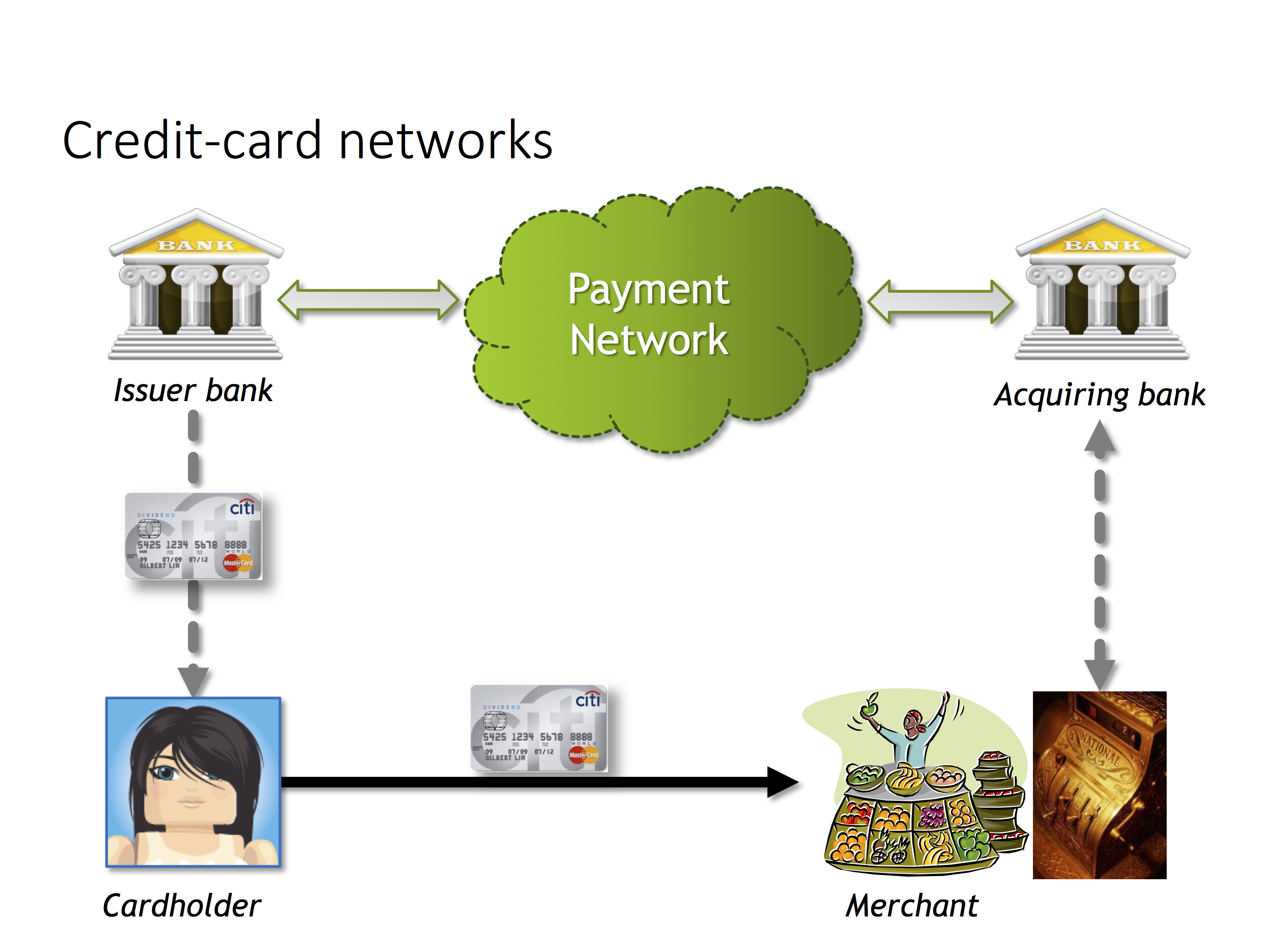
Roles in payment network

Roles in a typical payment network

Quick recap of the roles in a typical credit card transaction:

  • Card-holder is the person attempting to make a payment with their card
  • Merchant is the store where they are making a purchase. This could be a bricks-and-mortar store in meatspace with a cash register or an online ecommerce shop accepting payments from a web page.
  • Issuing bank: This is the financial institution who provided the consumer with their card. Typically the issuer
  • Acquiring bank: The counterpart to the acquirer, this is the institution that holds funds in custody for the merchant when payments are made
  • Payment network, in other words Visa or MasterCard. This is the glue holding all of the issuers and acquirers together, orchestrating the flow of funds from acquirers to issuers. One note about American Express and Discover: In these networks, the network itself also operates as issuer and acquirer. While they partner with specific banks to issue co-branded cards (such as a “Fidelity AmEx” card”) with revenue-sharing on issuer fees, the transaction processing is still handled by the network itself.

In reality there can be many more middle-man in the transaction vying for a cut of the fees, such as payment processors who provide merchants with one-stop solutions that include all the hardware and banking relationships.

Following the money

Before delving into what happens with fraudulent transactions, let’s consider the sunny-day path. Merchant pays some percent of the purchase, typically 2-3% for credit transactions depending on type of card, much lower for debit cards routed through the different PIN-debit network, for the privilege of accepting cards in return for the promise of higher sales and reduced overheads managing unwieldy bundles of cash. Lion’s share of that goes to the issuer— after all, they are the ones on the hook for actual credit risk– the possibility that having made a purchase and walked out of the store with their shiny object on borrowed money, the consumer later defaults on the loan and does not pay their credit card bill. (That also explains why debit cards can be processed with much lower overhead and why retailers are increasingly pushing for debit: in that case the transaction only clears if the card-holder already has sufficient funds deposited in their bank account. There is no concern about trying to recoup the payment down the road with interest.) Remainder of that fee is divvied up between acquirer, payment network and payment processors facilitating the transaction along the way.

When things go wrong

What about fraudulent transactions? First note that issuing bank itself is in the loop for every transaction. So the bank has an opportunity to decline any purchase if the issuer decides that the charge is suspicious and unlikely to be authorized by the legitimate cardholder. (That alone should be a cue that issuers in fact have a stake in preventing fraud: otherwise they should cynically take the position that every purchase is revenue opportunity, the higher the sum the greater the commission, and green-light everything and let someone else worry about fraud.) But those systems are statistical in nature, predicated on identifying large deviations from spending patterns while also trying to avoid false-positives. If a customer based in Chicago has suddenly starts spending large sums in New York, is that a stolen card or are they on vacation? Some amount of fraud inevitably gets past the heuristics. When the consumer calls up their bank at the end of the month and contests a particular charge appearing on their bill, the fundamental question stands: who will be left holding the bag?

[continued in part II]

CP

Android Pay: proxy no more

[Full disclosure: this blogger worked on Google Wallet 2011-2013]

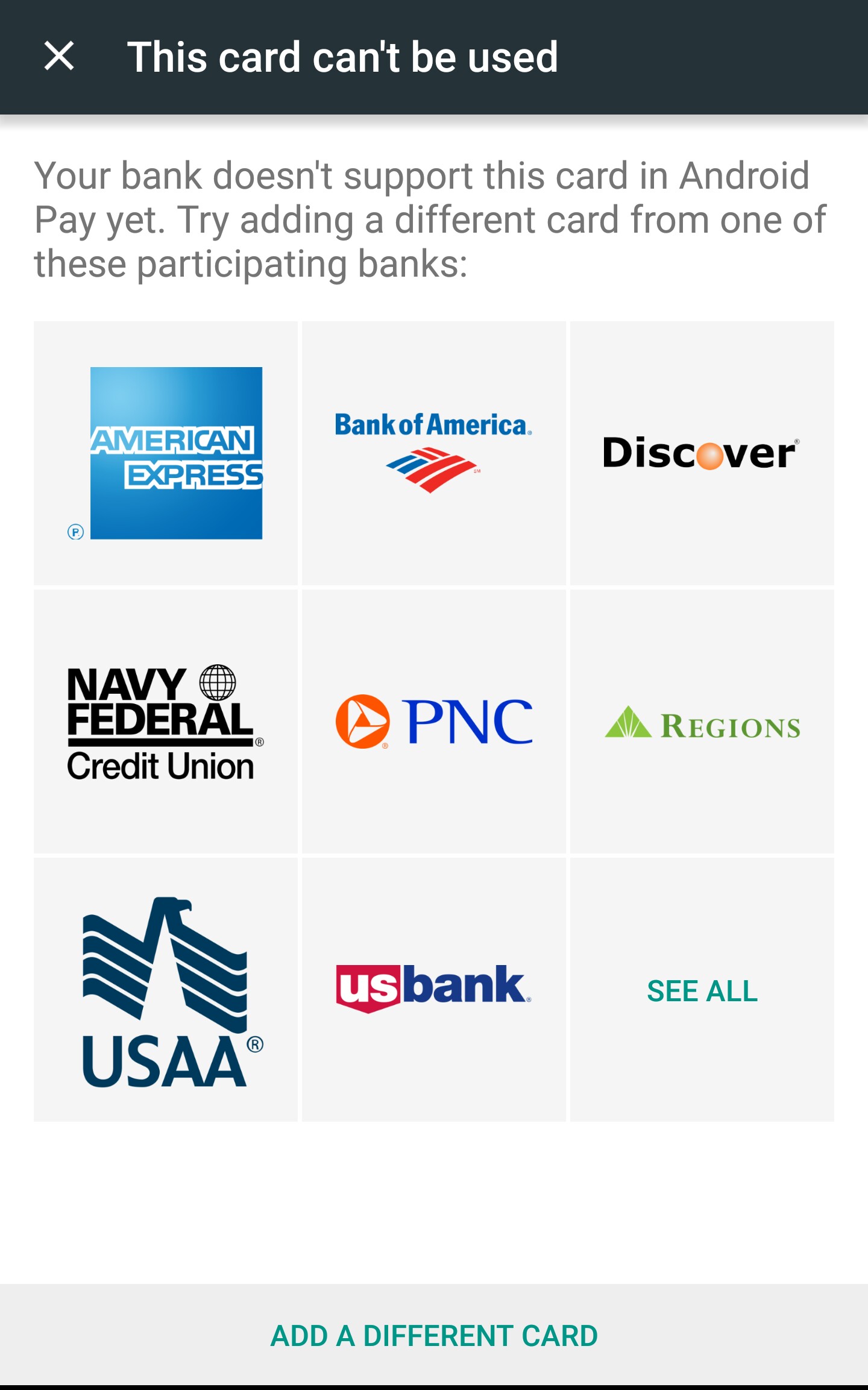
This blogger recently upgraded to Android Pay, one half of the mobile wallet offering from Google. The existing Google Wallet application retains functionality for peer-to-peer payments, while NFC payments are moved to the new Android Pay. At least that is the theory. In this case NFC tap-and-pay stopped working altogether. More interestingly, trying add cards from scratch showed that was not just a routine bug or testing oversight.  It was a deliberate shift in product design: the new version is no longer relying on “virtual cards” but instead integrates directly with card issuers. That means all cards are not created equal; only some banks are supported. (Although there may have been an ordinary bug too— according to Android Police, there is supposed to be an exception made for existing cards already used for NFC payments.)

Not all cards are welcome

Not all cards are welcome in Android Pay

Let’s revisit the economic aspects of the virtual-card model and outline why this shift was inevitable. Earlier blogs posts covered the technical aspects of virtual cards and how they are used by Google Wallet. To summarize, starting in 2012 Google Wallet did not in fact use the original credit-card when making payments. Instead a virtual-card issued by Google** is provisioned to the phone for use in all NFC transactions. That card is “virtual” in two senses. First it is an entirely digital payment option; there is no plastic version that can be used for swipe transactions. (There is a separate plastic card associated with Google Wallet; confusingly that card does not have NFC and follows a different funding model.) Less obvious, consumers do not have to fill out an application or pass a credit-history check to get the virtual card; in fact, it never shows up in their credit history. At the same time that card is very “real” in the sense of being a full-fledged MasterCard with 16 digit card number, expiration date and all the other attributes that make up a standard plastic card.

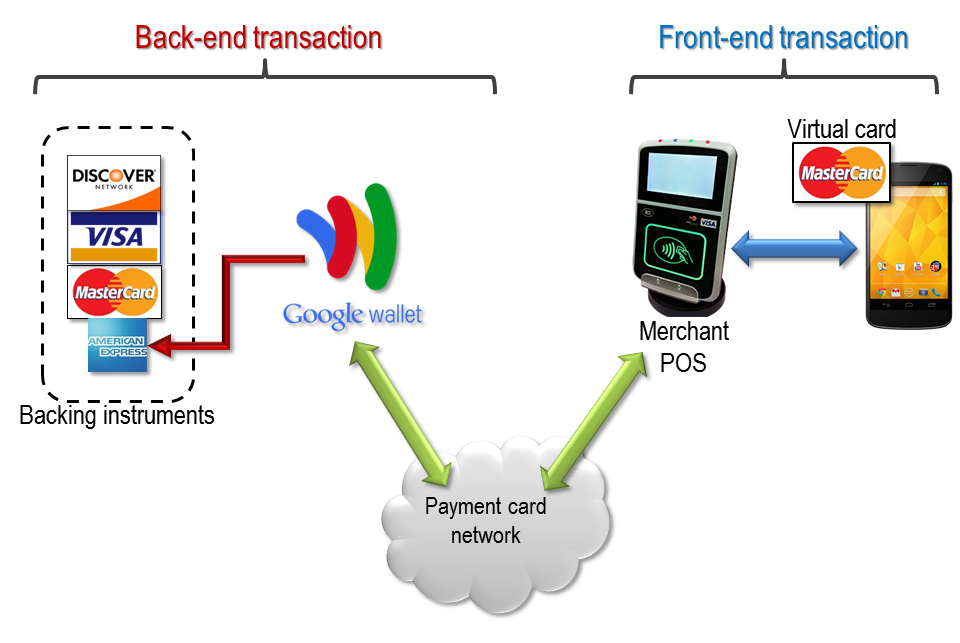
Proxying NFC transactions with a virtual card

Proxying NFC transactions with a virtual card

When the virtual card is used at some brick-and-mortar retailer for a purchase, the point-of-sale terminal tries to authorize the charge as it would for any other vanilla card. By virtue of how transactions are routed on payment networks such as Visa/MasterCard, that charge is eventually routed to the “issuing bank”— which happens to be Google. In effect the network is asking the issuer: “Can this card be used to authorize pay $21.55 to merchant Acme?” This is where the real-time proxying occurs. Before answering that question from the merchant, Google first attempts to place a charge for the same amount on one of the credit-cards supplied ahead of time by that Google Wallet user. Authorization for the virtual-card transaction is granted only if the corresponding charge for the backing instrument goes through.

(Interesting enough, that design makes NFC virtual card a prepaid card on steroids. Typically a prepaid-card is loaded ahead of time with funds and that balance later gets withdrawn down to pay for a purchase. Virtual card is doing the same thing on a highly compressed timeline: the card is “funded” by charging the backing credit-card and exact same balance is withdrawn to pay the merchant. The difference: it happens in a matter of seconds in order to stay under the latency requirements of payment networks.)

Why proxy?

So why all this complexity? Because it allows supporting any card without additional work required by the issuer. Recall that setting up a mobile NFC wallet requires provisioning a “payment instrument” capable of NFC transactions to that device. That is not just a matter of recording a bunch of details such as card number and CVV code once. Contactless payments use complex protocols involving cryptographic keys that generate unique authorization codes for each transaction. (This is what makes them more resistant to fraud involving compromised point-of-sale terminals, as in the case of Target and Home Depot breaches.) Those secret keys are only known to the issuing bank and can not be just read off the card-face by the consumer. That means provisioning a Citibank NFC card requires the mobile wallet to integrate with Citibank. That is how the original Google Wallet app worked back in 2011.

The problem is that such integrations do not scale easily, especially when there is a hardware secure element in the picture. There is a tricky three-way dance between the issuing bank who controls the card, mobile-wallet provider that authors the software on the phone and trusted service manager (TSM) tasked with managing over-the-air installation of applications on a family of secure elements. Very little about the issuer side is standardized, meaning that proliferating issuers also means a proliferation in the number of one-off integrations required to support each card.

Virtual cards cleanly solve that problem. Instead of having to integrate against incompatible provisioning systems from multiple banks, there is exactly one type of card provisioned to the phone. Integration with existing payment networks is instead relegated to the cloud, where ordinary online charges are placed against a backing instrument.

Proxy model: the downsides

While interesting from a technical perspective and addressing one of the more pressing obstacles to NFC adoption— namely users stymied by their particular financial institution not being supported— there are also clear downsides to this design.

Economics

As industry observers were quick to point out soon after launch, the proxy model is not economically viable at scale. Revisiting the picture above, there is a pair of transactions:

  1. Merchant places a charge against a virtual card
  2. Issuer of the virtual card places a charge for the identical amount against the consumer’s credit card

Both are going through credit-card networks. By virtue of how these network operate, each one incurs a fee, which is divvied up among various parties along the way. While the exact distribution varies based on network as well bargaining positions of issuer/acquirer banks, an issuing acquiring bank typically receives the lion’s share but less than 100%. For the above transactions, the provider of the virtual card is acting as issuer for #1 and merchant for #2. Google can expect to collect fees from the fronting instrument transaction while paying a fee for the backing charge.

In fact the situation is worse due to the different transaction types. The second charge is card-not-present or CNP, the same way online purchases are done by typing card numbers into a webpage. Due to increased risk of fraud, CNP transactions carry higher fees than in-store purchases where the customer presents a physical card and signs a receipt. So even if one could recoup 100% of the fee from the fronting instrument, that would typically not cover the cost of backing transaction. (In reality, the fees are not fixed; variables such as card type can greatly complicate the equation. For example, while the fronting instrument is always a MasterCard, the backing instrument could be an American Express which typically boasts some of the highest fees, putting the service deeper into the red.)

Concentrating risk

The other problem stems from in-store and CNP modes having different consequences in the event of disputed transactions. Suppose the card-holder alleges fraud or otherwise objects to a charge. For in store transactions with a signed receipt, the benefit of the doubt usually goes to the merchant, and the issuing bank is left eating the loss. For card-not present transactions where merchants can only perform minimal verification of card-holder, the opposite holds: process favors the consumer and the merchant is left holding the bag. Looking at the proxy model:

  • Google is the card issuer for an in-store purchase
  • Google is the merchant of record for the online, card-not-present charge against the backing instrument

In other words, the model also concentrates fraud risk with the party in the middle.

Great for users, bad for business?

In retrospect the virtual-card model was a great boon for consumers. From the user perspective:

  • You can make NFC payments with a credit card from any bank, even if your bank is more likely to associate NFC with football
  • You can use your preferred card, even at merchants who claim to not accept it. A merchant may not honor American Express but the magic of virtual cards has a MasterCard channeling for that AmEx. Meanwhile the merchant has no reason to complain because they are still paying ordinary commissions and not the higher AmEx fee structure.
  • You continue earning rewards from your credit-card. In fact that applies to even category-specific rewards, thanks to another under-appreciated feature of the proxy model. Some rewards programs are specific to merchant types, such as getting 2x cash-back only when buying gas. To retain that behavior, the proxy model can use different merchant-category code (MCC) during each backing charge. When the virtual card is used to pay at a gas station, Google can relay the appropriate MCC for the backing transaction.

From a strategic perspective, these subsidies can be lumped in with customer-acquisition costs, similar to Google Wallet initially offering a free $10 when it initially launched or Google Checkout doing the same a few years back. Did picking up the tab for three years succeed in boot-strapping an NFC ecosystem? Here the verdict is mixed. Virtual cards successfully addressed one of the major pain-points with early mobile wallets: limited selection of supported banks. Unfortunately there was an even bigger adoption blocker for Google Wallet: limited selection of wireless carriers. Because Verizon, AT&T and T-Mobile had cast their lot with the competing (and now failed) ISIS mobile wallet, these carriers actively blocked alternative NFC solutions on their devices. The investment in virtual cards had limited dividends because of a larger reluctance to confront wireless carriers. It’s instructive that Apple pursued a different approach, painstakingly working to get issuers on-board to cover a large percentage of cards on the market—but decidedly less than the 100% coverage achievable with virtual cards.

CP

** More precisely issued by Bancorp under contractual agreement with Google.

Getting by without passwords: local login (part II)

[Part of a series on getting by without passwords]

Before diving into implementation details, a word of caution: local login with hardware tokens is more of a convenience feature than a security improvement. Counter-intuitive as that might sound, using of strong public key cryptography buys very little against the relevant threat model for local access: proximity to the device. A determined adversary who has already gotten within typing distance of the machine and staring at a login prompt does not need to worry about whether it is requesting a password or some new-fangled type of authentication. That screen can be bypassed altogether, for example by yanking the drive out of the machine, connecting it to another computer and reading all of the data. Even information stored temporarily in RAM is not safe against cold-boot attacks or malicious USB devices that target vulnerable drivers. For these reasons there is a very close connection between local access-control and disk encryption. Merely asking for a password to login is not enough when that is a “discretionary” control implemented by the operating system, “discretionary” in the sense that all of the data on disk is accessible without knowing that password. That would be trivially bypassed by taking that OS out of the equation, accessing the disk as a collection of bits without any of the OS-enforced access controls.

For this reasons local smart-card logon is best viewed as a usability feature. Instead of long and complex passwords, users type a short PIN. That applies not only for login, but for every time screen is unlocked after screen-saver kicks in due to inactivity. By contrast applying the same formula for remote authentication over a network does represent a material improvement. It mitigates common attacks that can be executed without proximity to the device, such as phishing or brute-forcing passwords.

With that disclaimer in mind, here is an overview of login with hardware tokens across three common operating systems. Emphasis is on finding solutions that are easily accessible to an enthusiast; no recompiling of kernels or switching to an entirely different Linux distribution. One note on terminology: the discussion will use “smart-card” as catch-all phrase to refer to cryptographic hardware, with the understanding that its physical manifestation can assume other forms including smart-cards, NFC tags and even smart-phones.

Windows

Windows supports smart-card login using Active Directory out-of-the-box. AD is the MSFT solution for centralized administration of machines in a managed environment, such as a large company or branch of government with thousands of devices being maintained by an IT department. While AD bundles many different features, the interesting one for our purposes is a notion of centralized identity. While each machine joined to a particular AD domain still has local accounts— accounts that are only meaningful to that machine and not recognized anywhere— it is also possible to login using a domain account that is recognized across multiple devices. That involves verifying credentials with the domain controller using Kerberos. Kerberos in turn has an extension called PKINIT to complete the initial authentication using public-key cryptography. That is how Windows implements smart-card logon.

That’s all good and well for enterprises but what about the average home user? A typical home PC is not joined to an AD domain- in fact the low-end flavors of Windows that are typically bundled with consumer devices are not even capable of being joined to a domain. It’s one of those “enterprise features” only reserved for more the more expensive SKUs of the operating system, as a great example of discriminatory pricing to ensure those companies don’t get away with buying one of the cheaper versions. Even if the user was running  the right OS SKU, they would still require some other machine running Windows Server to act as the domain controller. In theory one can devise kludges such as a local virtual machine running on the same box to serve as the domain controller, but these fall short of our criteria for being within reach of a typical power-user.

Enter third-party solutions. These extend the Windows authentication framework for local accounts to support smart cards without introducing the extra baggage of Active Directory or Kerberos. A past blog post from January 2013 described one solution using eIDAuthenticate.


eIDAuthenticate entry

eIDAuthenticate entry

Choosing a certificate from attached card

Choosing a certificate from attached card

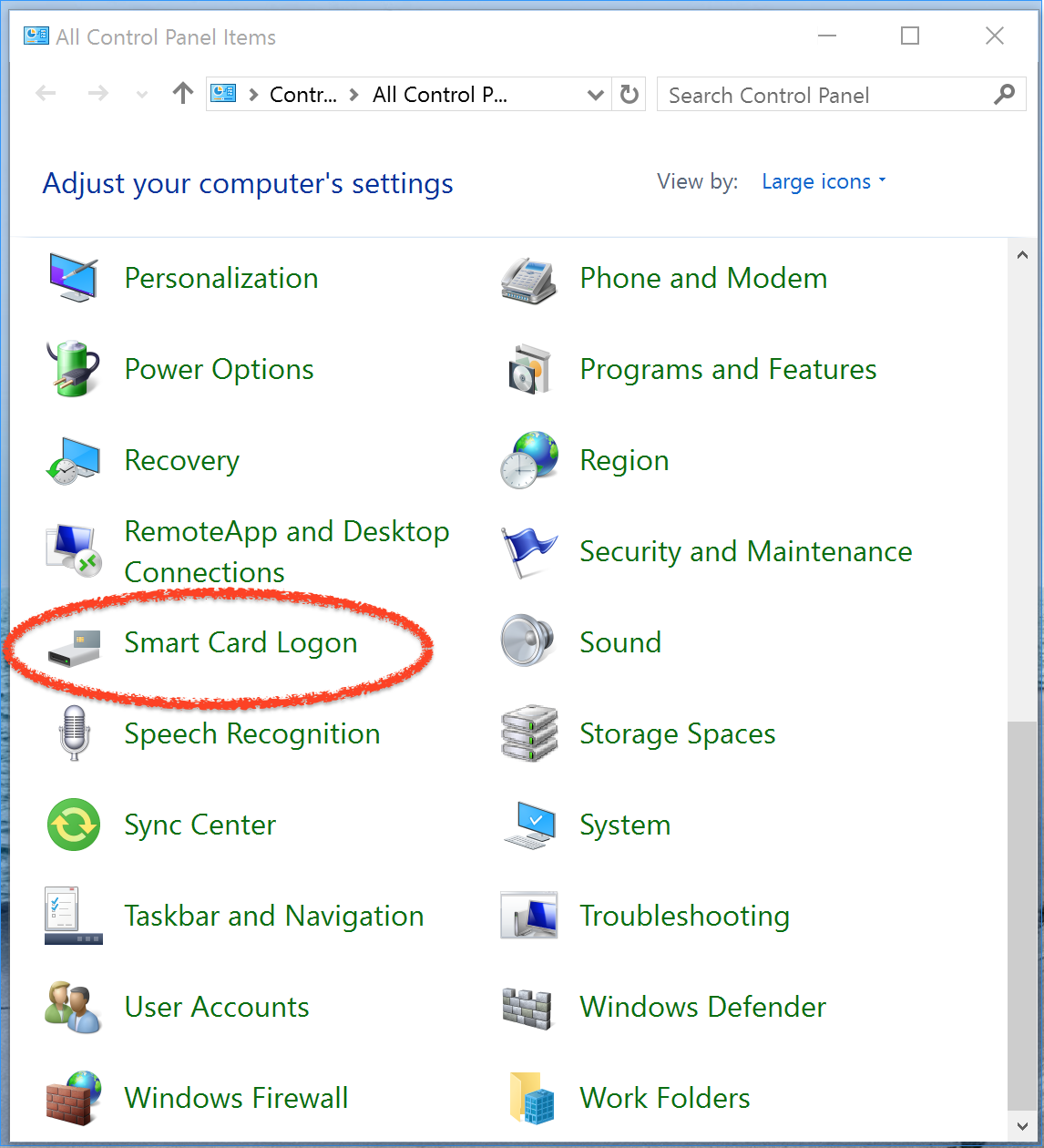
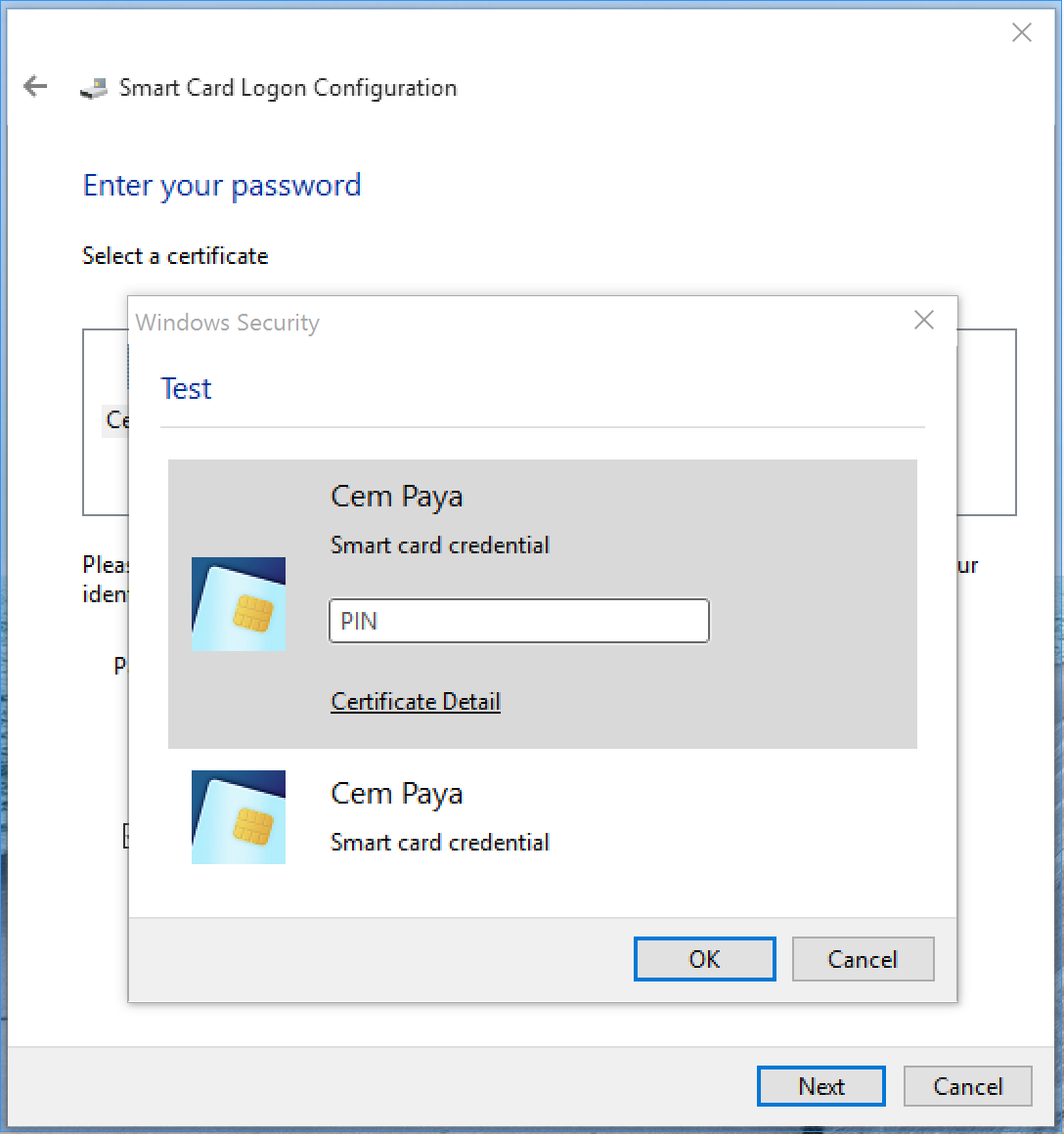
eIDAuthenticate allows associating a trusted certificate with a local Windows account via the control panel. The user can later login to the account using a smart-card that has the corresponding private-key for that certificate. (eIDAuthenticate can also disable the password option and require smart-cards. But the same effect can be obtained less elegantly by randomizing the password.)

eIDAuthenticate setup— trial run

eIDAuthenticate setup— trial run

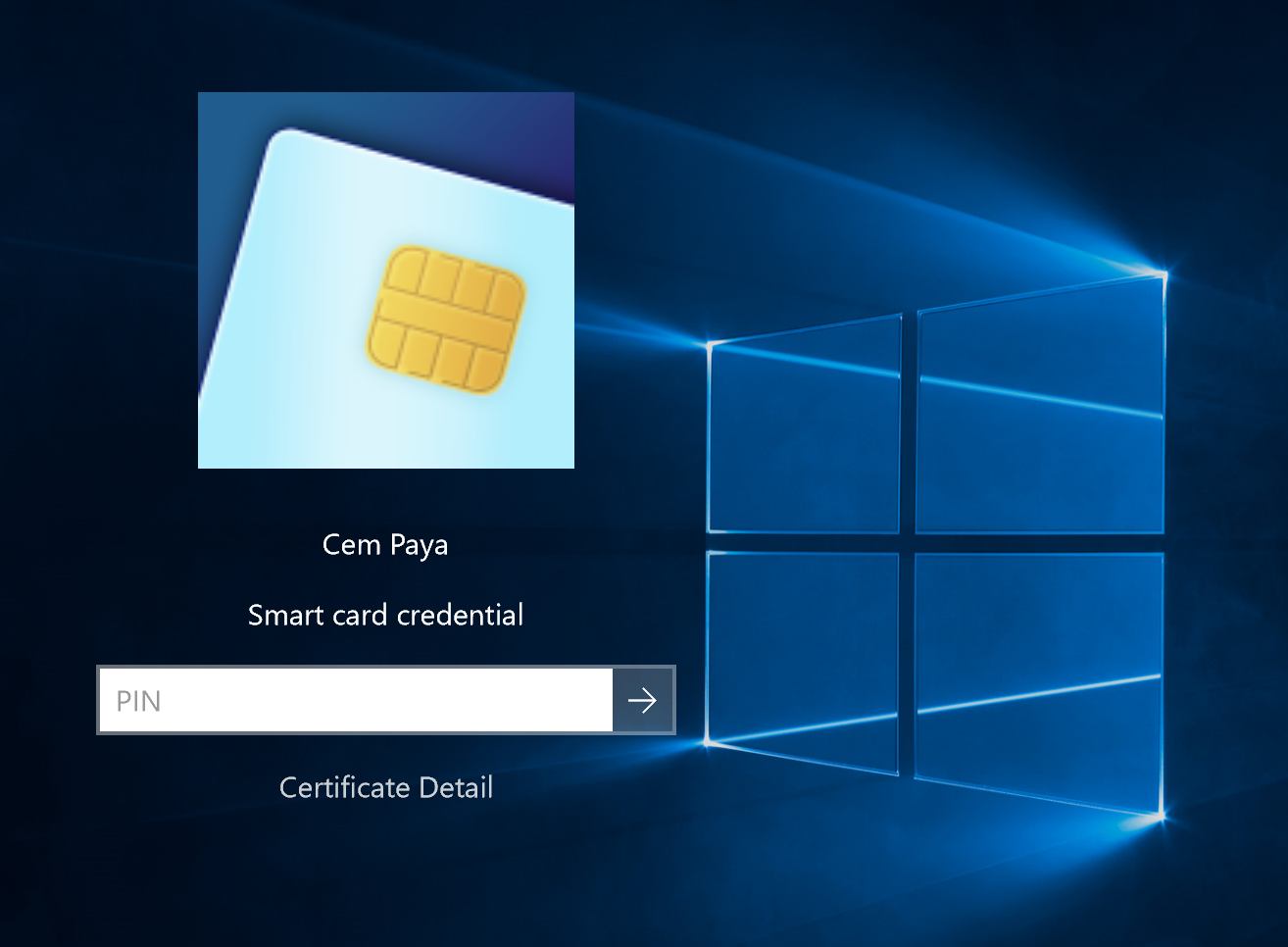
Using smart-card for local logon

Using smart-card for local logon

OSX

This case is already covered in a post from February on smart-card authentication in OS X which includes screenshots of the user-experience.

Linux / BSD

Unix flavors have by far the most complete story for authentication with smart-cards. Similar to the notion of extensible architecture of credential providers in Windows, Linux has pluggable authentication modules or PAMs. One of these is pam-pkcs11 for using hardware tokens. As the name implies, this module relies on the PKCS #11 standard as an abstraction for interfacing with cryptographic hardware. That means whatever gadget we plan to use must have a PKCS #11 module. Luckily the OpenSC project ships modules covering a variety of different hardware, including PIV cards of interest for our purpose. The outline of a solution combining these raw ingredients looks like:

  • Install necessary packages for PC/SC, OpenSC & pam-pkcs11
  • Configure system to include the new PAM in the authentication sequence
  • Configure certificate mappings for pam-pkcs11 module

While the first two steps are straightforward, the last one calls for a more detailed explanation. Going back to our discussion of smart-card login on OS X, the process breaks down into two stages:

  • Mapping: retrieving a certificate from the smart-card, verifying its validity and determining which user that certificate represents
  • Proof-of-possession: Verifying that the user holds the private-key corresponding to the public-key in the certificate. Typically this involves prompting for a PIN and asking the card to perform some cryptographic operation using the key.

While there is occasional variety in the protocol used for step #2 (even within PKINIT, there are two different ways to prove possession of private-key) the biggest difference across implementations concerns the first part. Case in point:

  • Active Directory determines the user identity from attributes of the certificate, such as the email address or Universal Principal Name (UPN). Note that this is an open-ended mapping. Any certificate issued by a trusted certificate authority with the right set of fields will do the trick. There is no need to register each such certificate with AD ahead of time. If a certificate expires or is revoked, a new one can be issued with the same attributes without having to inform all servers about the change.
  • eIDAuthenticate has a far more rudimentary, closed-ended model. It requires explicitly enumerating certificates that are trusted for a local account.
  • Ditto for OSX, which white-lists recognized certificates by hash but at least can support multiple certificates per account.**

Flexible mapping

By contrast to these pam-pkcs11 has by far the most flexible and well-developed model. In fact it is not a single model so much as a collection of different mapping options. These include the OSX/eIDAuthenticate model as special case, namely enumerating trusted certificates by their digest. Other mappers allow trusting open-ended set of credentials, such as any certificate issued by a specific CA with a particular email address or distinguished name, effectively subsuming the Active Directory trust model. But pam-pkcs11 goes far beyond that. There are mappers for interfacing with LDAP directories and even a mapper for integrating with Kerberos. In theory it can even function without X509 certificates at all; there is an SSH-based mapper that looks at raw public-keys retrieved from the token and compares against authorized keys files for the user.

UI after detecting smart-card

UI after detecting smart-card

Command line smart-card usage

Command line smart-card usage

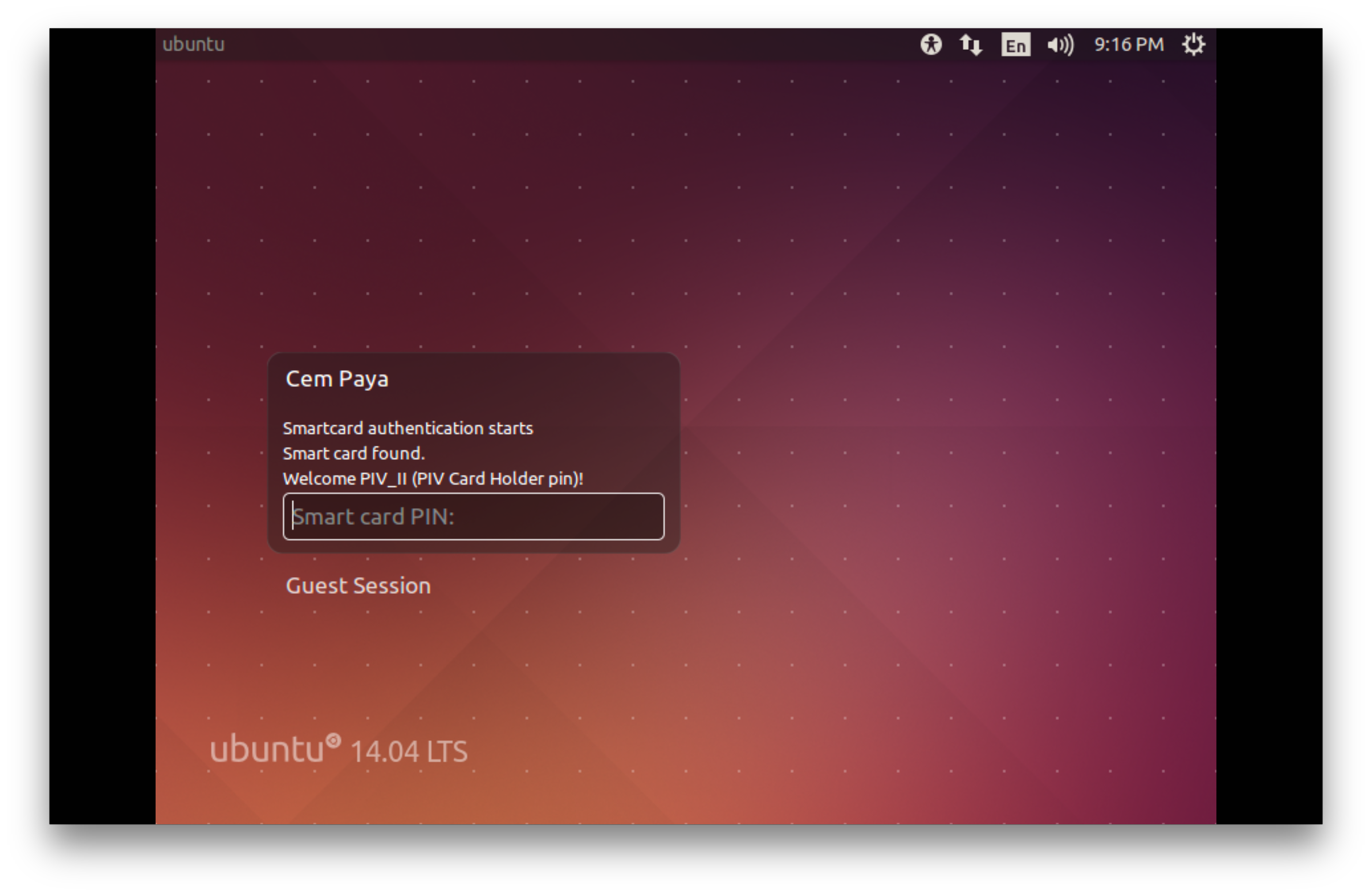
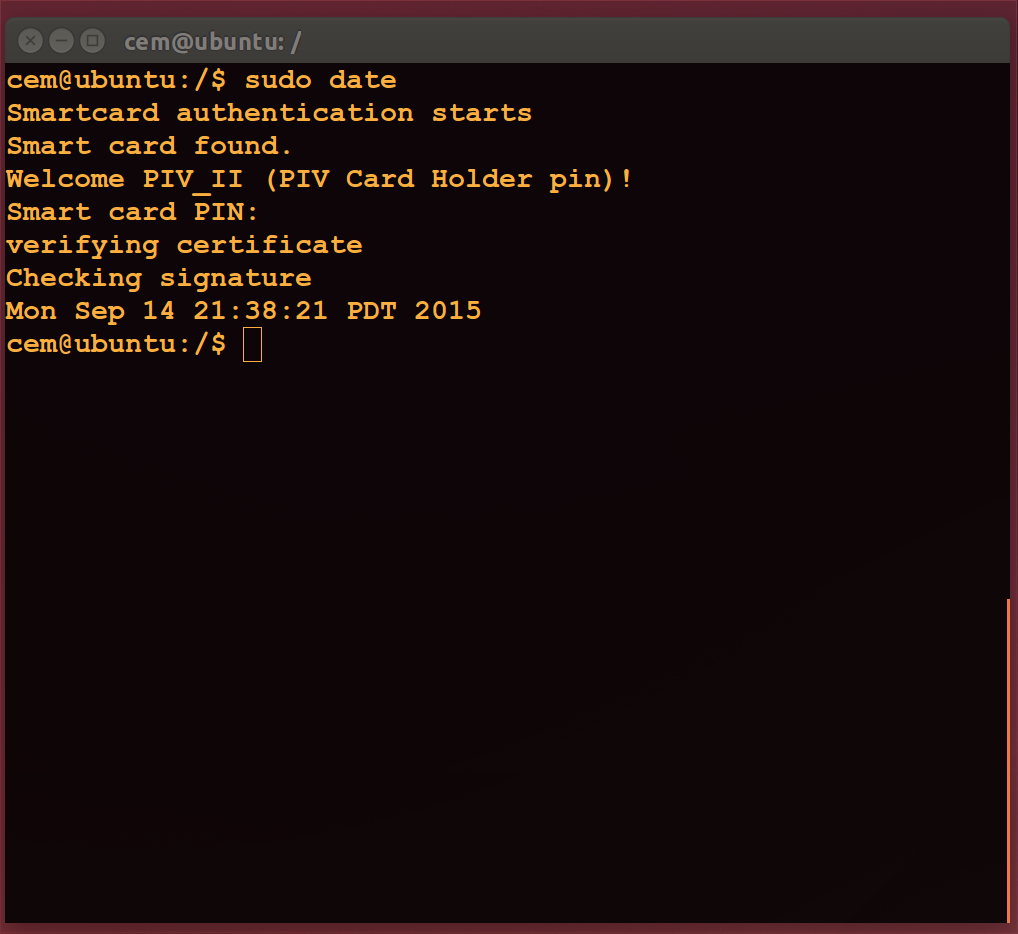
Assuming one or more mappers are configured, smart-card login changes the user experience for initial login, screen unlocking and command-line login, including sudo. Screenshots above give a flavor of this on Ubuntu 14.

CP

** OSX also appears to have hard-coded rules around what type of certificates will be accepted; for example self-signed certificates and those with an unrecognized critical extension are declined. That makes no sense since trust in the key is not coming from X509- unlike the case of Active Directory- but explicitly whitelisting of individual public-keys. The certificate is just a glorified container for public keys in this model.

Getting by without passwords: the case for hardware tokens

Summary/jump-ahead:

  1. OSX local login sans passwords
  2. Linux local login sans passwords
  3. LUKS disk-encryption sans passwords
  4. PGP email encryption sans passwords
  5. SSH using PIV cards/tokens sans passwords

For an authentication technology everyone loves to hate, there is still plenty of activity around passwords:

  • May 7 was international password day. Sponsored by the likes of MSFT, Intel and Dell the unofficial website urges users to “pledge to take passwords to the next level.”
  • An open competition to select a better password hashing scheme has recently concluded and crowned Argon2 as the winner.

Dedicated cryptographic hardware

What better time to shift gears from an endless stream of advice on Choosing Better Passwords? This series of posts will look at some pragmatic ways one can live without passwords. “Getting rid of passwords” is a vague objective and calls for some clarification— lest trivial/degenerate solutions become candidates. (Don’t like typing in a password? Enable automatic login after boot and your OS will never prompt you.) At a high level, the objective is: replace use of passwords by compact hardware tokens that both improve security and reduce cognitive burden on users.

The scope of that mission goes beyond authentication. Typically passwords are used in conjunction with access control: logging into a website, connecting to a remote computer etc. But there are other scenarios: for example, full-disk encryption or protecting an SSH/PGP key stored on disk typically involves typing a passphrase chosen by the user. These are equally good candidates in search of better technology. For that reason we focus on using cryptographic hardware, instead of biometrics or “weak 2-factor” systems such as OTP which are trivially phishable. Aside from their security deficiencies, they are only usable for authentication and by themselves can not provide a full suite of functionality such as data encryption or document signing.

Hardware tokens have the advantage that a single token can be sufficient to displace passwords in a variety of scenarios and even multiple instances of the same scenario, such as logging into multiple websites each with their own authentication system. (In other words, no identity federation or single sign-on, otherwise the solution is trivial.) While reusing passwords is a dangerous practice that users are constantly cautioned against,  reusing same public-key credentials across multiple sites presents minimal risk.

It turns out the exact model of hardware token or its physical form-factor (card vs USB token vs mobile-device vs wearable) is not all that important, as long as it implements right functionality, specifically public-key cryptography. More important for our purposes is support from commodity operating systems with device-drivers, middleware etc. to provide the right level of interoperability with existing applications. The goal is not overhauling the environment from top to bottom by replacing every app, but working within existing constraints to introduce security improvements. For concrete examples here, we will stick with smart-cards and USB tokens that implement the US government PIV standard, which enjoys widespread support across both proprietary and open-source solutions.

PIN vs password: rearranging deck chairs?

One of the first objections might be that such tokens typically have a PIN of their own. In addition to physical possession of the token, the user must supply a secret PIN to convince it to perform cryptographic operations. That appears to contradict the original objective of getting rid of passwords. But there are two critical differences.

First as noted above, a single hardware token can be used for multiple scenarios. For example it can be used for login to any number of websites and send while sharing a password across multiple sites is a bad idea. In that sense the user only has to carry one physical object and remember one PIN.

More importantly, the security of the system is much less dependent on the choice of PIN compared to single-factor systems based on a password. PIN is only stored on and checked by the token itself. Without physical possession of the token it is meaningless. That is why short numeric codes are deemed sufficient; the bulk of the security is provided by having tamper-resistant hardware managing complex, random cryptographic keys that users could not be expected to memorize. You will not see elaborate guidelines on choosing an unpredictable PIN by combining random dictionary words. PIN is only used as an incremental barrier to gate logical access after the much stronger requirement of  access to the hardware. (Strictly speaking, “access” includes the possibility of remote control over a system connected to the token;  in other words compromising a machine where the token is used. While this is a very realistic threat model, it still relies on the user physically connecting their token to an attacker-controlled system.)

Here is a concrete example comparing two designs:

  • First website uses passwords to authenticate users. It stores password hashes in order to be able to validate logins.
  • Second website uses public-key cryptography to authenticate users. Their database stores a public-key for each user. (Corresponding private-key lives on a hardware token with a PIN, although this is an implementation detail as far as the website is concerned.)

Suppose both websites are breached and bad guys walk away with contents of their database. In the first scenario, the safety of a user account is at least partially a function of their skill at choosing good passwords. You would hope the website used proper password-hashing to make life more difficult for attackers, by making it costly to verify each guess. But there is a limit to that game. The costs of verifying hashed passwords increase alike for attackers and defenders attacker. Some users will pick predictable passwords and given enough computing resources these can be cracked.

In the second case, the attacker is out of luck. Difficulty of recovering a private-key from the corresponding public key is the mathematical foundation on which modern cryptography rests. There are certainly flaws that could aid such an attack: for example, weak randomness when generating keys has been implicated in creating predictable keys. But those factors are a property of hardware itself and independent of user skills. In particular, quality of the user PIN— whether it was 1234 or 588429301267— does not enter into the picture.

User skill at choosing a PIN only become relevant in case an attacker gains physical access. Even in that scenario, attacks against the PIN are far more difficult.

  • Well-designed tokens implement rate limiting, so it is not possible to try more than a handful guesses via the “official” PIN verification interface.
  • Bypassing that avenue calls for attacking the tamper-resistance of the hardware itself. This is certainly feasible given proper equipment and sufficient time. But assuming the token had appropriate physical protections, it is a manual, time-consuming attack that is far more costly than running an automated cracker on a password dump.

Starting out local

With that context, the next series of posts will walk through examples of replacing use of passwords in each scenario with a hardware token. In keeping with the maxim “be the change you want to see in the world,” we focus on use-cases that can be implemented by unilaterally by end-users, without requiring other people to cooperate. If you wanted to authenticate to your bank using a hardware token and their website only supports passwords, you are out of luck. There isn’t much that can be done to meaningfully implement a scheme that offers comparable security within that framework. You could implement a password manager that users credentials on the card to encrypt the password, but at the end of the day the protocol still involves submitting the same fixed secret over and over. By contrast local uses of hardware tokens can be implemented without waiting for any other party to become enlightened. Specifically we will cover:

  1. Logging into a local machine. Spoiler alert- due to how screen unlocking works, this also covers that vexing question of “how do I unlock my screen using NFC?”
  2. Full-disk encryption
  3. Email encryption and signing with PGP

Also worth pointing out: SSHing to remote server with PIV token was covered earlier for OSX. Strictly speaking this is not “local” usage, but it satisfies the criteria of not requiring changes to systems outside our control. Assuming the remote server is configured for public-key authentication, how users are managing their private-key on their end remains transparent to other peers.

CP

[Updated 05.14.16 with table of contents]

Downside to security standards: when vulnerable is better than uncertified

Are security standards effective? The answer depends to a great extent on the standards process and certification process in question. On the one hand, objective third-party evaluations with clearly spelled-out criteria represent a big improvement over vendors’ own marketing fiction. In a post-Snowden world it has become common to throw around meaningless phrases such as “military grade” and “NSA proof” to capitalize on increased consumer awareness. At the same there is the gradual dawning that “certified” does not equal secure. For all the profitable consulting business PCI generates, that particular compliance program could not save Target and Home Depot from massive data breaches. One could argue that is a symptom of PCI being improperly designed & implemented, rather than any intrinsic problem with information security standards per se. After all it is the canonical example of fighting last year’s war: there is still verbiage in the standard around avoiding WEP and single-DES, as if the authors were addressing time-travelers from 1990s. Narrowing our focus to more “reputable” standards such as FIPS or Common Criteria which have long histories and fewer examples of spectacular failures, the question becomes: are consumers justified in getting a warm and fuzzy feeling on hearing the words “FIPS-certified” and “CC EAL5”?

When vendors are left to their own devices

On the one hand, it is easy to point out examples of comparable products where one model that is not subject to a certification process has demonstrable weaknesses that would have been easily caught during testing. BlackHat briefings recently featured a presentation on extracting 3G/4G cryptographic secrets out of a SIM card using elementary differential power-analysis. For anyone working on cryptographic hardware— and SIM cards are just smart-cards manufactured in a compact form factor designed to fit into a mobile device— this was puzzling. These attacks are far from novel; earliest publications date back to late 1990s. Even more remarkable, off-the-shelf equipment was sufficient to implement this attack against modern hardware. No fancy lab with exotic equipment required. The attack represents a complete break of the SIM security model. These cards have one job: safeguard the secret keys that authenticate the mobile subscriber to the wireless network. When these keys can be extracted and moved to another device, the SIM card has been effectively “cloned”— it has failed at its one and only security objective. How did the manufacturer miss such an obvious attack vector?

It turns out that vanilla SIM cards are not subject to much in the way of security testing. Unless that is, they are also going to be used for something  more critical: mobile payments over NFC. More commonly known as UICC, these units which are also designed to hold credit-card data must go through a series of rigorous evaluations defined by EMVCo. Examples of QA include both passive measurement of side-channel leaks, as well as attempting active attacks to deliberately induce faults in the hardware by manipulating power supply or zapping the chip with laser pulses. Amateur mistakes such as the one covered in BH presentation are unlikely to survive that level of scrutiny.

Frozen in time

From an economic perspective this makes sense. In the absence of external standards, manufacturers have little incentive to implement a decent security program. They are still free to make any number of marketing assertions, which is cheaper than actually doing the work or paying a  qualified, independent third-party to verify these assertions. It is tempting to conclude that more mandatory certification programs can only help bring transparency to this state of affairs: more standards applied to a broader range of products. But there is an often ignored side-effect where inflexible application of certification programs can have the effect of decreasing security. Mindless insistence on only using certified products can introduce friction to fixing known vulnerabilities in fielded systems. This is subtly distinct from the problem of delaying time to market or raising cost of innovation. That part goes without saying: introducing a new checklist as prerequisite to shipping certainly extends development schedule, while empowering third-party certification labs as gatekeepers to be paid by the vendor is effectively a tax on new products. Meanwhile some customer with an unsolved problem is stuck waiting while the wheels are turning on the certification process. That outcome is certainly suboptimal but the customer is not stuck with a defective product with a known exposure.

By contrast, consider what happens when an actual security flaw is discovered in a product that has already been through a certification process, bears the golden stamp of approval and has been deployed by thousands of customers. Certification systems are not magical, they can not be expected to catch all possible defects. (Remember the early optimism equating “PCI compliance” with a guarantee against credit-card breaches?) A responsible vendor can act on the discovery and make improvements to the next version of the product to address the weakness. Given that most products are designed to have some type of update mechanism, they may even be able to ship a retroactive fix that existing customers can apply to their units in the field to mitigate the vulnerability. Perhaps it is a firmware update or recommend configuration change for customers.

There is a catch: this new version may not have the all-important certification. At least, not initially out of the gate. Whether or not changes reset certification and require another pass varies by standard. Some are more lenient and scale the process based on extent of changes. They might exempt certain “cosmetic” improvements or offer fast-tracked “incremental” validation against an already vetted product. But in all cases there is now a question about what happens to the existing certification status. That question must be resolved before the update can be delivered to customers.

Certifiably worse-off

That dilemma was impressed on this blogger about 10 years ago on the Windows security team. When research was published describing new cache-based side-channel attacks affecting RSA implementations, it prompted us into evaluating side-channel protections for existing Windows stack. This was straightforward for the future  version of cryptography stack dubbed CNG. Slated for Vista, that code was still years from shipping, and there was no certification status to worry about.

Fixing the existing stack (CAPI) proved to be an entirely different story. Based on BSAFE library, the code running on all those XP and Windows Server 2003 boxes out there already boasted FIPS 140 certifications as a cryptographic module. The changes in question were not cosmetic; they were at the heart of multi-precision integer arithmetic used in RSA. It became clear that changing that code any-time soon with a quick update such as the monthly “patch Tuesday” would be a non-starter. While we could get started on FIPS recertification with one of the qualified labs, there was no telling when that process would conclude. Most likely outcome would be a CAPI update in a state of FIPS-limbo. That would be unacceptable for customers in regulated industries— government, military, critical-infrastructure— who are required by policy to operate systems according to FIPS compliance at all times. Other options were no better. We could exempt some Windows installations from the update, for example using  conditional logic that reverts back to existing code paths on systems configured in strict FIPS mode. But that would paradoxically disable a security improvement on precisely those systems where people most care about security.

All things considered, delaying the update in this example had relatively low risk. The vulnerability in question was local information disclosure, only  exploitable in specific scenarios when hostile code coexists on same OS with trusted applications performing cryptography. While that threat model became more relevant later with sand-boxed web-browser designs pioneered by Chrome, in the mid-2000s most likely scenario would have been terminal server installations shared by multiple users.

But the episode serves as a  great demonstration of what happens when blind faith in security certifications is taken to its logical conclusion: Customers prefer running code with known vulnerabilities as long as it has the right seal of approval, compared to new version that lives under a cloud of “pending certification.”

Designing for updates

The root cause of these situations is not limited to a rigid interpretation of standards that requires running compliant software 100% of the time even when it has a demonstrable flaw. Security certifications themselves are perpetuating a flawed model based on blessing static snapshots. Most certifications pass judgement on a very specific version of a product evaluated in a very specific configuration and frozen in time. In a world where threats and defenses constantly evolve, one would expect that well-designed products will also change in lockstep. Even products that are traditionally considered “hardware” such as firewall appliances, smart-cards and HSMs have significant amount of software that can be updated in the field. Arguably the capability for delivering new improvements in response to new vulnerabilities is itself an important security consideration, one that is under-valued by criteria focused on point-in-time evaluations.

So the solutions are two fold:

  • More flexible application of existing standards to accommodate a period of uncertainty following a new update being available before it has received official certification. There is already a race against the clock between defenders trying to patch their systems and attackers trying to exploit known vulnerabilities- and the existence of a new update from the vendor tips off even more would-be adversaries, increasing the second pool. There is no reason to further handicap defenders by waiting on the vagaries of third-party evaluation process.
  • Wider time-horizon for security standards. Instead of focusing on point-in-time evaluations, standards have to incorporate the possibility that a product may require updates in the field. That makes sense even for static evaluations: software update capabilities themselves often create vulnerabilities that can be exploited to gain control over a system. But more importantly, products and vendors need a story around how they can respond to new vulnerabilities and deliver updates (so they do not end up with another Android) without venturing into the territory of “non-certified” implementations.

CP

Software auto-updates: revisiting the trade-offs

Auto-updating software sounds like a great idea on paper: code gets better and repairs its own defects magically, without the user having to lift a finger. In reality it has a decidedly mixed track record. In case you missed the latest example, a buggy Windows 10 update caused machines to get into reboot loop. This is far from the first time that Redmond shipped faulty software updates. But it raises the stakes for automatic-update features, since MSFT has drawn a line in the sand with mandatory updates in Windows 10.

That makes it a good time to review the arguments for and against auto-updates:

  • Customers get a better product sooner, with fewer defects and enhanced functionality. Often users lack incentives to go out of their way to apply updates. Significant improvements could be hidden under the hood, without the benefit of shiny objects to lure users. Mitigations for security vulnerabilities are the prime example of invisible yet crucial improvements. In the absence of automatic mechanism for applying updates, few people would go out of their way to install something with non-descriptive name along the lines of “KB123456 Fix for CVE-2015-1234.” (But this may be changing, now that mainstream media routinely covers actively exploited vulnerabilities in Adobe Reader, Flash and IE. It’s as if journalists were enlisted into a coordinated public awareness campaign for security updates.)
  • Makes life easier for the vendor, with long-term benefits for customers. Having all users on the latest version of the product greatly reduces development costs, compared to actively supporting multiple versions for customers who have decided to not update. All new feature development happens against the latest version. Security fixes only have to be developed once, not multiple times for slightly different code-bases each with their quirks. Quality assurance is also helped by having only one version to check against, reducing the probability of buggy updates.
  • In some cases the positive externalities extend beyond the software publisher. Keeping all users on the latest and greatest version of a platform can boost the entire ecosystem. When there are few versions of an application floating in use, other people building on top of that application also have an easier time. Remember the never-ending saga of Internet Explorer on XP? For years versions before IE9 were the bane of web developers: no support for modern HTML5, idiosyncratic security problems such as content-sniffing and random departures from web standards implemented faithfully by every other browser. One site went so far as to institute a surcharge for users on IE7, to compensate for the extra work required to support them. But IE versions did not start out that way: when released in 2001 IE6 was arguably a perfectly satisfactory piece of code. With MSFT having no leverage to migrate those users to a newer version, the company created a massive legacy problem not only for itself but for anyone trying to design a modern website who had to contend with the quirks and limitations of 10+ year old technology.

Downsides to auto-updating break down into several categories:

  • Collateral damage. This is probably the most common complaint about updates gone wrong. There seems to be a paucity of evidence around what percent of Windows updates need to be recalled due to bugs—and MSFT may be understandably reluctant to release that figure— but public instances of updates gone awry are ubiquitous.
  • Downtime. Often updates require restarting the application, if not rebooting the machine altogether. This represents downtime and some loss of productivity, although the impact varies greatly and can be managed with judicious scheduling. Individual machines are rarely used 24/7 and updates scheduled at off-hours can be transparent. On the other hand rebooting the lone server supporting a global organization incurs a heavy cost; there may be no good time for that. (It also points to a design flaw in the IT infrastructure with one machine constituting a single-point-of-failure without redundancy.)
  • Revenue model. If all updates are given away for free, typically required for auto-updating, significant monetization opportunity is lost.  This is a problem for the vendor rather than customers, specific to business models relying on selling discrete software bundles, as opposed to a subscription service along the lines of Creative Cloud. But economics matter. This inconvenient fact lies at the heart of Android security update debacle– with no upside from delivering updates to a phone that has been already paid for, neither OEMs or carriers have slightest interest in shipping security fixes. Usually there is some line drawn between incremental improvements vs significant changes that merit an independent purchase. For example MSFT always shipped service packs free of charge while requiring new licenses for OS releases— until Windows 10, which breaks that pattern by offering a free upgrade for existing Windows 7/8 users.
  • Vendor controlled backdoor. Imagine you have an application running on your machine that calls out to a server in the cloud controlled by a third-party, receives arbitrary instructions and starts doing exactly what was prescribed in those instructions. One might rightly call that a backdoor or remote-access Trojan (RAT).  Auto-update capabilities are effectively no different, only legitimized by virtue of that third-party being some “reputable” software publisher. But security dependencies are not transformed away by magical promises of good behavior: if the vendor experiences an intrusion into their systems, the auto-update channel can now become a vector for targeting anyone running that application. It’s tempting to say that dependency (or leap-of-faith, depending on your perspective) already exists when installing an application written by the vendor. But there is an important difference between a single act trusting the integrity of one application as point-in-time decision, versus ongoing faith that the vendor will be vigilant 24/7 about safeguarding their update channel.

So what is a reasonable stance? There are at least two situations where disabling auto-updates makes sense. (Assuming the vendor actually provided controls for doing that. Many companies including Google in the early-days were a little too enthusiastic about forcing software on users.)

  1. Managed IT environments, or so-called “enterprise” scenario. These organizations have in-house IT departments capable of performing additional quality-assurance on the update before rolling it out to thousands of users. More importantly that QA can use a realistic configuration that mirrors their own deployment, as opposed to the generic or stand-alone testing. For example an update may function just fine on its own, but have a bad interaction with antivirus from vendor X or VPN client Y. Such  combinations can not be exhaustively checked by the original publisher.
  2. Data-centers and server environments. Regardless of the amount of redundancy present in a system, having servers update on their own without admin oversight is recipe for unexpected downtime.

In these situations the benefits of auto-updating outweighed the risks. By contrast that calculus gets inverted in the case of consumers, with the possible exception of power users. Most home users are neither in a position nor have the inclination to verify updates in an isolated environment, short of actually applying the update to one of their machines. The good news is that most end-user devices are not mission-critical either, in the sense that downtime does not inconvenience a large number of other people relying on the same machine. In these situations little is gained by delaying updates. It may buy a little extra insurance against the possibility that the vendor discovers some new defect (based on the experience of other early-adopters) and recall the update. But for critical security updates, that insurance comes at the cost of living with a known security exposure just as the release of a patch starts the clock for reverse-engineering the vulnerability to develop an exploit.

CP

Safenet HSM key-extraction vulnerability (part II)

[continued from part I: Introduction]

Exploit conditions

One question we have not addressed until now is the threat model. Typically before deriving related-keys and HMACing our chosen message, we have authenticate to the HSM. In the case of our Luna G5, that takes place out-of-band with USB tokens and PIN entered on external PIN-entry-device, or PED, attached to the HSM. For CloudHSM it uses a more rudimentary approach involving passwords sent by the client. (Consequently CloudHSM setup can only achieve level-2 security assurance in FIPS 140-2 evaluation criteria while PED-authenticated versions can achieve level-3.) Regardless of the authentication mode, the client must have a logged in session with HSM to use existing keys.. It is enough then for an attacker to compromise the client machine in order to extract keys. That may sound like a high barrier or even tautological- “if your machine is compromised, then your keys are also compromised.” But protecting against that outcome is precisely the reason for using cryptographic hardware in the first place. We offload key management to special-purpose, tamper-resistant HSMs because we do not trust our off-the-shelf PC to sufficiently resist attacks. The assumption is that even if the plain PC were compromised, attackers only have a limited window for using HSM keys and only as long as they retain persistence on the box, where they risk detection. They can not exfiltrate keys to continue using them after their access has been cut off. That property both limits damage and gives defenders time to detect/respond. A key extraction vulnerability such as this breaks that model. With a vulnerable HSM, temporary control over client (or HSM credentials, for that matter) allows permanent access to key outside the HSM.

PKCS #11 object attributes

The vulnerability applies to all symmetric keys, along with elliptic curve private-keys. There is one additional criteria required for exploitation: the key we are trying to extract must permit key-derivation operations. PKCS#11 defines a set of boolean attributes associated with stored objects that describe usage restrictions. In particular CKA_DERIVE determines whether a key can be used for derivation. A meta-attribute CKA_MODIFIABLE determines whether other attributes (but not all of them) can be modified. Accordingly an object that has CKA_DERIVE true or CKA_MODIFIABLE true— which allows arbitrarily changing the former attribute— is vulnerable.

Surprisingly many applications create keys with all of these attributes enabled, even when the operation is not meaningful. For example the Java JSP provider for Safenet creates keys with modifiable attribute set to true, and all possible purposes enabled. If a Bitcoin key were generated using that interface, the result would support not only digital signature- which is the only meaningful operation for Bitcoin keys, as they are used to sign transactions- but also wrap/unwrap, decryption and key derivation. It requires using the low-level PKCS #11 API to correctly configure attributes according to the principle of least-privilege, with only intended operations enabled. In fairness, part of the problem is that the APIs can not express the concept of an “ECDSA key” at generation time. This is obvious for the generic Java cryptography API which uses a generic “EC” type for generating elliptic curve keys. The caller does not specify ahead of time the purpose that key is being generated. Similarly PKCS #11 does not differentiate based on object type but relies on attributes. A given elliptic-curve private key can be used in ECDSA for signing, ECDH key-agreement to derive keys or ECIES for public-key decryption depending on whether corresponding CKA_* attributes are set.

Mitigation

Latest firmware update from Safenet addresses the vulnerability by removing weak key-derivation schemes. This is the more cautious approach. It is preferable to incremental tweaks such as attempting to set a minimum key-length, which would not be effective. For example if the HSM still allowed extract-key-from-key but required a minimum of 16 bytes, one could trivially work around it: prepend (or append) known 15 bytes to an existing key, then extract the first (or last, respectively) 16 bytes. Nominally the derived key is 16 bytes long and satisfies the constraints. In reality all but one byte is known and brute-forcing this key is no more difficult than brute forcing a single byte.

Likewise it is tempting to blame the problem on extract-key-from-key but other bit-flipping and splicing mechanism are equally problematic. All of the weak KDF schemes permit “type-casting” keys between algorithms, allowing attacks against one algorithm to be applied to keys that were originally intended for a different one. For example an arbitrary 16-byte AES can not be brute-forced given state-of-the-art today. But suppose you append/prepend 8 known bytes to create a 3DES key, as Safenet HSMs permit with the concatenate mechanisms. (Side-note: Triple-DES keys are 21 bytes  but they are traditionally represented using 24 bytes with least-significant bit reserved as parity check.) The result is a surprisingly weak key that can be recovered using a meet-in-the-middle attack with the same time complexity as recovering a single-DES key, albeit at the cost of using a significant amount of storage. Similarly XOR and truncation together can be used to recover keys by exploiting an unusual property of HMAC: appending a zero-byte to an HMAC key does not alter its outputs, up to the block size of the hash function. Even XOR alone without any truncation is problematic when applied to 3DES, where related-key attacks against the first and third subkey are feasible.

Workarounds using PKCS#11 attributes

Since the attack relies on using key-derivation mechanisms, the following work-around seems natural for protecting existing keys: set CKA_DERIVE to false which will prevent the key from being used in derivation mechanism and also set CKA_MODIFIABLE to false, making the object “read-only” going forward. This does not work; the CKA_MODIFIDABLE attribute is immutable and determined at time of key generation. If the key was not generated with proper set of attributes, it can not be protected after the fact. But there is a slightly more complicated work-around that uses object cloning. While a modifiable object can not be “fused” into a read-only object, it is possible to duplicate it and assign new attributes to the clone. This is the one opportunity for changing CKA_MODIFIABLE attribute to false. (Incidentally the transition in the opposite direction is disallowed: it is not possible to make a modifiable clone of an object that started out being immutable.) That creates a viable work-around: duplicate all objects and set modifiable/derive attributes to false in the new copy, delete the original. Applications may have to be reconfigured to use the new copy, which will have a different numeric handle, but could retain same label as original, if keys were being looked-up by name.

One limitation of this approach is that some secrets are intended for key-derivation. For example that secp256k1 private-key could have been used for ECDH key-agreement. That operation happens to be considered “key-derivation” according PKCS#11. That means CKA_DERIVE can not be set to false without rendering the key unusable. Per-object policy does not distinguish between derivation mechanisms at a granular level.

FIPS to the rescue?

Safenet HSMs have an option to be configured in “strict-FIPS” mode. This setting is defined by administrator at HSM-level and disables certain weak algorithms. At first we were hopeful this could be the one time where FIPS demonstrably improves security by outright mitigating a vulnerability. That turns out not to be the case. Even though the documentation states that weak algorithms are “disallowed” in FIPS mode, the restrictions only come into play when using keys. For example HSM will still generate a single DES key in strict-FIPS mode; but it will refuse to perform single-DES encryption. As for the problematic key-derivation mechanisms at the heart of this vulnerability: they are still permitted, as is HMAC using very short secrets.

Even if strict-mode FIPS worked as expected, it is not practical for existing users. Switching FIPS policy is a destructive operation; all existing keys are deleted. Instead a more indirect operation is required: backup all keys to a dedicated backup device, switch FIPS setting and restore from the backup or another HSM. After all that trouble any defensive gains would still be short-lived: nothing prevents switching the FIPS mode back and restoring from backups again.

Residual risks: cloning

The same problem with backup-and-restore also applies to cloning. Safenet defines a proprietary replication protocol to copy keys from one unit to another, as long as they share certain configurations:

  • Both HSMs must have same authentication mode: eg password-authenticated (FIPS 140-2 level 2) or  PED-authenticated (FIPS 140-2 level 3)
  • Both HSMs must be configured with the same cloning domain. This is an independent password or set of PED keys, distinct from “crypto-officer” or “crypto-user” credential required to use existing keys.

Strangely cloning works even when source/target HSM have different FIPS settings- it is possible to clone from an HSM in strict FIPS mode to one that is not. More surprisingly, it also works across HSMs with different firmware versions. So there is still an attack here: clone all keys from a fully-patched HSM to a vulnerable unit controlled by the attacker. Weak key-derivation algorithms will be enabled (on purpose)  in this latter unit, allowing the attack to be carried out.

How serious is this risk? Cloning requires exactly the same access as working with existing keys in the HSM: for the USB connected Luna G5, that is a USB connection. For the SA7000 as featured in AWS CloudHSM, it can be done remotely over the network. In other words an attacker who compromises a machine authorized to use the HSM, they get this access for free. The catch is that an additional credential is required, namely the cloning domain. Unlike standard “user” credentials necessary to operate the HSM, cloning-domain is not used under normal operation, only when initializing HSMs. Compromising a machine that is authorized to access the HSM guarantees compromise of the user role (or “partition owner” role in Safenet terminology.) But it does not guarantee that cloning-domain credentials can be obtained from the same box, unless the operators were being sloppy in reusing same passphrase.

CP

On Safenet HSM key-extraction vulnerability CVE-2015-5464 (part I)

This series of posts is provides a more in-depth explanation of the key-extraction vulnerability we discovered and reported to Safenet, designated as CVE-2015-5464.

PKCS11

Safenet HSMs are closely based on the PKCS#11 specification. This is a de facto standard designed to promote interoperability between cryptographic hardware by providing a consistent software interface. Imagine how difficult it would be to write a cryptographic application such as Bitcoin wallet to work with external hardware if each device required a different API for signing a Bitcoin transaction. Certainly at low-level differences between devices are apparent: some connect over USB while others are addressed over TCP/IP, each device typically requires different device driver much like brands of printers do. Instead PKCS11 seeks to provide a higher-level point where these differences can be abstracted behind a unified API, with a vendor-provided PKCS#11 module translating each function into the appropriate commands native to that brand of hardware.

PKCS#11 is a very complex standard with dozens of APIs and wide-range of cryptographic operations, called “mechanisms” for everything from encryption to random number generation. Safenet vulnerability involves the key derivation mechanisms. These are used to create a cryptographic key as a function of another key. For example BIP-32 for Bitcoin proposes the notion of hierarchical-deterministic wallets where a family of Bitcoin addresses are derived from a single “seed” secret. Designed properly, key-derivation provides such an amplification effect while protecting the primary secret.Even if a derived key is compromised, the damage is limited. One can not work their way back to the seed. But when designed improperly, the derived key has a simple relationship to the original secret and leaks information about it.

Some options are better left unimplemented

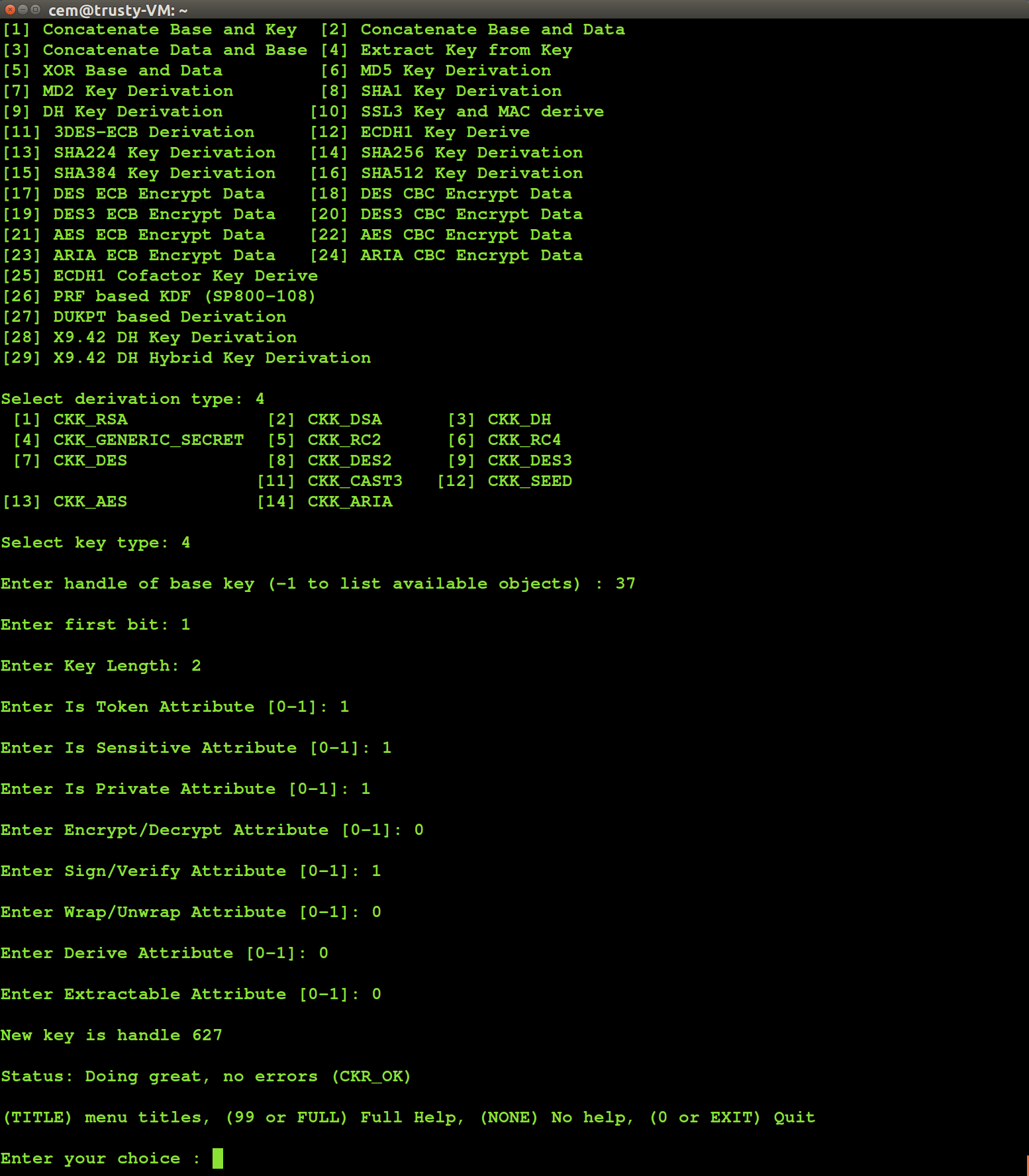
That turns out to be the problem with several of the key-derivation mechanisms defined in PKCS#11 and implemented by Safenet. (To give a flavor of what is supported, here is the list of options presented by the demonstration utility ckdemo shipped as part of Safenet client.) Many of these are sound. A few are problematic, with varying consequences. For example the ability to toggle secret-key bits using XOR and perform operations with the result leads to exploitable conditions for certain algorithms.

Related-key cryptanalysis is the specific branch specializing in these attacks. It turns out that for Safenet HSMs, we do not need to dig very deep into cryptanalytic results. There are at least two mechanisms that are easy to exploit and work generically against a wide-class of algorithms: extract-key-from-key and XOR-base-and-data.

Slicing-and-dicing secrets

Extract-key-from-key is defined in section 6.27.7 of PKCS#11 standard version 2.30. It may as well have been renamed “extract-substring” as the analog of standard operation on strings. This derivation scheme creates a new key by taking a contiguous sequence of bits at desired offset and length from an existing key. Here is an example of this in action with ckdemo utility provided by Safenet.

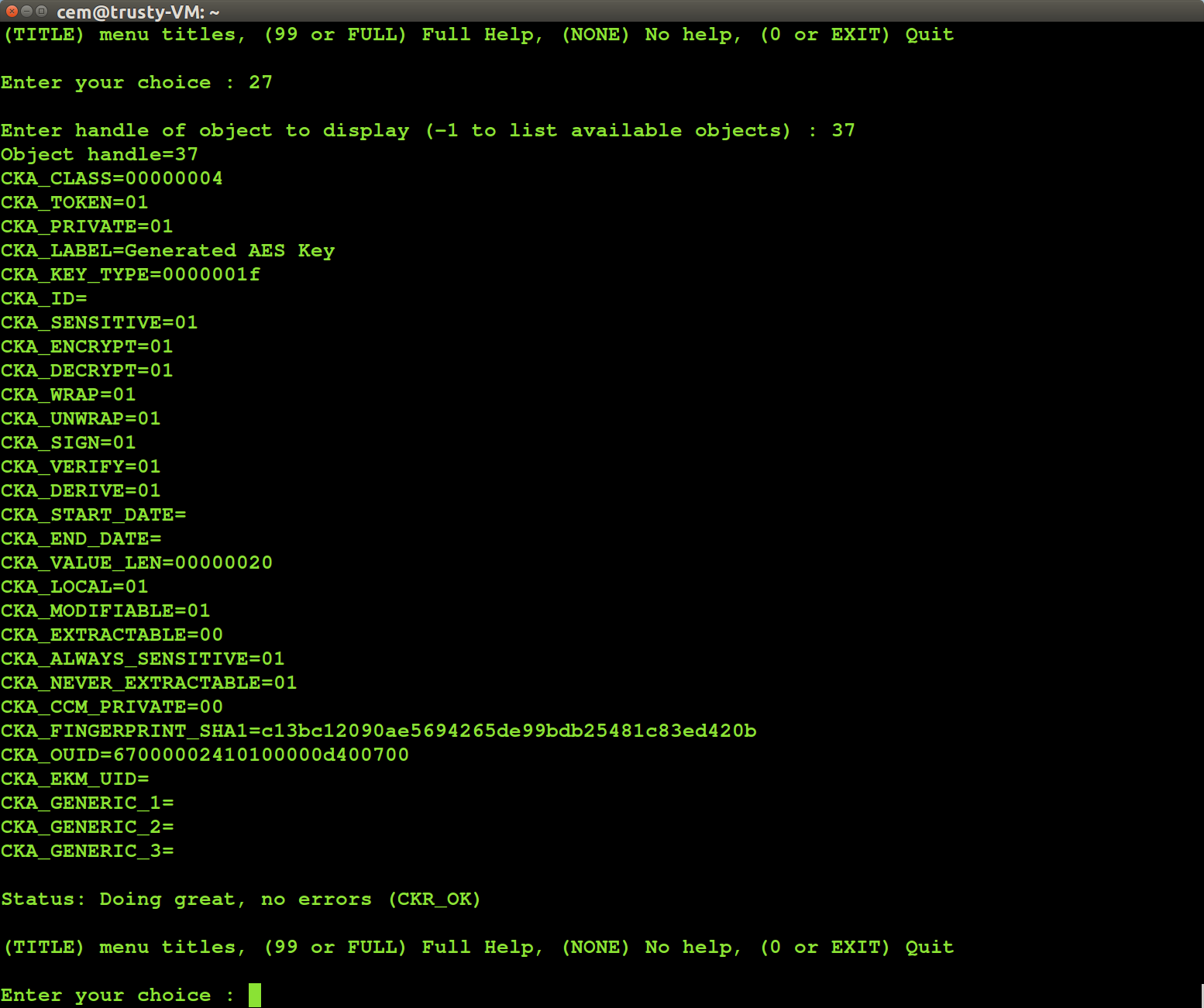
We start out with an existing 256-bit AES key with handle #37. Here are its PKCS #11 attributes:

PKCS #11 attributes of original AES key

PKCS #11 attributes of original AES key

Note CKA_VALUE_LEN attribute is 0x20 in hex, corresponding to 32 bytes as expected for 256-bit AES. Because the object is sensitive, those bytes comprising the key can not be displayed. But we can use key-derivation mechanism to extract a two-byte subkey from the original. We pick extract-key-from-key mechanism, start at the most-significant bit (ckdemo starts indexing bit-positions at 1 instead of 0) and extract 2 bytes:

Using extract-key-from-key derivation

Using extract-key-from-key derivation

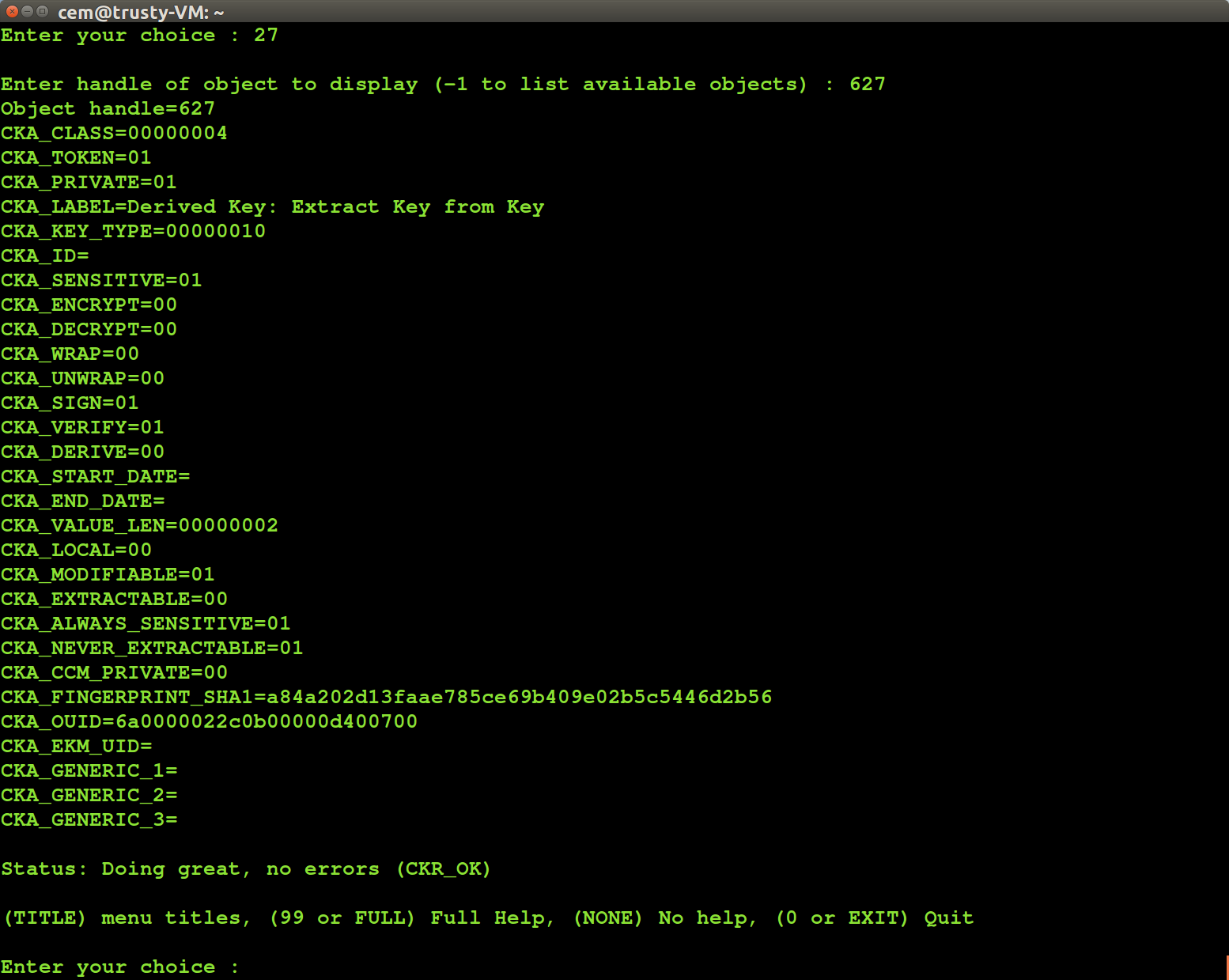
Now we look at attributes of the derived key. In particular note that its length is reported as 2 bytes:

PKCS #11 attributes of derived key

PKCS #11 attributes of derived key

So what can we do with this resulting two-byte key, which is not going to be very difficult to brute-force? Safenet supports HMAC with arbitrary sized keys so we can HMAC a chosen message:

HMAC chosen message using derived key

HMAC chosen message using derived key

Given this primitive, the attack is straightforward: brute-force the short key by trying all possibilities against known message/HMAC pairs. In this case we get 0x5CD3 since:

$ echo -n ChosenMessage | openssl dgst -sha256 -hmac `echo -en "\x5c\xd3"` 
(stdin)= 1db249f0e928b3aeff345aedaa3365ea690f06f3710433fc4a063b4cfffbe930

That corresponds to the two most-significant bytes of the original key. Now we can iterate: derive another short-key at different offset (say bits 17 through 32), brute-force that using a chosen message attack, repeat until all key bytes are recovered. Fully automated, this requires a couple of seconds with Luna G5, much less time with the more powerful SA7000 used in CloudHSM. Main trade-off is available computing power to brute-force key fragments offline. Given more resources, larger fragments of multiple contiguous bytes can be recovered at a time, necessitating fewer key derivation and HMAC operations. (Also since we have a chosen-plaintext attack with HMAC input that we control, there are time-space tradeoffs to speed up key recovery by building look-up tables ahead of time.)

Surprisingly this works not only against symmetric keys such as AES or generic HMAC secrets but also against elliptic-curve private keys (RSA, plain DSA and Diffie-Hellman were not affected.) This is an implementation quirk: these mechanisms are typically intended for symmetric-keys only. For elliptic-curve keys, the byte array being truncated is the secret scalar part of the key. For example the “secret” component for a Bitcoin ECDSA key is a discrete logarithm in secp256k1. Internally that discrete logarithms is just stored as 32-byte scalar value, and extract-key-from-key can be used to successively reveal chunks of that scalar value.

XOR-base-and-data suffers from a very similar problem. This operation derives a new key by XORing user-chosen data with original secret key. While there are cryptographic attacks exploiting that against specific algorithms such as 3DES, a design choice made by Safenet leads to simpler key recovery attack that works identically against any algorithm: when the size of data is less than size of the key, result is truncated to data size. XORing 256-bit AES key with one-byte data results in one-byte output. That provides another avenue for recovering a key incrementally: we derive new HMAC key by XORing with successively longer sequences of zero bytes, with only the last segment of new key left to brute-force at each step.

[continued in part II: exploit conditions, workarounds and mitigations]

CP

NFC hotel keys: when tag-types matter

Sometimes low-tech is better for security, particularly when compared to choosing the wrong type of latest technology. Growing use of NFC in hotel keys provides some instructive examples.

The hospitality industry started out with old-fashioned analog keys, where guests were given actual physical objects. Not surprisingly, they promptly proceeded to lose or misplace those keys, creating several problems for the hotel. First one is getting replacement keys made— certainly there are additional copies lying around, but they are still finite in number compared to the onslaught of careless guests. But more costly is having to potentially change that lock itself. With a key missing (and very likely attached to a key-tag bearing the hotel logo, along with room number) there is now someone else out there who could get into the room at will to burglarize the place. Upgrading to programmable card keys conveniently solves both problems. With a vast supply of cheap plastic stock, the hotel need not even charge guests for failing to return their key at checkout. Lost cards are not a security problem either, as the locking mechanism itself can be programmed to reject previous keys.

Until recently most of these cards used magnetic-stripes, the same 40-year old technology found in traditional credit-cards. It is trivial to clone such cards by reading the data encoded on the card and writing it over to a new blank card. Encrypting or authenticating card contents will not help— there is no need to reverse-engineer what those bits on the stripe represent or modify them. We are guaranteed that an identical card with same exact bits will open the door as long as the original does. (There may well be time-limitations, such as check-out date encoded in the card beyond which the door will not permit entry but those apply to both the original and clone.)

Jury is out on whether cards are easier to copy than old-fashioned keys. In both cases, some type of proximity is required. Reading magnetic stripe involves swiping the card through a reader; this can not be done with any stealth while the guest remains in possession of the card. Physical keys can also be copied at any home-improvement store but more surprisingly a clone can be made from a photograph of the key alone. The bitting, that pattern of bumps and ridges, is the abstract representation of the key that is sufficient to create a replica. This can be extracted from an image, as famously demonstrated for Diebold voting-machines. One paper from 2008 even used a high-powered zoom lenses to demonstrate feasibility of automatically extracting bitting from photographs taken 200ft away from the victim.

Next cycle of upgrades in the industry is replacing magnetic stripes by NFC. This blogger recently used such a key and decided to scan it using the handy NXP TagInfo application on Android:

Ultralight hotel key

Ultralight hotel key

How does this fare in comparison to the previous two options? It is arguably easiest to clone.

First notice the tag type is Ultralight. As the name implies, this is among the simplest types with least amount of memory. More importantly, Ultralight tags have no security mechanism against protecting their contents against reading. They are effectively 48 bytes worth of open books, available for anyone to read without authentication. Compare that to Mifare DESFire or even Mifare Classic, where each sector on the card has associated secret keys for read/write access. Data on those tags can only be accessed after NFC reader authenticates with the appropriate key.

So far this is not that different from magnetic stripes. The problem is NFC tags can be scanned surreptitiously while they are still on the person. It requires proximity; “N” does stand for “near” and typical read-ranges are limited to ~10cm. The catch is tags can be read through common materials such as cotton, plastic or leather. Metal shielding is required to effectively protect RFID-enabled objects against reading. It takes considerable skill to grab a card out of someone’s pocket, swipe it through a magnetic-stripe reader and return it undetected. It is much easier to gently bump into the same person while holding an ordinary phone with NFC capabilities.

The business case for upgrading a magnetic-stripe system to Ultralight is unclear. It certainly did not improve the security of guest rooms. By all indications it is also more expensive. Even the cheapest NFC tag still costs more than the ubiquitous magnetic stripe which has been around for decades. Same goes for readers mounted at every door required to process these cards. The only potential cost savings lie in using off-the-shelf mobile devices such as Android tablets for encoding cards at the reception desk, a very small piece of overall installation costs. (Speaking of mobile, this system also can not implement the more fancy use case of allowing customers to use their own phone as room key. While NFC hardware in most devices is capable of card-emulation, it can only emulate specific tag types. Ultralight is not one of them.) For a small incremental cost, the company providing this system could have used Ultralight C tags, which have three times as much memory, but also crucially, support 3DES-based authentication with readers that makes cloning non-trivial.

CP

Dual-EC, BitLocker disk encryption and conspiracy theories

[Full disclosure: this blogger worked at MSFT but has not been involved in BitLocker development]

Infosec community is still looking for a replacement since the cancellation of TrueCrypt. Last year the mysterious group behind the long standing disk-encryption system announced they were discontinuing work. In a final insult to users, they suggested current users migrate to BitLocker, the competing feature built into Windows. It could not have been worse timing, just when NCC Group announced to great fanfare their completion of an unsolicited security audit on the project. (Not to worry; there are plenty of audit opportunities left in OS/2 and DEC Ultrix for PDP11, to take other equally relevant systems as TrueCrypt.) What to do when your favorite disk encryption system has reached end-of-life? Look around for competing alternatives and weigh their strengths/weaknesses for starters. However a recent article on Intercept looking at Windows BitLocker spends more time spinning conspiracy theories than helping users migrate to BitLocker. There are four “claims” advanced:

  • Windows supports the dual-EC random number generator (RNG) which is widely believed to have been deliberately crafted by the NSA to be breakable
  • BitLocker is a proprietary implementation, and its source code is not available for review
  • MSFT will comply with law-enforcement requests to provide content
  • MSFT has removed the diffuser from BitLocker without a good explanation, demonstrably weakening the implementation

Let’s take these one by one.

“Windows has dual-EC random number generator”

It is true that Windows “next-generation” crypto API introduced in Vista supports dual-EC RNG, widely believed to have been designed by the NSA with a backdoor to allow predicting its output. In fact it was a pair of MSFT employees who first pointed out in a very restrained rump-session talk at 2007 Crypto conference that dual-EC design permits a backdoor without speculating on whether NSA itself had availed itself of the opportunity. Fast forward to Snowden revelations, and RSA Security finds itself mired in a PR debacle when it emerged that the company accepted $10M payment from the NSA for incorporating dual-EC.

Overlooked in the brouhaha is that while dual-EC has been available as an option in Windows crypto API, it was never set as the default random number generator. Unless some application went out of its way to request a different RNG— and none of the built-in Windows features including BitLocker ever did that— the backdoor would have sat idle. (That said it creates interesting opportunities for post-exploit payloads: imagine state-sponsored malware whose only effect on target is switching default system RNG, with no other persistence.)

From a product perspective, the addition of dual-EC RNG to Vista can be considered as a mere “checkbox” feature aimed at a vocal market segment. There was a published standard from NIST called SP800-90 laying down a list of officially-sanctioned RNG. Such specifications may not matter to end-users but carry a lot of weight in government/defense sector where deployments are typically required to operate in some NIST-approved configuration. That is why the phrase “FIPS-certified” makes frequent appearances in sales materials. From MSFT perspective, a lot of customers required those boxes to be checked as a prerequisite for buying Windows. Responding to market pressure, MSFT added the feature and did so in exactly the right way such “niche-appeal” features should be introduced: away from the mainline scenario, with zero impact on majority of users who do not care about it. That is the main difference between RSA and Windows: RSA made dual-EC the default RNG in their crypto library. Windows offered it as an option, but never set as the default the system RNG. (It would have made no sense; in addition to security concerns, it was plagued by dog-slow performance compared to alternatives based on symmetric ciphers such as AES counter-mode.)

Bottom line: Existence of a weak RNG as an additional option to satisfy some market niche— an option never used by default— has no bearing on the security of BitLocker.

“BitLocker is not open-source”

Windows itself is not open-source either but that has never stopped people from discovering hundreds of significant vulnerabilities by reverse engineering the binaries. Anyone is free to disassemble any particular component of interest or single-step through it in a debugger. Painstaking as that effort may be compared to reading original source, thousands of people have made a career out of this within the infosec community. In fact Microsoft even provides debug symbols drawn from source-code to make that task easier. As far as closed-source binaries go, Windows is probably the most carefully examined piece of commercial software with an entire cottage industry of researchers working to make that process in crafty ways. From comparing patched binaries against their earlier version to reveal silently fixed vulnerabilities to basic research on how security features such as EMET operate, being closed-source has never been a hurdle to understanding what is going on under the hood. The idea that security research community can collectively uncover hundreds of very subtle flaws in the Windows kernel, Internet Explorer or the graphics subsystem— massively complex code-bases compared to BitLocker— while being utterly helpless to notice a deliberate backdoor in disk encryption is laughable.

Second, many people past and present did get to look at Windows source code at their leisure. Employees, for starters. Thousands of current and past MSFT employees had the opportunity to freely browse Windows code, including this blogger during his tenure at MSFT. (That included the separate crypto codebase “Enigma” which involved signing additional paperwork related to export-controls.) To allege that all of these people, many of whom have since left the company and spoken out in scathing terms about their time, are complicit in hiding the existence of a backdoor or too oblivious/incompetent to notice its presence is preposterous.

And it is not only company insiders who had many chances to discover this hypothetical backdoor. Some government customers were historically given access to Windows code to perform their own audit. More recently the company has opened transparency centers in Europe inviting greater scrutiny. The idea that MSFT would deliberately include a backdoor with full knowledge that highly sophisticated and cautious customers— including China, not the most trusting of US companies— would get to pore over every line, or for that matter provide doctored source-code to hide the backdoor, is equally preposterous.

Bottom-line: Being open-source may well improve the odds for security community at large to identify vulnerabilities in a particular system. (But even that naive theory of “given enough eyeballs, all bugs are shallow” has been seriously questioned in the aftermath of Shellshock and never-ending saga of OpenSSL) But being closed-source in and of itself can not be a priori reason to disqualify a system on security grounds, much less serve as “evidence” that a hidden backdoor exists after having survived years of reverse-engineering in arguably the most closely scrutinized proprietary OS in the world. Linking source-code availability to security that way is a non-sequitur.

“MSFT will comply with law-enforcement requests”

This is a very real concern for content hosted in the cloud. For data stored on servers operated by MSFT such as email messages at Hotmail/Outlook.com, files shared via One Drive or Office365 documents saved to the cloud, the company can turn over content in response to an appropriate request from law enforcement.  MSFT is not alone in that boat either; same rules apply to Google, Facebook, Twitter, Yahoo, DropBox and Box. Different cloud providers compete along the privacy dimension based on product design, business model, transparency and willingness to lobby for change. But they can not hope to compete in the long run on their willingness to comply with existing laws on the books or creative interpretations of these laws.

All that aside, BitLocker is disk encryption for local content. It applies to data stored on disk inside end-user machine and removable media such as USB thumb-drives. It is not used to protect content uploaded to the cloud. (Strictly speaking one could use it to encrypt cloud storage, by applying BitLocker-To-Go on virtual disk images. But that is at best a curiosity, far from mainstream usage.)

On the surface then it seems there is not much MSFT can do if asked to decrypt a seized laptop with BitLocker enabled. If disk encryption is implemented properly, only the authorized user possesses the necessary secret to unlock. And if there is some yet-to-be-publicized vulnerability affecting all BitLocker usage such as cold-boot attacks, weak randomness or hardware defects in  TPMs, there is no need to enlist MSFT assistance in decryption. Law enforcement might just as well exploit that vulnerability on their own, using their own offensive capabilities. Such a weaknesses would have existed all along, before the laptop is seized pursuant to an investigation. There is nothing MSFT can do to introduce a new vulnerability after the seizure, any more than they can go back in time to back-door BitLocker before it was seized.

But there is a catch. Windows 8 made a highly questionable design decision to escrow BitLocker keys to the cloud by default. These keys are stored associated with the Microsoft Live account, presumably as a usability improvement against forgotten passphrases. If a user were to forget their disk encryption passphrase or the TPM used to protect keys malfunctions, they can still recover as long as they can  log into their online account. That capability provides a trivial way for MSFT to assist in the decryption of BitLocker protected volumes: tap into the cloud system to dig up escrowed keys. Good news is that default behavior can be disabled; in fact, it is disabled by default in enterprise systems presumably because MSFT realized IT departments would not tolerate such a cavalier attitude around key management.

Bottom-line: There is a legitimate concern here, but not in the way the original article envisioned. Intercept made no mention of the disturbing key-escrow feature in Windows 8. Instead the piece ventures into purely speculative territory around Government Security Program from 2003 and other red-herrings around voluntary public/private-sector cooperation involving MSFT.

“MSFT removed the diffuser”

For a change, this is a valid argument. As earlier posts mentioned, full-disk encryption suffers from a fundamental limitation: there is no room for an integrity check. The encryption of one sector on disk must fit exactly on that one sector. This would not be a problem if our only concern was confidentiality, or preventing other people from reading the contents of data. But it is a problem for integrity, detecting whether unauthorized changes were made. In cryptography this is achieved by adding an integrity check to data. That process is frequently combined with encryption because both confidentiality and integrity are highly desirable properties.

But in FDE schemes without any extra room to stash an integrity check, designers are forced to take a different approach. They give up on preventing bad guys from making changes, but try to make sure those changes can not be controlled with any degree of precision. In other words you can flip bits in the encrypted ciphertext stored on disk, and it will decrypt to something (without an integrity check, there is no such thing as “decryption error”) but that something will be meaningless junk; or so the designers hope. The original BitLocker diffusers attempted to achieve that effect, by “mixing” the contents within a sector such that modifying even a single bit of encrypted data would result in randomly introducing errors all over the sector after decryption. That notion was later formalized in cryptographic literature, standardized into modes such as XTS that are now supported by self-encrypting disk products on the market.

Fast forward to Windows 8 and the diffuser mysteriously goes away, leaving behind vanilla AES encryption in CBC mode. With CBC mode it is possible to introduce partially controlled changes at the level of AES blocks. (“Partial” in the sense that one block can be modified freely but then the previous block is garbled.) How problematic is that? It is easy to imagine hypothetical scenarios based on what the contents of that specific location represent. What if it is a flag that controls whether firewall is on and you could disable it? Or registry setting that shuts off ASLR? Or enables kernel-debugging, which then allows controlling the target with physical access? It turns out a more generic attack is possible in practice involving executables. The vulnerability was already demonstrated with LUKS disk-encryption for Linux. Suppose that sector on disk happens to hold an executable file that will be run by the user. Controlled changes mean the attacker can modify the executable itself, controlling what instructions will be executed when that sector is decrypted to run the binary. In other words, you get arbitrary code execution. More recently, the same attack was demonstrated against the diffuser-less BitLocker.

So there is a very clear problem with this MSFT decision. It weakens BitLocker against active attacks where the adversary gets the system to decrypt the disk after having tampered with its contents. That could happen without user involvement if decryption is done by TPM alone. Or it may be an evil-maid attack where the laptop is surreptitiously modified but the legitimate owner, being oblivious, proceeds to unlock the disk by entering their PIN.

Bottom-line: Windows 8 did weaken BitLocker, either because the designers underestimated the possibility of active attacks or made a deliberate decision that performance was more important. It remains to be seen whether Windows 10 will repair this.

CP