Private cloud-computing and the emperor’s new key management (part II)

[continued from part I]

So what are the problems with Box enterprise-key management?

1. Key generation

First observe that the bulk data encryption keys are generated by Box. These are the keys used to encrypt the actual contents of files in storage. These keys need to be generated “randomly” and discarded afterwards, keeping only the version wrapped by the master-key. But access to the customer key is not required if one can recover the data-encryption keys directly. A trivial way for Box to retain access to customer data- for example, if ordered by law enforcement- is to generate keys using a predictable scheme or simply stash aside the original key.

2. Possession of keys vs. control over keys

Note that Box can still decrypt data anytime, as long as the HSM interface is up. For example consider what happens when employee Alice uploads a file and shares it with employee Bob. At some future instant, Bob will need to get a decrypted copy of this file on his machine. By virtue of the fact Box must be given access to HSMs, there must exist at least one path where that decryption takes place within Box environment, with Box making an authenticated call to the HSM.**

That raises two problems. The first is that the call does not capture user intent. As Box notes, any requests to HSM will create an audit-trail but that is not sufficient to distinguish between the cases:

  • Employee Bob is really trying to download the file Alice uploaded
  • Some Box insider went rogue and wants to read that document

While there is an authentication step required to access HSMs, those protocols can not express whether Box is acting autonomously versus acting on behalf of a user at the other side of the transaction requesting a document. That problem applies even if Box refrains from making additional HSM calls in order to avoid arousing suspicion— just to be on the safe side, in case the enterprise is checking HSM requests against records of what documents its own employees accessed, even though the latter is provided by Box and presumably subject to falsification. During routine use of Box, in the very act of sharing content between users, plaintext of the document is exposed. If Box wanted to start logging documents- because it has gone rogue or is being compelled by an authorized warrant- it could simply wait until another user tries to download the same document, in which case decryption will happen naturally. No spurious HSM calls are required. For that matter Box could just wait until Alice makes some revisions to the document and uploads a new version in plaintext.

3. Blackbox server-side implementation

Stepping back from specific objections, there is a more fundamental flaw in this concept: customers still have to trust that Box has in fact implemented a system that works as advertised. This is ongoing trust for the life of the service, as distinct from one-time trust at the outset. The latter would have been an easier sell because such leaps of faith are common when purchasing IT. It is the type of optimistic assumption one makes when buying a laptop for example, hoping that the units were not Trojaned from the factory by the manufacturer. Assuming the manufacturer was honest at the outset, deciding to go rogue at later point in time would be too late- they can not compromise existing inventory already shipped out. (Barring auto-update or remote-access mechanisms, of course.)

With a cloud service that requires ongoing trust, the risks are higher: Box can change its mind and go “rogue” anytime. They can start stashing away unencrypted data, silently escrowing keys to another party or generating weak keys that can be recovered later. Current Box employees will no doubt swear upon a stack of post-IPO shares that no such shenanigans are taking place. This is the same refrain: “trust us, we are honest.” They are almost certainly right. But to outsiders a cloud service is an opaque black-box: there is no way to verify that such claims are accurate. At best an independent audit may confirm the claims made by the service provider, reframing the statement into “trust Ernst & Young, they are honest” without altering the core dynamic: this design critically relies on competent and honest operation of the service provider to guarantee privacy.

Bottom line

Why single out Box when this is the modus operandi for most cloud operations? Viewing the glass as half-full, one could argue that at least they tried to improve the situation. One counter-point is that putting this much effort for negligible privacy improvement makes for a poor cost/benefit tradeoff. After going through all the trouble of deploying HSMs, instituting key-management procedures and setting up elaborate access-controls between Box and corporate data center, the customer ends up not much better than they would have been using vanilla Google Drive.

That is unfortunate because this problem is eminently tractable. Of all the different private-computing  scenarios, file storage is most amenable to end-to-end privacy- after all there is not much “computing” going on, when all you are doing is storing and retrieving chunks of opaque ciphertext without performing any manipulation on it. Unlike solving the problem of searching over encrypted text or calculating formulas over a spreadsheet with encrypted cells, no new cryptographic techniques are required to implement this. (With the possible exception of proxy re-encryption; but only if we insist that Box itself handle sharing. Otherwise there is a trivial client-side solution, by decrypting and reencrypting to another user public-key.) Instead of the current security theater, Box could have spent about the same amount of development effort to achieve true end-to-end privacy for cloud storage.

CP

** Tangent: Box has a smart-client and mobile app so in theory decryption could also be taking place on the end-user PC. In that model HSM access is granted to enterprise devices instead of Box service itself, keeping the trust boundary internal to the organization. But that model faces practical difficulties in implementation. Among other things, HSM access involves some shared credentials- for example in the case of Safenet Luna SA7000s used by CloudHSM, there is a partition passphrase that would need to be distributed to all clients. There is also the problem that user Alice could decrypt any document, even those she did not have access to by permission. To work around such issues, would require adding a level of indirection by putting another service in front of HSMs that authenticates users via their standard enterprise identity, not their Box account. Even then there is the scenario for files from a web-browser when no such intelligence exists to perform on the fly decryption client-side.
Private cloud-computing and the emperor’s new key management (part I)

The notion of private computation in the cloud has been around at least in theory for almost as long cloud computing itself, even predating the times when infrastructure-as-a-service went by the distinctly industrial sounding moniker “grid-computing.” That precedence makes sense, because it addresses a significant deal-breaker for many faced with the decision to outsource computing infrastructure: data security. What happens to proprietary company information when it is now sitting on servers owned by somebody else? Can this cloud-provider be trusted to not “peek” at the data or tamper with the operation of the services that tenants are running inside the virtual environment? Can the IaaS provider guarantee that some rogue employee can not help themselves to confidential data in the environment? What protections exist if some government with creative interpretation of fourth-amendment right comes knocking?

Initially cloud providers were quick to brush aside these concerns with appeals to brand authority and brandishing certifications such as ISO 27001 audits and PCI-compliance. Some customers however remained skeptical, requiring special treatment beyond such assurances. For example Amazon has a dedicated cloud for its government customers, presumably with improved security controls and isolated from the other riff-raff always threatening to break out of their own VMs to attack other tenants.

Provable privacy

Meanwhile the academic community was inspired by these problems to build a new research agenda around computing on encrypted data. These schemes assume cloud providers are only given encrypted data which they can not decrypt- not even temporarily, an important distinction that critically fails for many of the existing systems as we will see. Using sophisticated cryptographic techniques, the service provider can perform meaningful manipulations on ciphertext such as searching for text or number-crunching, producing results that are are only decryptable by the original data owner. This is a powerful notion. It preserves the main advantage of cloud computing: lease CPU cycles, RAM and disk space from someone else on demand to complete a task while maintaining confidentiality of the data being processed, including crucially the outputs from the task.

Cloud privacy in practice

At least that is the vision. Today private-computation in the cloud is caught in a chasm between:

  • Ineffective window-dressing that provides no meaningful security- subject of this post
  • Promising ideas that are not quite feasible at-scale yet, such as fully homomorphic encryption

In the first category are solutions which boil down to the used-car salesmen pitch: “trust us, we are honest and/or competent.” Some of these are transparently non-technical in nature: for example warrant canaries are an attempt to work-around the gag-orders accompanying national security letters by using the absence of a statement to hint at some incursion by law enforcement. Others attempt to cloak or hide the critical trust assumption in layers of complex technology, hoping that an abundance of buzzwords (encrypted, HSM, “military-grade,” audit-trail, …) can pass for a sound design.

Box enterprise key management

As an example consider enterprise-key management feature pitched by Box. On paper this is attempting to solve a very real problem discussed in earlier posts: storing data in the cloud encrypted in such a way that the cloud-provider can not read the data. To qualify as “private-computation” in the full sense, that guarantee must hold even when the service provider is:

  • Incompetent- experiences a data-breach by external attackers out to steal any data available
  • Malicious- decides to peek into or tamper with hosted data, in violation of existing contractual obligations to the customer
  • Legally compelled- required to provide customer data to law-enforcement agency pursuant to an investigation

A system with these properties would be a far-cry from popular cloud storage solutions available today. By default Google Drive, Microsoft One Drive and Dropbox have full access to customer data. Muddying the waters somewhat, they often tout as “security feature” that customer data is encrypted inside their own data-centers. In reality of course such encryption is complete window-dressing: it can only protect against risks introduced by the cloud service provider, such as rogue employees and theft of hardware from data-centers. That encryption can be fully peeled away by the hosting service whenever it wants, without any cooperation required by the original data custodian.

Design outline

The solution Box has announced with much fanfare claims to do better. Here is an outline of that design to the extent that can be gleamed from published information:

  • There is a master-key for each customer, where “customer” is defined as an enterprise rather than individual end-users. (Recall that Box distinguishes itself from Dropbox and similar services by focusing on managed IT environments.)
  • As before, individual files uploaded to Box are encrypted with a key that Box generates.
  • The new twist is that those individual bulk-encryption keys are in turn encrypted by the customer specific master-key

So far, this is only adding a hierarchical aspect to key management. Where EKM is different is transferring custody of the master-key back to the customer, specifically to HSMs hosted at Amazon AWS and backed-up by units hosted in the customer data-center holding duplicates of the same secrets keys. (It is unclear whether these are symmetric  or asymmetric keys. The latter design would make more sense by allowing encryption to proceed locally without involving remote HSMs and only decryption to require interaction.)

Box implies that this last step is sufficient to provide “Exclusive key control – Box can’t see the customer’s key, can’t read it or copy it.” Is that sufficient? Let’s consider what could go wrong.

[continued in part II]

CP

Interactive services detection and crypto hardware: when security features collide

It is not uncommon for security features to have unexpected interactions, undercutting each other. For example Tor and Bitcoin do not mix. More subtle are situations when one feature designed to mitigate a specific threat blocks some other security feature from working. This blogger recently ran into an example with Windows Server.

Enterprises frequently have to operate public-key infrastructure (PKI) systems to issue credentials to their own employees—and arguably such closed PKI systems have been far more successful than the house-of-cards that is SSL certificate issuance for the web. There are stand-alone certificate authority products such as the open-source EJBCA package but for most MSFT environments, the requirement is typically addressed by CA functionality built into Windows Server. Certificate Services is a role that can be added to the server configuration, either integrated with Active Directory (not necessarily colocated with the domain controller) or as stand-alone CA.

Offloading key-management

Since the security of PKI is critically dependent on security of the cryptographic keys used by the certificate authority, one of the standard ways to harden such a system is to move key material into dedicated cryptographic hardware. In enterprise  environments, this usually means a hardware security module (HSM) connected to the CA servers. Lately the meaning of “HSM” has been greatly watered-down by companies suggesting that a glorified smart-card qualifies- perhaps these designers envision an unorthodox data-center layout with card readers glued to the side of server racks. But if one is willing to live without the improved tamper-resistance and higher performance of a dedicated HSM product, there is a more attractive option built-in. Starting with Windows 8, a Trusted Platform Module can be used to emulate virtual smart cards based on the GIDS specification.

Regardless of hardware choice, from the tried-and-true FIPS140 certified massive box to the jankiest USB token from an over-enthusiastic DIY project, these solutions all have the same defining feature. Private key material used by the CA for signing certificates is stored on an external device. No matter how badly the Windows server itself has been compromised, that key can not be extracted. (Of course the device will happily oblige if the compromised server asks to sign any message. That can be almost as bad as having direct key access when the signature has high value, as Adobe found out in the code-signing case.)

Getting along with external cryptographic hardware

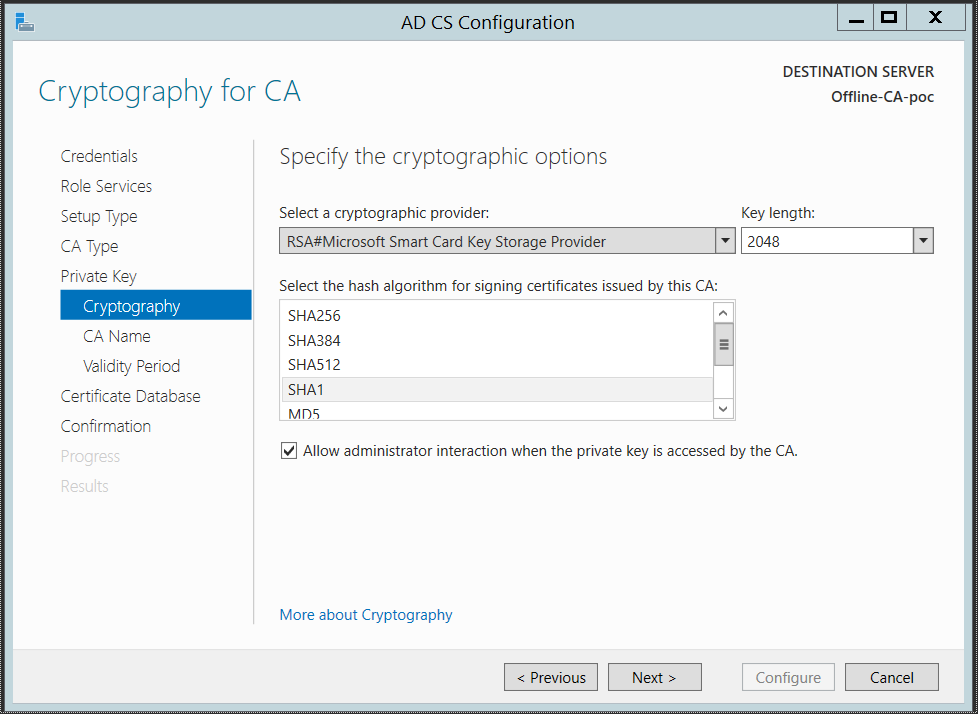
At the nuts and bolts level, getting this scenario to work requires that Windows have some awareness of external cryptographic hardware. Windows crypto stack includes an extensibility layer for vendors to integrate their own device by authoring smart card mini-drivers. Certificate Services role in turn has an option to pick a particular cryptographic service provider during setup:

Screenshot from ADCS configuration UI

Screenshot from ADCS configuration UI

As noted earlier, the smart-card provider is actually a “meta-provider” that can route operations to other hardware using a mini-driver for that model of hardware. So the most direct route would be:

  • Create a virtual-smart card on TPM and initialize it with PIN
  • Configure Certificate Server to use smart-card provider
  • Generate the signing key on the virtual smart card

By all appearances, this process appears to work during initial configuration of certificate services. When the CA is being initialized, a PIN prompt for the virtual smart-card will appear and after authenticating, a self-signed certificate will be created as expected. (Assuming we are going with the most common configuration of a root certificate. There are other options such as creating a CSR to source a certificate from a third-party; in that case the CSR will be created correctly.)

But when the service itself is started, something strange happens. The certificate server management console can not connect to the service as RCPs time out. It appears to be stuck; in fact it does not look like it started successfully. It can not be stopped or restarted either, short of killing the hosting process. So what is going on?

Shatter attacks

Explaining why the CA service got stuck involves a flash back to 2005. Prior to Vista, different applications  showing UI on a Windows desktop were not isolated from each other. For example a privileged application running with administrator or system account could show a prompt in the same desktop session that unprivileged user applications operate. While this might seem obvious— where else would the UI appear if not on the user’s screen?— there is a serious security problem here. By design applications can send UI-related messages, called “window messages,” to each other. For example one application can send a message to simulate clicking on a button in another application or pasting text into a dialog box.

The original example of this vulnerability dubbed Shatter, involved more than just simulating button clicks or faking keystrokes. It relied on the existence of a specific message that includes a callback function- effectively instructing the application to invoke arbitrary piece of code. As envisioned, these callback functions were supposed to have been specified by the application itself and accordingly trusted. But nothing prevented a different app running under a different OS account from injecting the same type of message into the message queue of another application. When you can influence the flow of execution in a process to the point of making it jump to an arbitrary specified memory address, you have full control. (The original attack also relied on injecting shell-code into the memory space of the target via an earlier window message simulating pasting of text.)

But even if that dangerous message type was deprecated or applications modified to validate the incoming callback before invoking it, the broader architectural problem remains: applications running at different privilege levels can influence each other. For example if the user opened an elevated command line prompt running as administrator, even her unprivileged user applications could send keystrokes to that window, executing arbitrary commands as administrator.

Vista introduced proper UI isolation to address this problem. These changes also affected a special class of applications that normally would never be expected to show UI or interact with users: services. But it turns out many background services are not content to run invisible in the background, and occasionally feel compelled to converse with users. Session-0 isolation comes into play for that case. There are now multiple sessions in Windows, and services all operate in the special privileged session 0. Any UI displayed there would have no effect on the main desktop the user is staring at. This uses the same principle as terminal server: if multiple users were logged into a server, an application opened by one user would only render on his/her desktop, with no effect on others users with their own remote desktop session.

Interactive services detection

Hiding UI from background services under the rug may trades the security problem for an application-compatibility problem. Services are not supposed to display UI directly. Instead they are supposed to have an unprivileged counterpart in the user session they can communicate with via standard inter-process channels such as named-pipes or LPC. Knowing that developers do not necessarily know- much less care to follow- best practices, Windows team faced the problem of accommodating “legacy” services. As far as the service is concerned, there is nothing obviously wrong. It has rendered UI and is waiting for the user to make a decision, which appears to be taking forever.

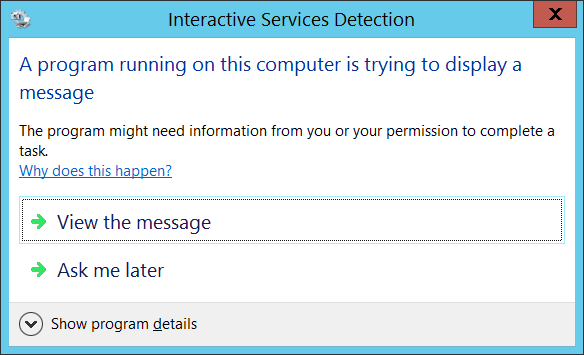
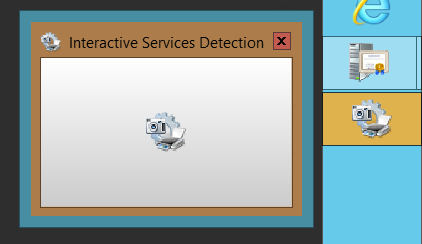
Interactive services detection attempts to solve that problem by detecting such UI and alerting the user in their own session with a notification. By acting on the notification, user can switch to session 0 temporarily, which has only that one dialog from the interactive service visible, and deal with the prompt.

“Our code never makes that mistake”

That provides an explanation for why certificate services is stuck:

  • During initial configuration of certificate services role, the cryptographic hardware is being accessed from an MMC console process running in the user session. PIN collection dialog renders without a problem.
  • During sustained operation of certificate services, the same hardware is accessed from a background service.

So why did interactive service detection not kick-in and alert the user that there is some UI demanding attention in session 0?

The answer is an optimistic assumption made by MSFT that by “now” (defined as Windows Server 2012 time-frame) all legacy services will have been fixed, rendering interactive service detection redundant. In WS2012 the feature is disabled by default. It turns out even Windows Server 2008 had traces of that optimism: 64-bit services were exempt on the theory that developers porting their service from x86 to x64 might as well be forced to fix any interactivity. But in this case the “faulty” code is the built-in certificate service running in native 64-bit mode from MSFT: credential-collection prompts from the smart-card stack are showing up in session 0.

Luckily the feature can be enabled with a registry tweak. With interactive service detection enabled, when certificate services starts up, the expected notification does show up in user session. Switching to session 0 one finds the familiar PIN prompt for the virtual smart card. (Note that entering the PIN is not required each time the CA uses the external crypto device to sign. It is only collected once to create an authenticated session, allowing the system to operate as a true hands-off service after the operator has kick-started it.)

Taskbar notification for interactive service

Taskbar notification for interactive service

Interactive services detection dialog on main desktop

Interactive services detection dialog on main desktop

The problem is not confined to use of virtual smart cards. Other vendors appear to have run into the same problem. Thales who manufactures the nSafe (formerly nCipher) line of HSMs has a white-paper noting that interactive service detection must be enabled for their product to operate correctly. Oddly enough, the configuration dialog for certificate server already has a checkbox to indicate that administrator interaction may be required for use of signing keys. That alone should have been a hint that this “background service” may in fact need to interact with the administrator, especially when the UI-related behavior of vendor-specific drivers can not be known in advance.

CP

From stock options to predatory lending for tech employees

“We are an investment firm interested in structuring liquidity for current or former [company name redacted] employees. If you or anyone you know is interested in help exercising options […] or is making a major life purchase, we may be able to help.”

Not exactly your average spam message. Addressed by name and referring specifically to a particular start-up, this email contained an offer for an unusual type of financial transaction:  loan to help offset the cost of exercising options. Welcome to the Silicon Valley version of predatory lending.

To make sense of the connection between high-risk loans and technology IPOs, we need to revisit the history of equity-based compensation. While employee ownership is by no means new phenomenon, starting with 1990s it became a significant if not primary component of employee compensation for technology startups. Leaving established companies to join startups often involved exchanging  predictable salaries for higher-risk, higher-reward structure conferred by equities. In many ways, the original success story for equity in technology was a blue-chip company predating that first dot-com bubble: Microsoft. “Never touch your options” was the advice offered to new employees, urging them to hold out on exercising as long as possible— because the price of MSFT much like tulip bulbs (and later real-estate) could only go up, the argument went.

Equity rewards come in two main flavors: stock grants or stock options. (Strictly speaking there are also important distinctions within each category, such as incentive-stock options versus non-qualifying stock options which we will put aside here.) Stock grants are straightforward. Employees are rewarded a number of shares as part of employment offer, subject to a vesting schedule. Typically there is a “cliff” at one-year for starting to vest some fraction—employees who don’t last that long end up with nothing. This is followed by incremental additions monthly or quarterly until the end of the vesting schedule. It is also not uncommon to issue refresher grants yearly or based on performance milestones.

Options, or more precisely call-options, represent the right to buy shares of stock at a predetermined price. For example, employee Alice joins Acme Inc when company stock is trading at $100. That would be her “strike price.” She is given a grant, which represents some number of option, also subject to a vesting schedule. Fast forward a year later when vesting starts, let’s say Acme stock is trading at $120— representing a remarkable 20% yearly increase, which was not uncommon for technology companies in their early growth phase. These options allow Alice to still purchase her shares at the original $100 price and if she chooses to, turn around and sell at prevailing market price.

Due to vagaries of accounting, options were far more favorable to a company than outright grant of stock. Downside is they transfer significant risk downstream to employees. Notwithstanding the irrational exuberance of asset bubbles, it turns out there is no iron-clad rule guaranteeing a sustained increase in stock prices, not even for technology companies. Even if the company itself is relatively healthy, stock price can be dragged down by overall economic trends— such as recession— such that current market price may well be below the strike price at any given time, rendering the options worthless. There is also a great element of volatility. Employees with start dates only weeks apart may observe very different outcomes if there were wild price swings determining the initial price— not at all uncommon for small growth stocks. It is not even guaranteed that an earlier start is necessarily an advantage. If the strike price happens to be set right before a major correction, employees may find their options underwater for a long time. (After Microsoft experienced a steep decline following its ill-advised adventure with DOJ anti-trust trial and dot-com crash of 2000, some employees observed that quitting and re-applying for their current job would be the rational course of action.) Such volatility runs deep; small fluctuations in price can make a significant difference. Consider an employee whose strike price was $100, when it is trading at $110 currently. So far, so good. Another 10% increase in price would roughly doubles the value of those options. 10% decrease by contrast renders them completely worthless. Stock grants on the other hand are far more stable against such perturbations. A 10% movement in the underlying stock represents exactly 10% change in either direction in the value of the grant.

No wonder then that options have historically invited foul-play. There has been more than one scandal including at the mighty Apple for backdating. Executives have faced criminal charges for these shenanigans. Even Microsoft, the original pioneer of option-based compensation, eventually threw in the towel and switched to stock grants after years of stubborn persistence. Of course for MSFT there was a more compelling reason: the stock price plateaued, or even slightly declined in inflation adjusted terms rendering the options worthless for most employees. (Interestingly, Google also switched from options to RSU stock grants around 2010, even when the core business was still experiencing robust growth, unlike its mismanaged counterpart in Redmond. But Google also created a one-time opportunity for employees to exchange underwater options for new ones priced at post-2008 collapse valuation.)

So what does all this have to do with questionable loans for startup employees? Our scenario involving the hypothetical employee made one assumption:  she can sell the stock after exercising the option. Recall that the option by itself is a right to buy the stock. In other words, using the option involves spending money and ending up in possession of actual stock. After that initial outlay, one can turn around immediately and sell those shares on the market to realize the difference as profit. This process is common enough to have its own designation: exercise-and-sell. Most employee stock-option plans allow employees to execute it without fronting the funds for initial purchase of stock. Similarly there is exercise-and-sell-to-cover, where some fraction is sold at market price to offset exercise costs while holding on to remaining shares. In neither case does the employee have to provide any funds upfront for the purchase of stock at the strike price.

Therein lies a critical assumption: that there exists a market for trading the shares. That holds for publicly traded companies but gets murky in pre-IPO situations. Facebook shares were traded on Second Market prior to the IPO. Next generation of startups took that lesson to heart and incorporated clauses into their employee agreements to remove that liquidity avenue. Typically the equity rewards have been structured such that shares are not transferrable and can not be used as collateral.

Suppose employee Alice is leaving her pre-IPO company to take another opportunity. If the equity plan involved outright grants, the picture is simple: Alice retains what she has vested until her final day of employment and leaves on the table the unvested portion. In the case of stock options, the picture gets more complicated. Option plans are typically contingent on employment. Not only does vesting end, but unexercised options are forfeited unless they are exercised before departure or within short time-window afterwards. That means if Alice wants to retain her investment in future success of the company, she must buy the stock outright at its current valuation (typically set based on private financing rounds, at artificially low 409A valuations) and pay tax on “gains” depending on the type of option involved. Of course such gains exist purely on paper at that point, since there is no way for Alice to capture the difference until there is a liquidity event to enable selling her equity. In other words, Alice is forced to take on additional risk to protect the value of options. Alice must come up with cash to cover both the purchase of an asset that has presently zero liquidity— and may well turn out to have zero value, if the company flames out before IPO— and income tax on the profits IRS believes have resulted from this transaction.

This is where the shady lenders enter the picture. Targeting employees at start-ups who have recently changed jobs on LinkedIn, these enterprising folks offer to lend money for covering the value of the options. While this blogger can not comment on the legality of such services, it is clear that both sides are taking on significant risk. Recall that agreements signed by the employee preclude transfer of unexercised options— more precisely, the company will not recognize the new “owner.” Such assets can’t be used as meaningful collateral for the loan, leaving the lender with no recourse if  he/she were to default. They could report the default to credit bureaus or forgive the loan— in which case it becomes “income” as far as IRS is concerned, triggering additional tax obligations— but none of that reduces the lender exposure.

Meanwhile the employee is taking a gamble on the same outcome, namely that the executed future value of these options will be realized. If the company does not IPO or market valuation ends up significantly lower than the projections used for purposes of calculating exercise costs, they will end up in the red against the loan. That is materially worse than ending up with underwater options. Recall that an option is a right but not an obligation to purchase stock at previously agreed upon (and one hopes, lower than current market value) price. There is no requirement to exercise an option that is underwater; the rational strategy is to walk away from it. But once options are exercised and shares owned outright, the employee is fully exposed to risk of future price swings. They have effectively “bought” those options on margin, except that instead of a traditional brokerage house extending margin with full control over the account, it is a new breed of opportunistic predatory lenders.

CP

What is wrong with Apple Pay? NFC and cross-channel fraud (2/2)

[continued from part #1]

(Full disclosure: this blogger worked on Google Wallet 2012-2013)

Mobile payment systems as implemented today muddy the clean lines between “card-present” and “card-not-present” interactions. Payments take place at a brick-and-mortars store with the consumer present and tapping an NFC terminal. But the card itself is delivered to the smart-phone remotely, via over-the-air provisioning. Consumers do not have to walk into a bank-branch or even prove ownership of a valid mailing address. They may be required to pass a know-your-customer or KYC test by answering a series of questions designed to deter money laundering. But that requires no physical presence, being carried out within a web-browser or mobile application.

Arguably this is not too different from traditional plastic-cards: they are also “provisioned” remotely, by sending the card in an envelope via snail mail. Meanwhile the application takes place online, with the customer completing a form to provide necessary information for a credit check; effectively card-not-present information. The main difference is that applying for a new credit card has a much higher bar than provisioning an existing card to a smart-phone. In one case, the bank is squarely facing default risk: the possibility that the consumer may run up a hefty bill on the new card and never pay it back. In the latter scenario, there is no new credit being extended— NFC purchases are charged against preexisting line of credit, with the same limits and interest rates as before. There is no reason to suspect that an otherwise prudent and restrained customer will become a spendthrift merely because they can also spend their money via tap-and-pay.

Consequently the burden of proof is much lower when proving that one owns an existing card vs proving that one is a good credit risk for an additional card based on past loan history. Applying for a new line of credit typically requires knowledge of social-security number (perhaps the most misused piece of quasi-secret information, having been repurposed from an identifier into an authenticator) billing address and personal information such as date of birth. Adding an existing card into an NFC wallet is much simpler, although variations exist between  different implementations. For example Google Wallet required users to enter their card number, complete with CVV2 to prove ownership. Apple Pay goes one step further, borrowing an idea from Coin: users take a picture of the card with the phone camera. This is largely security theater. Any competent carder can create convincing replicas that will fool a store clerk inspecting the card in his/her hand; a blurry image captured with a phone camera is hardly an effective way to detect forgeries. It is more likely a concession from Apple to issuing banks. More important, no amount of taking pictures will reveal magnetically encoded information from the stripe. Neither Apple Pay or Google Wallet have any assurance of CVV1. (Interestingly Coin can verify that because it ships with an actual card-reader that users must swipe their cards through— a necessity because Coin effectively depends on cloning mag-stripes.)

Bottom line: all of the information required to provision an existing  card to a mobile device for NFC payments can be obtained from a card-not-present transaction. For example, it can be obtained via phishing or compromising an online merchant to observe cards in flight through their system. For the first time, it becomes possible to “obtain” a new credit card using only card-not-present data lifted from an existing card. That payment instrument can be now used to go on a  spending spree in the real-world, at any retailer accepting NFC payments. Online fraud has breached what used to be a Chinese-wall and crossed over into bricks-and-mortar space.

CP

What is wrong with Apple Pay? NFC and cross-channel fraud (1/2)

Several news stories have “discovered” that Apple Pay has not, in fact, spelled the end of credit card fraud and may even have created new opportunities. That seems surprising considering that NFC payments were supposed to be an improvement over magnetic-stripe swipes in terms of security, using a cryptographic protocol that prevents reusing information stolen from one merchant to make additional fraudulent transactions at another one. Much of the problem turns out to be usual sad state of technology journalism. It is not that NFC or EMV have a new vulnerability that is being exploited against hapless iPhone users. (To be fair, EMV does have its fair share of security weaknesses and mobile payments have introduced some incremental risks, but those subtleties are not what has the press riled up.) Apple has not created a new way to steal credit-cards. But it has created a more effective avenue for monetizing already stolen cards. Apple Pay is not the vulnerability— it is just one particular technique for exploiting an ancient one.

Online vs in-store transactions

Going back to our summary of how credit-card payments operate, we differentiated between two types of transactions:

  • Card-present, or more colloquially “in-store.” The customer walks up to a cash registers and hands over their card to the merchant. That card can be “read” in different ways. At the low-tech end of the spectrum is old-school mechanical imprinting, creates an actual carbon-copy of the front of the card bearing embossed numbers. More common is the “swipe” where information encoded in the magnetic-stripe at the back of the card is scanned by moving the card through a magnetic field. Finally if the card has a smart chip, there is the EMV option of executing a complex cryptographic protocols between card/terminal. In these cases each interaction is unique and the data observed by the terminal different, unlike a magnetic-stripe which has the same information every time.
  • “Online,” or what used to be called phone-order/mail-order back when picking up a telephone or sending pieces of paper via USPS did not seem such an antiquated concepts. Generically this class is known as “card-not-present” transaction, because the merchant does not have the actual piece of plastic in hand when placing the charge. (We will avoid the term “online” because in payments it is also used to describe when a point-of-sale terminal is communicating in real-time with card network, as opposed to batching up transactions for later submission.)

Containing fraud

From a fraud perspective, the key observation is that each modality exchanges slightly different information with the terminal. All of them share the same basic data such as credit-card number and expiration. But each one also introduces a unique twist. Track-data on magnetic stripe has a 3-5 digit “card validation code” commonly called CVV1. Online transactions use a different value called CVV2, printed on the card itself but not encoded in the magnetic-stripe. Meanwhile the basic version of EMV simulates the action of swiping for “track-data” for backwards compatibility, but substitutes a dynamic CVV or CVV3 which changes each time in a manner unpredictable without knowing the cryptographic secret stored in the chip.

A corollary of this difference is that it acts as a natural “firewall” between channels. Fraud remains largely contained to its original channel. Consider the criminals who popped Target or HomeDepot point-of-sale terminals in the past. This attack allowed to them amass a cache of raw track-data from magnetic-stripes swiped at those cash registers. That information can be used to create convincing replicas of cards that will behave exactly like the original card when swiped through a reader. But there is no CVV2 encoded in the magnetic-stripe.** That is a limiting factor if our criminals wanted to monetize those cards online, instead of walking into a store. Most websites these days will collect and validate CVV2 for online orders. (As an aside, there trade-offs in both avenue for monetization. In-store fraud is harder to scale because it requires recruiting mules to run the risk of walking into a store with fake cards, with their faces captured on camera. Online fraud scales better; there is no limit to how many websites you can drive to or how many big-box items can fit into the trunk. Downside is delivery involves a shipping address that can be traced- notice how many ecommerce sites flat out refuse shipping to PO boxes.)

[continued]

CP

** Some merchants have started asking for or keying in CVV2 by looking at the card during retail transactions. That is a dangerous pattern. It may help that particular merchant reduce fraud temporarily by doing additional verification on the card, but it weakens the overall ecosystem by putting card-not-present at greater risk against compromised terminals.

Second-guessing Satoshi: ECDSA and Bitcoin (part II)

[continued from part I]

There are ways to improve confidence in the correct operation of a blackbox ECDSA implementation that has bee tasked with signing transactions with our private key. One approach suggested in the original paper is choosing the jointly between blackbox and external client requesting signatures. There is an inherent asymmetry here, because the two sides can not complete such a protocol on equal terms. Because knowledge of the nonce used to a particular signature allows private-key recovery, the client can not learn the final value that will be used to compute the signature. But we can still defeat a kleptographic system by guaranteeing that the blackbox can not fully control choice of nonce either.

  • Blackbox chooses its own nonce k and commits to it, for example by outputting a hash of the curve point that would have resulted from using that nonce eg P = k∗G
    where G is the generator of the group. (Recap: first half of an ECDSA signature is the x-coordinate of the point on the elliptic-curve that is obtained by “multiplying” the generator with the nonce.)
  • Client returns a random scalar value r.
  • Blackbox opens the commitment to reveal its chosen point P— but not the scalar k— and then proceeds to compute the signature using Q = r ∗ (k∗G).
  • Before accepting the signature, client verifies that the final point Q and original choice P are related as Q = r∗P.

This guarantees that even if a kleptopgraphic implementation chose “cooked” k values to leak information, that signal is washed away when those choices are multiplied by random factors. In fact  multiplication is not the only option. The protocol is equally effective with addition and using (r+k) ∗ P as final value. But an extra point-multiplication for both sides can not be avoided because each side still has to compute r∗P on its own. They can not accept a result precomputed by the other side.  (It does make it easier to for the client to verify expected result by a simple point addition instead of the more expensive multiplication.)

Main challenge for this protocol is the interactivity— it changes the interface between the ECDSA implementation and client invoking a signature operation by requiring two round-trips. But it need not require changes to the client software. For cryptographic hardware such as HSMs, there is already a middleware layer such as PKCS#11 that translates higher-level abstractions such as signing into low-level commands specific to the device. This abstraction layer could hide the extra round-trip. Alternatively the round-trip can be eliminated by a stateful client. Suppose that after every signature the HSM outputs a commitment to the nonce it will use for the next signature and client caches this value. Then each signature request can be accompanied by client’s own random contribution and each signature response can be verified against the commitment cached from previous operation.

We can extend that further to come up with a different mitigation: suppose that the blackbox ECDSA implementation is asked to commit to thousands of nonces ahead of time. The client can in turn specify a single seed value that will be used to influence every nonce in the list according to a pseudo-random function of that random seed. (We can’t simply add/multiply every nonce with the same random value. That would fail to mask patterns across multiple nonces chosen by a kleptographic implementation.) In this case no interactivity is required for signature operations, since both blackbox and client contributions to the final nonce are determined ahead of time. One caveat: a kleptographic implementation can try to cheat by faking a malfunction and outputting invalid responses in order to skip some values in the sequence, leaking information based on which ones were omitted. Meanwhile the client can’t insist that blackbox sign with previous nonce, because reusing nonces across different messages also results in private-key disclosure.

As a side-note: precomputing and caching nonces can also serve as a performance optimization, by leveraging the online/offline nature of ECDSA. Such signature schemes have the unusual property that a significant chunk of the required computation can be done without seeing the message that is being signed. For ECDSA the generation of the first half of the signature fits the bill: multiply a fixed point of the elliptic-curve by a random nonce that is chosen independent of the message. That point multiplication is by far the most expensive part of the signature. Front-loading that and computing nonces ahead of time reduces perceived latency when it is time to actually emit a signature.

One problem not addressed in the original paper is that of key generation. If the objective is guarding against a kleptographic blackbox ECDSA implementation, then it can not be trusted to generate keys either. Otherwise it is much simpler to “leak” private keys directly by using a subverted RNG whose output is known to the adversary. Ensuring randomness of nonces used when signing will not help in that situation; the private key is already compromised without signing a single message. But the same techniques used to randomize the nonce can be applied here, since an ECDSA public-key is also computed as a point-product of the secret private key and fixed generator point. The blackbox can commit to its choice of private-key by outputting a hash of the public-key, and the client can provide additional random input that causes final chosen key to be distributed randomly even if the blackbox was dishonest.

All of this complexity raises a different question: why is Bitcoin using ECDSA in the first place? As pointed out, RSA signing does not suffer from this problem of requiring “honest” randomness for each signature. But that is simply one criteria among many considerations. A future post will compare RSA and ECDSA side-by-side for use in a cryptocurrency such as Bitcoin.

[continued]

CP

Second-guessing Satoshi: ECDSA and Bitcoin (part I)

“Cold-wallets can be attacked.” Behind that excited headline turns out to be a case of superficial journalism and missing the real story. Referring back to the original paper covered in the article, the attack is premised on a cold-wallet implementation that has been already subverted by an attacker. Now that may sound tautological: “if your wallet has been compromised, then it can be compromised.” But there is a subtlety the authors are careful to point out: offline Bitcoin storage is supposed to be truly incommunicado. Even if an attacker has managed to get full control and execute arbitrary code- perhaps by corrupting the system ahead of time, before it was placed into service- there is still no way for that malicious software to communicate with the outside world and disclose sensitive information. Here we give designers the benefit of the doubt, assuming they have taken steps to physically disable/remove networking hardware and place the device in a Faraday cage at the bottom of a missile silo. Such counter-measures foreclose the obvious communication channels to the outside world. The attacker may have full control of the wallet system, including knowledge of the cryptographic keys associated with Bitcoin funds, but how does she exfiltrate those keys?

There is always the possibility of covert channels, ways of communicating information in a stealth way. For example the time taken for a system to respond could be a hidden signal: operate quickly to signal 0, introduce artificial delays to communicate 1. But such side-channels are not readily available here either; the workings of offline Bitcoin storage are not directly observable to attackers in the typical threat model. Only the legitimate owners have direct physical access to the system. Our attacker sits some place on the other side of the world, while those authorized users walk in to generate signed transactions.

But there is one piece of information that must be communicated out of that offline wallet and inevitably become visible to everyone— the digital signature on Bitcoin transactions signed by that wallet. Because transactions are broadcast to the network, those signatures are public knowledge. Within those signatures is an easy covert channel. Credit goes to ECDSA, the digital-signature algorithm chosen by Satoshi for the Bitcoin protocol. ECDSA is a probabilistic  algorithm. For any given message, there is a large number of signatures that would be considered “valid” according to the verification algorithm; in fact for the specific elliptic-curve used by Bitcoin, an extraordinarily large number in the same ballpark as estimated number of particles in the observable universe. An “honest” implementation of ECDSA is expected to choose a nonce at random and construct the signature based on that random choice. But that same freedom offers a malicious ECDSA implementation to covertly send messages by carefully “cooking” the nonce to produce a specific pattern in the final signature output. For example successive key-bits can be leaked by choosing the signature to have same parity as the bit being exfiltrated.

But the channel present within ECDSA is far more sophisticated. Building on the work of Moti Yung and Adam Young, it is an example of a kleptographic system. It is efficient: two back-to-back signatures are sufficient to output the entire key. It is also deniable: without the additional secret value injected by the attacker, it is not possible for other observers with access to same outputs—recall that everyone gets to see transactions posted on the blockchain— to pull-off that key-recovery feat. That includes the legitimate owner of the wallet. To everyone else these signatures looks indistinguishable from those output by an “honest” cold-storage implementation.

There is a notion of deterministic ECDSA where nonces are generated as a function of the message, instead of chosen randomly. This variant was designed to solve a slightly different problem, namely that each ECDSA signature requires a fresh unpredictable nonce. Reusing one from a different message or even generating a partially predictable nonce leads to private-key recovery. While this looks like a promising way to close the covert channel, the problem is there is no way for an outside observer to verify that the signature was generated deterministically. (Recall that we posit attacker has introduced malware subverting the operation of the cold-storage system, including its cryptographic implementation.) Checking that a signature was generated deterministically requires knowing the private key- which defeats the point of only entrusting private keys to the cold-storage itself.

This same problem also applies to other black-box implementations of ECDSA where the underlying system is not even open to inspection, namely special-purpose cryptographic hardware such as smart-cards and hardware security modules (HSM.) An HSM manufacturer could use a similar kleptographic technique to disclose keys in a way that only that manufacturer can recover. In all other aspects, including statistical randomness tests run against those nonces, the system is indistinguishable from a properly functioning device.

[continued- countermeasures]

CP

Smart-card logon for OS X (part IV)

[continued from part III]

Smart-card elevation

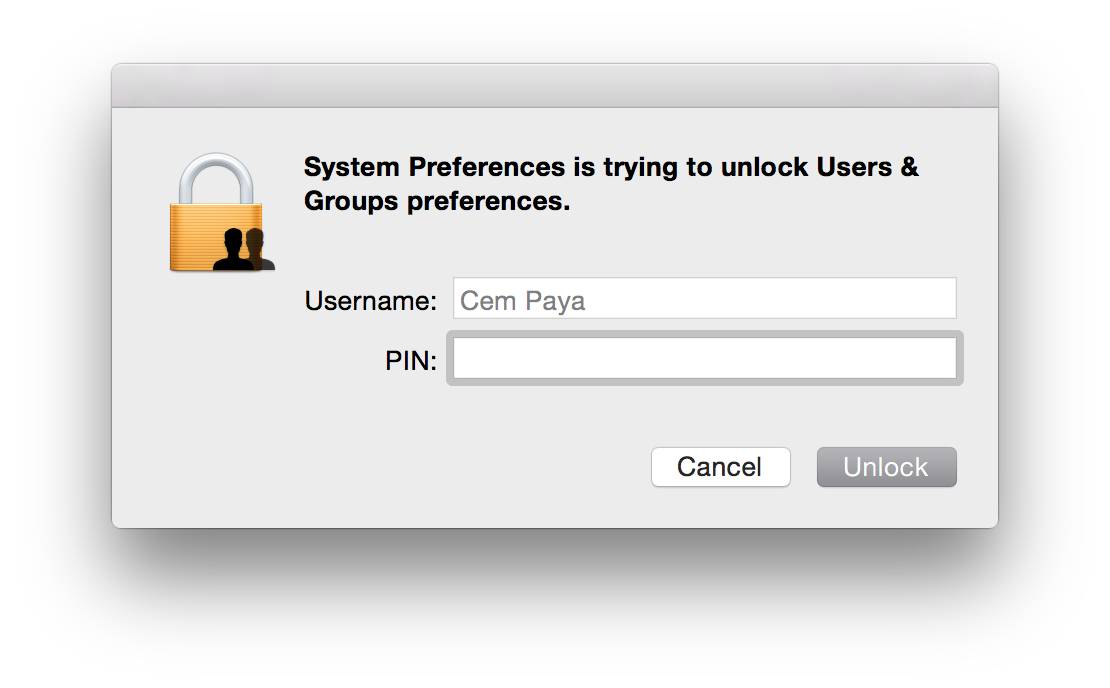
In addition to the login screen and screen-saver, elevation prompts for sensitive operations will also work with smart-cards:

Elevation prompt asking for PINAs before, the dialog can adjust for credential type in real-time. On detecting presence of a smart-card (more precisely, a card for which an appropriate tokend module exists and contains valid credentials) the dialog will change in two subtle ways:

  • Username field is hard-coded to the account mapped from the certificate on the card, and this entry is grayed out to prevent edits
  • Password field is replaced by PIN

If the card is removed before PIN entry is completed, UI reverts back to the original username/password collection model.

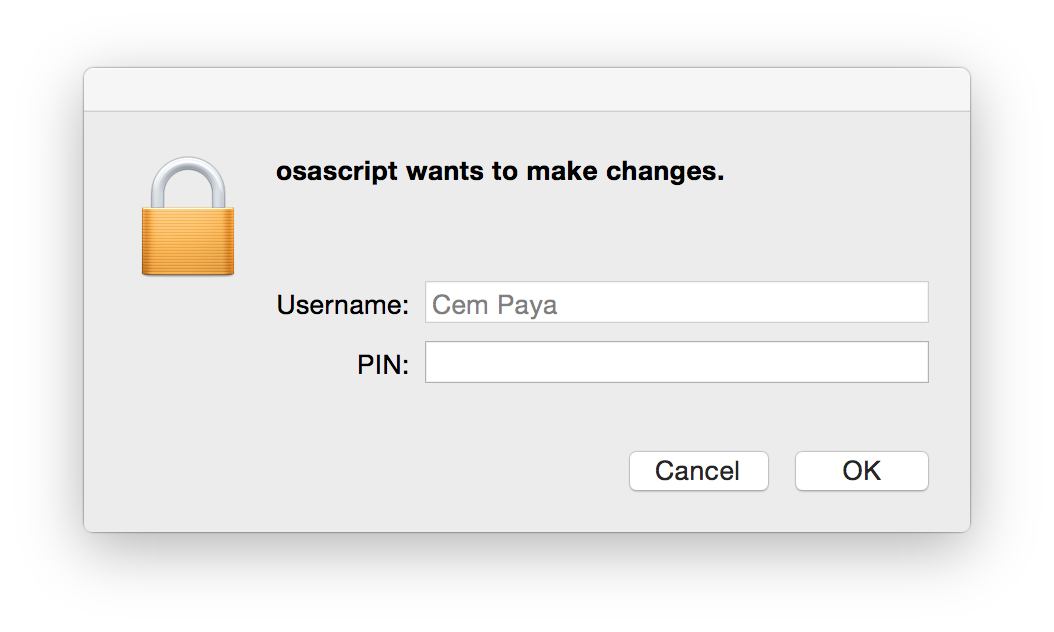
One might expect that elevation in command line with “sudo” would similarly pick up the presence of smart-card but that is not the case. su and sudo still require a password. One heavy-weight solution involves installing the PKCS#11 PAM (pluggable authentication module) since OS X does support the PAM extensibility mechanism. A simpler work-around is to substitute an osascript wrapper for sudo. This wrapper can invoke the GUI credential collection which is already smart-card aware:

sudo replacement with PIN collection(Downside is that the elevation request is attributed to osascript, instead of the specific binary to be executed with root privileges. But presumably the user who typed out the command knows the intended target.)

Recap

Before discussing the trust-model and comparing it to Windows implementation, here is a quick overview of steps to enable smart-card logon with OS X:

  • Install tokend modules for the specific type of card you plan to use. For the US government PIV standard, OpenSC project installer contains one out of the box.
  • Enable smart-card login using the security command to modify authorization database.
    $ sudo security authorizationdb smartcard enable
    YES (0)
    $ sudo security authorizationdb smartcard status
    Current smartcard login state: enabled (system.login.console enabled, authentication rule enabled)
    YES (0)

    (Side-note: prior to Mavericks the authorization “database” was a plain text-file at /etc/authorization and it could be edited manually with a text editor— this is why some early OSX smart-card tutorials suggest tinkering with the file directly. In Mavericks it is a true SQLite database and best manipulated with the security utility.)

  • Associate one or more certificate mappings to the local account, using sc_auth command.

Primitive trust-model

Because certificate hashes are tied to a public-key, this mapping does not survive the reissuance of the certificate under a different key. That defeats the point of using PKI in the first place. OSX is effectively using X509 as a glorified public-key container, no different from SSH in the trusting specific keys rather than the generalized concept of an identity (“subject”) whose key at any given time is vouched for by a third-party. Contrast that with how Active Directory does certificate mapping, adding a level of indirection by using fields in the certificate. If the certificate expires or the user loses their token, they can be issued a new certificate from the same CA. Because the replacement has the same subject and/or same UPN, it provides continuity of identity: different certificate, same user. There is no need to let every endpoint know that a new certificate has been issued for that user.

A series of future posts will look at how the same problem is solved on Linux using a PAM tailored for digital certificates. Concrete implementations such as PAM PKCS#11 have same two-stage design: verify ownership of private key corresponding to a certificate, followed by mapping the certificate to local account. Its main differentiating factor is the choice of sophisticated mapping schemes.  These can accommodate everything from the primitive single-certificate approach in OSX to the Windows design that relies on UPN/email, and other alternatives that build on existing Linux trust structures such as ssh authorized keys.

CP

Smart-card logon for OS X (part III)

[continued from part II]

Managing the mapping for smart-card logon

OS X supports two options for mapping a certificate to a local user account:

  • Perform look-up in enterprise directory
  • Decide based on hash of the public-key in the certificate

For local login on stand-alone computers without Active Directory or equivalent, only the second, very basic option is available. As described by several sources [Feitian, PIV focused guides, blog posts], sc_auth command in OS X— which is just a Bash script— is used to manage that mapping via various sub-commands. sc_auth hash purports to display keys on currently present smart-cards, but in fact outputs a kitchen sink of certificates including those coming from the local keychain. It can be scoped to  specific key by passing an identifier. For example to get PIV authentication key out of a PIV card when using OpenSC tokend modules:

$ sc_auth hash -k "PIV"
67081F01CB1AAA07EF2B19648D0FD5A89F5FAFB8 PIV AUTH key

The displayed value is a SHA1 hash derived from the public-key. (Keep in mind that key names such “PIV AUTH key” above are manufactured by the tokend middleware; your mileage may vary when using different one.)

To convince OS X into accepting that certificate for local logon, sc_auth accept must be invoked with root privileges.

$ sudo sc_auth accept -u Alice -k "PIV"

This instructs the system to accept the PIV certificate on presently connected smart-card for authenticating local user Alice.  There is another option to specify the key using its hash:

$ sudo sc_auth accept -u Alice -h 67081F01CB1AAA07EF2B19648D0FD5A89F5FAFB8

More than one certificate can be mapped to a single account by repeating that process. sc_auth list will display all currently trusted public-key hashes for a specified user:

$ sc_auth list -u Alice
67081F01CB1AAA07EF2B19648D0FD5A89F5FAFB8

Finally sc_auth remove deletes all certificates currently mapped to a local user account:

$ sudo sc_auth remove -u Alice

Smart-card user experience on OS X

So what does the user experience look like once the mapping is configured?

Initial login

First the bad news: don’t throw away your password just yet. The boot/reboot process remains unchanged. FileVault II full-disk encryption still requires typing in the password to unlock the disk.** Interestingly, its predecessor the original FileVault did support smart-cards because it was decrypting a container in the file-system after enough of the OS had been loaded to support tokend. New variant operates at a much lower level. Because OS X does not ask for the password a second time after the FileVault prompt, there is no opportunity to use smart-card in this scenario.

Good news is that subsequent authentication and screen unlocking can be done using a smart-card. The system recognizes the presence of a card and modifies its UI to switch authentication mode on the fly. For example, here is what the Yosemite login screen usually looks like after signing out:**

Standard login screen

Standard login screen

After a card is connected to the system, the UI updates automatically:

OS X login UI after detecting card presence

OS X login UI after detecting card presence

Local account mapped to the certificate from the card is chosen, and any other  avatars that may have been present disappear from the UI. More subtly the password prompt changes into a PIN prompt. After entering the correct PIN, the system will communicate with the card to verify its possession of the private-key and continue with login as before.

Caveat emptor

  • On failed PIN entry, the system does not display the number of remaining tries left before the card is locked. It is common for card standards to return this information as part of the error; PIV specification specifically mandates that. Windows will display the count after incorrect attempts as a gentle nudge to be careful with next try; a locked card typically requires costly intervention by enterprise IT.
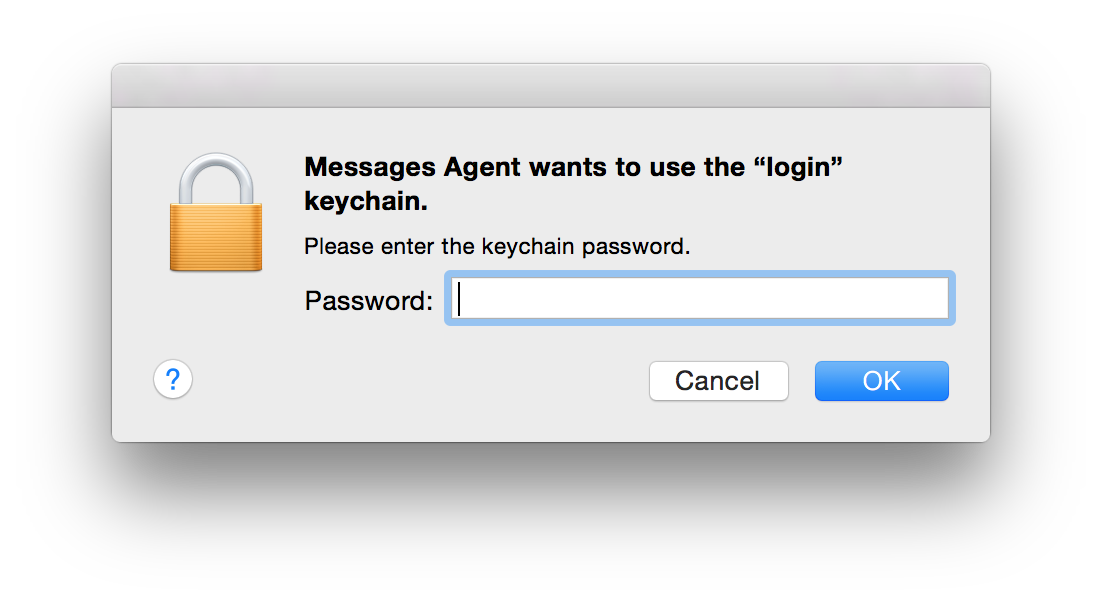
  • After logging in, it is not uncommon to see another prompt coming from the keychain, lest the user is lulled to a false sense of freedom from passwords:
    Screen Shot 2015-02-08 at 20.17.11 Keychain entries previously protected by the password still need to be unlocked using the same credential. If authentication took place using a smart-card, that password is not available after login. So the first application trying to retrieve something out of the key-chain will trigger on-demand collection. (As the dialog from Messages Agent demonstrates, that does not take very long.)

Screen unlock

Unlocking the screen works in a similar fashion, reacting to the presence of a card. Here is example UI when coming out of screen-saver that requires password:

Screen-saver prompting for password

Screen-saver prompting for password

After detecting card presence:

Screen-saver prompting for card PIN

Screen-saver prompting for card PIN

This is arguably the main usability improvement to using smart-cards. Instead of typing a complex passphrase to bring the system out of sleep or unlock after  walking away (responsible individuals lock their screen before leaving their computer unattended, one would hope) one need only type in a short numeric PIN.

[continued]

CP

* In other words OS X places the burden of security on users to choose a random pass-phrase, instead of offloading that problem to specialized hardware. Similarly Apple has never managed to leverage TPMs for disk encryption, despite a half-hearted attempt circa 2006, keeping with the company tradition of failing to grok enterprise technologies.
** MacWorld has a helpful guide for capturing these screenshots, which involve SSH from another machine.