Smart-card logon for OS X (part IV)

[continued from part III]

Smart-card elevation

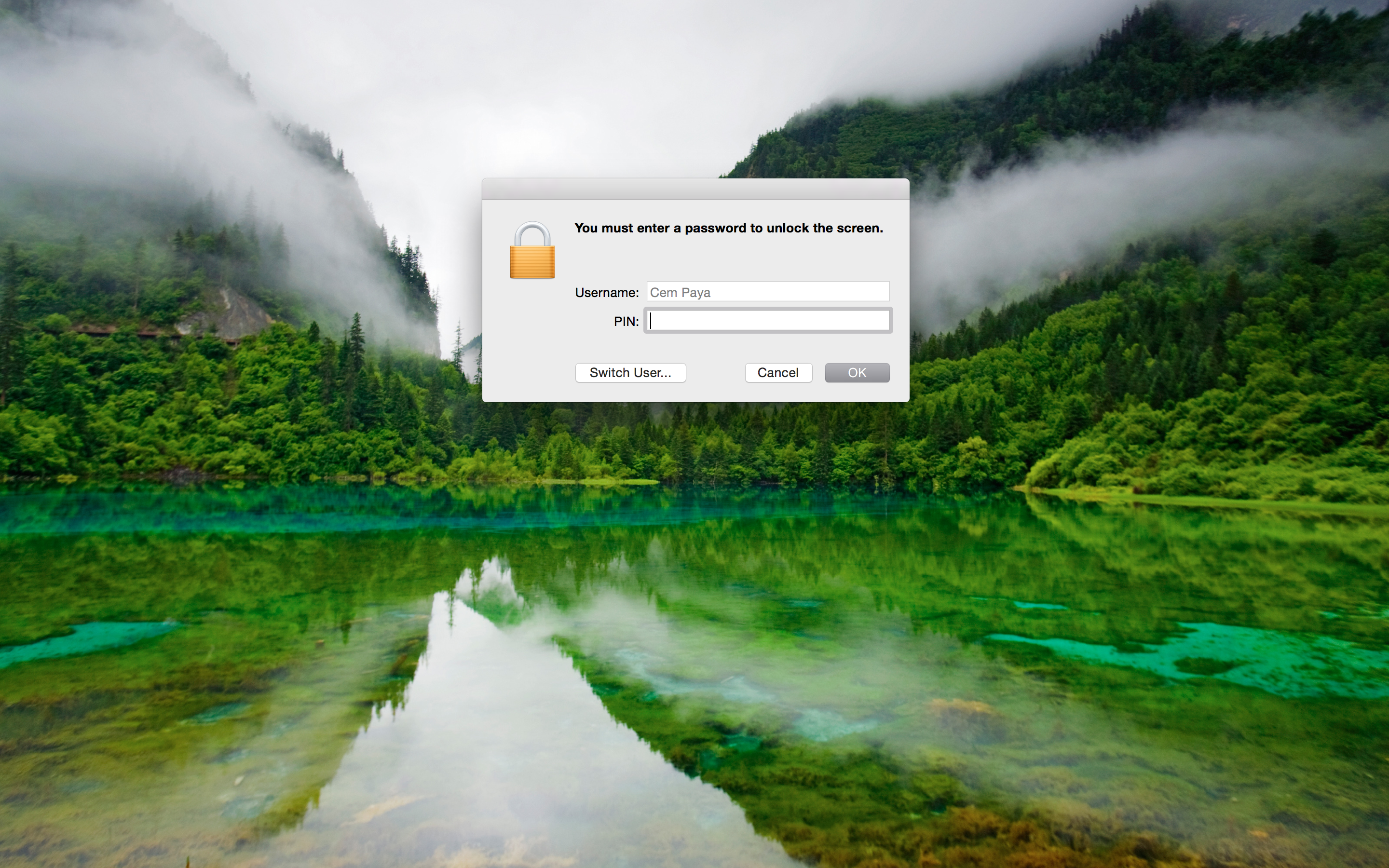
In addition to the login screen and screen-saver, elevation prompts for sensitive operations will also work with smart-cards:
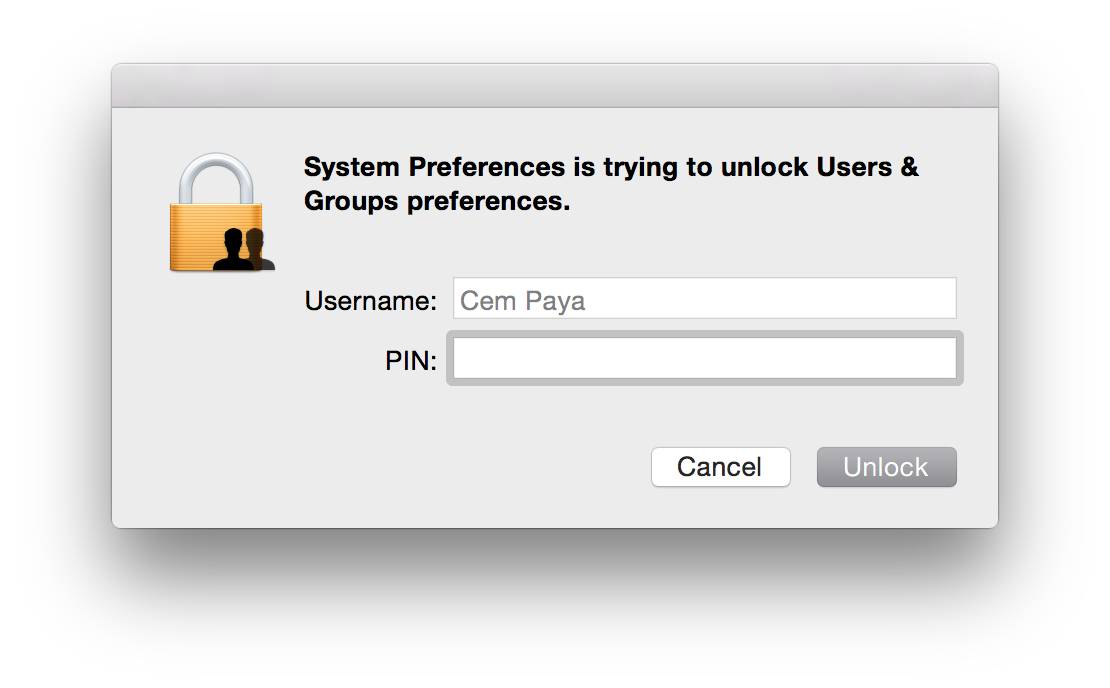
Elevation prompt asking for PINAs before, the dialog can adjust for credential type in real-time. On detecting presence of a smart-card (more precisely, a card for which an appropriate tokend module exists and contains valid credentials) the dialog will change in two subtle ways:

  • Username field is hard-coded to the account mapped from the certificate on the card, and this entry is grayed out to prevent edits
  • Password field is replaced by PIN

If the card is removed before PIN entry is completed, UI reverts back to the original username/password collection model.

One might expect that elevation in command line with “sudo” would similarly pick up the presence of smart-card but that is not the case. su and sudo still require a password. One heavy-weight solution involves installing the PKCS#11 PAM (pluggable authentication module) since OS X does support the PAM extensibility mechanism. A simpler work-around is to substitute an osascript wrapper for sudo. This wrapper can invoke the GUI credential collection which is already smart-card aware:
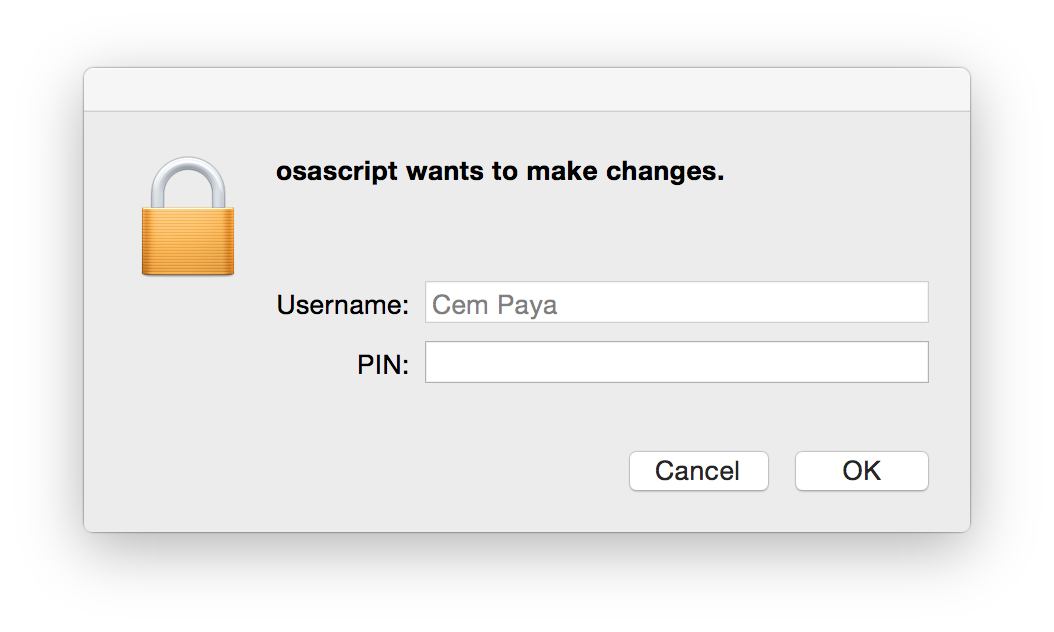
sudo replacement with PIN collection(Downside is that the elevation request is attributed to osascript, instead of the specific binary to be executed with root privileges. But presumably the user who typed out the command knows the intended target.)

Recap

Before discussing the trust-model and comparing it to Windows implementation, here is a quick overview of steps to enable smart-card logon with OS X:

  • Install tokend modules for the specific type of card you plan to use. For the US government PIV standard, OpenSC project installer contains one out of the box.
  • Enable smart-card login using the security command to modify authorization database.
    $ sudo security authorizationdb smartcard enable
    YES (0)
    $ sudo security authorizationdb smartcard status
    Current smartcard login state: enabled (system.login.console enabled, authentication rule enabled)
    YES (0)

    (Side-note: prior to Mavericks the authorization “database” was a plain text-file at /etc/authorization and it could be edited manually with a text editor— this is why some early OSX smart-card tutorials suggest tinkering with the file directly. In Mavericks it is a true SQLite database and best manipulated with the security utility.)

  • Associate one or more certificate mappings to the local account, using sc_auth command.

Primitive trust-model

Because certificate hashes are tied to a public-key, this mapping does not survive the reissuance of the certificate under a different key. That defeats the point of using PKI in the first place. OSX is effectively using X509 as a glorified public-key container, no different from SSH in the trusting specific keys rather than the generalized concept of an identity (“subject”) whose key at any given time is vouched for by a third-party. Contrast that with how Active Directory does certificate mapping, adding a level of indirection by using fields in the certificate. If the certificate expires or the user loses their token, they can be issued a new certificate from the same CA. Because the replacement has the same subject and/or same UPN, it provides continuity of identity: different certificate, same user. There is no need to let every endpoint know that a new certificate has been issued for that user.

A series of future posts will look at how the same problem is solved on Linux using a PAM tailored for digital certificates. Concrete implementations such as PAM PKCS#11 have same two-stage design: verify ownership of private key corresponding to a certificate, followed by mapping the certificate to local account. Its main differentiating factor is the choice of sophisticated mapping schemes.  These can accommodate everything from the primitive single-certificate approach in OSX to the Windows design that relies on UPN/email, and other alternatives that build on existing Linux trust structures such as ssh authorized keys.

CP

Smart-card logon for OS X (part III)

[continued from part II]

Managing the mapping for smart-card logon

OS X supports two options for mapping a certificate to a local user account:

  • Perform look-up in enterprise directory
  • Decide based on hash of the public-key in the certificate

For local login on stand-alone computers without Active Directory or equivalent, only the second, very basic option is available. As described by several sources [Feitian, PIV focused guides, blog posts], sc_auth command in OS X— which is just a Bash script— is used to manage that mapping via various sub-commands. sc_auth hash purports to display keys on currently present smart-cards, but in fact outputs a kitchen sink of certificates including those coming from the local keychain. It can be scoped to  specific key by passing an identifier. For example to get PIV authentication key out of a PIV card when using OpenSC tokend modules:

$ sc_auth hash -k "PIV"
67081F01CB1AAA07EF2B19648D0FD5A89F5FAFB8 PIV AUTH key

The displayed value is a SHA1 hash derived from the public-key. (Keep in mind that key names such “PIV AUTH key” above are manufactured by the tokend middleware; your mileage may vary when using different one.)

To convince OS X into accepting that certificate for local logon, sc_auth accept must be invoked with root privileges.

$ sudo sc_auth accept -u Alice -k "PIV"

This instructs the system to accept the PIV certificate on presently connected smart-card for authenticating local user Alice.  There is another option to specify the key using its hash:

$ sudo sc_auth accept -u Alice -h 67081F01CB1AAA07EF2B19648D0FD5A89F5FAFB8

More than one certificate can be mapped to a single account by repeating that process. sc_auth list will display all currently trusted public-key hashes for a specified user:

$ sc_auth list -u Alice
67081F01CB1AAA07EF2B19648D0FD5A89F5FAFB8

Finally sc_auth remove deletes all certificates currently mapped to a local user account:

$ sudo sc_auth remove -u Alice

Smart-card user experience on OS X

So what does the user experience look like once the mapping is configured?

Initial login

First the bad news: don’t throw away your password just yet. The boot/reboot process remains unchanged. FileVault II full-disk encryption still requires typing in the password to unlock the disk.** Interestingly, its predecessor the original FileVault did support smart-cards because it was decrypting a container in the file-system after enough of the OS had been loaded to support tokend. New variant operates at a much lower level. Because OS X does not ask for the password a second time after the FileVault prompt, there is no opportunity to use smart-card in this scenario.

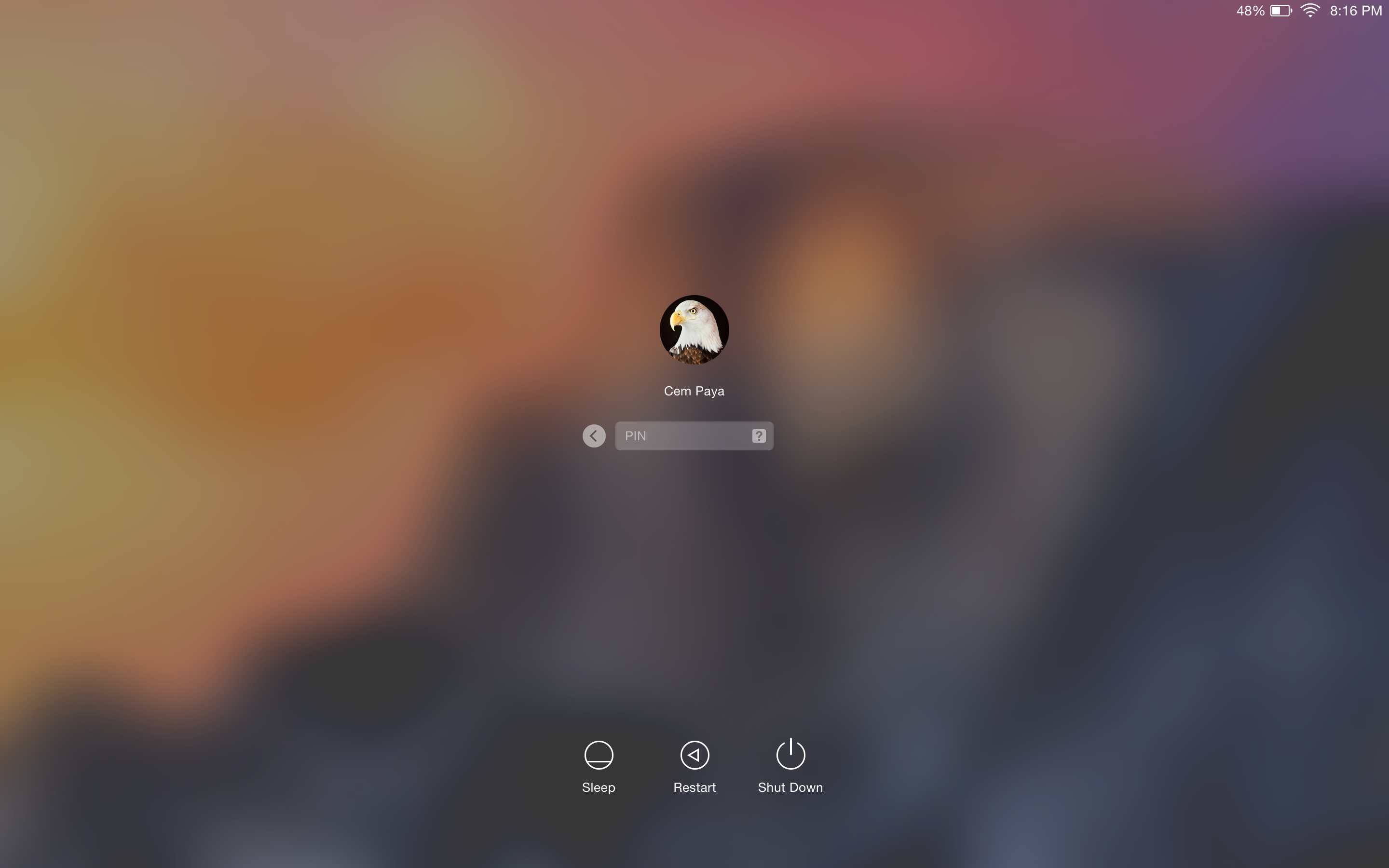
Good news is that subsequent authentication and screen unlocking can be done using a smart-card. The system recognizes the presence of a card and modifies its UI to switch authentication mode on the fly. For example, here is what the Yosemite login screen usually looks like after signing out:**

Standard login screen

Standard login screen

After a card is connected to the system, the UI updates automatically:

OS X login UI after detecting card presence

OS X login UI after detecting card presence

Local account mapped to the certificate from the card is chosen, and any other  avatars that may have been present disappear from the UI. More subtly the password prompt changes into a PIN prompt. After entering the correct PIN, the system will communicate with the card to verify its possession of the private-key and continue with login as before.

Caveat emptor

  • On failed PIN entry, the system does not display the number of remaining tries left before the card is locked. It is common for card standards to return this information as part of the error; PIV specification specifically mandates that. Windows will display the count after incorrect attempts as a gentle nudge to be careful with next try; a locked card typically requires costly intervention by enterprise IT.
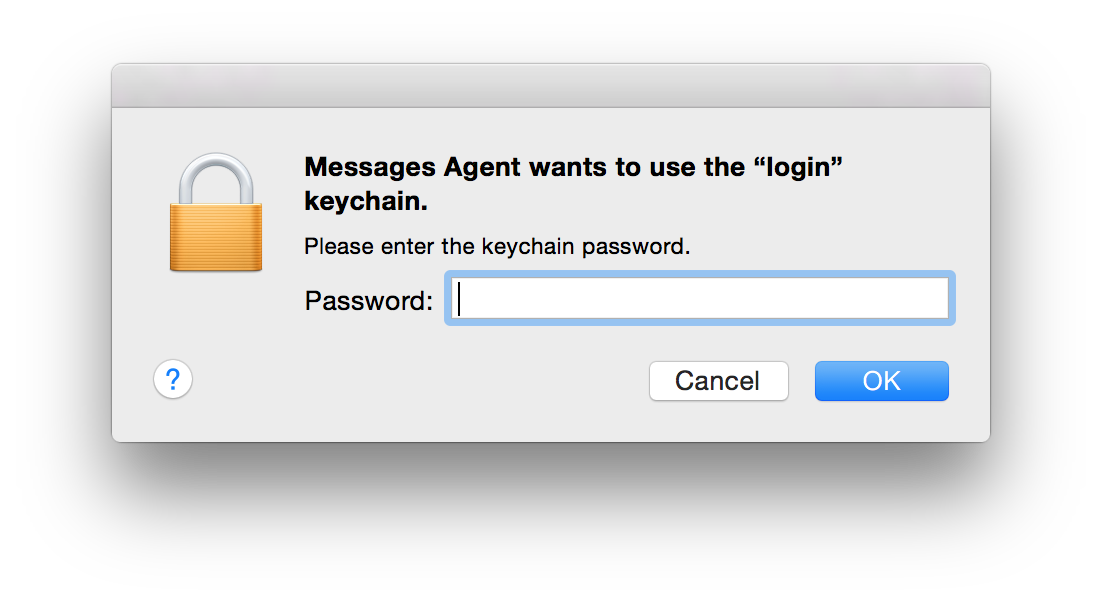
  • After logging in, it is not uncommon to see another prompt coming from the keychain, lest the user is lulled to a false sense of freedom from passwords:
    Screen Shot 2015-02-08 at 20.17.11 Keychain entries previously protected by the password still need to be unlocked using the same credential. If authentication took place using a smart-card, that password is not available after login. So the first application trying to retrieve something out of the key-chain will trigger on-demand collection. (As the dialog from Messages Agent demonstrates, that does not take very long.)

Screen unlock

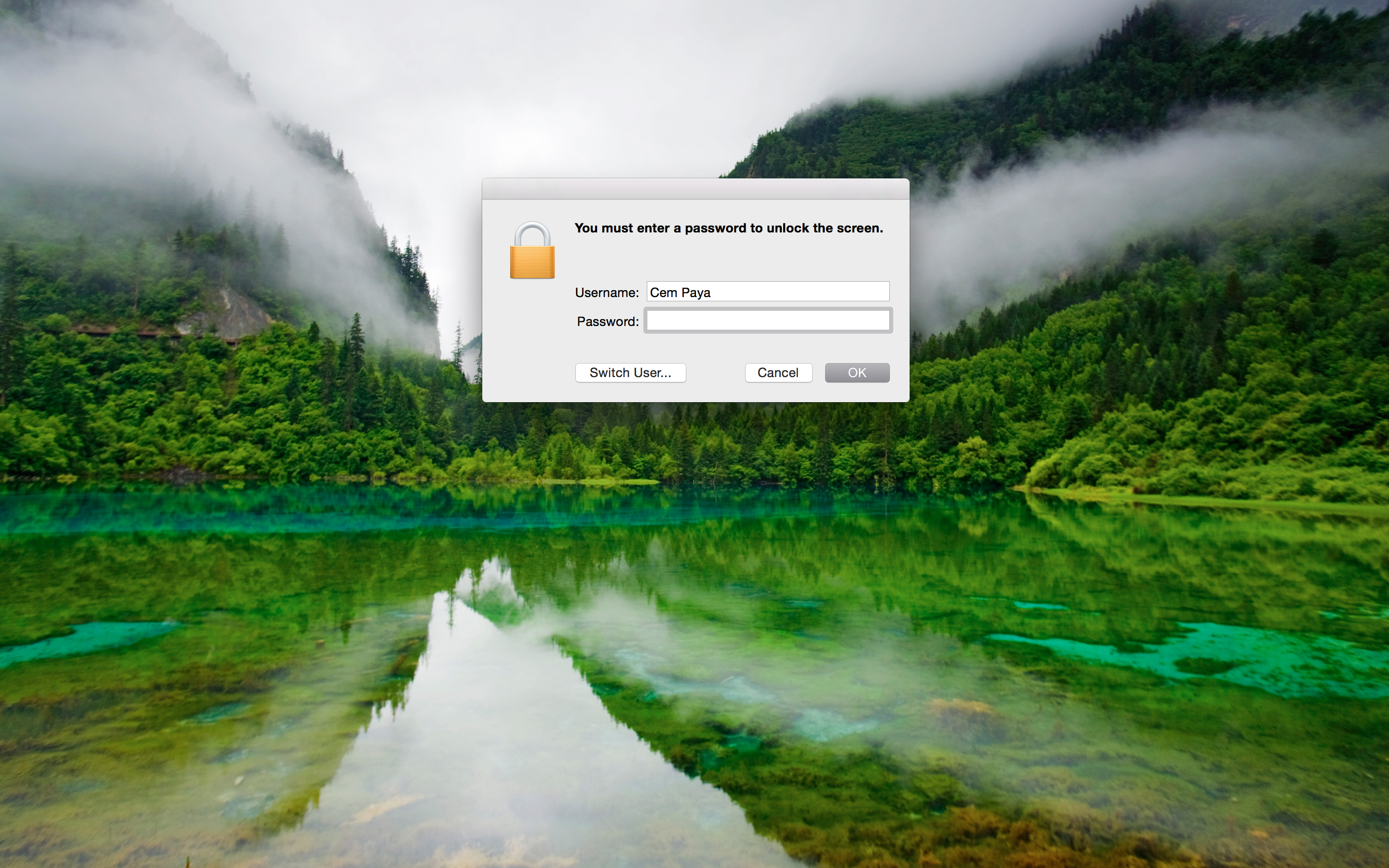
Unlocking the screen works in a similar fashion, reacting to the presence of a card. Here is example UI when coming out of screen-saver that requires password:

Screen-saver prompting for password

Screen-saver prompting for password

After detecting card presence:

Screen-saver prompting for card PIN

Screen-saver prompting for card PIN

This is arguably the main usability improvement to using smart-cards. Instead of typing a complex passphrase to bring the system out of sleep or unlock after  walking away (responsible individuals lock their screen before leaving their computer unattended, one would hope) one need only type in a short numeric PIN.

[continued]

CP

* In other words OS X places the burden of security on users to choose a random pass-phrase, instead of offloading that problem to specialized hardware. Similarly Apple has never managed to leverage TPMs for disk encryption, despite a half-hearted attempt circa 2006, keeping with the company tradition of failing to grok enterprise technologies.
** MacWorld has a helpful guide for capturing these screenshots, which involve SSH from another machine.

Smart-card logon for OS X (part II)

[continued from part I]

Local vs domain logon

In keeping with the Windows example from 2013, this post will also look at local smart-card logon, as opposed to directory based. That is, the credentials on the card correspond to a user account that is defined on the local machine, as opposed to a centralized identity management service such as Active Directory. A directory-based approach would allow similar authentication to any domain-joined machine using a smart-card, while the local case only works for a user account recognized by one machine. For example, it would not be possible to use these credentials to access a remote file-share afterwards, while that would be supported for the AD scenario because the logon in that case results in Kerberos credentials recognized by all other domain participants.

Interestingly that local logon case is natively supported by the remnants of smart-card infrastructure in OS X. By contrast Windows only ships with domain logon, using PKINIT extension to Kerberos. Third-party solutions such as eIDAuthenticate are required to get local scenario working on Windows. (In the same way that Apple can’t seem to grok enterprise requirements, MSFT errs in the other direction of enabling certain functionality only for enterprise. One can imagine a confused program manager in Redmond asking “why would an average user ever want to login with a smart-card?”)

Certificate mapping

At a high-level there are two pieces to smart-card logon, which is to say authenticating with a digital certificate where the private key happens to reside on a “smart card.” (Increasingly the card is not an actual card but could be a USB token or even virtual-card emulated by the TPM on the local machine.)

  • Target machine decides which user account that certificate represents
  • The card proves possession of the private-key corresponding to the public-key found in the certificate

The second part is a relatively straightforward cryptographic problem that has many precedents in the literature, including SSH public-key authentication and TLS client authentication. Typically both sides jointly generate a challenge, the card performs a private-key operation using that challenge and machine verifies the result using the public-key. Exact details vary based on key-type and allowed key-usage attributes in the certificate. For example if the certificate had an RSA key, the machine could encrypt some data and ask the card to respond with proof that it can recover the original plaintext. If the certificate instead had an ECDSA key which is only usable for signatures but not encryption (or it has an RSA key but the key-usage constraints on the certificate rule out encryption) the protocol may involve signing a jointly generated challenge.

Tangent: PKINIT in reality

Reality of PKINIT specification is a lot messier— not to mention the quirks of how Windows has implemented it historically. Authentication of user is achieved indirectly in two steps. First client sends the Kerberos domain-controller (KDC) a request signed with its own key-pair, then receives a Kerberos ticket-granting-ticket (TGT) from KDC encoded in one of two different ways:

  • Encrypted in the same RSA key used by the client when signing— this was the only option supported in early implementations of PKINIT in Windows
  • Using a Diffie-Hellman key exchange, with DH parameter and client input authenticated by the signature sent in the original request

Mapping from any CA

The good news is local logon does not involve a KDC, there is no reason for implementations to worry about idiosyncrasies of RFC4556 or interop with Kerberos. Instead they have a different problem in mapping a certificate to user accounts. This is relatively straightforward in the enterprise: user certificates are issued by an internal certificate authority that is either part of Active Directory domain controller using the certificate services role (in the common case of an all-Windows shop) or some stand-alone internal CA that has been configured for this purpose and marked as trusted by AD. The certificates are based on a fixed template with username encoded in specific  X509 fields such as email address or UPN, universal principal name. That takes the guesswork out of deciding which user is involved.  The UPN “alice@acme.com” or that same value in email field unambiguously indicates this is user Alice logging into Acme enterprise domain.

By contrast local smart-card logon is typically designed to work with any existing certificates the user may have, including self-signed ones; this approach might be called “bring-your-own-certificate” or BYOC. No assumptions can be made about the template that certificate follows, other than conforming to X509. It may not have any fields that would allow obvious linking with the local account. For example there may be no UPN and email address might point to Alice’s corporate account, while the machine in question is a stand-alone home PC with personal account nicknamed “sunshine.” Main design challenge then is devising a flexible and secure way to choose which certificates are permitted to login to which account.

[continued]

CP

Smart-card logon for OS X (part I)

OS X in the enterprise

Apple is not exactly known for an enthusiastic enterprise scenarios, which is surprising considering the company’s steady rise in popularity as standard issue IT equipment at large companies. It was common for Mac-operations team at Google to frequently report bugs that made it difficult to manage the enterprise fleet— and Google has thousands of Macbooks company wide. These were routinely ignored and under-prioritized by a culture more focused on designing shiny objects than pedestrian tasks like enterprise controls. So one would expect that a decidedly enterprise-oriented security feature along the lines of smart-card logon could not possibly work on OS X. But the real surprise is it can be made to work using only open source software and in spite of Apple’s best attempts to deprecate all things smart-card related.

Market pressure: it works

Back-tracking  we have the first riddle: why did a consumer-oriented platform known more for flashy graphics than high-security scenarios even bother implementing smart-card support in the first place? The credit for that goes to the US government—indirectly. Presidential directive HSPD-12 called for a common identification standard for federal employees and contractors. In response, NIST developed FIPS 201 as a comprehensive standard encompassing hardware/software for employee badges, PKI-based credentials on those badges and framework for identity management built around those credentials. The vision was ambitious, encompassing both physical access- say getting into restricted areas inside an airport- and logical access such as authenticating to a server in the cloud. Lynchpin of this vision was the CAC (Common Access Card), later replaced by PIV or Personal Identity Verification card. Compliance with CAC and PIV became baseline requirement for certain product sales to the federal government.

That same demand got Windows Vista playing well with CAC and PIV. (Not that it mattered, as Vista never succeeded in the marketplace.) Much better out-of-the-box support carried over into Windows 7. Apple was not immune to that pressure either. OS X had its own proprietary tokend stack for interacting with smart-cards, comparable to the Windows smart-card mini driver architecture. A tokend module for PIV was provide starting with 10.5 to enable standard PIV scenarios such as email encryption or authenticating to websites in a browser.

Deprecated in favor of?

“There are 2 ways to do anything at Google: the deprecated one and the one that does not yet work.” — inside joke at Google

This is where the paths between Apple and MSFT diverged. MSFT continued to invest in improving the smart-card stack, introducing new mini-driver models and better PIV integration. OS X Lion removed support for tokend, no longer shipping the modules in the core OS image. This was the culminating act of Apple washing its hands clean off this pesky security technology, which had started earlier by open-sourcing the smart-card services component earlier and handing off development to a group of volunteers clustered around an open-source project.

In principle punting all development work to an open-source community does not sound too bad. Building blocks are freely available, if anyone cares to compile from sources and install the components manually. In practice most companies do not want to deal with the complexity of maintaining their own packages or watching updates from the upstream open-source project. Third-party vendors [this, that, others] stepped into the void to provide complete solutions going beyond tokend modules, offering additional utilities for administering the card that missing from OS X.

Apple may eventually define a new cryptography architecture with feature parity to CDSA. At the moment nothing ships in the box for enabling smart-card support, not even for PIV. But relics of the supposedly deprecated architecture still survive even in Mavericks. That foundation combined with tokend modules shipping in OpenSC installer- derived from that original open-source release- allow implementing smart-card logon using only free software.

[continued]

CP

Cloud storage and encryption revisited: Bitlocker attacks (part II)

[continued]

Instead of adopting one of the standardized narrow block cipher modes for Bitlocker, Windows 8 removed the diffuser and reverted to plain CBC mode. This bizarre change greatly simplifies crafting controlled changes to binaries to obtain arbitrary code execution. Suppose we know the sectors on disk where a particular application resides and we know exactly which version of that application it is. Now the PE format for Windows executables contains many sections- some of them meta-data/headers, others resources such as strings and icons. More interestingly, there are the portions which are truly “executable;” they contain the stream of instructions that will run when this application is invoked. Being able to manipulate even a small number of instructions in that stream achieves code execution.

There are several practical difficulties along the way. As pointed out, CBC mode does not permit changes with surgical precision- we can control one full block of 16 bytes but only at the expense of having no say over the preceding one. But one can repeat the same trick with the next two adjacent blocks, getting to control  one out of two blocks in each sector. That calls for an unusual way to organize shell code: divide it into small fragments of 14 bytes or less, with 2-byte relative forward jumps at the end to skip over the next block that is outside our control. (As the analog of return-oriented programming, this could be jump-oriented programming.) We also need to locate a candidate block that can be used as entry point into the shell code. Recall that controlling block N requires that we modify block N-1; that means code linearly executing through block N-1 may crash or do strange things before reaching block N. Instead we need to find a point in the binary where a branch or call target lands at the beginning of a nicely aligned 16-byte block. Considering that most functions will be aligned at 8 or 16 byte addresses, this is not a significant hurdle.

Exploiting this against a local Bitlocker-protected boot volume is straightforward, as demonstrated in the iSEC research: choose a binary that is guaranteed to be executed automatically on boot without user action- such as winlogon– along with a code path in that binary that is guaranteed to be hit. For removable drives and cloud storage, it is less clear whether these conditions will arise in practice. Such volumes typically contain “data”- documents, presentations, music, photography etc. instead of executable files that can be readily infected with shellcode. (Exception being whole-system images meant for recovering from an OS corruption.) But one can not rule out more sophisticated attacks; the definition of what counts as “executable” is itself encoded in the filesystem metadata, which can be modified with the same technique for modifying file contents. For example the user may have uploaded a Word document with “doc” extension to the cloud. But if we change the extension to “bat” and modify the contents appropriately to create a valid batch file, we get code execution.

There is another challenge that makes exploitation harder for the cloud case: knowing exactly where on disk the file targeted for modifications resides. This is easier to determine for local attacks where disk layout is based on a fixed template. If we know the victim is using a particular Dell laptop with factory-installed Windows image, we can order an identical laptop with same size disk and examine which sectors the target binary occupies on that Window installation. (This will not work for files that are replaced. For example if an OS update brings in a new version of some system binary, chances are it will not be updated in place. Instead it will be recreated by assigning new sectors from unused space— sectors whose locations are unpredictable because they are based on the pattern disk usage up until that point.) By contrast volumes synced to the cloud do not have a fixed structure, directory pattern or naming convention that can be used to estimate where interesting data may have ended up.

Still, none of these problems qualify as a systemic mitigation. If anything the remote storage scenario illustrates why it is necessary to move beyond the core assumption in FDE, namely that each sector must encrypt to exactly one sector, with no room for expansion to accommodate integrity checks. That is a reasonable assumption for local disk encryption for reasons articulated in the Elephant diffuser whitepaper: compatibility when encrypting existing volumes, performance overhead from having to read/write multiple sectors if integrity checks were stored separately and resulting requirement for transactional updates. None of these constraints apply to cloud storage. It may be possible to retrofit required data expansion into protocols such as iSCSI to salvage full-disk encryption. A more pessimistic conclusion is that FDE is not the right framework for creating private storage in the cloud, and different file-system level approaches may be necessary.

CP

Cloud storage and encryption revisited: Bitlocker attacks (part I)

Interesting research from iSEC Partners on attacking the weakened Bitlocker design in Windows 8 has corollaries for the problem of trying to apply full-disk encryption to protect cloud storage. Last year we sketched out a series of experiments on trying to create private storage by combining existing full-disk encryption (FDE) scheme with standard cloud storage providers such as Dropbox or Google Drive. The simplest design is creating a virtual disk image (VHD)  backed by an ordinary file, syncing that file to the cloud, mounting the VHD as drive and enabling Bitlocker-To-Go on the volume same way one could enable it on a USB thumb-drive.

As noted these prototypes suffer from an intrinsic problem: FDE provides confidentiality but not integrity. Encryption alone stops the cloud storage service from finding out what is stored, but will not prevent them from being able to make changes. (Or for that matter, unauthorized changes by adversaries on the network path between user and cloud provider. That attack vector was more clear with an alternative design involving iSCSI targets stored in the cloud. iSCSI has no transport level security, unlike the SSL-based sync used by most cloud storage services.) Because there is no redundancy in FDE, any ciphertext will decrypt to something even after it has been tampered with. Granted, the resulting garbled plaintext may cause trouble further up in the application layer. For example in the case of an encrypted VHD, if the file-system structures stored on disk have been corrupted, the VHD will no longer mount correctly as an NTFS volume. Perhaps the file-system is intact but the first few hundred bytes for a particular file have been scrambled, with the result that it is no longer recognized as the correct type, because file formats typically have a fixed preamble. Other file formats such as text are more resilient, but they could end up with corrupted data in the middle resulting from incorrect decryption.

It’s clear such attacks can result in random data corruption. Less clear is whether controlled changes can be made to an encrypted volume to achieve more dangerous outcomes. iSEC research demonstrates such an outcome against Bitlocker in Windows 8. While their proof-of-concept works against a local boot volume, the same techniques would apply to disk images stored in the cloud, although it will be more difficult to reproduce the attack for reasons described in the next post.

Critical to this exploit is a weakening of Bitlocker in Windows 8. Recall that block ciphers are designed to encrypt a fixed amount of data at a time. For example AES operates on 16 bytes at a time. To encrypt larger amounts of plaintext requires choosing a mode of operation—a way to invoke that single-block encryption repeatedly as a blackbox until all of the data has been processed. The naive way of doing this, namely encrypting each block independently, is known as electronic codebook or ECB mode. It has significant drawbacks, dramatically illustrated with the penguin pictures. Cipher-block chaining or CBC mode does a better job of hiding patterns in plaintext such as repeated blocks by mixing one block into the encryption of the next one. But CBC still does not provide integrity. In fact it becomes easier to modify ciphertext to get desired changes. With ECB mode attackers are usually limited to replacing blocks with other known plaintext blocks. By contrast CBC mode allows getting full control over any block by making changes to the preceding one. More specifically, any difference XORed into the preceding block will result in the same difference XORed into the plaintext when current block is decrypted.  This capability comes with a caveat: the decryption of that preceding block is corrupted and replaced with junk that we can not control in the general case.

For these reasons simple block cipher modes are combined with a separate integrity check. Alternatively one can use authenticated encryption modes such as GCM, which also compute an integrity check along the way while processing plaintext blocks. Because disk-encryption schemes can not add an integrity check— encryption of one disk sector must fit in exactly one sector— they have to defend against these risks by alternative means. The original version of Bitlocker in Vista used a reversible diffuser dubbed Elephant to “mix” the contents of a sector before encryption, such that errors introduced in decryption will be amplified across the entire sector unpredictably, instead of being neatly confined to single blocks. While Elephant was an ad hoc design, later theoretical treatments of the subject in the literature introduced the notion of narrow-block ciphers and “wide-block ciphers to properly capture this intuitive notion: difficult to make controlled changes across a large chunk of plaintext, much larger than the block size of the underlying primitive such as AES. IEEE Security in Storage Working Group then standardized a number of modes such as XTS that have provable security properties based on assumptions about the underlying block cipher.

[continued]

CP

EMV: end of the road for dynamic mag-stripes?

A 2012 post on this blog discussed the renewed commercial interest in programmable magnetic-stripe (also known as “dynamic mag-stripe”) technology that allows a single plastic card to represent multiple credit/debit/loyalty/rewards cards by changing the information encoded on the fly. At the time, crowd-funded Coin was leading the charge. ArsTechnica recently reviewed other entrants in this increasingly crowded space including Wocket and Plastc, which have more advanced features including NFC. But the article still fails to answer a simple question: can these cards work with the upcoming shift to chip & PIN in the US? (More precisely, chip & signature initially—true to their conservative and cautious nature, US banks are planning to roll out EMV without changing the user-experience at least initially. The chip will participate in the transaction with point-of-sale but card-holders do not have to authenticate by entering their PIN.)

Somewhat confusing matters is that at least Plastc is described as being EMV compatible. On the surface that would suggest one could take a chip-card, somehow “load” it on Plastc and use the Plastc device in place of the original card for EMV transactions going forward. But that can’t work short of a serious vulnerability in the design of the original. While Plastc may possess all the necessary hardware and software required to participate in EMV transactions, emulating an existing EMV card requires access to the information provisioned on that card. Therein lies the problem: some of that information- card number and expiration date- are readily obtained, some of it is designed to be very difficult to extract.

A plain magnetic-stripe card is trivially copied: readers can be bought for a few dollars, or even free thanks to Square handing them out to anyone that asks. Card-writers that can encode new information on to the magnetic stripe are more expensive but within reach; entire kits complete with blank cards can be purchased for a few hundreds dollars off the shelf. “Cloning” such a card is as simple as reading the information on the magnetic stripe from the original card, and writing it into a new one. (A convincing replica for fraudulent purposes would also need to recreate the visual design features such as the embossed numbers, hologram and background image. Coin and similar programmable cards are deliberately designed to look distinctive; they are not attempting to pass for a perfect copy of the original card.)

EMV cards by design resist such cloning. Unlike the fixed information encoded on the magnetic stripe, the chips produce slightly different responses for every interaction with the point-of-sale terminal. These responses are generated using secret cryptographic keys stored inside the chip. They are deliberately difficult to extract: keys themselves are never output as part of the protocol and there is no “reader” to view the contents of internal storage. The card-holder can not look it up on a web page or swipe the card through a gadget; that would defeat the point of keeping the keys secret. Absent vulnerabilities in card software responsible for wielding those keys, only esoteric hardware-level attacks would successfully allow extracting them: monitoring RF output or power consumption with high precision, inducing calculated faults by aiming precisely timed laser pulses, peeling the circuitry layer-by-layer under high magnification. It’s a safe bet consumers will not be asked to repeat those procedures at home.

That rules out the type of do-it-yourself provisioning possible with magnetic stripes. While card-holders can easily “load”  plain magnetic stripe cards into Coin without involvement from the issuer (whether issuers condone or object to that practice is another story) that same approach will not fly for chip cards. Succeeding with EMV provisioning model requires buy-in from banks and card networks. Plastc could pursue agreements with issuers to provision card data directly on the Plastc hardware or they could pursue the tokenization approach of creating a proxy card that forward transactions to the original. But all of these require getting buy-in from banks, one risk-averse institution at a time. Apple took that route for Apple Pay, and despite its market power has not achieved 100% coverage among issuers. The odds look daunting for a start-up.

CP

Bitcoin transaction fees: beyond the 1% barrier

Here is a recent Bitcoin transaction:

8f1d3a8ef6b2d4a25d2f499279e01518b4770819ccbc39a765c4c326170c61b3

It stands out for several reasons. First is the number of inputs into the transaction: while most transactions spends funds from a handful of other transactions, this one is aggregating from dozens. More interesting is that it moved an astonishing 217500 bitcoins total, valued at roughly 81 million dollars based on the  exchange rate at the time of this transaction. That figure stands in sharp contrast to another one: the total commission (or “miners-fee” as the terminology goes in Bitcoin) paid for moving this amount: one-ten-thousandth of a Bitcoin which comes out to about 4¢ or less than 0.000001% of the transaction cost. Where nuclear energy once promised “electricity too cheap to meter,” Bitcoin seems to hold out the possibility of funds movement with negligible fees.

That rosy picture changes quickly once we look at fees charged for more typical transactions, which are often mediated by third-party payment processors, rather than going through the blockchain directly. For example Coinbase— one of the more prominent Bitcoin payment processing services— does not take any commission for accepting Bitcoin, but charges 1% to merchants who choose to convert their funds to fiat currency. (It is a safe bet that this is what most large merchants are doing, since the problem of vaulting Bitcoin is unfamiliar.) That rate is several orders of magnitude above the rate achievable using the blockchain directly. What accounts for such high margins? That may be the wrong question to ask. Perhaps a better approach is to look at garden-variety payment systems and ask what justifies their fee schedule.

  • Credit cards: A fixed cost on the order of 30-40 US cents, plus a per valor amount ranging from 2-3% of the transaction depending on the type of card. For example American Express has historically had highest processing fees than Visa or MasterCard. Similarly rewards cards tend to have higher fees. Large merchants such as Walmart have better leverage with card networks for negotiating fees— although not enough to stop being disgruntled about it— while smaller businesses tend to pay higher effective rates.
  • Debit networks: 2010 Durbin amendment ushered in a steep drop in debit fees. While small community banks were exempted from the regulation, for the majority of large banks in the US debit transactions now have a minimal transaction fee of 0.05% plus roughly a quarter. There is a different fee schedule with higher rate for “small-ticket” purchases less than $15 but for amounts in that range both formulas converge to similar amounts.
  • Square: Square handles credit-card processing for the long-tail of small businesses, except that the “merchant of record” as far as the network goes is Square itself. Meanwhile the actual retailer transacting with the customer pays Square a flat 2.75% for swipe transactions regardless of the type of card used. (Keyed-in cards— Square analog for card-not-present transactions incur a higher 3.5% rate.)
  • Paypal: Anywhere from 2.2% to 2.9% of transaction based on monthly volume, plus a small fixed cost. Higher rates and currency-conversion fees apply for international transactions.
  • Western Union: Complex schedule based on amount, funding source (credit-card vs bank account) and whether the funds are sent online, from mobile-app or in-person. Two sample data points along the spectrum: sending $100 to New York by credit-card costs $12 for a staggering 12% rate. But sending ten-times as much to the same zip-code funded by a bank account costs less at an effective 1% fee.

These numbers are all over the place, but one can explain at least why the orders of magnitude are stacked this way. For example, in the case of a credit card transaction, the fee is split between acquiring bank, the issuing bank— the one that gave the customer their credit-card—  and the network itself. (In the case of Discover and AmEx, “issuer” can be same entity as the network.) Of these three parties, most notable is the issuer taking risk of consumer credit. The cardholder can spend the money but never pay back the issuer for the charges. There are additional costs the issuer must contend width— dealing with disputes, absorbing the cost of fraud in case of charge-backs, reissuing cards etc.— but credit risk is by far the most significant one, hence the triumvirate of credit-reporting bureaus compiling massive dossiers to estimate the creditworthiness of every American. There are also large operational expense for the issuer: rewards programs. Those frequent-flier miles, cash-back awards and airline status upgrades all cost money, which the issuer hopes to recoup from its share of the transaction fees along with interest earned on customers carrying balances.

The absence of such frills explains why PIN-debit networks are able to operate with much lower overhead. A debit transaction only clears if customer has funds present in their bank account. There is no credit extended with the expectation of future payment. Second, debit cards also have nominally better security compared to plastic cards: entering PIN at the point-of-sale terminal is required for spending and there is no “card-not-present” model where simply entering in a number and expiration into a website— easily compromised— allows debit transactions. This is why debit-card skimmers have to both capture magnetic stripe and PIN entry.  Debit transactions can also be reversed and disputed, but the process and timelines associated are different from credit cards.

What about Square? Square pays one transaction fee to Visa/MasterCard/AmEx while charing the merchant a different one, presumably profiting from the difference. That means profitability for  is critically dependent on the actual mix of funds that customers are using and transaction amounts. If every customer of a Square merchant spent a few dollars only and paid with their American Express card, Square margins would be completely squeezed out, potentially putting the company into the red on each transaction. (In the extreme, this reduces to the time-honored dot-com business model: “We lose money on every transaction, but we make up for it in volume.”)

Returning to the problem of processing Bitcoin transactions for merchants, there is no “issuing bank”, nor is there an“acquirer.” Closest analog to the network are the Bitcoin miners competing to produce the next block in the public ledger that records all transactions, but their fees are nominal— dramatically illustrated by the $80M transaction above. So what is the risk that Coinbase is taking? There is no dispute resolution or fraud investigation to speak of: Bitcoin transactions are famously irreversible. It is the ultimate in self-reliance where your cryptographic keys are your funds: lose control over the key, there is no bank to call, no 1-800 number to report, no FDIC insurance to cover losses. There is no notion of charge-back or penalties levied by the network for having too many transactions reversed. There is some currency risk, considering most merchants seem to prefer getting paid in US dollars immediately instead of vaulting Bitcoin— likely due to the lack of expertise in storing and handling cryptocurrency. That means whenever there is a precipitous drop in the Bitcoin-to-USD exchange rate, Coinbase is left holding the bag, having acquired Bitcoins from the customer while paying out fiat currency to the merchant. And there are certainly no lavish vacations or frequent-flier status upgrades being awarded to anybody: Coinbase does not have any relationship with the consumer. (While Coinbase also provides a consumer wallet service, there is no guarantee that an incoming Bitcoin remittance is originating from one of these.)

In short, there is little reason to expect that merchant processing fees for Bitcoin should be in the 1% range- including currency exchange- as they are today. These rates are more likely to be a reflection of a nascent market, high volatility in exchange rates, lack of merchant expertise in directly handling Bitcoin and first-mover advantage enjoyed by initial participants, that is likely to face downward competitive pressure as the risk-models mature.

CP

How to fail at code-signing, the Sony edition

Another massive corporate security breach? Readers well-versed in contemporary history of data-breaches may not be surprised to learn that the target this time was Sony, a repeat-customer for enterprising attackers since 2011. But they might still be surprised to learn both the extent of damage and surprisingly weak internal processes used by Sony in managing critical assets. Leaked internals documents and emails are making the rounds, despite best efforts by Sony to put the genie back in the bottle both using alleged denial-of-service attacks and enlisting their army of attorneys to mail out nastygrams to journalists as Christmas presents.

Here we will focus on just one aspect of the breach: theft of code-signing keys. These were the credentials used by Sony for digitally signing applications authored by the company, proving their origin. Granted “authored by Sony” does not automatically translate into “safe” or “not riddled with vulnerabilities.” Knowledge of authorship attested by the digital signature is at best intended to be a proxy for the reputation of the software publisher. A reputable company would not be in the business of publishing harmful malware, goes the theory. Ironically Sony itself has provided a spectacular counter-example to that assumption: in 2006 the company willfully and deliberately published a malicious rootkit designed to implement gratuitous DRM restrictions against copying CDs on personal computers. Granted at the time digital signatures were not commonly required for Windows kernel-mode drivers, which is the specific type of binary this rootkit assumed. In that sense, the question of code-signing was decoupled from the problem of honesty on behalf of the software vendor. In principle the terms of use required by CAs prior to issuing a code-signing certificate includes warm-and-fuzzy promises by the publisher that they will not use the certificate to sign malicious code.

Back to Sony, the organization which we learned, keeps passwords in cleartext files and stores encryptions keys alongside the content they are protecting. It would not be out of character for such an enterprise to also mismanage their code-signing keys. Sure enough signing keys were also one of the reported casualties of the breach, with signed malware turning up not too long after reports of the incident surfaced. (One report claims the sample discovered was just a proof-of-concept created by a security researcher, as opposed to actual malware found in the wild for offensive purposes.) Regardless, the certificate in question was quickly revoked by the certificate authority. At least for the  Authenticode scheme which is the de facto standard on Windows, revocation checking is enabled by default— unlike the half-baked way it is implemented for SSL by most web browsers— providing at least a modicum of assurance that this particular certificate is unlikely to be used for hiding malware.

What about all of the other Sony certificates? Such a large organization is likely to have multiple certificates used for different applications and different teams. What happened to the rest? For that  what about Sony SSL certificates? In a data-breach the probability of various assets getting compromised is highly correlated. It would be astonishing if an organization so negligent at managing cryptographic keys somehow exercised utmost caution to protect SSL keys. Why aren’t certificate authorities promptly revoking all Sony certificates and forcing the company to reissue? It is worth pointing out a CA does not have to wait for Sony to request revocation. Terms-of-use for most CAs include provisions that allow the CA to unilaterally revoke a certificate when it is believed to have been compromised; here is the example from GlobalSign. So are CAs being negligent in waiting for a “smoking gun” in the form of malware signed by the compromised key instead of proactively taking action?

This question exposes one of the basic conflicts of interest in code-signing systems with trust mediated by third-party certificate authorities— Authenticode being an example of such open models. There are risks associated with revoking as well as risk associated with not taking action:

  • Revoking a certificate could mean application relying on it break. In the case of code-signing previously signed binaries will no longer validate. Doomsday predictions range from bricked devices to webpages not loading correctly.
  • Not revoking on the other hand could mean that malicious binaries are signed under the Sony name and users tricked into installing such applications. In that case the CA would be guilty of negligence, in aiding and abetting attacks against third-parties who relied on the CA to vouch for Sony identity.

It turns out that first problem was already taken into account by Authenticode very early via time-stamping. Binaries signed by the software publisher are further counter-signed by a trusted third-party vouching for the current time that signature was observed. Revocation standards in turn allow specifying the time from which point onwards the certificate is to be considered untrusted. All signatures made before that time— based on the third-party timestamp— continue to validate. Signatures bearing a later time-stamp or none at all are voided.

So why are certificate authorities still erring on the side of not revoking certificates, when there is every reason to believe that Sony is not in control of its private keys? Put bluntly, CAs get paid by the software publisher and at the end of the day, is primarily responsible to the publisher, while occasionally throwing a bone to the CAB forum, a balkanized consortium of certificate authorities and browser vendors attempting to set baseline standards for issuance. The CA has very little responsibility to anyone else. Those users who ended up installing malware signed by “Sony” thinking it was a legitimate certificate? Tough luck. They are not the ones paying $$$ to the certificate authority.
Granted this question of liability has never been tested in an actual court case. CA could plausibly  pass the buck by pointing the finger at Sony, arguing that it is the certificate “subject”— in other words the customer paying the CA— that is solely responsible for initiating revocation. (There is no denying that Sony should have been quicker on the draw here.) But the fact that CAs go out of their way to reserve unilateral revocation rights undermines that argument: why reserve that right in the first place when CA is too conflicted to take action when the customer is clearly negligent?

CP

NFC payments and powered-by-the-field mode (part II)

[continued from part I]

The security problem with running NFC payments in PBTF mode is that it takes user consent out of the picture. This defeats one of the main security improvements mobile wallets have over traditional plastic NFC cards: better control over when and which payments are authorized. In addition to the physical proximity requirement created by short-range of NFC, a number of additional pure software checks exist in the mobile application to guarantee that any payment taking place is one the user fully intended. For example:

  • Most implementations require that the screen is on
  • Correct PIN must have been entered “recently” in to the mobile application, based on a configurable time window. For example the original Google Wallet designed using secure-elements capped this at a conservative 5 minutes. (Interesting enough the more recent host-card emulation release defaults to 24 hours, effectively removing this control.)
  • Some implementations display a confirmation dialog with the requested amount/currency. Consumer must acknowledge this before the transaction is finalized.

Key observation is that such controls are implemented partly or completely by the mobile Android/iOS application. For example the PIN time-out in Google Wallet uses Android timers set to kick-in after the configured time elapses. Why can’t this logic reside in the SE applet itself? The first is a hardware limitation: SE can not maintain a true “wall” clock because it has no power source of its own and is only powered up for brief periods to perform specific tasks such as payments or authentication. The second is a usability/complexity trade-off: in theory payment applets could revert back to “unauthenticated” state after every transaction, requiring a new PIN entry. But that would make it difficult to deal with two common scenarios. First is retrying the same transaction that did not go through– common problem, as consumers not used to interacting with NFC readers. Second is completing several purchases in succession, for example in the case of large shopping centers with multiple merchants. In order to avoid manual PIN re-entry in these situations, the mobile application would have to cache the PIN outside the secure element for the same duration, create a more risky situation than just relying on a timer to issue some command to the SE.

Even if time-outs and deactivation could be implemented reliably with future hardware changes, there is still one fundamental problem with PBTF: the consumer has no inkling when a transaction is taking place or for that matter what exactly happened. Recall that PBTF can only generate enough juice to power up the secure element and NFC controller chips; the small burst of electricity supplied by the reader is not enough to power up the far-more resource hungry mobile device itself. (Inductive charging exists for mobile devices such as Nexus 4 from 2012. Even if point-of-sale terminals supplied that much power, it would take around half-minute for a phone to boot-up and reach the point of running the payments application, far too long to be useful for tap payments where deadlines are measured in fractions of a second.) With the main processor powered off, there is no way to inform user with a beep/vibration that a transaction has taken place, much less ask them for confirmation ahead of time. Given those constraints, the secure element applet responsible for payments must fend for itself when deciding whether to proceed. Imagine the code waking up to find itself powered by the external field and faced with a request for payment. (By the way, neither NXP or Broadcom/Oberthur chips at the time provided any means to distinguish that from regular powered-by-host mode but let’s assume future hardware will solve that.) Is that because the consumer is holding up their phone against a real point-of-sale terminal at a store to checkout? Or is this an unauthorized person holding a rogue NFC-reader while that same person is standing on a bus with their phone in their pocket, oblivious to the virtual pick-pocketing? PBTF takes away one of the main advantages of having dual-interface secure element coupled to smartphone: trusted user-interface for communicating user intent.

That determination can not be made without the host OS participating– which it can not while powered off. One can imagine various heuristics to permit “low-risk” transactions: authorize a maximum of 10 transactions, approve only if the requested payment amount is small (but don’t forget about currency in addition to numeric amount as this paper demonstrates) or approve if the merchant is recognized. The problem is that only the first of these can be implemented reliably. Merchant authentication is rudimentary at best in EMV. Meanwhile the mag-stripe profile of EMV employed for backwards compatibility does not authenticate purchase amounts at all. In fact there is not even a provision to send the payment amount to the phone. Amusingly MasterCard MMPP added that capability but this is window dressing: the amount/currency does not factor into the calculation of CVV3. POS can claim to charge 5¢ while interacting with the phone but then authorize $1000.

Finally there is the principle of least surprise: consumer do not expect their phones to be capable of doing anything— much less spending money— when they are powered off. (Contrary to claims that NSA can continue tracking phones when powered off.) That argues for making PBTF an opt-in choice for users to enable once they are familiar with the technology. This fact was impressed on a blogger’s colleague during the early days of Google Wallet. While trying to demonstrate that how new technology is perfectly safe by tapping a powered-off Nexus S against a Vivotech 4500, the engineer was shocked to hear the familiar beep of a successful transaction emitted from the reader. It turned out that he powered off the phone by yanking the battery. Because of that abrupt shutdown, the NFC stack never had a chance to disable card-emulation mode. With NFC controller set to card-emulation and PBTF enabled by-default in early NFC controller firmware, that left the secure element “armed” to conduct payments. (Luckily the reader was not connected to any POS, so no actual money changed hands during this instructive, if somewhat unexpected demonstration.) That experience promptly inspired a firmware update to disable PBTF by default for Android devices.

CP