Second-guessing Satoshi: ECDSA and Bitcoin (part II)

[continued from part I]

There are ways to improve confidence in the correct operation of a blackbox ECDSA implementation that has bee tasked with signing transactions with our private key. One approach suggested in the original paper is choosing the jointly between blackbox and external client requesting signatures. There is an inherent asymmetry here, because the two sides can not complete such a protocol on equal terms. Because knowledge of the nonce used to a particular signature allows private-key recovery, the client can not learn the final value that will be used to compute the signature. But we can still defeat a kleptographic system by guaranteeing that the blackbox can not fully control choice of nonce either.

  • Blackbox chooses its own nonce k and commits to it, for example by outputting a hash of the curve point that would have resulted from using that nonce eg P = k∗G
    where G is the generator of the group. (Recap: first half of an ECDSA signature is the x-coordinate of the point on the elliptic-curve that is obtained by “multiplying” the generator with the nonce.)
  • Client returns a random scalar value r.
  • Blackbox opens the commitment to reveal its chosen point P— but not the scalar k— and then proceeds to compute the signature using Q = r ∗ (k∗G).
  • Before accepting the signature, client verifies that the final point Q and original choice P are related as Q = r∗P.

This guarantees that even if a kleptopgraphic implementation chose “cooked” k values to leak information, that signal is washed away when those choices are multiplied by random factors. In fact  multiplication is not the only option. The protocol is equally effective with addition and using (r+k) ∗ P as final value. But an extra point-multiplication for both sides can not be avoided because each side still has to compute r∗P on its own. They can not accept a result precomputed by the other side.  (It does make it easier to for the client to verify expected result by a simple point addition instead of the more expensive multiplication.)

Main challenge for this protocol is the interactivity— it changes the interface between the ECDSA implementation and client invoking a signature operation by requiring two round-trips. But it need not require changes to the client software. For cryptographic hardware such as HSMs, there is already a middleware layer such as PKCS#11 that translates higher-level abstractions such as signing into low-level commands specific to the device. This abstraction layer could hide the extra round-trip. Alternatively the round-trip can be eliminated by a stateful client. Suppose that after every signature the HSM outputs a commitment to the nonce it will use for the next signature and client caches this value. Then each signature request can be accompanied by client’s own random contribution and each signature response can be verified against the commitment cached from previous operation.

We can extend that further to come up with a different mitigation: suppose that the blackbox ECDSA implementation is asked to commit to thousands of nonces ahead of time. The client can in turn specify a single seed value that will be used to influence every nonce in the list according to a pseudo-random function of that random seed. (We can’t simply add/multiply every nonce with the same random value. That would fail to mask patterns across multiple nonces chosen by a kleptographic implementation.) In this case no interactivity is required for signature operations, since both blackbox and client contributions to the final nonce are determined ahead of time. One caveat: a kleptographic implementation can try to cheat by faking a malfunction and outputting invalid responses in order to skip some values in the sequence, leaking information based on which ones were omitted. Meanwhile the client can’t insist that blackbox sign with previous nonce, because reusing nonces across different messages also results in private-key disclosure.

As a side-note: precomputing and caching nonces can also serve as a performance optimization, by leveraging the online/offline nature of ECDSA. Such signature schemes have the unusual property that a significant chunk of the required computation can be done without seeing the message that is being signed. For ECDSA the generation of the first half of the signature fits the bill: multiply a fixed point of the elliptic-curve by a random nonce that is chosen independent of the message. That point multiplication is by far the most expensive part of the signature. Front-loading that and computing nonces ahead of time reduces perceived latency when it is time to actually emit a signature.

One problem not addressed in the original paper is that of key generation. If the objective is guarding against a kleptographic blackbox ECDSA implementation, then it can not be trusted to generate keys either. Otherwise it is much simpler to “leak” private keys directly by using a subverted RNG whose output is known to the adversary. Ensuring randomness of nonces used when signing will not help in that situation; the private key is already compromised without signing a single message. But the same techniques used to randomize the nonce can be applied here, since an ECDSA public-key is also computed as a point-product of the secret private key and fixed generator point. The blackbox can commit to its choice of private-key by outputting a hash of the public-key, and the client can provide additional random input that causes final chosen key to be distributed randomly even if the blackbox was dishonest.

All of this complexity raises a different question: why is Bitcoin using ECDSA in the first place? As pointed out, RSA signing does not suffer from this problem of requiring “honest” randomness for each signature. But that is simply one criteria among many considerations. A future post will compare RSA and ECDSA side-by-side for use in a cryptocurrency such as Bitcoin.

[continued]

CP

Second-guessing Satoshi: ECDSA and Bitcoin (part I)

“Cold-wallets can be attacked.” Behind that excited headline turns out to be a case of superficial journalism and missing the real story. Referring back to the original paper covered in the article, the attack is premised on a cold-wallet implementation that has been already subverted by an attacker. Now that may sound tautological: “if your wallet has been compromised, then it can be compromised.” But there is a subtlety the authors are careful to point out: offline Bitcoin storage is supposed to be truly incommunicado. Even if an attacker has managed to get full control and execute arbitrary code- perhaps by corrupting the system ahead of time, before it was placed into service- there is still no way for that malicious software to communicate with the outside world and disclose sensitive information. Here we give designers the benefit of the doubt, assuming they have taken steps to physically disable/remove networking hardware and place the device in a Faraday cage at the bottom of a missile silo. Such counter-measures foreclose the obvious communication channels to the outside world. The attacker may have full control of the wallet system, including knowledge of the cryptographic keys associated with Bitcoin funds, but how does she exfiltrate those keys?

There is always the possibility of covert channels, ways of communicating information in a stealth way. For example the time taken for a system to respond could be a hidden signal: operate quickly to signal 0, introduce artificial delays to communicate 1. But such side-channels are not readily available here either; the workings of offline Bitcoin storage are not directly observable to attackers in the typical threat model. Only the legitimate owners have direct physical access to the system. Our attacker sits some place on the other side of the world, while those authorized users walk in to generate signed transactions.

But there is one piece of information that must be communicated out of that offline wallet and inevitably become visible to everyone— the digital signature on Bitcoin transactions signed by that wallet. Because transactions are broadcast to the network, those signatures are public knowledge. Within those signatures is an easy covert channel. Credit goes to ECDSA, the digital-signature algorithm chosen by Satoshi for the Bitcoin protocol. ECDSA is a probabilistic  algorithm. For any given message, there is a large number of signatures that would be considered “valid” according to the verification algorithm; in fact for the specific elliptic-curve used by Bitcoin, an extraordinarily large number in the same ballpark as estimated number of particles in the observable universe. An “honest” implementation of ECDSA is expected to choose a nonce at random and construct the signature based on that random choice. But that same freedom offers a malicious ECDSA implementation to covertly send messages by carefully “cooking” the nonce to produce a specific pattern in the final signature output. For example successive key-bits can be leaked by choosing the signature to have same parity as the bit being exfiltrated.

But the channel present within ECDSA is far more sophisticated. Building on the work of Moti Yung and Adam Young, it is an example of a kleptographic system. It is efficient: two back-to-back signatures are sufficient to output the entire key. It is also deniable: without the additional secret value injected by the attacker, it is not possible for other observers with access to same outputs—recall that everyone gets to see transactions posted on the blockchain— to pull-off that key-recovery feat. That includes the legitimate owner of the wallet. To everyone else these signatures looks indistinguishable from those output by an “honest” cold-storage implementation.

There is a notion of deterministic ECDSA where nonces are generated as a function of the message, instead of chosen randomly. This variant was designed to solve a slightly different problem, namely that each ECDSA signature requires a fresh unpredictable nonce. Reusing one from a different message or even generating a partially predictable nonce leads to private-key recovery. While this looks like a promising way to close the covert channel, the problem is there is no way for an outside observer to verify that the signature was generated deterministically. (Recall that we posit attacker has introduced malware subverting the operation of the cold-storage system, including its cryptographic implementation.) Checking that a signature was generated deterministically requires knowing the private key- which defeats the point of only entrusting private keys to the cold-storage itself.

This same problem also applies to other black-box implementations of ECDSA where the underlying system is not even open to inspection, namely special-purpose cryptographic hardware such as smart-cards and hardware security modules (HSM.) An HSM manufacturer could use a similar kleptographic technique to disclose keys in a way that only that manufacturer can recover. In all other aspects, including statistical randomness tests run against those nonces, the system is indistinguishable from a properly functioning device.

[continued- countermeasures]

CP

Smart-card logon for OS X (part IV)

[continued from part III]

Smart-card elevation

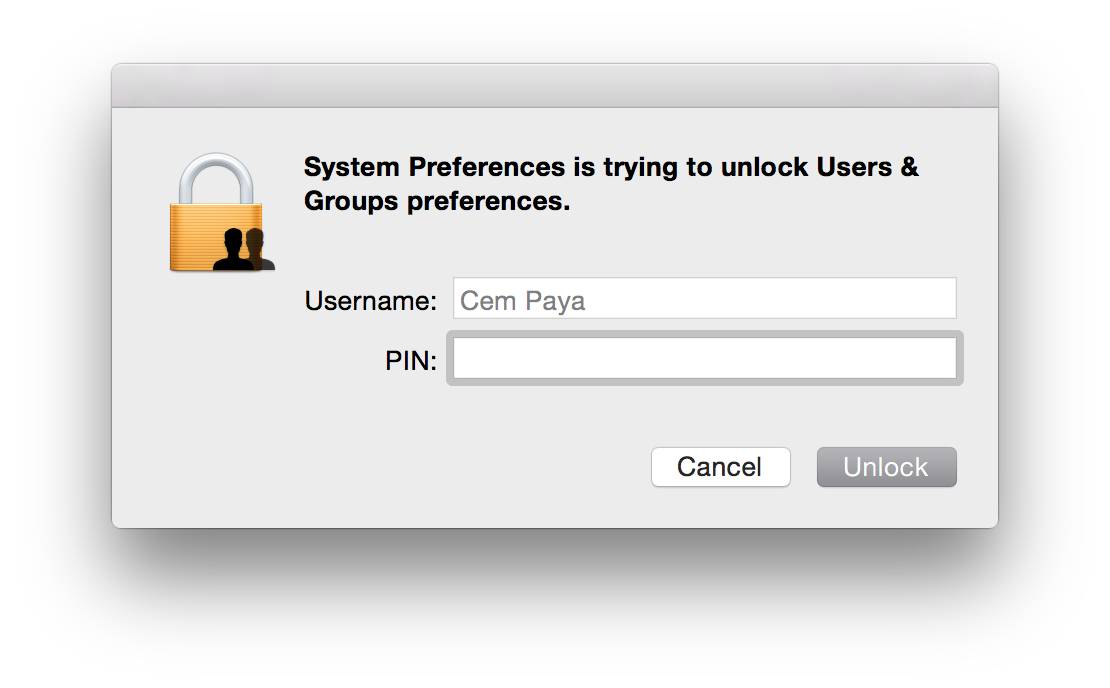
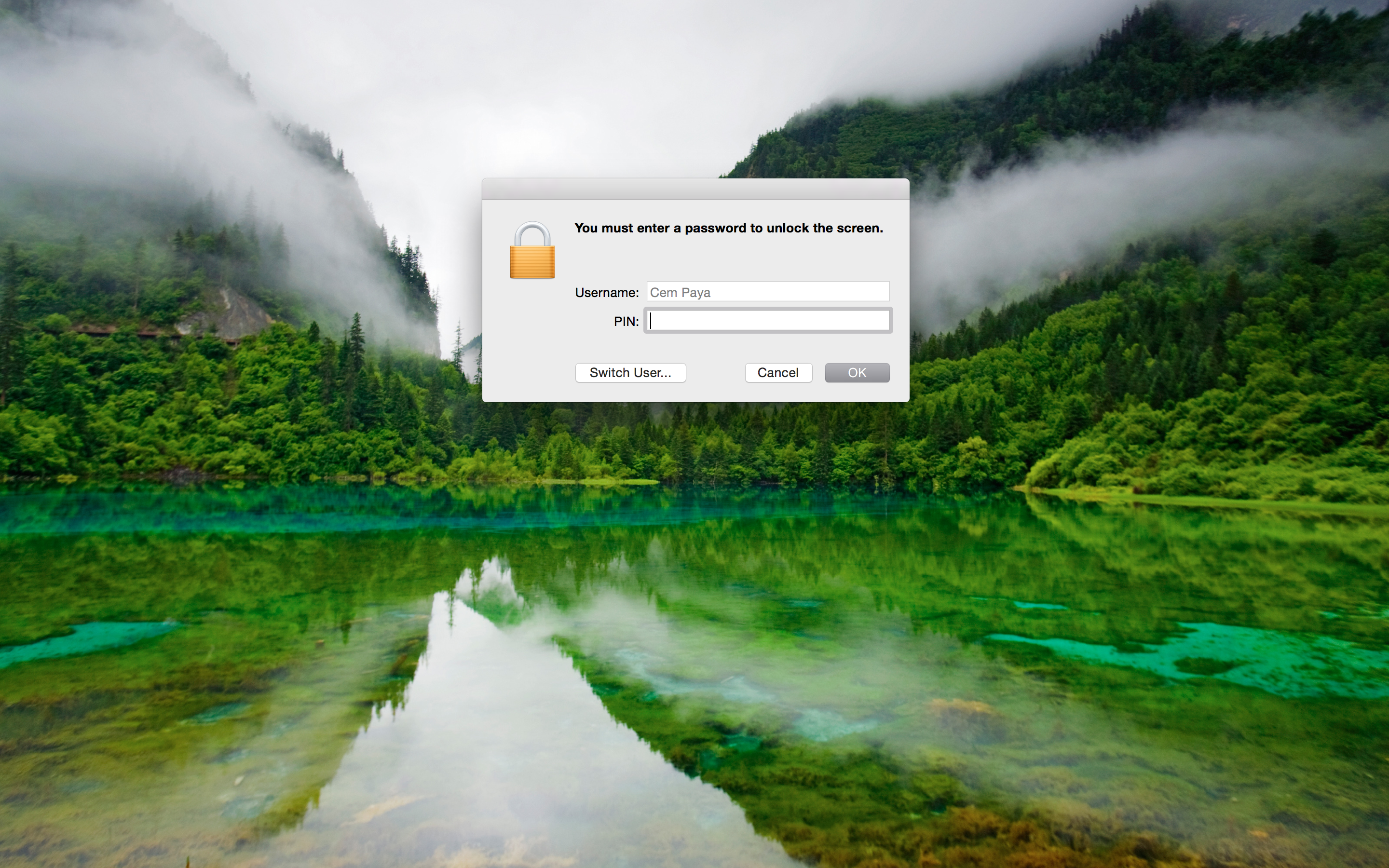
In addition to the login screen and screen-saver, elevation prompts for sensitive operations will also work with smart-cards:

Elevation prompt asking for PINAs before, the dialog can adjust for credential type in real-time. On detecting presence of a smart-card (more precisely, a card for which an appropriate tokend module exists and contains valid credentials) the dialog will change in two subtle ways:

  • Username field is hard-coded to the account mapped from the certificate on the card, and this entry is grayed out to prevent edits
  • Password field is replaced by PIN

If the card is removed before PIN entry is completed, UI reverts back to the original username/password collection model.

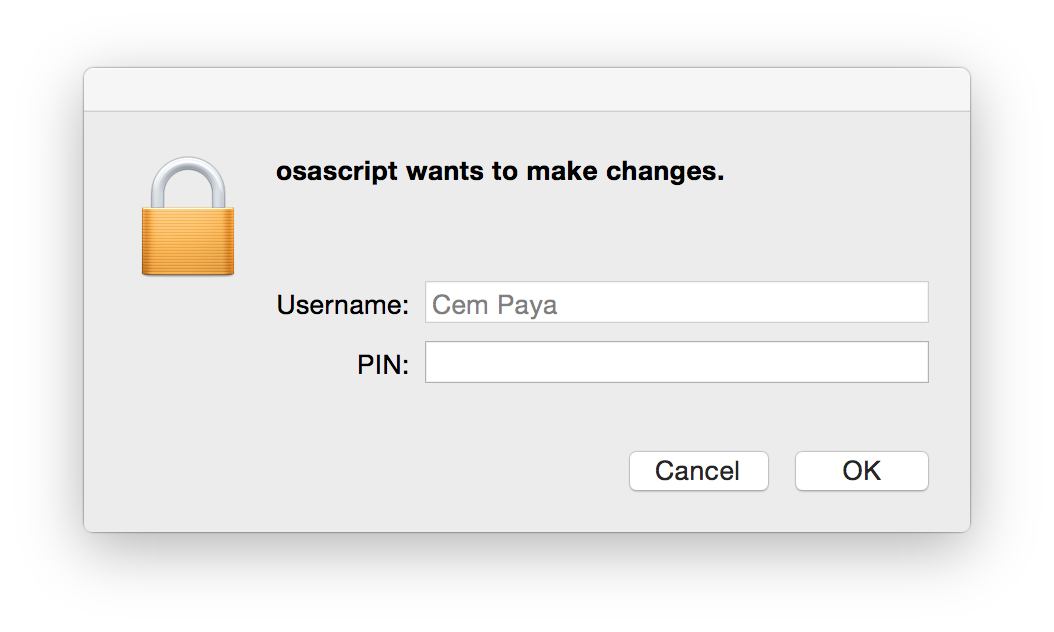
One might expect that elevation in command line with “sudo” would similarly pick up the presence of smart-card but that is not the case. su and sudo still require a password. One heavy-weight solution involves installing the PKCS#11 PAM (pluggable authentication module) since OS X does support the PAM extensibility mechanism. A simpler work-around is to substitute an osascript wrapper for sudo. This wrapper can invoke the GUI credential collection which is already smart-card aware:

sudo replacement with PIN collection(Downside is that the elevation request is attributed to osascript, instead of the specific binary to be executed with root privileges. But presumably the user who typed out the command knows the intended target.)

Recap

Before discussing the trust-model and comparing it to Windows implementation, here is a quick overview of steps to enable smart-card logon with OS X:

  • Install tokend modules for the specific type of card you plan to use. For the US government PIV standard, OpenSC project installer contains one out of the box.
  • Enable smart-card login using the security command to modify authorization database.
    $ sudo security authorizationdb smartcard enable
    YES (0)
    $ sudo security authorizationdb smartcard status
    Current smartcard login state: enabled (system.login.console enabled, authentication rule enabled)
    YES (0)

    (Side-note: prior to Mavericks the authorization “database” was a plain text-file at /etc/authorization and it could be edited manually with a text editor— this is why some early OSX smart-card tutorials suggest tinkering with the file directly. In Mavericks it is a true SQLite database and best manipulated with the security utility.)

  • Associate one or more certificate mappings to the local account, using sc_auth command.

Primitive trust-model

Because certificate hashes are tied to a public-key, this mapping does not survive the reissuance of the certificate under a different key. That defeats the point of using PKI in the first place. OSX is effectively using X509 as a glorified public-key container, no different from SSH in the trusting specific keys rather than the generalized concept of an identity (“subject”) whose key at any given time is vouched for by a third-party. Contrast that with how Active Directory does certificate mapping, adding a level of indirection by using fields in the certificate. If the certificate expires or the user loses their token, they can be issued a new certificate from the same CA. Because the replacement has the same subject and/or same UPN, it provides continuity of identity: different certificate, same user. There is no need to let every endpoint know that a new certificate has been issued for that user.

A series of future posts will look at how the same problem is solved on Linux using a PAM tailored for digital certificates. Concrete implementations such as PAM PKCS#11 have same two-stage design: verify ownership of private key corresponding to a certificate, followed by mapping the certificate to local account. Its main differentiating factor is the choice of sophisticated mapping schemes.  These can accommodate everything from the primitive single-certificate approach in OSX to the Windows design that relies on UPN/email, and other alternatives that build on existing Linux trust structures such as ssh authorized keys.

CP

Smart-card logon for OS X (part III)

[continued from part II]

Managing the mapping for smart-card logon

OS X supports two options for mapping a certificate to a local user account:

  • Perform look-up in enterprise directory
  • Decide based on hash of the public-key in the certificate

For local login on stand-alone computers without Active Directory or equivalent, only the second, very basic option is available. As described by several sources [Feitian, PIV focused guides, blog posts], sc_auth command in OS X— which is just a Bash script— is used to manage that mapping via various sub-commands. sc_auth hash purports to display keys on currently present smart-cards, but in fact outputs a kitchen sink of certificates including those coming from the local keychain. It can be scoped to  specific key by passing an identifier. For example to get PIV authentication key out of a PIV card when using OpenSC tokend modules:

$ sc_auth hash -k "PIV"
67081F01CB1AAA07EF2B19648D0FD5A89F5FAFB8 PIV AUTH key

The displayed value is a SHA1 hash derived from the public-key. (Keep in mind that key names such “PIV AUTH key” above are manufactured by the tokend middleware; your mileage may vary when using different one.)

To convince OS X into accepting that certificate for local logon, sc_auth accept must be invoked with root privileges.

$ sudo sc_auth accept -u Alice -k "PIV"

This instructs the system to accept the PIV certificate on presently connected smart-card for authenticating local user Alice.  There is another option to specify the key using its hash:

$ sudo sc_auth accept -u Alice -h 67081F01CB1AAA07EF2B19648D0FD5A89F5FAFB8

More than one certificate can be mapped to a single account by repeating that process. sc_auth list will display all currently trusted public-key hashes for a specified user:

$ sc_auth list -u Alice
67081F01CB1AAA07EF2B19648D0FD5A89F5FAFB8

Finally sc_auth remove deletes all certificates currently mapped to a local user account:

$ sudo sc_auth remove -u Alice

Smart-card user experience on OS X

So what does the user experience look like once the mapping is configured?

Initial login

First the bad news: don’t throw away your password just yet. The boot/reboot process remains unchanged. FileVault II full-disk encryption still requires typing in the password to unlock the disk.** Interestingly, its predecessor the original FileVault did support smart-cards because it was decrypting a container in the file-system after enough of the OS had been loaded to support tokend. New variant operates at a much lower level. Because OS X does not ask for the password a second time after the FileVault prompt, there is no opportunity to use smart-card in this scenario.

Good news is that subsequent authentication and screen unlocking can be done using a smart-card. The system recognizes the presence of a card and modifies its UI to switch authentication mode on the fly. For example, here is what the Yosemite login screen usually looks like after signing out:**

Standard login screen

Standard login screen

After a card is connected to the system, the UI updates automatically:

OS X login UI after detecting card presence

OS X login UI after detecting card presence

Local account mapped to the certificate from the card is chosen, and any other  avatars that may have been present disappear from the UI. More subtly the password prompt changes into a PIN prompt. After entering the correct PIN, the system will communicate with the card to verify its possession of the private-key and continue with login as before.

Caveat emptor

  • On failed PIN entry, the system does not display the number of remaining tries left before the card is locked. It is common for card standards to return this information as part of the error; PIV specification specifically mandates that. Windows will display the count after incorrect attempts as a gentle nudge to be careful with next try; a locked card typically requires costly intervention by enterprise IT.
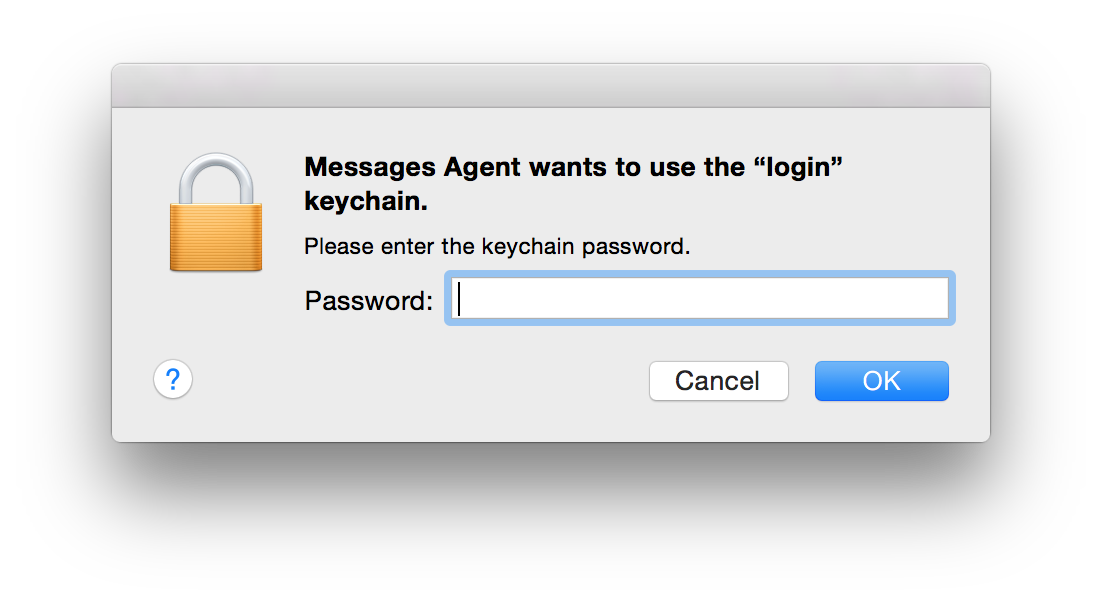
  • After logging in, it is not uncommon to see another prompt coming from the keychain, lest the user is lulled to a false sense of freedom from passwords:
    Screen Shot 2015-02-08 at 20.17.11 Keychain entries previously protected by the password still need to be unlocked using the same credential. If authentication took place using a smart-card, that password is not available after login. So the first application trying to retrieve something out of the key-chain will trigger on-demand collection. (As the dialog from Messages Agent demonstrates, that does not take very long.)

Screen unlock

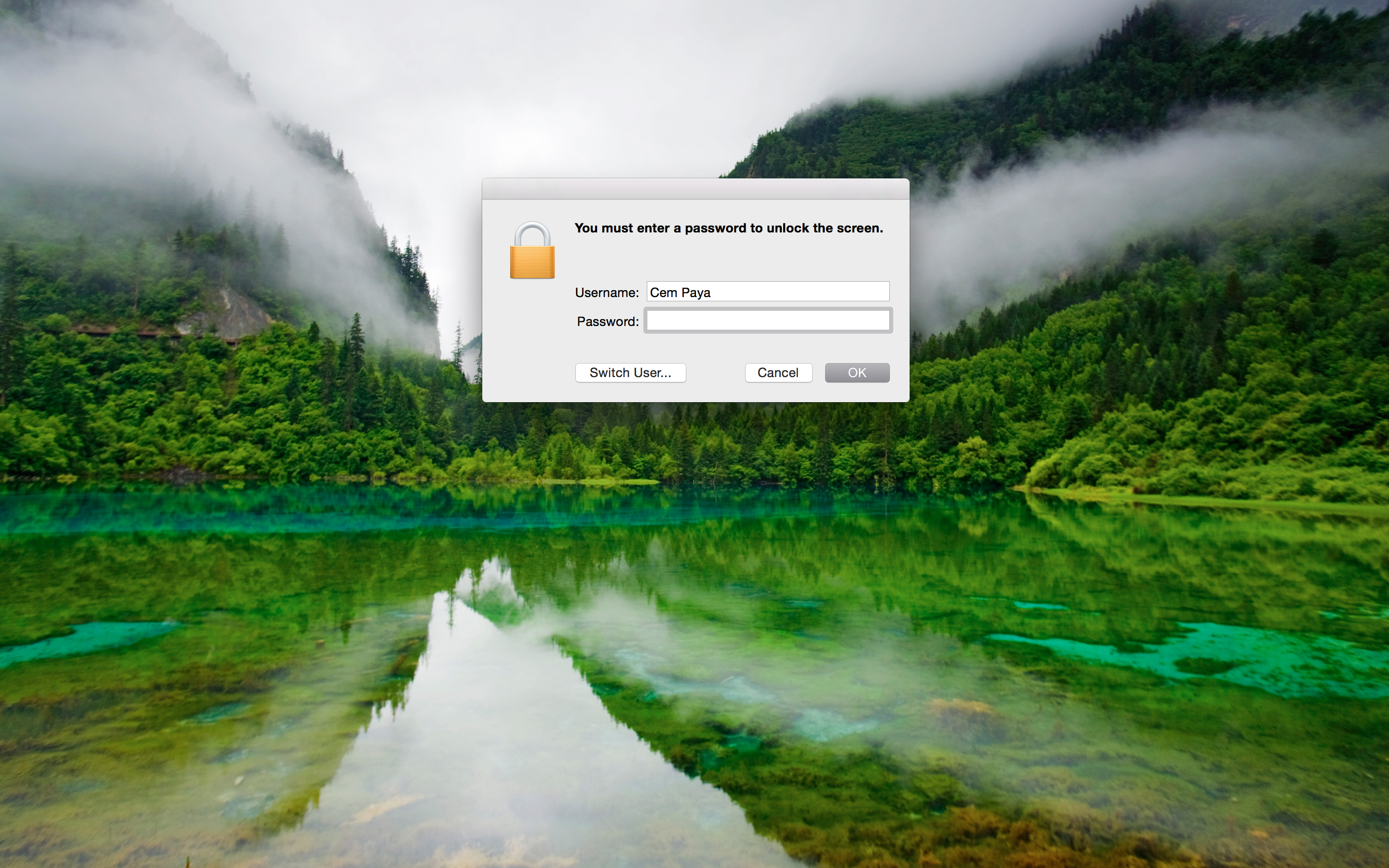
Unlocking the screen works in a similar fashion, reacting to the presence of a card. Here is example UI when coming out of screen-saver that requires password:

Screen-saver prompting for password

Screen-saver prompting for password

After detecting card presence:

Screen-saver prompting for card PIN

Screen-saver prompting for card PIN

This is arguably the main usability improvement to using smart-cards. Instead of typing a complex passphrase to bring the system out of sleep or unlock after  walking away (responsible individuals lock their screen before leaving their computer unattended, one would hope) one need only type in a short numeric PIN.

[continued]

CP

* In other words OS X places the burden of security on users to choose a random pass-phrase, instead of offloading that problem to specialized hardware. Similarly Apple has never managed to leverage TPMs for disk encryption, despite a half-hearted attempt circa 2006, keeping with the company tradition of failing to grok enterprise technologies.
** MacWorld has a helpful guide for capturing these screenshots, which involve SSH from another machine.

Smart-card logon for OS X (part II)

[continued from part I]

Local vs domain logon

In keeping with the Windows example from 2013, this post will also look at local smart-card logon, as opposed to directory based. That is, the credentials on the card correspond to a user account that is defined on the local machine, as opposed to a centralized identity management service such as Active Directory. A directory-based approach would allow similar authentication to any domain-joined machine using a smart-card, while the local case only works for a user account recognized by one machine. For example, it would not be possible to use these credentials to access a remote file-share afterwards, while that would be supported for the AD scenario because the logon in that case results in Kerberos credentials recognized by all other domain participants.

Interestingly that local logon case is natively supported by the remnants of smart-card infrastructure in OS X. By contrast Windows only ships with domain logon, using PKINIT extension to Kerberos. Third-party solutions such as eIDAuthenticate are required to get local scenario working on Windows. (In the same way that Apple can’t seem to grok enterprise requirements, MSFT errs in the other direction of enabling certain functionality only for enterprise. One can imagine a confused program manager in Redmond asking “why would an average user ever want to login with a smart-card?”)

Certificate mapping

At a high-level there are two pieces to smart-card logon, which is to say authenticating with a digital certificate where the private key happens to reside on a “smart card.” (Increasingly the card is not an actual card but could be a USB token or even virtual-card emulated by the TPM on the local machine.)

  • Target machine decides which user account that certificate represents
  • The card proves possession of the private-key corresponding to the public-key found in the certificate

The second part is a relatively straightforward cryptographic problem that has many precedents in the literature, including SSH public-key authentication and TLS client authentication. Typically both sides jointly generate a challenge, the card performs a private-key operation using that challenge and machine verifies the result using the public-key. Exact details vary based on key-type and allowed key-usage attributes in the certificate. For example if the certificate had an RSA key, the machine could encrypt some data and ask the card to respond with proof that it can recover the original plaintext. If the certificate instead had an ECDSA key which is only usable for signatures but not encryption (or it has an RSA key but the key-usage constraints on the certificate rule out encryption) the protocol may involve signing a jointly generated challenge.

Tangent: PKINIT in reality

Reality of PKINIT specification is a lot messier— not to mention the quirks of how Windows has implemented it historically. Authentication of user is achieved indirectly in two steps. First client sends the Kerberos domain-controller (KDC) a request signed with its own key-pair, then receives a Kerberos ticket-granting-ticket (TGT) from KDC encoded in one of two different ways:

  • Encrypted in the same RSA key used by the client when signing— this was the only option supported in early implementations of PKINIT in Windows
  • Using a Diffie-Hellman key exchange, with DH parameter and client input authenticated by the signature sent in the original request

Mapping from any CA

The good news is local logon does not involve a KDC, there is no reason for implementations to worry about idiosyncrasies of RFC4556 or interop with Kerberos. Instead they have a different problem in mapping a certificate to user accounts. This is relatively straightforward in the enterprise: user certificates are issued by an internal certificate authority that is either part of Active Directory domain controller using the certificate services role (in the common case of an all-Windows shop) or some stand-alone internal CA that has been configured for this purpose and marked as trusted by AD. The certificates are based on a fixed template with username encoded in specific  X509 fields such as email address or UPN, universal principal name. That takes the guesswork out of deciding which user is involved.  The UPN “alice@acme.com” or that same value in email field unambiguously indicates this is user Alice logging into Acme enterprise domain.

By contrast local smart-card logon is typically designed to work with any existing certificates the user may have, including self-signed ones; this approach might be called “bring-your-own-certificate” or BYOC. No assumptions can be made about the template that certificate follows, other than conforming to X509. It may not have any fields that would allow obvious linking with the local account. For example there may be no UPN and email address might point to Alice’s corporate account, while the machine in question is a stand-alone home PC with personal account nicknamed “sunshine.” Main design challenge then is devising a flexible and secure way to choose which certificates are permitted to login to which account.

[continued]

CP

Smart-card logon for OS X (part I)

OS X in the enterprise

Apple is not exactly known for an enthusiastic enterprise scenarios, which is surprising considering the company’s steady rise in popularity as standard issue IT equipment at large companies. It was common for Mac-operations team at Google to frequently report bugs that made it difficult to manage the enterprise fleet— and Google has thousands of Macbooks company wide. These were routinely ignored and under-prioritized by a culture more focused on designing shiny objects than pedestrian tasks like enterprise controls. So one would expect that a decidedly enterprise-oriented security feature along the lines of smart-card logon could not possibly work on OS X. But the real surprise is it can be made to work using only open source software and in spite of Apple’s best attempts to deprecate all things smart-card related.

Market pressure: it works

Back-tracking  we have the first riddle: why did a consumer-oriented platform known more for flashy graphics than high-security scenarios even bother implementing smart-card support in the first place? The credit for that goes to the US government—indirectly. Presidential directive HSPD-12 called for a common identification standard for federal employees and contractors. In response, NIST developed FIPS 201 as a comprehensive standard encompassing hardware/software for employee badges, PKI-based credentials on those badges and framework for identity management built around those credentials. The vision was ambitious, encompassing both physical access- say getting into restricted areas inside an airport- and logical access such as authenticating to a server in the cloud. Lynchpin of this vision was the CAC (Common Access Card), later replaced by PIV or Personal Identity Verification card. Compliance with CAC and PIV became baseline requirement for certain product sales to the federal government.

That same demand got Windows Vista playing well with CAC and PIV. (Not that it mattered, as Vista never succeeded in the marketplace.) Much better out-of-the-box support carried over into Windows 7. Apple was not immune to that pressure either. OS X had its own proprietary tokend stack for interacting with smart-cards, comparable to the Windows smart-card mini driver architecture. A tokend module for PIV was provide starting with 10.5 to enable standard PIV scenarios such as email encryption or authenticating to websites in a browser.

Deprecated in favor of?

“There are 2 ways to do anything at Google: the deprecated one and the one that does not yet work.” — inside joke at Google

This is where the paths between Apple and MSFT diverged. MSFT continued to invest in improving the smart-card stack, introducing new mini-driver models and better PIV integration. OS X Lion removed support for tokend, no longer shipping the modules in the core OS image. This was the culminating act of Apple washing its hands clean off this pesky security technology, which had started earlier by open-sourcing the smart-card services component earlier and handing off development to a group of volunteers clustered around an open-source project.

In principle punting all development work to an open-source community does not sound too bad. Building blocks are freely available, if anyone cares to compile from sources and install the components manually. In practice most companies do not want to deal with the complexity of maintaining their own packages or watching updates from the upstream open-source project. Third-party vendors [this, that, others] stepped into the void to provide complete solutions going beyond tokend modules, offering additional utilities for administering the card that missing from OS X.

Apple may eventually define a new cryptography architecture with feature parity to CDSA. At the moment nothing ships in the box for enabling smart-card support, not even for PIV. But relics of the supposedly deprecated architecture still survive even in Mavericks. That foundation combined with tokend modules shipping in OpenSC installer- derived from that original open-source release- allow implementing smart-card logon using only free software.

[continued]

CP

Cloud storage and encryption revisited: Bitlocker attacks (part II)

[continued]

Instead of adopting one of the standardized narrow block cipher modes for Bitlocker, Windows 8 removed the diffuser and reverted to plain CBC mode. This bizarre change greatly simplifies crafting controlled changes to binaries to obtain arbitrary code execution. Suppose we know the sectors on disk where a particular application resides and we know exactly which version of that application it is. Now the PE format for Windows executables contains many sections- some of them meta-data/headers, others resources such as strings and icons. More interestingly, there are the portions which are truly “executable;” they contain the stream of instructions that will run when this application is invoked. Being able to manipulate even a small number of instructions in that stream achieves code execution.

There are several practical difficulties along the way. As pointed out, CBC mode does not permit changes with surgical precision- we can control one full block of 16 bytes but only at the expense of having no say over the preceding one. But one can repeat the same trick with the next two adjacent blocks, getting to control  one out of two blocks in each sector. That calls for an unusual way to organize shell code: divide it into small fragments of 14 bytes or less, with 2-byte relative forward jumps at the end to skip over the next block that is outside our control. (As the analog of return-oriented programming, this could be jump-oriented programming.) We also need to locate a candidate block that can be used as entry point into the shell code. Recall that controlling block N requires that we modify block N-1; that means code linearly executing through block N-1 may crash or do strange things before reaching block N. Instead we need to find a point in the binary where a branch or call target lands at the beginning of a nicely aligned 16-byte block. Considering that most functions will be aligned at 8 or 16 byte addresses, this is not a significant hurdle.

Exploiting this against a local Bitlocker-protected boot volume is straightforward, as demonstrated in the iSEC research: choose a binary that is guaranteed to be executed automatically on boot without user action- such as winlogon– along with a code path in that binary that is guaranteed to be hit. For removable drives and cloud storage, it is less clear whether these conditions will arise in practice. Such volumes typically contain “data”- documents, presentations, music, photography etc. instead of executable files that can be readily infected with shellcode. (Exception being whole-system images meant for recovering from an OS corruption.) But one can not rule out more sophisticated attacks; the definition of what counts as “executable” is itself encoded in the filesystem metadata, which can be modified with the same technique for modifying file contents. For example the user may have uploaded a Word document with “doc” extension to the cloud. But if we change the extension to “bat” and modify the contents appropriately to create a valid batch file, we get code execution.

There is another challenge that makes exploitation harder for the cloud case: knowing exactly where on disk the file targeted for modifications resides. This is easier to determine for local attacks where disk layout is based on a fixed template. If we know the victim is using a particular Dell laptop with factory-installed Windows image, we can order an identical laptop with same size disk and examine which sectors the target binary occupies on that Window installation. (This will not work for files that are replaced. For example if an OS update brings in a new version of some system binary, chances are it will not be updated in place. Instead it will be recreated by assigning new sectors from unused space— sectors whose locations are unpredictable because they are based on the pattern disk usage up until that point.) By contrast volumes synced to the cloud do not have a fixed structure, directory pattern or naming convention that can be used to estimate where interesting data may have ended up.

Still, none of these problems qualify as a systemic mitigation. If anything the remote storage scenario illustrates why it is necessary to move beyond the core assumption in FDE, namely that each sector must encrypt to exactly one sector, with no room for expansion to accommodate integrity checks. That is a reasonable assumption for local disk encryption for reasons articulated in the Elephant diffuser whitepaper: compatibility when encrypting existing volumes, performance overhead from having to read/write multiple sectors if integrity checks were stored separately and resulting requirement for transactional updates. None of these constraints apply to cloud storage. It may be possible to retrofit required data expansion into protocols such as iSCSI to salvage full-disk encryption. A more pessimistic conclusion is that FDE is not the right framework for creating private storage in the cloud, and different file-system level approaches may be necessary.

CP

Cloud storage and encryption revisited: Bitlocker attacks (part I)

Interesting research from iSEC Partners on attacking the weakened Bitlocker design in Windows 8 has corollaries for the problem of trying to apply full-disk encryption to protect cloud storage. Last year we sketched out a series of experiments on trying to create private storage by combining existing full-disk encryption (FDE) scheme with standard cloud storage providers such as Dropbox or Google Drive. The simplest design is creating a virtual disk image (VHD)  backed by an ordinary file, syncing that file to the cloud, mounting the VHD as drive and enabling Bitlocker-To-Go on the volume same way one could enable it on a USB thumb-drive.

As noted these prototypes suffer from an intrinsic problem: FDE provides confidentiality but not integrity. Encryption alone stops the cloud storage service from finding out what is stored, but will not prevent them from being able to make changes. (Or for that matter, unauthorized changes by adversaries on the network path between user and cloud provider. That attack vector was more clear with an alternative design involving iSCSI targets stored in the cloud. iSCSI has no transport level security, unlike the SSL-based sync used by most cloud storage services.) Because there is no redundancy in FDE, any ciphertext will decrypt to something even after it has been tampered with. Granted, the resulting garbled plaintext may cause trouble further up in the application layer. For example in the case of an encrypted VHD, if the file-system structures stored on disk have been corrupted, the VHD will no longer mount correctly as an NTFS volume. Perhaps the file-system is intact but the first few hundred bytes for a particular file have been scrambled, with the result that it is no longer recognized as the correct type, because file formats typically have a fixed preamble. Other file formats such as text are more resilient, but they could end up with corrupted data in the middle resulting from incorrect decryption.

It’s clear such attacks can result in random data corruption. Less clear is whether controlled changes can be made to an encrypted volume to achieve more dangerous outcomes. iSEC research demonstrates such an outcome against Bitlocker in Windows 8. While their proof-of-concept works against a local boot volume, the same techniques would apply to disk images stored in the cloud, although it will be more difficult to reproduce the attack for reasons described in the next post.

Critical to this exploit is a weakening of Bitlocker in Windows 8. Recall that block ciphers are designed to encrypt a fixed amount of data at a time. For example AES operates on 16 bytes at a time. To encrypt larger amounts of plaintext requires choosing a mode of operation—a way to invoke that single-block encryption repeatedly as a blackbox until all of the data has been processed. The naive way of doing this, namely encrypting each block independently, is known as electronic codebook or ECB mode. It has significant drawbacks, dramatically illustrated with the penguin pictures. Cipher-block chaining or CBC mode does a better job of hiding patterns in plaintext such as repeated blocks by mixing one block into the encryption of the next one. But CBC still does not provide integrity. In fact it becomes easier to modify ciphertext to get desired changes. With ECB mode attackers are usually limited to replacing blocks with other known plaintext blocks. By contrast CBC mode allows getting full control over any block by making changes to the preceding one. More specifically, any difference XORed into the preceding block will result in the same difference XORed into the plaintext when current block is decrypted.  This capability comes with a caveat: the decryption of that preceding block is corrupted and replaced with junk that we can not control in the general case.

For these reasons simple block cipher modes are combined with a separate integrity check. Alternatively one can use authenticated encryption modes such as GCM, which also compute an integrity check along the way while processing plaintext blocks. Because disk-encryption schemes can not add an integrity check— encryption of one disk sector must fit in exactly one sector— they have to defend against these risks by alternative means. The original version of Bitlocker in Vista used a reversible diffuser dubbed Elephant to “mix” the contents of a sector before encryption, such that errors introduced in decryption will be amplified across the entire sector unpredictably, instead of being neatly confined to single blocks. While Elephant was an ad hoc design, later theoretical treatments of the subject in the literature introduced the notion of narrow-block ciphers and “wide-block ciphers to properly capture this intuitive notion: difficult to make controlled changes across a large chunk of plaintext, much larger than the block size of the underlying primitive such as AES. IEEE Security in Storage Working Group then standardized a number of modes such as XTS that have provable security properties based on assumptions about the underlying block cipher.

[continued]

CP

EMV: end of the road for dynamic mag-stripes?

A 2012 post on this blog discussed the renewed commercial interest in programmable magnetic-stripe (also known as “dynamic mag-stripe”) technology that allows a single plastic card to represent multiple credit/debit/loyalty/rewards cards by changing the information encoded on the fly. At the time, crowd-funded Coin was leading the charge. ArsTechnica recently reviewed other entrants in this increasingly crowded space including Wocket and Plastc, which have more advanced features including NFC. But the article still fails to answer a simple question: can these cards work with the upcoming shift to chip & PIN in the US? (More precisely, chip & signature initially—true to their conservative and cautious nature, US banks are planning to roll out EMV without changing the user-experience at least initially. The chip will participate in the transaction with point-of-sale but card-holders do not have to authenticate by entering their PIN.)

Somewhat confusing matters is that at least Plastc is described as being EMV compatible. On the surface that would suggest one could take a chip-card, somehow “load” it on Plastc and use the Plastc device in place of the original card for EMV transactions going forward. But that can’t work short of a serious vulnerability in the design of the original. While Plastc may possess all the necessary hardware and software required to participate in EMV transactions, emulating an existing EMV card requires access to the information provisioned on that card. Therein lies the problem: some of that information- card number and expiration date- are readily obtained, some of it is designed to be very difficult to extract.

A plain magnetic-stripe card is trivially copied: readers can be bought for a few dollars, or even free thanks to Square handing them out to anyone that asks. Card-writers that can encode new information on to the magnetic stripe are more expensive but within reach; entire kits complete with blank cards can be purchased for a few hundreds dollars off the shelf. “Cloning” such a card is as simple as reading the information on the magnetic stripe from the original card, and writing it into a new one. (A convincing replica for fraudulent purposes would also need to recreate the visual design features such as the embossed numbers, hologram and background image. Coin and similar programmable cards are deliberately designed to look distinctive; they are not attempting to pass for a perfect copy of the original card.)

EMV cards by design resist such cloning. Unlike the fixed information encoded on the magnetic stripe, the chips produce slightly different responses for every interaction with the point-of-sale terminal. These responses are generated using secret cryptographic keys stored inside the chip. They are deliberately difficult to extract: keys themselves are never output as part of the protocol and there is no “reader” to view the contents of internal storage. The card-holder can not look it up on a web page or swipe the card through a gadget; that would defeat the point of keeping the keys secret. Absent vulnerabilities in card software responsible for wielding those keys, only esoteric hardware-level attacks would successfully allow extracting them: monitoring RF output or power consumption with high precision, inducing calculated faults by aiming precisely timed laser pulses, peeling the circuitry layer-by-layer under high magnification. It’s a safe bet consumers will not be asked to repeat those procedures at home.

That rules out the type of do-it-yourself provisioning possible with magnetic stripes. While card-holders can easily “load”  plain magnetic stripe cards into Coin without involvement from the issuer (whether issuers condone or object to that practice is another story) that same approach will not fly for chip cards. Succeeding with EMV provisioning model requires buy-in from banks and card networks. Plastc could pursue agreements with issuers to provision card data directly on the Plastc hardware or they could pursue the tokenization approach of creating a proxy card that forward transactions to the original. But all of these require getting buy-in from banks, one risk-averse institution at a time. Apple took that route for Apple Pay, and despite its market power has not achieved 100% coverage among issuers. The odds look daunting for a start-up.

CP

Bitcoin transaction fees: beyond the 1% barrier

Here is a recent Bitcoin transaction:

8f1d3a8ef6b2d4a25d2f499279e01518b4770819ccbc39a765c4c326170c61b3

It stands out for several reasons. First is the number of inputs into the transaction: while most transactions spends funds from a handful of other transactions, this one is aggregating from dozens. More interesting is that it moved an astonishing 217500 bitcoins total, valued at roughly 81 million dollars based on the  exchange rate at the time of this transaction. That figure stands in sharp contrast to another one: the total commission (or “miners-fee” as the terminology goes in Bitcoin) paid for moving this amount: one-ten-thousandth of a Bitcoin which comes out to about 4¢ or less than 0.000001% of the transaction cost. Where nuclear energy once promised “electricity too cheap to meter,” Bitcoin seems to hold out the possibility of funds movement with negligible fees.

That rosy picture changes quickly once we look at fees charged for more typical transactions, which are often mediated by third-party payment processors, rather than going through the blockchain directly. For example Coinbase— one of the more prominent Bitcoin payment processing services— does not take any commission for accepting Bitcoin, but charges 1% to merchants who choose to convert their funds to fiat currency. (It is a safe bet that this is what most large merchants are doing, since the problem of vaulting Bitcoin is unfamiliar.) That rate is several orders of magnitude above the rate achievable using the blockchain directly. What accounts for such high margins? That may be the wrong question to ask. Perhaps a better approach is to look at garden-variety payment systems and ask what justifies their fee schedule.

  • Credit cards: A fixed cost on the order of 30-40 US cents, plus a per valor amount ranging from 2-3% of the transaction depending on the type of card. For example American Express has historically had highest processing fees than Visa or MasterCard. Similarly rewards cards tend to have higher fees. Large merchants such as Walmart have better leverage with card networks for negotiating fees— although not enough to stop being disgruntled about it— while smaller businesses tend to pay higher effective rates.
  • Debit networks: 2010 Durbin amendment ushered in a steep drop in debit fees. While small community banks were exempted from the regulation, for the majority of large banks in the US debit transactions now have a minimal transaction fee of 0.05% plus roughly a quarter. There is a different fee schedule with higher rate for “small-ticket” purchases less than $15 but for amounts in that range both formulas converge to similar amounts.
  • Square: Square handles credit-card processing for the long-tail of small businesses, except that the “merchant of record” as far as the network goes is Square itself. Meanwhile the actual retailer transacting with the customer pays Square a flat 2.75% for swipe transactions regardless of the type of card used. (Keyed-in cards— Square analog for card-not-present transactions incur a higher 3.5% rate.)
  • Paypal: Anywhere from 2.2% to 2.9% of transaction based on monthly volume, plus a small fixed cost. Higher rates and currency-conversion fees apply for international transactions.
  • Western Union: Complex schedule based on amount, funding source (credit-card vs bank account) and whether the funds are sent online, from mobile-app or in-person. Two sample data points along the spectrum: sending $100 to New York by credit-card costs $12 for a staggering 12% rate. But sending ten-times as much to the same zip-code funded by a bank account costs less at an effective 1% fee.

These numbers are all over the place, but one can explain at least why the orders of magnitude are stacked this way. For example, in the case of a credit card transaction, the fee is split between acquiring bank, the issuing bank— the one that gave the customer their credit-card—  and the network itself. (In the case of Discover and AmEx, “issuer” can be same entity as the network.) Of these three parties, most notable is the issuer taking risk of consumer credit. The cardholder can spend the money but never pay back the issuer for the charges. There are additional costs the issuer must contend width— dealing with disputes, absorbing the cost of fraud in case of charge-backs, reissuing cards etc.— but credit risk is by far the most significant one, hence the triumvirate of credit-reporting bureaus compiling massive dossiers to estimate the creditworthiness of every American. There are also large operational expense for the issuer: rewards programs. Those frequent-flier miles, cash-back awards and airline status upgrades all cost money, which the issuer hopes to recoup from its share of the transaction fees along with interest earned on customers carrying balances.

The absence of such frills explains why PIN-debit networks are able to operate with much lower overhead. A debit transaction only clears if customer has funds present in their bank account. There is no credit extended with the expectation of future payment. Second, debit cards also have nominally better security compared to plastic cards: entering PIN at the point-of-sale terminal is required for spending and there is no “card-not-present” model where simply entering in a number and expiration into a website— easily compromised— allows debit transactions. This is why debit-card skimmers have to both capture magnetic stripe and PIN entry.  Debit transactions can also be reversed and disputed, but the process and timelines associated are different from credit cards.

What about Square? Square pays one transaction fee to Visa/MasterCard/AmEx while charing the merchant a different one, presumably profiting from the difference. That means profitability for  is critically dependent on the actual mix of funds that customers are using and transaction amounts. If every customer of a Square merchant spent a few dollars only and paid with their American Express card, Square margins would be completely squeezed out, potentially putting the company into the red on each transaction. (In the extreme, this reduces to the time-honored dot-com business model: “We lose money on every transaction, but we make up for it in volume.”)

Returning to the problem of processing Bitcoin transactions for merchants, there is no “issuing bank”, nor is there an“acquirer.” Closest analog to the network are the Bitcoin miners competing to produce the next block in the public ledger that records all transactions, but their fees are nominal— dramatically illustrated by the $80M transaction above. So what is the risk that Coinbase is taking? There is no dispute resolution or fraud investigation to speak of: Bitcoin transactions are famously irreversible. It is the ultimate in self-reliance where your cryptographic keys are your funds: lose control over the key, there is no bank to call, no 1-800 number to report, no FDIC insurance to cover losses. There is no notion of charge-back or penalties levied by the network for having too many transactions reversed. There is some currency risk, considering most merchants seem to prefer getting paid in US dollars immediately instead of vaulting Bitcoin— likely due to the lack of expertise in storing and handling cryptocurrency. That means whenever there is a precipitous drop in the Bitcoin-to-USD exchange rate, Coinbase is left holding the bag, having acquired Bitcoins from the customer while paying out fiat currency to the merchant. And there are certainly no lavish vacations or frequent-flier status upgrades being awarded to anybody: Coinbase does not have any relationship with the consumer. (While Coinbase also provides a consumer wallet service, there is no guarantee that an incoming Bitcoin remittance is originating from one of these.)

In short, there is little reason to expect that merchant processing fees for Bitcoin should be in the 1% range- including currency exchange- as they are today. These rates are more likely to be a reflection of a nascent market, high volatility in exchange rates, lack of merchant expertise in directly handling Bitcoin and first-mover advantage enjoyed by initial participants, that is likely to face downward competitive pressure as the risk-models mature.

CP