Physical access with PIV card: untapped potential

“Build it, and they will come” does not always work out for standards. Case in point: the sad state of physical access implementations for the US government PIV (Personal Identity Verification) card. Specified by NIST publication SP800-73 lays out an ambitious vision, supporting both logical and physical access control. The first category is access to buildings, restricted areas such as airport tarmacs. In the second category are scenarios such as smart-card logon for computers, connecting to a wireless network that uses 802.1x authentication or creating a VPN tunnel to the corporate network. The standard defines multiple public/private key-pairs and associated X509 certificates that a card can carry, intended for different purposes such as encryption or document signing. It even has some limited flexibility in choosing algorithms, supporting both RSA and ECDSA.

Strong authentication with public-key cryptography

The capabilities outlined in the PIV specification lend to a straightforward physical access protocol with high-level assurance. A very rough sketch of the interaction between card and compatible readers would run like this:

  • Cardholder presents their card into a badge reader
  • The reader queries the PIV card for one of the digital certificate.
  • It verifies the certificate up to a trust root and performs revocation checking.
  • Then the reader extracts the public-key from the certificate and issues a cryptographic challenge to the card that can only be answered with the corresponding private key.
  • Card computes the response to the challenge.
  • Reader uses the public-key to verify that the card response is correct. If this step fails, the protocol terminates with failure.
  • If the response is correct, the reader has successfully verified the identity of the cardholder.
  • This is not quite the end of the story however, since we still have to determine whether that person is allowed access to the restricted space. Typically that involves querying a back-end system that keeps track of access rules. These rules can be arbitrarily complex. For example some users may only be granted access to restricted area during business hours. But such policies are independent of the authentication scheme used between card and reader.

Reality: static data, no authentication

In reality many readers that claim to support PIV cards however do not implement anything near this level of security assurance. To take one example: the RP40 is a widely-deployed contactless reader from HID’s multiCLASS family of readers. Along with legacy 125Khz used for supporting the flawed and broken HID iClass protocol, the reader supports the modern 13.56Mhz band associated with NFC.

The PIV card also happens to be dual-interface, meaning that it can be used either by bringing the reader into contact with the metal plate on the card surface or wirelessly, by holding the card in the induction field generated by an NFC reader. The standard goes to great lengths to distinguish between NFC and contact-based usage, describing which operations are permitted in both cases. Of the different key-pairs specified in the PIV standard, only one– the card authentication key– can be used over NFC. The others are only accessible over the contact interface. (This restriction correlates with requirement for PIN entry: any key that requires PIN entry prior to use can only be invoked over the contact interface.)

RP40 specifications state that these readers support the “US Government PIV” standard. In principle then RP40 readers could have implemented a sound public-key based cryptographic protocol, compliant with the PIV standard by using the card-authentication key along the lines sketched above. But it turns out they don’t. Much like other early generation of PIV-compatible readers, they rely one of two pieces of static data:

  • UID associated with the card. This operates at the NFC layer, independent of PIV standard. UID supposed to be a unique identifier for NFC tags. In reality it is neither guaranteed to be unique across all tags or stable. Some cards deliberately emit a random UID that changes on each NFC activation, as a privacy measure designed to deter tracking. NFC standard only depends on UID to be unique for multiple tags introduced into the reader field at the same time, so-called “anti-collision” purposes. It is not intended to be used for authentication. While genuine NFC tags are required to have globally unique identifiers burnt-in at the factory, counterfeit chips exist that allow changing the UID to masquerade as any other tag.
  • CHUID, or card-holder unique identifier. Despite the name similarity, CHUID is a data object defined by the PIV standard. This is just a static piece of information stored on the card. It may have its own signature or other integrity protection but this signature is also static. CHUID can be trivially copied to another card and replayed. (Incidentally an update to FIPS201, the basis for PIV standard, clarified this further and deprecated use of CHUID for access control.)

In neither case is there a challenge-response protocol to verify that this static data emitted from the card was not cloned from a legitimate one. In fairness HID also has a new line of readers called PIVclass which does have proper authentication using either card-authentication key over NFC or the PIV authentication key with card slot & numeric keypad for PIN entry. But this is a relatively recent offering, specifically targeted at the government sector. Many commercial office buildings– including this blogger’s current and previous office locations– have an installed base of HID multiCLASS readers. Ripping out readers and installing new ones is a difficult proposition. Until they are upgraded, physical access with PIV falls short of its full potential.

CP

Using cloud services as glorified drive: a wishlist (part VIII)

Recap from this series of posts exploring the idea of creating a private cloud storage systems (where the service provider can not read user data even if they want to or are compelled to) using only commodity systems:

Given that none of these proof-of-concept implementations were practical, time to ask a different question: what would an ideal cloud storage system look like?

1. 100% user ownership for keys

Cryptographic keys used for encryption are generated by the user and only stored on user-owned/operated devices. Keys are never “loaned” to the cloud provider, not even temporarily to perform on-the-fly decryption operations when the user is accessing data. Otherwise the provider can make a copy of the key or otherwise improperly capture the key, extending that “temporary” access into “permanent” access. Similarly keys can not be stored by the cloud provider permanently, not even in password protected form because that would permit the cloud provider to mount an offline attack to try to guess that password. (SpiderOak fails this criteria as noted earlier.)

2. Locally installed and managed application

The code performing the encryption/decryption must be a locally installed client application. This allows the user to exercise much better control over the behavior of that code, and guard against unauthorized changes. This is in contrast with on-the-fly delivery of such code from the cloud provider, as in the case of a web page for example. If the encryption logic is embedded in Javascript loaded every time from the cloud service, it would be trivial for that service provider to go rogue and serve modified logic that surreptitiously copies user keys or otherwise subtly undermines the integrity of encryption. This is exactly what happened with Hushmail because they were relying on JavaScript code delivered by the service provider into the user browser.

Of course the line between “locally installed”– or what used to be called shrink-wrap software in the days when applications would come in boxes lining store shelves– versus “web-based” is increasingly blurred. Even local applications can have update mechanisms that call home and receive additional pieces of code they execute. Depending on the vendor, such mechanism may or may not provide any user control. Microsoft for instance tends to make automatic updates at least opt-out. Google on the other typically favors forcing updates on users.

In this mode the software publisher to slip-in malicious logic targeted at specific users to undermine the encryption process. That said this is a relatively high-risk process. In principle such a backdoor would be discoverable if someone went to the trouble of reverse-engineering updates. It would also be undeniable for the publisher, since software updates are typically digitally signed. A reputation for delivering malicious updates can be limiting for future business prospects. (As an aside, Hushmail also has an option for using a Java applet, touted as “safer” option— never mind that Java in the browser has been a source of constant vulnerabilities. But that applet itself comes from Hushmail, so there is no reason the service provider could not tamper with its logic if it were inclined to do so.)

3. Standardized, modular protocol for cloud synchronization

To avoid the type of situation described earlier, it is best to decouple the local software that provides encryption from the remote service that provides storage of bits. Ideally this means a modular design: multiple local encryption schemes can be coupled with a given storage provider. Conversely for a given local encryption scheme, there are multiple providers who can store the resulting ciphertext, competing on factors such as space allocated, bandwidth and cost. This relieves the user from depending on a single entity for both providing the encryption logic and storing the resulting ciphertext. More importantly it gives users full control over the implementation: if they distrust a particular software publisher, they can choose a different interoperable one.

4. Encryption at individual file-level

This is primarily to simplify access from multiple devices. It is much easier to merge or manage changes at the granularity level of individual files than at a lower level of filesystems. The reason Bitlocker-based designs did not handle concurrent access very well is that a filesystem is effectively a global structure that can not be managed piecemeal by multiple devices unaware of each other. Worst-case scenario would be one device overwriting an edit made elsewhere but this is far more amenable to existing technologies for tracking/merging changes as long as all versions of the file can be retrieved from the cloud.

CP

Reminder: oauth tokens and application passwords give attackers persistence (part II)

[continued from part I]

The password anti-pattern

Oauth protocol is an example of design-by-committee.  It started out as a solution to a simple data sharing problem. Before long it branched out into a series of edge-cases for solving every possible use-case while blurring the line between authentication and authorization along the way.

The starting objective can be plainly stated as: allow user data to be reused across websites. To take a contemporary example, suppose LinkedIn wants to access user contacts from Gmail in order to suggest existing professional connections by comparing email addresses. The original approach adopted by every website in these situations came to be called the password anti-pattern. LinkedIn simply asked users to type in their Gmail password, then turned around and impersonated the user to Google, logging into their account to scrape contacts. (We could also call it “institutionalized phishing” but when respectable web services engage in the practice, a more neutral expression is preferred in polite company. Incidentally LinkedIn has been sued over their aggressive contact scraping, and the plaintiffs allege “hacking” into user accounts. That sounds like a creative attorney describing this practice of impersonating users with their password.)

There are many problems with the password anti-pattern. It trains users to get phished by creating the misleading impression that it is OK for any website to ask for any other website’s password. It is not compatible with two-factor authentication because it assumes that only a password is needed. (To add insult to injury, LinkedIn could also have asked for the one-time passcode since 2-factor authentication with OTP is still susceptible to phishing. Luckily they have not gone that far.) Finally any access granted will be lost when the user changes their password, requiring another round of collection.

Oauth addressed this problem by defining a protocol for the user to grant one website (“consumer“) access to specific resources associated with that user at another website (“service provider“). Not only does this avoid password sharing but it offers fine-grained access control: LinkedIn could request permission to access contacts only, without  getting access to email or documents for instance. The end result of completing the oauth consent flow is an access token obtained by the consumer that can be used to access user data in the future.

Oauth for unauthorized access

By the definition of the earlier post, oauth counts as “alternative account access” mechanism. It can be used independently of passwords or any other credentials to access user data. Of course if this works for legitimate websites the user intended to grant access, it works just as well for websites controlled by attackers. After gaining temporary access to an account, an attacker can go through the oauth approval flow and grant her own website access to all possible user resources associated with that service provider.

Oauth for client applications

The original oauth use case was an example of authorization problem: controlling access to resources. Oauth did not prescribe how users authenticate at either the consumer or the resource provider. Almost immediately the protocol came to be repurposed and used for different use-cases: accessing user data from devices and client-applications. The distinction between these is becoming blurred now. Originally the first category intended to cover special-purpose appliances such as DVD players or gaming consoles, while the second one refers to applications running on commodity platforms such as a Windows desktop application or a mobile app on iPhone.

Both have two distinguishing features. At a superficial level, they lack the standard web browser interface for interacting with the ordinary oauth approval flow. More importantly, the ultimate destination for user data is a device he/she owns, as opposed to a service in the cloud with its own distinct identity. This is a somewhat bizarre notion of “authorization”: devices and applications are not independent actors with their own volition. In traditional security models, they are perceived as agents working on behalf of the user without any distinction made. Accessing Netflix from a DVD player is not a case of “authorizing” the DVD player to download movies, any more than logging into a banking website is an act of “authorizing” the web browser to access financial data.

Oauth and Android

Android relies heavily on this model for managing Google accounts. Because authentication on mobile devices is highly inconvenient, the operating system attempts to do this only once and persist some type credential for the life of the phone. When the user sets up their account on ICS and newer flavors of Android, an all-powerful oauth token is stored by the account manager. This token has the special login scope: it can be used to obtain oauth tokens for any other scope. Much like other access tokens, it can be revoked by the user. Unlike ordinary oauth tokens, it is invalidated automatically on a password change, providing some damage control in cases of recovering from account hijacking.

[continued]

CP

Reminder: oauth tokens and application passwords give attackers persistence (part I)

The recent dispute over whether Twitter itself experienced a breach or merely oauth tokens were compromised from a third-party website serves as a useful reminder about the risks of “alternative account access” credentials. That phrase is intended to cover the different ways of accessing user data held by a cloud provider without going through the standard authentication process such as typing a username and password.

These side-channels present two problems:

  • They can become the primary avenue for account hijacking
  • More subtly they can function as backdoor to persist access, after the attacker has obtained unauthorized access to the account in some other way

Seeking persistence

Consider the plight of an attacker who managed to get access to a user account temporarily. That could mean the user forgot to log out of a public machine. Maybe they were phished but they have 2-factor authentication enabled, leaving the attacker holding just 1 valid OTP. (See earlier post on why two-factor authentication with OTP can not prevent phishing.) Or they made a bad decision to use a friend’s PC temporarily to check email and that PC happened to be infected with malware.

In all cases the attacker ends up controlling an authenticated session with the website, having convinced that website they are in fact the legitimate user. The catch is such sessions have a limited lifetime. They can expire for any number of reasons: some sites impose a time limit, others explicitly allow users to logout their existing sessions– Google supports that feature— or trigger logout automatically based on certain events such as a password change. The attacker’s objective is achieving persistence under these circumstances. In other words, extending access to user data as far into the future as possible.

Value of stealth

One option of course is to change the password and lock the original user out. Unfortunately this has the disadvantage of alerting the target that their account has been hijacked. The victim may then take steps to recover, contacting the service provider and even alerting their friends out-of-band.

The “ideal” solution is one where attacker can peacefully coexist with the legitimate user, signing into the account and accessing user data freely without locking out the victim or otherwise tipping them off. Staying under the radar has two benefits. First it buys attacker time to download data from the account they just breached; bandwidth limitations mean that pilfering years worth of email could take a while. Equally important, it allows additional user data to accumulate in the compromised account. More incoming email, more pictures uploaded, more documents authored.

Application passwords

One example of such peaceful coexistence is application passwords or application-specific passwords (ASP) in Google terminology. ASPs are a temporary kludge to deal with incompatibilities created by two-factor authentication. Many protocols have been designed and many applications coded on the assumption that “authentication” equals submitting a username and password. They also bet on these c these credentials rarely changes and can be collected once from the user to be repeatedly used without additional prompting. Two-factor schemes introduce a secondary credential varying over time, breaking that assumption.

If every application had to be upgraded to support the new type of credential, 2FA could not be deployed in any realistic scenario. On the other hand if users were allowed to login with just a password, that would void any benefit of second-factor by leaving open some avenue where it is not enforced. (It turns out Dropbox had exactly this architectural flaw— basic mistakes happen often in our industry.)

Trading compatibility for security

ASP to the rescue. These are randomly generated passwords issued by the service– not chosen by the user. That makes them ideal for “appeasing” applications that demand a password, even when the system has moved on to better-and-safer means of authentication. Why is this better than the good old-fashioned password the user already had? ASPs are randomly generator and not meant to be user memorable. There is no way to phish users for an existing ASP because the user does not know it. Usually it is not even possible to go back and look at previously issued ASPs, except during initial creation. They are displayed generated, entered into the relevant application and promptly forgotten about.

Unintended consequences

Of course if the user can generate ASPs that grant access to email or other resources accessible over a programmatic API, so can the bad guys if they get unauthorized access to the user account. That brings us to option #1 for persistence: create an ASP. Even if the user later logs out all sessions or even changes their password, ASPs remain valid.

There is a catch: the scope of data that can be accessed. Typically an ASP can not be used to sign-in on a web page through the browser; it does not function as a direct replacement for the “real” password. Instead it is used by native applications (desktop or mobile) accessing API endpoints or using a standard protocol such as IMAP to sync email. In fact IMAP is a fairly common offering shared by multiple services. It also happens to be one of the more valuable pieces of user data. Beyond that each service has different API offerings offering access to different resources. For example Google has a “deprecated” proprietary authentication protocol dubbed ClientLogin that accepts ASP and returns authentication tokens suitable for user data.

The second part of this post will focus on a different way to get persistence that does not have this “limitation” of relying on home-brew authentication schemes.

[continued]

CP

** As an aside: “application-specific” turns out to be a misnomer. Even if the ASP is generated for and only given to the email application, that same ASP can be used by a different application for accessing other resources owned by that user.

All your keys are belong to us: Windows 8.1, BitLocker and key-escrow

The first crypto-wars

It is said that history is written by victors. The conventional account of 1990s Crypto Wars is an epic struggle pitting the software industry against the Clinton administration over use of strong cryptography in commercial software. At the time such products were curiously regulated as “munitions” and subject to ITAR (International Traffic in Arms Regulations) in much the same way as selling a Stinger missile. Concerned about the implications of strong cryptography and intent on keeping it from falling into the wrong hands, the administration favored an escrowed encryption standard. This envisioned a world where users could have their strong cryptography with one caveat: a copy of the secret keys protecting the communication would be made available to law enforcement. This notion of key-escrow became the flash-point in a contentious debate. Industry argued that such handicaps would greatly disadvantage US products in global markets, since competing offerings from European and Asian firms faced no such restrictions.

The unusual alliance of civil libertarians, first-amendment proponents, cypherpunks and commercial interests won that argument. The Clipper chip proposal for implementing the EES standard went nowhere, the administration backed down and most vestiges of export controls were gone in a matter of years.

Fast forward to today, key escrow is back in more subtle and insidious ways.

Bitlocker

The next chapter of the story stats out innocuously with Microsoft introducing BitLocker full-disk encryption with the ill-fated Vista release of Windows. Designed to leverage special tamper-resistant hardware called Trusted Platform Module (TPM), BitLocker provides encryption for data at rest– a valuable defense as data breaches resulting from theft of laptops are on the rise. Windows 7 extends the underlying technology to also protect removable drive using a variant called BitLocker-To-Go.

Forgot your password?

There is a down side to encryption: it creates an availability problem, a new way to lose data. If cryptographic keys are lost, data encrypted in those keys becomes unrecoverable just as if the disk had been wiped clean. In the case of BitLocker that could mean TPM malfunction, user forgetting a passphrase, entering an incorrect PIN too many times or losing the smart card. The solution? Backing up keys. When setting up Bitlocker encryption, Windows will helpfully remind the user to stash a recovery key in a “safe location,” lest they lose the primary decryption mechanism.  There are a couple of options:

  • Print a hard-copy on paper
  • Save it to a file or removable drive– ideally not on the same disk, otherwise a circularity results
  • For domain-joined machines, there is also the “option” to upload recovery keys to Active Directory— in other words key-escrow to the IT department, (In quotes because the decision is not made by end users but configured centrally by IT policy.)

Key-escrow reconsidered

When evaluating the impact of key-escrow on a particular encryption design, the critical detail is the relationship between the data owner and third-party acting as escrow agent. For example in enterprise deployments, Bitlocker is commonly employed with automatic escrow to the corporate IT system as noted. Arguably this model makes sense in a managed environment for two reasons:

  1. Ownership: This is controversial but many enterprises state in their acceptable use policy (AUP) that data residing on company issued hardware belongs to the company.  (Note that the bring-your-own-device or BYOD model muddies the waters on this.) In that sense the data-owner is not the individual employee but the enterprise and it is their decision to escrow keys with the IT department.
  2. Threat model: IT staff operating the Active Directory system already have administrator privileges on user machines and can execute arbitrary code. Users can not have privacy against their own IT department under any realistic threat model of a managed environment. In that sense key-escrow to AD does not introduce any additional privacy risk: the escrow agent was already in a position to read all data.

To the cloud

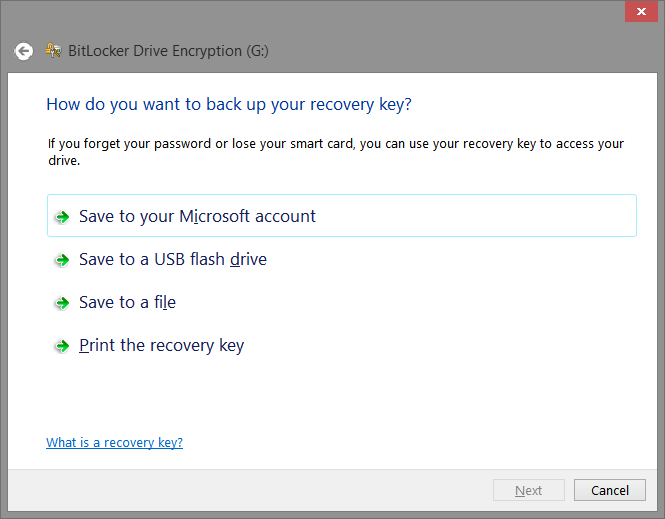
Windows 8 introduced a new option for BitLocker recovery keys, displayed prominently as the first choice: save to your Microsoft Account.

BackupRecoveryKey

BitLocker recovery key options. (Screenshot from Windows 8 BitLocker-To-Go setup wizard.)

That means storing back-up keys on Microsoft servers, with access gated by the MSFT online identity system, also known by past names .NET Passport and Windows Live. By authenticating with the same identity in the future, users can retrieve the keys from the cloud if they need to recover from a key loss scenario. In other words, key-escrow to Microsoft.

This is arguably the most reliable way to back up keys. It also happens to be the most opaque one and fraught with privacy questions. When keys are printed out on hard-copy or saved on USB drive, they are still in physical possession of the user. That does not mean they are immune to risk– pieces of paper can be stolen, files stored on a machine can be pilfered by malware. Yet these risks are visible and largely under the control of the user. For example if the user happened to save recovery keys on a thumb drive, they could choose to put that object into a safety deposit box if they were sufficiently paranoid. By contrast when keys are uploaded to the cloud, the chain of custody goes cold. The cloud service is a blackbox and users have no way to ascertain what is going, how keys are stored and if anyone else has been given access.

Unlike the enterprise scenario, the escrow-agent is not the data owner in this case. Microsoft is the provider of the operating system. There is no expectation that any user data stored on that machine must be accessible to the vendor providing the software. There are additional privacy risks introduced by electing this option but it remains just that– an option. Each user can weight the options and decide independently whether the added reliability merits such risks.

Defaults and nudges

Windows 8.1 will not be released until October but developer previews are already available. Judging by preliminary information on MSDN, Bitlocker “enhancements” for Windows 8.1 and Windows Server 2012 R2, this release ups the ante. Key escrow is enabled by default on consumer PCs.

Unlike a standard BitLocker implementation, device encryption is enabled automatically so that the device is always protected. If the device is not domain-joined a Microsoft Account that has been granted administrative privileges on the device is required. When the administrator uses a Microsoft account to sign in, the clear key is removed, a recovery key is uploaded to online Microsoft account and TPM protector is created.

Remembering that “not domain-joined” will apply to most consumer PCs for use at home,  this translates to: for any Windows 8.1 machine that happens to have requisite TPM hardware, BitLocker disk encryption will be enabled with recovery keys escrowed to MSFT automatically.

Why is this significant? One could counter that it is merely an opt-out setting users are free to override if they happen to disagree with MSFT policies. But it is well-known that choice of default settings made by the application developer are critical. Majority of users will accept them verbatim. Behavioral economics literature is full of examples of crafting  default options to “nudge” the system overall towards a particular social outcome, without overt coercion applied at individual level.

There is nothing wrong with offering an option for cloud escrow. But making that an automatic decision without giving users upfront notice and meaningful chance to opt-out is disingenuous. It is particularly tone-deaf given the current post-Snowden climate of heightened awareness around privacy and surveillance. Allegations around US government surveillance have raised questions about the safety of personal information entrusted to cloud providers. Such accusations are expected to cost the industry billions of dollars in lost revenue as customers curtail their investment of resources in the cloud.

One could also counter that any encryption is better than leaving the data unprotected. But enabling BitLocker automatically also has the downside of crowding out other options by creating a false sense of security. It sends the users a misleading signal that the data protection problem is solved, no further action is required. Users are far less likely to comparison-shop for different full-disk encryption schemes— including alternatives that don’t have same weakness around key management. They are less likely to make an informed decision based on their personal preferences. For some the automated key-escrow may be a welcome convenience, a complete non-issue. Others disturbed by Snowden revelations may consider it a deal-breaker. That is a decision MSFT can not make on behalf of users. It is telling that managed environments with Active Directory– the type one would find in a medium/large company– are already exempted from this feature, in recognition of different negotiation dynamics. It is not individual employees but centralized IT department making decisions about how to protect company data. The idea of someone in Redmond having copies of their encryption key may not sit very well with this audience. (It also turns out to be much more difficult to force unwanted functionality on this group– witness how well Vista fared in the enterprise.)

Windows 8.1 is deliberately giving up ground the industry bitterly argued over– and won– during the Clinton administration. It is bizarre that Microsoft, both a central figure in and prime beneficiary of that struggle, is now voluntarily creating the same outcome It once tried to avert. Only this time key-escrow is hailed as a “feature.”

CP

Samsung tectiles, NFC standards and compatibility

This is what gives NFC a bad name. Samsung decides to ship NFC tags in an effort to promote the fledgling technology. Later it turns out many devices including its own flagship Galaxy S4 can not read these “Tectile” tags. This blog post tries to explain what is going on.

There are three modes an NFC controller can operate in, covered in greater detail in earlier post. For our purposes the relevant one is reader mode. This is when the Android device is attempting to interrogate an NFC-enabled object and read/write data. Because this is a client-server interaction with the phone in charge of driving the protocol, compatibility becomes a function of both sides: controller hardware inside the phone/tablet/laptop and the tag.

Tags and controllers: diversity vs. concentration

When it comes to tags, there is no shortage of variation and diversity. There are four “types” of tags defined by NFC Forum. Within each category, there are multiple offerings with differing capacities and security levels. Android NFC API groups tags by type (A, B, F for Felica, V for proximity which is a slightly different standard and IsoDep for 14443-4) along with dedicated features for special-case handling of Mifare Classic and Ultralight. How many of these are users likely to run into?

  • Mifare Classic is the original technology that started it all. To this day it is used for public transit scenarios where subscribers are issued cards for long-term use.
  • By contrast disposable paper tickets typically use cheaper Ultralight tags which are type-2 in NFC forum designation.
  • Stickers and conference badges are also commonly based on type-2 tags.
  • The NFC Ring popularized by a Kickstarter campaign uses type-2 NTAG203 tags.
  • Type-3 or Felica is relatively uncommon outside Japan.
  • More recently  transit systems including Clipper in Bay Area and ORCA in Seattle have deployed DESFire EV1, which is a type-4 tag.
  • Credit cards used for tap-and-pay appear as type-4 tags at NFC level.

For all this diversity, it is a very different story on the controller side. Since NFC is a standard much like Bluetooth, in principle anyone can build an NFC controller. One may expect the usual proliferation of hardware with multiple companies getting into the game, creating a market with competing alternatives for an OEM to choose from. In reality Android devices have historically sourced hardware from only two manufacturers:

  • NXP:  The very first NFC-enabled Android device was the Nexus S released at the end of 2010. This device shipped the PN65N which combined an NFC controller (PN544) along with an embedded secure element from the SmartMX line of secure ICs.
  • Broadcom: This is the newcomer, first making its debut with Nexus 4. It was also picked up by the far more popular Samsung Galaxy S4. It also required a change to the NFC stack in the operating system in terms of how libnfc communicates with the NFC controller at low-level.

In principle nothing prevents an enterprising OEM from including an NFC controller from ay other supplier. OEMs do in fact make independent decision about sourcing ancillary components such as the NFC antenna that is typically embedded in the back cover of the phone. But Google has spent a lot of time fine-tuning the low-level NFC stack in Android to play nice with these popular hardware choices. OEMs going off the reservation also become responsible for maintaining necessary tweaks for their chosen brand even as Android itself continues to evolve its own stack.

Mifare Classic

Then there is the original NFC application that started it all, Mifare Classic. This product predates NFC forum and standardization of the technology but remains very popular for many applications, especially in public-transit systems. As explained in this summary:

Mifare Classic is not an NFC forum compliant tag, although reading and writing of the tag is supported by most of the NFC devices as they ship with an NXP chip.

This contains a hint about what is going on. All other tag types follow standard laid out by NFC forum, Mifare Classic does not. Interfacing with this tag type requires licensing and implementing additional protocols.

That explains why phones equipped with NXP-built PN65N and PN65O controllers have no problem with Classic tags. Broadcom on the other hand, appears to have decided on skipping the feature, perhaps betting on the market moving away from Classic tags to newer options such as DESFire EV1. In the long run this may be a reasonable strategic call. There are plenty of reasons to migrate, including security concerns: Mifare Classic uses a proprietary cryptographic protocol which has been successfully reverse-engineered and broken as early as 2008. In the short term however, Mifare Classic is far from going extinct and users with Broadcom devices are in for an unpleasant surprise.

Bonus: Mifare emulation in secure element

Demonstrating the complex intertwined dependencies in hardware industry, devices such as Nexus 4 can do Mifare Classic emulation. This is not reading an NFC tag– that would be handled by the NFC controller, which as we noted earlier does not support the proprietary Mifare classic protocol. Instead the phone is playing the opposite role and acting as a Mifare Classic tag to external readers. This seems particularly odd considering that card-emulation mode itself is a feature of NFC controller.

The contradiction is resolved by noting that in card-emulation mode the controller is simply acting as pass-through for the communication; it is not the one fielding Mifare Classic commands. The actual target communicating with the external NFC reader is the embedded secure element. On Nexus 4 and similar  devices, the controller is built by Broadcom but the attached SE is sourced from well-known French smart-card manufacturer Oberthur instead. That particular hardware does in fact license Mifare Classic protocols and can emulate such tags.

To answer the logical question of why one would want a phone with fully-programmable secure element acting as a primitive NFC sticker: Mifare emulation was used in Google Wallet for offer redemption. For example the user could receive a coupon that is provisioned into the secure element. This would be redeemed during checkout by tapping the NFC terminal at the point-of-sale. Logically two different NFC tags are involved in such a transaction.  One of them is the emulated Mifare Classic tag that contains a coupon for that merchant. The other is a type-4 ISO14443 standard “tag” containing EMV-compliant credit card responsible for payment.

CP

Using cloud services as glorified drive: iSCSI caveats (part VII)

Previous posts described a proof-of-concept using cloud computing to run Windows Server VMs and configure iSCSI targets to create private cloud storage encrypted by BitLocker-To-Go. In this update we will look at the fine-print and limitations of using iSCSI.

Concurrent access

One problem glossed over until now has been accessing data from multiple locations. Suppose the user has mounted the iSCSI target as local disk from one machine at home. Later they want to access the same data in the cloud from their laptop. This does not pose any problems for Bitlocker-To-Go decryption since the smart card protecting the volume is inherently mobile. (Also note the card is only used once to unlock the volume. It does not have to remain inserted in the reader or otherwise present near the machine for continued access.) But it does pose a problem with iSCSI model: the same underlying NTFS filesystem is now being manipulated by multiple machines with no synchronization. That is a recipe for data corruption.

Contrast this to the encrypted VHD model sketched earlier: in that case synchronization is done implicitly by software running locally on each machine, responsible for uploading that VHD file to the cloud. When uploads are done concurrently from multiple machines, it is up to the cloud provider to decide which one wins– most likely the one with most recent timestamp. But no attempt is done to “merge” files. If the user mounted VHD from one machine and added file A, then mounted it from another machine to add file B, the cloud provider does not magically collate those into a single virtual disk containing both additions. (On the bright side, whatever disk image is eventually uploaded is consistent. There is no possibility of ending up with corrupt “mash-up” combining sectors from both VHDs.)

If two machines are accessing the same iSCSI target and making modifications, there is no such guarantee. In both cases, each initiator eg some instance of Windows, will be directly manipulating file-system structures on the assumption that it alone is in charge of NTFS on that volume. The result is similar to what could happen if VHD image associated with a running virtual machine is also locally mounted by the host OS: too many cooks in the kitchen messing with the filesystem.

Solving this would require carefully coordinating access between multiple clients. One could envision a local agent on each machine, responsible for disconnecting or remounting the volume as read-only (but this is tricky) when another client connects to the same volume. The problem is that such a change will be disruptive to any application with files opened on that volume, akin to yanking a USB drive in the middle of using it.

Authentication and integrity pitfalls

The simplified flow described earlier did not use any authentication for iSCSI initiators. Of course this is not a viable option when the VM is running remotely on a cloud platform such as Azure; anyone on the Internet would be able to access the iSCSI target. Bitlocker encryption provides confidentiality but it can not provide integrity or availability. Without some manner of authentication, nothing prevents any other person from repeating the same steps to mount the remote disk and delete all data.

The problem with CHAP

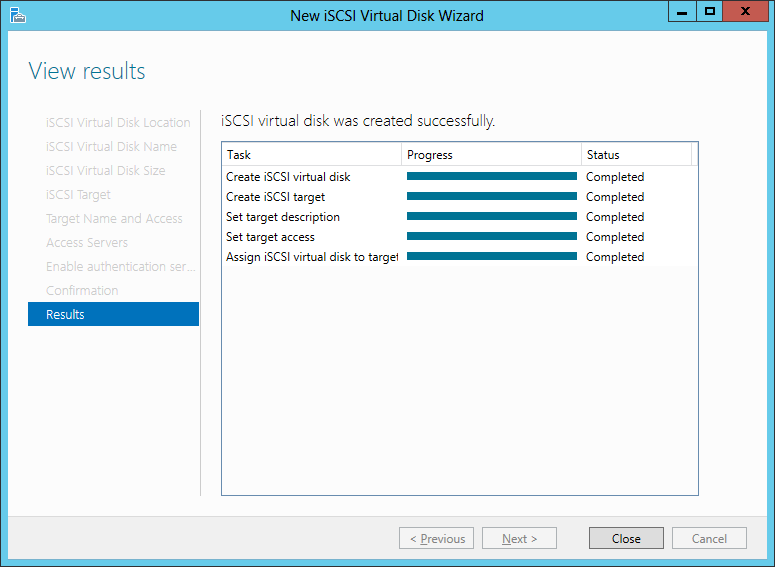
At first it looks like this can be addressed by using CHAP (Challenge Handshake Authentication Protocol) which is officially part of the iSCSI standard. It is also supported by Windows. CHAP can provide mutual authentication between initiators and targets. Revisiting the steps from the previous post for configuring an iSCSI target, there is an authentication option on the Windows Server wizard to limit access to specific initiators in possession of a particular secret. These credentials are specified using the “Advanced” option on the initiator side. Limiting access in this manner mitigates the basic risk: random people hitting the IP address of our remote storage VM and discovering the iSCSI targets can no longer connect and overwrite data at will.

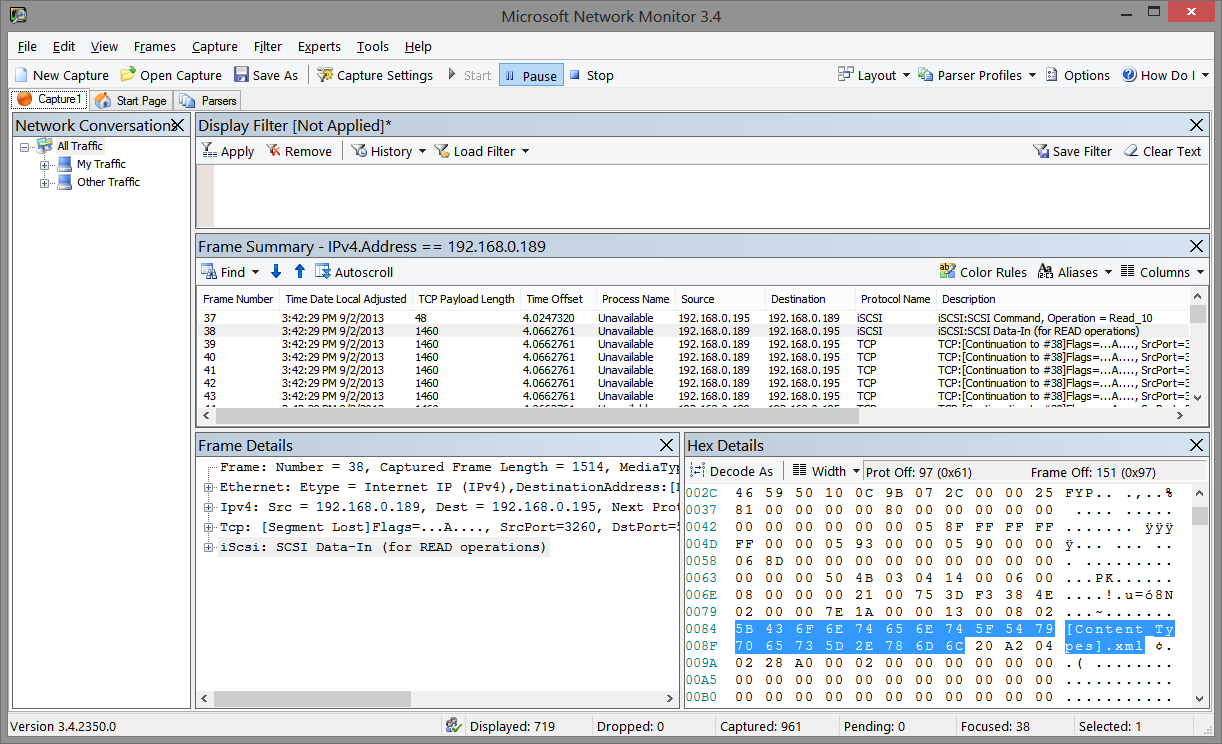
Suspending disbelief that such access control is scalable– since each device accessing the iSCSI volume would have its own initiator ID, it requires an entry in the target configuration– there is still another problem: CHAP does not protect the payload itself. This can be easily observed by getting a network trace of raw TCP traffic between an initiator and target. Below is an example from MSFT Network Monitor which comes with a built-in parser recognizing iSCSI traffic:

iSCSI traffic between initiator and target

iSCSI traffic between sample initiator and target

It shows an iSCSI response fragment transmitted when accessing a Powerpoint file. BitLocker is not turned on for the target volume– to make it easier to observe raw data in the trace– but CHAP authentication is enabled for the connection. Highlighted region of the IP packet shows distinctly recognizable plain-text data. A similar experiment would show that modifying parts of the payload is not detectable by either side. RFC3720 describing iSCSI says as much under security considerations:

The authentication mechanism alone (without underlying IPsec) should only be used when there is no risk of eavesdropping, message insertion, deletion, modification, and replaying.

When BitLocker-To-Go is used, eavesdropping problem goes away but tampering risks remain. An attacker can not recover the data or even make controlled changes such as flipping one bit. Under ordinary circumstances, standard encryption modes such as CBC would allow making such changes on ciphertext. But disk encryption schemes are designed to resist controlled bit-fiddling attacks. No scheme can actually prevent or detect changes completely, because there is no extra space to store an integrity check– one sector worth of plaintext must encrypt to exactly one sector ciphertext. The best outcome one can aim for is to ensure that any change to ciphertext will result in decrypting to effectively random data, uncorrelated with the original. That is still a problem. For example when the user is uploading a document to the cloud, an attacker intercepting network traffic can replace those BitLocker-protected blocks with all zeroes. When those blocks are later retrieved from the cloud to reconstruct the document, the modified ciphertext will still decrypt to something other than what the user originally uploaded.

Protecting the payload itself requires some type of transport-layer mechanism such as IPSec or establishing an ad-hoc ssh tunnel between initiator and target. This is yet another moving piece on top of an already complex setup. IPSec in particular is closely tied to Active Directory on Windows and requires having both sides being members of the same forest. That is a tall order, considering we want to access the cloud data from any Windows device, or even any device capable of acting as iSCSI initiator.

Verdict on iSCSI + BitLocker

Because of these limitations and general lack of support for iSCSI on platforms outside Windows, this proof-of-concept combining iSCSI targets in cloud VM with BitLocker-To-Go is far from being widely-usable.

The final post in this series will tackle the question of what an ideal solution for cloud storage with local encryption could look like.

[continued]

CP

Android RNG vulnerability: distorted incentives and platform ownership (part II)

[continued from part I]

The Android bargain: ceding control, gaining market share

The reason individual developers are enlisted to fix platform bugs is simple: Google does not have the ability to push security updates to users. In what may be the worst-kept secret of the mobile industry repeatedly pointed out by pundits,  the update channel for most devices is controlled by handset manufacturer and/or carrier. (The exception being “pure” Google-experience devices offered under the Nexus umbrella. But even these are not immune from carrier interference: for example Google caved-in to demands for blocking Google Wallet on Galaxy Nexus phones subsidized by Verizon.)

This is no accident or oversight. In trying to compete with iPhone for market share, Google made a Faustian bargain with OEMs and carriers. Providing them an open-source OS that could be endlessly customized and tweaked. This was not mere rhetoric or paying tribute to the open source model. It was a deliberate concession, partially ceding control of the handset software to provide a more appealing platform that OEMs/carriers would. An iPhone has only one “handset manufacturer” (Apple) and looks the same from Verizon or AT&T. Android follows the PC model of hardware competition in allowing OEMs to differentiate not only on features and pricing but also with “value-add” customizations to the OS: HTC Sense skin, Samsung eye-tracking etc. Carriers also jumped into the fray trying to distinguish their devices with customizations, for example controlling wireless-tethering to squeeze more revenue out of data plans.

By all indications, the plan worked. Reaching market a full year after the iPhone, Android nevertheless managed to overcome Apple’s first-mover advantage. Judged by unit shipments, Android dwarfs the iPhone in the US and globally.

Distorted incentives

There are two downsides to this hard-won battle for market share:

  • Once the OEM/carrier goes off the reservation and starts changing the operating system, incorporating updates is no longer a straightforward proposition. A security patch issued by Google for “vanilla” Android builds may not work against a heavily customized image from some OEM. (Imagine if Google pushed out an update that rendered some fraction of AT&T devices unusable?) At a minimum OEMs/carriers must be involved in testing the security update against their customizations to guarantee nothing will break. In some cases they may have to do additional work to modify the update to work for their particular scenario.
  • At the same time as the difficulty of delivering updates goes up, the economic incentive for doing so vanishes. Because the OEM/carrier views the operating system as an asset they can compete on (eg it is not a “freebie” magically gifted from Cupertino in identical shape to everyone) it is no longer something to be given away freely. Why invest in upgrading legacy devices when you can sell that customer a brand new phone with the latest and greatest OS? The same distortion applies to the carrier thanks to device subsidies: over time a subscriber pays more than the hardware retail cost. It is more profitable for the carrier to “upgrade” the user to new phone– even for nominal fee– locking them into another extended contract.

The ultimate contradiction: Google has less ability to deliver security updates to Android phones– devices  always powered on and connected to the Internet–than Microsoft had for Windows PCs in 2004.

CP

Android RNG vulnerability: when the platform fails

The recent vulnerability in the Android pseudo-random number generator (PRNG) used in critical applications including Bitcoin serves as an instructive example of how distorted incentives in the mobile device ecosystem upends the established wisdom around relying on the platform.

At first this looks like any other PRNG vulnerability, in the spirit of the Debian openssl debacle from 2008 but certainly of lower severity. But unlike Debian which affected ssh and SSL server keys, the consequences in this case lent themselves to better press coverage. All Android Bitcoin applications were  impacted. Money was lost to the tune of $5700. Still PCs get popped and bank account information used for fraud involving much larger amounts, using far more mundane web browser and Flash vulnerabilities. What makes this vulnerability unique?

  • Word of the problem originated with an announcement on Bitcoin mailing list, warning of a problem in Android that required updating all clients. There was no authoritative announcement from Android team or attempts to coordinate updates for other security-critical applications that may be at comparable risk.
  • It is not uncommon for a vendor to be blind-sided by an external researcher publicly dropping news of a security vulnerability, a zero-day so to speak. But when that happens most companies are quick to react, spin up a response and issue some type of announcement in order to get ahead of the messaging. But Google was missing in action completely for the first couple of days. Eventually a post on the Android developer blog confirmed the vulnerability— without providing much in the way of details around root cause.
  • But the post did offer a “solution” to work around the problem: a code snippet for developers to incorporate into their own application. In other words, individual apps were being asked to issue updates to compensate for a platform defect.

In platforms we trust

Platform APIs exists to centralize implementation of shared functionality, which can be inefficient, tricky or plain impossible if every individual application attempted to duplicate for themselves. Cryptographic PRNGs are a particularly good example of functionality best left to the platform. Computers are fundamentally deterministic, contrary to their outward appearance and getting them to generate “random” behavior is a difficult problem. In the absence of special hardware such as upcoming physical RNG in Intel chips, the quality of randomness depends on access to entropy sources serving as seed for initial state. A good implementation will attempt collect from the hardware and surrounding environment: hardware identifiers, timing events, location, CPU load, sensors, running processes, …  Not surprisingly this complexity is a good candidate for being punted to the platform. Windows packages it into platform API with CryptGenRandom. In Linux it is integrated even deeper into the OS as kernel-mode devices mapped under /dev/random and /dev/urandom, which are then invoked by cryptography libraries such as openssl.

Bitcoin applications relying on the platform API to produce cryptographic quality random numbers were on solid ground, following common wisdom in computer science about not reinventing the wheel. This is particularly true in cryptography which abounds in stories of home-brew implementations gone awry. The assumption is that platform owner is responsible for understanding how a particular primitive is best implemented on a given hardware/OS combination. That includes not only security against side-channel attacks but also leveraging hardware capabilities to squeeze that last percent of performance. (For example recent Intel processors have instructions for speeding up AES.) This is  the implicit contract between developers and platform owners: Developers call the “official” supported API which promises identical behavior across a wide-variety of devices and versions of the platform, instead of relying on undocumented behavior or reinventing the wheel in left-field. In return, the platform owner commits to keeping that API stable and providing the ideal implementation taking into account hardware/OS quirks.

Systemic risk

Platforms are not immune to vulnerabilities either and their effects can be far-reaching. For example in 2004 a critical vulnerability was found in the Windows ASN1 parser. The vulnerability affected all applications leveraging that API, directly or indirectly. These dependencies are not always obvious: sometimes the app calls one API which happens to invoke the vulnerable one under the covers, unbeknownst to the developer. For example parsing digital certificates invokes these code paths because X509 is built on ASN1. Widespread usage greatly amplifies the attack surface: any one of these applications can be used to trigger the vulnerability. This helps the attacker, creating multiple avenues to deliver an exploit. Whether or not it also increases the complexity for defender side depends on exactly how tightly applications and platform are connected.

  1. Loose coupling. In the case of Windows most platform functionality is packaged as a shared component called “dynamic link library” or DLL. There is exactly one DLL implementing an API and that single binary happens to be shared by all applications on the system.** In the best case scenario then “security fix” means Microsoft updating that DLL. That is what happened with that ASN1 vulnerability MS04-007. Users received patches from Microsoft Update website, individual applications using the API were not affected. Granted the process is far from perfect and occasionally faulty patches will break functionality, or reveal incorrect behavior in apps relying on undocumented quirks of the API. But it works well enough to operate at large scale by platform owners.
  2. Other times there is no clean separation between “platform” and its consumers. Instead the functionality offered by the platform provider is duplicated in every single application. A notorious example from 2009: critical vulnerability in Active Template Library. ATL is a building-block for developers offered by MSFT, used for writing ActiveX controls. That was bad news enough. Because these controls are often designed to be embedded on web pages, they are accessible to malicious sites. Worse, the vulnerability was traced to a part of ATL that is not distributed as part of Windows. Instead each application effectively incorporates the vulnerable code snippet into itself. Identifying and fixing all such vulnerable controls proved quite the mess, requiring a concerted outreach by MSFT to persuade individual software vendors to publish updates.

Strange case of the Android RNG vulnerability

Android circa 2013 can not accomplish what Windows could in 2003. The RNG vulnerability falls into category #1 while the response decidedly looks like #2. Based on published accounts, root-cause is a bad interaction between the way Android forks new processes and how Java RNG implementation initializes its entropy pool. This is fundamentally a platform problem. When the next version of Android is delivered to a device, this problem will go away. The implementation underlying that Java API for generating random-number will be updated transparently. Third-party applications calling that API will not notice a difference. The exact same app will call the same API but magically receive “more random” looking random numbers, instead of  the predictable ones that caused problems for Bitcoin. Individual developers do not recompile their applications and users do not have to reinstall every application to benefit from the upgrade.

Except this is exactly what happened: Android issued a desperate plea for developers to rewrite their applications and compensate for a bug ultimately fixed in the platform. What is going on here? The answer has little to do with any architectural  deficits in Android or Google shirking responsibility. Instead it is another consequence of the distorted economics of mobile, all but guaranteeing that users can not receive security updates.

[continued]

CP

** Strictly speaking there can be multiple variants. For example on 64-bit Windows, there is one for 32-bit and one for 64-bit applications. Similarly .NET introduces managed assemblies that can request a particular DLL version for compatibility. In these cases the number of files requiring an update can go from 1 to many. But it still remains the case that such updates can be delivered by MSFT– even for legacy versions of the DLL– without action required on the part of application developers.

NFC ring and screen unlock (part III)

The previous post sketched the risks involved in using NFC-enabled objects for access control and how the NFC Ring fares against common attacks. The final part in the series examines trade-offs involved in improving security with different tag choices.

Cryptography and NFC tags

As part II pointed out, more advanced NFC tags support access control using cryptographic means, including the original Mifare Classic. The quality of that cryptographic protocol is a different story. Classic tags used a proprietary cipher dubbed Crypto-1 which has been successfully reverse engineered and broken.

Since then NXP has introduced improved models using established cryptographic algorithms. For example DESfire uses triple-DES with two independent keys as the name suggests. Interestingly enough, DESfire chips were vulnerable to a side-channel attack based on measuring power consumption. In terms of the threat model, this falls under the “physical access” category; the attack requires carefully instrumenting the chip and observing its behavior in a controlled environment. Bumping someone in the subway with a stealth reader is unlikely to yield those conditions.

Further up the security chain there is DESfire EV1, which replaces two-key triple DES with AES. As of this writing there are no published attacks in the literature against EV1 model.

The final point along the spectrum is a programmable smart card. For example SmartMX is a family of embedded secure-execution environments from NXP, programmed using Javacard. This allows complete freedom to choose the cryptographic protocol, unlike the situation with picking an existing tag type such as DESfire where the protocol is fixed but users control the key material. For example a custom public-key authentication scheme can be defined or an existing profile such as NIST 800-73 PIV can be reused.

Trade-offs

Improved security  has associated costs, in both the monetary sense and engineering one. A tag must perform expensive cryptographic operations in order to authenticate the reader. That may take time, which is bad enough when dealing with the severely constrained hardware present on those tags. But more importantly it requires power. Since tags do not have batteries or any other internal source of energy, that power must originate with the induction field of the NFC reader, generating a current in the tag antenna. That coupling defines the main constraint on physical dimensions of NFC tags. Smaller antenna could translate into longer delays when scanning, incompatibility with certain readers that emit insufficient power or finicky behavior for positioning the tag in relationship to reader.

A ring form factor is hampered not only by the dimensions of what users are willing to wear but also the curvature of the antenna surface away from the plane of the reader. That argues against some heavyweight options such as EV1 but Ultralight C could have been a viable option. Starting with the original Ultralight (48 bytes and no access control) this variant triples the available space and adds 3DES authentication.

Opening more than one door

There is another complication to using these tags: the reader must have access to the same keys. This is relatively easy when the object is used for a single scenario. Typically tags start out with each sector configured to use default transport keys.  If that NFC ring is only used to unlock one Android device, that device can take over key-management and rotate keys to new, randomly generated ones stored on the phone. That approach gets tricky when the tag is used for multiple access-control scenarios, such as gating entry into several rooms with their own badge reader. In that case some type of cooperative scheme is required for each reader to reserve one or more free sectors for its own use. (Public-key based credentials do not have this problem, since a single public-key can be used with any number of access control implementations.)

CP